

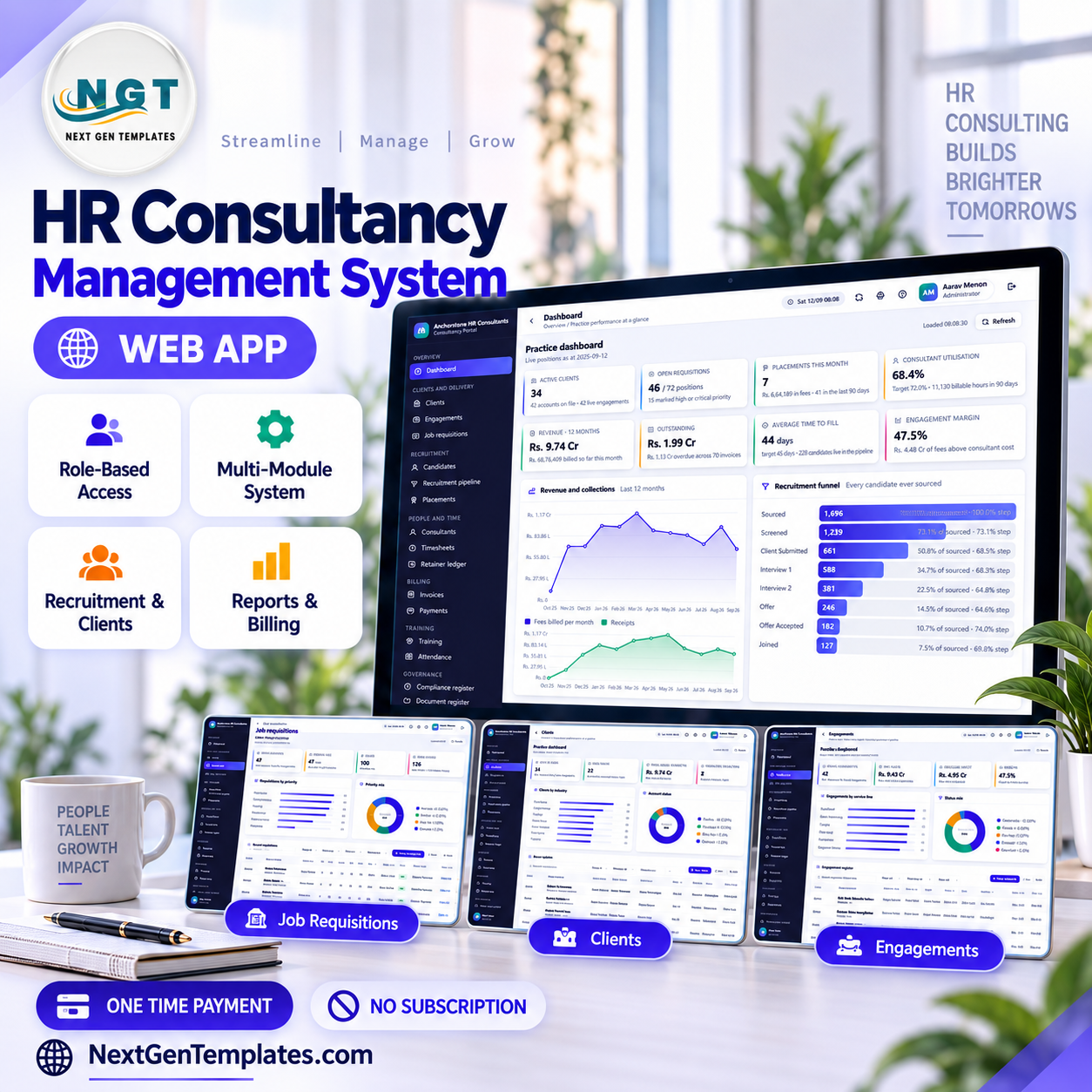

The HR Consultancy Management System Web App is a 24-module Google Apps Script system for HR consultancies and staffing firms: 8 roles across 52 named permissions, 24 database tables, 18 built-in reports, and a seeded demo practice of 13,987 rows so every screen is populated the moment you sign in. Deploy it into your own Google account in about 15 minutes.
🌍 Join 10,000+ customers in 180+ countries using NextGenTemplates to replace paid SaaS tools with one-time-purchase Excel, Google Sheets, Power BI and web-app templates.
✅ Instant download · One-time payment · No subscription · No per-user fees · Lifetime access
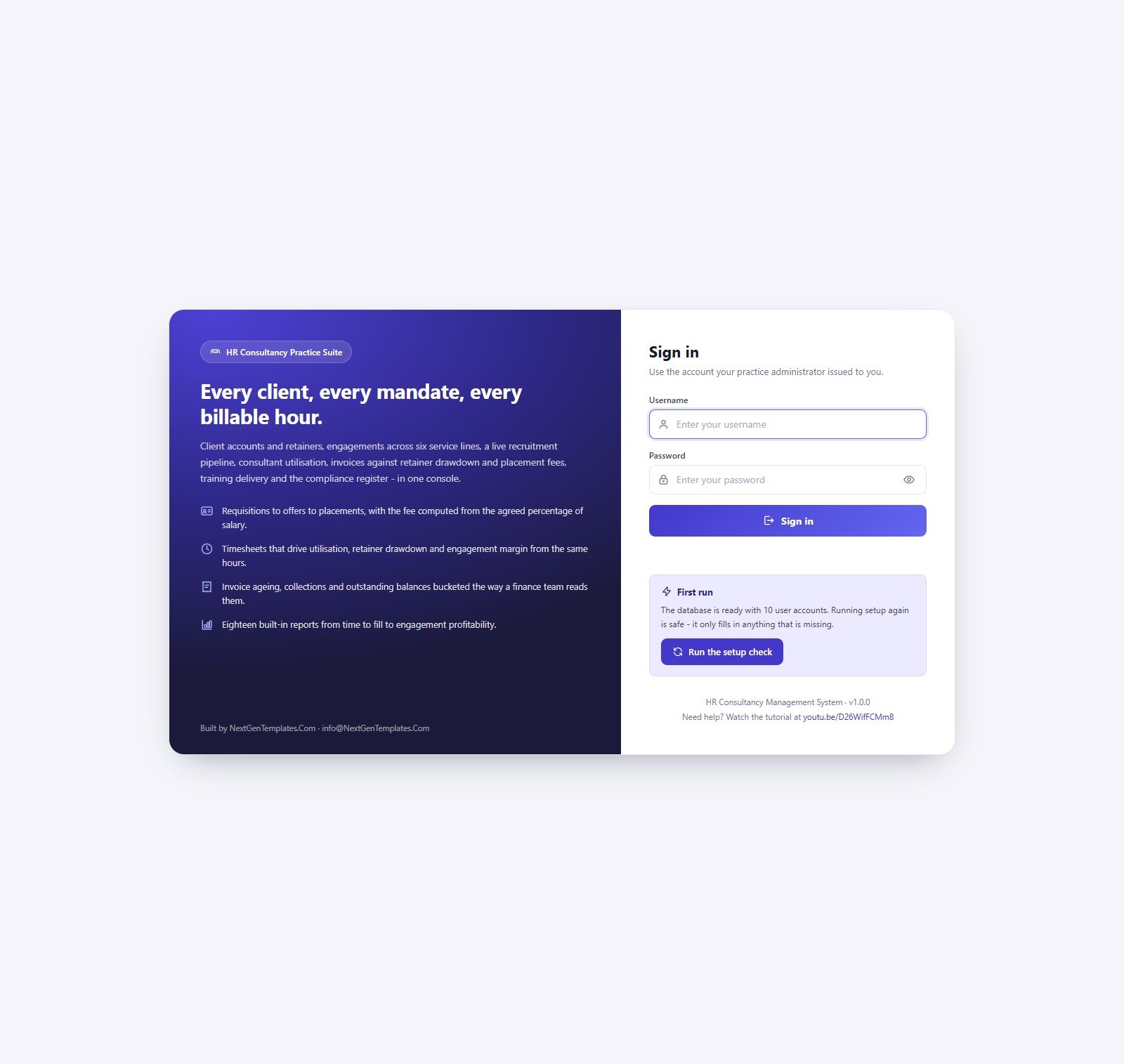
Sign-in screen and role-based access
Every session starts here. The card carries a “First run” panel that builds the database on its own, so there is no editor step for the person deploying it. Ten seeded accounts cover all eight roles.
🚀 Try the Live Demo Before You Buy
We have deployed this system in our own Google account so you can test every page and every one of the eight roles — with the full sample practice loaded — before you pay anything. No signup, no email required.
🔑 Test Login Credentials
Sign in as admin to see everything, then sign back in as recruiter or compliance — the restricted roles are where the point lands fastest. A recruiter simply has no Invoices, no Payments and no Users in the sidebar, and the server refuses those calls even if the URL is typed by hand.
💡 These credentials are public by design. They are the seeded logins of a shared demo instance that resets — not a customer’s deployment, and there is no real personal data in it. In your own copy you change every one of them from Users → the key icon → Reset the password. What you get after purchase: the full source (Code.gs + Index.html) plus a step-by-step deployment guide, so your own private instance runs in your own Google account in about 15 minutes.
🔑 Key Features of the HR Consultancy Management System Web App
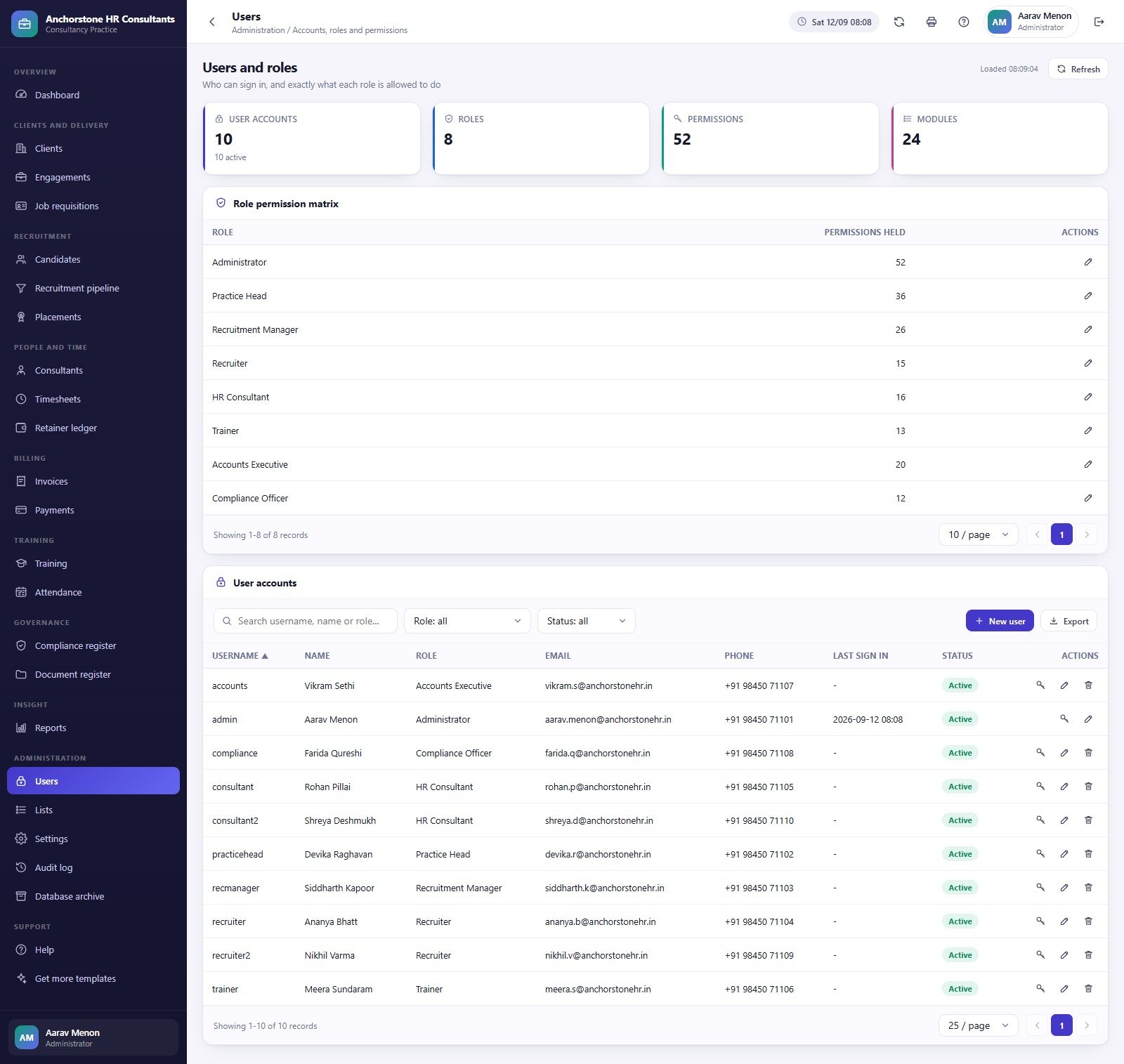
🔹 Eight roles, 52 permissions, enforced twice. Administrator, Practice Head, Recruitment Manager, Recruiter, HR Consultant, Trainer, Accounts Executive and Compliance Officer hold 52, 36, 26, 15, 16, 13, 20 and 12 permissions respectively. The same permission map hides the menu item in the browser and blocks the call on the server, so a hidden screen cannot be reached by typing a URL.
🔹 The recruitment desk, end to end. Requisitions carry a position count, seniority, priority, an agreed fee percentage and an ageing clock. Candidates flow through eight pipeline stages — Sourced, Screened, Client Submitted, Interview 1, Interview 2, Offer, Offer Accepted, Joined — and every drop-out is tagged with a reason, so the funnel and the “why candidates fall out” ranking build themselves.
🔹 Seven numbers the server computes, not the form. Placement fee (offered salary × the requisition’s fee percentage), retainer drawdown, utilisation, time to fill, invoice ageing, engagement margin and funnel conversion are all calculated server-side, so a hand-edited form cannot inject a wrong fee, balance or margin.
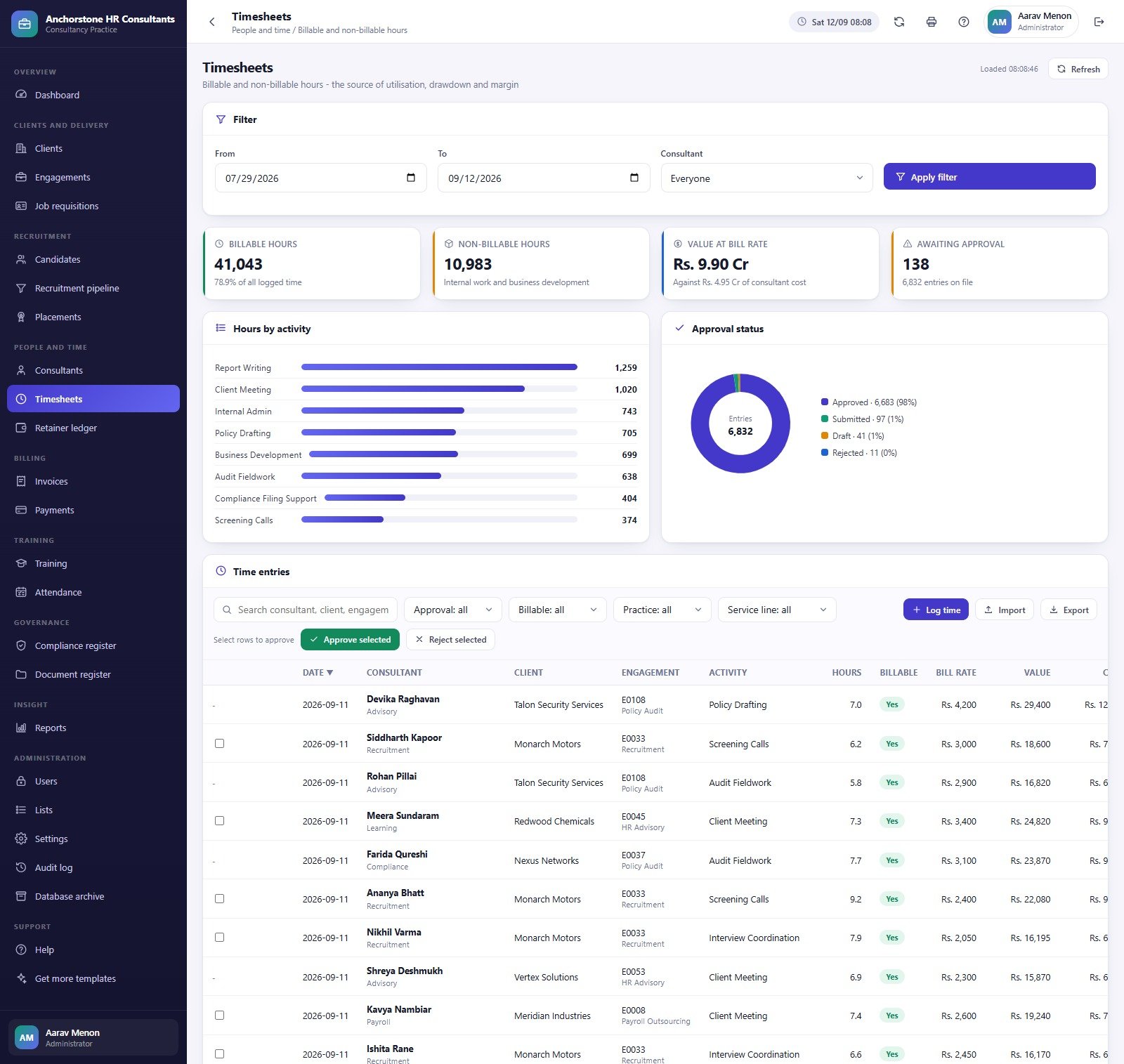
🔹 Timesheets that actually drive the money. The same approved hours produce utilisation on the Consultants page, drawdown on the Retainer ledger and margin on the engagement. In the sample practice that is 6,832 entries — 41,043 billable hours against 10,983 non-billable, 78.9% of all logged time.
🔹 Billing with a real ageing spread. 583 sample invoices across five types (Retainer, Time and Material, Placement Fee, Fixed Fee, Training) with sub-total, GST, part payments and buckets for Current, 1-30, 31-60, 61-90 and 90+ days.
🔹 Governance built in. A compliance register of 362 obligations by area and risk, a 248-row document register with Drive-backed uploads, and an audit log the Compliance Officer can read but not edit.
🔹 18 built-in reports across Revenue (3), Delivery (4), Recruitment (6), Finance (2), Training (2) and Governance (1), each driven by a From/To reporting period.
🔹 Runs on your own Google account. It builds its own Google Sheets database of 24 tables plus a Drive folder tree with nine subfolders (Resumes, Contracts, Offer Letters, Audit Reports, Compliance Evidence, Certificates, Invoices, Archives, Exports). Passwords are stored as salted SHA-256 hashes — nobody, administrator included, can read one back.
📦 What Is Inside the HR Consultancy Management System Web App
Twenty-four modules sit in one left-hand rail, grouped Overview, Clients and Delivery, Recruitment, People and Time, Billing, Training, Governance, Insight, Administration and Support. Ten of them are shown below; the rest — Engagements, Candidates, Consultants, Retainer ledger, Payments, Training, Attendance, Compliance register, Document register, Lists, Settings, Audit log, Database archive and Help — follow the same KPI-cards-then-charts-then-register layout, so once you have read one screen you can read them all.
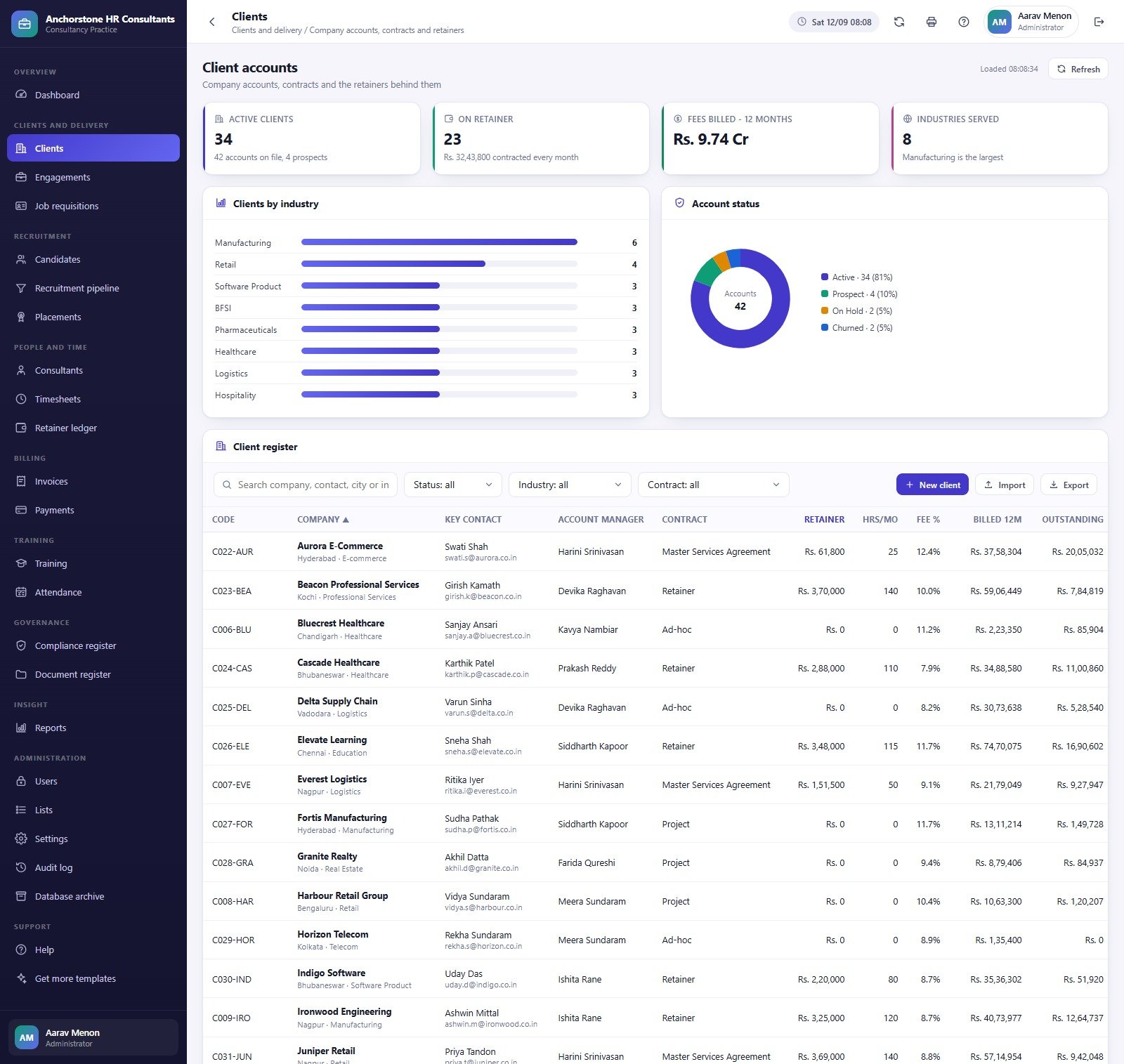
Practice dashboard
Eight KPI cards — Active Clients, Open Requisitions, Placements This Month, Consultant Utilisation, Revenue (12 months), Outstanding, Average Time to Fill and Engagement Margin — over Revenue and Collections by month, the recruitment funnel, Fee Income by Service Line, Outstanding by Ageing Bucket, Utilisation by Practice, Top Clients by Fee Income and Placements per Month.
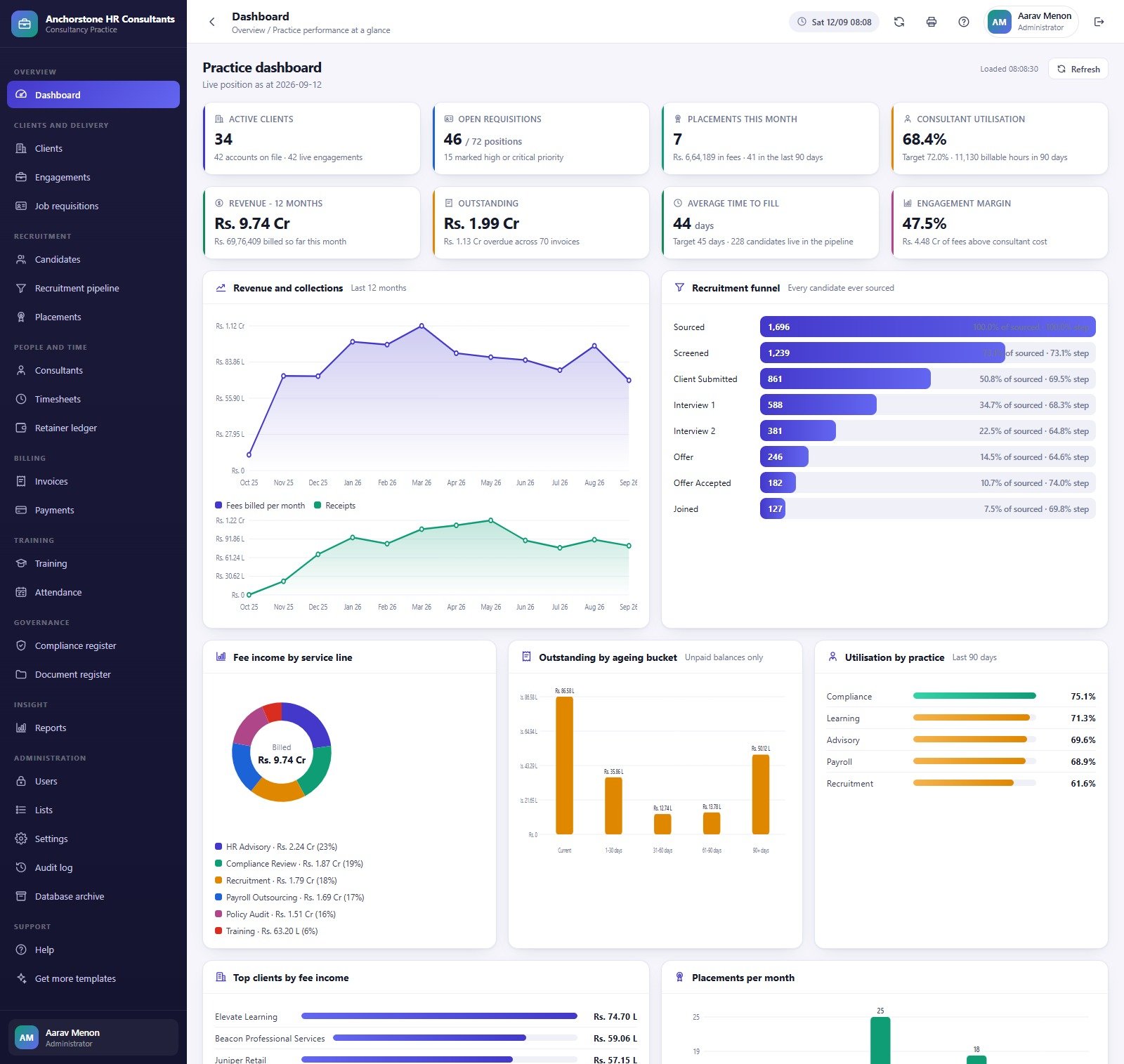
Clients
The account book: 42 client companies across fifteen industries on retainer, project and ad-hoc contracts, with Clients by Industry, Account Status and the client register underneath.
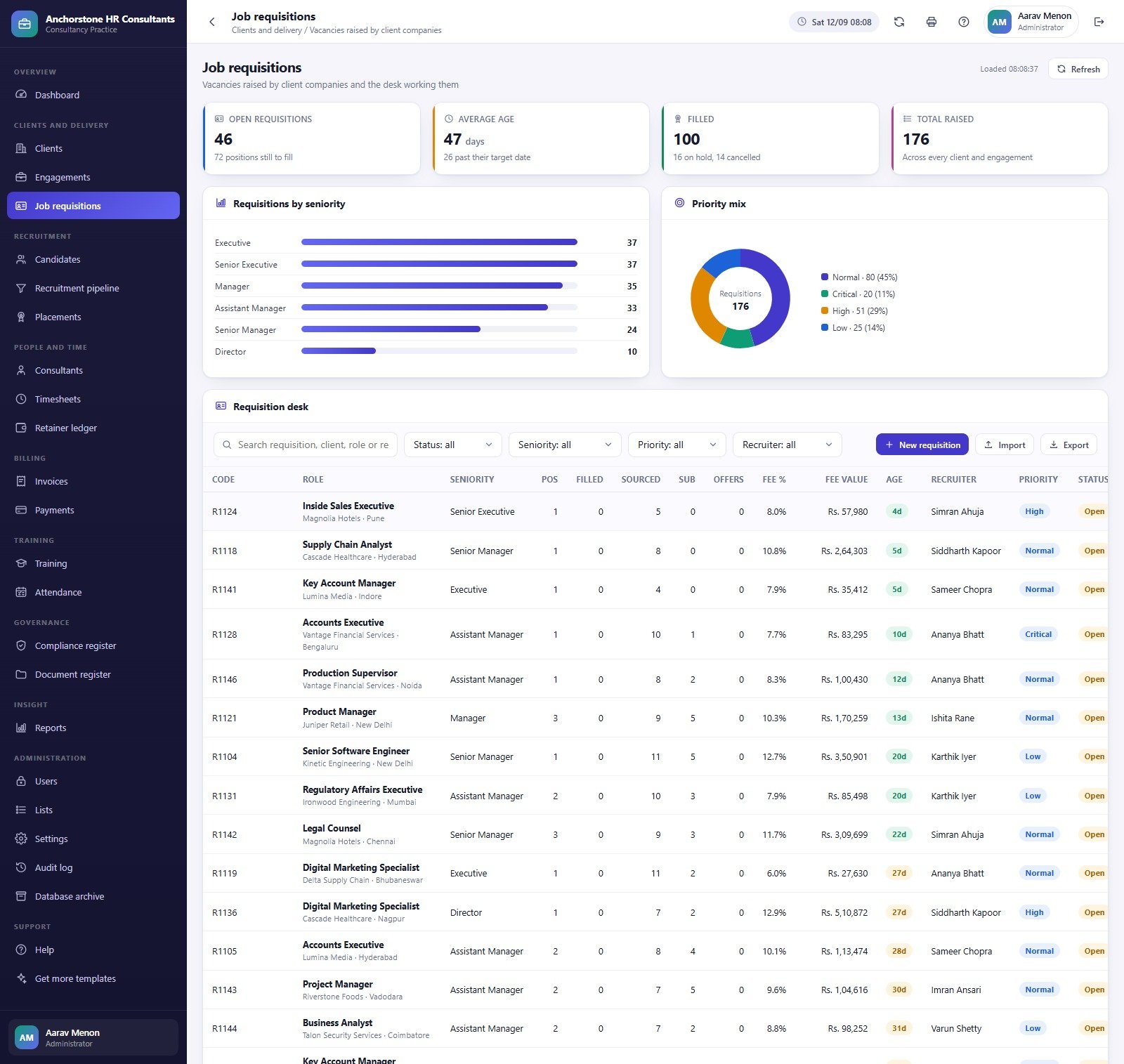
Job requisitions
46 open of 176 raised, average age 47 days with 26 past target, plus Requisitions by Seniority and Priority Mix. The desk lists code, role, client, positions, sourced, submitted, offers, fee %, fee value, age, recruiter, priority and status, with Import and Export.
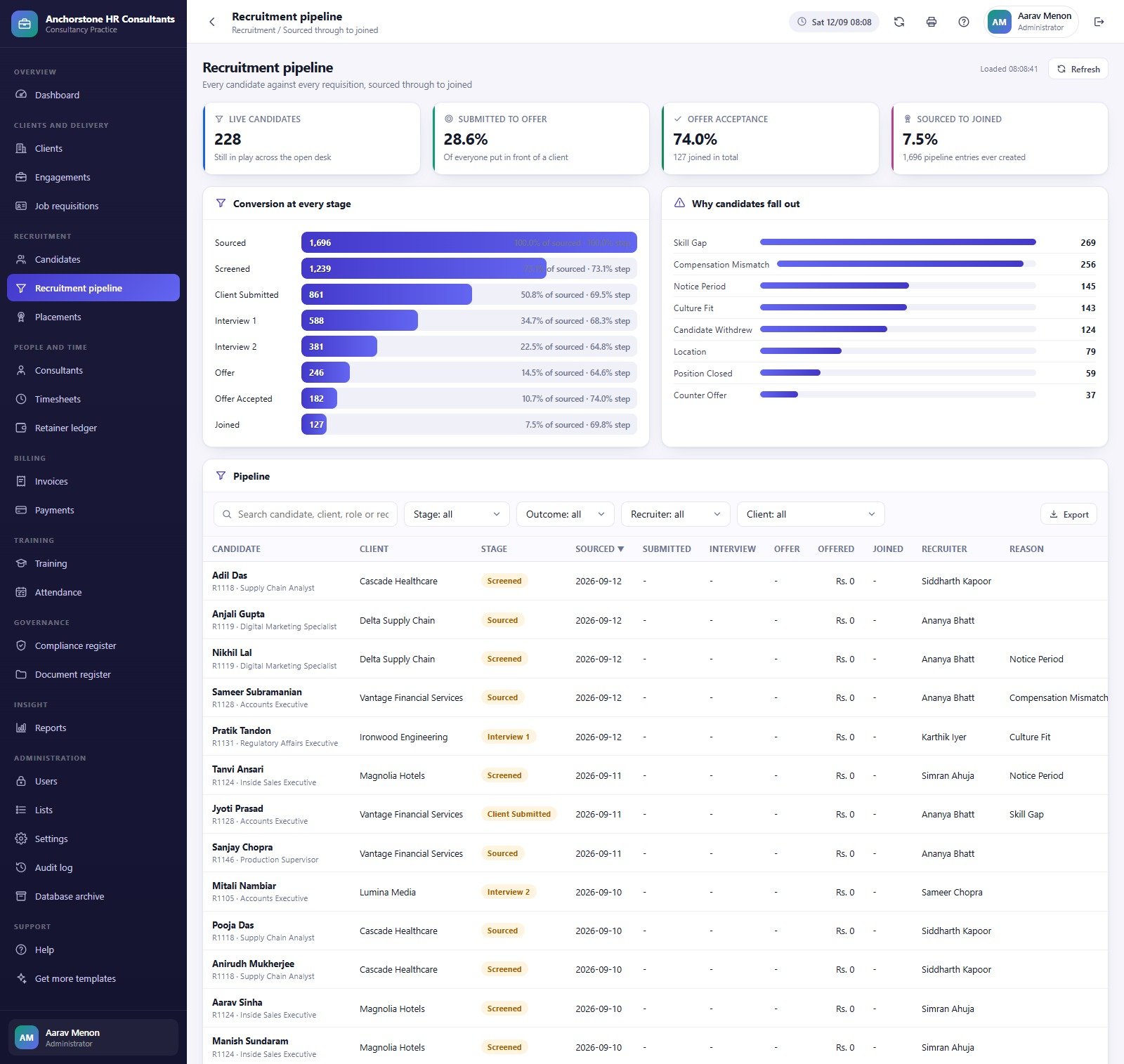
Recruitment pipeline
Conversion at Every Stage from 1,696 sourced down to 127 joined, beside Why Candidates Fall Out — Skill Gap 269, Compensation Mismatch 256, Notice Period 145, Culture Fit 143, Candidate Withdrew 124, Location 79, Position Closed 59, Counter Offer 37.
Placements
Confirmed joins with the fee earned on each and the replacement guarantee window. Fee Earned by Client and Placements by Seniority sit above a register carrying join date, offered salary, fee %, placement fee, days to fill, guarantee-to date, recruiter and invoice status.

Timesheets
Billable Hours, Non-Billable Hours, Value at Bill Rate and Awaiting Approval, with Hours by Activity and Approval Status. Rows can be approved or rejected in bulk from the register, and time can be imported from a CSV template.
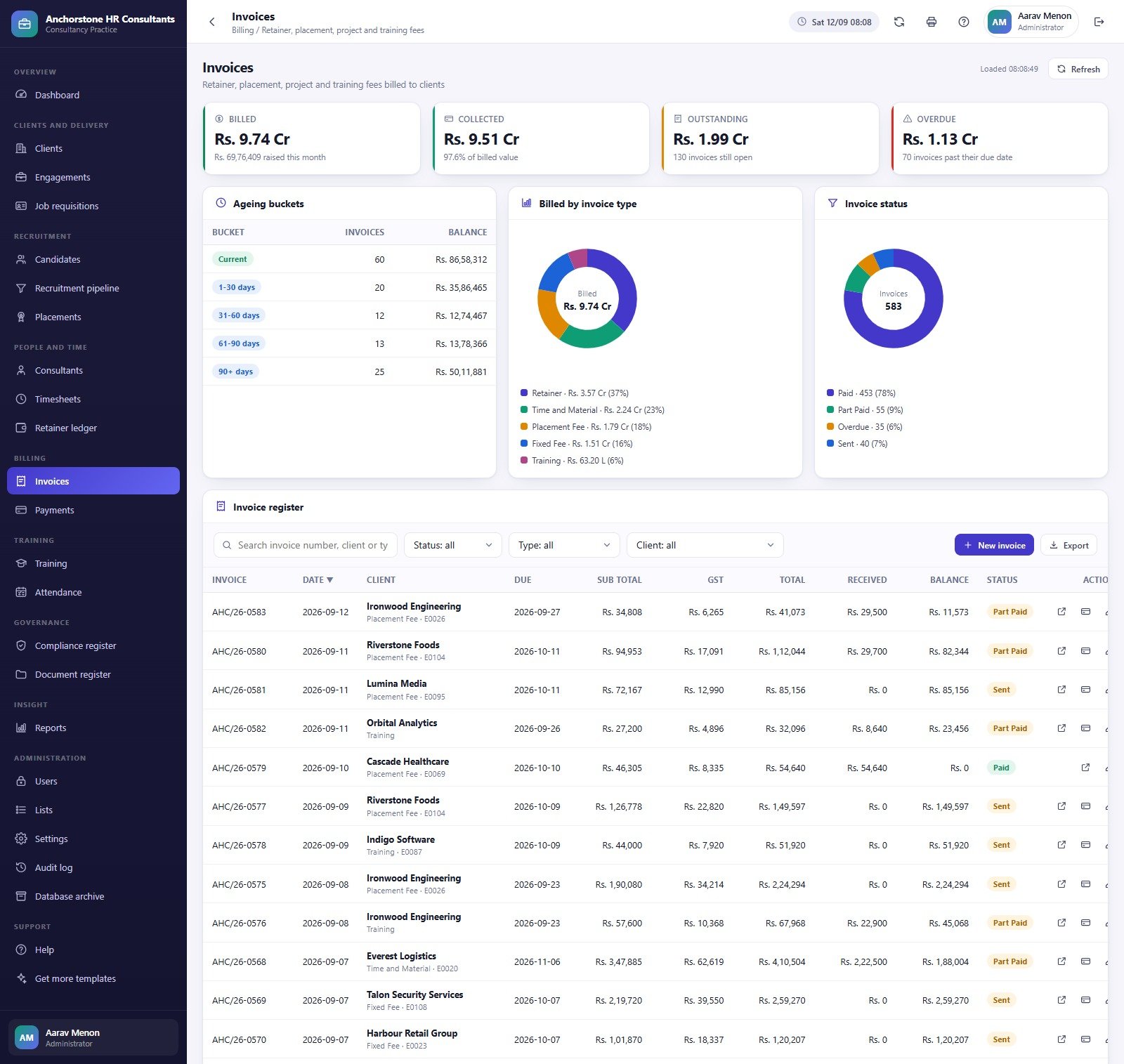
Invoices
Billed, Collected, Outstanding and Overdue over Ageing Buckets, Billed by Invoice Type and Invoice Status. The register shows invoice number, date, client, due date, sub-total, GST, total, received and balance, with print and payment actions per row.
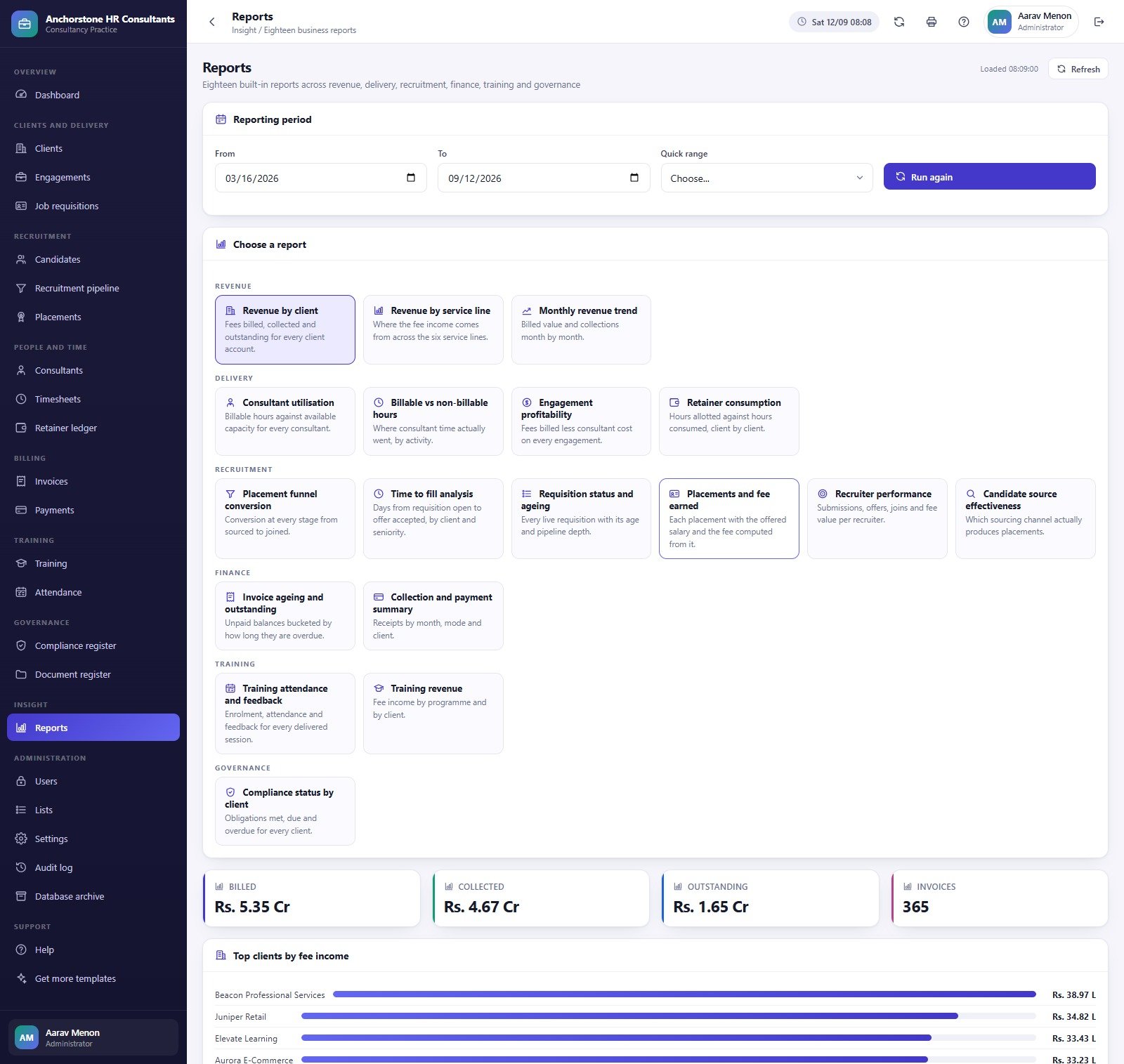
Reports
Eighteen reports behind one From/To period picker — Revenue by Client, Revenue by Service Line, Monthly Revenue Trend, Consultant Utilisation, Billable vs Non-Billable Hours, Engagement Profitability, Retainer Consumption, Placement Funnel Conversion, Time to Fill Analysis, Requisition Status and Ageing, Placements and Fee Earned, Recruiter Performance, Candidate Source Effectiveness, Invoice Ageing and Outstanding, Collection and Payment Summary, Training Attendance and Feedback, Training Revenue, and Compliance Status by Client.
Users and the role permission matrix
10 accounts, 8 roles, 52 permissions and 24 modules. An administrator can retune any role except Administrator itself from the matrix — tick a permission off and that menu item disappears for every user holding the role, on the next sign-in.
⚖️ What This System Is – and What It Is Not
The HR Consultancy Management System Web App is an administrative record-keeping system. It stores and reports on what your consultancy has already decided and done. It is not a compliance product, and buying it changes nothing about your legal position. Specifically, it does not:
- ❌ Make you or your clients compliant with any employment, labour, payroll, tax or data-protection law in any jurisdiction. GDPR and UK GDPR, EEOC, FLSA, TUPE, working-time rules and right-to-work checks are examples of things this system does not address, test for, or keep you on the right side of.
- ❌ Constitute legal, HR, immigration or tax advice, and nothing it produces is an employment contract, a disciplinary record or a grievance determination of any legal standing.
- ❌ Perform payroll calculation, statutory filing, background screening or right-to-work verification. The compliance register tracks that an obligation exists, is due, or has been marked met by a named owner — it does not perform the obligation or verify the evidence.
- ❌ Score, rank, shortlist or make any automated decision about a candidate or an employee. Every stage change and every outcome in the pipeline is typed in by a person.
🔐 Data protection is entirely yours. An HR consultancy running this holds personal data about other companies’ employees. Candidate records, offered salaries, performance notes, disciplinary detail and uploaded resumes and contracts are among the most sensitive categories of personal data there are — and here they live in a Google Sheets database and a Drive folder inside your own Google account. Lawful basis, consent and notice, access control, encryption, retention and deletion schedules, data-processing agreements with your clients, breach response, and any cross-border transfer are all your responsibility, not the template’s. Take advice before you put a single real candidate into it.
🧪 Every row you see is demo data. “Anchorstone HR Consultants”, its 42 clients, 700 candidates, 34 consultants and 127 placements are invented for the screenshots and the live demo. No demo employee record is a real person, and none of the figures describe a real business.
📊 This Web App vs. Spreadsheets vs. Paid HR / ATS SaaS – Where It Fits
| Feature | This Web App | Spreadsheet stack | BambooHR / Workday / Bullhorn |
|---|---|---|---|
| Cost | ✅ $39.99 one-time | Free, but built and maintained by you | $8-$40 per user per month, often with a platform fee |
| Platform | ✅ Your own Google account (Apps Script + Sheets + Drive) | Excel or Google Sheets | Vendor cloud |
| Setup time | ✅ About 15 minutes, database builds itself | Days to weeks per module | Weeks, usually with paid onboarding |
| Role-based access | ✅ 8 roles, 52 permissions, enforced on the server | Sheet protection only – easy to work around | ✅ Yes |
| Recruitment funnel + placement fees | ✅ 8 stages, fee computed from the requisition | Manual formulas | ✅ Yes (ATS tier) |
| Retainer drawdown from timesheets | ✅ Built in | Rarely attempted | Usually a separate PSA product |
| Source code you can edit | ✅ Full Code.gs + Index.html | ✅ Yes | ❌ No |
| Per-user fees as the team grows | ✅ None | None | Every seat is billable |
| Year-1 cost at 5 users | ✅ $39.99 | $0 plus your build time | $1,500-$6,000+ |
For a small consultancy that wants one console for clients, mandates, hours and invoices without a per-seat bill, this sits in the sweet spot — provided you accept that hosting, security and compliance are on you.
👥 Who This Template Is For – and Who It’s Not For
✅ Built for:
- Independent HR consultants and boutique consultancies of roughly 3-40 people running advisory, recruitment and training side by side
- Recruitment and staffing agencies that bill placement fees and want the fee computed from the requisition rather than a spreadsheet
- Practices on retainers that need drawdown, utilisation and engagement margin from the same approved hours
- Anyone comfortable inside Google Workspace who wants to own the code and the data
❌ Not for:
- Anyone looking for a compliance guarantee, statutory filing, payroll runs or right-to-work verification — this does none of those
- Enterprise HR teams that need SOC 2, SSO, DPIA tooling, audited retention or a vendor to sign a processor agreement
- In-house HR departments managing their own employees — this is built around client engagements, retainers and billing
- Teams that want a hosted product with support SLAs rather than source code they deploy and maintain themselves
⚙️ How to Use the HR Consultancy Management System Web App
- Try the live demo first. Open the green block above, sign in as
admin, then sign in again asrecruiterorcomplianceand watch the sidebar shrink. That comparison tells you in ten seconds whether the role model fits your practice. - Create a new standalone Apps Script project at script.new and name it “HR Consultancy Management System”.
- Paste
Code.cs.txtintoCode.gs, then add an HTML file named exactlyIndexand paste inIndex.txt. The backend asks for that file by name. - Deploy as a Web app — execute as Me, access Anyone — and accept the Google permission prompt for Sheets, Drive and Gmail.
- Run setup once, from the web app’s “First run” panel or the editor’s
setupfunction. It walks seventeen stages, resumes itself if it runs out of time, and is safe to re-run. - Sign in as
adminand change every seeded password from Users → the key icon. - Clear the demo practice and import your own Clients, Candidates, Consultants, Job Requisitions, Timesheets and Training Attendance from the CSV templates in the Import dialog.
- Tune the role permission matrix, set print sizes and email options in Settings, and take advice on retention and lawful basis before real personal data goes in.
💼 Real-World Use Cases
Devika runs a nine-person HR consultancy. Her practice sells advisory retainers, recruitment and the occasional training programme, and until now the three lines lived in three spreadsheets. She uses the Retainer ledger to see which client months are under-consumed before the quarter closes, and Engagement Profitability to find the two engagements where consultant cost has quietly eaten the fee.
Siddharth manages a four-person recruitment desk. He works the requisition list by age and priority, and uses Why Candidates Fall Out at the monthly client review — when Compensation Mismatch is the top reason on a mandate, that is a salary-band conversation with the client, not a sourcing problem.
Farida is the compliance officer at a firm serving fifteen clients. She signs in and sees the compliance and document registers, the audit log and the governance reports — and nothing else. No invoices, no salaries, no user administration. Her register tracks which obligations are overdue and who owns each one; the actual filing still happens outside the system.
🛠️ Honest Notes on This Build
Every cross-page total was recomputed against the shipped screens before this listing was written, and the structural numbers reconcile: 46 open + 100 filled + 16 on hold + 14 cancelled = 176 requisitions raised; the funnel’s 127 joined equals the 127 placements on record; 41,043 billable + 10,983 non-billable = 52,026 hours, and 41,043 of those is the 78.9% shown; 6,683 approved + 97 submitted + 41 draft + 11 rejected = 6,832 timesheet entries, with 138 awaiting approval; 453 paid + 55 part-paid + 35 overdue + 40 sent = 583 invoices; the five ageing buckets add to exactly the Rs. 1.99 Cr outstanding figure; and the Reports page holds exactly the eighteen reports it claims.
Three presentation quirks are worth knowing before you buy:
- On Invoices, the “Collected” card’s subtitle reads “97.6% of billed value”. That compares a GST-inclusive receipts total against a GST-exclusive billed total. The underlying figures are right — collected plus outstanding equals the billed value plus 18% GST — but the true collection rate against gross invoiced value is nearer 83%.
- On the Compliance register, the 56.5% score correctly excludes the 17 “Not Applicable” obligations (195 of 345), but its caption reads “195 of 362 obligations met”, and 195 of 362 is 53.9%. The score is right; the caption’s denominator is not the one it used.
- On Placements, the “Average Time to Fill” card carries the subtitle “41 still inside the guarantee window”, which is a different statistic from the headline it sits under.
None of these affect the stored data, and all three are a one-line edit in Index.html if they bother you. The screenshots are untouched, so you can check every claim above against them.
❓ Frequently Asked Questions
Does this make our HR processes compliant?
No. It is an administrative record-keeping system. It does not make you or your clients compliant with GDPR, UK GDPR, EEOC, FLSA, TUPE, working-time or right-to-work rules, it gives no legal or HR advice, and it performs no statutory filing, payroll calculation or background screening. Compliance remains entirely your responsibility.
Can I try it before buying?
Yes. A full live demo of the HR Consultancy Management System Web App is deployed at the green Launch button above, with all ten seeded logins published so you can compare an administrator’s view against a recruiter’s or a compliance officer’s. Those credentials are public by design and belong to a shared demo that resets.
Is it safe to put real candidate and salary data in it?
That is your decision to make with advice. The system stores data in a Google Sheets database and a Drive folder in your own Google account, with salted SHA-256 password hashing and server-side permission checks. Lawful basis, retention, encryption, client data-processing agreements and cross-border transfer are all on you.
How long does setup take?
About 15 minutes. Paste two files into a new Apps Script project, deploy as a web app, and run setup once. Setup is staged and resumable across seventeen stages, and re-running it is always safe because each stage only fills in what is missing.
How does this compare to BambooHR or Bullhorn?
Those are hosted products with support, security certifications and per-seat pricing from roughly $8 to $40 per user per month. This is $39.99 once, runs in your own Google account, and hands you the source code — but hosting, backups, security and compliance become your job. Choose accordingly.
Is the sample data real?
No. All 13,987 seeded rows — the clients, candidates, consultants, placements and invoices of “Anchorstone HR Consultants” — are invented demo data so every screen is populated on day one. No record describes a real person or a real business, and every table can be cleared and replaced from CSV.
Can I change what each role can see?
Yes. An administrator edits any role except Administrator itself from Users → Role permission matrix. The same permission map hides the menu item in the browser and rejects the call on the server, so removing a permission genuinely removes access rather than just hiding a link.
👤 About the Author
Built by PK — Microsoft Certified Professional with 15+ years of Excel, Google Sheets and Power BI experience. Founder of NextGenTemplates, reaching 300K+ subscribers across YouTube channels (@PK-AnExcelExpert, @NextGenTemplates, @NeoTechNavigators). Every template is hand-built and tested before release.
🔗 Explore Related Templates
If you only need the hiring desk and not the whole practice, the Recruitment & Applicant Tracking System Web App is the narrower sibling — 12 pages covering jobs, candidates, pipeline, interviews and offers, with no retainers, invoices, training or compliance register. For reporting rather than running the desk, see the Recruitment Agencies Dashboard in Google Sheets and the Executive Search & Staffing Dashboard in Google Sheets, both six-tab analytical dashboards rather than data-entry systems. On the employer side, the Payroll Management Dashboard in Google Sheets and the Performance Management Dashboard in Power BI cover ground this system deliberately leaves alone. The HR Consultancy Management System Web App is the only one of these that is a running application rather than a spreadsheet. Browse more in Web Apps, or bundle ten ready-made HR files with the HR Google Sheets Pack.
📖 Click here to read the Detailed Blog Post
🎥 Visit our YouTube channel for step-by-step video tutorials
👉 YouTube.com/@NextGenTemplates
📅 Last updated: September 2026































Reviews
There are no reviews yet.