

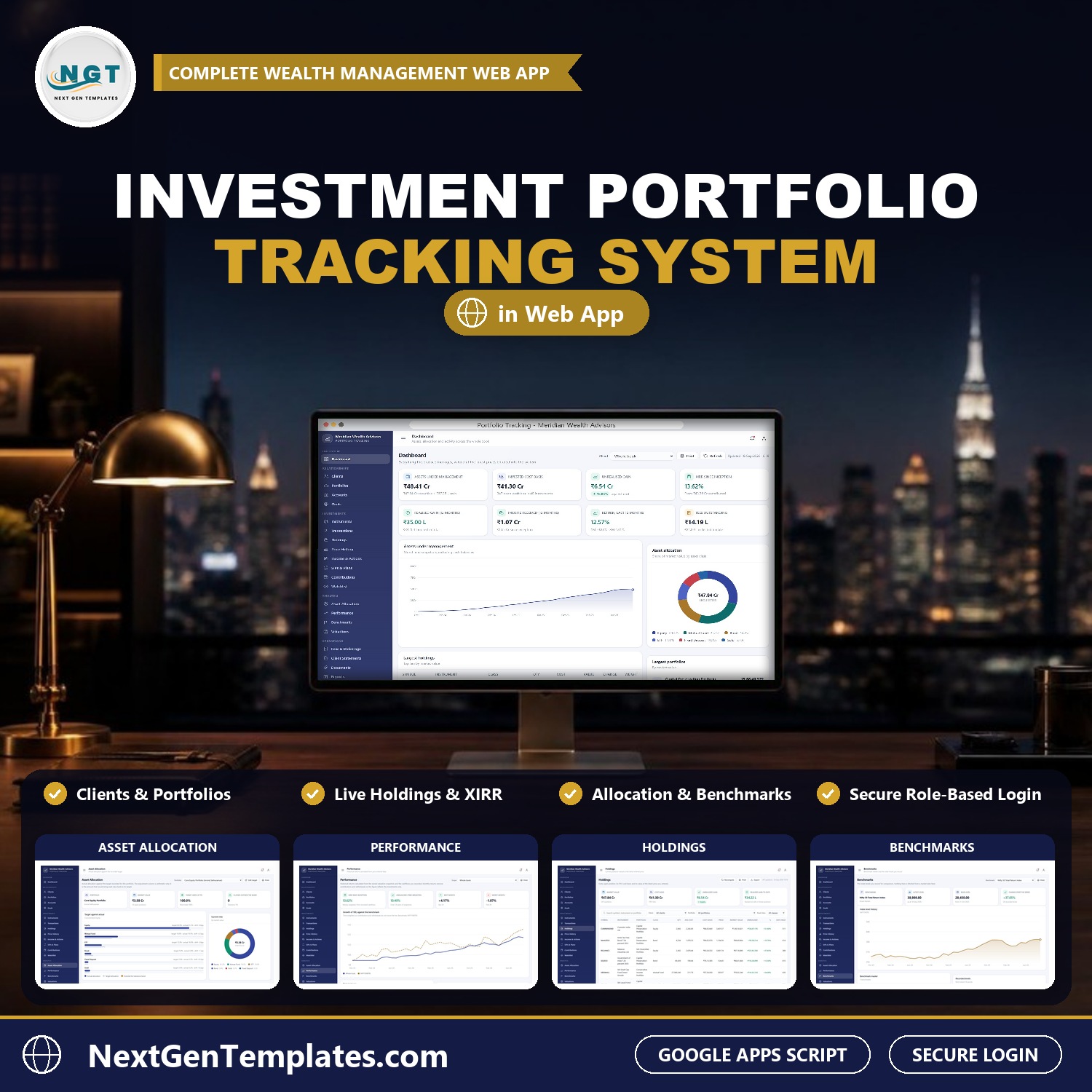
The Investment Portfolio Tracking System Web App is a role-based Google Apps Script application for advisory practices, family offices and wealth desks. It covers 29 sidebar screens, 6 user roles, 19 filterable reports and 27 database tables, and it installs with 6,676 seeded rows so every screen is populated the moment you sign in. Record transactions and prices, and the system rebuilds FIFO holdings, cost basis, allocation and historical performance for you.
🌍 Join thousands of teams using NextGenTemplates to replace paid SaaS subscriptions with one-time-purchase Google Sheets, Excel, Power BI and Apps Script templates.
✅ Instant download · One-time payment · No subscription · No per-user fees · Lifetime access
🚀 Try the Live Demo
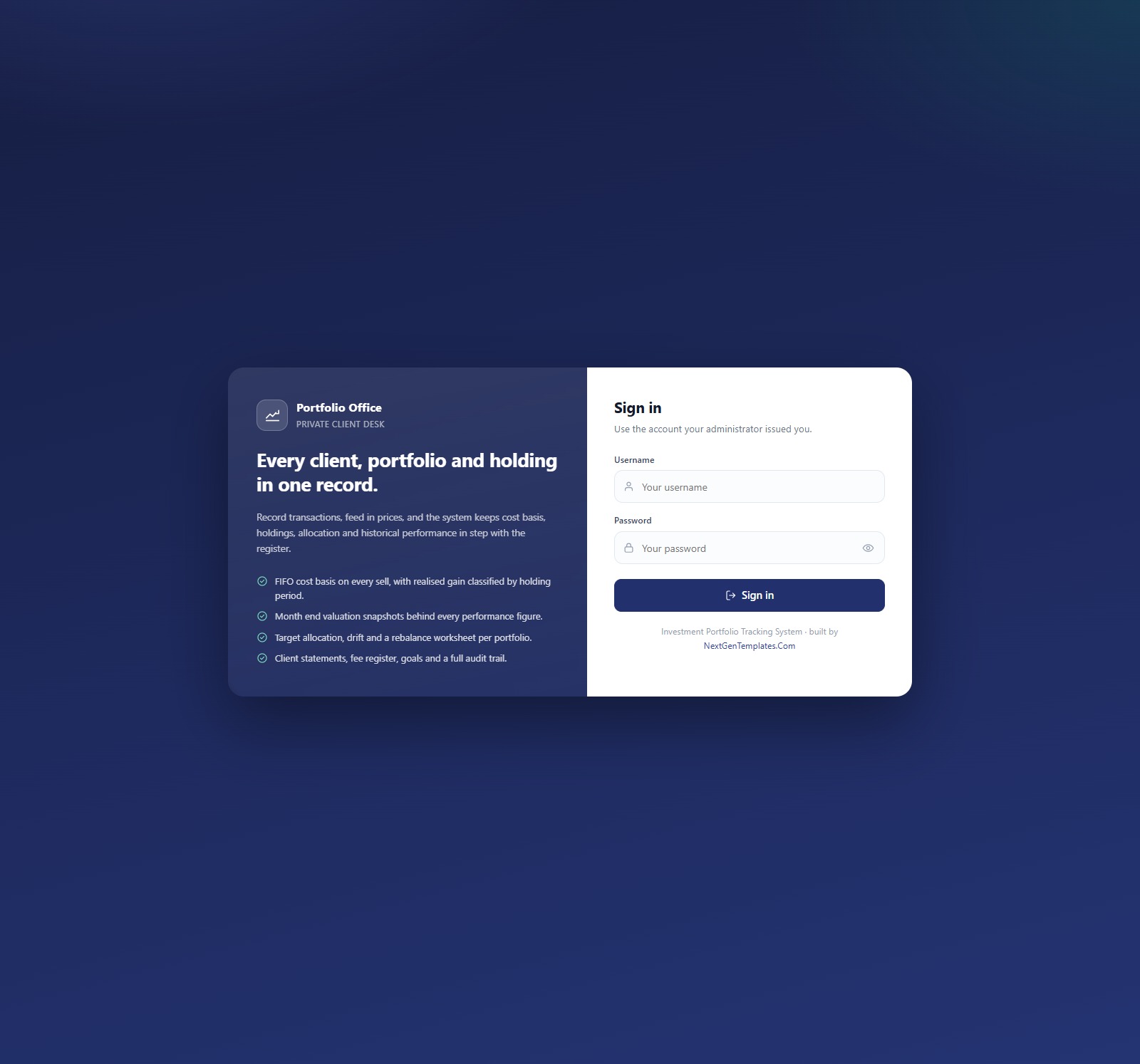
Sign in to the shared demonstration system before you buy. Try the Auditor login to see how the read-only role works, then the Administrator login to see everything.
Demo sign-in accounts
| Role | Username | Password |
|---|---|---|
| Administrator | admin | Mrd#Adm2026! |
| Portfolio Manager | pmanager | Pfm#Mgr2026! |
| Research Analyst | analyst | Res#Anl2026! |
| Operations Executive | operations | Ops#Exe2026! |
| Client Servicing | servicing | Cls#Srv2026! |
| Auditor (read only) | auditor | Aud#Vwr2026! |
These credentials belong only to a seeded shared demo instance that may be reset at any time. Your purchased copy is deployed under your own Google account, with its own database, and you change every password on day one.
🔑 Key Features of the Investment Portfolio Tracking System Web App
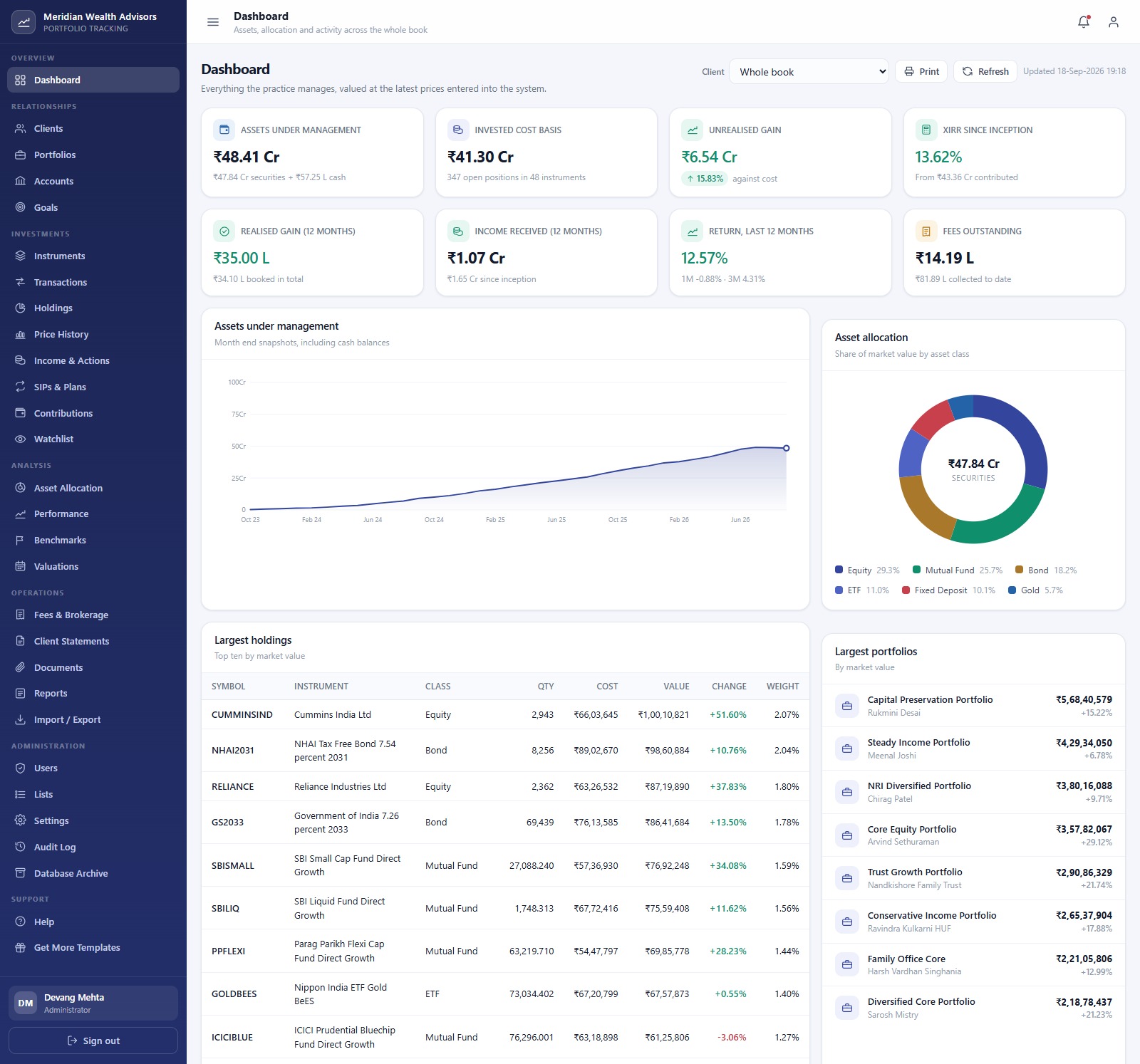
📊 Dashboard with 8 KPI cards: Assets Under Management, Invested Cost Basis, Unrealised Gain, XIRR Since Inception, Realised Gain (12 months), Income Received (12 months), Return Last 12 Months and Fees Outstanding, plus Assets Under Management by Month, Asset Allocation by Asset Class, Largest Holdings and Largest Portfolios. A client picker switches the whole page from the whole book to a single client.
🧮 FIFO cost basis on every sell: saving or deleting a transaction rebuilds holdings, cost basis and valuation snapshots. Each sell shows its realised gain and whether it is Short Term or Long Term by holding period.
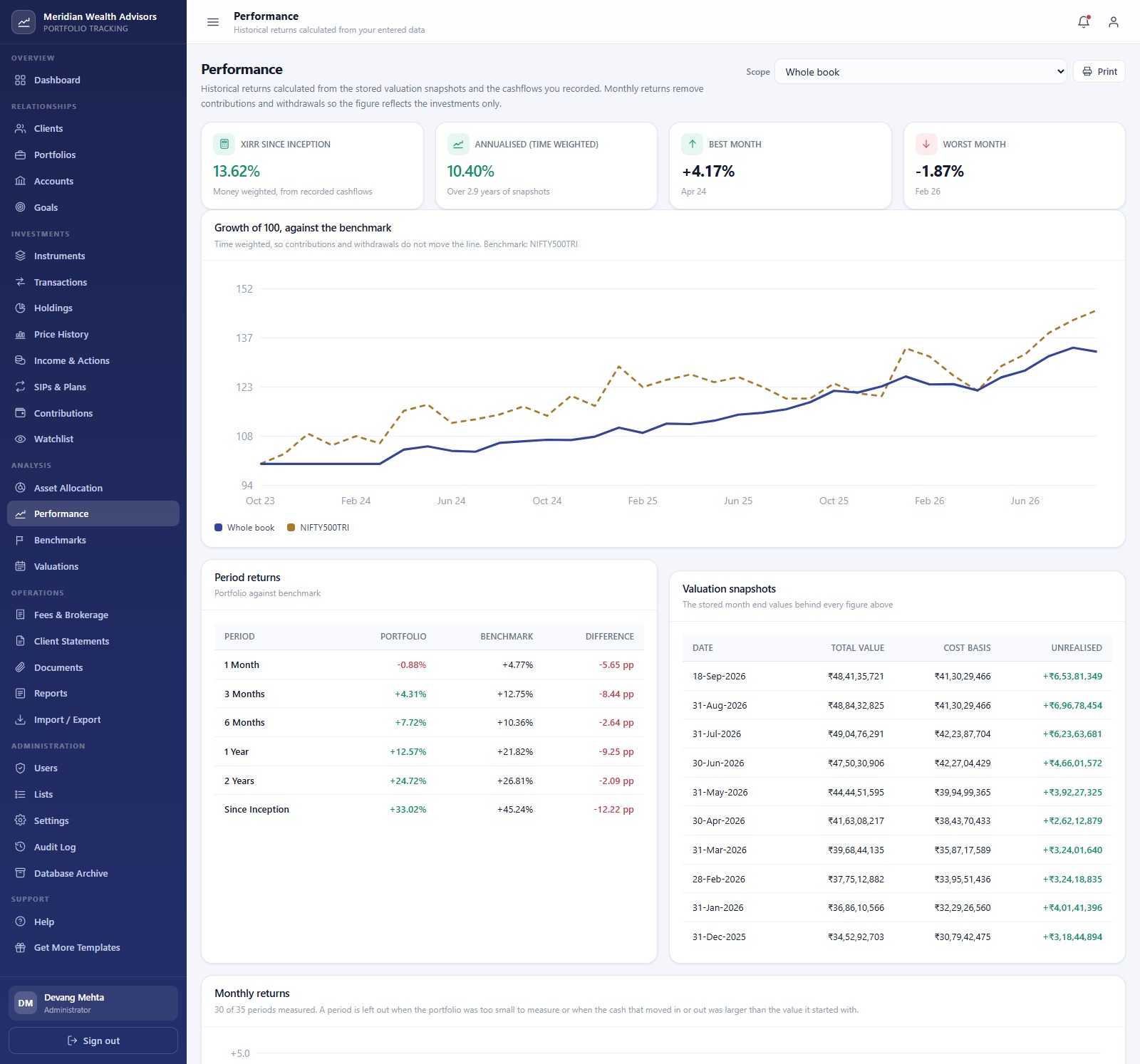
📈 Performance you can defend: the Performance screen reports money-weighted XIRR, annualised time-weighted return, best and worst month, growth of 100 against a benchmark and period returns for 1, 3 and 6 months, 1 and 2 years and since inception.
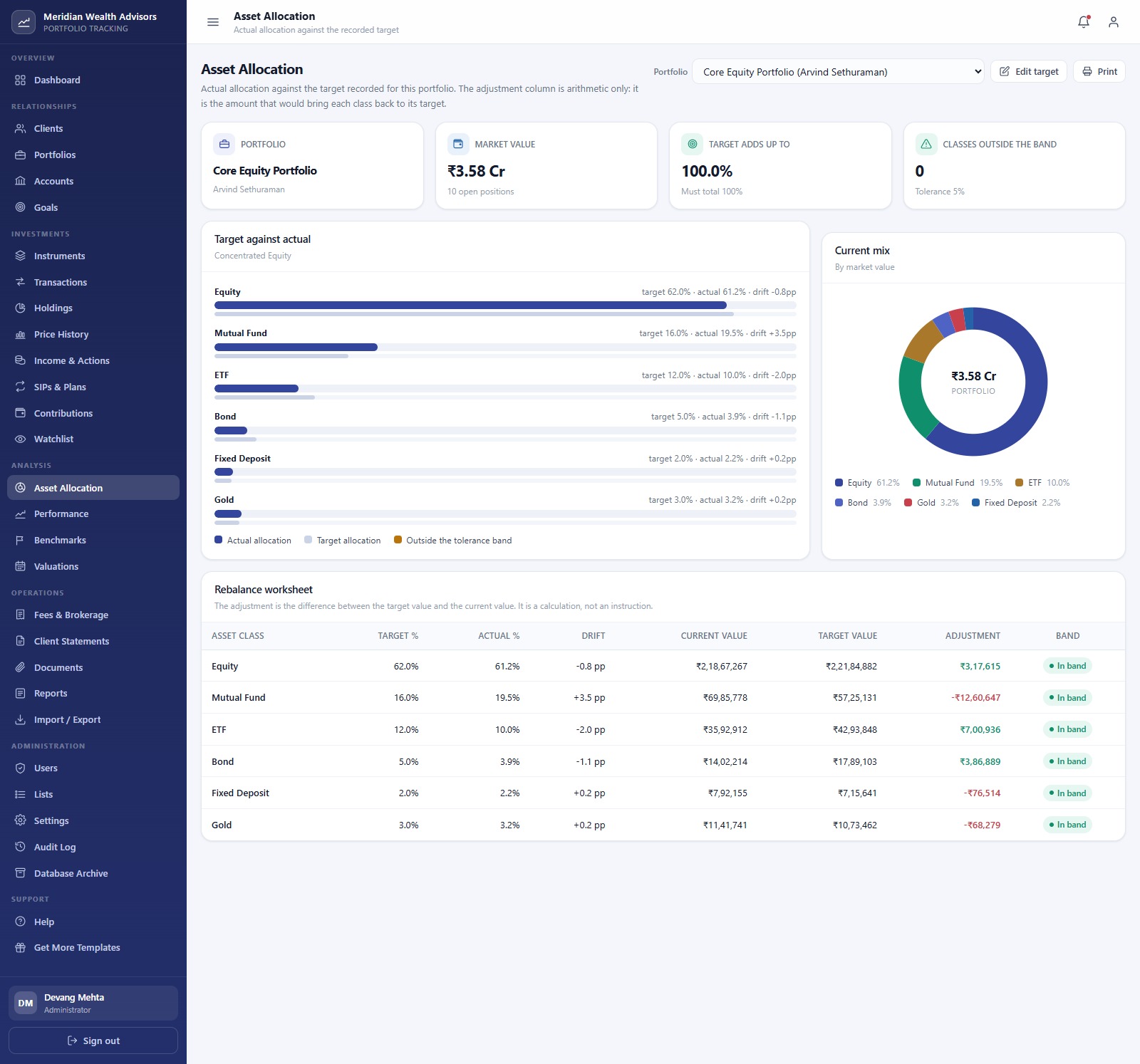
⚖️ Target allocation and rebalancing: record a target mix per portfolio, see drift in percentage points against a tolerance band, and read a rebalance worksheet showing the arithmetic adjustment per asset class. It is a calculation, not an instruction.
👥 Client portfolio management system: clients, portfolios, accounts, goals with funding progress, SIPs and recurring plans, contributions and withdrawals, fees and brokerage, documents and period client statements that can be printed or emailed.
🔐 Six roles enforced on the server: Administrator, Portfolio Manager, Research Analyst, Operations Executive, Client Servicing and a read-only Auditor, with a permission matrix on the Users screen and a full audit log.
📦 What’s Inside the Investment Portfolio Tracking System Web App
The download ZIP holds Code.cs.txt (server code), Index.txt (the complete interface) and a PDF user manual. Setup builds its own Google Sheets database, Drive folder tree and seeded records in your Google account.
Dashboard
The whole book at a glance: eight KPI cards, Assets Under Management by Month, Asset Allocation by Asset Class, the top ten holdings by market value and the largest portfolios.
Portfolios
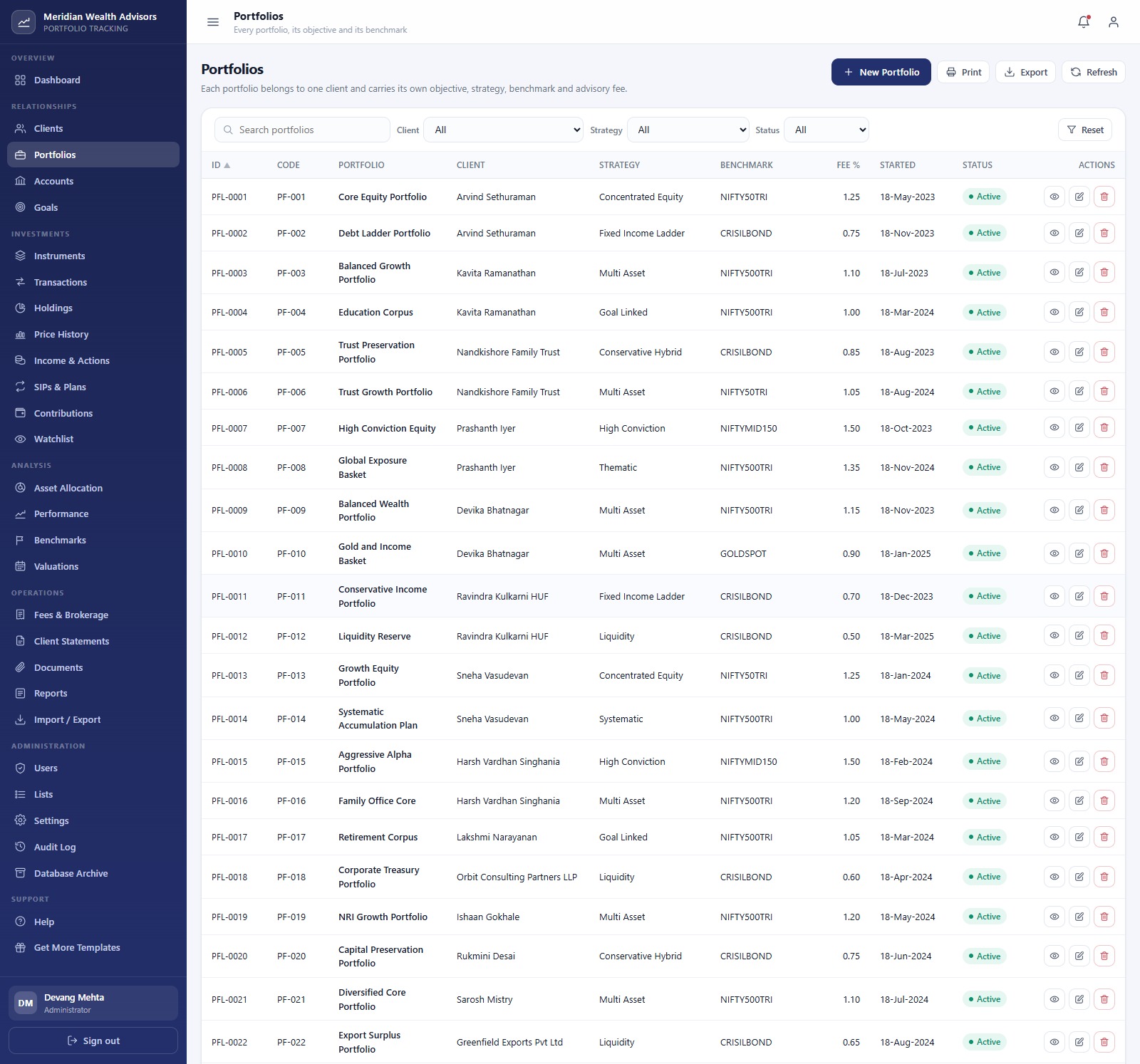
Every portfolio with its client, strategy, benchmark, advisory fee percentage, start date and status, with search and filters by client, strategy and status.
Transactions
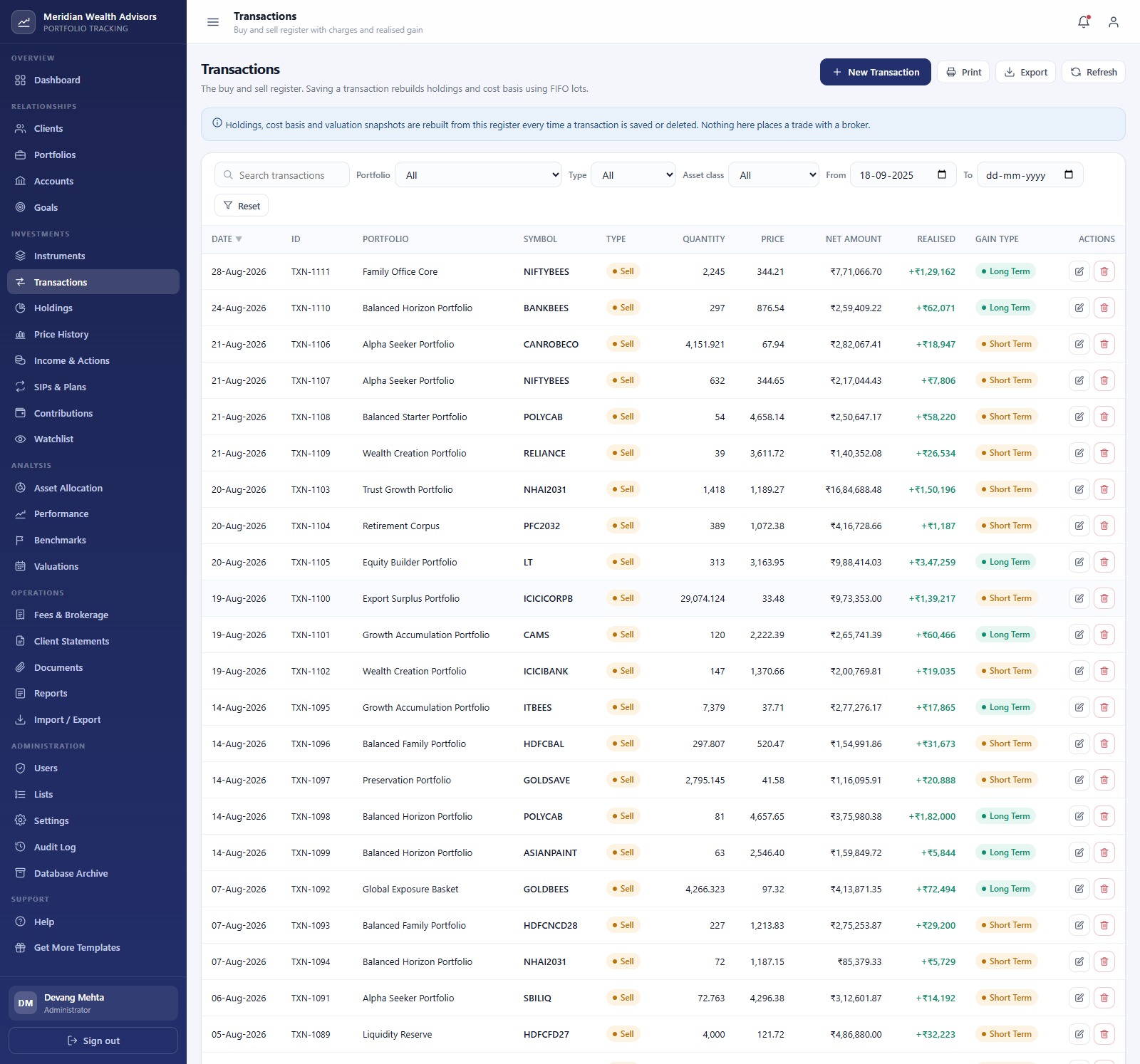
The buy and sell register with quantity, price, net amount, realised gain and gain type. Nothing here places a trade with a broker.
Holdings
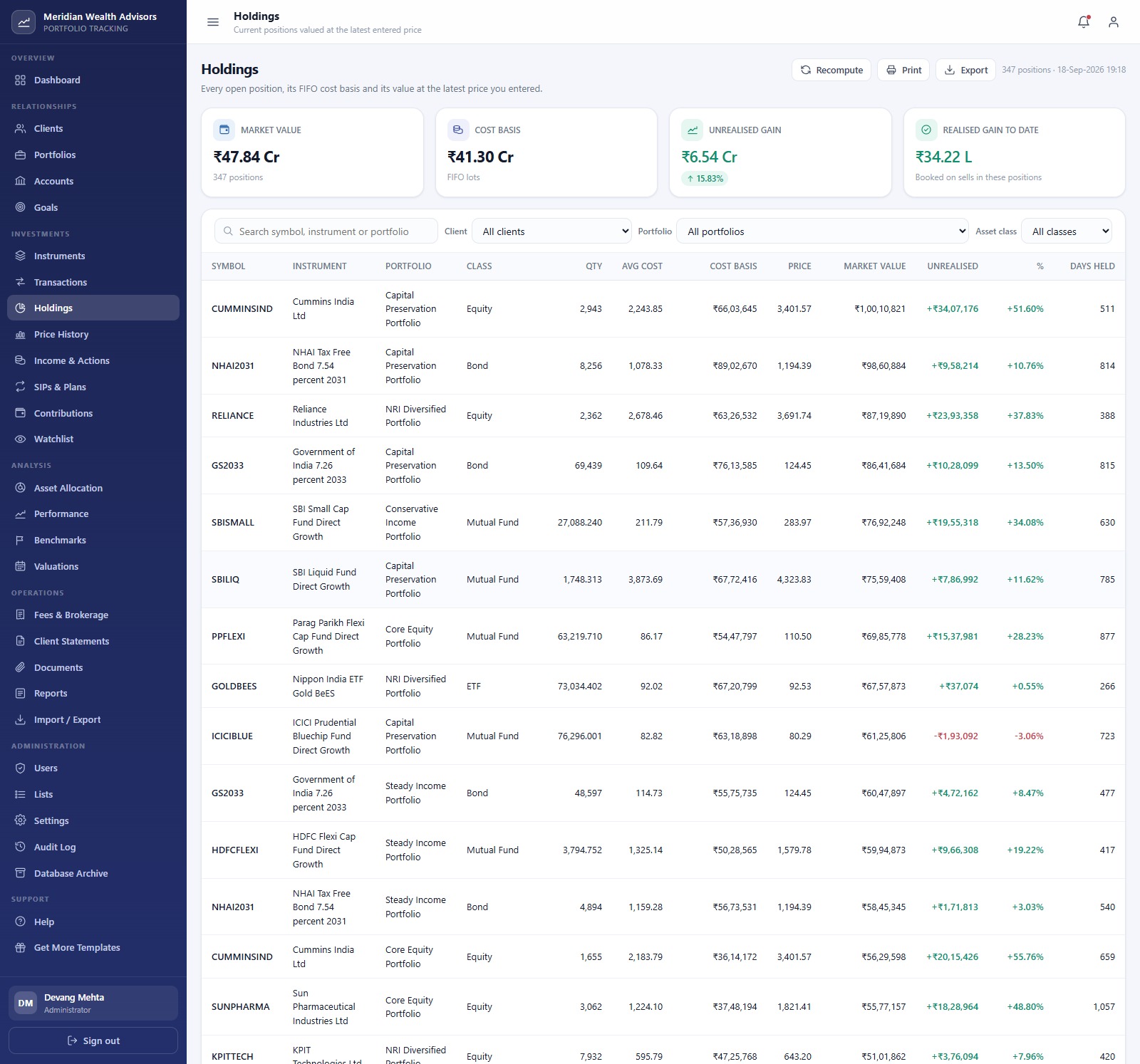
Every open position with FIFO average cost, cost basis, latest entered price, market value, unrealised gain and days held, plus Market Value, Cost Basis, Unrealised Gain and Realised Gain to Date cards.
Asset Allocation and Performance
Target against Actual by Asset Class with drift, a Current Mix by Market Value chart and the rebalance worksheet; then XIRR, time-weighted return, Growth of 100 against the Benchmark, Period Returns and the stored valuation snapshots.
SIPs, Client Statements and Reports
Systematic plans with amount, frequency, instalments done and next due date; period statements showing opening value, income, realised gain and closing value; and 19 reports grouped by valuation, transactions, gains, income, allocation, performance, plans, cashflow, fees, clients and instruments.
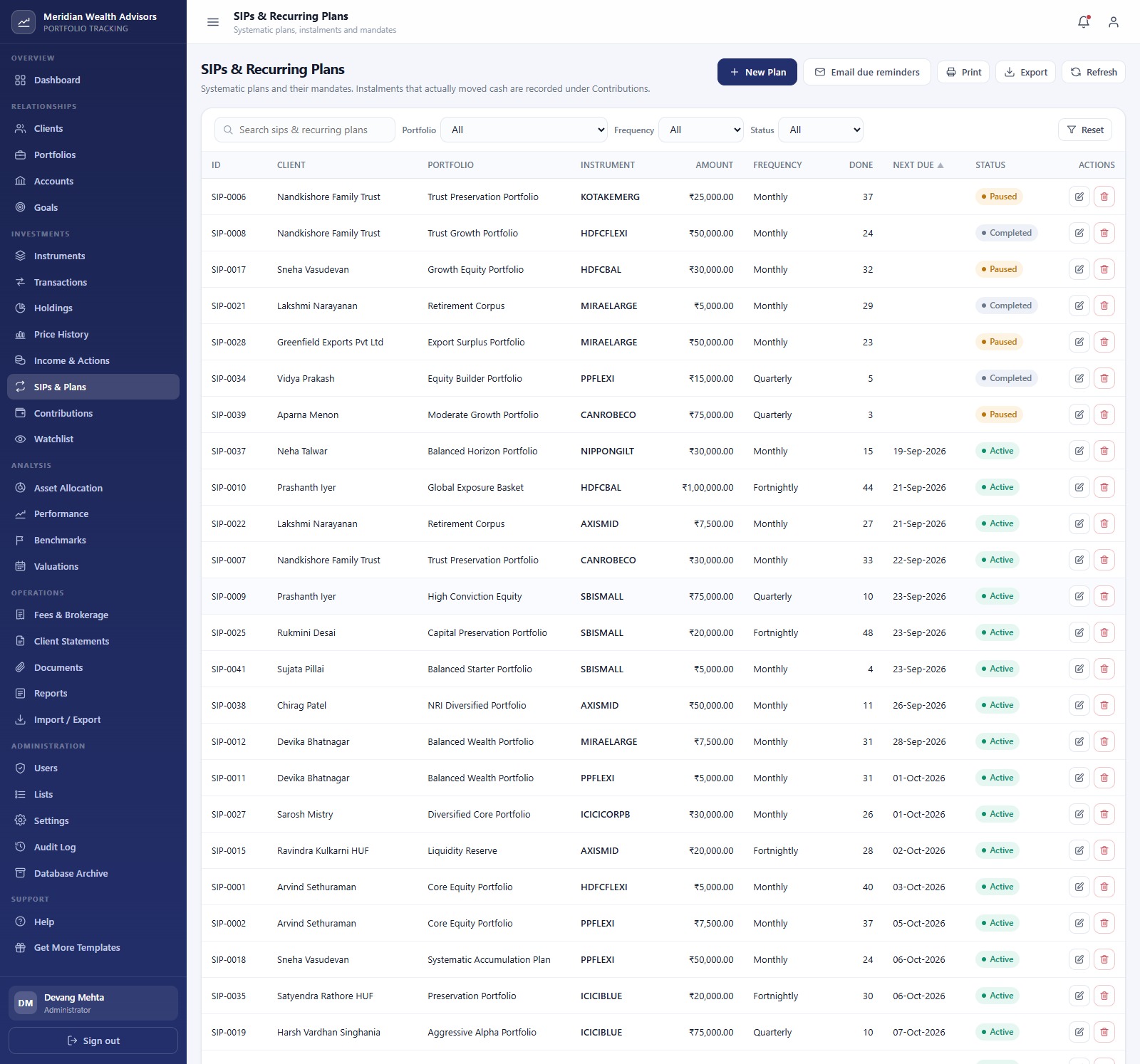
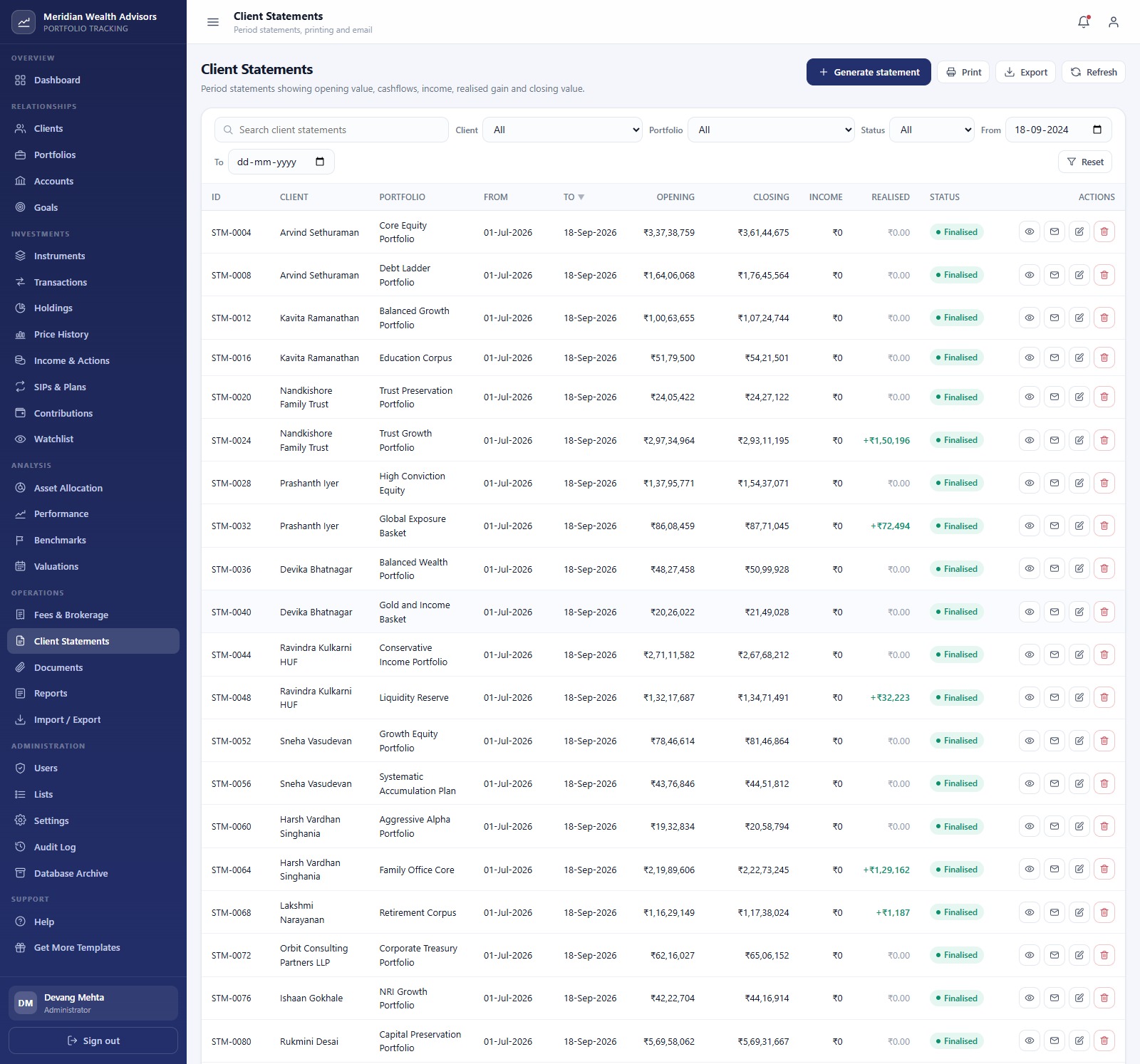
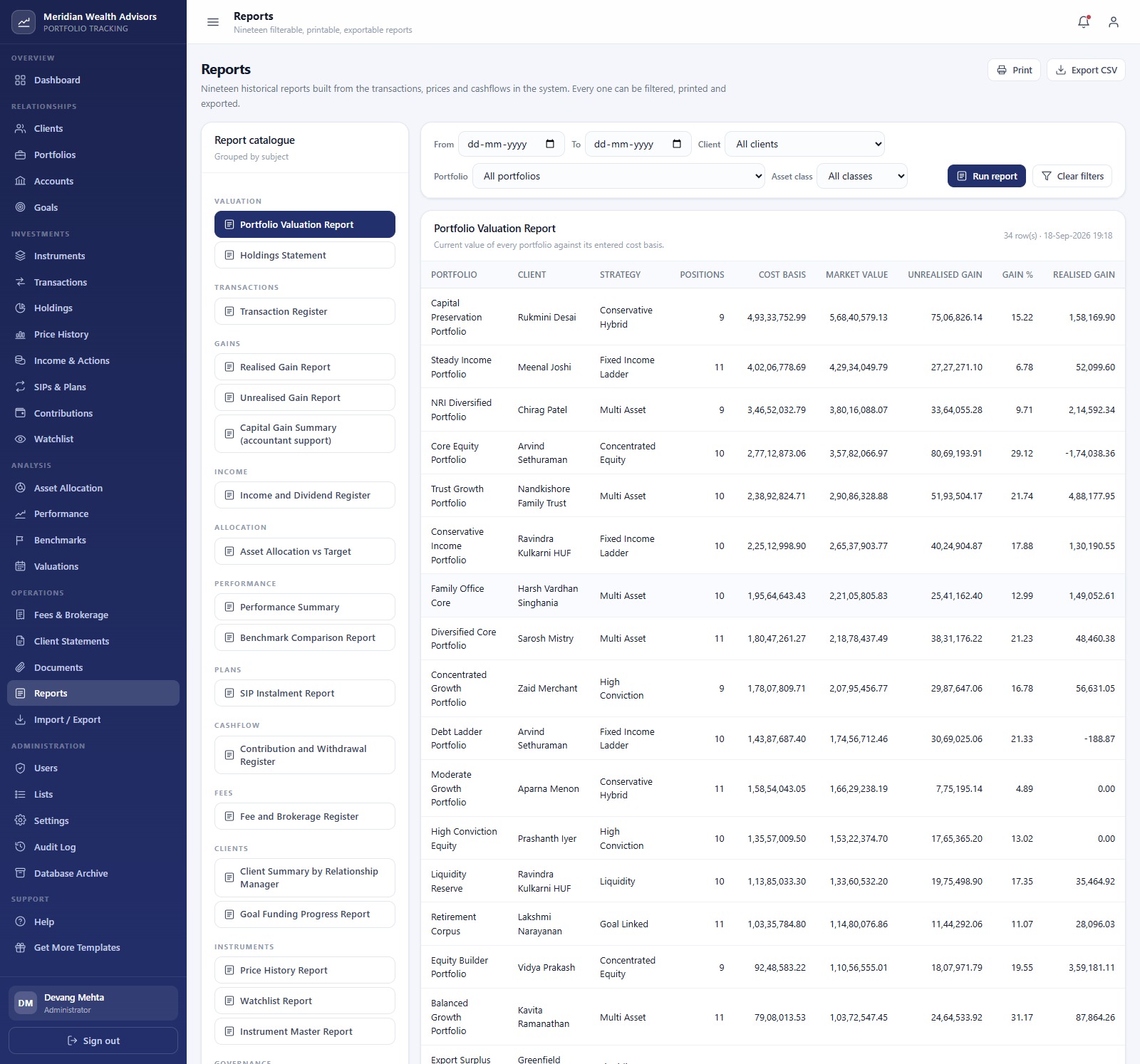
Other screens include Clients, Accounts, Goals, Instruments, Price History (with bulk price entry), Income & Actions, Contributions, Watchlist, Benchmarks, Valuations, Fees & Brokerage, Documents, Import / Export, Users, Lists, Settings, Audit Log and Database Archive.
📊 Investment Portfolio Tracking System Web App vs. Spreadsheet Tracker vs. Paid Portfolio Software
| Feature | This web app | Excel / Sheets portfolio tracker | Paid portfolio software (Addepar / Orion / Black Diamond) |
|---|---|---|---|
| Cost | ✅ One-time purchase | One-time or free | Annual contract, often priced per account or AUM |
| Platform | Browser web app on your Google account | Spreadsheet file | Vendor cloud |
| Multi-user roles | ✅ 6 roles, server-enforced | Sheet sharing only | ✅ Yes |
| FIFO cost basis and realised gain | ✅ Automatic on save | Manual formulas | ✅ Yes |
| XIRR and time-weighted return | ✅ Built in | Build it yourself | ✅ Yes |
| Live market data feed | No, prices are entered or imported | Possible with formulas | ✅ Yes |
| Client statements and 19 reports | ✅ Print, export, email | No | ✅ Yes |
| Data ownership | ✅ Your own Google Drive | ✅ Your file | Vendor hosted |
| Source code editable | ✅ Full Apps Script source | ✅ Formulas | No |
For small practices that want a multi-user investment portfolio tracker without an enterprise contract, this web app sits in the sweet spot.
👥 Who This Template Is For, and Who It’s Not For
✅ Built for:
- Independent advisers and small wealth desks tracking 10-100 client portfolios
- Family offices that want one record of every holding, goal and fee
- Teams that want a wealth management web app they own and can customise
❌ Not for:
- Anyone who needs order placement with a broker or exchange; it does not place trades
- Users who need live market prices; there is no market data feed
- Anyone looking for investment advice, recommendations or statutory tax filing
⚙️ How to Use This Web App
- Try the live demo first, signing in with a few different roles.
- Create a new Apps Script project, paste
Code.cs.txtinto Code.gs and add an HTML file named Index withIndex.txt. - Deploy as a web app, then run first-time setup from the sign-in page or the editor.
- Sign in as admin, change all six default passwords and remove unused accounts.
- Add clients, portfolios, accounts and instruments, then enter prices and transactions.
- Record contributions and withdrawals on the day cash moved so XIRR and time-weighted return stay accurate.
💼 Real-World Use Cases
Anita runs a three-person advisory practice. She uses this web app to post month-end prices in one pass, generate client statements and email them, while her operations executive handles transaction entry under a restricted role.
A family office manager tracks four generations of goals. Goals, SIPs and target allocations sit in one place, and the rebalance worksheet shows how far each portfolio has drifted before the quarterly review.
❓ Frequently Asked Questions
Can I try the Investment Portfolio Tracking System Web App before buying?
Yes. The live demo above has six seeded accounts, one per role. Sign in as the Auditor to see the read-only view or as the Administrator to see every screen. The demo is shared and can reset, so do not enter real client information there.
Does it connect to a live market data feed or a broker?
No. It is a tracking and record-keeping system. You enter or import prices and transactions, and it calculates holdings and performance from them. It does not place trades, fetch live prices or give investment advice.
How are returns calculated?
Money-weighted XIRR comes from the contributions and withdrawals you record, and the annualised time-weighted return comes from stored month-end valuation snapshots, so cashflows do not distort the line. Period returns are compared against the portfolio benchmark.
Can I change the currency?
Yes. Settings holds the currency code and currency symbol, along with the print size (3 inch, 4 inch or A4) and email switches. The demo uses Indian rupees with Indian digit grouping.
How long does setup take?
Pasting the two files and deploying takes around 10 minutes. First-time setup then builds the database; a large seed can take a few minutes and continues automatically if Apps Script’s six-minute limit is reached.
How does this compare to paid portfolio software?
Enterprise platforms add live data feeds, custodian integrations and compliance tooling for an annual contract. This web app is a one-time purchase that runs in your Google account, suited to smaller teams entering their own data.
👤 About the Author
Built by PK, Microsoft Certified Professional with 15+ years of Excel, Google Sheets, Apps Script and Power BI experience. Founder of NextGenTemplates, reaching 300K+ subscribers across YouTube channels (@PK-AnExcelExpert, @NextGenTemplates, @NeoTechNavigators). Every template is hand-built and tested before release.
🔗 Explore Related Templates
🔹 Chit Fund Management System Web App: another finance system built on the same role-based Apps Script framework.
🔹 Insurance Agency Management System Web App: a role-based Apps Script system for insurance advisory firms.
🔹 Stock Portfolio Tracker in Google Sheets and Mutual Fund and SIP Tracker for a single-user Google Apps Script portfolio tracker alternative in plain Sheets.
🔹 Wealth Management Dashboard in Google Sheets for practice-level analytics.
Browse every Web App template.
📖 Click here to read the Detailed Blog Post
🎥 Visit our YouTube channel for step-by-step video tutorials
👉 YouTube.com/@NextGenTemplates
📅 Last updated: September 2026






























Reviews
There are no reviews yet.