

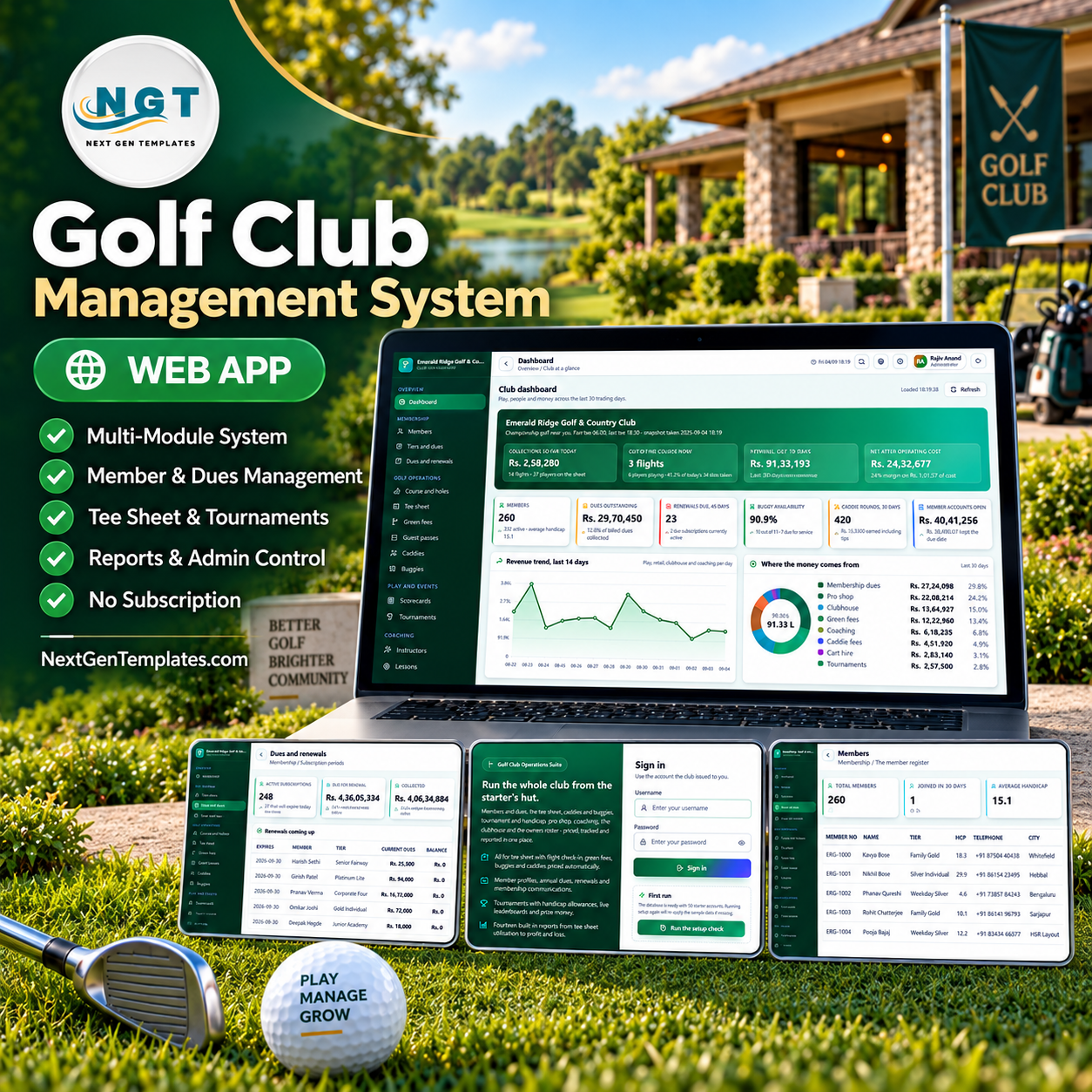

The Golf Club Management System Web App is a golf club management system that runs 28 documented modules from one sidebar – the tee sheet, membership, dues, caddies, buggies, tournaments, the pro shop, the clubhouse, greenkeeping and 14 built-in reports. It ships with 35 database tables, 12,968 rows of worked sample data, 8 roles across 58 permissions and 42 editable dropdown lists. Deployment takes about 15 minutes: paste two files into a new Google Apps Script project, deploy, run setup once.
🌍 Join 8,400+ teams in 40+ countries using NextGenTemplates to replace paid SaaS tools with one-time-purchase Excel, Google Sheets, Power BI and Apps Script templates.
✅ Instant download · One-time payment · No subscription · No per-user fees · Lifetime access · Runs in your own Google account

🚀 Try the Live Demo Before You Buy
We have deployed this web app in our own Google account so you can test every page and every role – with the full seeded club inside – before purchasing. No signup, no email required.
🔑 Test Login Credentials
Sign in as admin to see everything including Users, Settings, the Audit log and the Database archive, or as proshop or coach to see how much a restricted role actually loses. That difference is the product – the sidebar shrinks, and the server refuses the write as well.
| Role | Username | Password |
|---|---|---|
| 👨💼 Administrator | admin | Golf@2024 |
| Club Manager | manager | Manager@2024 |
| Golf Operations | golfops | TeeTime@2024 |
| Front Desk | frontdesk | Reception@2024 |
| Pro Shop | proshop | ProShop@2024 |
| Course Superintendent | greens | Fairway@2024 |
| Accounts | accounts | Accounts@2024 |
| Golf Instructor | coach | Coach@2024 |
| Front Desk (second desk) | frontdesk2 | Counter@2024 |
| Golf Operations (starter) | golfops2 | Starter@2024 |
💡 These credentials are public on purpose – they are the seeded logins of a shared demo that resets, not of anyone’s live club. After purchase you get the full source (Code.gs + Index.html) plus the deployment guide, and you run your own private instance in your own Google account.
🔑 Key Features of the Golf Club Management System Web App
- ⛳ A working tee sheet, not a calendar. Move between days, book a flight, check players in, close a completed round and cancel a booking. Tee interval, maximum players per flight, the advance booking window and the slots released per day are all settings – the demo runs 10 minutes, 4 players, 14 days and 34 slots, and occupancy is measured against that number.
- 💳 Membership, tiers and dues in one chain. Eight tiers carry a joining fee, annual and monthly dues, a guest pass allowance, a green fee discount and a buggy discount. Renew a subscription and the system raises the next period and its statement in one step, then emails the member if email is switched on.
- 🏌️ Green fees priced automatically. The rate card sets a price per course, player type, day type and number of holes, with buggy-included and caddie-included flags. Member rates can be zero where play is covered by the subscription, and the tier discount applies on top.
- 🏆 Tournaments with real handicap maths. Five formats – Stableford, Stroke Play, Scramble, Four Ball Best Ball and Match Play – with entry fees, a field limit, a handicap allowance and a prize fund. Post the scores and the leaderboard and prize money recalculate themselves.
- 📈 Handicaps calculated from the cards. Every scorecard records gross, course handicap, net, Stableford points, putts, fairways and greens in regulation. The handicap movement panel computes an index from the best forty percent of a player’s differentials and shows it against the recorded handicap.
- 🛒 Pro shop and clubhouse that post to the member account. The counter builds a basket, applies the member discount and tax, takes payment and reduces stock in a single write. Clubhouse bills add the service charge and can be settled at the outlet or charged to the account and picked up by the next statement.
- 💰 Statements, payments and an expense register. Member statements pull together everything charged in a period with an ageing panel; receipts post against an open statement and the balance, status and member account all update together. The expense register carries 11 categories with an approval step.
- 🔐 Eight roles over 58 permissions. The role decides which sidebar items appear, and the server re-checks the same permission on every read and every write – hiding a menu item is never the only protection. Passwords are stored as a salted SHA-256 hash, sessions expire after 12 hours, and deactivating an account ends access without deleting history.
- 📊 Fourteen reports, no report builder needed. Daily revenue summary, tee sheet utilisation, membership dues and renewals, green fee and guest income, caddie rounds and earnings, buggy fleet utilisation, tournament results, handicap movement, pro shop sales and stock, coaching lesson revenue, clubhouse food and beverage, course maintenance log, outstanding member accounts, and profit and loss – each with a date range, CSV export and print.
📦 What’s Inside the Golf Club Management System Web App
Ten sidebar groups, 28 documented modules and a Help centre with one section per screen. These are the screens you will live in.
Club dashboard
Collections so far today, flights out on the course, revenue and net result for the trading window, six membership and operations cards, then revenue trend by day, where the money comes from, when the tee sheet fills, the operating cost mix, who is out on the course, who is next off the first tee, the highest spending members and a “what needs attention” list.

Tee sheet
The starter’s working screen: flights booked, occupancy against the slots released, charged for the day, checked in and cancellations, plus busiest tee hours and how today was booked (online, telephone, counter, walk-in, corporate desk). Every row carries the lead player, course, players, booking type, buggy, caddie, charge, payment and status.

Member register
Every playing member with tier, handicap, telephone, city, joining date, rounds played, account balance and status, filtered by tier, status and city. Members by tier and the handicap spread sit above the table.

Dues and renewals
Every subscription period with what was billed, collected and still owed, the renewals coming up and dues billed by tier. Renewals falling due inside the next sixty days are counted for you.

Tournaments
Events, entries taken, entry fees billed, prize money awarded and what is still on the calendar, with formats played, field size by event and a live leaderboard showing position, handicap, gross, net, points, prize and entry fee status.

Pro shop inventory
Stock lines by category and brand with cost, selling price, quantity on hand, reorder level, supplier and shelf. Anything at or below the reorder level appears in the reorder list with its supplier already attached.

Report centre
All fourteen reports on one page. Pick a report, set the dates or use “This month” or “Last 90 days”, run it, then export CSV or print.

Users and roles
Accounts, roles and a role matrix over 58 permissions, with the security notes printed where the administrator will actually read them.

Also inside: course and holes (par, yardage per tee box, stroke index, hazard note, rating and slope), guest passes, caddies, buggies, scorecards, instructors, the coaching diary, pro shop sales, the clubhouse menu, greenkeeping, staff and payroll, statements, payments, expenses, dropdown Lists, 41 Settings, the Audit log, and a Database archive that moves old rows to a dated CSV on Drive and never touches master data.
📊 Golf Club Management System Web App vs. Spreadsheets vs. Golf Club SaaS – Where This Fits
| Feature | Golf Club Management System Web App | Spreadsheet + paper tee sheet | Golf club SaaS (Lightspeed Golf / Golfmanager / Club Caddie) |
|---|---|---|---|
| Cost | $39.99 one-time ✅ | Free | Recurring subscription, priced per course |
| Platform | Google Apps Script, in your own Google account ✅ | Excel or Google Sheets | Vendor cloud |
| Setup time | About 15 minutes; staged setup seeds the whole club ✅ | Days of building, then maintenance forever | Onboarding call, then vendor-led configuration |
| Role-based permissions | 8 roles, 58 permissions, re-checked server side ✅ | Sheet protection at best | Yes ✅ |
| Real-time team collaboration | Yes – 10 accounts on one shared database ✅ | Version conflicts | Yes ✅ |
| Mobile access | Any browser, no app install ✅ | Painful on a phone | Yes ✅ |
| Customisable fields and screens | Full source code included – edit anything ✅ | Yes ✅ | Only what the vendor exposes |
| Built-in reports | 14, with CSV export and print ✅ | Build each one yourself | Yes ✅ |
| Member data stays in your account | Yes – your own Google Drive, no third party ✅ | Yes ✅ | Held on the vendor’s servers |
| Year-1 cost at 5 users | $39.99, then nothing ✅ | Free, plus the hours | A full year of subscription |
For clubs that want a real multi-user system without a per-course subscription or a vendor holding the member list, the Golf Club Management System Web App sits in the sweet spot.
👥 Who This Template Is For – and Who It’s Not For
✅ This template is built for:
- Single-course golf clubs and country clubs with roughly 100-1,000 members, running the desk on spreadsheets and a paper tee sheet
- Club managers and secretaries who need dues, renewals and outstanding member accounts in the same place as play
- Golf operations staff and starters who want a tee sheet with flight check-in, green fees, buggies and caddies priced automatically
- Academies, driving ranges and nine-hole courses that also sell coaching, retail and food
- Developers and consultants who want a complete Apps Script codebase to brand and extend for a club client
❌ This template is NOT for:
- Clubs that need a member-facing self-service booking portal or a mobile app – this is staff-facing software
- Anyone expecting online card payments; it records how a payment arrived but processes none – there is no gateway and no card storage
- Multi-site groups needing consolidated reporting across several clubs in one instance
- Clubs that need an official handicap index filed with a national federation – the index here is the club’s own calculation from the cards on file
- Teams that want vendor-hosted infrastructure, a support SLA and someone else running the backups
⚙️ How to Use the Golf Club Management System Web App
- Try the demo first. Open the live demo above, sign in as admin, then sign in again as proshop to see the role separation before you buy.
- Create a new Apps Script project. Go to script.new, paste Code.cs.txt into Code.gs, add an HTML file named exactly Index and paste Index.txt into it.
- Deploy as a web app. Deploy > New deployment > Web app, Execute as: Me, Who has access: Anyone, then accept the permission prompt.
- Run setup once. Open the web app URL and press “Build the database now” on the first-run panel, or run setup from the editor. Setup is staged and resumable, so a six-minute timeout is not a problem.
- Sign in and change every password. Use admin / Golf@2024, then reset all ten seeded accounts from the Users screen. Nobody, including an administrator, can read an existing password back.
- Make it your club. Set the club name, address, tax number, currency, tax percent, first and last tee time, tee interval, slots per day and print sizes under Settings; edit the 42 dropdown lists under Lists.
- Load your own data. Import members, tiers, the rate card, holes, caddies, buggies, staff and pro shop stock, or clear the sample rows and enter your own.
- Run it daily. Book the tee sheet, check players in, take pro shop and clubhouse charges, raise statements, post receipts and run the reports at month end. New to Apps Script? The NeoTech Navigators deployment walk-through covers the publish step.
💼 Real-World Use Cases
Meera runs a 260-member country club outside Bengaluru. Her starter used to keep the tee sheet on a clipboard and the accounts desk chased dues from a spreadsheet. With the Golf Club Management System Web App she sees collections so far today, the renewals falling due inside 45 days and the outstanding member billing on one dashboard – and pro shop counter sales land on the member’s statement instead of a chit in a drawer.
Vikram is head of golf operations at a 27-hole club with an academy nine. He prices three layouts separately on a 14-line rate card, assigns caddies from the caddie board and closes each round with the fee, the tip and a rating. Buggy battery health and next service dates sit on the same screen, so a cart never goes out at 62% again.
Arjun coaches at the same club and only ever sees four screens. His login opens the coaching diary, scorecards, tournaments and the member list – no dues, no expenses, no user administration. The club did not have to buy a second product to give a contractor limited access.
❓ Frequently Asked Questions
Can I try the golf club management system before buying?
Yes. A full live demo of the Golf Club Management System Web App is deployed above with the whole seeded club inside and all ten role logins printed. Nothing is hidden behind a signup form, and the demo resets, so you can create and delete freely.
What exactly do I download?
A ZIP containing Code.cs.txt (the complete Apps Script server code), Index.txt (the entire front end) and the user manual PDF. There is no compiled or obfuscated file – you own and can edit every line of the Golf Club Management System Web App.
How long does setup take?
About 15 minutes end to end. Creating the project and deploying takes five, and the staged setup routine builds all 35 tables and seeds the sample club by itself, resuming automatically if it hits the Apps Script six-minute execution limit.
Does the Golf Club Management System Web App take payments online?
No. It records how a payment arrived – bank transfer, card, UPI, cash or cheque – and posts it against the member’s statement. There is no payment gateway, no card storage and no auto-debit, so cardholder data never touches the system.
How does this compare to golf club SaaS like Lightspeed Golf or Golfmanager?
Those are hosted subscriptions with vendor support and a member-facing booking layer. This is a one-time $39.99 purchase that runs inside your own Google account with the source code included, so there is no per-course fee and no third party holding your member list – but you host, secure and back it up yourself.
Are the handicaps official?
No. The system calculates a club index from the best forty percent of a player’s scoring differentials and shows it against the recorded handicap, which is useful for club competitions. It is not affiliated with, and does not file to, any national handicapping authority.
Can more than one person use it at the same time?
Yes. It ships with ten accounts across eight roles, and the role decides both which sidebar items appear and what the server will allow on every read and write. Sessions expire after 12 hours and every action is written to the audit log.
👤 About the Author
Built by PK – Microsoft Certified Professional with 15+ years of Excel, Google Sheets, Power BI and Google Apps Script experience. Founder of NextGenTemplates, reaching 300K+ subscribers across YouTube channels (@PK-AnExcelExpert, @NextGenTemplates, @NeoTechNavigators). Every template is hand-built and tested before release.
🔗 Explore Related Templates
- Club & Association Membership Management System Web App – the same architecture aimed at societies and associations, where dues and members matter more than play.
- Golf Course KPI Dashboard in Google Sheets – the reporting layer on its own, if you already have an operational system and only want the numbers.
- Golf Course KPI Scorecard in Excel – a month-picker scorecard with traffic lights for the committee pack.
- CrossFit Box Management System Web App and Bowling Alley Management System Web App – sibling Apps Script systems for other membership-and-booking venues.
- Browse the full Web Apps category or the Google Sheets Dashboards collection.
📖 Click here to read the Detailed Blog Post
🎥 Visit our YouTube channel for step-by-step video tutorials
👉 YouTube.com/@NextGenTemplates
📅 Last updated: September 2026
Compatibility and Requirements
- Runs as a Google Apps Script web app in your own Google account. You need a free Google account and a web browser.
- Staff open it in any browser, so no app install is needed. Google explains how to get started with Sheets and Apps Script projects in Get started with Google Sheets.


































Reviews
There are no reviews yet.