

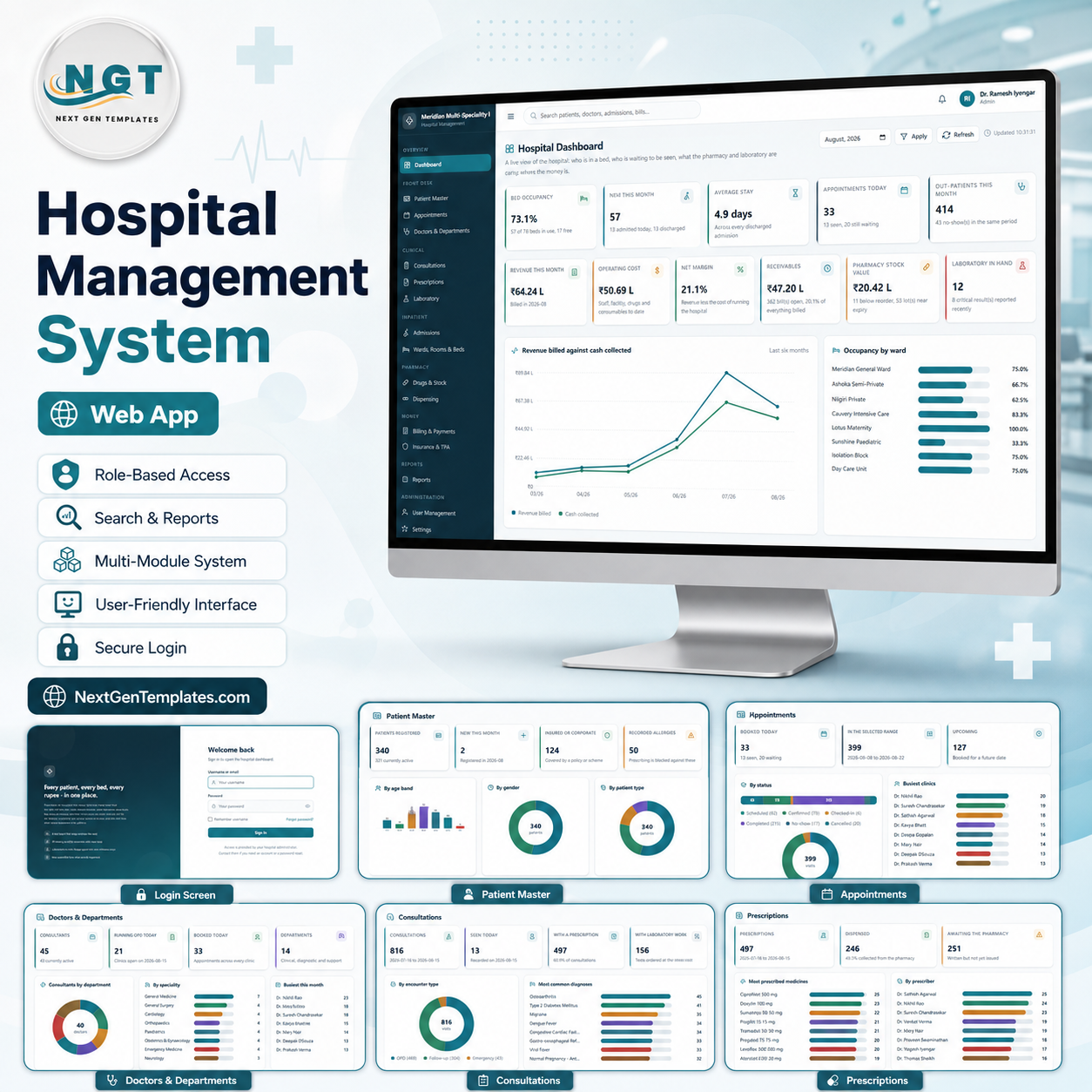
The Hospital Management System Web App is a Google Apps Script application with 20 working screens, 8 role-based sign-ins and 33 database sheets behind them. Its seeded demo hospital carries 340 patients, 45 consultants, 78 beds across 8 wards, 136 medicines, 60 laboratory tests and 1,451 bills — 15,370 rows in total — so no screen is empty on the day you deploy it. Setup is one click: press Set up the database on the sign-in card and every sheet, account and sample record is built for you.
This is an administrative record-keeping system for a hospital’s office operations — registration, appointments, bed allotment, pharmacy stock, billing, insurance claims and paperwork. It stores what your staff type into it and adds up what they enter. It is not clinical software, not an electronic health record of record, and it makes no clinical decisions.
🌍 Join 8,400+ teams in 40+ countries using NextGenTemplates to replace paid SaaS tools with one-time-purchase Excel, Google Sheets, Power BI and Apps Script templates.
✅ Instant download · One-time payment · No subscription · No per-user fees · Lifetime access · Full source code
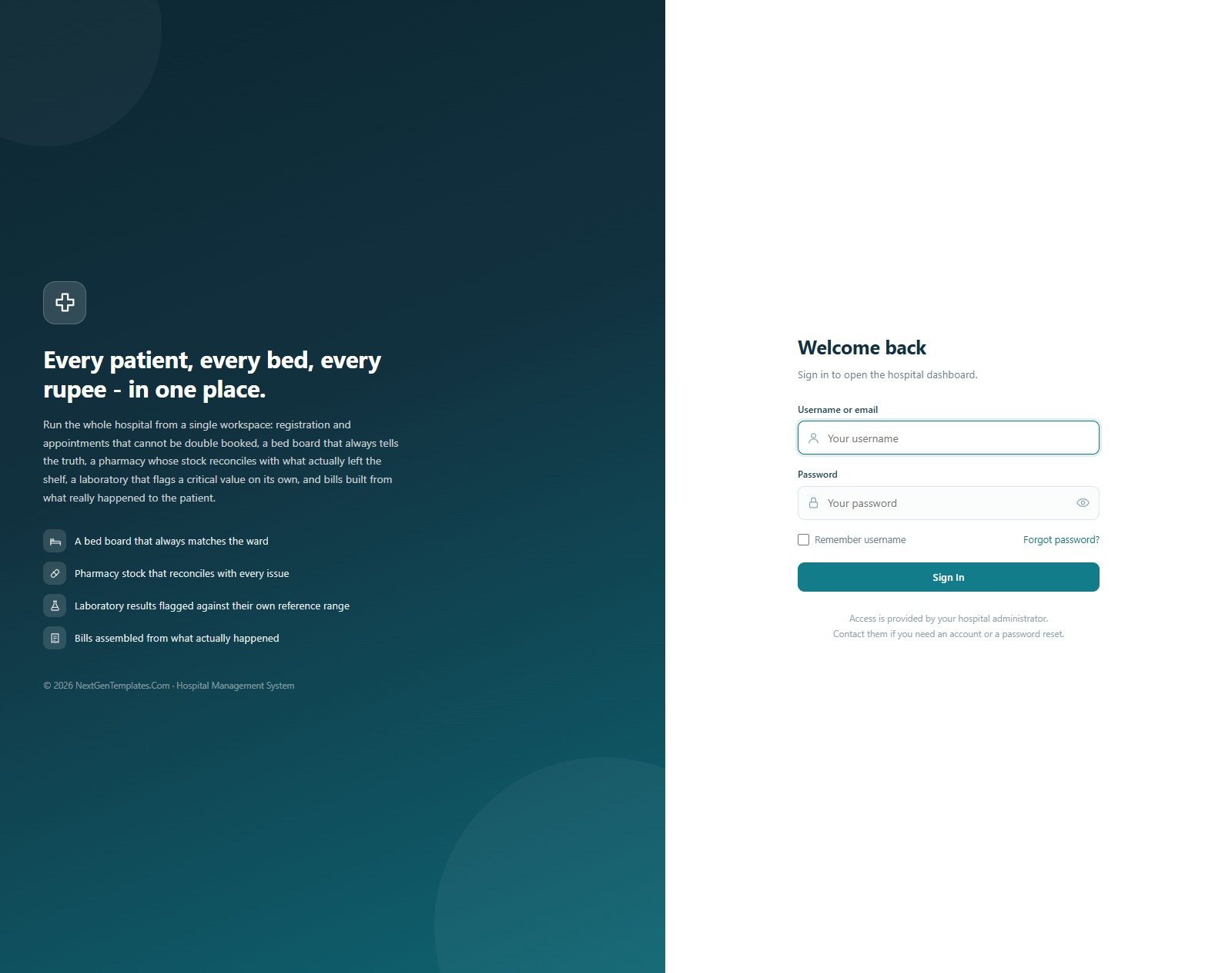
Sign-In and Role-Based Access
Eight accounts ship with the system — Admin, Hospital Manager, Doctor, Nurse, Receptionist, Pharmacist, Lab Technician and Billing Executive. The role someone signs in with decides both the menu they see and what the server will let them do, so a nurse never reaches billing and a pharmacist never reaches user administration.
🚀 Try the Live Demo Before You Buy
We have deployed this web app in our own Google account so you can test every page and every one of the eight roles — with a full set of sample records — before purchasing. No signup, no email required.
🔑 Test Login Credentials
Sign in as admin to see everything including User Management, Settings and the Audit Log — then sign out and come back as nurse or pharmacy to watch the menu shrink to exactly what that job needs. The role separation is the point of the system, and it takes about ten seconds to see it.
⚠️ About this demo: these are public demo logins on a single shared instance that is reset periodically — not a customer’s deployment. Anyone can sign in and anyone can change what is in it. Every patient, doctor and bill in the demo is fictional sample data generated for the template; none of it relates to a real person. Please do not enter real patient information into the demo.
💡 What you get after purchase: the full source code (Code.gs + Index.html) plus a step-by-step deployment guide, so you can run your own private instance in your own Google account in under 15 minutes.
🔑 Key Features of the Hospital Management System Web App
💠 Eight roles, enforced on the server. The Hospital Management System Web App ships 8 sign-in accounts and a 22-permission matrix across 8 roles. Ticking a module in User Management changes both the sidebar that role sees and the guard on every endpoint behind it, so permissions cannot be bypassed from the browser.
💠 An appointment book that refuses bad bookings. The server blocks a double booking in the same slot, a booking past a consultant’s daily patient limit, and a booking on a day that consultant does not run OPD. The seeded clinic runs 33 appointments today across 43 active consultants.
💠 A bed board that always matches the ward. 78 beds sit across 8 wards and 32 rooms. A bed holds one active admission at a time, occupied and maintenance beds refuse a new one, discharge releases the bed, and length of stay is computed from the two dates rather than typed.
💠 Pharmacy stock derived from batches, never from a typed number. 136 medicines are held over 285 purchase lots. Every dispense line draws down a real lot, an expired lot is refused, and a lot cannot issue more units than it holds — so stock on hand and the shelf cannot drift apart.
💠 Bills assembled from what actually happened. A bill’s total is the sum of its line items and its paid amount is the sum of its receipts. A payment can never exceed the outstanding balance. The seeded hospital carries 1,451 bills, 3,646 bill items and 1,395 receipts that reconcile exactly.
💠 Laboratory results flagged against their own reference range. The abnormal flag on a result is derived from the value against the test master’s normal range, so a technician cannot mislabel a critical value by hand.
💠 Fourteen reports, all exportable and printable. Daily Collection Summary, Revenue by Department, Outstanding Receivables & Ageing, Monthly Revenue against Operating Cost, OPD Footfall, Doctor Performance, Admissions & Discharge Register, Bed Occupancy & Ward Utilisation, Diagnosis Frequency, Patient Demographics, Pharmacy Sales & Stock Valuation, Low Stock & Near Expiry, Laboratory Workload & Turnaround, and Insurance Claim Status & Settlement.
💠 46 dropdown lists you control. Every select box in the application is driven from List Management — 310 values across 46 lists. Add a value and it appears across the system immediately, with no code change.
💠 A complete audit trail. Every create, update, delete, admission, discharge, dispense, receipt, permission change and archive is written to the Audit Log with the user, module, action and record reference.
📦 What’s Inside the Hospital Management System Web App
Hospital Dashboard
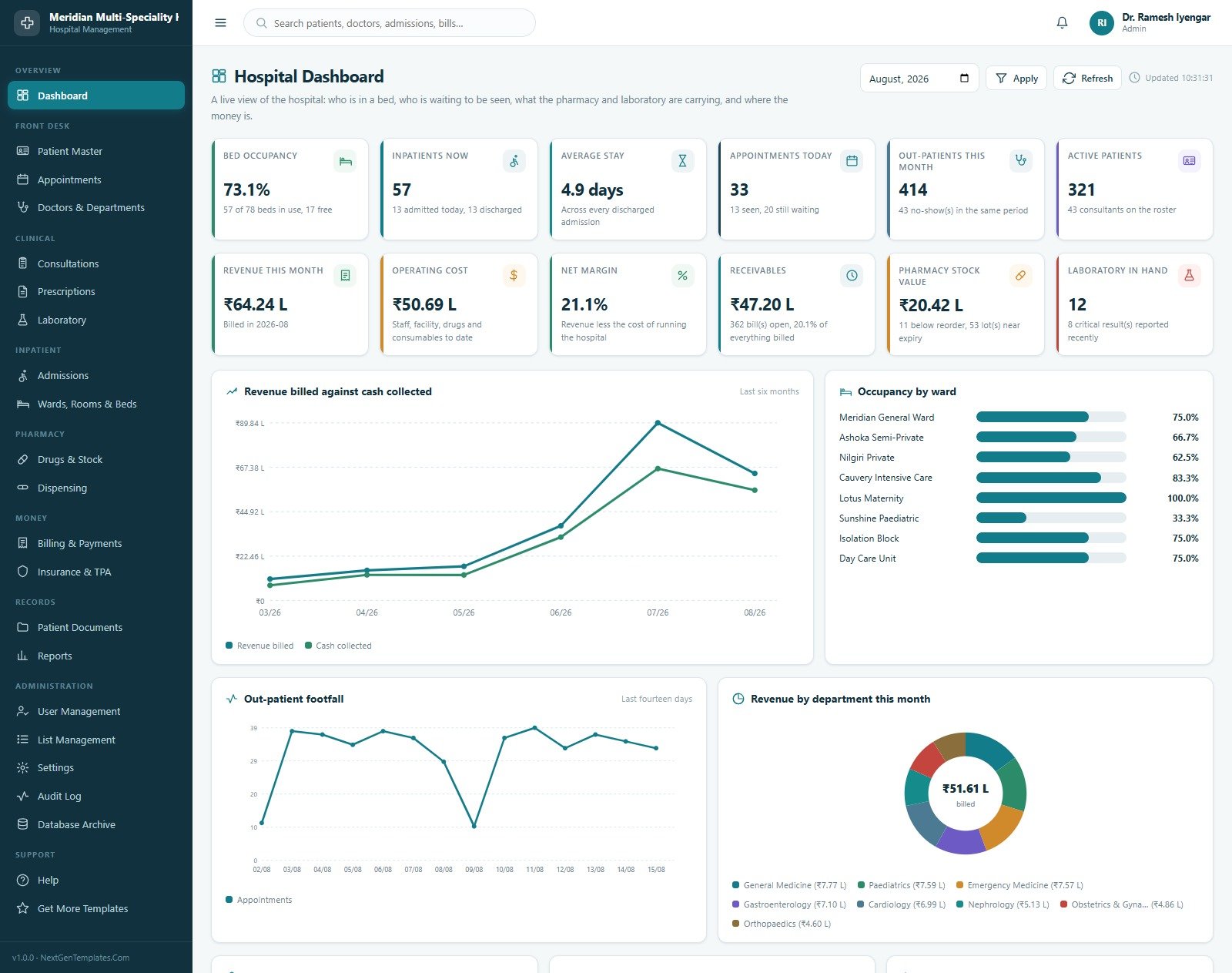
Twelve cards over one screen: Bed Occupancy, Inpatients Now, Average Stay, Appointments Today, Out-Patients This Month, Active Patients, Revenue This Month, Operating Cost, Net Margin, Receivables, Pharmacy Stock Value and Laboratory In Hand. Below them sit Revenue Billed against Cash Collected over six months, Occupancy by Ward, Out-Patient Footfall over fourteen days and Revenue by Department.
Patient Master
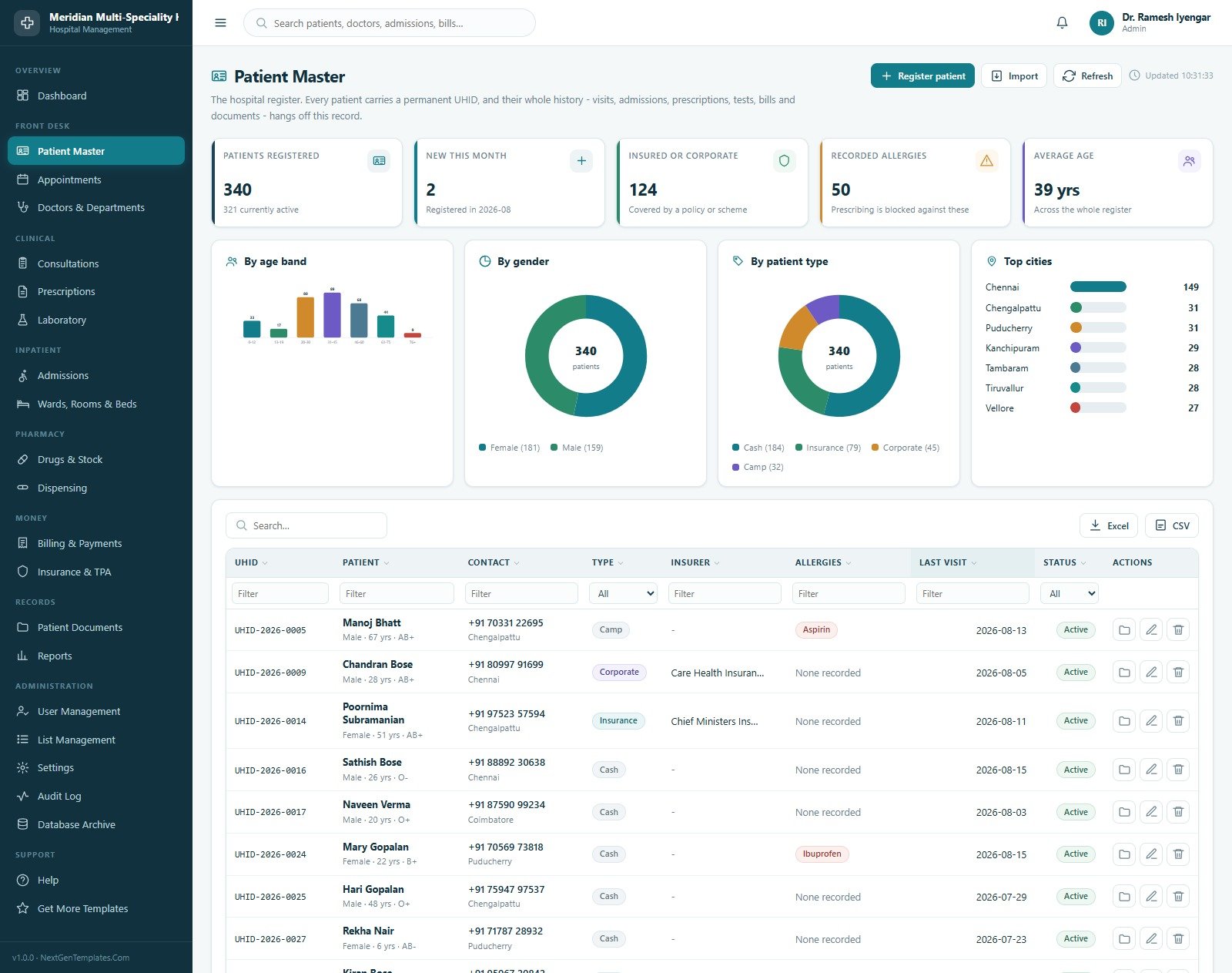
The hospital register. Every patient carries a permanent UHID and their whole history hangs off it. Cards show Patients Registered, New This Month, Insured or Corporate, Recorded Allergies and Average Age, with breakdowns by Age Band, by Gender, by Patient Type and Top Cities, then a filterable table with per-column filters and Excel and CSV export.
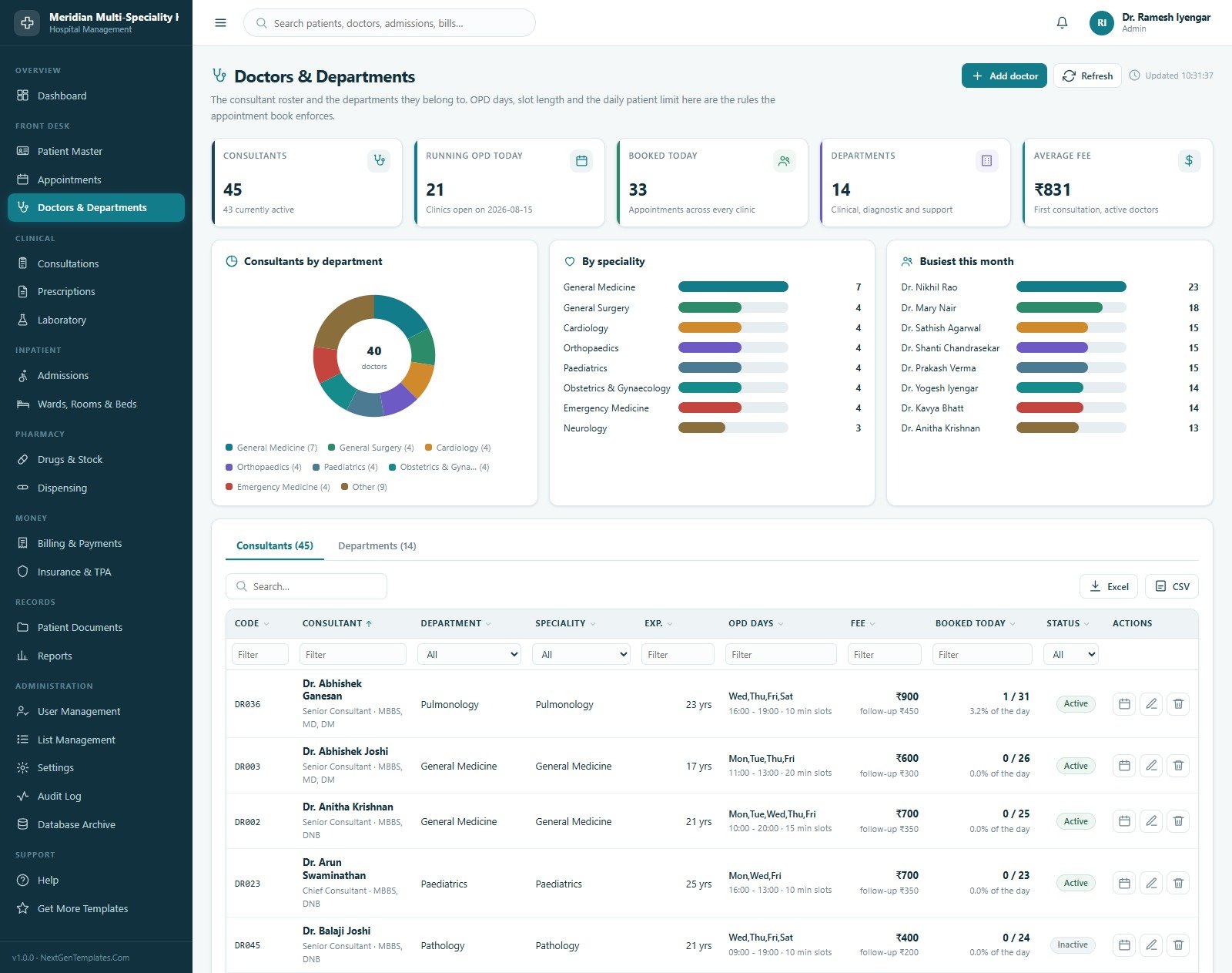
Doctors & Departments
The consultant roster and the 14 departments they belong to. Cards cover Consultants, Running OPD Today, Booked Today, Departments and Average Fee, with charts for Consultants by Department, Count by Speciality and Busiest This Month. Each consultant row carries OPD days, clinic hours, slot length, daily limit, first and follow-up fee — and those are the rules the appointment book enforces.
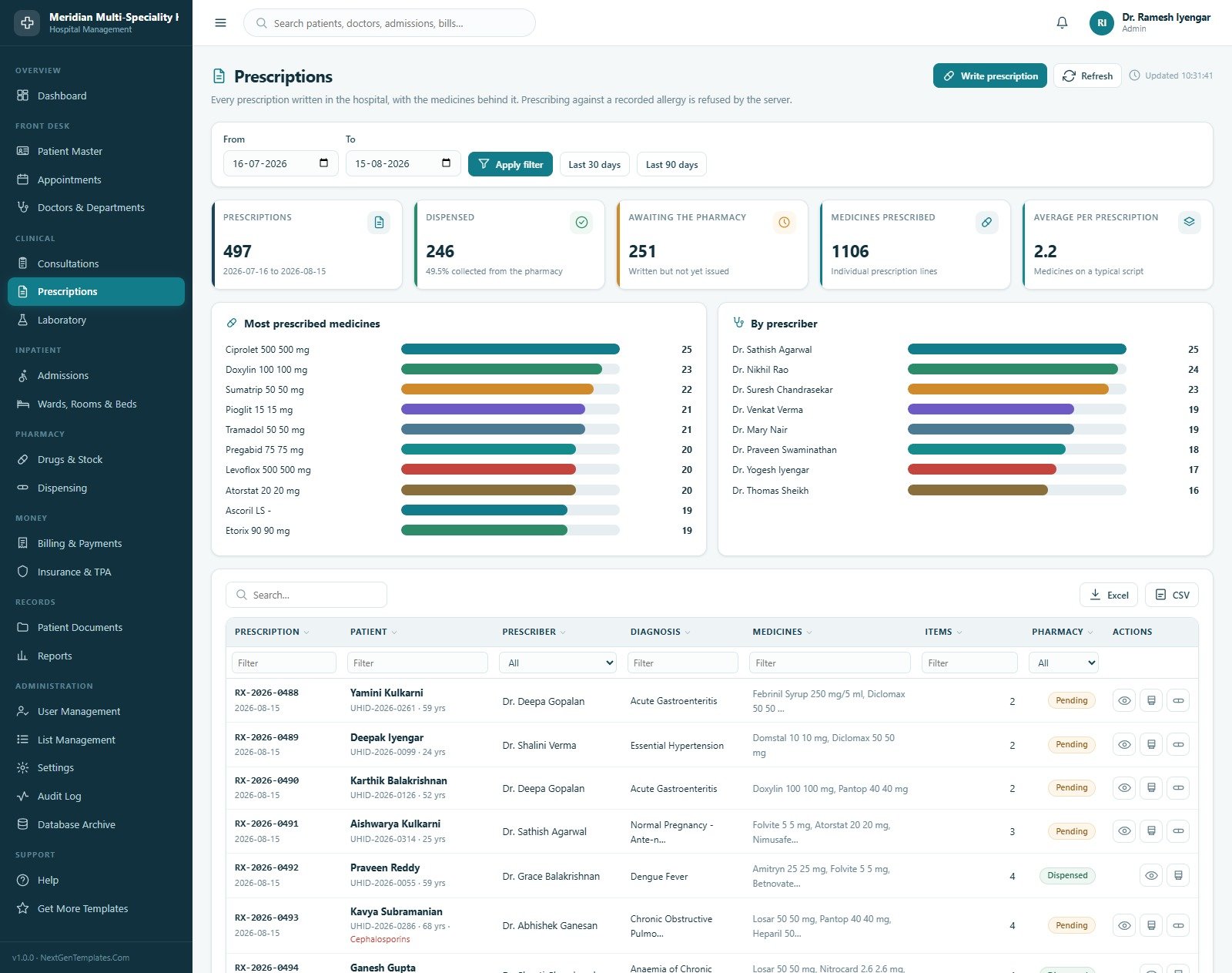
Prescriptions
Every prescription written in the hospital and the medicines behind it, with cards for Prescriptions, Dispensed, Awaiting the Pharmacy, Medicines Prescribed and Average per Prescription, plus Most Prescribed Medicines and a count By Prescriber. A prescription line for a medicine the patient is recorded as allergic to is refused by the server unless the prescriber records an override reason.
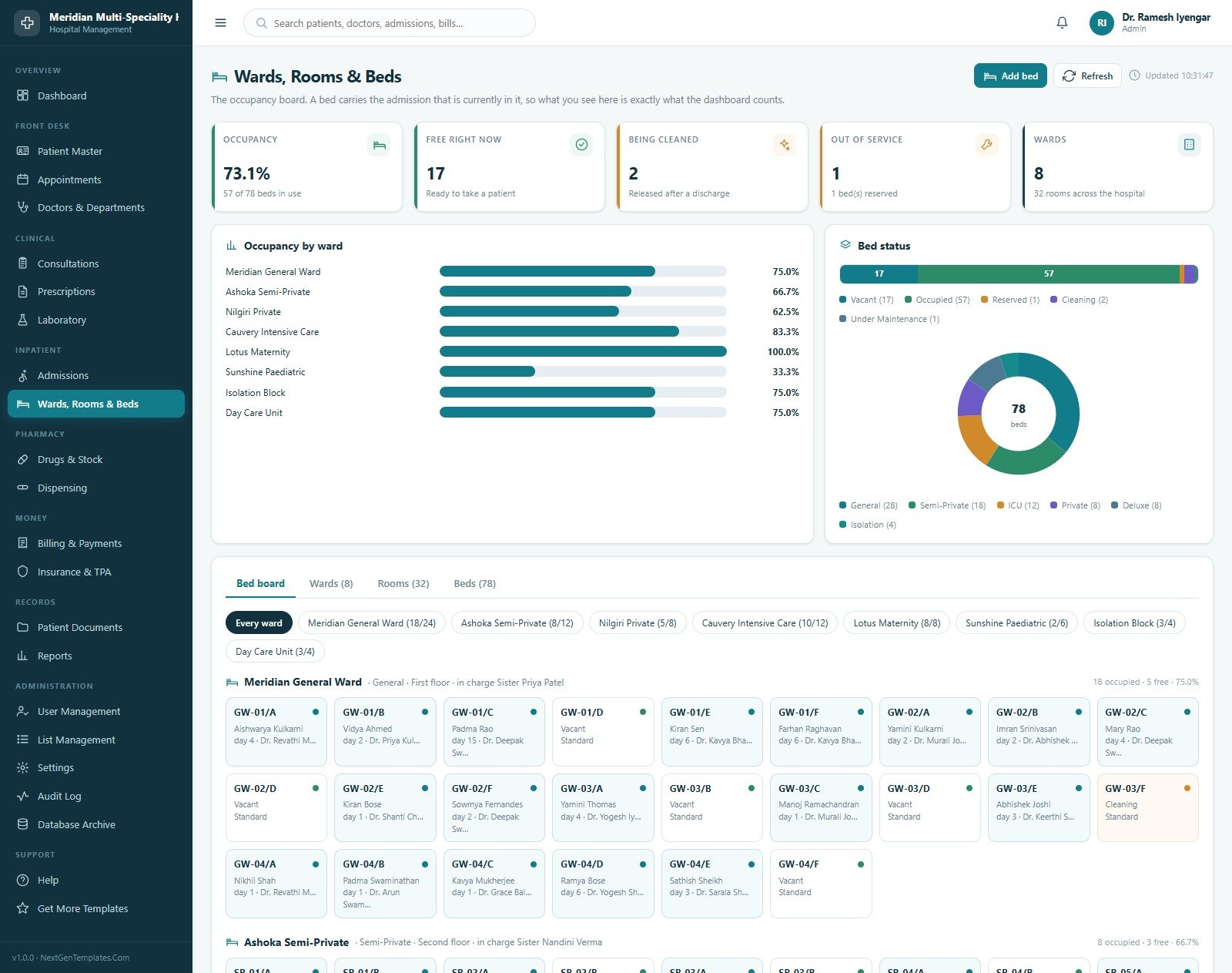
Wards, Rooms & Beds
The occupancy board. Cards show Occupancy, Free Right Now, Being Cleaned, Out of Service and Wards, alongside Occupancy by Ward and a Bed Status split of vacant, occupied, reserved, cleaning and under maintenance. Below sits the bed board itself — every bed as a tile showing its patient, day of stay and consultant — with tabs for the ward, room and bed masters and their daily tariffs.
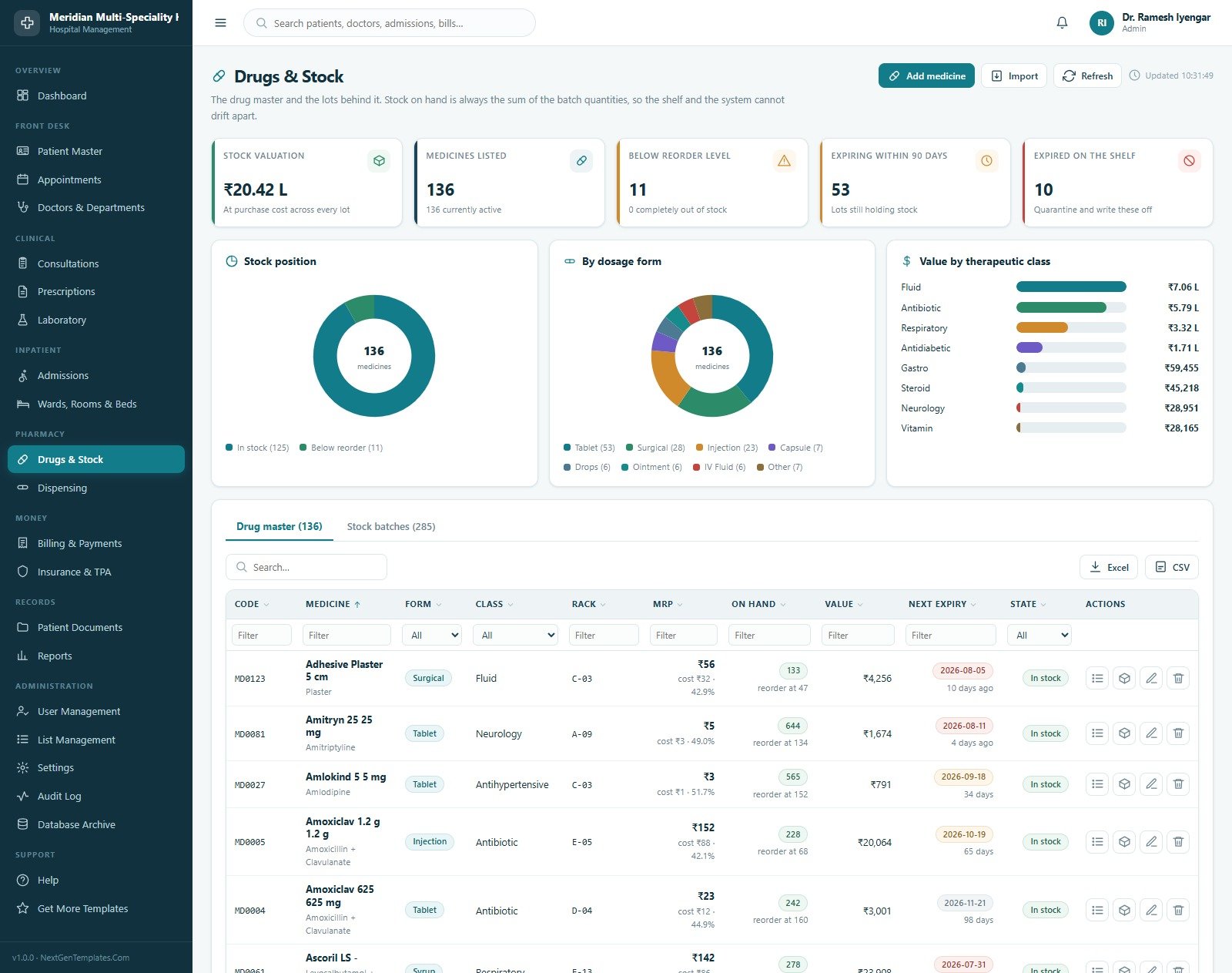
Drugs & Stock
The pharmacy’s drug master and the purchase lots behind it. Cards give Stock Valuation, Medicines Listed, Below Reorder Level, Expiring Within 90 Days and Expired on the Shelf, with Stock Position, a split By Dosage Form and Value by Therapeutic Class. Each medicine row carries its form, class, rack, MRP, cost, units on hand, reorder point and next expiry date, and a Stock Batches tab lists every lot.
Billing & Payments
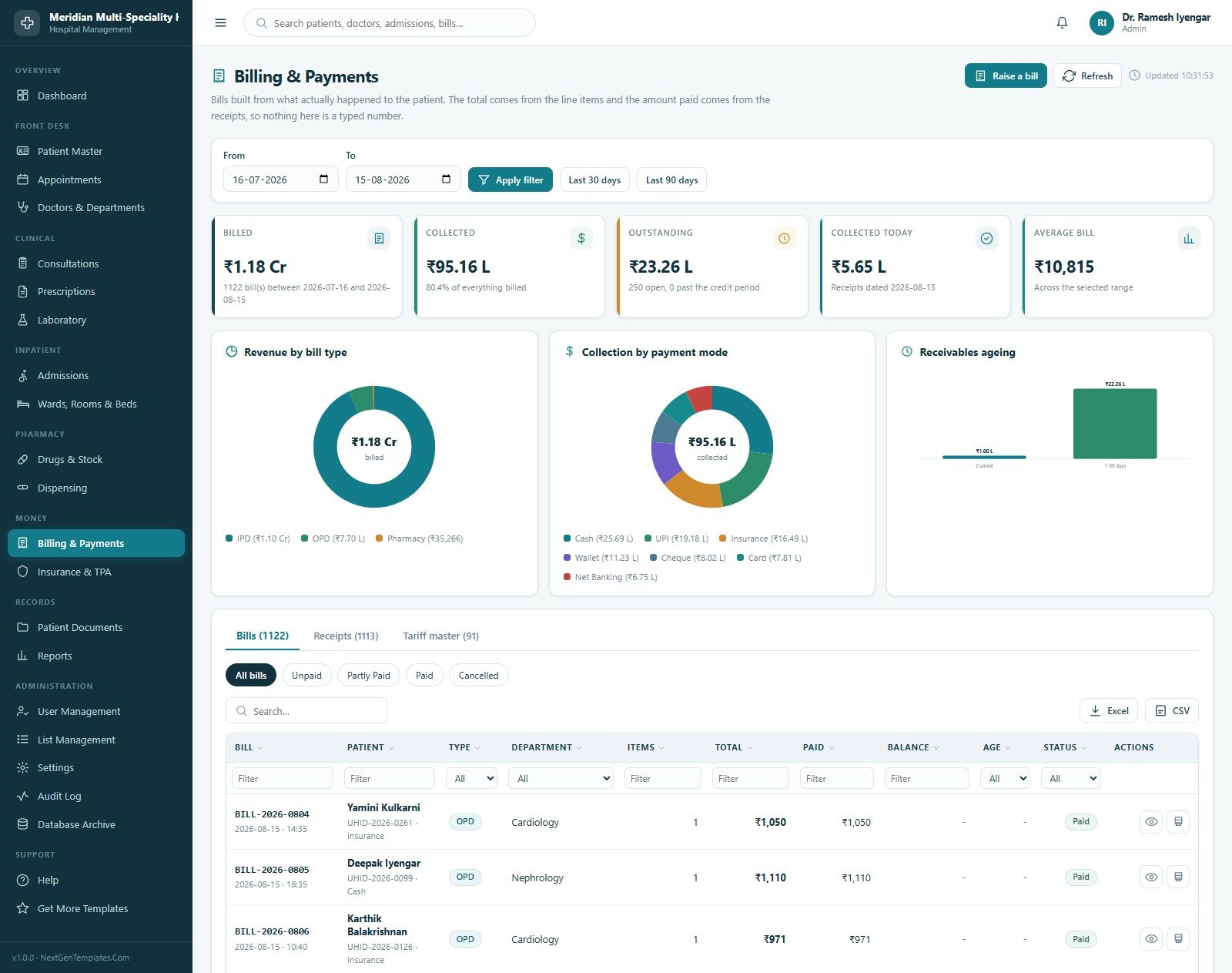
Cards for Billed, Collected, Outstanding, Collected Today and Average Bill, then Revenue by Bill Type across IPD, OPD and pharmacy, Collection by Payment Mode across cash, UPI, insurance, wallet, cheque, card and net banking, and a Receivables Ageing chart. Tabs hold the bills, the receipts against them and a 91-line tariff master covering consultations, procedures, surgery, radiology, nursing, ambulance and packages.
Patient Documents
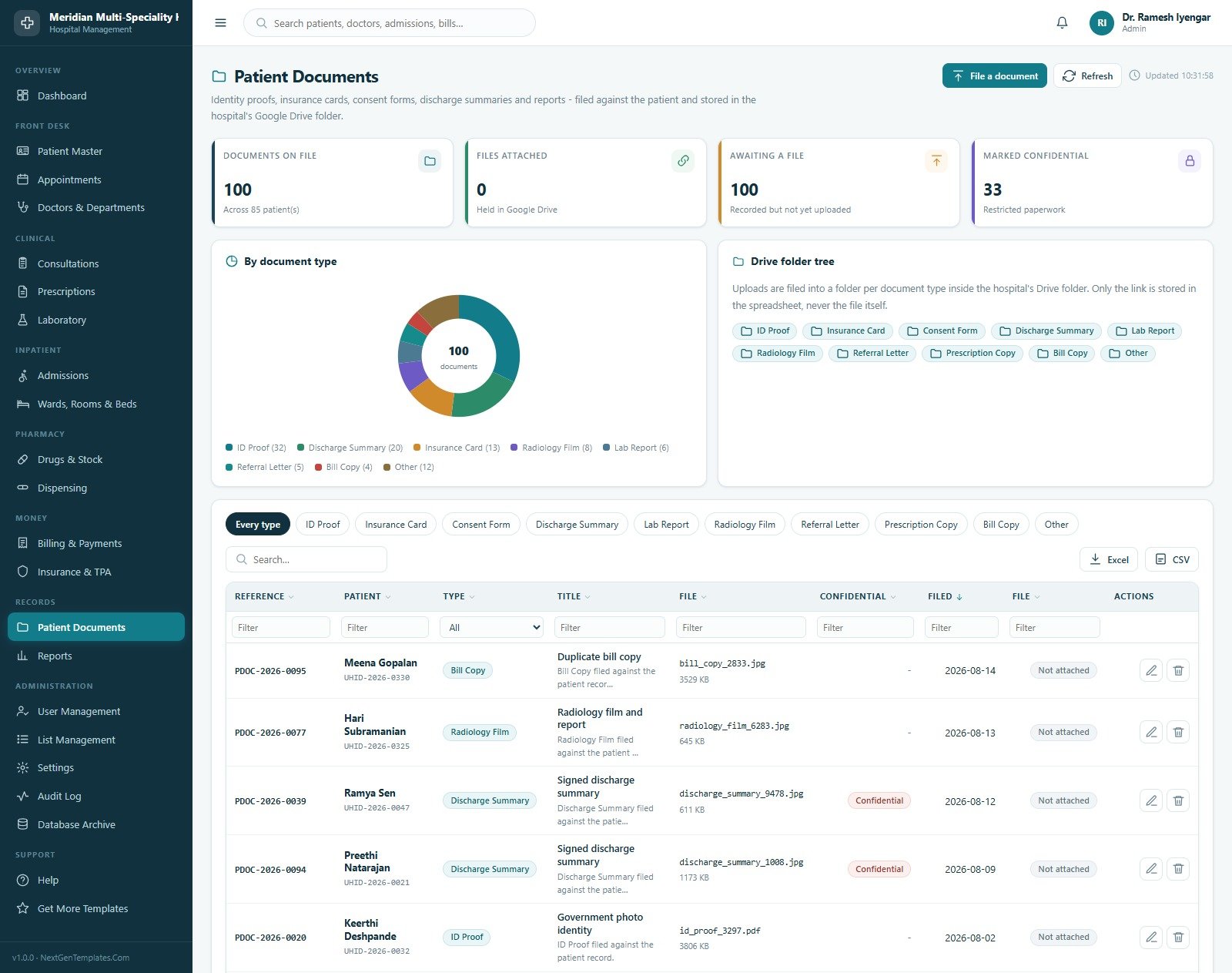
Identity proofs, insurance cards, consent forms, discharge summaries, radiology films and reports, filed against the patient and uploaded into a folder-per-type tree inside the hospital’s own Google Drive folder. Cards track Documents on File, Files Attached, Awaiting a File and Marked Confidential, with a breakdown By Document Type. Only the Drive link is stored in the spreadsheet, never the file itself.
Reports
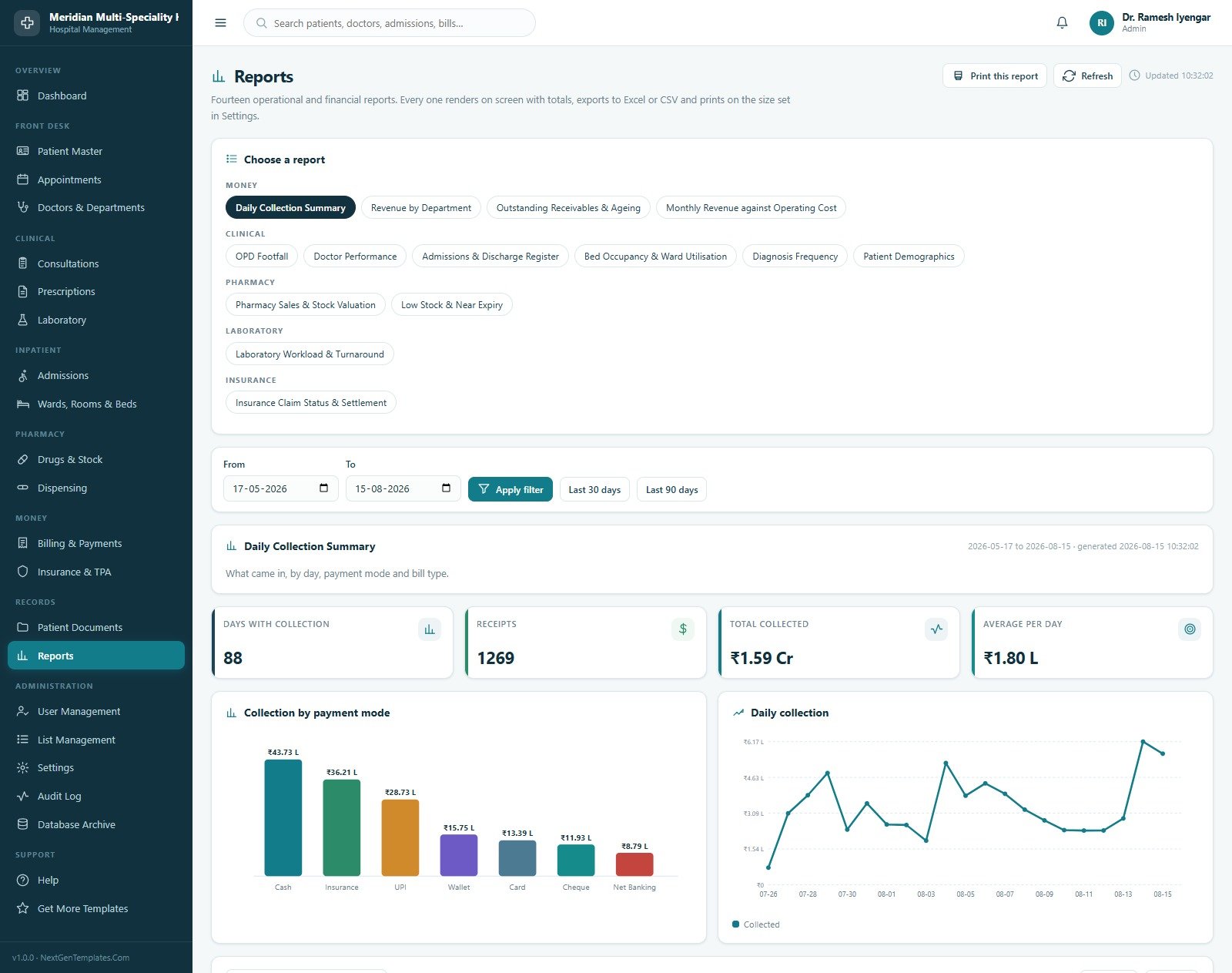
Fourteen operational and financial reports grouped under Money, Clinical, Pharmacy, Laboratory and Insurance. Each renders on screen with its own cards and charts over a date range you choose, exports to Excel or CSV, and prints at the paper size set in Settings.
Appointments
The clinic book, with Booked Today, In the Selected Range, Upcoming, No-Shows and Consultation Fees, plus By Status, Busiest Clinics and How They Booked across walk-in, phone, online and referral. Free-slot lookup, tokens, check-in and no-show tracking all live here.
Consultations
The clinical encounter record: presenting complaint, vitals, examination note, diagnosis and advice. Cards cover Consultations, Seen Today, With a Prescription, With Laboratory Work and Consultation Fees, with charts for encounter type, most common diagnoses and volume by department. A consultation can raise a prescription and a laboratory order in the same flow.
Laboratory & Diagnostics
Orders, samples and results over a 60-test master spanning haematology, biochemistry, microbiology and pathology. Cards show Orders, Still to Report, Critical Results, Average Turnaround and Laboratory Revenue, with an Order Pipeline, Most Requested Tests and a Result Distribution of normal, high, low and critical.
Admissions & Discharge
The inpatient register — Currently Admitted, Admitted Today, Past Their Discharge Date, Average Length of Stay and Room Charges Accrued, with admissions By Type, Inpatients by Ward and a Length of Stay distribution. Admitting locks a bed and discharge releases it and produces a summary.
Pharmacy Dispensing
Medicines issued against a prescription or over the counter. Pharmacy Sales, Dispensed Today, Cost of Goods, Gross Margin and Units Issued sit above Best Selling Medicines, a split By Payment Mode and a Prescription against Counter comparison. Every line decrements a real batch.
Insurance & TPA
Cashless and reimbursement claims against 12 insurers, TPAs, corporates and government schemes. Claimed, Settled, In Play, Past the Settlement Window and Deductions sit above a Claim Pipeline, Claimed Value by Insurer and Open Claims by Age. Each claim is aged against that insurer’s own settlement window.
User Management
Sign-in accounts and the permission matrix behind them — Accounts, Locked Out, Roles and Permissions, with a Users tab and a Roles & permissions tab. Passwords are set here, users are forced to choose their own at next sign-in, and the Admin role itself is locked so a hospital can never lock itself out.
List Management
46 dropdown lists and 310 values driving every select box in the application — admission types, bed types, bill types, blood groups, claim statuses, diagnoses, document types, drug categories, payment modes, specialities, ward types and more. Add a value and it appears everywhere at once.
Settings
Eight tabs of configuration with no code change: Hospital (name, registration number, address, phone, emergency line, email, website and logo for every printed document), Finance (currency, tax rates, credit period, monthly staff and facility cost), Clinical (slot length, OPD hours, discharge cut-off hour, near-expiry window, allergy block), Print (3 inch, 4 inch or A4), Email, Theme, Security and Archive.
Audit Log
The system’s own who-did-what trail, filterable by date, user, module and action, with charts By User, By Module and By Action. Every entry names the user, the module, the action and the record it touched.
Database Archive
Google Sheets has practical size limits, so the archive copies closed activity out to a dated spreadsheet and removes it from the live database. A full backup copy is taken first and nothing is removed until that copy succeeds. Master data is never archived, and neither is an open admission, a bill with a balance or an unsettled claim.
Help and Get More Templates
An in-app manual covering getting started, the patient journey, what each screen does, the rules the server enforces, roles and permissions, printing, import and export, archiving and a questions-people-ask section — plus a page linking to the wider NextGenTemplates library.
📊 Hospital Management System Web App vs. a Spreadsheet Register vs. Paid Hospital SaaS — Where This Fits
| Feature | Hospital Management System Web App | Plain spreadsheet / paper register | Cloud hospital SaaS (Insta, Halemind, Practo Ray class) |
|---|---|---|---|
| Cost | $39.99 one-time | Free, but rebuilt by hand | $40–$300 / month, often per bed or per user |
| Platform | Google Apps Script + Google Sheets, in your own account | Excel or Google Sheets | Vendor’s cloud |
| Setup time | Under 15 minutes — paste two files and deploy | Days of column design | Weeks of onboarding and vendor sign-off |
| Role-based logins | ✅ 8 roles, guarded on the server | ❌ Sheet-level sharing only | ✅ Included |
| Where your data lives | ✅ Your own Google Drive | ✅ Your own file | ❌ Vendor-hosted |
| Source code included | ✅ Yes — Code.gs and Index.html are yours | n/a | ❌ Never |
| Per-user / per-bed fees | ✅ None | None | ❌ The main cost driver |
| Year-1 cost at 8 users | $39.99 | $0 plus a lot of your time | $3,800–$14,000+ |
| Clinical decision support / certified EHR | ❌ No — this is an administrative record only | ❌ No | Varies by vendor and country |
For a clinic or small hospital that wants its admissions, pharmacy and billing in one place without a per-bed subscription — and is happy to keep clinical certification out of scope — the Hospital Management System Web App sits in the sweet spot.
👥 Who This Template Is For — and Who It’s Not For
✅ This template is built for:
- Owners and administrators of small and mid-sized hospitals, nursing homes and day-care centres who currently run registration, beds and billing across several disconnected spreadsheets
- Multi-speciality clinics with an in-house pharmacy and laboratory that want one register instead of three
- Hospital managers who need occupancy, receivables and pharmacy stock on a single screen each morning
- Developers and IT consultants who want a working Apps Script codebase to adapt for a healthcare client rather than start from an empty project
- Teaching and training use — a realistic hospital administration system to demonstrate, with a full seeded database
❌ This template is NOT for:
- Anyone needing clinical decision support, diagnosis assistance or treatment guidance — the system records what staff type and does nothing else with it
- Anyone needing a certified EHR or EMR of record, or a regulated medical device — this carries no FDA, CE, MDR or equivalent clearance of any kind
- Anyone needing HIPAA, GDPR or any other health-data privacy compliance, or a data-security guarantee — none is offered, and compliance depends entirely on how you deploy and administer it
- Pharmacy dispensing safety — there is no drug-interaction checking, no dose checking, no controlled-substance handling and no e-prescribing capability. The allergy check is a simple match against what someone typed into the patient record
- Medical coding, insurance-claim regulation or billing-code compliance — the billing module adds up your own tariff, nothing more
- Accreditation evidence — it produces no JCI, NABH or equivalent accreditation artefacts and makes no accreditation claim
- Large hospitals needing SSO, HL7/FHIR interfaces, PACS integration or 24/7 vendor support
⚙️ How to Use the Hospital Management System Web App
- Try the demo first. Open the live demo above and sign in as
admin, then again asnurseorbilling. Confirm the screens and the role separation are what you need before you buy. - Download and unzip the file. It contains
Code.cs.txt,Index.txtand the user manual PDF. - Open a new Google Sheet, choose Extensions → Apps Script, and paste
Code.cs.txtinto the file namedCode.gs, replacing everything in it. - Add an HTML file named exactly
Indexand pasteIndex.txtinto it. Save. - Deploy → New deployment → Web app. Execute as: Me. Who has access: Anyone. Accept the permission prompt.
- Open the web app URL and press Set up the database on the sign-in card. Every sheet, account and sample record is built in one pass.
- Sign in with the default administrator account from the manual and change every password immediately in User Management.
- Fill in Settings → Hospital, Finance, Clinical and Print. Every printed document follows these.
- Replace the seeded wards, beds, consultants, drug master, test master and tariff with your own, then run Reseed Hospital Data to clear the sample activity.
- Start registering patients. Everything else follows the patient.
💼 Real-World Use Cases
Dr. Sharma runs a 40-bed nursing home. Admissions were on a whiteboard, the pharmacy on one spreadsheet and bills on another, and the three never agreed at month-end. He uses the Hospital Management System Web App so the bed board, the dispensing log and the bill are the same record — and reads occupancy and receivables off one dashboard each morning instead of reconciling three files.
Priya manages the front desk of a multi-speciality clinic. She books against real OPD days and daily limits, so the system refuses the double bookings that used to cause hour-long waits, and she raises the OPD bill from the same screen she registered the patient on.
Ganesh is an IT consultant serving three small hospitals. He deploys the system into each client’s own Google account, edits Code.gs to match their tariff structure and ward naming, and charges for the customisation — with no licence to renew and nothing hosted on his own servers.
❓ Frequently Asked Questions
Can I try it before buying?
Yes. A full live demo of the Hospital Management System Web App is deployed and linked above, with sign-in details for all eight roles. No signup, no email and no card. It is a shared public instance that resets periodically, so treat anything you enter there as temporary and fictional.
Is this HIPAA compliant, or a certified EHR?
No — to both. The Hospital Management System Web App is administrative record-keeping software. It is not an electronic health record of record, it holds no HIPAA, GDPR, FDA, CE, JCI or NABH certification, and no data-security or privacy guarantee is offered. Whether your deployment meets any legal or regulatory obligation is entirely a matter of how you configure, host and administer it, and you should take your own advice on that.
Does it check drug interactions or dosages?
No. The Hospital Management System Web App does no drug-interaction checking, no dose checking and no controlled-substance handling, and it is not an e-prescribing system. It does refuse a prescription line for a medicine the patient is recorded as allergic to, but that is a simple match against text a member of staff typed into the patient record.
Where is the data stored, and who can see it?
In a Google Sheet inside your own Google account, with uploaded patient documents in your own Google Drive folder. Nothing is sent to NextGenTemplates and no third party hosts it. Access is controlled by your Apps Script deployment settings and the eight role logins inside the system.
How long does setup take?
Under 15 minutes for someone who has used the Apps Script editor before. Paste two files, deploy as a web app, press Set up the database once, and the Hospital Management System Web App builds all 33 sheets and its sample hospital in a single pass.
How does this compare to a paid hospital SaaS?
A cloud hospital system typically costs $40 to $300 a month, often per bed or per user, and gives you no source code. The Hospital Management System Web App is $39.99 once, runs in your own Google account, and ships its full source. What you give up is vendor support, clinical certification and interfaces such as HL7 or PACS.
Can I change the modules, fields and branding?
Yes. Settings covers the letterhead, currency, tax, clinical rules, print size, theme and security without touching code. The 46 dropdown lists are editable from List Management. Beyond that, Code.gs and Index.html are included in full and you are free to modify them.
Is the demo data real patient information?
No. Every patient, consultant, diagnosis, prescription and bill in the Hospital Management System Web App is fictional sample data generated for the template. The seed is deterministic, so a fresh install always produces the same 340 patients and 15,370 rows — useful for training and for following the manual.
👤 About the Author
Built by PK — Microsoft Certified Professional with 15+ years of Excel, Google Sheets and Power BI experience. Founder of NextGenTemplates, reaching 300K+ subscribers across YouTube channels (@PK-AnExcelExpert, @NextGenTemplates, @NeoTechNavigators). Every template is hand-built and tested before release.
🔗 Explore Related Templates
Browse the full Web Apps collection for more ready-to-deploy Apps Script systems, or start with these healthcare neighbours:
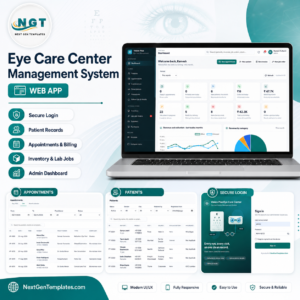
- Eye Care Center Management System Web App — the same role-based architecture applied to an optical practice, with spectacle orders and prescriptions.
- Physiotherapy Clinic Management System Web App — session packages, therapist scheduling and treatment plans.
- Blood Bank Management System Web App — donors, units, cross-matching records and issue registers.
- Therapy Center Management System Web App — a smaller practice system for therapy and counselling centres.
- Prescription Record Data Entry System in Excel — an offline Excel alternative if you only need the prescription register.
- Doctor Duty Roster Data Entry System in Excel — pairs well for planning consultant shifts alongside this system.
📖 Click here to read the Detailed Blog Post
🎥 Visit our YouTube channel for step-by-step video tutorials
👉 YouTube.com/@NextGenTemplates
📅 Last updated: August 2026



























Reviews
There are no reviews yet.