

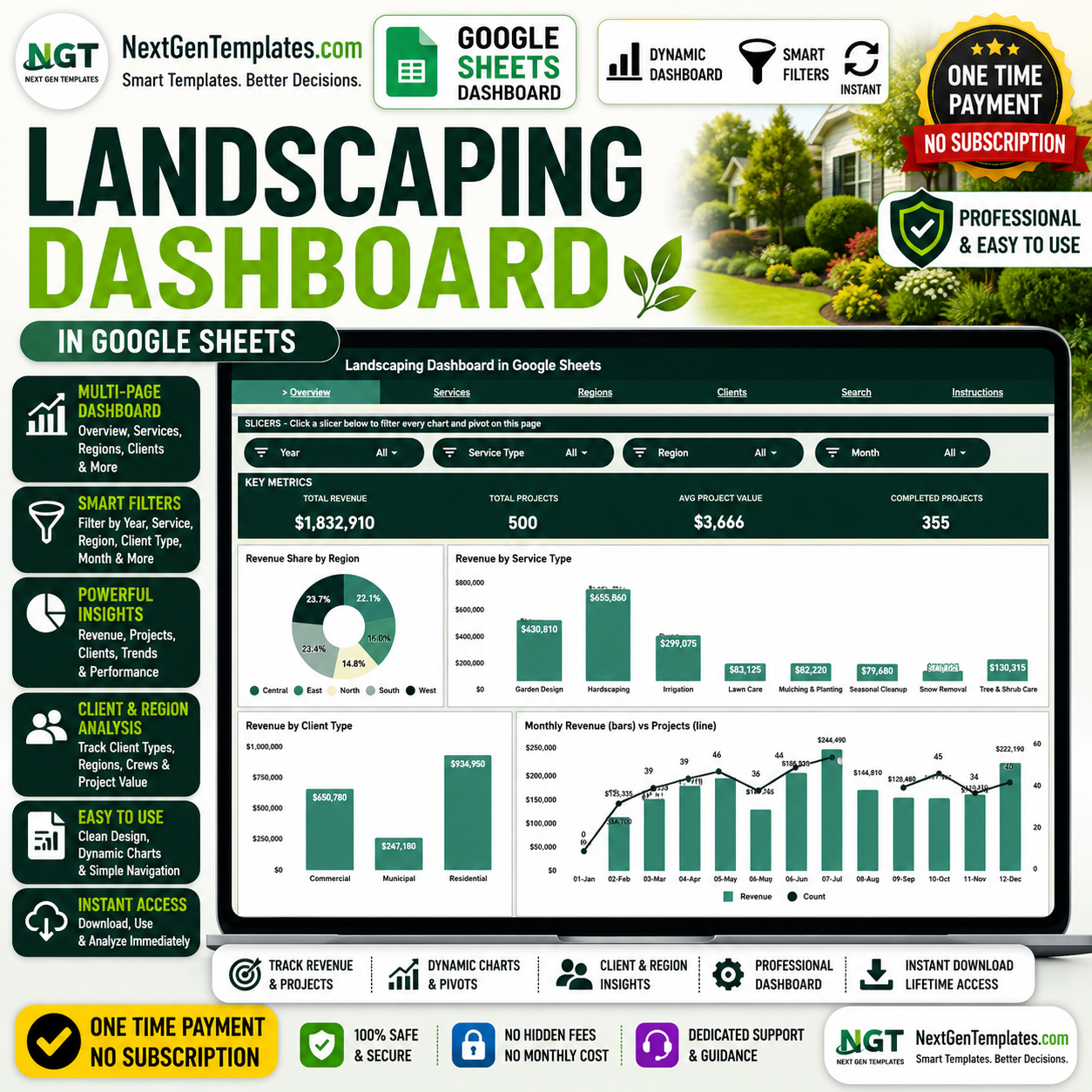

The Landscaping Dashboard in Google Sheets tracks 4 headline KPIs across 6 interactive sheets, with 15+ pre-built charts and native slicers that filter every view in a single click. Setup takes under 10 minutes — paste your job records into the Data sheet and every card, chart, and pivot refreshes automatically.
🌍 Join 8,400+ teams in 40+ countries using NextGenTemplates to replace paid SaaS tools with one-time-purchase Google Sheets Dashboards, Excel, Power BI, and HTML templates.
✅ Instant download · One-time payment · No subscription · No per-user fees · Lifetime access
🔑 Key Features of the Landscaping Dashboard in Google Sheets
🔹 4 live KPI cards — Total Revenue, Total Projects, Avg Project Value, and Completed Projects sit at the top of the Overview sheet and recalculate the moment you add a new job row.
🔹 6 connected sheets — the Landscaping Dashboard in Google Sheets ships with Overview, Services, Regions, Clients, Search, and Data tabs, so every angle of your landscaping business has a dedicated view.
🔹 15+ pre-built charts — revenue is broken down by region, service type, client type, crew, project size, payment method, and month, plus project counts by status and size.
🔹 Native Google Sheets slicers — filter the entire dashboard by region, service, or client in one click; the slicers are bound to the underlying pivot tables, so charts and cards move together.
🔹 Instant project Search page — pick any Project ID from a dropdown and the sheet shows the full record: date, service type, client type, region, crew, client name, revenue, payment method, project size, crew lead, and status.
🔹 100% Google Sheets — no add-ons, no macros, no installs; it runs in any browser and you can share it with a link or export to PDF and Excel.
📦 What’s Inside the Landscaping Dashboard in Google Sheets
Page 1: Overview
The Overview sheet opens with four KPI cards — Total Revenue, Total Projects, Avg Project Value, and Completed Projects — followed by four charts and a row of slicers for quick filtering. Each chart is explained below:
🔸 Revenue by Region — Compares total revenue earned across each service region. It shows at a glance which territories drive the most income and where coverage is thin.
🔸 Revenue by Service Type — Splits revenue across services such as lawn care, hardscaping, and maintenance. It reveals which offerings are most profitable for the business.
🔸 Revenue by Client Type — Breaks revenue down by residential, commercial, and other client categories. It highlights which client segment contributes the largest share of sales.
🔸 Revenue and Projects by Month — Plots monthly revenue alongside the number of projects on a combined timeline. It exposes seasonal peaks and slow months so you can plan crews and cash flow.
 Overview
Page 2: Services
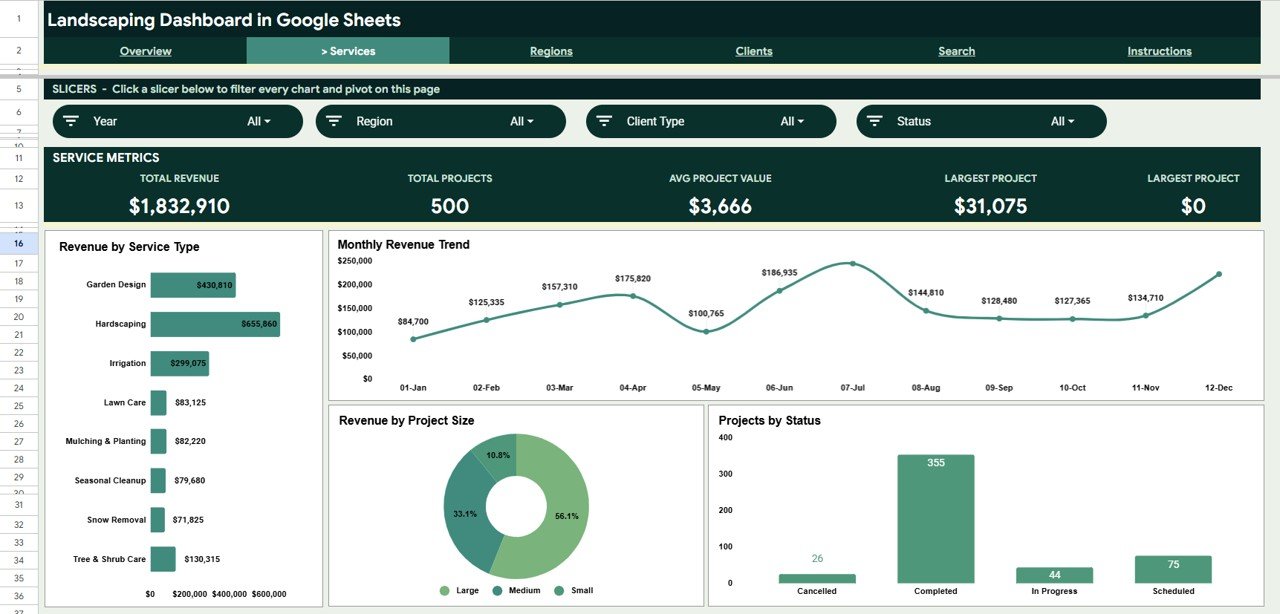
The Services sheet drills into what you sell. It charts Revenue by Service Type, Revenue by Month, Revenue by Project Size, and Projects by Status, so you can see which services earn the most and how jobs progress from quoted to completed.
 Services
Page 3: Regions
The Regions sheet maps performance across territories. It charts Revenue by Region, Revenue by Client Type, Revenue by Crew, and Revenue by Month, helping you compare territories and assign crews where demand is highest.
 Regions
Page 4: Clients
The Clients sheet focuses on who pays you. It charts Revenue by Client Type, Revenue by Payment Method, Projects by Size, and Revenue by Month, so you can spot your most valuable client segments and preferred payment channels.
 Clients
Search Sheet tab
The Search sheet is a single-project lookup. Select any Project ID from the dropdown and the page instantly displays that job’s date, service type, client type, region, crew, client name, revenue, payment method, project size, crew lead, and status — perfect for answering a client call without scrolling through raw data.
 Search Sheet tab
Data Sheet tab
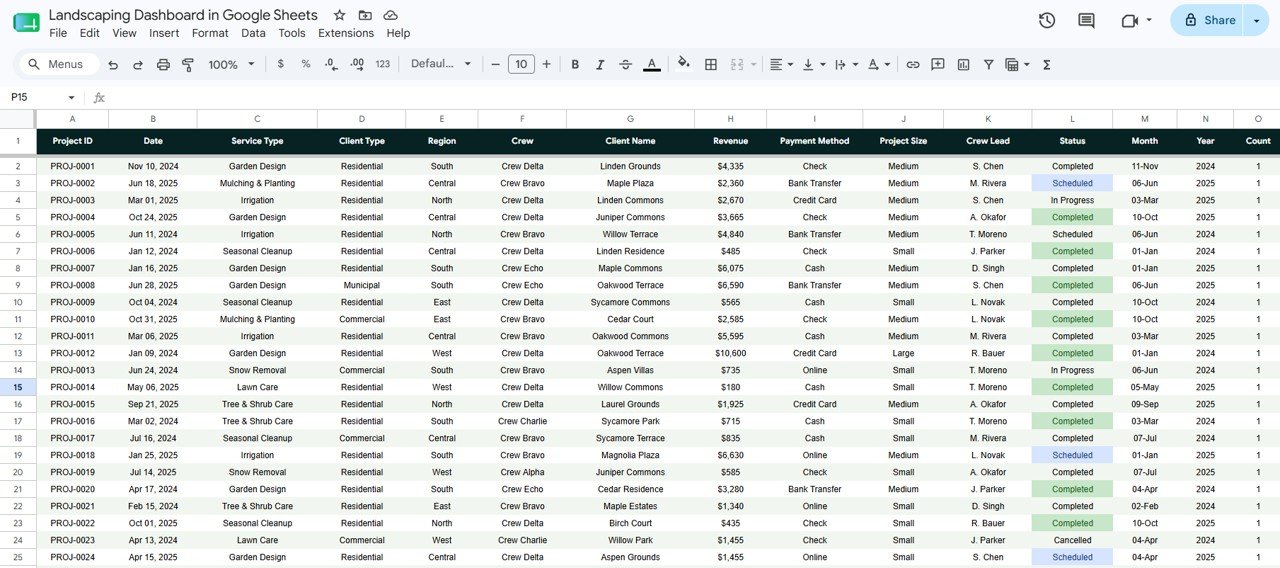
The Data sheet is where everything begins. Add your jobs in the same column format provided and the cards, charts, pivots, and Search page update automatically — no formula edits required.
 Data Sheet tab
📊 Landscaping Dashboard in Google Sheets vs. Microsoft Excel Dashboard vs. Paid Field-Service SaaS — Where This Fits
| Feature | Landscaping Dashboard in Google Sheets | Microsoft Excel Dashboard | Jobber / Yardbook / Aspire |
|---|---|---|---|
| Cost | $9.99 one-time ✅ | $10–$20 one-time | $29–$199 / month |
| Platform | Google Sheets (cloud, any browser) ✅ | Desktop Excel | Web + mobile app |
| Setup time | Under 10 minutes ✅ | Under 10 minutes | Hours to onboard |
| Real-time team collaboration | Yes — built-in ✅ | Limited | Yes |
| Mobile access | Yes — Sheets app ✅ | Excel app needed | Yes |
| Customizable fields | Fully editable ✅ | Fully editable | Restricted to vendor schema |
| Share with link | Yes ✅ | No | Account login required |
| Crew & project-status tracking | Yes — Services & Regions sheets ✅ | Yes | Yes |
| Year-1 cost at 5 users | $9.99 total ✅ | $10–$20 total | $1,740–$11,940 |
For landscaping and lawn-care firms that want crew, revenue, and client analytics without paying monthly per-seat fees, the Landscaping Dashboard in Google Sheets sits in the sweet spot.
👥 Who This Template Is For — and Who It’s Not For
✅ This template is built for:
- Owners of landscaping, lawn-care, and grounds-maintenance businesses with 1–50 crews who want a single source of truth.
- Operations managers who need to compare revenue by region, crew, and service type each month.
- Solo landscapers and small teams who want professional reporting without paying for Jobber or Aspire.
❌ This template is NOT for:
- Enterprise field-service operations needing live GPS dispatch, route optimization, and automated invoicing.
- Teams that require role-based permissions, audit logs, or SOC 2 compliance baked into the tool.
⚙️ How to Use the Landscaping Dashboard in Google Sheets
- Open the PDF in your download and click the Google Sheets copy link to create your own editable copy in Google Drive.
- Go to the Data sheet and replace the sample rows with your own jobs, keeping the same column order.
- Return to the Overview sheet — the 4 KPI cards and charts refresh automatically.
- Use the slicers at the top of each sheet to filter by region, service, or client.
- Open the Search sheet and pick a Project ID to view any single job’s full details.
💼 Real-World Use Cases
Marcus owns a 12-crew landscaping company in Texas. He uses the Landscaping Dashboard in Google Sheets to compare revenue by region each month, spot which crews bring in the most work, and decide where to hire — without paying $199/month for Aspire.
Priya runs a residential lawn-care startup. She tracks Revenue by Service Type and Revenue by Payment Method to see that maintenance contracts and card payments drive most of her cash flow, then doubles down on recurring plans.
Dan, an operations manager, answers client calls fast. When a customer asks about a job, he opens the Search sheet, selects the Project ID, and reads back the date, crew, revenue, and status in seconds.
❓ Frequently Asked Questions
What KPIs does the Landscaping Dashboard in Google Sheets track?
The Landscaping Dashboard in Google Sheets tracks 4 headline KPIs — Total Revenue, Total Projects, Avg Project Value, and Completed Projects — plus 15+ charts covering revenue by region, service type, client type, crew, project size, payment method, and month.
How long does setup take?
Setup takes under 10 minutes. Make your own copy of the Landscaping Dashboard in Google Sheets, paste your jobs into the Data sheet in the same column order, and every card, chart, and pivot updates automatically — no formulas to edit.
How does this compare to Jobber or Aspire?
Jobber and Aspire charge $29–$199 per month, while the Landscaping Dashboard in Google Sheets is a $9.99 one-time purchase. It covers reporting and analytics rather than live dispatch, making it ideal for small firms that mainly need clear revenue and crew insights.
Can I use it on my phone?
Yes. Because the Landscaping Dashboard in Google Sheets runs entirely in Google Sheets, you can open it in the free Sheets mobile app, filter with slicers, and check the Search sheet from any job site.
Do I need to know formulas or coding?
No. The Landscaping Dashboard in Google Sheets is fully built with pivot tables, slicers, and charts. You only add data on the Data sheet — everything else recalculates on its own.
Can I customize the services, regions, or crews?
Yes. All fields in the Landscaping Dashboard in Google Sheets are editable. Change the service types, regions, crews, and client types on the Data sheet and the pivots and charts adapt to your own categories.
👤 About the Author
Built by PK — Microsoft Certified Professional with 15+ years of Excel, Google Sheets, and Power BI experience. Founder of NextGenTemplates, reaching 300K+ subscribers across YouTube channels (@PK-AnExcelExpert, @NextGenTemplates, @NeoTechNavigators). Every template is hand-built and tested before release.
🔗 Explore Related Templates
- Pest Control Dashboard in Google Sheets — another field-service analytics dashboard with the same slicer-driven layout.
- Moving Company Dashboard in Google Sheets — track jobs, revenue, and crews for a moving business.
- Photography Business Dashboard in Google Sheets — a service-business dashboard for studios and freelancers.
Browse the full range of Google Sheets Dashboards for more ready-to-use templates.
📖 Click here to read the Detailed Blog Post
Watch the step-by-step video tutorial:
🎥 Visit our YouTube channel for step-by-step video tutorials
👉 YouTube.com/@NextGenTemplates
Compatibility and Requirements
- Works in Google Sheets. You need a free Google account and a web browser. The free Sheets mobile app also opens it.
- You pick a Project ID from a dropdown on the Search sheet. Google explains dropdowns in Create an in-cell dropdown list.
Related Landscaping Templates
- Landscaping Dashboard in Excel: the same dashboard for Excel
- Landscaping Dashboard in Power BI: the Power BI edition
- Landscaping Services Dashboard in Excel: another Excel view of landscaping services
- Free Home Renovation Budget Tracker in Google Sheets: a free budget tracker for project costs
Browse all Google Sheets dashboards.




















Reviews
There are no reviews yet.