
Managing a modern supply chain is no longer simple. Businesses must coordinate suppliers, warehouses, shipping methods, product categories, and delivery timelines simultaneously. When information is scattered across multiple spreadsheets and manual reports, decision-making becomes slow, errors increase, and operational visibility disappears.
That is exactly why we created the Supply Chain Management Dashboard in Google Sheets — a powerful, cloud-based analytics solution designed to help organizations monitor supply chain performance in one centralized system.
This ready-to-use dashboard transforms raw operational data into meaningful insights using interactive charts, automated calculations, and dynamic filters. Instead of spending hours preparing reports, managers can instantly track orders, deliveries, supplier performance, returns, and fulfillment efficiency from a single dashboard.
Because the solution is built in Google Sheets, your team can access and collaborate on data anytime, anywhere. Whether you manage logistics operations, retail distribution, procurement, or manufacturing supply chains, this dashboard provides the visibility needed to make faster and smarter decisions.
With structured KPI cards, deep analytical pages, and detailed data exploration features, the dashboard helps you identify delays, evaluate supplier efficiency, and optimize warehouse performance — all without expensive software.
🚀 Key Feature of Supply Chain Management Dashboard in Google Sheets
✅ Cloud-based dashboard accessible from any device
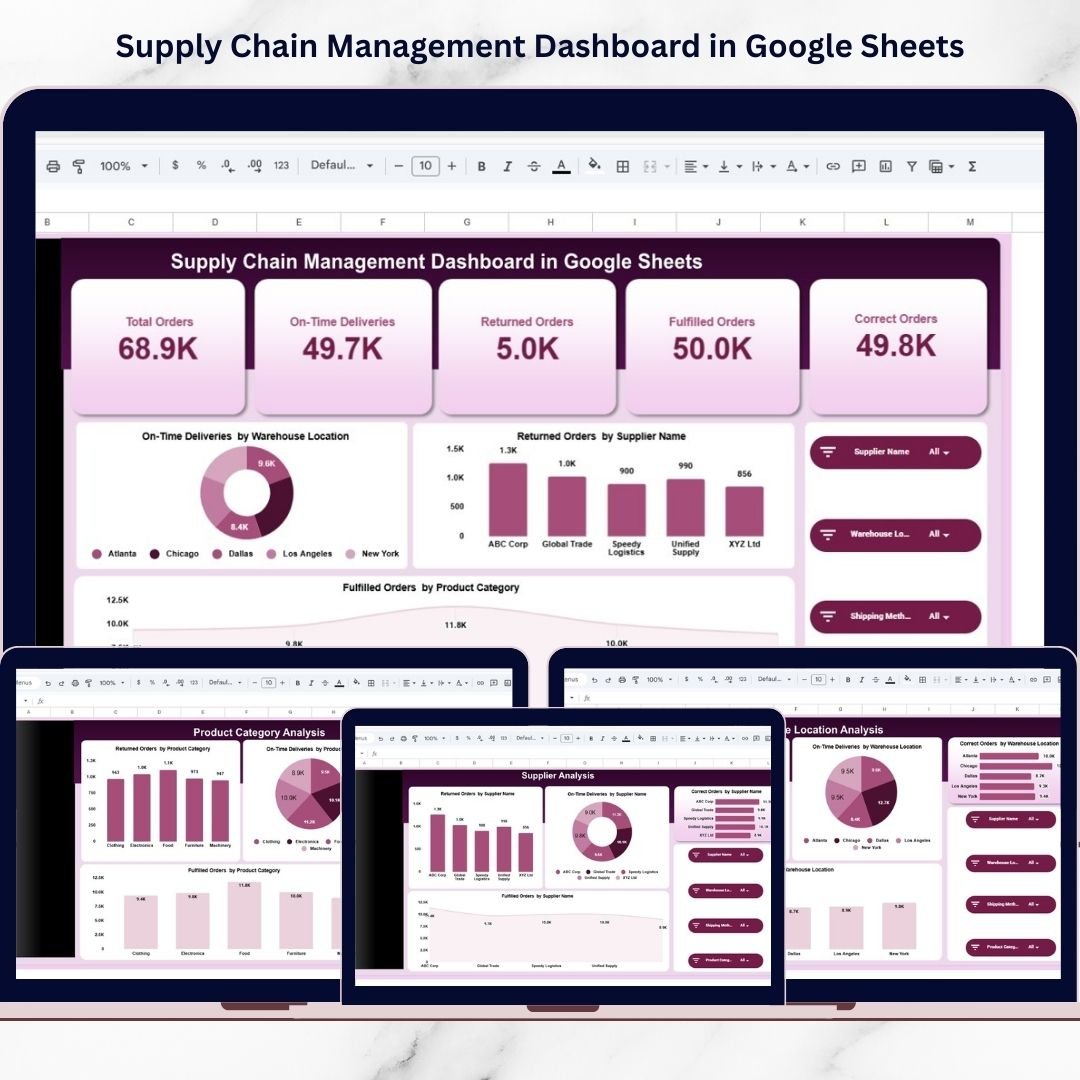
✅ Interactive filters for Supplier, Warehouse, Shipping Method, and Category
✅ Real-time KPI tracking with automated updates
✅ Visual KPI cards for instant performance overview
✅ Multi-page analytics for deep operational insights
✅ Supplier, warehouse, and product performance comparison
✅ Built-in search and data exploration functionality
✅ Fully customizable KPIs and charts
✅ No coding or technical setup required
These features allow decision-makers to monitor supply chain operations clearly and respond quickly to performance changes.
📦 What’s Inside the Supply Chain Management Dashboard in Google Sheets
This professionally designed template includes multiple analytical pages:
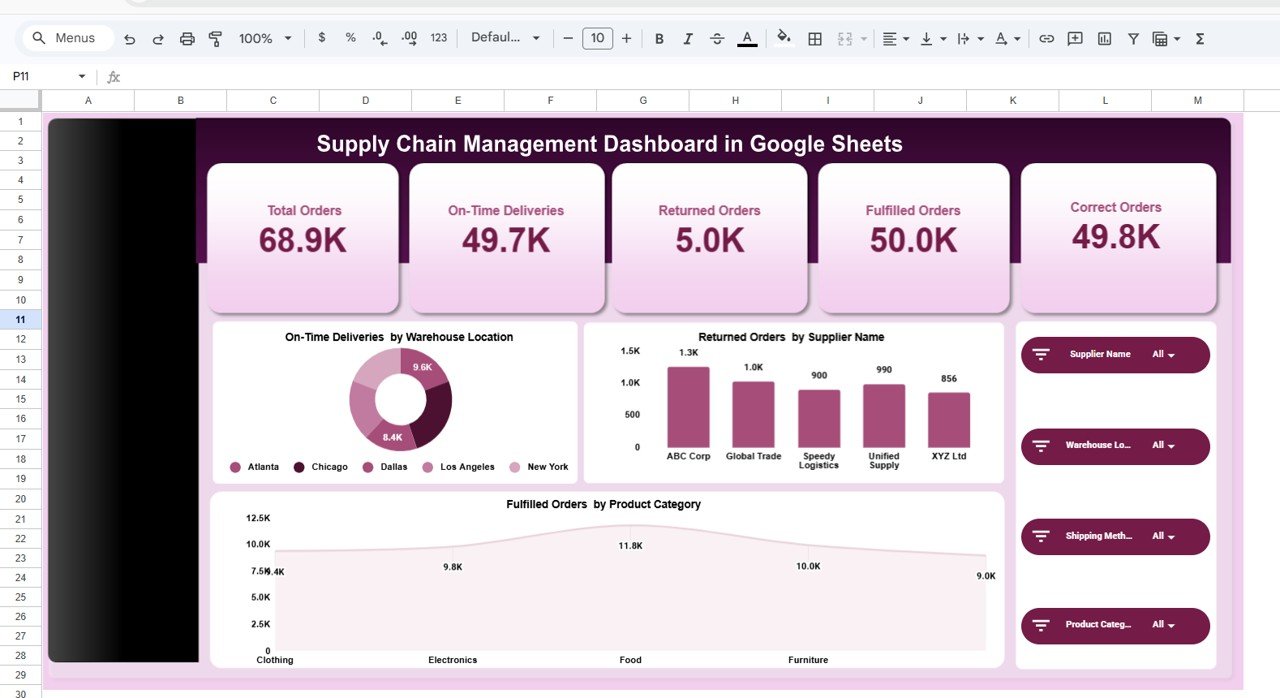
📊 Overview Dashboard Page
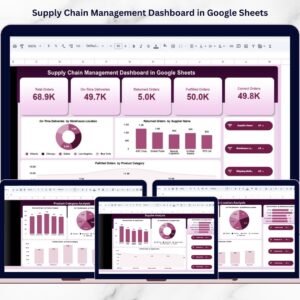
Displays key KPIs such as Total Orders, On-Time Deliveries, Returned Orders, Fulfilled Orders, and Correct Orders with interactive charts.
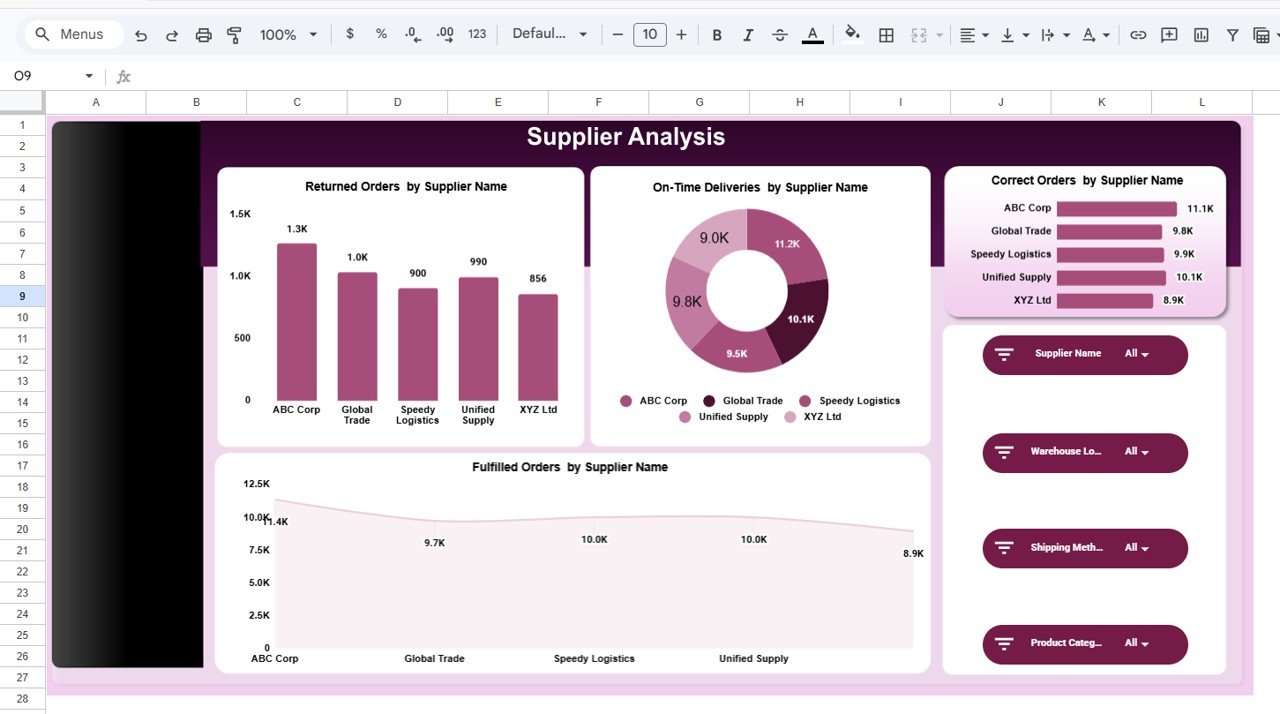
🚚 Supplier Analysis Page
Evaluates supplier performance using delivery success, return rates, and fulfillment trends.
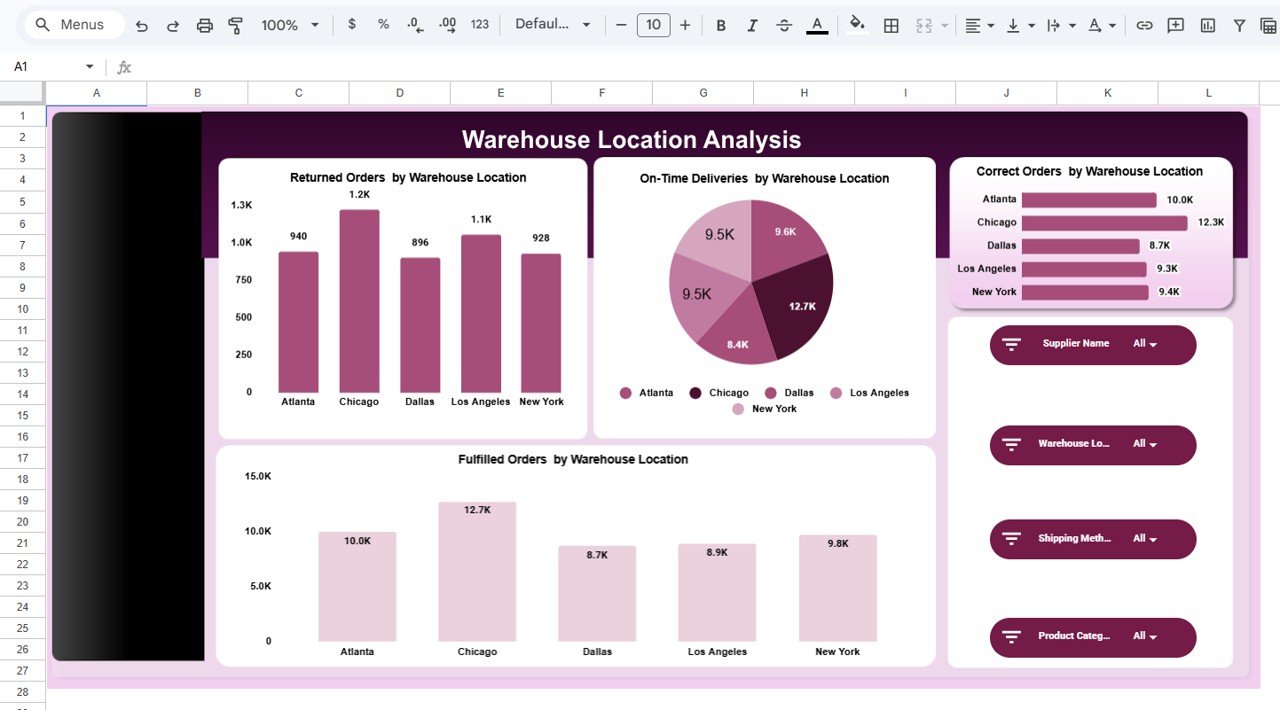
🏭 Warehouse Location Analysis Page
Helps managers compare warehouse efficiency and identify operational bottlenecks.
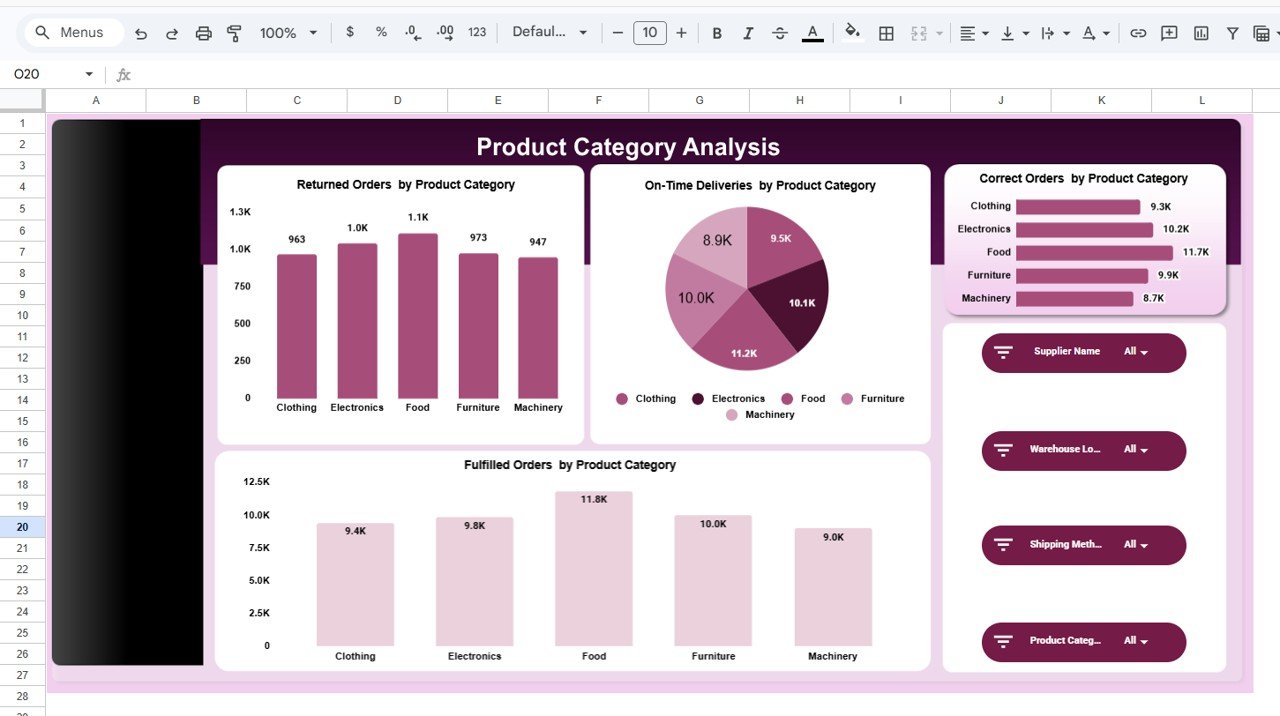
📦 Product Category Analysis Page
Analyzes demand trends and fulfillment performance across product categories.
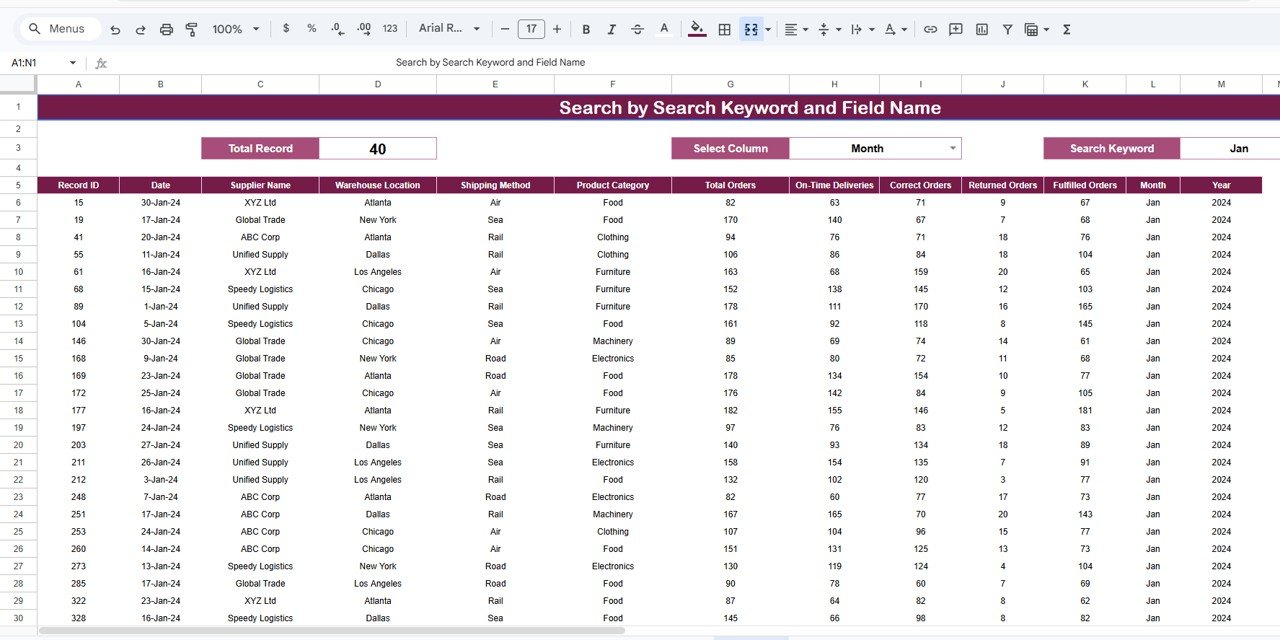
🔎 Search & Data Exploration Page
Allows users to explore detailed transaction records with filters, keyword search, and validation tools.
Together, these pages provide both strategic overview and operational-level analysis.
⚙️ How to Use the Supply Chain Management Dashboard in Google Sheets
Getting started is simple:
1️⃣ Upload or paste your supply chain data into the dataset sheet.
2️⃣ Ensure consistent data formats for accurate calculations.
3️⃣ Use filters to analyze suppliers, warehouses, or shipping methods.
4️⃣ Review KPI cards to monitor operational performance instantly.
5️⃣ Explore analytical pages for deeper insights.
6️⃣ Use the search page to validate records and investigate issues.
Within minutes, your operational data converts into a professional analytics dashboard.
👥 Who Can Benefit from This Supply Chain Management Dashboard in Google Sheets
This dashboard is ideal for:
✅ Supply chain managers and operations leaders
✅ Logistics and transportation companies
✅ Procurement and sourcing teams
✅ Warehouse supervisors and planners
✅ Retail and eCommerce businesses
✅ Manufacturing organizations
✅ Business analysts and decision-makers
Because it runs entirely in Google Sheets, teams can implement it immediately without IT dependency.
By using this dashboard consistently, organizations improve delivery reliability, strengthen supplier relationships, reduce operational risks, and make confident data-driven decisions. Instead of reacting to problems after they occur, you gain proactive visibility into your entire supply chain.
### Click here to read the Detailed blog post
Watch the step-by-step video tutorial:
### Visit our YouTube channel to learn step-by-step video tutorials
👉 https://www.youtube.com/@PKAnExcelExpert
Compatibility and Requirements
- Works in Google Sheets. You need a free Google account and a web browser.
- Google explains its charts in Add & edit a chart or graph.
Frequently Asked Questions
Which pages does the dashboard include?
Overview, Supplier Analysis, Warehouse Location Analysis, Product Category Analysis and a Search and Data Exploration page.
Which KPIs are on the Overview page?
Total Orders, On-Time Deliveries, Returned Orders, Fulfilled Orders and Correct Orders.
Can I filter the views?
Yes. Filters cover Supplier, Warehouse, Shipping Method and Category.
How do I add my own data?
Upload or paste your supply chain data into the dataset sheet in the same format. The KPI cards and charts update from it.
Is there a Power BI version?
Yes. The Supply Chain Management Dashboard in Power BI covers the same topic in Power BI.
Related Supply Chain Templates
- Supply Chain Management Dashboard in Excel: the same topic in Excel
- Supply Chain Management Dashboard in Power BI: the same topic in Power BI
- Procurement Tracker and Dashboard in Google Sheets: purchase orders and spend
- Trucking and Logistics Dashboard in Google Sheets: trucking and delivery analysis
- Procurement and Vendor Management Kit: 7 procurement templates in one download
Browse all Google Sheets dashboards or the Google Sheets inventory management templates.