

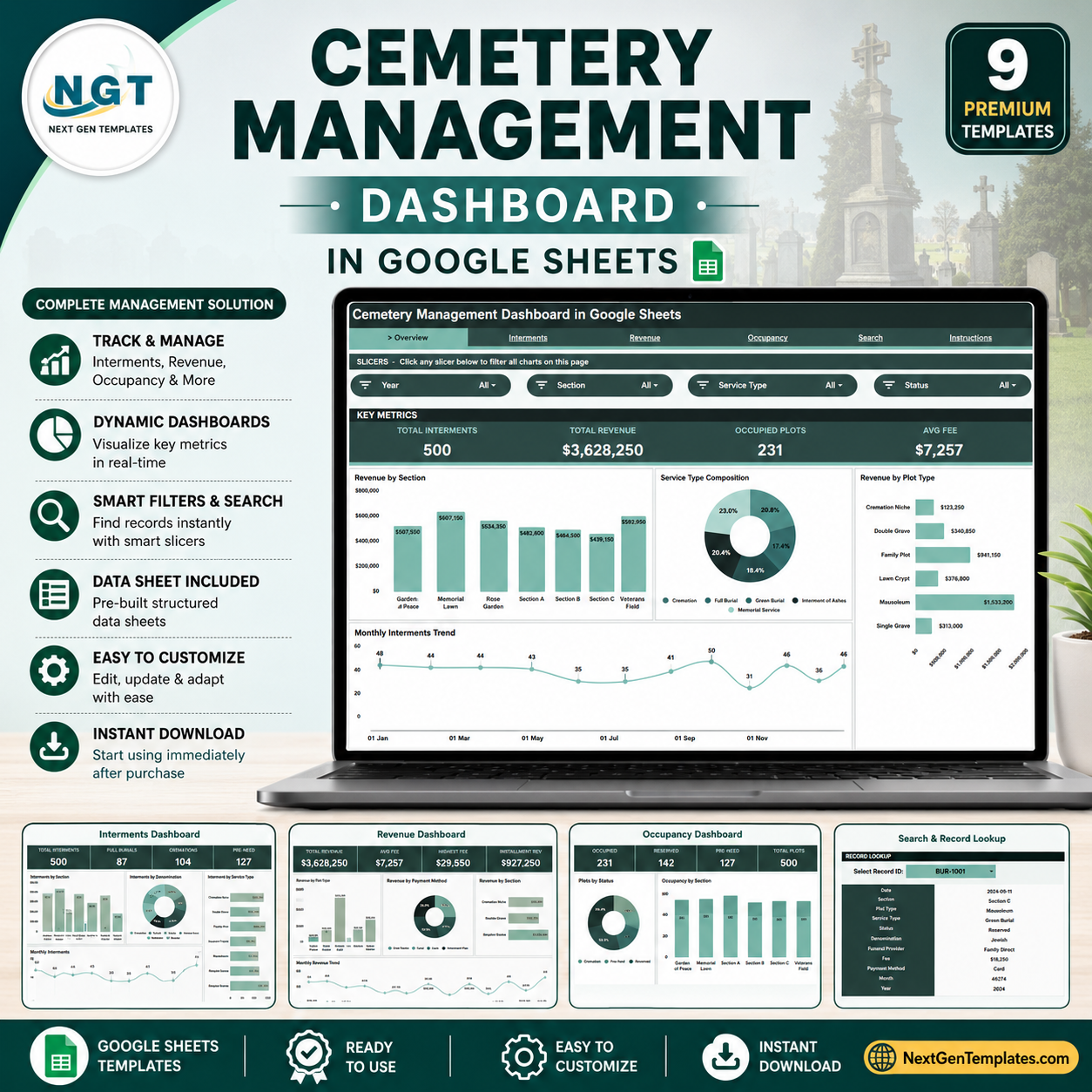
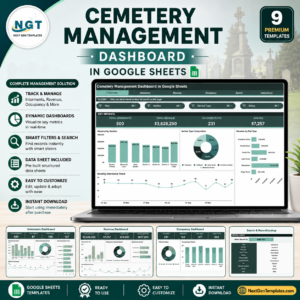
The Cemetery Management Dashboard in Google Sheets tracks 4 headline KPIs and 16 charts across 5 interactive pages plus a Data sheet and a Search tab. Setup takes under 10 minutes — replace the sample records on the Data sheet and every card, chart, and filter refreshes automatically.
🌍 Join 8,400+ teams in 40+ countries using NextGenTemplates to replace paid SaaS tools with one-time-purchase Excel, Google Sheets, Power BI, and HTML templates.
✅ Instant download · One-time payment · No subscription · No per-user fees · Lifetime access
Cemetery offices, memorial parks, and funeral providers still run interment registers, plot maps, and fee ledgers on paper or scattered spreadsheets. This Google Sheets dashboard pulls interments, revenue, and plot occupancy into one shareable file your whole office can open in a browser.
🔑 Key Features of the Cemetery Management Dashboard
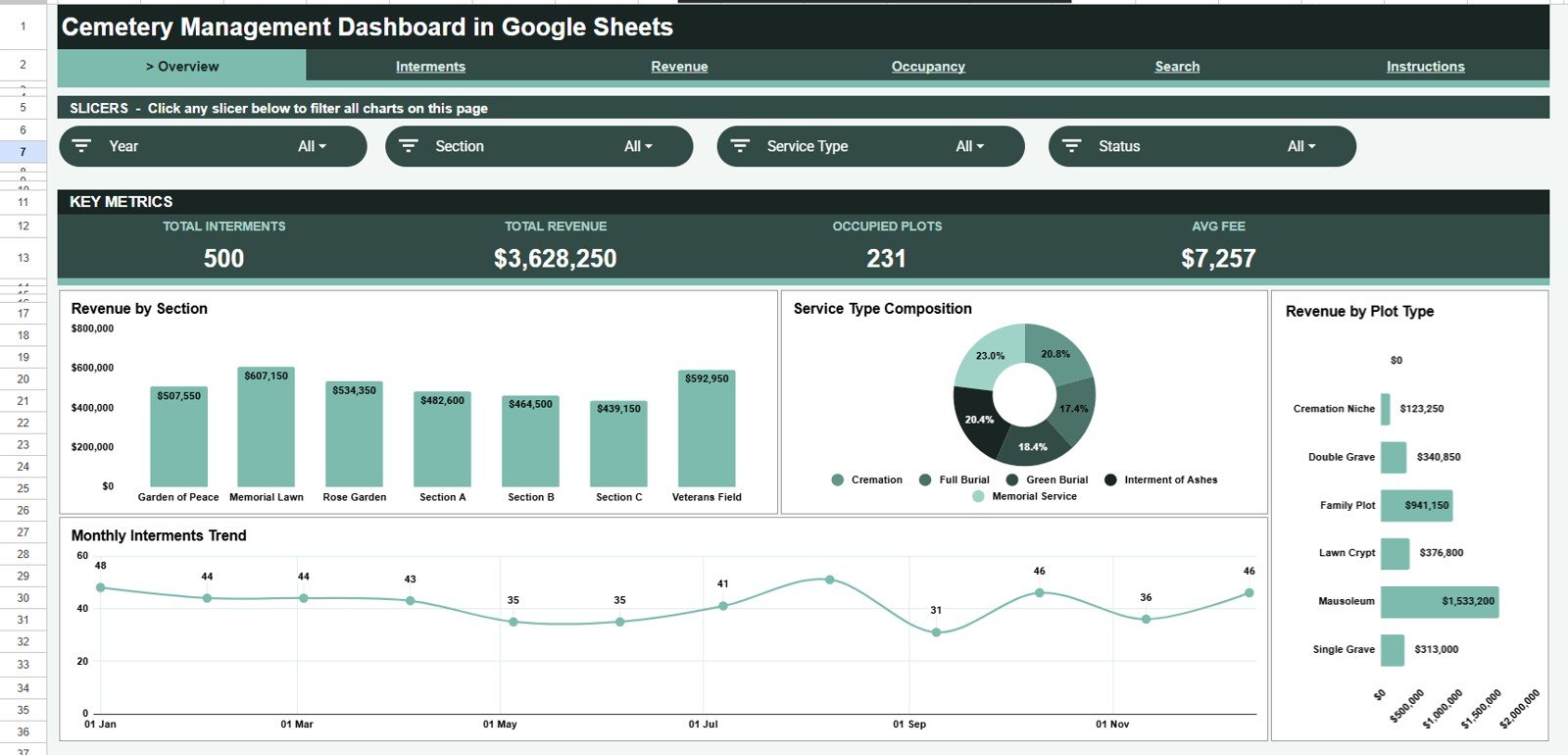
📊 Four real-time KPI cards. The Overview page shows Total Interments, Total Revenue, Occupied Plots, and Average Fee. Each card recalculates instantly as you log new burials on the Data sheet, so the front-desk view is always current.
📈 Sixteen ready-made charts. Across the Overview, Interments, Revenue, and Occupancy pages you get 16 charts — including Revenue by Section, Interments by Service Type, Plots by Status, and Utilization by Section — built and formatted for you.
🎛️ One-click slicer filters. Slicers at the top of the Overview let you filter the entire dashboard by section, plot type, or service type in a single click, then reset just as fast.
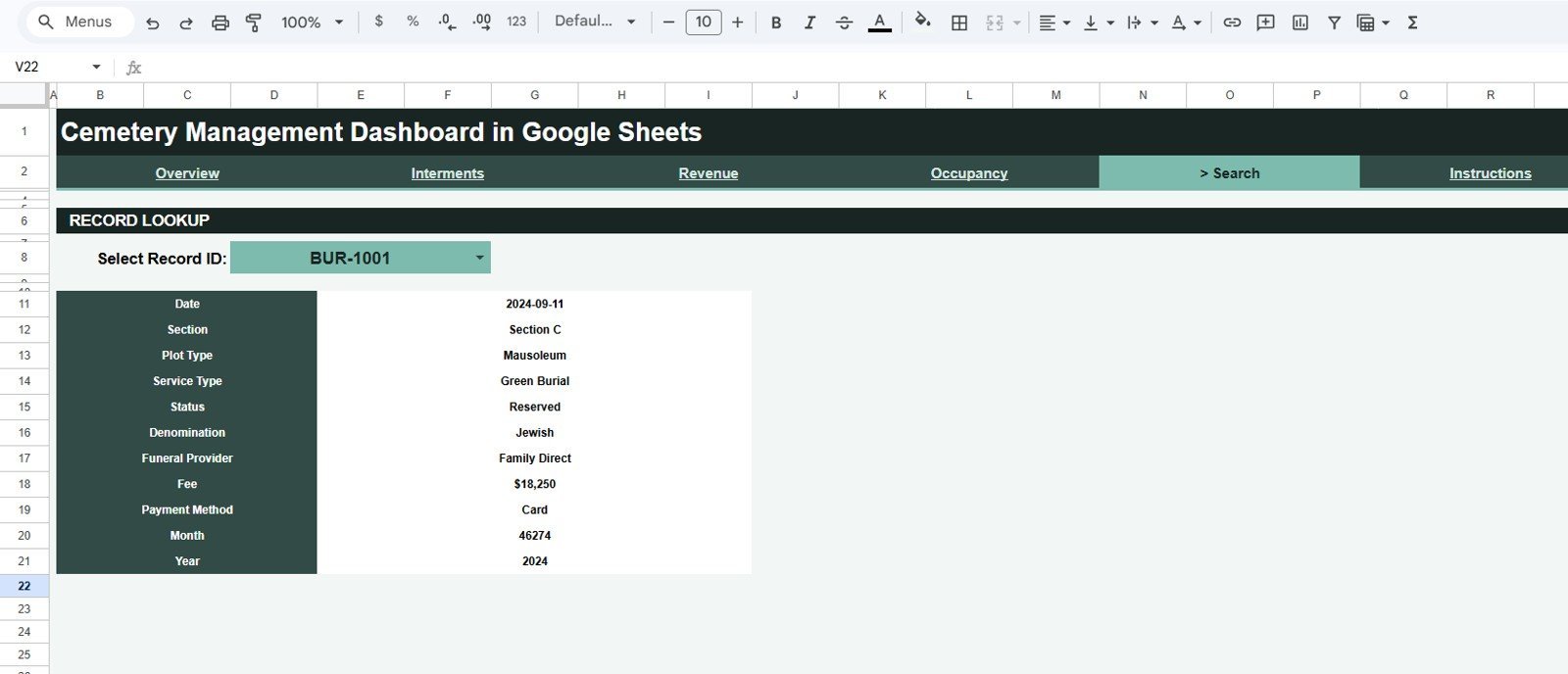
🔎 Record-level Search tab. Select any Record ID from a dropdown and the Search page returns that record’s Date, Section, Plot Type, Service Type, Status, Denomination, Funeral Provider, Fee, Payment Method, Month, and Year.
📦 What’s Inside the Cemetery Management Dashboard
Page 1: Overview
The landing page carries the four KPI cards — Total Interments, Total Revenue, Occupied Plots, Avg Fee — above four charts: Revenue by Section, Interments by Service Type, Revenue by Plot Type, and Interments by Month. Slicers let you filter the whole page instantly.
Cemetery Management Dashboard
Page 2: Interments
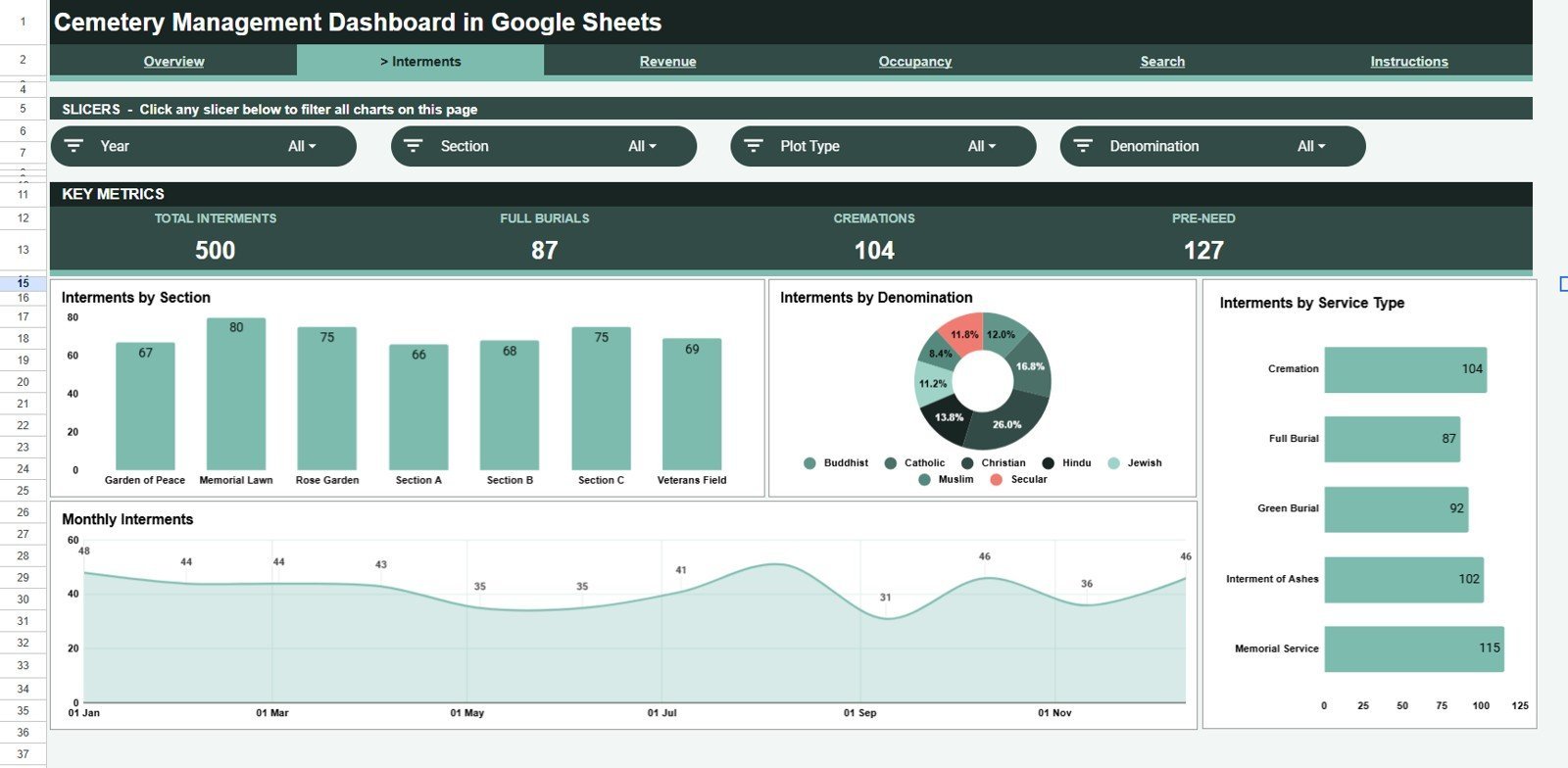
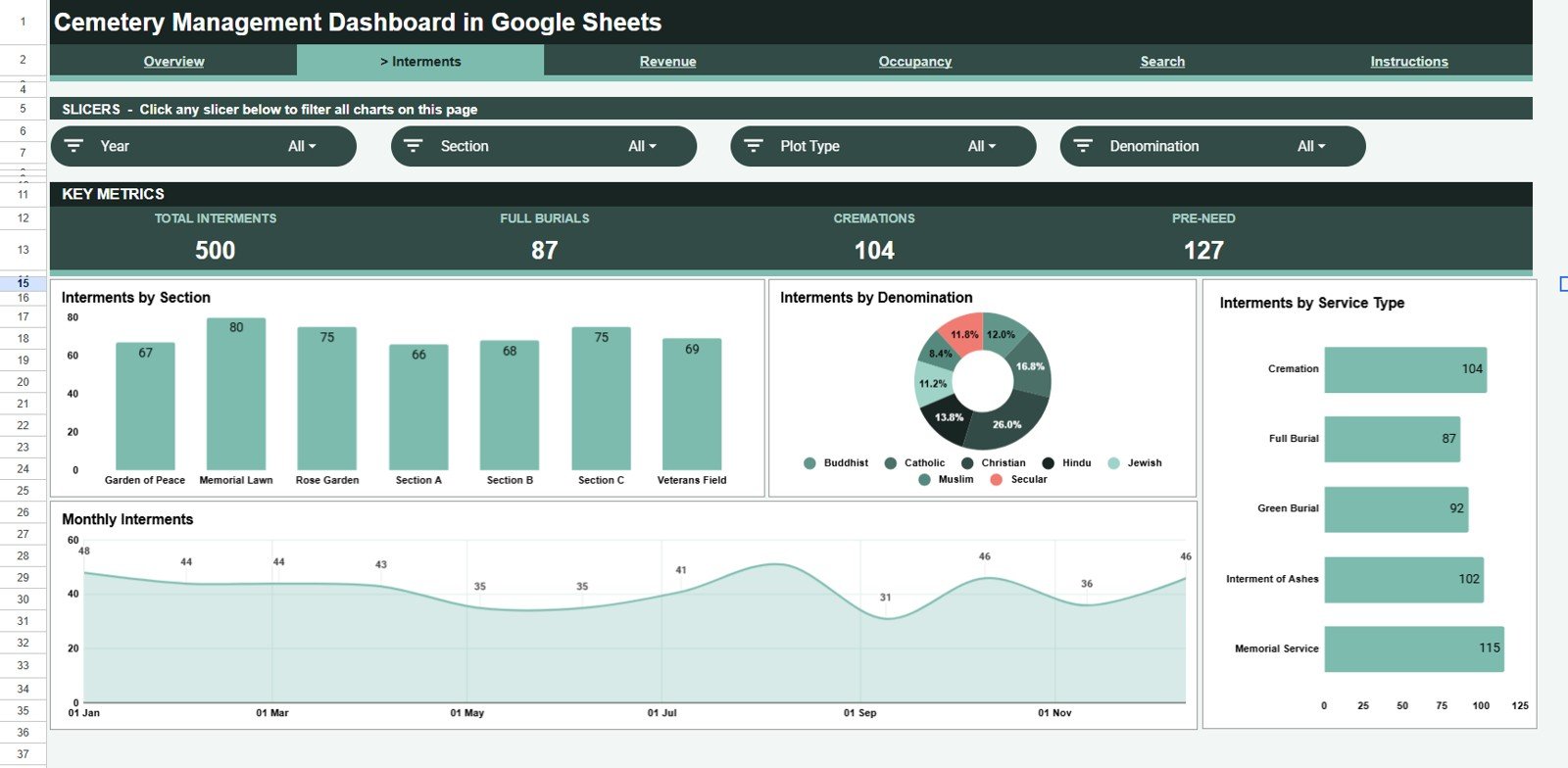
This tab analyses burial activity with four charts: Interments by Section, Interments by Denomination, Interments by Service Type, and Interments by Month — so you can see which sections and service types are busiest over time.
Interments
Page 3: Revenue
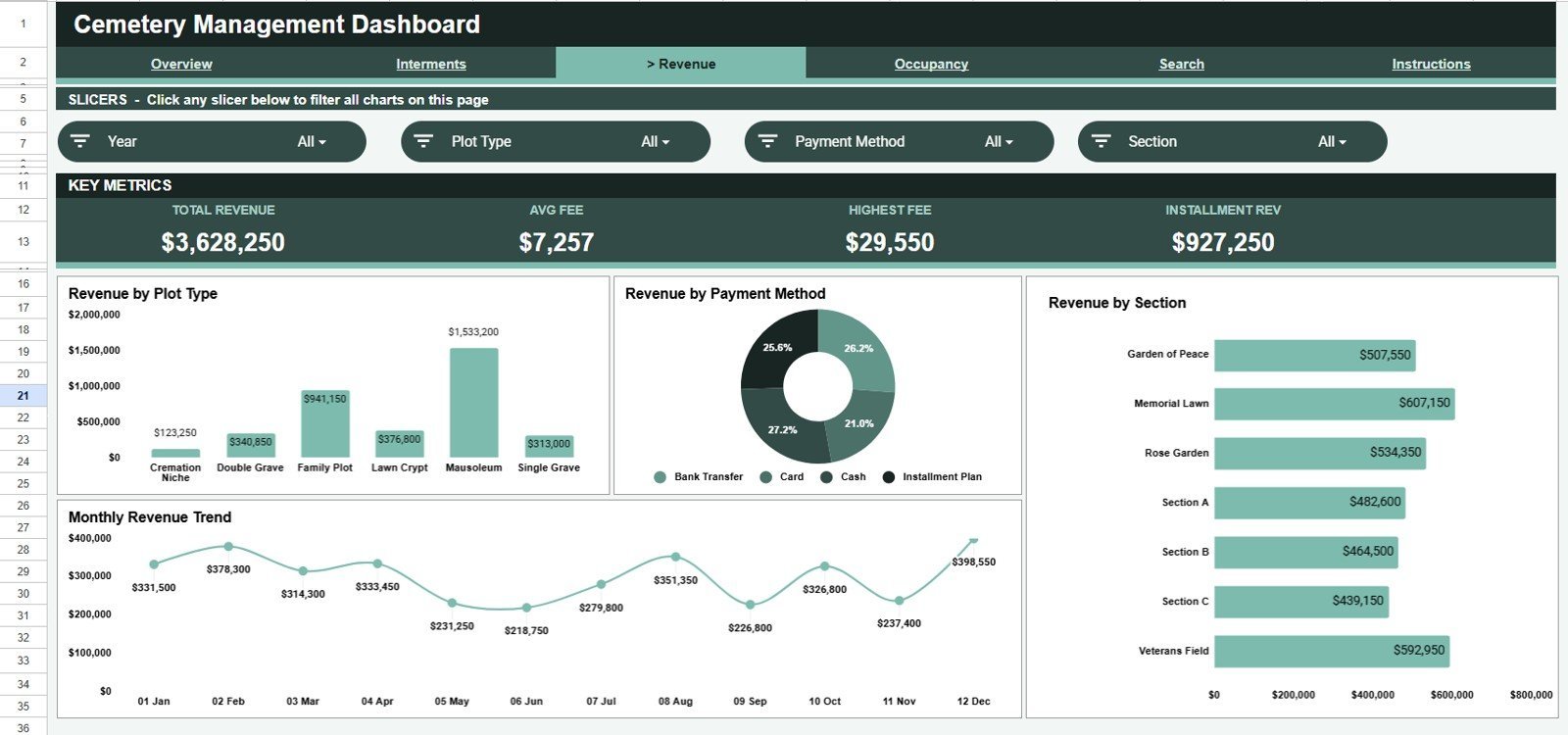
The Revenue tab tracks income with Revenue by Plot Type, Revenue by Payment Method, Revenue by Section, and Revenue by Month — a clear picture of where fees come from and how cash flow moves through the year.
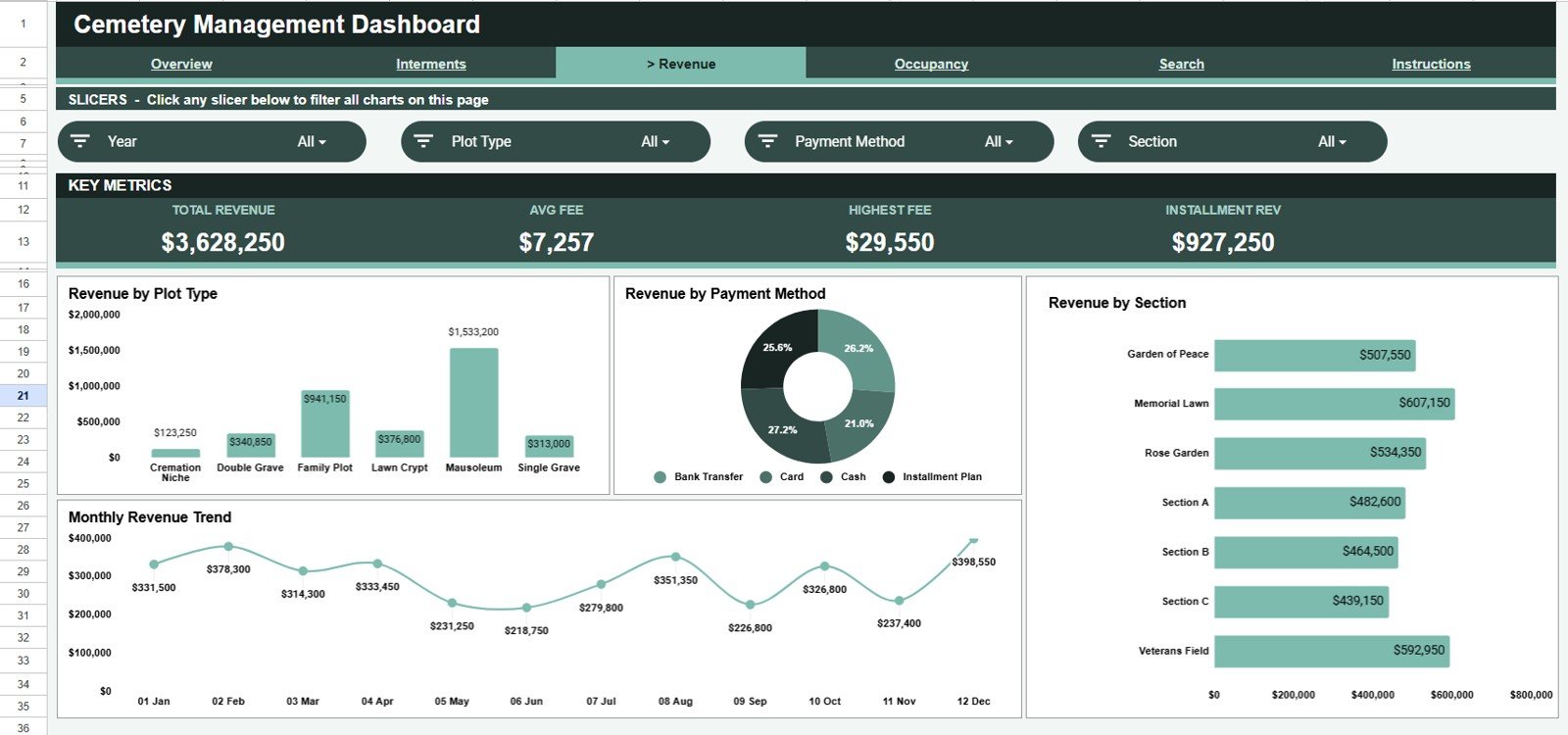
Revenue
Page 4: Occupancy
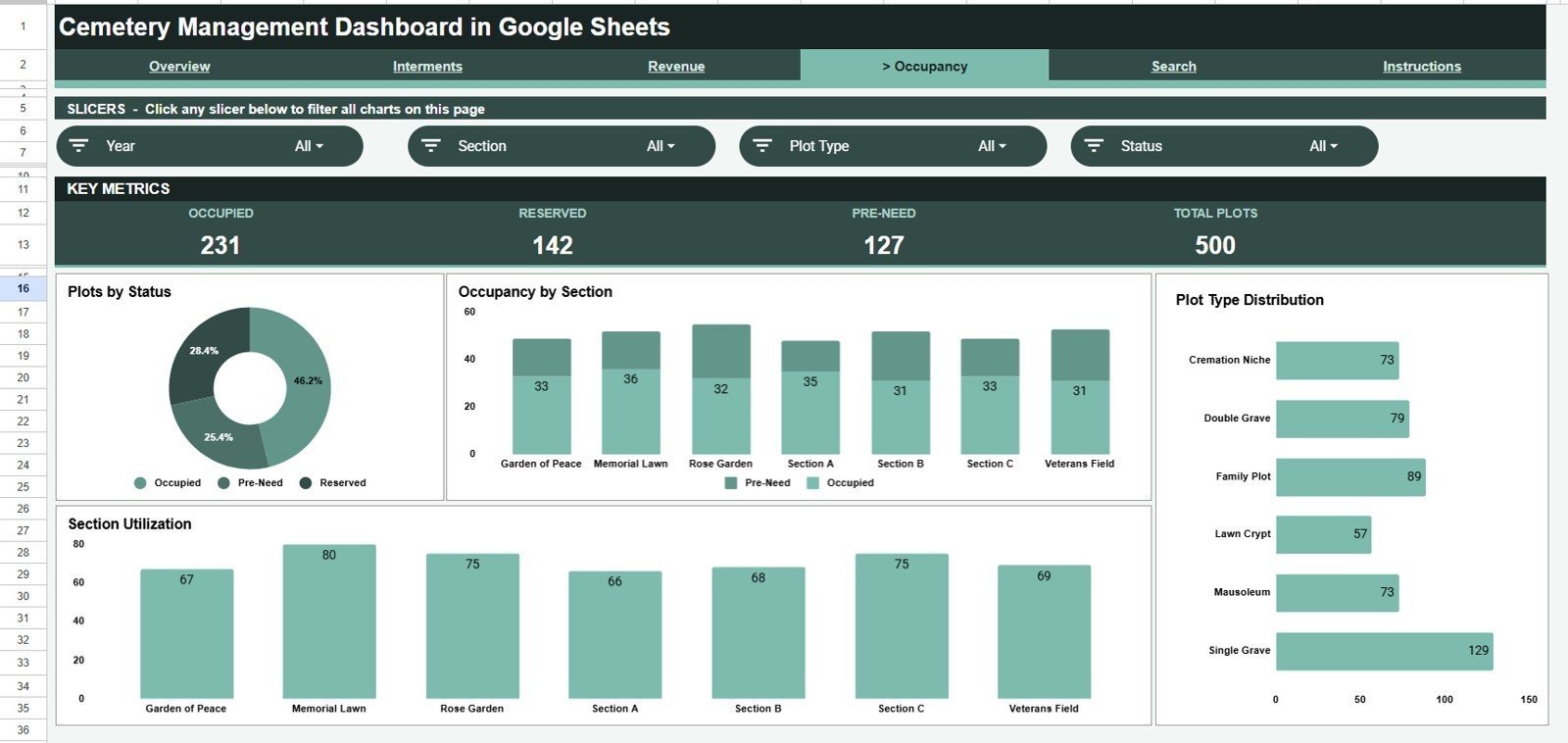
The Occupancy tab monitors plot inventory with Plots by Status, Occupancy by Section, Plots by Plot Type, and Utilization by Section — so you always know how much space remains and which sections are filling fastest.
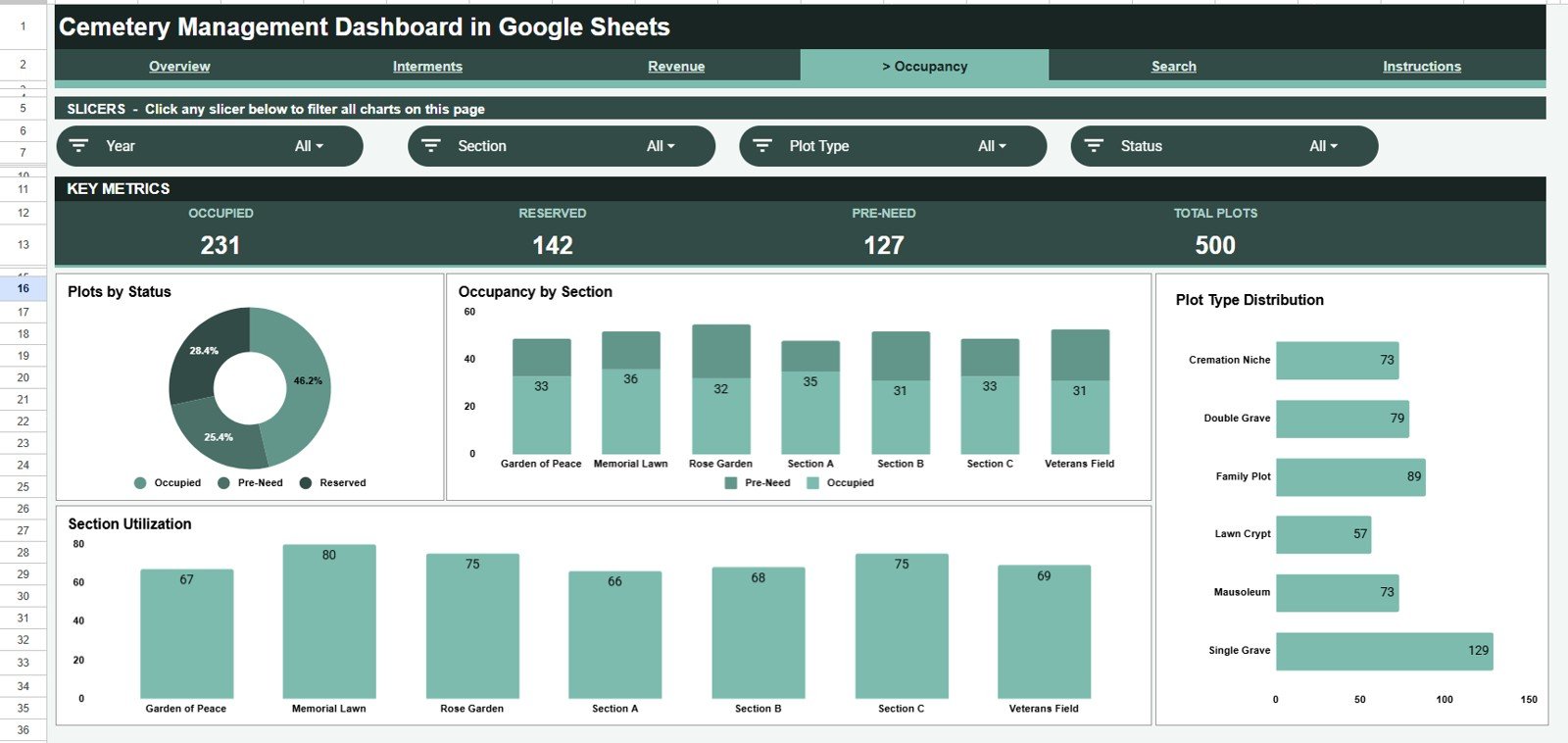
Occupancy
Page 5: Search
A record-lookup page. Pick any Record ID from the dropdown to instantly see the full details for that interment, including Date, Section, Plot Type, Service Type, Status, Denomination, Funeral Provider, Fee, Payment Method, Month, and Year.
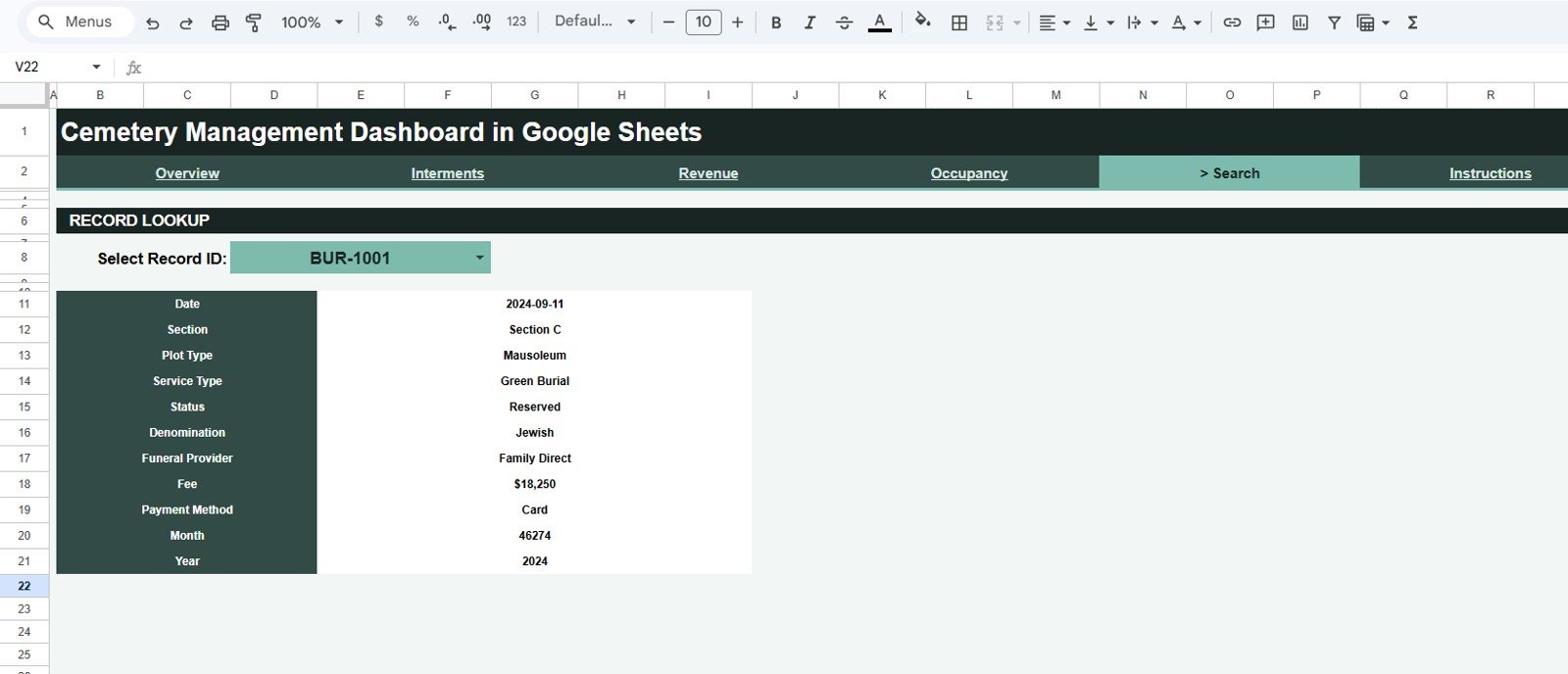
Search Sheet tab
Data Sheet tab
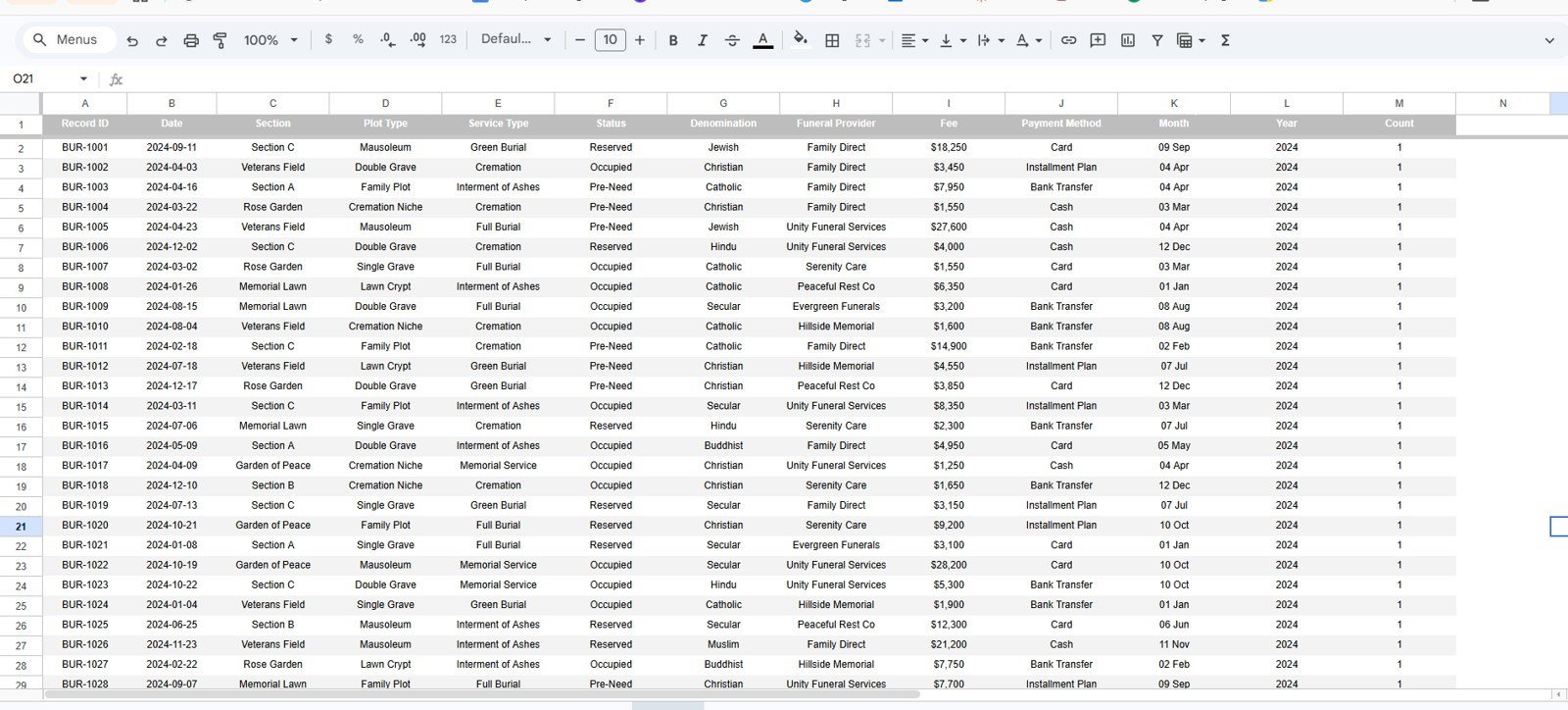
The Data sheet is where you enter records in the same column format. Add a new row for each interment and every KPI, chart, slicer, and the Search tab update automatically — no formula editing needed.
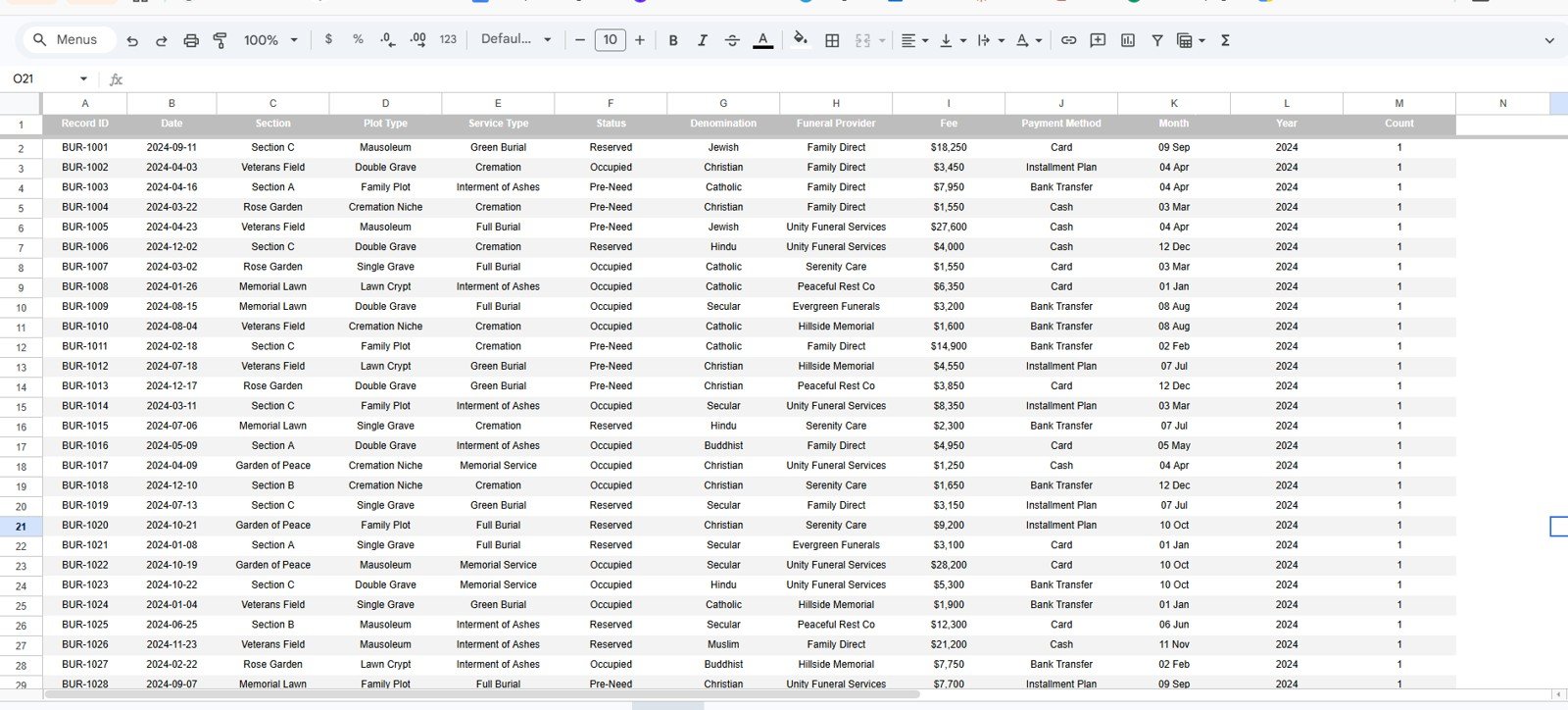
Data Sheet tab
📊 Cemetery Management Dashboard vs. Excel vs. Paid Cemetery Software — Where This Fits
| Feature | Cemetery Management Dashboard (Google Sheets) | Microsoft Excel Dashboard | PlotBox / Pontem Cemetery Software |
|---|---|---|---|
| Cost | $9.99 one-time | $15-20 one-time | $1,000s / year + setup |
| Platform | Browser — any device | Desktop Excel | Cloud SaaS |
| Setup time | Under 10 minutes | Under 10 minutes | Weeks of onboarding |
| Real-time team collaboration | ✅ Yes, native | Limited | ✅ Yes |
| Mobile access | ✅ Built in | Add-on app | ✅ Yes |
| Customizable fields | ✅ Fully editable | ✅ Fully editable | Vendor-controlled |
| Share with link | ✅ Yes | File send only | ✅ Yes |
| Year-1 cost at 5 users | $9.99 total | $15-20 total | $3,000-10,000+ |
| Owns your data file | ✅ You keep it | ✅ You keep it | Hosted by vendor |
For cemetery offices that want clear interment, revenue, and occupancy reporting without a four-figure software contract, the Cemetery Management Dashboard sits in the sweet spot.
👥 Who This Template Is For — and Who It’s Not For
✅ This template is built for:
- Cemetery and memorial-park offices managing a few hundred to a few thousand plots
- Funeral homes and burial providers that need a shared interment and fee register
- Churches, trusts, and municipal bodies running a graveyard on spreadsheets or paper
- Administrators who want charts and a record search without learning new software
❌ This template is NOT for:
- Large multi-site operators needing GIS plot mapping, deeds, and survey integration
- Teams that require audited, access-controlled databases with role permissions
⚙️ How to Use the Cemetery Management Dashboard
- Open the PDF guide in your download and click the Google Sheets copy link to save your own editable copy.
- Go to the Data sheet and replace the sample interments with your own records, keeping the column order.
- Open the Overview to see KPI cards and charts refresh, then use the slicers to filter by section or service type.
- Use the Search tab to look up any single record by its Record ID.
💼 Real-World Use Cases
Margaret manages a 1,200-plot municipal cemetery. She logs each interment on the Data sheet and uses the Occupancy page to show the council how many plots remain by section — replacing a paper ledger and a yearly stocktake that used to take days.
David runs a family-owned funeral and burial service. He uses the Revenue page to see income by plot type and payment method each month, and the Search tab to pull a family’s record in seconds when relatives call with questions.
❓ Frequently Asked Questions
What KPIs does the Cemetery Management Dashboard track?
The Cemetery Management Dashboard tracks 4 headline KPIs — Total Interments, Total Revenue, Occupied Plots, and Average Fee — plus 16 charts covering interments, revenue, and occupancy. All metrics update automatically when you add records to the Data sheet.
How long does setup take?
Setup takes under 10 minutes. Make your own copy from the included link, paste your interment records into the Data sheet in the existing column format, and every card, chart, slicer, and the Search tab refresh on their own.
Do I need Excel or any software to install?
No. The Cemetery Management Dashboard runs entirely in Google Sheets in your browser, so it works on Windows, Mac, Chromebook, tablets, and phones with nothing to install.
Can my whole office use it at once?
Yes. Because it lives in Google Sheets, you can share the file by link and several staff can view or edit the same dashboard at the same time with no per-user fees.
How does this compare to paid cemetery software?
Paid cemetery platforms can cost thousands per year. The Cemetery Management Dashboard is a one-time $9.99 purchase that covers interment, revenue, and occupancy reporting for offices that don’t need GIS mapping or deed management.
👤 About the Author
Built by PK — Microsoft Certified Professional with 15+ years of Excel, Google Sheets, and Power BI experience. Founder of NextGenTemplates, reaching 300K+ subscribers across YouTube channels (@PK-AnExcelExpert, @NextGenTemplates, @NeoTechNavigators). Every template is hand-built and tested before release.
🔗 Explore Related Templates
- Church Transaction Analysis Dashboard in Google Sheets — track giving and transactions for a faith community.
- Building Utility Cost Dashboard in Google Sheets — monitor facility running costs by site.
- Accounting Firm Revenue Dashboard in Google Sheets — revenue and WIP tracking.
Browse more Google Sheets Dashboards for other industries.
📖 Click here to read the Detailed Blog Post
Watch the step-by-step video Demo:
🎥 Visit our YouTube channel for step-by-step video tutorials
👉 YouTube.com/@NextGenTemplates
📅 Last updated: June 2026





















Reviews
There are no reviews yet.