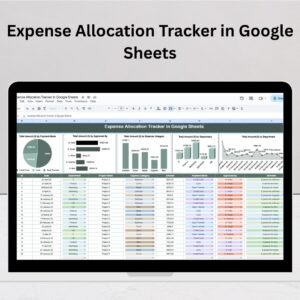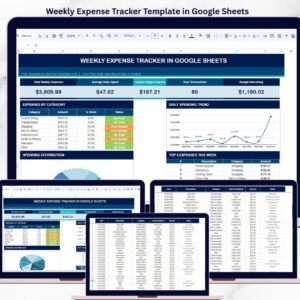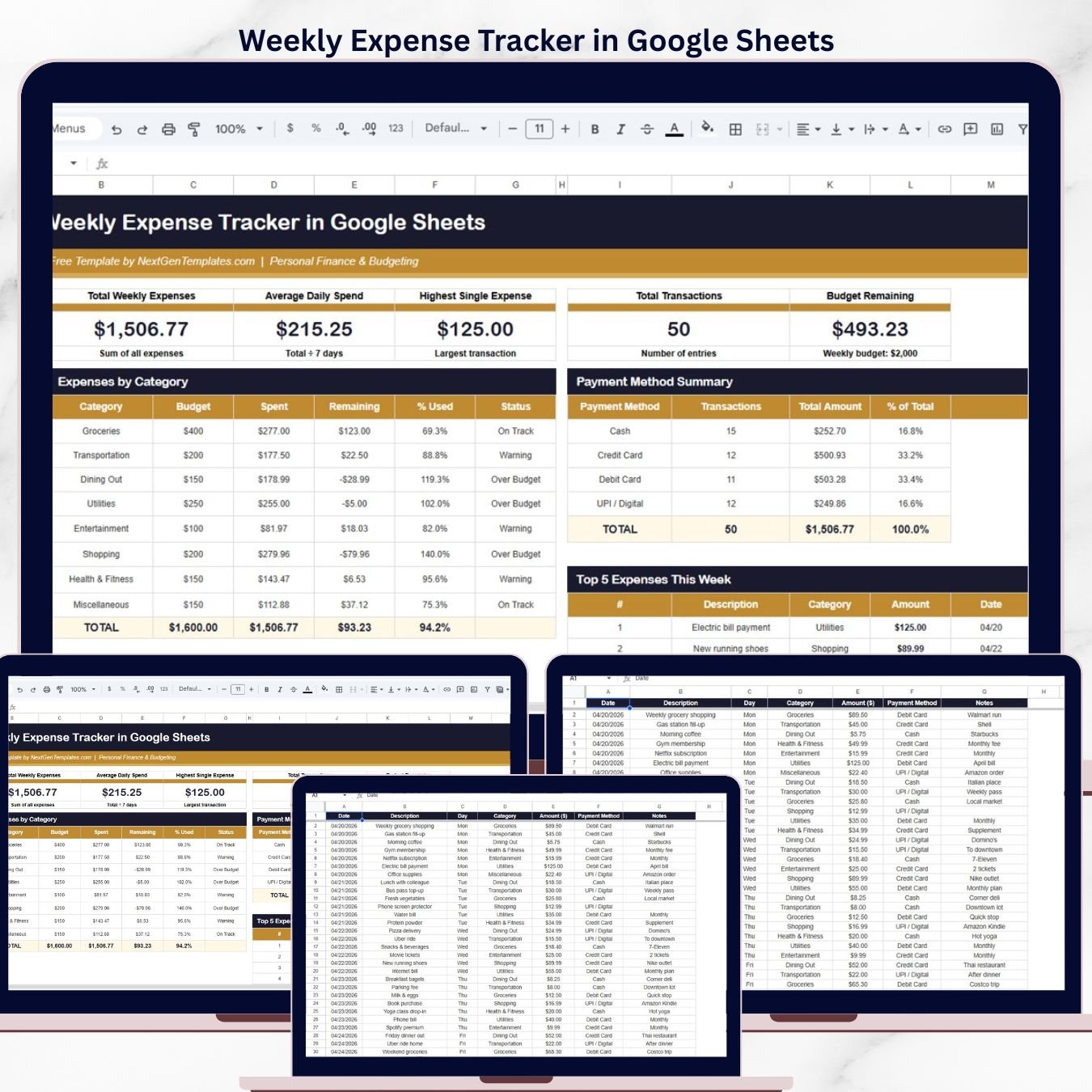
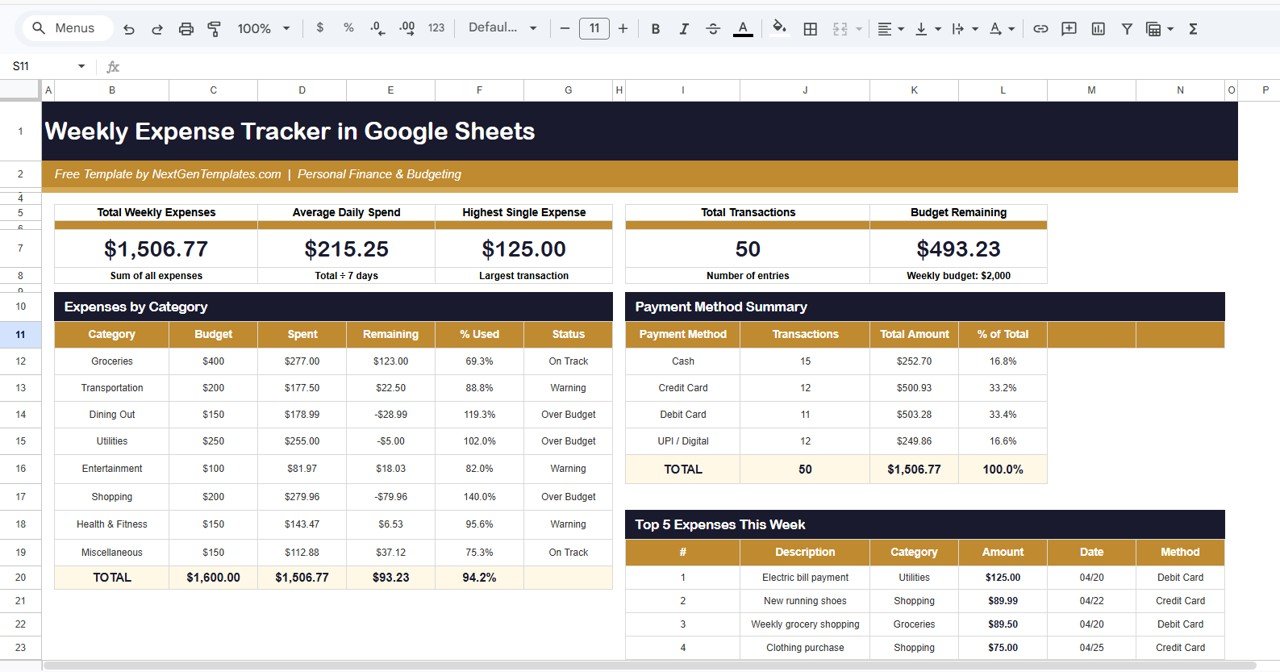

The Weekly Expense Tracker in Google Sheets monitors 5 KPIs across 2 interactive pages, with 6 pre-built charts and multiple slicers for instant filtering by category, payment method, and status. Setup takes under 5 minutes — open the Google Sheets link, make a copy, replace the sample data, and every chart updates automatically.
🌍 Join 8,400+ teams in 40+ countries using NextGenTemplates to replace paid SaaS tools with one-time-purchase Excel, Google Sheets, Power BI, and HTML templates.
✅ 100% FREE · Instant download · No subscription · No per-user fees · Lifetime access
🔑 Key Features of Weekly Expense Tracker in Google Sheets
📊 5 KPI Cards on the Overview Page — Track Total Weekly Expenses, Average Daily Spend, Highest Single Expense, Total Transactions, and Budget Remaining at a glance. Each card recalculates the moment you apply a slicer filter, giving individuals and families a filtered snapshot in one click.
📈 6 Dynamic Charts Across the Overview Page — The tracker covers Spent Amount by Category, Budget vs Spent by Category, Status by Category, Total Amount by Payment Method, Transactions by Payment Method, and Top 5 Expenses by Amount. These 6 charts deliver a 360-degree view of where your money went during the week.
🎯 Multiple Slicer Filters for Instant Analysis — Apply filters to slice data by category, payment method, or budget status without any manual sorting. The entire Overview page recalculates in real-time when you select a slicer option.
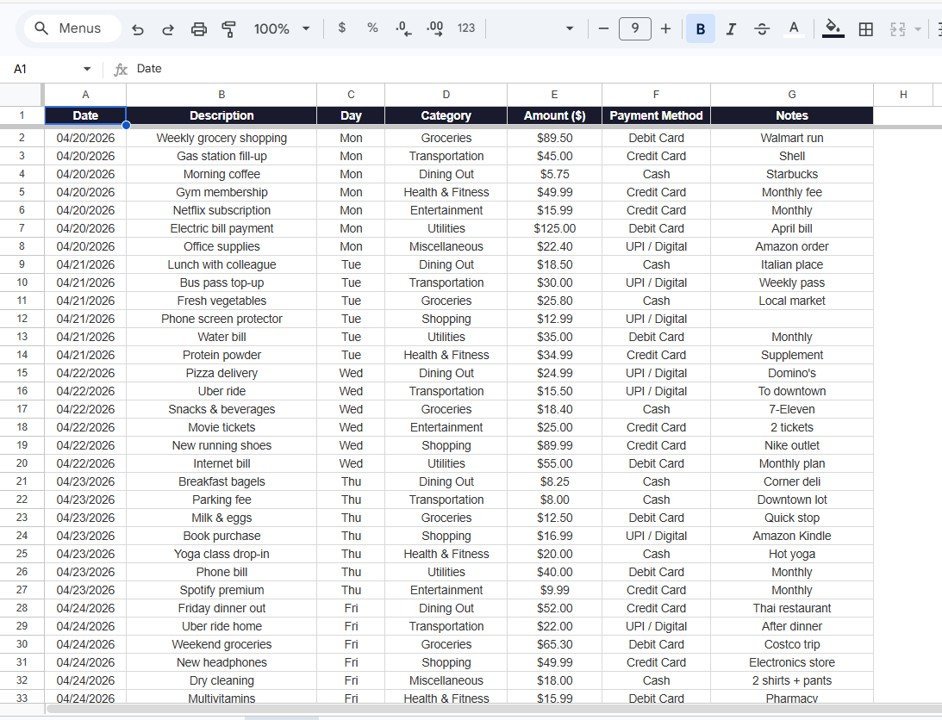
📝 Structured Data Sheet for Daily Logging — The Data Sheet logs every transaction with columns for Date, Day, Category, Description, Payment Method, Amount, and Notes. Drop-down menus keep category and payment-method data consistent for accurate chart reporting.
☁️ Cloud-Based with Real-Time Sync — Works in any browser on desktop, tablet, or phone. Edit from your laptop at home and your phone at the grocery store — Google Sheets syncs instantly, no manual save needed. Share with family members for collaborative household expense tracking.
Explore more Google Sheets Tracker Templates and Google Sheets Dashboard Templates on NextGenTemplates for budgeting, finance, and expense tracking solutions.
📦 What’s Inside the Weekly Expense Tracker in Google Sheets
This template includes 2 sheet tabs designed for efficient weekly expense management:
1 — Overview Page: The command center of your weekly finances. At the top, 5 KPI cards display Total Weekly Expenses, Average Daily Spend, Highest Single Expense, Total Transactions, and Budget Remaining. Below the cards, 6 analytical charts cover Spent Amount by Category, Budget vs Spent by Category, Status by Category, Total Amount by Payment Method, Transactions by Payment Method, and Top 5 Expenses by Amount. Multiple slicer filters let you apply filters and see the filtered dashboard quickly across all dimensions.
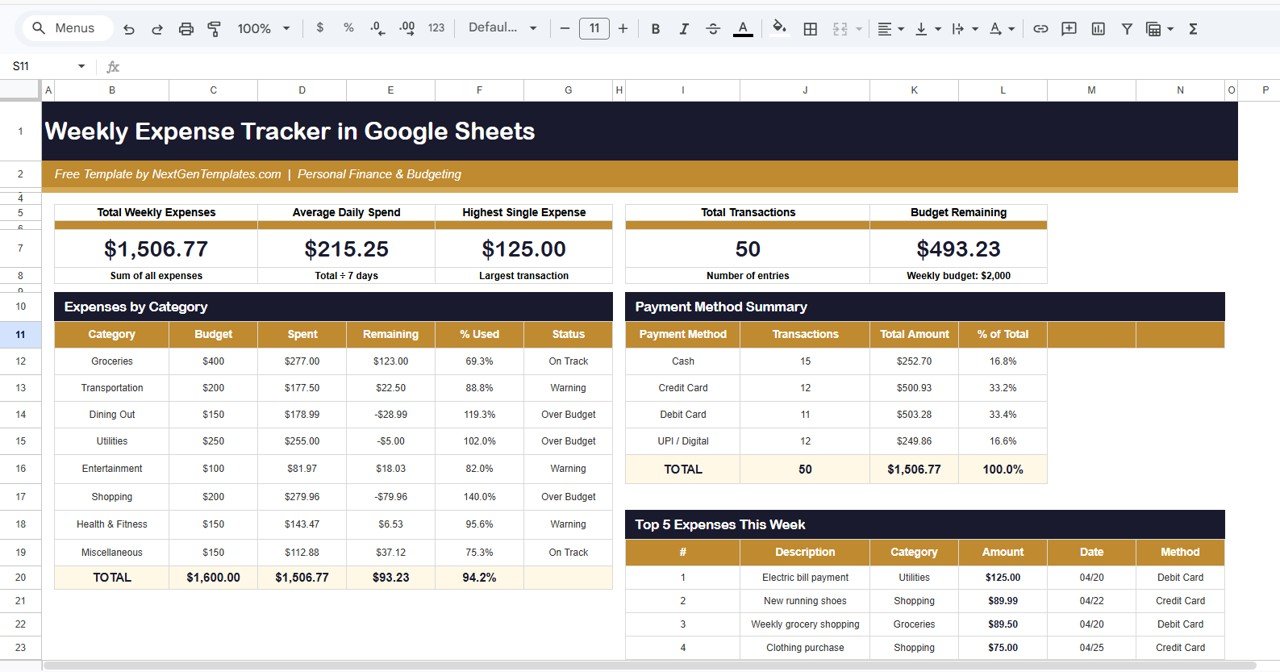
Weekly Expense Tracker in Google Sheets
2 — Data Sheet: This is the Data sheet. Here you need to add the data in the same format as the sample records provided. Simply replace the sample entries with your own weekly expenses — all charts and KPI cards update automatically.
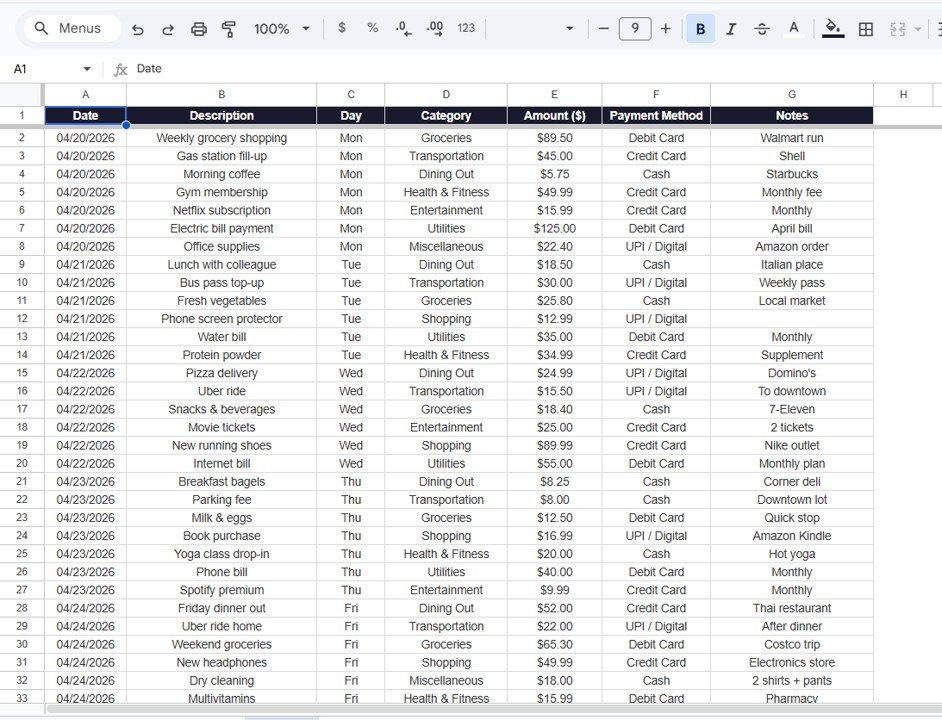
Data Sheet tab
📊 Weekly Expense Tracker in Google Sheets vs. Excel Expense Tracker vs. Mint / YNAB — Where This Fits
| Feature | Weekly Expense Tracker in Google Sheets | Excel Expense Tracker | Mint / YNAB |
|---|---|---|---|
| Cost | FREE forever | Free (requires Excel license) | $0–$15 / month subscription |
| Platform | Google Sheets (browser + mobile) | Microsoft Excel (desktop) | Web + Mobile app |
| Setup Time | Under 5 minutes | 5–10 minutes | 15–30 minutes with bank linking |
| Real-Time Collaboration | ✅ Share via Google Drive link | ❌ Single-user file | Limited (paid family plans) |
| Mobile Access | ✅ Google Sheets app | Limited on mobile | ✅ Native apps |
| Slicer Filters | ✅ Built-in slicers | Manual pivot filtering | ❌ Fixed views |
| Bank Account Required | ❌ No — privacy-first | ❌ No | ✅ Yes — links to your bank |
| Year-1 Cost (1 user) | $0 | $70+ (Microsoft 365) | $84–$180 |
| Budget vs Spent Charts | ✅ Built-in per category | Manual chart setup | ✅ Auto-generated |
For individuals who want a visual weekly expense tracker with slicer filters and budget comparison charts without paying monthly subscriptions, the Weekly Expense Tracker in Google Sheets sits in the sweet spot.
👥 Who This Template Is For — and Who It’s Not For
✅ This template is built for:
- Individuals and families tracking weekly spending across 6+ categories with visual budget comparisons
- Students and young professionals building their first expense-tracking habit using a free cloud-based tool
- Couples and roommates who want to share and co-edit a single expense sheet in real time via Google Drive
- Anyone who prefers manual expense logging without linking bank accounts to third-party apps
❌ This template is NOT for:
- Users needing automatic bank transaction imports and real-time transaction syncing
- Businesses requiring multi-user expense approval workflows and receipt scanning
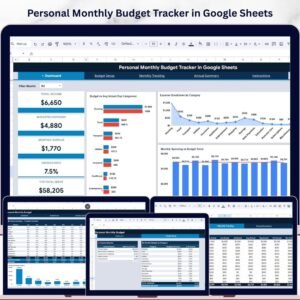
- People looking for 12-month rolling budget forecasts — see the Personal Monthly Budget Tracker in Google Sheets instead
⚙️ How to Use the Weekly Expense Tracker in Google Sheets
- Open the PDF guide included in your download and click the Google Sheets copy link to create your own editable copy in Google Drive.
- Navigate to the Data Sheet and replace the sample data with your own weekly expenses — Date, Day, Category, Description, Payment Method, Amount, and Notes.
- Switch to the Overview page — all 5 KPI cards and 6 charts update automatically with your data.
- Use the slicer filters on the Overview page to drill down by category, payment method, or budget status.
- Review the Top 5 Expenses chart to identify your biggest weekly spending items.
- Share with family via Google Drive for collaborative household expense tracking.
💼 Real-World Use Cases
Priya is a 26-year-old marketing executive in Mumbai earning ₹55,000 per month. She uses the Weekly Expense Tracker in Google Sheets to log every coffee, auto ride, and online order during the week. The Budget vs Spent by Category chart showed her food delivery was 40% over budget — she switched to meal prep the following week and saved ₹2,200.
James and Lisa share a two-bedroom apartment in Austin. They added each other to the same Google Sheets file and split logging duties — James logs groceries and utilities, Lisa logs entertainment and subscriptions. The slicer filters let them quickly isolate who is spending more in each category without arguments.
Carlos is a freelance web developer in Buenos Aires with variable weekly income. He logs business and personal expenses separately using the Category column. Every Friday he screenshots the Overview page for his accountant — setup took 3 minutes and weekly maintenance is under 5 minutes.
❓ Frequently Asked Questions
What KPIs does the Weekly Expense Tracker in Google Sheets track?
The Weekly Expense Tracker in Google Sheets tracks 5 KPIs on the Overview page — Total Weekly Expenses, Average Daily Spend, Highest Single Expense, Total Transactions, and Budget Remaining. Six charts analyze spending by category, payment method, and top expenses.
Is the Weekly Expense Tracker in Google Sheets really free?
Yes. The Weekly Expense Tracker in Google Sheets is 100% free from NextGenTemplates. Download instantly, create your own copy in Google Drive, and customize it without any subscription or hidden fees.
How long does setup take?
Setup takes under 5 minutes. Open the PDF guide, click the copy link to add the tracker to your Google Drive, replace the sample data with your own expenses, and every chart and KPI card updates automatically.
Can I share this tracker with my family?
Yes. Since it runs on Google Sheets, share the file via Google Drive with family members. Multiple people can view and edit the tracker simultaneously for collaborative household expense management.
How does this compare to Mint or YNAB?
Mint and YNAB charge $0–$15 per month and require linking your bank account. The Weekly Expense Tracker in Google Sheets is free forever, uses manual entry, and works without bank-account access — ideal for users who prioritize privacy.
Can I customize the expense categories?
Yes. The categories and payment methods are fully editable. Rename them, add new ones, or remove unused categories — all charts update dynamically.
Does this tracker work on mobile?
Yes. The Weekly Expense Tracker in Google Sheets works in the Google Sheets app on iOS and Android. Log expenses on the go and review charts from your phone or tablet.
👤 About the Author
Built by PK — Microsoft Certified Professional with 15+ years of Excel, Google Sheets, and Power BI experience. Founder of NextGenTemplates, reaching 300K+ subscribers across YouTube channels (@PK-AnExcelExpert, @NextGenTemplates, @NeoTechNavigators). Every template is hand-built and tested before release.
🔗 Explore Related Templates
📌 Weekly Expense Tracker Template in Google Sheets — Simpler 2-sheet weekly tracker with daily logging and category charts. Free
📌 Budget Calculator in Google Sheets — 50/30/20 budget rule calculator with automatic allocation cards. Free
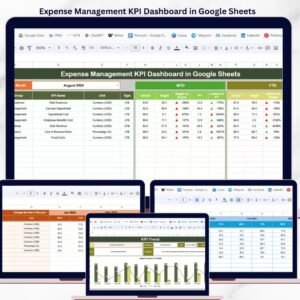
📌 Expense Management KPI Dashboard in Google Sheets — MTD/YTD expense KPI tracking with trend charts. $8.99
📌 Weekly Expense Tracker in Excel — Same weekly tracking experience for Microsoft Excel users. Free
📌 Browse all Google Sheets Tracker Templates
📖 Click here to read the Detailed Blog Post
🎥 Visit our YouTube channel for step-by-step video tutorials
👉 YouTube.com/@NextGenTemplates