
Managing personal finances effectively has become more important than ever. People often earn income from multiple sources and spend money on rent, utilities, groceries, transportation, entertainment, and other lifestyle expenses. However, without a structured budgeting system, it becomes difficult to understand where money is going each month.
Many individuals still manage their finances mentally or through scattered notes and receipts. As a result, overspending becomes common, savings decrease, and financial goals remain difficult to achieve.
That is where the Monthly Budget Plan Template in Google Sheets becomes extremely helpful.
This ready-to-use budgeting template helps individuals track income, monitor expenses, and analyze spending habits in a structured way. Instead of guessing where your money goes, the template provides a clear financial overview that compares planned budgets with actual spending.
Because Google Sheets works in the cloud, users can access and update their financial data anytime and from any device.
If you want a simple yet powerful tool to organize your personal finances, this monthly budget planner offers the perfect solution.
💰 Key Feature of Monthly Budget Plan Template in Google Sheets
This budgeting template includes several features that make personal financial planning simple and effective.
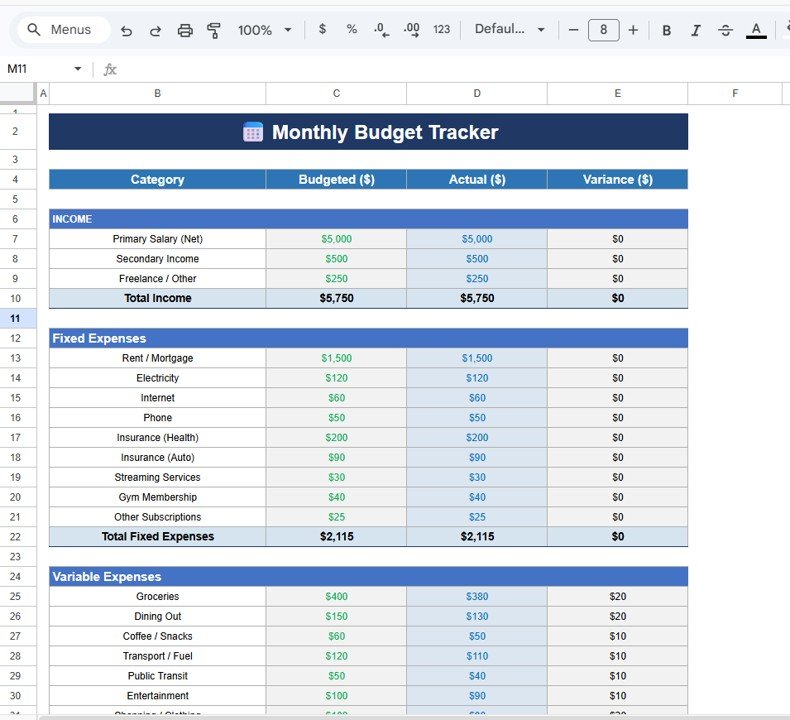
📊 Monthly Income Tracking – Record multiple income sources and calculate total monthly income automatically.
📋 Fixed Expense Planning – Track recurring expenses such as rent, utilities, insurance, and subscriptions.
🛒 Variable Expense Budgeting – Set spending limits for categories like groceries, transportation, entertainment, and shopping.
📈 Budget vs Actual Comparison – Compare planned budgets with actual spending to identify overspending.
📊 Automatic Variance Calculation – Instantly see whether you are under budget or over budget.
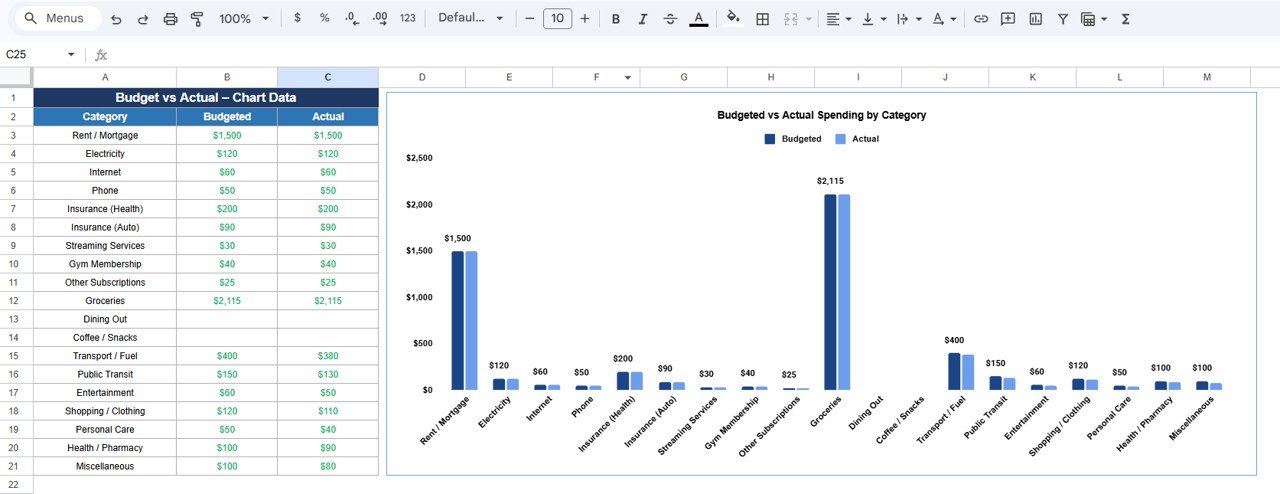
📉 Visual Budget vs Actual Charts – Identify spending patterns using visual charts.
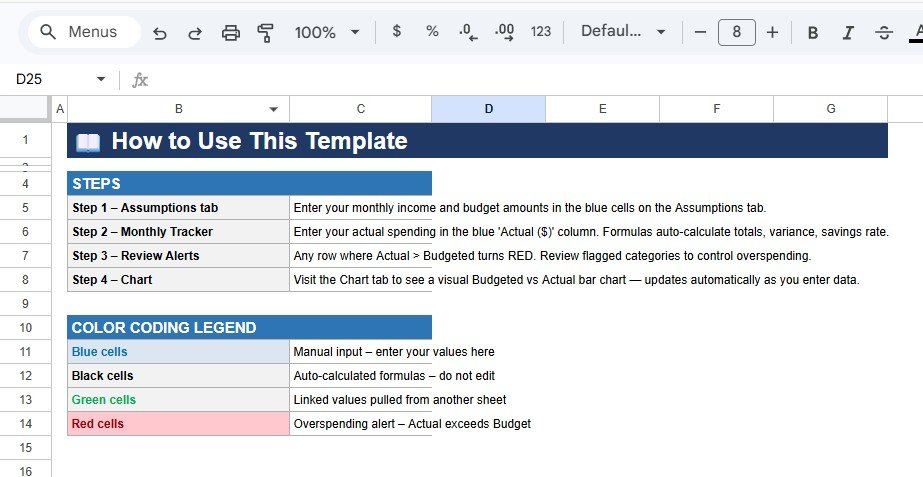
🎨 Color-Coded Financial Alerts – Easily recognize manual inputs, formulas, and overspending alerts.
☁️ Cloud-Based Access – Manage your budget from any device using Google Sheets.
🔄 Automated Calculations – Built-in formulas automatically update totals and performance indicators.
Because of these features, individuals gain better control over their finances and spending habits.
📦 What’s Inside the Monthly Budget Plan Template in Google Sheets
This template includes structured sheets designed to help users plan and track their monthly finances.
Inside the template you will find:
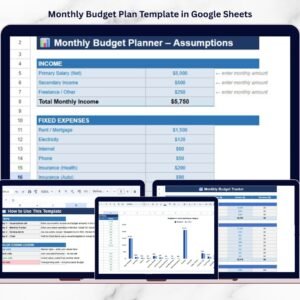
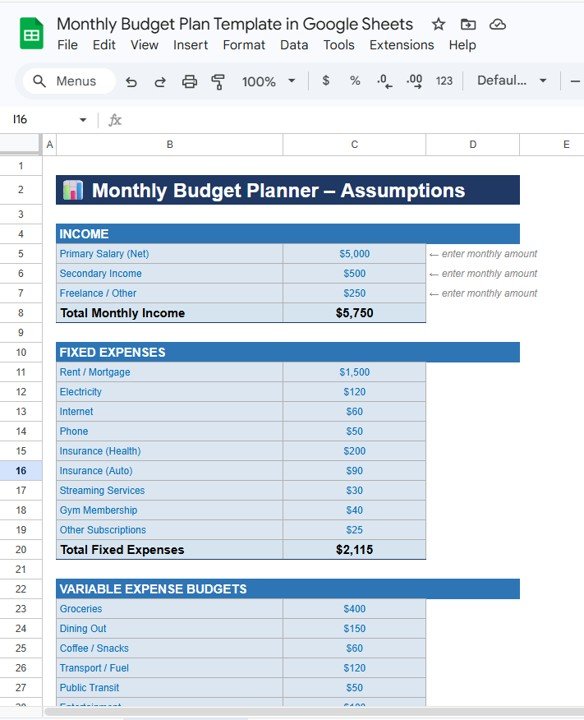
✅ Assumptions Sheet – Enter expected income and planned expenses
✅ Monthly Budget Tracker Sheet – Record actual spending and track budget performance
✅ Budget vs Actual Chart Sheet – Visualize spending patterns using charts
The template organizes financial information into categories such as:
Primary Salary
Secondary Income
Freelance Income
Fixed Expenses:
Rent or Mortgage
Utilities
Insurance
Subscriptions
Variable Expenses:
Groceries
Dining Out
Transportation
Shopping
Entertainment
Health and Personal Care
Because the template automatically calculates totals and variances, users can easily monitor financial performance.
⚙️ How to Use the Monthly Budget Plan Template in Google Sheets
Using this budget planner is very simple.
1️⃣ Enter your expected income sources in the Assumptions Sheet.
2️⃣ Define monthly budgets for fixed and variable expenses.
3️⃣ Record actual spending in the Monthly Budget Tracker Sheet.
4️⃣ Review the Variance column to see whether spending is above or below budget.
5️⃣ Analyze spending trends using the Budget vs Actual chart.
Within seconds, users can see a clear picture of their monthly financial performance.
Because the template uses automated calculations and visual indicators, budgeting becomes much easier and more organized.
👥 Who Can Benefit from This Monthly Budget Plan Template
This budgeting template is designed for individuals who want better control over their finances.
It is especially useful for:
👨💼 Working Professionals
🎓 Students
👨👩👧 Families
💻 Freelancers
📊 Personal Finance Enthusiasts
🏡 Household Budget Managers
Because the template runs in Google Sheets, users can access and update their financial records anytime.
💡 Why People Use This Monthly Budget Planner
✔ Clear overview of income and expenses
✔ Better control over monthly spending
✔ Easy tracking of financial habits
✔ Identification of overspending categories
✔ Improved financial planning and savings
✔ Automated calculations and variance analysis
✔ Simple and beginner-friendly budgeting system
✔ Accessible anywhere using Google Sheets
Instead of managing finances through scattered notes or memory, users gain a structured budgeting system that helps improve financial discipline.
This template converts financial data into actionable insights that help individuals make smarter financial decisions.
### Click here to read the Detailed blog post
Watch the step-by-step video tutorial:
Visit our YouTube channel to learn step-by-step video tutorials
Youtube.com/@NeotechNavigators
Compatibility and Requirements
- Works in Google Sheets. You need a free Google account and a web browser.
- The template has three sheets: Assumptions, Monthly Budget Tracker and Budget vs Actual Chart. Google explains how charts work in Add and edit a chart or graph.
Frequently Asked Questions
Which sheets are included?
Three sheets: Assumptions, Monthly Budget Tracker and Budget vs Actual Chart.
Where do I enter my income and planned budget?
Enter your expected income sources and your planned fixed and variable expenses on the Assumptions sheet.
How do I know if I am over budget?
Record your actual spending on the Monthly Budget Tracker sheet. The Variance column shows whether each category is above or below budget, and the template uses color to flag overspending.
Which expense categories are covered?
Fixed expenses include rent or mortgage, utilities, insurance and subscriptions. Variable expenses include groceries, dining out, transportation, shopping, entertainment, and health and personal care. Income categories are primary salary, secondary income and freelance income.
Is there an Excel version?
Yes. See the Monthly Budget Planner Template in Excel.
Related Budget Templates
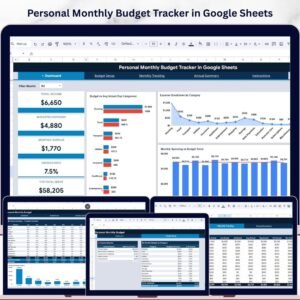
- Personal Monthly Budget Tracker in Google Sheets: another monthly budget tracker in Google Sheets
- Monthly Budget Planner Template in Excel: the Excel edition
- Budget Calculator in Google Sheets: a free budget calculator
- Monthly Budget Checklist in Google Sheets: a checklist for your monthly budget routine
- Google Sheets Starter Pack: 12 Google Sheets templates in one download
Browse all Google Sheets financial tools and Google Sheets trackers.