



Shared Expense Splitter Tracker in Google Sheets gives roommates, couples, travel groups, event organizers, and small teams a cleaner way to track shared costs, who paid, who still owes, and whether each expense is settled. In one editable file, buyers get 2 key sheet tabs, 1 headline unsettled-balance card, 4 dashboard charts, and 4 dropdown-list sections for cleaner entries. Built by PK for a 300K+ spreadsheet learning audience, this tracker is a one-time $6.99 template with no recurring app subscription and no bank-login requirement.
Key Features of Shared Expense Splitter Tracker in Google Sheets
- Total Unsettled Balance card: See the open amount still needing settlement across the selected records.
- Overview dashboard: Review shared expense activity with cards, slicers, charts, and filtered analysis in one sheet.
- Four chart views: Analyze spending by category, settled status, person, and month.
- Dropdown Lists sheet: Maintain category, settled status, person, and split type options in one controlled area.
- Google Sheets sharing: Use your own Drive copy and share access with roommates, partners, clients, or group members.
- Manual-entry privacy: Track group expenses without connecting payment accounts to a third-party app.
- Editable structure: Rename dropdown values, categories, people, and split methods as your group changes.
What’s Inside the Shared Expense Splitter Tracker in Google Sheets
1 – Overview Page
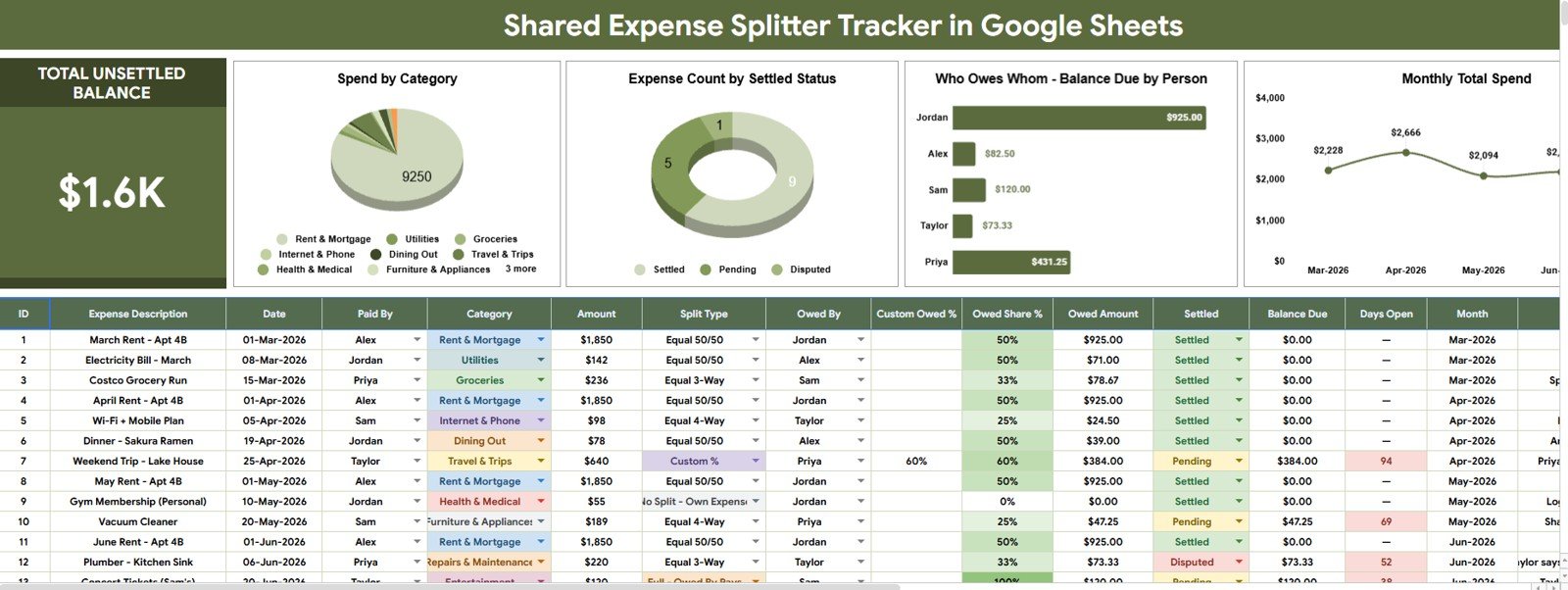
The Overview Page is the main reporting sheet. At the top, the Total Unsettled Balance card shows the high-level amount that has not yet been settled, so users can quickly see whether the group is fully caught up or still has balances to clear.
The page also includes multiple slicers for fast filtering. Users can narrow the dashboard by person, category, settled status, split type, month, or other available fields without rebuilding formulas.
Spend by Category: This chart groups shared spending by category, such as rent, groceries, travel, utilities, meals, supplies, or custom categories. It helps the group understand where most shared money is going before discussing reimbursement.
Expense Count by Settled Status: This chart counts expenses by payment or settlement status. It helps users separate settled records from pending or unsettled items so follow-up conversations are based on clear records.
Balance Due by Person: This chart shows how much is due by each person. It is useful for roommate groups, couples, travel groups, and event teams that need a quick person-by-person balance view.
Monthly Total Spend by Month: This chart tracks shared spending month by month. It helps users spot higher-cost months, seasonal spending, trip periods, or recurring group costs.
2 – Dropdown Lists
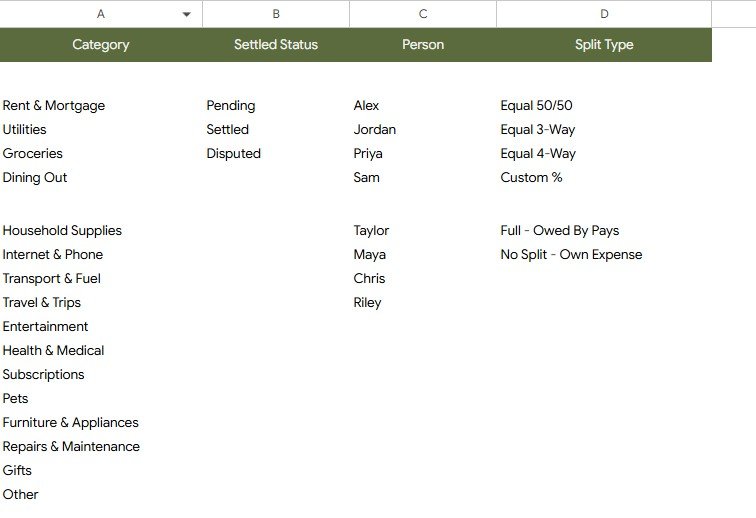
The Dropdown Lists sheet keeps the tracker consistent. Instead of typing the same category, status, person, or split method in different ways, users can maintain clean list options and use them across the tracker.
Category Options by Expense Type: This list controls the category values used for expense entries. Clean category names make the Spend by Category chart easier to read.
Settled Status Options by Payment Status: This list standardizes settlement labels such as Settled, Pending, Unsettled, or custom statuses. Consistent status values make the settled-status chart more reliable.
Person Options by Group Member: This list stores the people involved in the expense split. It helps avoid duplicate labels for the same person and keeps balance reporting cleaner.
Split Type Options by Sharing Method: This list controls how expenses are grouped by split method, such as equal split, custom split, paid by one person, or reimbursement-related labels.
Shared Expense Splitter Tracker in Google Sheets vs. Microsoft Excel Tracker vs. Paid Expense App – Where This Fits
| Feature | This Google Sheets tracker | Microsoft Excel tracker | Paid expense app |
|---|---|---|---|
| Cost | $6.99 one-time sale price | Template cost plus possible Microsoft license | Often monthly, annual, or feature-gated |
| Platform | Google Sheets in Drive | Excel desktop or web | Vendor-hosted web or mobile app |
| Setup time | Copy the file, update lists, enter expenses | Download and customize workbook | Create account, invite users, configure groups |
| Real-time team collaboration | Native Google sharing | Depends on OneDrive or SharePoint | Usually account-based |
| Mobile access | Google Sheets app or browser | Excel app or browser | Usually included |
| Customizable fields | Edit people, categories, statuses, split types, and labels | Editable if workbook is unlocked | Limited by app settings |
| Share with link | Yes, with Drive permissions | Yes, with Microsoft cloud sharing | Usually login-based |
| Year-1 cost at 5 users | $6.99 before any Google Workspace cost | Template plus licensing cost | Can rise with paid plans |
| Unsettled balance view | Included as a headline dashboard card | Must be built or customized | Depends on app plan and workflow |
Who This Template Is For – and Who It’s Not For
This tracker is for roommates, friends planning a trip, couples sharing bills, small event teams, clubs, coworking groups, student houses, and families that want a practical shared expense record in Google Sheets.
It is not a bank-sync tool, payment processor, accounting system, tax system, or legal settlement record. If your group needs automated bank feeds, regulated bookkeeping, invoice payments, or audit controls, use specialist software alongside this tracker.
How to Use the Shared Expense Splitter Tracker in Google Sheets
- Open the included guide after purchase and create your own editable Google Sheets copy.
- Update the Dropdown Lists sheet with your people, categories, settled statuses, and split types.
- Enter each shared expense with the payer, category, amount, date, person, split type, and settlement status.
- Open the Overview Page to review Total Unsettled Balance and the four dashboard charts.
- Use slicers during group check-ins to filter by person, status, category, or month.
- Mark expenses as settled when reimbursements are completed.
Real-World Use Cases
Maya, a roommate house manager, tracks rent add-ons, utilities, groceries, and shared supplies so each person can see what is still unsettled.
Daniel, a travel planner, records hotels, meals, cabs, tickets, and group purchases during a trip, then filters the dashboard by person after the trip ends.
Priya, an event coordinator, tracks shared vendor deposits, supplies, and reimbursements so the team can clear balances after the event.
Frequently Asked Questions
What does the Total Unsettled Balance card show?
It shows the open balance that has not yet been settled based on the tracker records and selected filters.
Can I customize the categories and people?
Yes. The Dropdown Lists sheet lets you edit category options, person names, settled statuses, and split type values.
Does this template split expenses automatically?
The tracker is designed to organize shared expenses, balances, people, categories, and settlement status in Google Sheets. Review the included sheet logic and adjust split assumptions to match your group’s rules.
Can multiple people use the same file?
Yes. After copying the file to Google Drive, you can share it with viewers, commenters, or editors using Google Sheets permissions.
Does it connect to payment apps or bank accounts?
No. It is a manual-entry tracker, which keeps setup simple and avoids requiring payment account access.
Is this a subscription product?
No. It is a one-time Google Sheets template purchase from NextGenTemplates.
About the Author
Built by PK – Microsoft Certified Professional with 15+ years of Excel, Google Sheets, and Power BI experience. Founder of NextGenTemplates, reaching 300K+ subscribers across YouTube channels. Every template is hand-built and tested before release.
Explore Related Templates
- Personal Cash Flow Tracker in Google Sheets
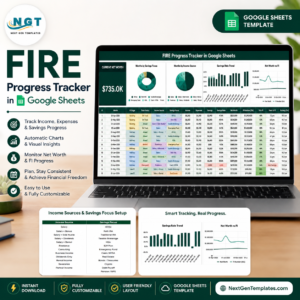
- FIRE Progress Tracker in Google Sheets
- Retirement Savings Tracker in Google Sheets
- Loan EMI Repayment Tracker in Google Sheets
- Mutual Fund and SIP Tracker in Google Sheets
Browse more Google Sheets templates, Google Sheets tracker templates, and Google Sheets financial tools.
Download the Shared Expense Splitter Tracker in Google Sheets when you want a simple shared expense dashboard for unsettled balances, categories, people, statuses, split types, and monthly spending.
Watch the step-by-step video Demo:
Last updated: July 28, 2026.
Compatibility and Requirements
- Works in Google Sheets. You need a free Google account and a web browser.
- You pick categories, settled statuses, people and split types from dropdown lists on the Dropdown Lists sheet. Google explains dropdowns in Create an in-cell dropdown list.
More Questions About This Template
Which sheets are included?
Two sheets: the Overview Page and the Dropdown Lists sheet. The Overview Page has the Total Unsettled Balance card, slicers and four charts. The Dropdown Lists sheet holds the category, settled status, person and split type options.
Which charts are on the Overview Page?
Spend by Category, Expense Count by Settled Status, Balance Due by Person and Monthly Total Spend by Month.
Can I filter the dashboard by person or month?
Yes. The Overview Page has slicers, so you can narrow the cards and charts by person, category, settled status, split type or month.
Is there an Excel version for tracking shared costs?
This template is built for Google Sheets. For a similar Google Sheets layout, see the Expense Allocation Tracker in Google Sheets. For Excel, see the Expense Allocation Tracker in Excel.
Related Expense Templates
- Expense Allocation Tracker in Google Sheets: split costs across categories or groups
- Expense Report and Tracker in Google Sheets: log and report individual expenses
- Income and Expense Dashboard in Google Sheets: income and spending in one dashboard
- Expense Allocation Tracker in Excel: the Excel option for allocating costs
- Expense Reimbursement Tracker in Google Sheets: follow reimbursements until they are paid
Browse all Google Sheets trackers and Google Sheets financial tools.





















Reviews
There are no reviews yet.