

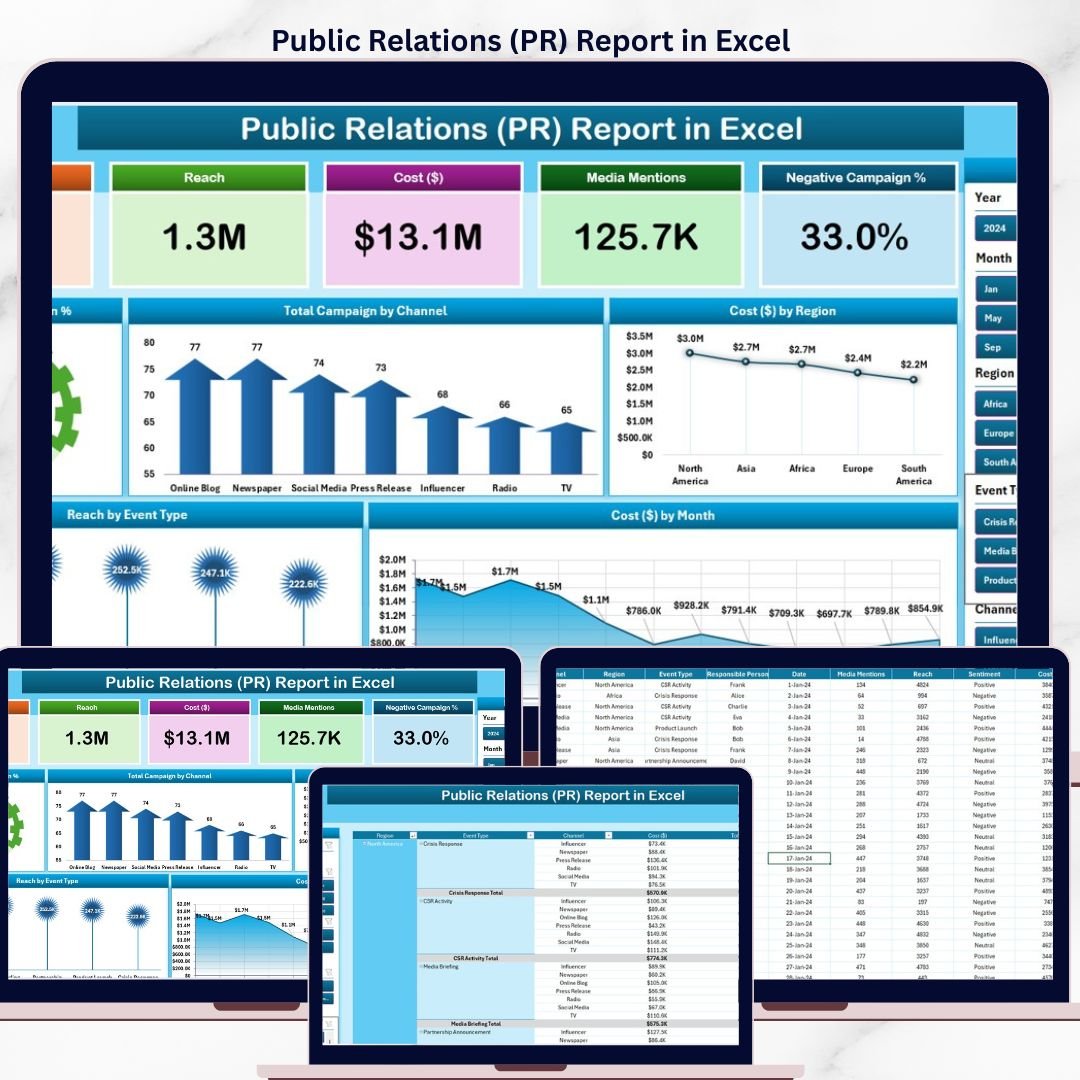

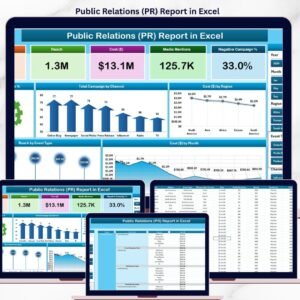
The Public Relations (PR) Report in Excel tracks 5 core PR KPIs across 4 structured sheets, with 5 interactive charts covering Positive Campaign %, channel mix, regional cost, event-type distribution, and monthly spend. Setup takes under 10 minutes — paste your campaign data into the Data sheet, click Refresh All, and every card, chart, and slicer updates automatically through pivot tables.
🌍 Join 8,400+ teams in 40+ countries using NextGenTemplates to replace paid SaaS tools with one-time-purchase Excel, Google Sheets, Power BI, and HTML templates.
✅ Instant download · One-time payment · No subscription · No per-user fees · Lifetime access
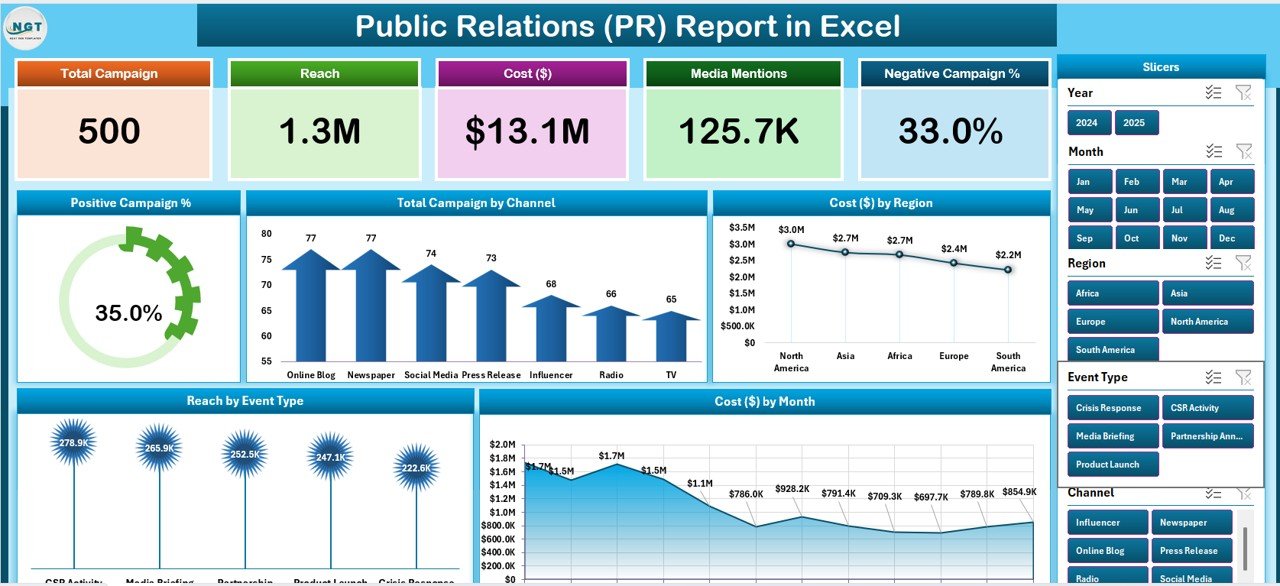
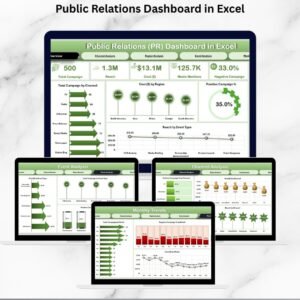
Public Relations (PR) Report in Excel — Summary Page
🔑 Key Features of the Public Relations (PR) Report
🔹 Five-KPI Summary Page – The top of the Summary Page shows 5 card-style KPIs giving PR leads an instant view of campaign performance, while a right-side slicer panel filters the entire report by channel, region, event type, or month.
🔹 Positive Campaign % Tracking – A dedicated chart visualises the share of campaigns that landed positive coverage versus neutral or negative mentions, so PR managers can prove sentiment ROI to leadership without buying a $500/month media-monitoring tool.
🔹 Total Campaign by Channel – Compare campaign volume across Press Release, Media Pitch, Press Conference, Influencer, Social Media, and Podcast Tour channels. Use it to rebalance effort toward the channels that actually generate placements.
🔹 Cost by Region – Groups total PR spend by region (North America, EMEA, APAC, LATAM) so global comms teams can spot under-funded markets and over-spending without exporting CSVs.
🔹 Region by Event Type – A breakdown of how event types (Product Launch, Crisis Response, Awards, Trade Show, Sponsorship) distribute across regions — useful for board reporting and quarterly PR strategy reviews.
🔹 Cost by Month – A 12-month trend view of total PR spend, useful for cash-flow forecasting, identifying budget creep, and measuring the cost-per-placement of seasonal campaigns.
🔹 Detailed Report Page with Information Table – A separate Report Page includes a left-side slicer and a campaign-level table — useful for exporting filtered campaign lists, preparing client deliverables, or building monthly PR retainers reports.
🔹 100% Pivot-Table Driven – The Support sheet holds every pivot table that feeds the dashboard. Update one cell in the Data sheet, hit Refresh All, and every card, chart, and slicer updates automatically — no formula edits required.
🔹 Works offline on Windows and Mac Excel – No internet, no cloud, no subscription. Embargoed press releases and unannounced campaign data never leave your machine.
📦 What’s Inside the Public Relations (PR) Report
The file includes 4 Excel sheets, each with a specific purpose in the PR reporting workflow.
1. Summary Page — The main dashboard view. At the top, 5 KPI cards display headline metrics at a glance. The right-side slicer panel filters the entire page by channel, region, event type, and month. Five charts cover the core analytical questions: Positive Campaign %, Total Campaign by Channel, Cost by Region, Region by Event Type, and Cost by Month.
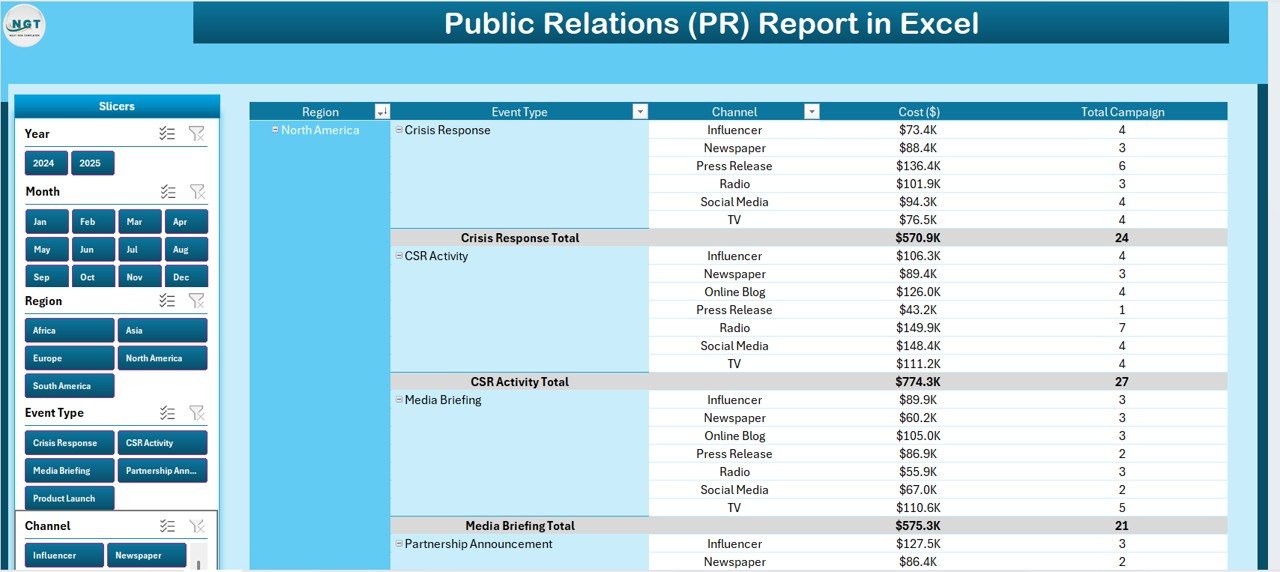
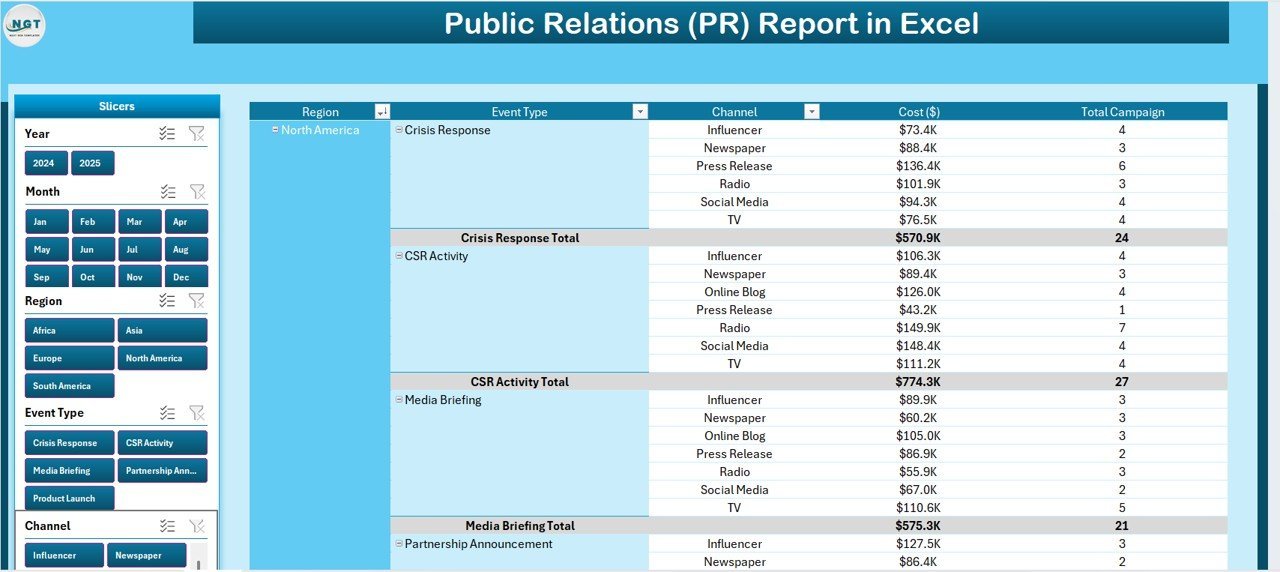
Report Page with left-side slicer and information table
2. Report Page — A left-side slicer drives a detailed information table with campaign-level records. Use this page to pull filtered campaign lists for client reporting, agency retainers, or PR audit packets.
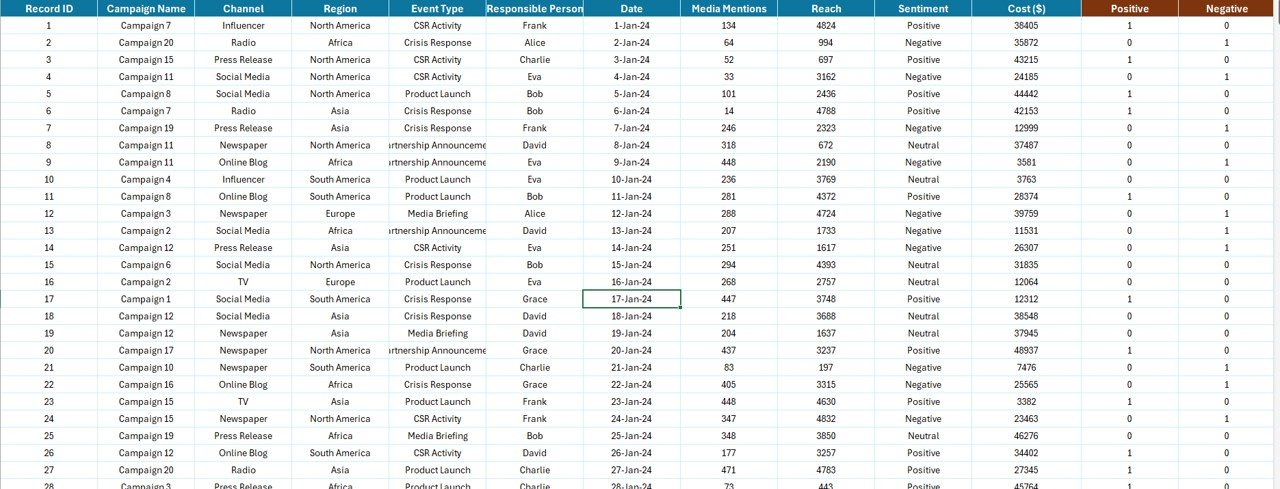
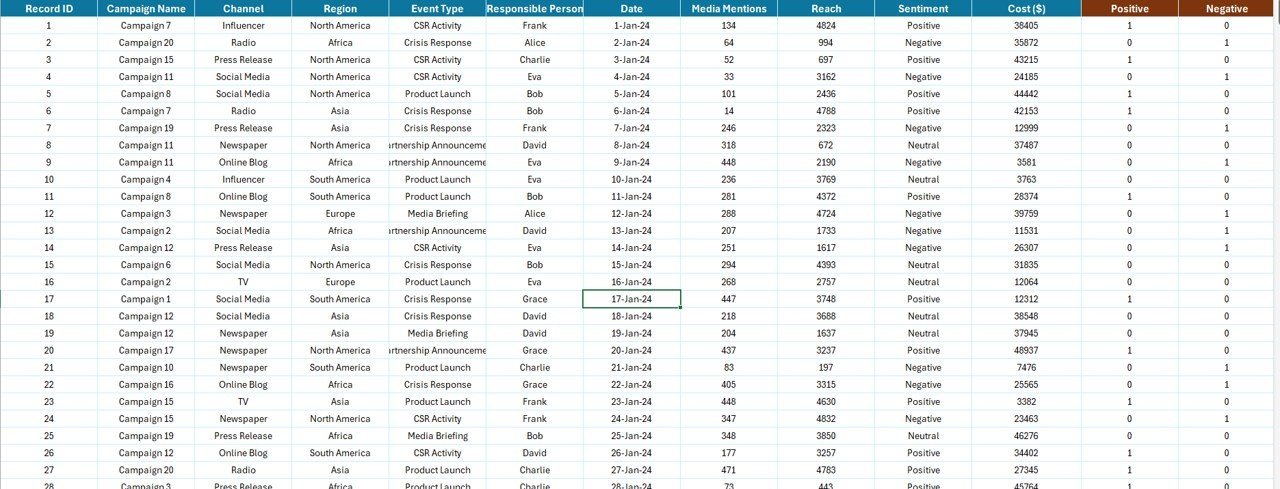
Data Sheet — replace sample campaign data here
3. Data Sheet — The raw input sheet. Paste your campaign-level data into the same column structure (Campaign ID, Date, Channel, Region, Event Type, Cost, Sentiment, Reach, Placements). Keep the headers identical — the pivot tables depend on them.
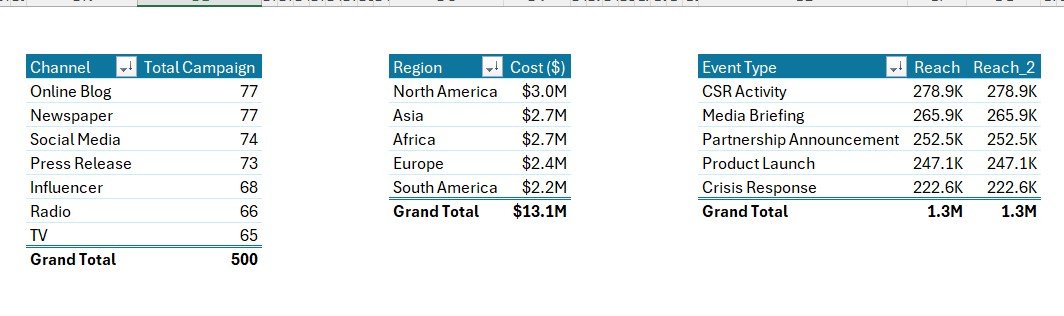
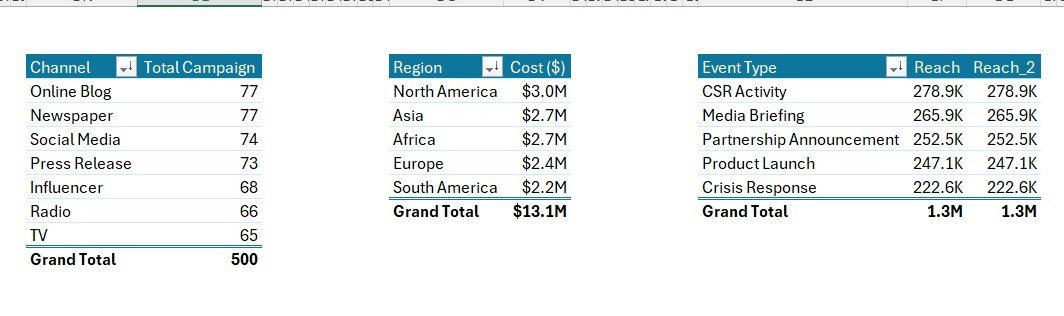
Support Sheet with pivot tables driving every chart
4. Support Sheet — Holds every pivot table that feeds the Summary Page charts and KPI cards. After updating the Data sheet, click Data → Refresh All in the Excel ribbon and every pivot recalculates. Keep this sheet hidden in production — your team only needs to see the Summary Page and Report Page.
📊 Public Relations (PR) Report in Excel vs. Google Sheets Equivalent vs. Cision / Meltwater — Where This Fits
| Feature | Public Relations (PR) Report in Excel | Google Sheets equivalent | Cision / Meltwater |
|---|---|---|---|
| Cost | $7.99 one-time | ~$10 one-time template | $7,000–$24,000 / year |
| Platform | Microsoft Excel (desktop) | Google Sheets (browser) | Web SaaS |
| Works offline | ✅ Yes | ❌ Requires internet | ❌ Requires internet |
| Setup time | Under 10 minutes | ~15 minutes | 2–4 weeks onboarding |
| Customizable KPIs & charts | ✅ Fully editable | ✅ Editable | ❌ Fixed reports |
| Per-user licence fees | None — share freely | None | $500+ per seat / month |
| Embargoed data stays local | ✅ Yes | ❌ Cloud (Google servers) | ❌ Vendor cloud |
| Year-1 cost at 5 PR users | $7.99 | ~$10 | $7,000 – $24,000+ |
| Channel & region breakdown | ✅ Pre-built | Needs rebuild | ✅ Pre-built |
For comms teams that want channel, region, and sentiment visibility without paying $7,000+ per year in media-monitoring fees, the Public Relations (PR) Report in Excel sits in the sweet spot.
👥 Who This Template Is For — and Who It’s Not For
✅ This template is built for:
- Solo PR consultants and freelancers reporting to 3–10 clients on a retainer
- In-house PR managers at companies of 50–500 employees who need monthly board reports
- Boutique PR agencies (3–20 staff) running multi-region campaigns without an enterprise SaaS budget
- Comms teams reconciling campaign cost against placements and sentiment for quarterly reviews
- Marketing managers who own PR as one channel and want a clean cost-per-region view
❌ This template is NOT for:
- Global enterprise comms teams needing real-time media monitoring across 100+ outlets and AI sentiment scoring
- Teams needing automatic press-clip ingestion, journalist databases, or distribution wires (use Cision or Meltwater)
- Anyone without a basic Microsoft Excel licence — grab the Google Sheets version of our PR Outreach Calendar instead
⚙️ How to Use the Public Relations (PR) Report
- Download and open the .xlsx file in Microsoft Excel 2016 or later, on Windows or Mac.
- Go to the Data sheet and replace the sample rows with your campaign-level data. Keep all column headers identical.
- Click Data → Refresh All in the Excel ribbon. Every pivot table in the Support sheet recalculates.
- Open the Summary Page. All 5 KPI cards and 5 charts now reflect your data. Use the right-side slicer to filter by channel, region, event type, or month.
- Switch to the Report Page to pull filtered campaign-level views for client decks, retainer reports, or PR audits.
- Hide the Support sheet before sharing the file with clients — they only need to see the Summary and Report pages.
💼 Real-World Use Cases
Anika runs a 6-person boutique PR agency in London. She uses the Public Relations (PR) Report each month to show 8 retainer clients exactly which campaigns generated positive coverage, broken down by channel and region. The Cost by Region chart helped her spot that EMEA campaigns delivered 2x the placements per dollar versus North America — she shifted budget and grew agency margin by roughly 14% in one quarter.
Marcus is the in-house Head of Comms at a 200-person SaaS company in Austin. He uses the Region by Event Type chart to plan the next quarter’s product-launch and trade-show calendar, and the Positive Campaign % chart to brief the CEO before every board meeting. He saved roughly $14,000 in his first year by replacing his Cision seat with this $7.99 template — without losing any reporting fidelity.
Sara is a solo PR consultant managing 4 startup clients from Toronto. She needs clean monthly reports for client decks but can’t justify enterprise media-monitoring software. The Public Relations (PR) Report gives her the Cost by Month and Channel mix charts she needs, runs entirely offline on her MacBook, and cost her $7.99 once.
❓ Frequently Asked Questions
What KPIs does the Public Relations (PR) Report in Excel track?
The Public Relations (PR) Report tracks 5 headline KPIs on the Summary Page — shown as card visuals — plus 5 interactive charts covering Positive Campaign %, Total Campaign by Channel, Cost by Region, Region by Event Type, and Cost by Month. All metrics auto-update when you refresh the pivot tables.
How does this compare to Cision or Meltwater?
Cision and Meltwater charge $7,000–$24,000 per year per seat for full media-monitoring suites. The Public Relations (PR) Report in Excel is a $7.99 one-time purchase with no per-user fees, works offline, and keeps embargoed campaign data on your device rather than in a vendor cloud — though it does not replace real-time media monitoring or journalist databases.
How long does setup take?
Setup takes under 10 minutes. Open the .xlsx file, paste your campaign-level data into the Data sheet (keep the column headers identical), then click Data → Refresh All. Every card, chart, and slicer on the Summary Page updates automatically. No formulas to edit.
Does this template work on Mac Excel?
Yes. The Public Relations (PR) Report in Excel is built entirely with pivot tables and slicers — no VBA, no macros — so it runs identically on Windows Excel and Mac Excel 2016 or later. No internet connection is required.
Can I add my own channels, regions, or event types?
Yes. Add new channels, regions, event types, or sentiment categories to the Data sheet. After adding rows, click Data → Refresh All in the ribbon and every pivot table on the Support sheet picks up the new categories and updates the Summary Page charts automatically.
Is embargoed campaign data safe with this template?
Data stays on your device. The Public Relations (PR) Report in Excel doesn’t connect to any cloud service, API, or external database — useful when handling embargoed press releases or unannounced campaign briefs. For full enterprise security you’ll still want to encrypt the file and control access.
Can I share the report with clients?
Yes. Email the .xlsx file or share it via OneDrive, Dropbox, or SharePoint. There’s no per-user licence — clients and account managers can open and filter the report freely with any Microsoft Excel installation.
👤 About the Author
Built by PK — Microsoft Certified Professional with 15+ years of Excel, Google Sheets, and Power BI experience. Founder of NextGenTemplates, reaching 300K+ subscribers across YouTube channels (@PK-AnExcelExpert, @NextGenTemplates, @NeoTechNavigators). Every template is hand-built and tested before release.
🔗 Explore Related Templates
🔹 Public Relations KPI Scorecard in Excel — The traffic-light scorecard sibling of this report, with red/amber/green status against monthly PR targets.
🔹 Corporate Communications Dashboard in Power BI — The enterprise Power BI version for larger comms teams that want interactive drill-downs.
🔹 Public Relations (PR) Outreach Calendar in Google Sheets — Plan your media outreach 12 weeks ahead with this Google Sheets calendar.
🔹 Administration Report in Excel — Same Excel report format applied to admin operations metrics.
Also browse all our Excel Reports for more industry-specific reporting templates.
📖 Click here to read the Detailed Blog Post
🎥 Visit our YouTube channel for step-by-step video tutorials
👉 YouTube.com/@NextGenTemplates
📅 Last updated: April 2026
Watch the step-by-step video tutorial:









Reviews
There are no reviews yet.