

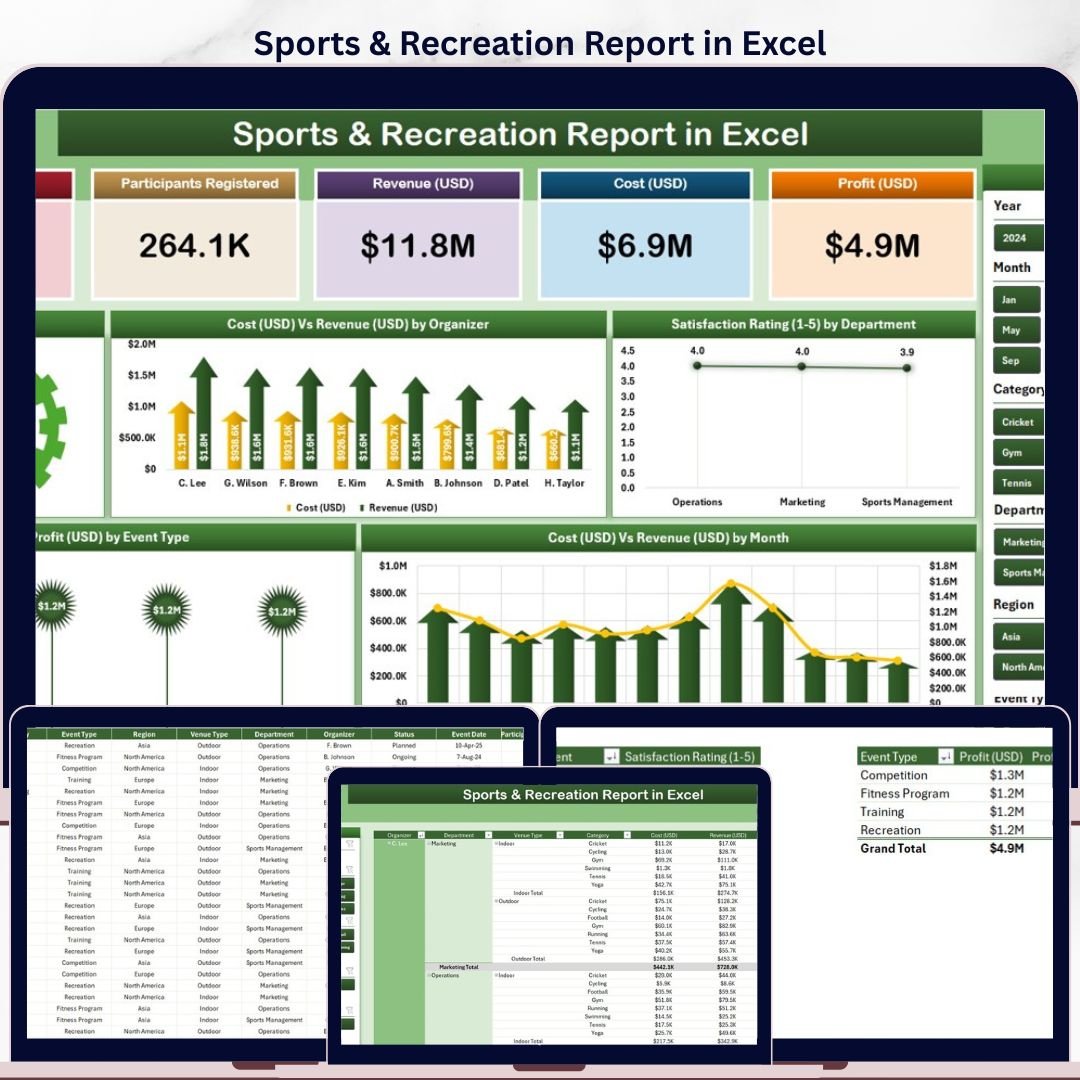
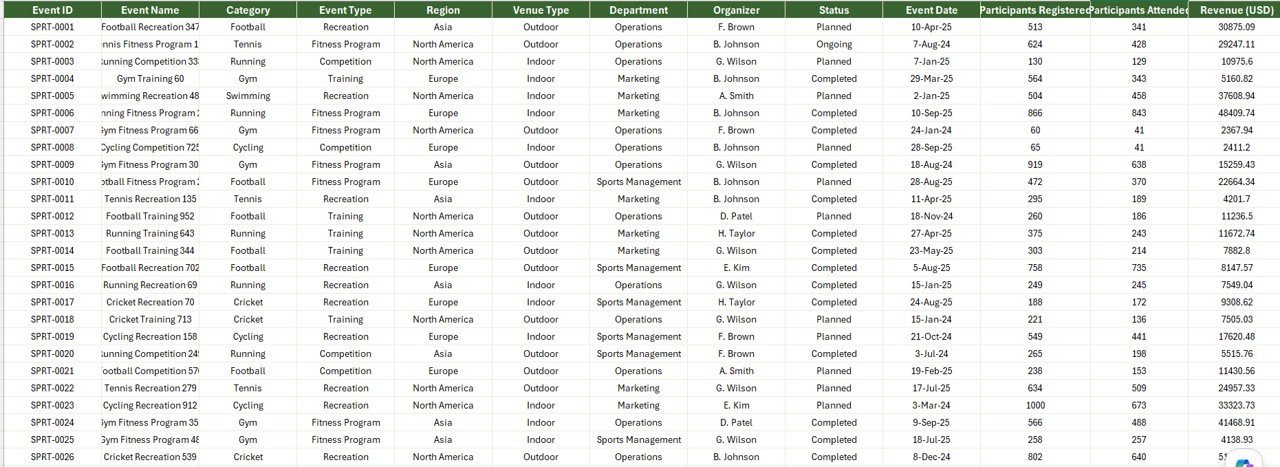
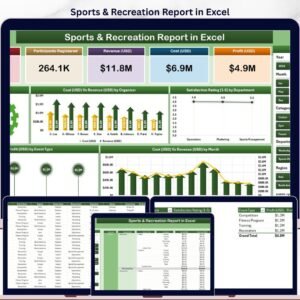
The Sports & Recreation Report in Excel tracks 5 core KPIs across 4 structured sheets, with 5 interactive charts covering profit margin, cost vs revenue by organizer, satisfaction rating by department, profit by event type, and monthly cost vs revenue trends. Setup takes under 10 minutes — replace the sample data and every chart, card, and slicer refreshes automatically through pivot tables. ⚡
🌍 Join 8,400+ teams in 40+ countries using NextGenTemplates Excel reports to replace paid sports management SaaS tools with one-time-purchase Excel, Google Sheets, Power BI, and HTML templates.
✅ Instant download · One-time payment · No subscription · No per-user fees · Lifetime access
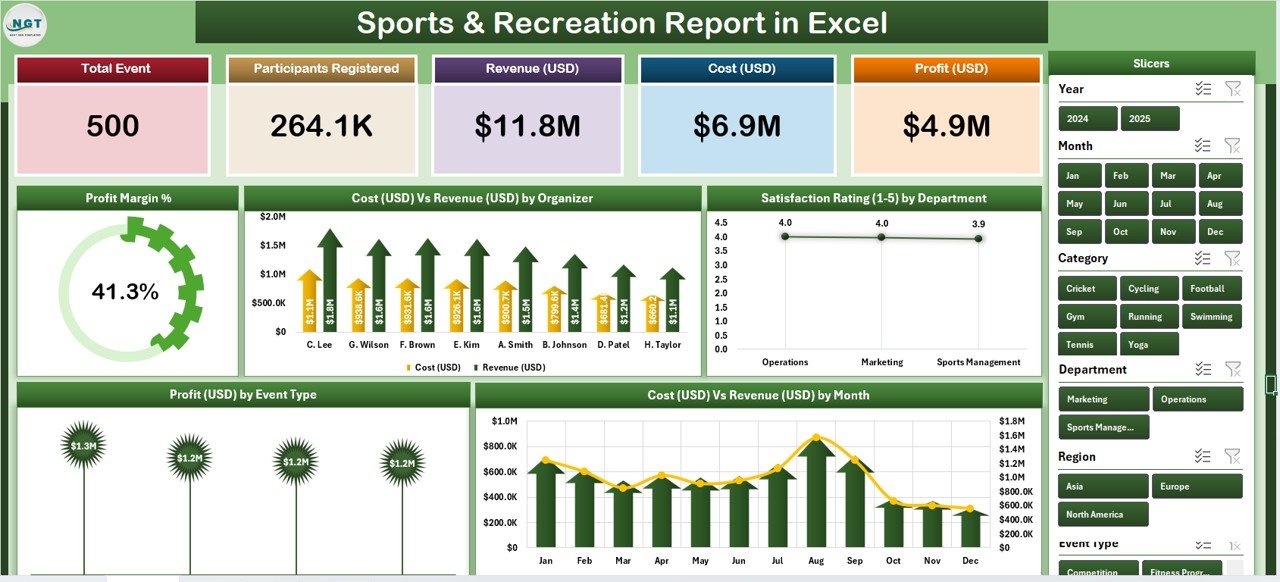
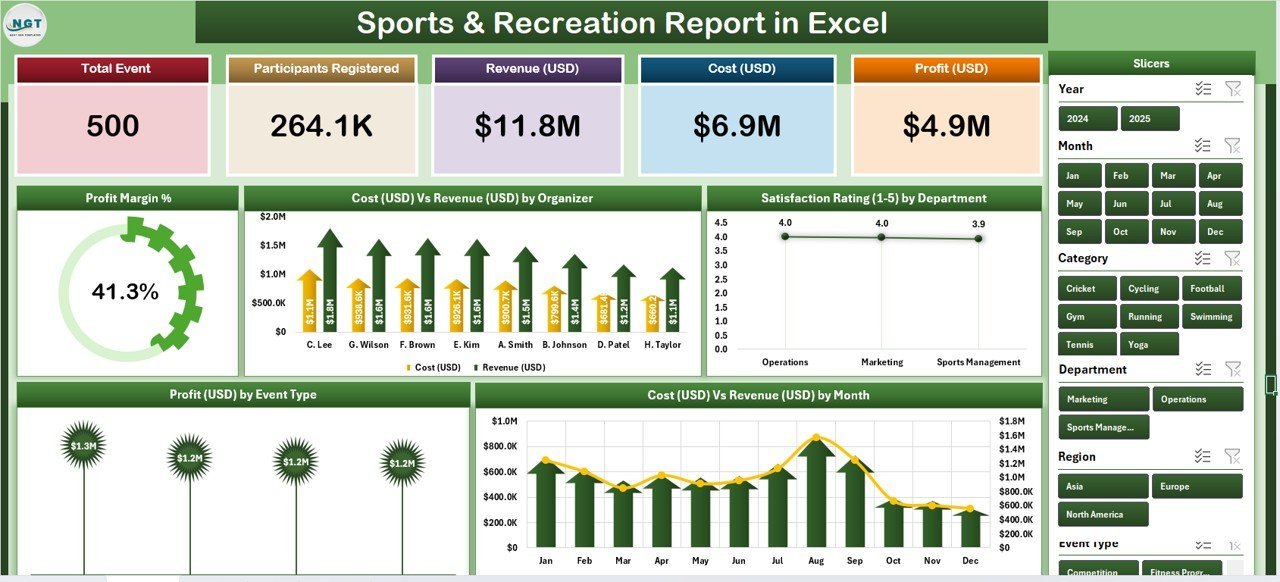
Sports & Recreation Report in Excel — Summary Page
🔑 Key Features of the Sports & Recreation Report
This report gives sports club managers, recreation directors, fitness studio owners, and event finance teams a single Excel file for tracking event profitability, organizer cost-revenue ratios, departmental satisfaction, and monthly financial trends — without paying $150 to $400 per facility per month for club management SaaS.
🔹 Five-KPI Summary Page – The top of the Summary Page displays 5 card-style KPIs giving leadership an instant snapshot of sports and recreation performance. A right-side slicer panel lets you filter the entire report by event type, organizer, department, or time period.
🔹 Profit Margin % chart – A headline visual showing the overall profitability of your sports programs. Recreation directors use this to spot loss-making events before they erode the quarterly budget.
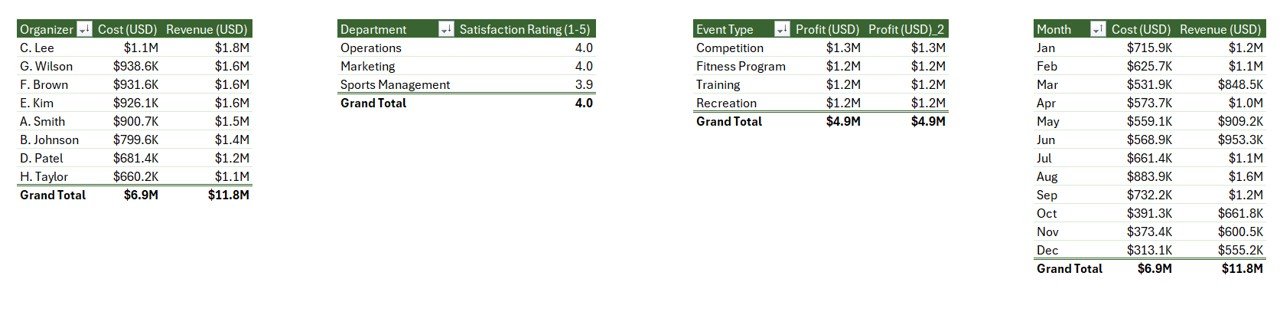
🔹 Cost Vs Revenue by Organizer – Breaks down financial performance across every event organizer side by side, so program managers see exactly which organizers run profitable events and which need pricing or expense reviews.
🔹 Satisfaction Rating by Department – Tracks member and participant satisfaction across departments (Aquatics, Fitness, Youth Programs, Adult Leagues, Tournaments, etc.) — a leading indicator of renewal and word-of-mouth growth.
🔹 Profit by Event Type – Groups net profit by event type (Tournaments, Leagues, Camps, Clinics, Special Events) so club owners know exactly which formats pay for themselves and which need a pricing review.
🔹 Cost Vs Revenue by Month – A 12-month trend view of total event cost against total revenue, useful for cash-flow forecasting, spotting seasonal dips, and measuring the ROI of marketing campaigns or new program launches.
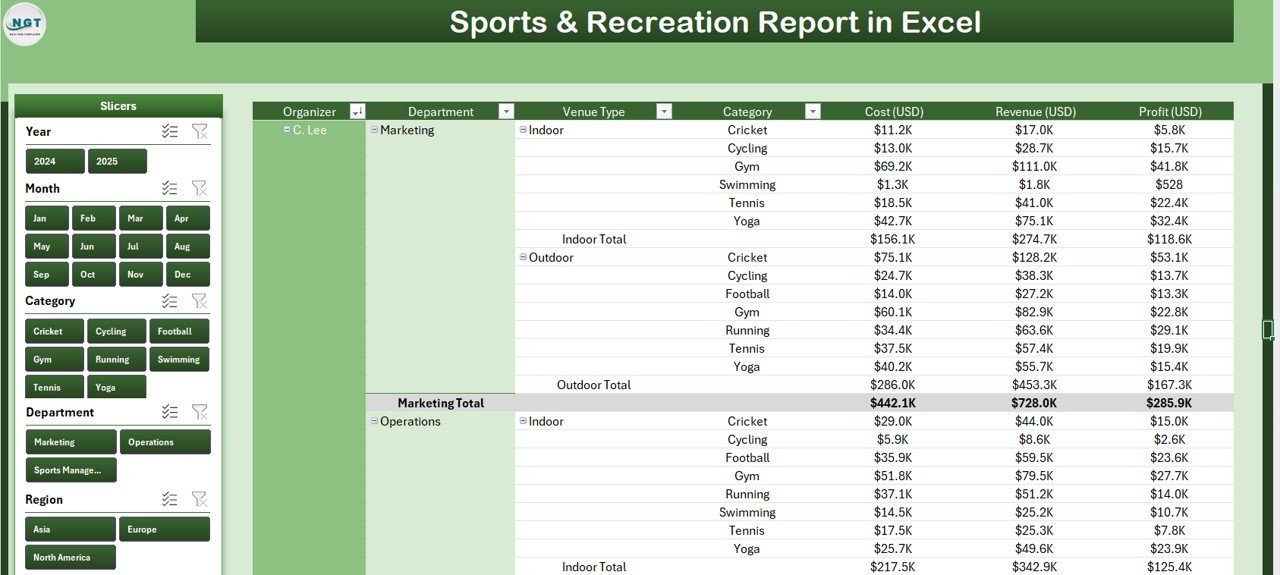
🔹 Detailed Report Page with Information Table – A separate Report Page includes a left-side slicer and a transaction-level information table — built for auditing individual events, preparing finance reports, and exporting line-item data for accountants.
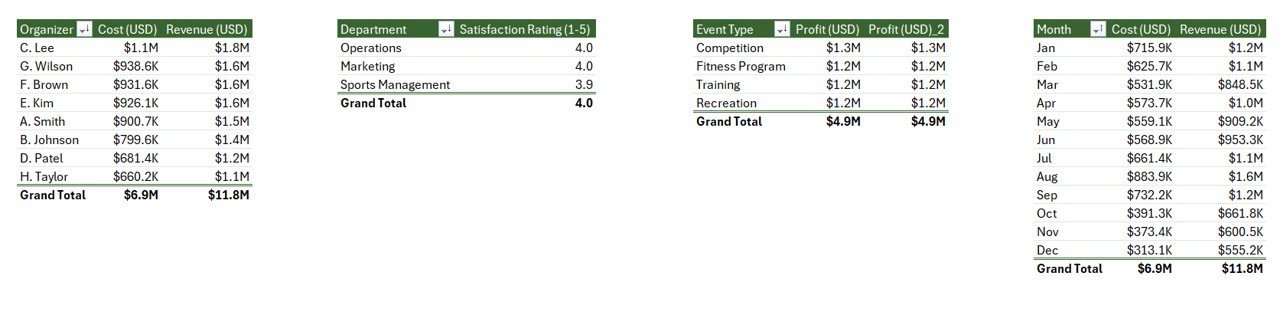
🔹 100% Pivot-Table Driven – The Support sheet holds every pivot table that feeds the dashboard. Update the Data sheet once, hit Data → Refresh All, and every card, chart, and slicer rebuilds automatically — no formulas to edit.
🔹 Works offline on Windows and Mac Excel – No internet, no cloud, no subscription. Member and event data stays on your device, which matters for facilities running strict data-privacy workflows.
📦 What’s Inside the Sports & Recreation Report
The file includes 4 Excel sheets, each with a defined role in the monthly reporting workflow.
Page 1: Summary Page
The main dashboard view. At the top, 5 KPI cards display headline metrics at a glance. A right-side slicer panel filters the entire page by event type, organizer, department, and time period. Five interactive charts cover the core questions sports and recreation leadership ask every month: Profit Margin %, Cost Vs Revenue by Organizer, Satisfaction Rating by Department, Profit by Event Type, and Cost Vs Revenue by Month.
Page 2: Report Page
A left-side slicer drives a detailed information table with transaction-level event records. Use this page to pull event-level lists for finance reviews, organizer audits, or month-end reconciliation with the accounting team.
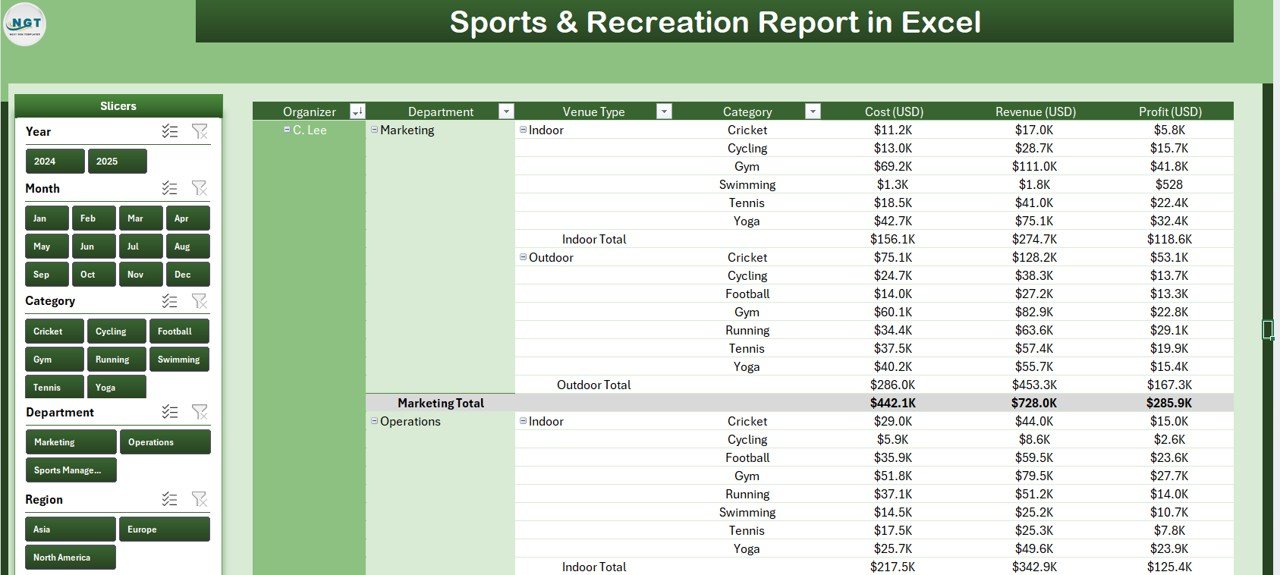
Page 3: Data Sheet
The raw input sheet. Paste your event-level records into the same column structure (Date, Event Type, Organizer, Department, Revenue, Cost, Satisfaction Rating, etc.). Keep the headers identical — every pivot in the Support sheet references them directly.
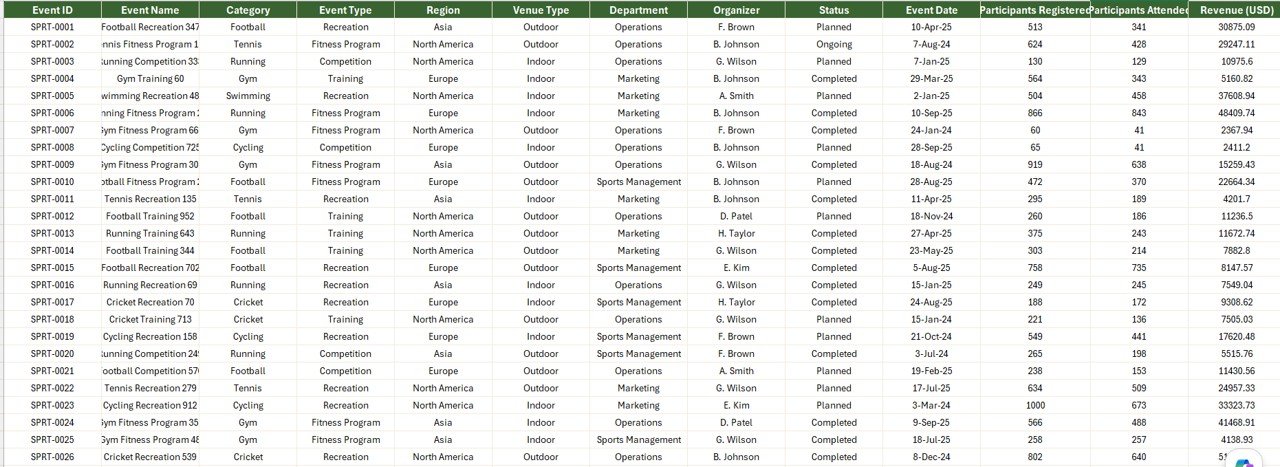
Page 4: Support Sheet
Holds every pivot table that feeds the Summary Page charts and KPI cards. After updating the Data sheet, click Data → Refresh All in the Excel ribbon and every pivot recalculates. Hide this sheet in production — your team only needs to see the Summary Page and Report Page.
📊 Sports & Recreation Report in Excel vs. Google Sheets Equivalent vs. Jonas Club / EZFacility — Where This Fits
| Feature | Sports & Recreation Report in Excel | Google Sheets equivalent | Jonas Club / EZFacility / MINDBODY |
|---|---|---|---|
| Cost | $7.99 one-time ✅ | ~$10 one-time template | $150–$400 / facility / month |
| Platform | Microsoft Excel (desktop) | Google Sheets (browser) | Web + mobile SaaS |
| Works offline | ✅ Yes | ❌ Requires internet | ❌ Requires internet |
| Setup time | Under 10 minutes ✅ | ~15 minutes | 2–6 weeks onboarding |
| Customizable KPIs & charts | ✅ Fully editable | ✅ Editable | ❌ Fixed reporting modules |
| Per-user licence fees | None — share freely | None | $150+ per facility / month |
| Data stays on your device | ✅ Yes | ❌ Cloud (Google servers) | ❌ Vendor cloud |
| Year-1 cost at 3 facilities | $7.99 ✅ | ~$10 | $5,400–$14,400 |
| Organizer + event-type breakdown | ✅ Pre-built | Needs rebuild | ✅ Pre-built |
For sports clubs and recreation centers that want organizer, event-type, and departmental profit visibility without paying $5,000+ per year in SaaS fees, the Sports & Recreation Report in Excel sits in the sweet spot.
👥 Who This Template Is For — and Who It’s Not For
✅ This template is built for:
- Sports club managers tracking event profitability and organizer performance month over month
- Recreation center directors running 2–10 program areas who need departmental cost-revenue comparisons
- Fitness studio and gym owners preparing monthly finance reports for stakeholders or franchise HQ
- Event finance teams reviewing tournament, league, and camp profitability across organizers
- Sports consultants and program managers delivering monthly client reports without rebuilding charts in PowerPoint
❌ This template is NOT for:
- Enterprise sports federations needing certified cloud infrastructure with SSO, role-based access, and audit logs
- Teams that need integrated member registration, online booking, payment processing, and access control in one system (use Jonas Club Software or MINDBODY)
- Clubs that only use Google Sheets — browse our Google Sheets Dashboards instead
- Real-time scoreboards or live event tracking with sub-second updates
⚙️ How to Use the Sports & Recreation Report
- Download and open the .xlsx file in Microsoft Excel 2016 or later, on Windows or Mac.
- Go to the Data sheet and replace the sample rows with your club or facility’s event-level records. Keep all column headers identical.
- Click Data → Refresh All in the Excel ribbon. Every pivot table on the Support sheet recalculates.
- Open the Summary Page. All 5 KPI cards and 5 charts now reflect your data. Use the right-side slicer to filter by event type, organizer, department, or period.
- Switch to the Report Page to pull filtered line-item views for finance reviews, organizer audits, or accountant exports.
- Hide the Support sheet before sharing the file with non-finance staff — they only need the Summary Page and Report Page.
💼 Real-World Use Cases
David runs operations at a 12-court tennis club in Phoenix. He uses the Sports & Recreation Report each month to spot which event types are losing money to under-priced clinics. The Profit by Event Type chart helped him identify that junior camps were running a 9% margin while adult leagues sat at 34% — he repriced the camp packages and recovered an estimated $18,000 per season.
Sarah is a recreation director for a municipal sports complex in Manchester. She uses the Cost Vs Revenue by Organizer and Satisfaction Rating by Department views every Monday to compare third-party organizer performance. After spotting that her tournament organizer had 22% higher costs but matching revenue, she renegotiated the contract and saved roughly £14,000 in the next quarter — without paying $300 a month for EZFacility’s analytics module.
Priya is a freelance sports consultant working with mid-size Indian fitness chains. She uses the Sports & Recreation Report as her standard monthly client deliverable. Each engagement gets the same 4-sheet model — replace data, refresh, screenshot the Summary Page into the client’s deck. Cuts her reporting prep from 5 hours to 40 minutes per client.
❓ Frequently Asked Questions
What KPIs does the Sports & Recreation Report in Excel track?
The Sports & Recreation Report tracks 5 headline KPIs on the Summary Page shown as card visuals, plus 5 interactive charts: Profit Margin %, Cost Vs Revenue by Organizer, Satisfaction Rating by Department, Profit by Event Type, and Cost Vs Revenue by Month. All metrics update automatically when you refresh the pivot tables after pasting new data.
How does this compare to Jonas Club Software or EZFacility?
Jonas Club Software and EZFacility charge $150 to $400 per facility per month — roughly $1,800 to $4,800 per facility per year. The Sports & Recreation Report in Excel is a $7.99 one-time purchase with no per-facility fees, works offline, and keeps member data on your device. It’s a reporting layer, not a replacement for a club management or POS platform.
How long does setup take?
Setup takes under 10 minutes. Open the .xlsx file, paste your event-level data into the Data sheet keeping the column headers identical, then click Data → Refresh All. Every card, chart, and slicer on the Summary Page updates automatically. No formulas to rewrite, no DAX, no macros.
Does this template work on Mac Excel?
Yes. The Sports & Recreation Report in Excel uses only pivot tables and slicers — no VBA, no macros — so it runs identically on Windows Excel and Mac Excel 2016 or later. No internet connection is required, which makes it ideal for facilities with strict data-isolation policies.
Can I add my own event types, organizers, or departments?
Yes. Add new event types, organizers, departments, or satisfaction levels directly to the Data sheet. After adding rows, click Data → Refresh All in the ribbon and every pivot table on the Support sheet picks up the new categories. The Summary Page charts populate automatically — no manual chart edits.
Is member data safe with this template?
Event and member data stays entirely on your device. The Sports & Recreation Report in Excel doesn’t connect to any cloud service, API, or external database. You control encryption, access, and sharing — unlike vendor-cloud SaaS tools where data sits on third-party servers by default.
Can I share the report with my team?
Yes. Email the .xlsx file or share via OneDrive, Dropbox, or SharePoint. There’s no per-user licence — managers, coaches, and finance staff can open and filter the report freely with any Microsoft Excel installation. For multi-user editing, use OneDrive co-authoring or a shared SharePoint location.
👤 About the Author
Built by PK — Microsoft Certified Professional with 15+ years of Excel, Google Sheets, and Power BI experience. Founder of NextGenTemplates, reaching 300K+ subscribers across YouTube channels (@PK-AnExcelExpert, @NextGenTemplates, @NeoTechNavigators). Every template is hand-built and tested before release.
🔗 Explore Related Templates
🔹 Sports & Recreation KPI Dashboard in Excel — The dashboard-format sibling tracking MTD/YTD KPIs across 7 sheets with combo charts and target-vs-actual indicators.
🔹 Sports & Recreation KPI Dashboard in Power BI — The Power BI version with drill-through pages and DAX measures.
🔹 Sports & Recreation Dashboard in Power BI — A broader operations dashboard covering facility usage, memberships, and program participation.
🔹 Event Production KPI Dashboard in Power BI — A companion template for teams that primarily run ticketed events and tournaments.
🔹 Healthcare Services Report in Excel — A peer Excel Report with the same 4-sheet pivot-driven structure, in the healthcare vertical.
Also browse all our Excel Reports and Excel Dashboard Templates for more industry-specific reports.
📖 Click here to read the Detailed Blog Post
🎥 Visit our YouTube channel for step-by-step video tutorials
👉 YouTube.com/@NextGenTemplates






Reviews
There are no reviews yet.