

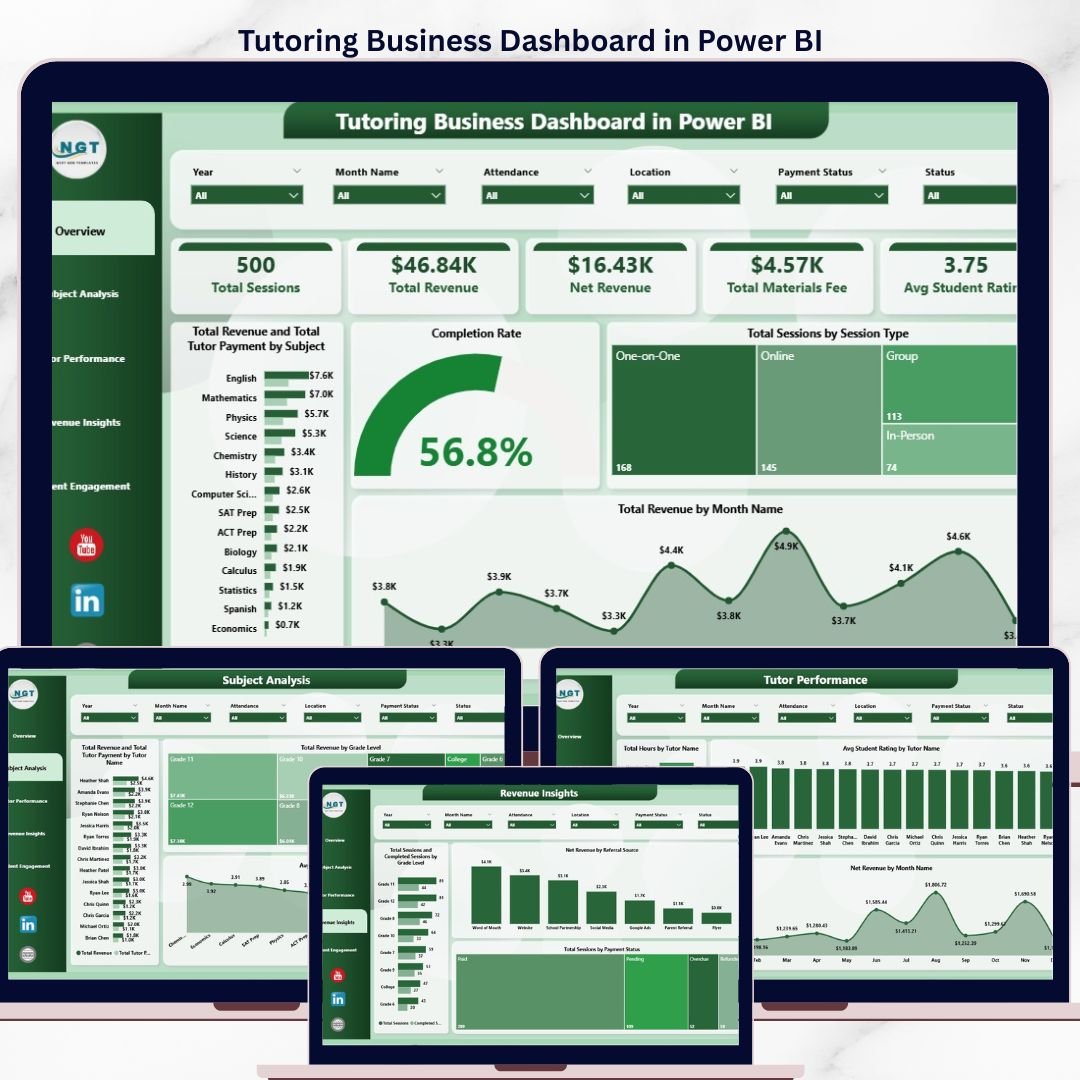

The Tutoring Business Dashboard in Power BI tracks 5 core KPIs — Total Sessions, Total Revenue, Net Revenue, Total Materials Fee, and Avg Student Rating — across 5 fully interactive pages with 15+ pre-built visuals and multi-level slicers. Setup takes under 10 minutes: open the .pbix file in Power BI Desktop, replace the sample data, and every chart, card, and filter refreshes automatically.
🌍 Join 8,400+ teams in 40+ countries using NextGenTemplates to replace paid SaaS tools with one-time-purchase Excel, Google Sheets, Power BI, and HTML templates.
✅ Instant download · One-time payment · No subscription · No per-user fees · Lifetime access
Tutoring Business Dashboard in Power BI
🔑 Key Features of Tutoring Business Dashboard in Power BI
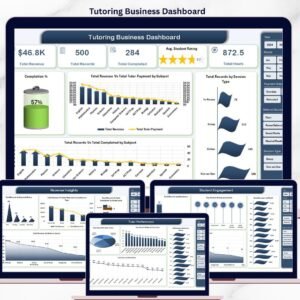
📊 5 dedicated analysis pages — Overview, Subject Analysis, Tutor Performance, Revenue Insights, and Student Engagement — each built as a separate Power BI page with its own slicers, cards, and visuals so tutoring owners can move from high-level revenue to granular tutor-level data without leaving the file.
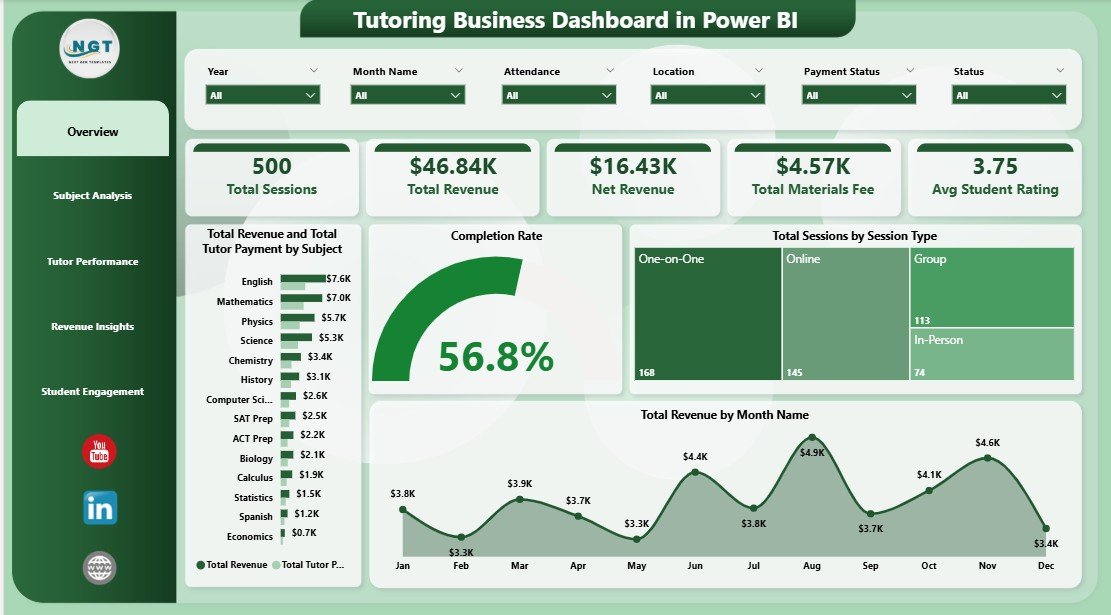
💰 5 executive KPI cards on the Overview page — Total Sessions, Total Revenue, Net Revenue, Total Materials Fee, and Avg Student Rating. These cards recalculate the second you apply any slicer, so a principal can see “what does revenue look like for Grade 9 Math tutors in Q3?” in under 5 seconds.
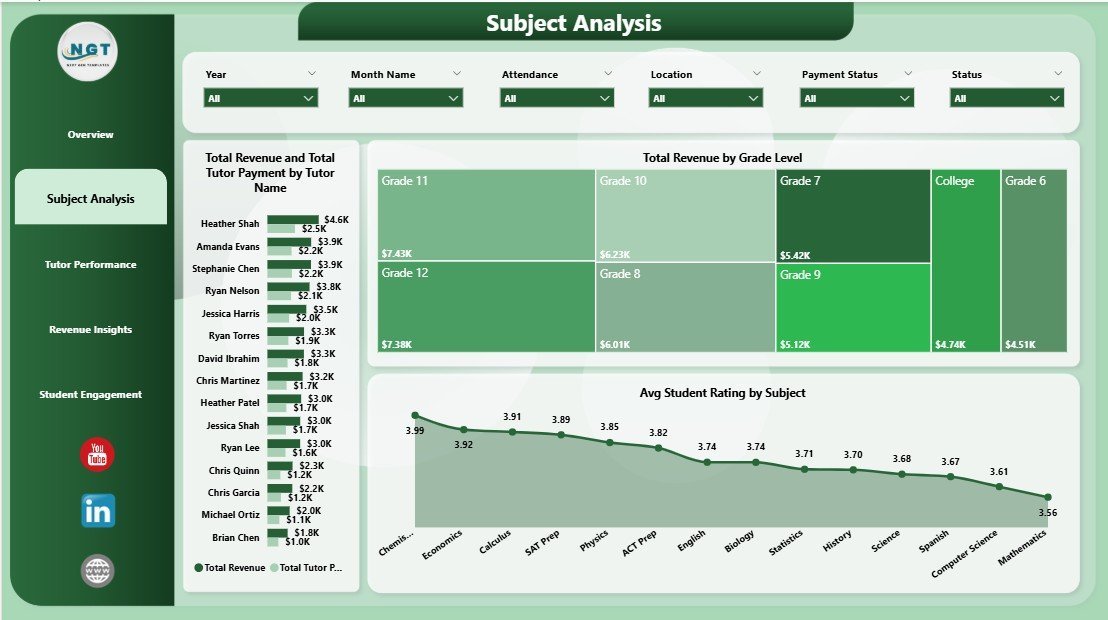
🎯 Subject + Tutor economics side by side — the Subject Analysis page compares Total Revenue vs Total Tutor Payment by Subject and by Tutor Name, so you can spot which subjects are high-margin and which tutors are actually generating profit after payout — instead of guessing from raw revenue.
📈 Completion Rate tracking — a dedicated visual on the Overview page measures session completion rate (completed ÷ scheduled), which is the single strongest leading indicator of churn for tutoring businesses. Pair it with Total Sessions by Session Type to see whether group, 1-on-1, or online sessions are holding up.
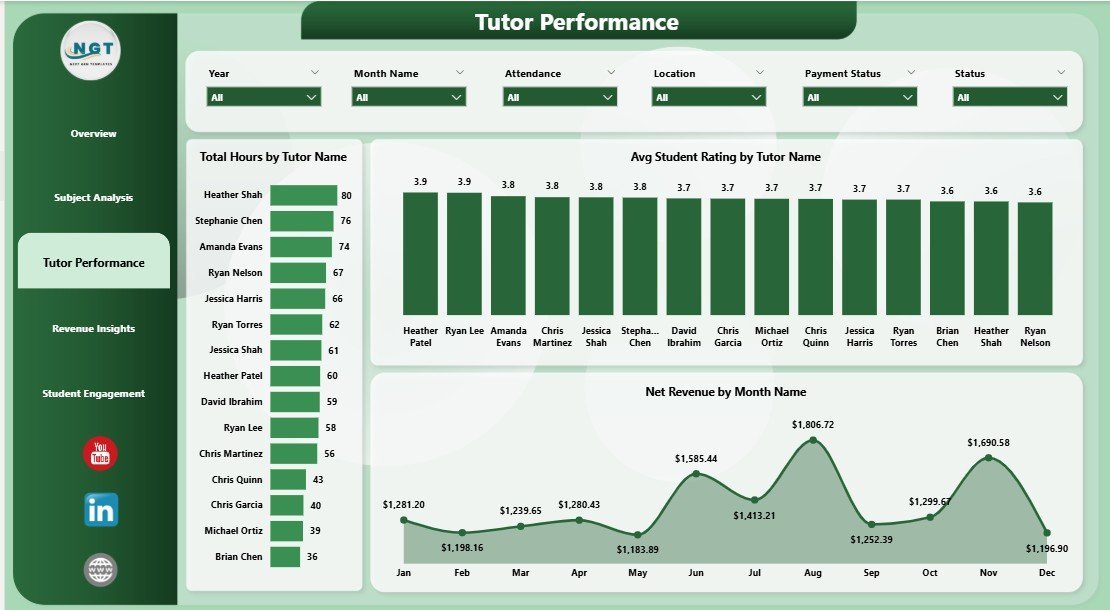
🧑🏫 Tutor Performance scorecard — Total Hours by Tutor Name, Avg Student Rating by Tutor Name, and Net Revenue by Month Name let you rank tutors, spot burnout (high hours + falling ratings), and calculate a fair monthly payout.
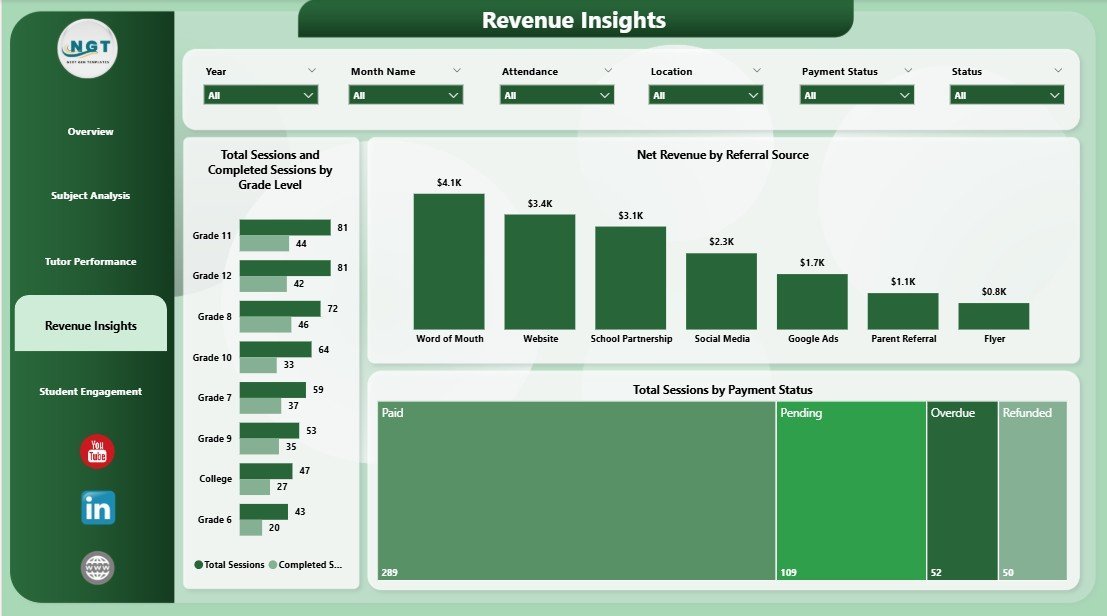
🎓 Revenue Insights page — Total Sessions and Completed Sessions by Grade Level, Net Revenue by Referral Source, and Total Sessions by Payment Status let you see which grades drive the most revenue, which referral channels are worth reinvesting in, and how much money is sitting in unpaid invoices.
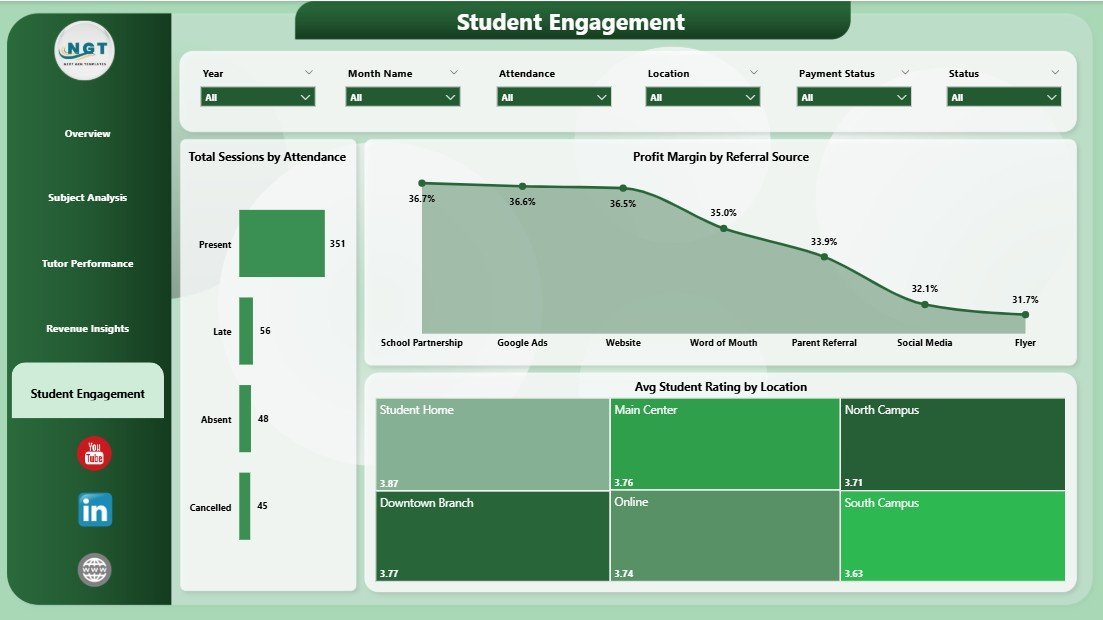
👥 Student Engagement view — Total Sessions by Attendance, Profit Margin by Referral Source, and Avg Student Rating by Location help you catch attendance drop-off, compare profitability of each acquisition source, and benchmark rating quality across physical locations or online cohorts.
🎚️ Cross-page slicers — each page includes a slicer panel for Tutor, Subject, Month, Grade, Session Type, and Payment Status, so filters apply consistently whether you’re on the Overview or Student Engagement view.
📦 What’s Inside the Tutoring Business Dashboard in Power BI
The file is a single .pbix built in Power BI Desktop, opening into 5 tab-linked report pages.
Page 1 — Overview
5 KPI cards at the top (Total Sessions, Total Revenue, Net Revenue, Total Materials Fee, Avg Student Rating) plus four charts: Total Revenue and Total Tutor Payment by Subject, Completion Rate, Total Sessions by Session Type, and Total Revenue by Month Name. Slicer panel covers every major dimension.
Overview — KPI Cards and Monthly Revenue Trend
Page 2 — Subject Analysis
Total Revenue and Total Tutor Payment by Tutor Name, Total Revenue by Grade Level, and Avg Student Rating by Subject. Answers the “which subject and which tutor is actually making money” question.
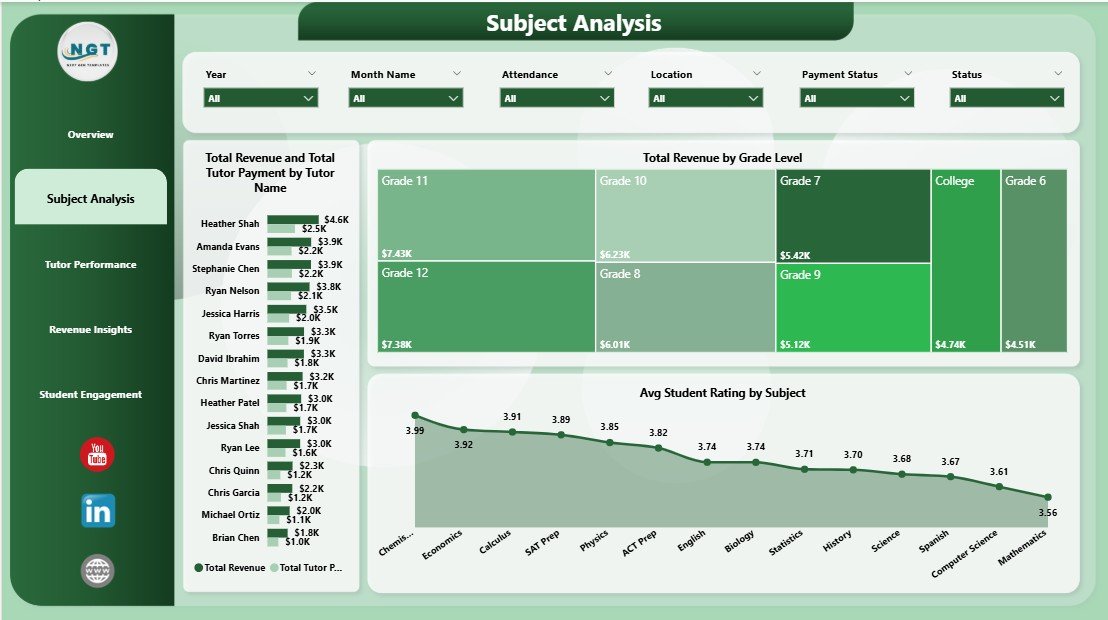
Subject Analysis — Revenue and Tutor Payment by Tutor
Page 3 — Tutor Performance
Total Hours by Tutor Name, Avg Student Rating by Tutor Name, and Net Revenue by Month Name. Use this for monthly tutor reviews and payout calculations.
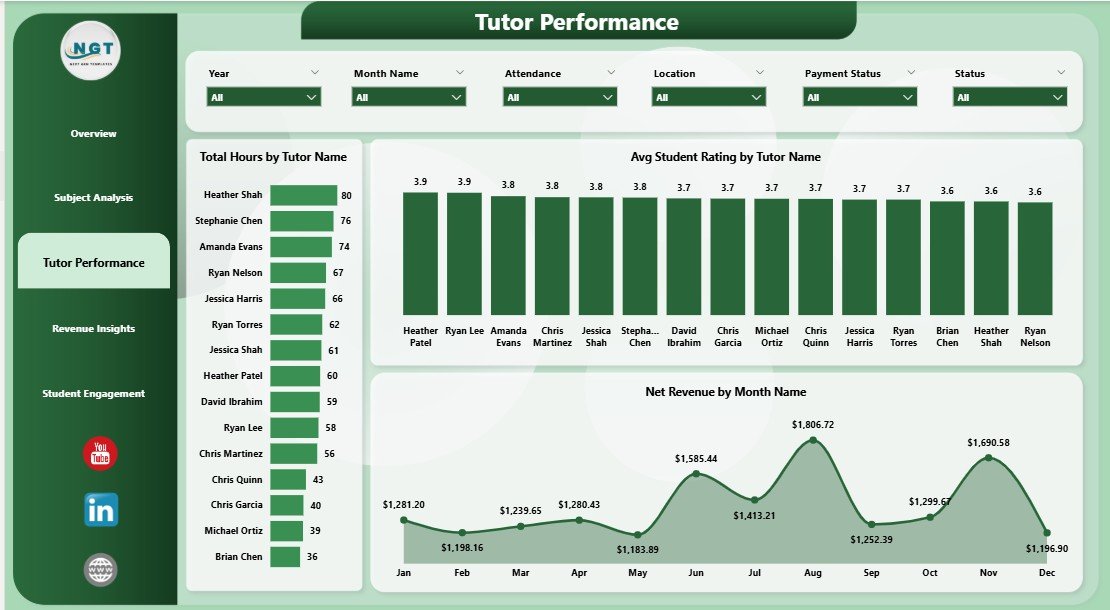
Tutor Performance — Hours, Rating and Net Revenue
Page 4 — Revenue Insights
Total Sessions and Completed Sessions by Grade Level, Net Revenue by Referral Source, and Total Sessions by Payment Status. Isolates where money is earned, where it’s stuck, and which grades are most profitable.
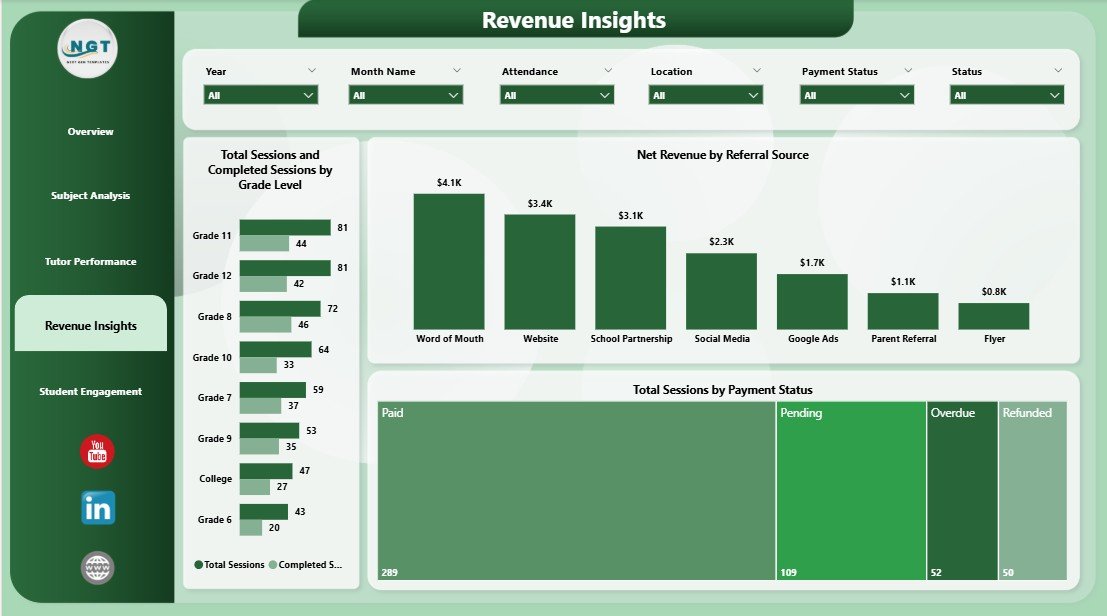
Revenue Insights — Grade Level, Referral Source and Payment Status
Page 5 — Student Engagement
Total Sessions by Attendance, Profit Margin by Referral Source, and Avg Student Rating by Location. Highlights attendance leakage, channel profitability, and location-level service quality.
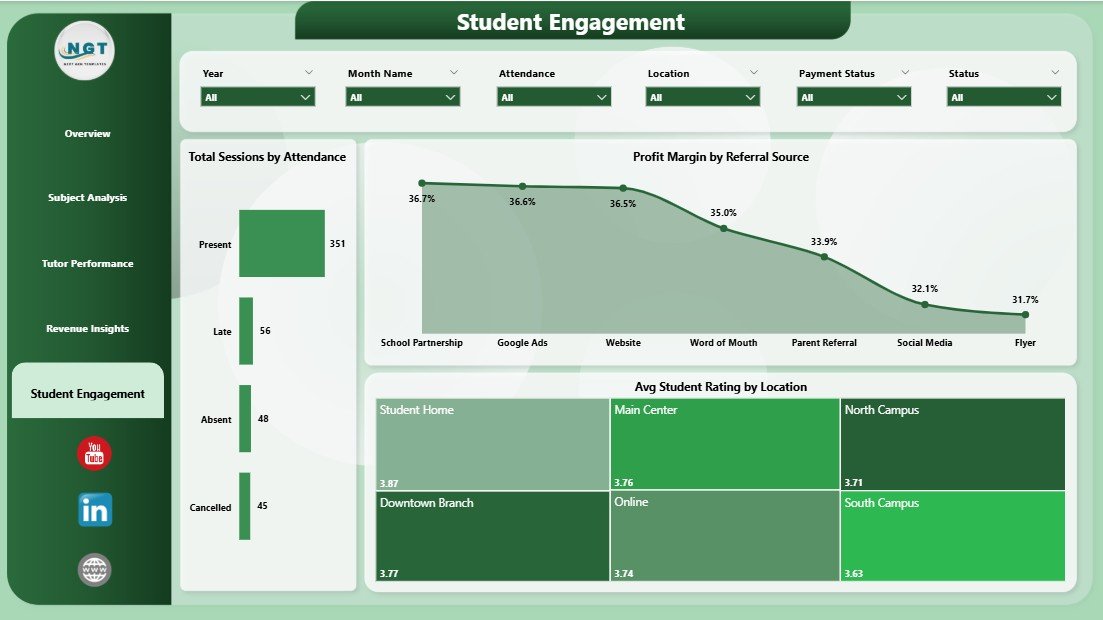
Student Engagement — Attendance, Profit Margin and Rating by Location
📊 Tutoring Business Dashboard in Power BI vs. Tableau/Qlik vs. Paid Tutoring SaaS — Where This Fits
| Feature | Tutoring Business Dashboard in Power BI | Tableau / Qlik Equivalent | TutorCruncher / Teachworks |
|---|---|---|---|
| Cost | $17.99 one-time | $15-75 / user / month | $27-149 / month |
| Platform | Power BI Desktop (free) | Paid BI platform | Closed SaaS |
| Setup time | Under 10 minutes | 3-7 days | 1-2 weeks onboarding |
| Fully customizable fields | ✅ Yes | ✅ Yes | ❌ Limited |
| Own your data locally | ✅ Yes (.pbix file) | ⚠️ Partly | ❌ Vendor-hosted |
| Tutor payment tracking | ✅ Built-in | Manual build | ✅ Yes (priced up) |
| Rating + attendance views | ✅ Built-in | Manual build | Partial |
| Year-1 cost at 3 users | $17.99 total | ~$540-2,700 | ~$972-5,364 |
For tutoring founders who want revenue, tutor, and student analytics without paying per-user SaaS fees, the Tutoring Business Dashboard in Power BI sits in the sweet spot.
👥 Who This Template Is For — and Who It’s Not For
✅ This template is built for:
- Solo tutors and tutoring businesses with 2-25 tutors who want one place to see revenue, tutor payments, and student ratings
- Tutoring academy owners running in-person + online sessions across multiple subjects and grade levels
- Franchise or multi-location coaching centers comparing profitability by location and referral source
- Finance teams calculating monthly tutor payouts, materials fees, and net revenue from session data
❌ This template is NOT for:
- Large K-12 school districts needing SIS integration, parent portals, or student report cards
- Users without Power BI Desktop — the file requires Power BI Desktop (free download from Microsoft)
- Tutoring businesses wanting built-in scheduling, invoicing, or online payments inside the dashboard (this is analytics, not an LMS)
⚙️ How to Use the Tutoring Business Dashboard in Power BI
- Download the .zip file and extract the .pbix file.
- Open the .pbix file in Power BI Desktop (free from Microsoft).
- Click Transform data and point the data source to your own session log (date, tutor, subject, grade, session type, revenue, tutor payment, rating, attendance, payment status, location, referral source).
- Click Refresh — all 5 KPI cards, 15+ visuals, and slicers recalculate instantly.
- Use the slicer panel on each page to filter by tutor, subject, month, or payment status.
- Publish to Power BI Service (optional) to share with co-founders or investors.
💼 Real-World Use Cases
Priya runs a 12-tutor after-school academy in Pune. She uses the Tutoring Business Dashboard in Power BI every Monday to see which tutors logged the most hours, which subjects had the highest completion rate, and how much she owes each tutor before payroll — replacing a tangled Google Sheet she used to maintain manually.
Marcus runs an online SAT prep business with 4 contract tutors across 3 US states. He opens the Revenue Insights page to track Net Revenue by Referral Source and cut spend on channels with low profit margin. Last quarter he reallocated $2,000 in ad spend based on what the dashboard showed him.
Lena owns a small tutoring franchise with 3 locations. She uses the Student Engagement page to compare Avg Student Rating by Location and quickly identifies which location needs tutor retraining — without building a BI report from scratch.
❓ Frequently Asked Questions
What KPIs does the Tutoring Business Dashboard in Power BI track?
The Tutoring Business Dashboard in Power BI tracks 5 core KPIs on the Overview page — Total Sessions, Total Revenue, Net Revenue, Total Materials Fee, and Avg Student Rating — plus 15+ supporting visuals including Completion Rate, Total Hours by Tutor, Net Revenue by Month, and Profit Margin by Referral Source across 4 analysis pages.
How long does setup take?
Setup for the Tutoring Business Dashboard in Power BI takes under 10 minutes. Open the .pbix file in Power BI Desktop, point the data source to your own session log, click Refresh, and every card, chart, and slicer updates automatically. No DAX writing is required for basic use.
How does this compare to TutorCruncher or Teachworks?
TutorCruncher and Teachworks are full-featured SaaS platforms starting around $27-149/month. The Tutoring Business Dashboard in Power BI is a $17.99 one-time analytics file that sits on top of your existing data. If you already use a simpler tool (or just spreadsheets), this dashboard gives you BI-grade reporting without monthly fees.
Do I need the paid version of Power BI?
No. The Tutoring Business Dashboard in Power BI works fully in Power BI Desktop, which is free from Microsoft. You only need Power BI Pro if you want to publish and share reports via Power BI Service with other users — analysis itself is 100% free.
Can I edit the visuals and add my own measures?
Yes. The Tutoring Business Dashboard in Power BI is fully unlocked — you can edit any visual, add DAX measures, change colors, add new pages, or connect to SQL/Excel/CSV sources. It’s yours to customize.
Is the Tutoring Business Dashboard in Power BI also available for Excel?
Yes. The Tutoring Business Dashboard in Excel is available as a cross-platform equivalent if you prefer Excel over Power BI. Both files are priced identically and cover the same KPIs.
Will the dashboard update as I add new session data?
Yes. The Tutoring Business Dashboard in Power BI refreshes all 5 KPI cards, 15+ visuals, and slicers automatically when you click Refresh. As long as the new rows match the column headers, the dashboard will expand to include them with no manual rebuild needed.
👤 About the Author
Built by PK — Microsoft Certified Professional with 15+ years of Excel, Google Sheets, and Power BI experience. Founder of NextGenTemplates, reaching 300K+ subscribers across YouTube channels (@PK-AnExcelExpert, @NextGenTemplates, @NeoTechNavigators). Every template is hand-built and tested before release.
🔗 Explore Related Templates
Also available as: Tutoring Business Dashboard in Excel — same KPIs, Excel-based workflow.
Other Education analytics templates worth pairing with this dashboard:
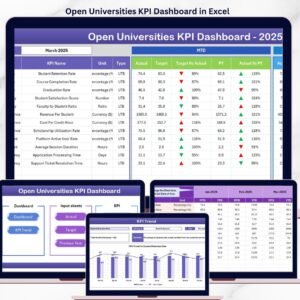
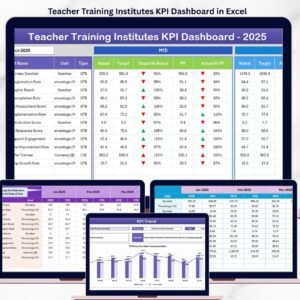
- Teacher Training Institutes KPI Dashboard in Excel — for training center owners.
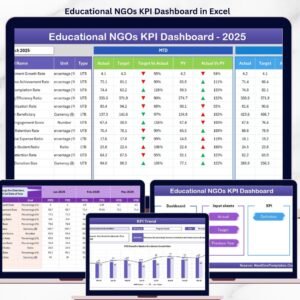
- Educational NGOs KPI Dashboard in Excel — for grant-funded programs.
- Driving School Dashboard in Excel — adjacent coaching-business dashboard.
Browse more Power BI Dashboards or view all Dashboard Templates.
📖 Click here to read the Detailed Blog Post
🎥 Visit our YouTube channel for step-by-step video tutorials
👉 YouTube.com/@NextGenTemplates
📅 Last updated: April 2026
Watch the step-by-step video tutorial:
Compatibility and Requirements
- Works in Power BI Desktop, which is free from Microsoft. Download it from Get Power BI Desktop.
- The file is a single .pbix with 5 report pages. You only need Power BI Pro if you want to publish and share it through Power BI Service.































Reviews
There are no reviews yet.