



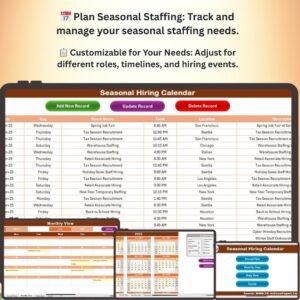
The Seasonal Hiring Calendar in Excel is a powerful tool designed to help businesses efficiently plan, manage, and track seasonal hiring activities. Whether you’re preparing for the busy holiday season, a summer rush, or any other period of increased demand, this Excel template allows you to streamline the hiring process by keeping track of hiring schedules, deadlines, candidate progress, and staffing needs.
This customizable calendar enables you to plan ahead for seasonal staff, ensuring you have the right number of employees in place to handle spikes in business. With clear deadlines, task assignments, and detailed tracking, the Seasonal Hiring Calendar in Excel helps you stay organized and ensure a smooth seasonal hiring process.
Key Features of the Seasonal Hiring Calendar in Excel
📅 Seasonal Staffing Planning
Plan your seasonal hiring needs well in advance by identifying the number of hires needed for each role, specific deadlines for candidate interviews, and training schedules. Ensure that all tasks are completed in a timely manner.
⚡ Task Assignment & Tracking
Assign tasks to hiring managers and HR staff, track candidate progress, and ensure that key hiring milestones are met before the busy season begins.
📈 Real-Time Updates
As data is entered, the calendar updates automatically, allowing you to keep track of hiring progress in real time. Monitor application statuses, interview schedules, and onboarding processes with ease.
📋 Customizable & Flexible
Easily customize the calendar to fit the specific needs of your business, such as adjusting for different roles, hiring timelines, or seasonal hiring events.
🖥️ User-Friendly Interface
The Excel calendar template is easy to navigate, with clearly defined fields for deadlines, applications, interviews, and hires. This ensures a smooth workflow and keeps your hiring team organized.
Why You’ll Love the Seasonal Hiring Calendar in Excel

✅ Plan Ahead for Seasonal Hiring
Stay ahead of the curve by planning your seasonal hiring needs well in advance. Avoid last-minute hiring and ensure that you have the right people in place for peak business periods.
✅ Optimize Hiring Processes
Track candidate progress, assign tasks, and ensure all deadlines are met with a streamlined workflow. This helps you complete seasonal hiring quickly and efficiently.
✅ Ensure Timely Staffing
Ensure that all roles are filled on time and that employees are trained and ready for the busy season. Track key milestones such as interviews, offer letters, and orientation.
✅ Improve Team Collaboration
Easily assign tasks to HR staff, hiring managers, and department leads to make collaboration seamless. Everyone involved in the hiring process will know their responsibilities and deadlines.
✅ Gain Full Visibility
Gain a clear overview of your seasonal hiring process from start to finish. Track the entire timeline, from the job posting to the final hire, ensuring you don’t miss any crucial steps.
What’s Inside the Seasonal Hiring Calendar Template?
- Staffing Needs Tracker: Track the number of hires needed for each role and department.
- Hiring Timeline: Monitor important hiring dates, such as job postings, interview schedules, and onboarding deadlines.
- Candidate Tracking: Track candidate progress from application to hire and ensure no candidates are missed.
- Task Management: Assign specific tasks to team members and monitor progress.
- Customizable Fields: Adjust the calendar to reflect your company’s specific seasonal hiring needs and deadlines.
How to Use the Seasonal Hiring Calendar in Excel
1️⃣ Download the Template: Get instant access to your Seasonal Hiring Calendar in Excel.
2️⃣ Set Up Your Hiring Timeline: Input your hiring deadlines, staffing needs, and role descriptions.
3️⃣ Track Candidate Progress: Monitor interview schedules, offer letters, and training status.
4️⃣ Ensure Timely Hiring: Stay on top of key dates, from posting jobs to completing interviews and onboarding.
Who Can Benefit from the Seasonal Hiring Calendar in Excel?
🔹 HR Managers & Recruitment Teams
🔹 Business Owners & Operations Managers
🔹 Retail & Hospitality Managers
🔹 Seasonal Employers & Event Coordinators
🔹 Hiring Managers in Seasonal Industries
🔹 Anyone Looking to Streamline Their Seasonal Hiring Process
Plan, manage, and track your seasonal hiring with the Seasonal Hiring Calendar in Excel. Make your hiring process more efficient and ensure you have the right team in place for your busy seasons.
Click here to read the Detailed blog post
Visit our YouTube channel to learn step-by-step video tutorials
Youtube.com/@PKAnExcelExpert
Compatibility and Requirements
- Works in Microsoft Excel desktop (Excel 2016 or later, or Microsoft 365).
- New to Excel? Start with Microsoft’s free Excel for Windows training.
Frequently Asked Questions
What does the Seasonal Hiring Calendar track?
Staffing needs per role and department, hiring dates such as job postings, interviews and onboarding deadlines, candidate progress and assigned tasks.
Can I assign tasks to my team?
Yes. You can assign tasks to hiring managers and HR staff and monitor their progress.
Can I track candidates from application to hire?
Yes. The candidate tracking section follows each candidate through interviews, offer letters and training status.
Can I adjust it for different seasons and roles?
Yes. The fields are customizable, so you can set your own roles, hiring timelines and seasonal events.
Related Hiring Templates
- Recruitment Calendar in Excel: plan recruitment events across the year
- Recruitment and Hiring Dashboard in Excel: see hiring results on a dashboard
- Recruitment and Hiring Report in Excel: report hiring activity
- Recruitment Calendar in Google Sheets: a recruitment calendar in Google Sheets
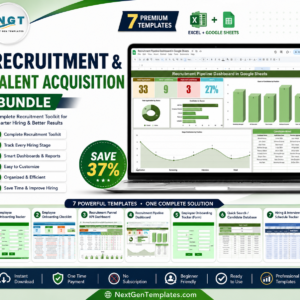
- Recruitment & Talent Acquisition Bundle: 7 hiring templates in one download
Browse all Excel calendars or the Excel HR and Payroll templates.











Reviews
There are no reviews yet.