

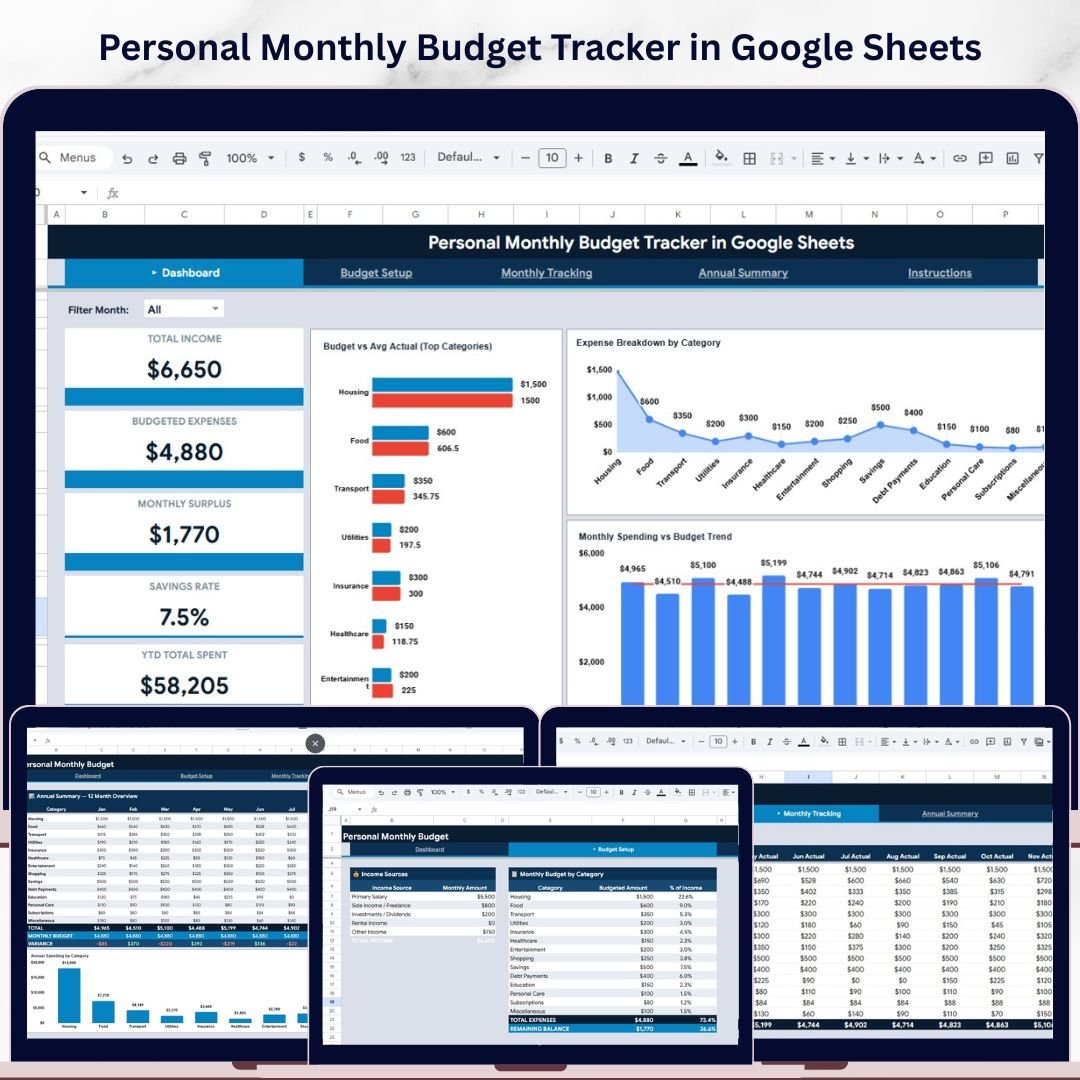
📊 Personal Monthly Budget Tracker in Google Sheets is your ultimate companion for mastering personal finances, tracking every dollar, and building lasting savings habits. Whether you are a working professional trying to stay on top of monthly expenses, a student managing a tight budget, or a family planning long-term financial goals, this ready-to-use Google Sheets template gives you full visibility into your income, expenses, budgets, and savings — all in one beautifully organized spreadsheet.Personal Monthly Budget Tracker in Google Sheets
This template includes 4 powerful pages — a visual Dashboard, a Budget Setup sheet, a Monthly Tracking sheet, and an Annual Summary — designed to help you plan, monitor, and optimize your personal budget every single month. Simply replace the sample data with your own numbers and watch the charts, KPIs, and summaries update automatically. No formulas to write, no complicated setup — just plug in your data and take control of your money.
If you are looking for more Google Sheets Tracker Templates, explore our growing library of professional templates designed for every need.
🔑 Key Features of Personal Monthly Budget Tracker in Google Sheets
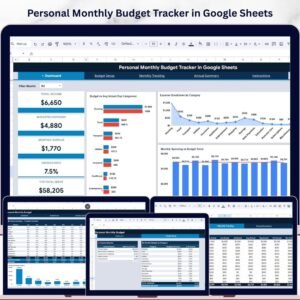
✨ Interactive Dashboard with 6 KPI Cards – View Total Income, Budgeted Expenses, Monthly Surplus, Savings Rate, YTD Total Spent, and a Savings Gauge at a glance for instant financial awareness.
📊 3 Dynamic Dashboard Charts – Analyze your spending with Budget vs Avg Actual by Top Categories, Expense Breakdown by Category, and Monthly Spending vs Budget Trend by Month.
🎛️ Slicer Filters for Quick Analysis – Apply filters directly on the dashboard to slice data by category, month, or any dimension and see filtered results instantly.
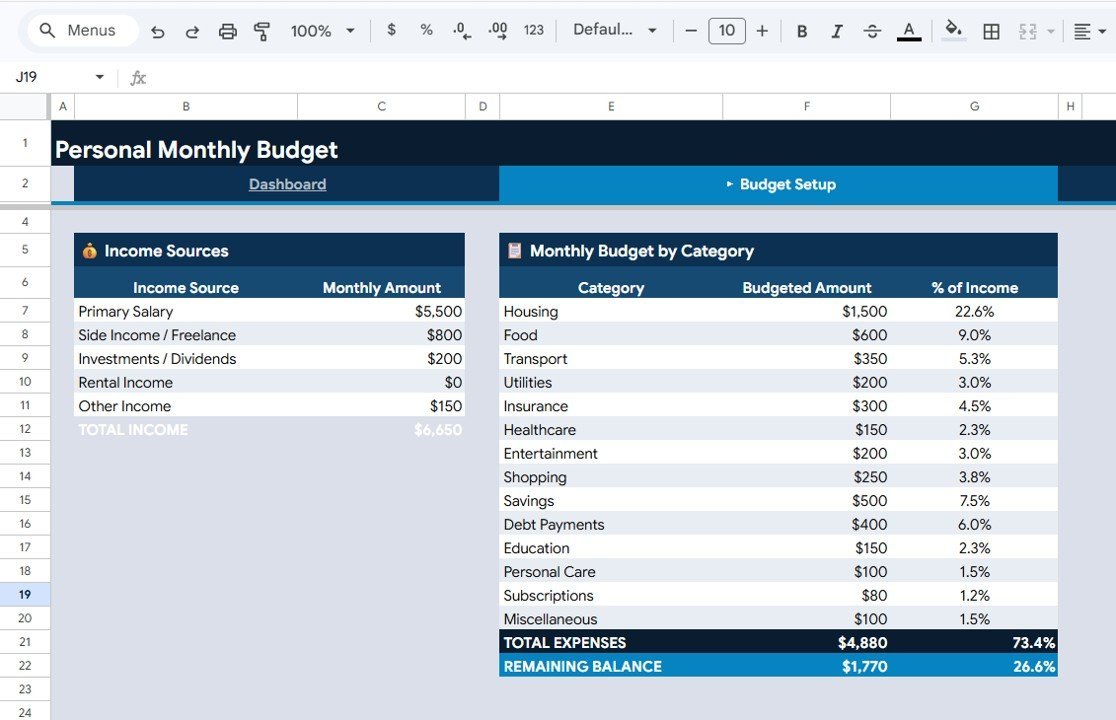
💰 Budget Setup Page – Define your Income Sources by Monthly Amount and set your Monthly Budget by Category with automatic Percentage of Income calculations.
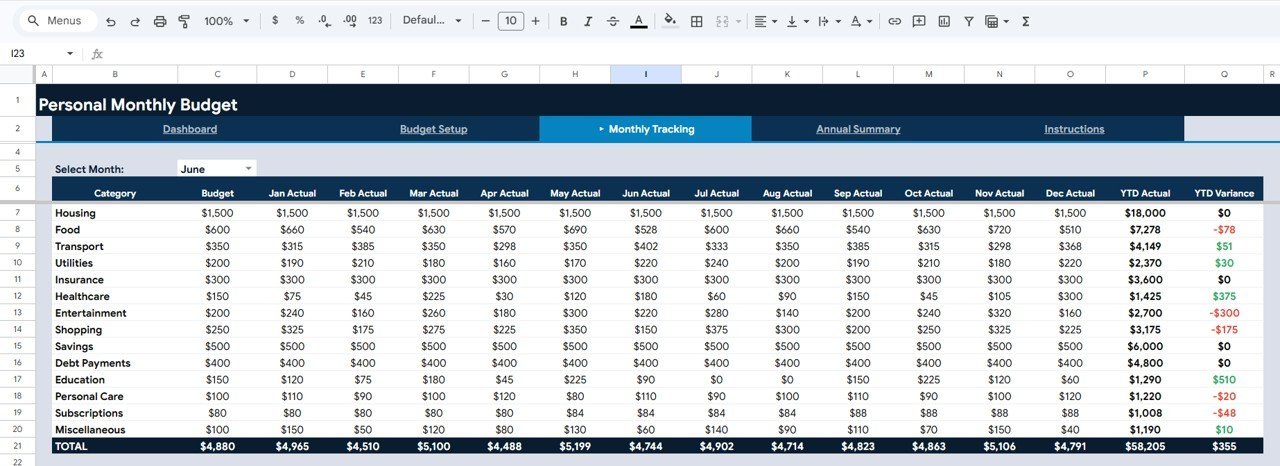
📅 Monthly Tracking Sheet – Record Monthly Actual Spending by Category, compare Budget vs Actual by Month, and track YTD Actual and YTD Variance by Category to stay on course.
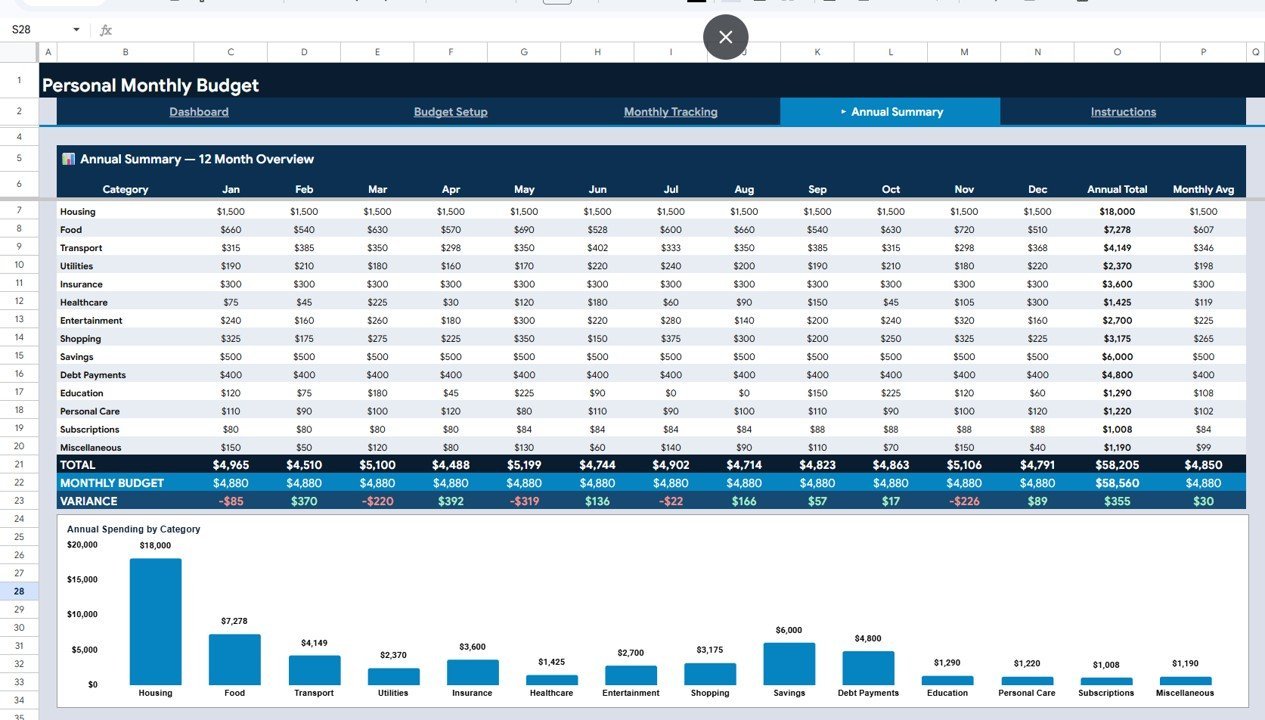
📈 Annual Summary Page – Get the big picture with Annual Total and Monthly Avg by Category, Monthly Budget vs Variance by Month, and Annual Spending by Category breakdown.
🔗 Fully Automated Formulas – All calculations, KPIs, and charts update automatically when you enter your data — zero manual work required.
🎨 Professional Clean Design – Visually appealing layout with consistent color coding across all 4 pages for easy reading and presentation.
📦 What’s Inside the Personal Monthly Budget Tracker
This template contains 4 professionally designed pages that work together seamlessly:
📌 Dashboard Page – Your financial command center featuring 6 KPI cards (Total Income, Budgeted Expenses, Monthly Surplus, Savings Rate, YTD Total Spent, Savings Gauge) plus 3 interactive charts showing Budget vs Avg Actual by Top Categories, Expense Breakdown by Category, and Monthly Spending vs Budget Trend. Multiple slicers let you filter the entire dashboard instantly.
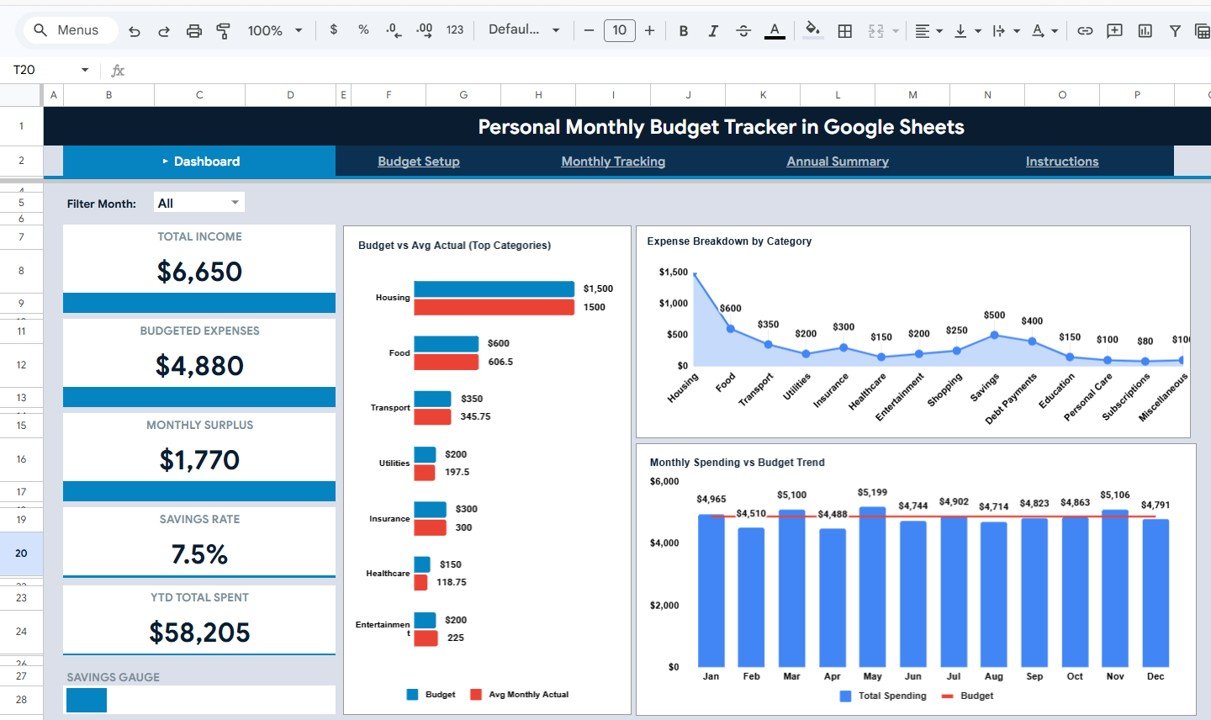
Personal Monthly Budget Tracker in Google Sheets
📌 Budget Setup Page – Define your income sources with monthly amounts and allocate your monthly budget across categories. The template automatically calculates each category’s percentage of your total income, making it easy to see where your money is planned to go.
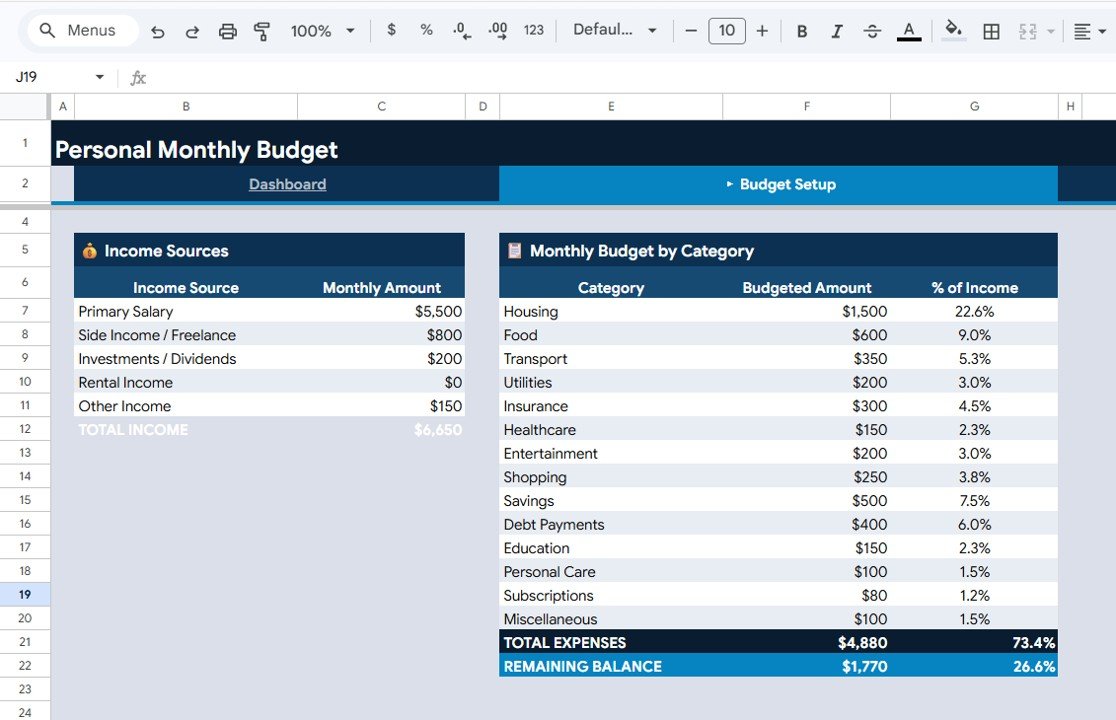 Budget Setup
📌 Monthly Tracking Page – Record your actual spending each month by category and compare it against your budget. The sheet calculates Budget vs Actual by Month and YTD Actual and YTD Variance by Category so you always know exactly where you stand.
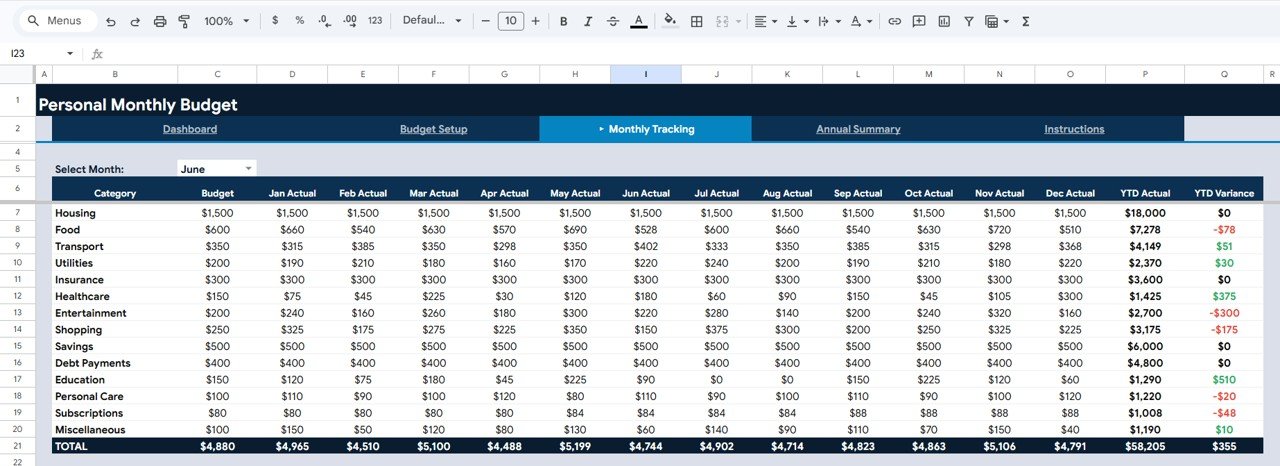 Monthly Tracking
📌 Annual Summary Page – Review the full year at once with Annual Total and Monthly Avg by Category, a Monthly Budget vs Variance chart, and Annual Spending by Category breakdown to understand your financial patterns.
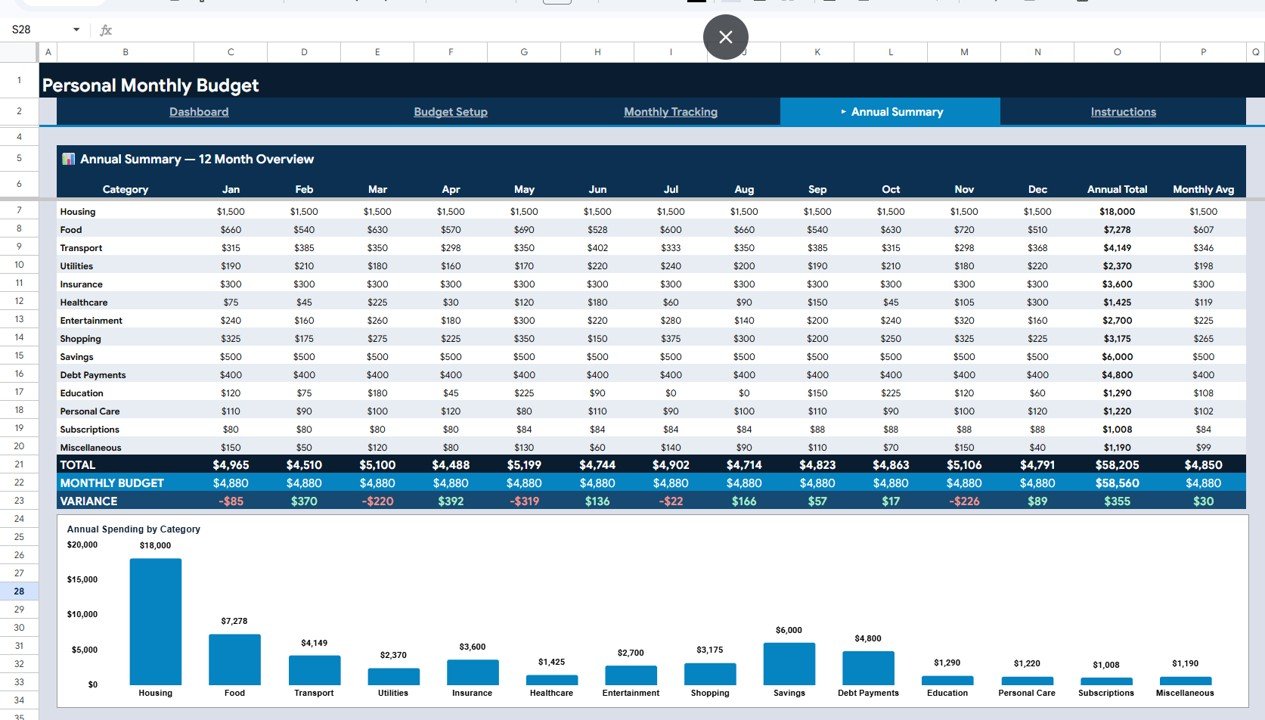 Annual Summary
⚙️ How to Use the Personal Monthly Budget Tracker
1️⃣ Open the PDF guide included in your download and click the Google Sheets copy link to create your own editable copy in Google Drive.
2️⃣ Go to the Budget Setup tab and enter your income sources and monthly budget allocations by category.
3️⃣ Each month, open the Monthly Tracking tab and enter your actual expenses by category.
4️⃣ Switch to the Dashboard tab to see your KPIs, charts, and trends update automatically. Use the slicers to filter by month or category.
5️⃣ At the end of the year, review the Annual Summary tab for a complete picture of your spending patterns and budget variance.
👥 Who Can Benefit from This Template
🔹 Working professionals managing monthly salary and expenses
🔹 Students tracking limited budgets and savings goals
🔹 Couples or families planning household finances together
🔹 Freelancers and gig workers with variable income streams
🔹 Anyone who wants a clear, visual way to track personal spending and build savings
Looking for a comprehensive finance toolkit? Check out our Finance & Accounting Command Center Bundle with 8 premium templates covering everything from expense tracking to financial dashboards. Also explore the Personal Expense Tracker in Google Sheets and the Personal Finance Dashboard in Google Sheets for even deeper financial insights.
❓ Frequently Asked Questions
What does the Personal Monthly Budget Tracker in Google Sheets include?
The Personal Monthly Budget Tracker in Google Sheets includes 4 pages — a visual Dashboard with 6 KPI cards and 3 charts, a Budget Setup sheet for income and budget allocation, a Monthly Tracking sheet for actual spending vs budget, and an Annual Summary page for full-year analysis.
Do I need advanced Google Sheets skills to use this budget tracker?
No. Simply replace the sample data with your own income and expense numbers and all charts, KPIs, and summaries update automatically. No formulas or technical knowledge required.
Can I customize the expense categories in this template?
Yes. The Budget Setup page lets you define your own expense categories and income sources. All linked charts and calculations will adjust based on your custom categories.
How is this different from the Monthly Budget Plan Template?
The Personal Monthly Budget Tracker focuses on tracking actual spending against budgets with YTD variance analysis and annual summaries. The Monthly Budget Plan Template is designed more for upfront budget planning and allocation. Both templates complement each other perfectly.
Can I use this tracker for business budgets too?
This template is designed for personal and household finances. For business or departmental budgets, explore our dedicated Google Sheets Templates collection which includes specialized business budget trackers.
🔗 Explore Related Templates
🔹 Savings Goal Planner in Google Sheets – Set and track multiple savings goals with visual progress indicators.
🔹 Debt Payoff Calculator Template in Google Sheets – Plan your debt-free journey with snowball and avalanche strategies.
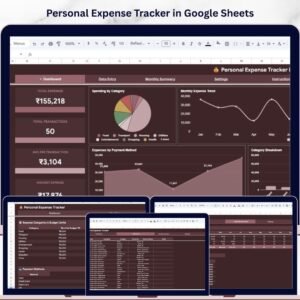
🔹 Personal Expense Tracker in Google Sheets – Log daily expenses and analyze spending patterns with automated charts.
📖 Click here to read the Detailed Blog Post
Click here to Purchase the Personal Monthly Budget Tracker in Google Sheets
Watch the step-by-step video tutorial:
🎥 Visit our YouTube channel to learn step-by-step video tutorials
👉 YouTube.com/@NextGenTemplates


Reviews
There are no reviews yet.