

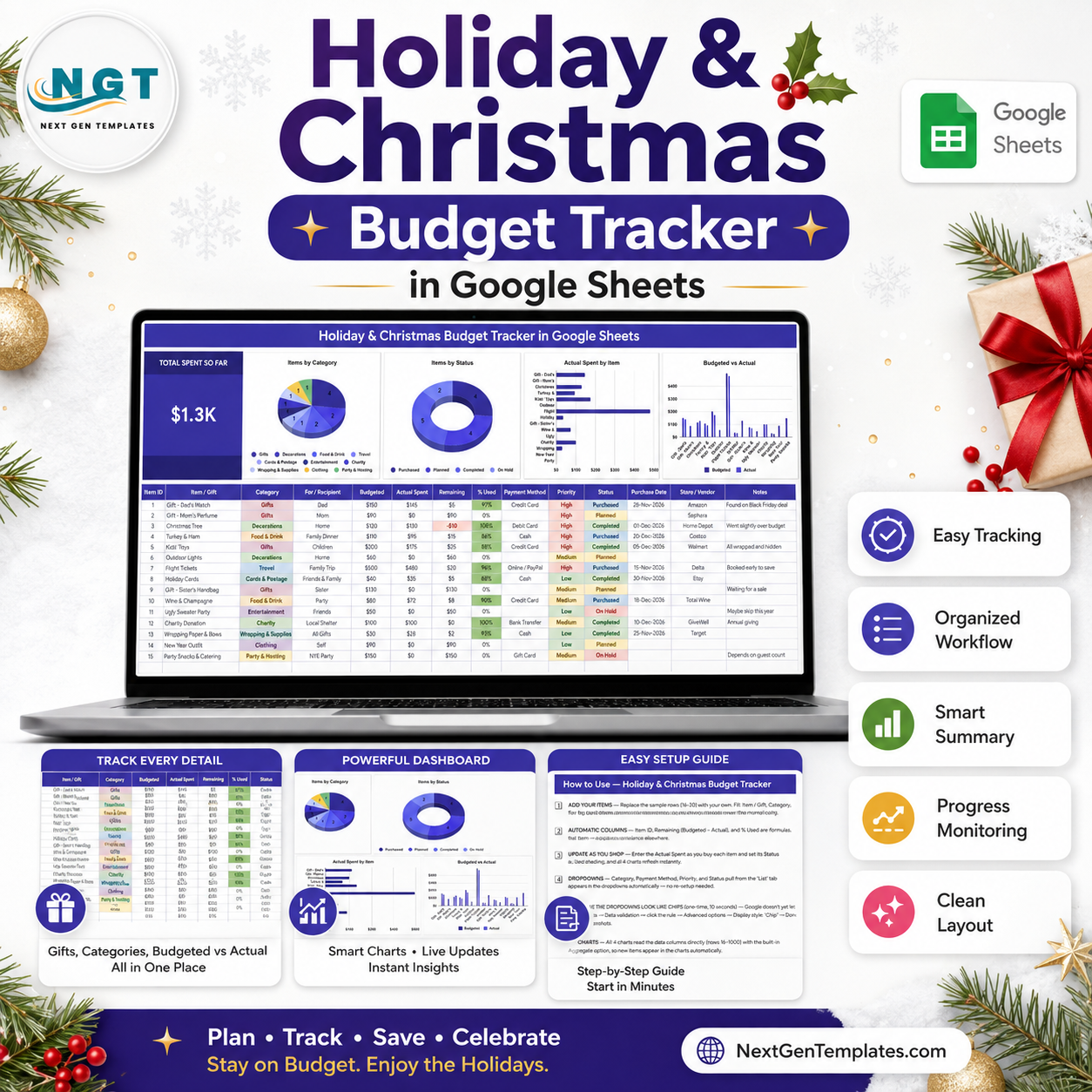
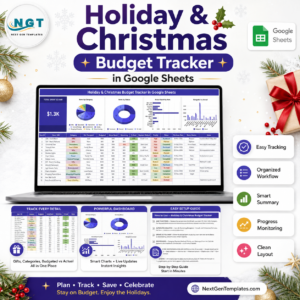
The Holiday & Christmas Budget Tracker in Google Sheets logs every gift, meal, decoration and trip across 14 columns, 10 spending categories and 4 live charts on one scrollable page. Setup takes under 10 minutes: replace the 15 sample rows with your own and the Total Spent So Far card, the % Used shading and all four charts refresh instantly.
🌍 Join 8,400+ teams in 40+ countries using NextGenTemplates to replace paid SaaS tools with one-time-purchase Excel, Google Sheets, Power BI, and HTML templates.
✅ Instant download · One-time payment · No subscription · No per-user fees · Lifetime access
🔑 Key Features of the Holiday & Christmas Budget Tracker
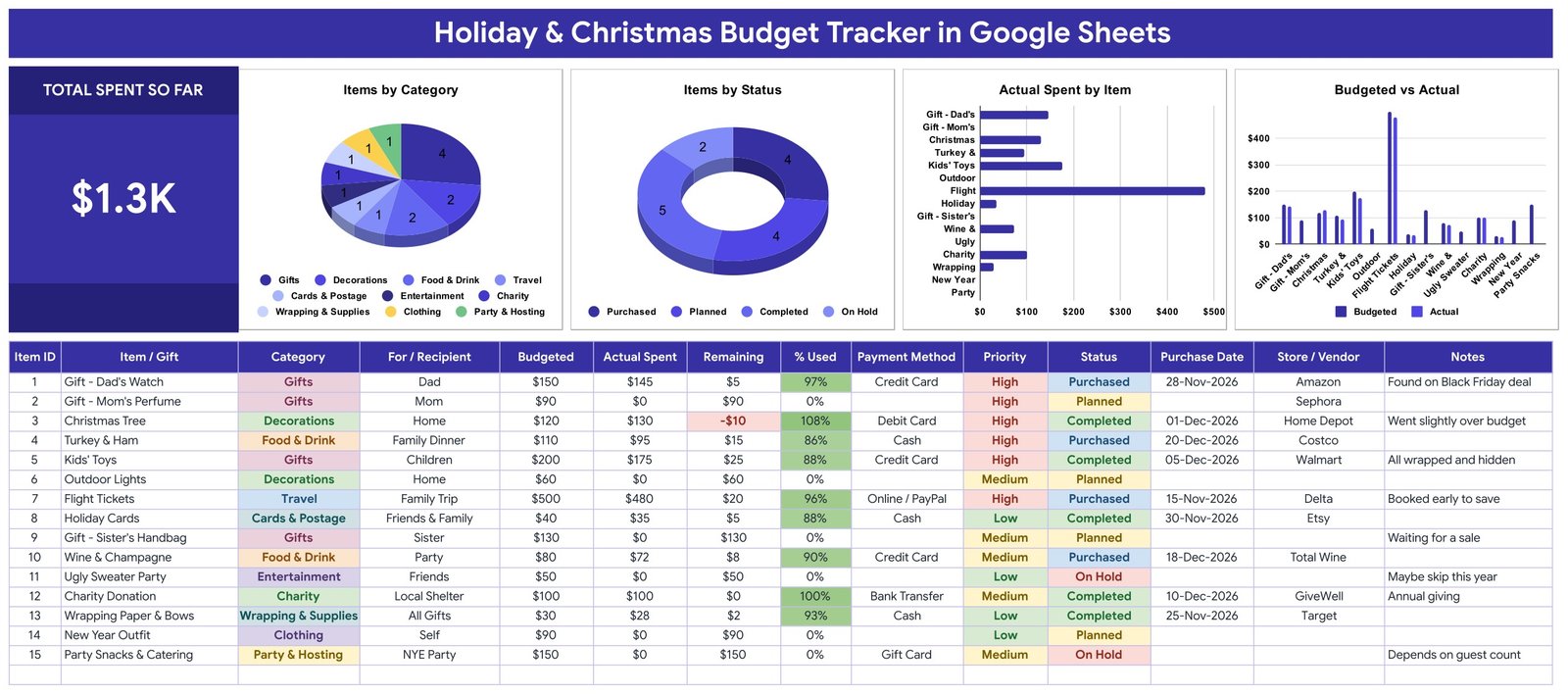
🎁 One page, 14 columns, no tab-hopping. The tracker records Item ID, Item / Gift, Category, For / Recipient, Budgeted, Actual Spent, Remaining, % Used, Payment Method, Priority, Status, Purchase Date, Store / Vendor and Notes. Everything about a single purchase lives on one row, so nothing gets logged twice or forgotten in a second sheet.
💰 A Total Spent So Far card that never lies. The large KPI card on the left sums the Actual Spent column live. The sample file reads $1.3K across 15 items — the moment you type a real amount, the card moves, so you always know the true damage before the next shopping trip.
📉 Over-budget detection built into the row. Remaining is Budgeted minus Actual Spent and turns red the instant it goes negative — the sample Christmas Tree row shows -$10 at 108% used. The % Used column shades green as you approach the limit, giving you a two-signal warning to rebalance elsewhere.
🥧 Four charts that read the data columns directly. Items by Category and Items by Status show where the list is concentrated and how much is still only planned; Actual Spent by Item ranks the real money by line; Budgeted vs Actual puts the plan and the reality side by side for every entry. All four use the built-in Aggregate option over rows 16-1000, so there are no hidden helper tables to maintain.
🏷️ 10 categories, 4 statuses, 3 priorities, 6 payment methods. Categories cover Gifts, Decorations, Food & Drink, Travel, Cards & Postage, Entertainment, Charity, Wrapping & Supplies, Clothing and Party & Hosting. Status runs Planned → Purchased → Completed, with On Hold for the ones you are still deciding on.
🔁 Dropdowns that expand themselves. Every dropdown pulls from the List tab across rows 2-500. Add “Secret Santa” or “Apple Pay” once on the List tab and it appears in the dropdown on every existing and future row — no re-running data validation.
🎨 Yours to recolour. The theme colours live in a single constant block at the top of the build script, and the money columns reformat to ₹, € or £ in two clicks. This tracker sits alongside our other Google Sheets templates and shares the same clean layout language.
📦 What’s Inside the Holiday & Christmas Budget Tracker
Page 1: Holiday & Christmas Budget Tracker
The working page. A Total Spent So Far KPI card sits beside four charts — Items by Category, Items by Status, Actual Spent by Item, and Budgeted vs Actual — with the 14-column entry table underneath, pre-filled with 15 realistic sample rows covering gifts, a family flight, the Christmas tree, charity giving and a New Year party.
Page 2: How to Use
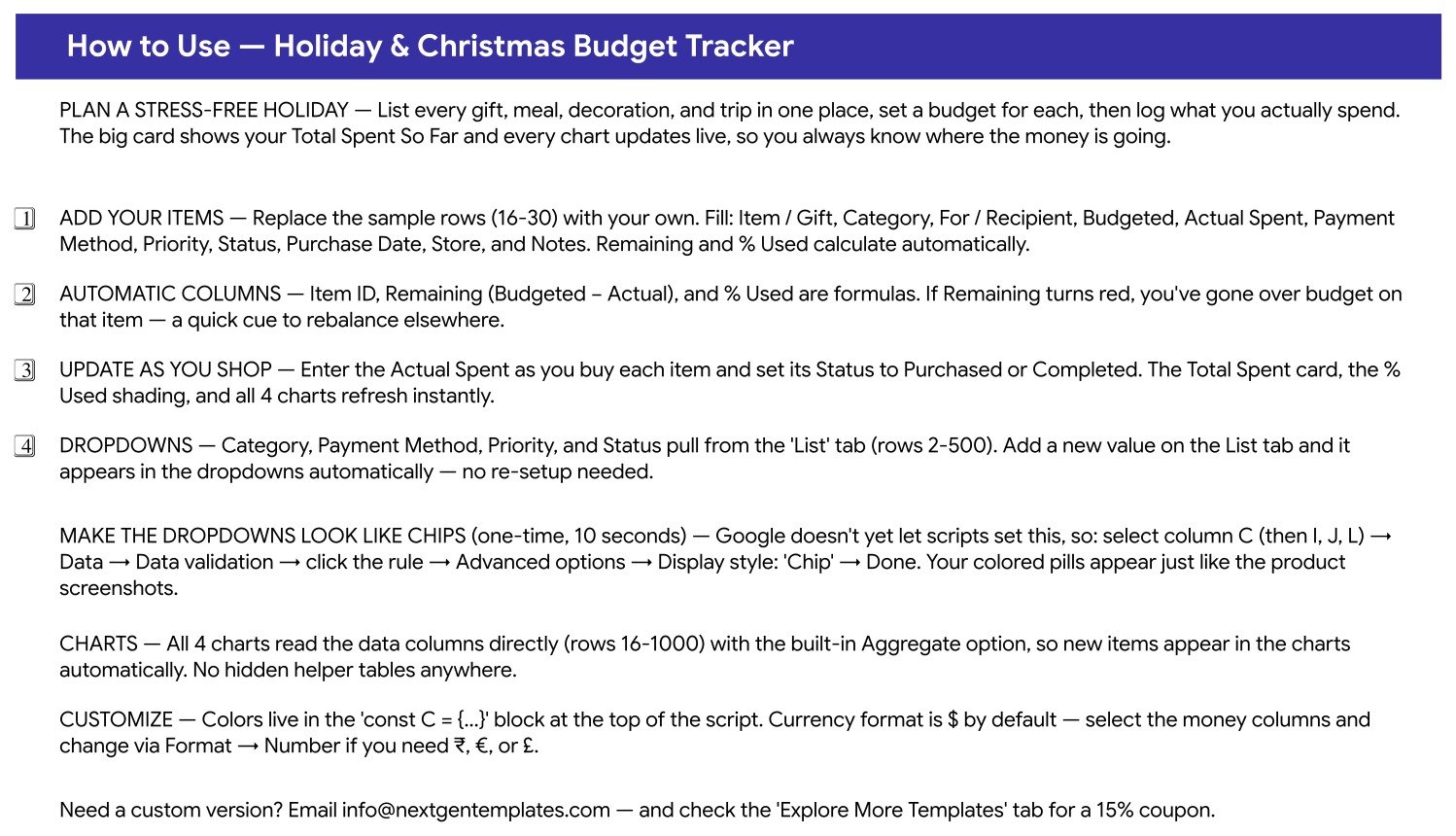
A built-in four-step guide covering how to replace the sample rows, which columns calculate themselves, how to update Status as you shop, and the one-time 10-second trick for turning the dropdowns into coloured chips via Data → Data validation → Display style: Chip.
Page 3: Explore More Templates
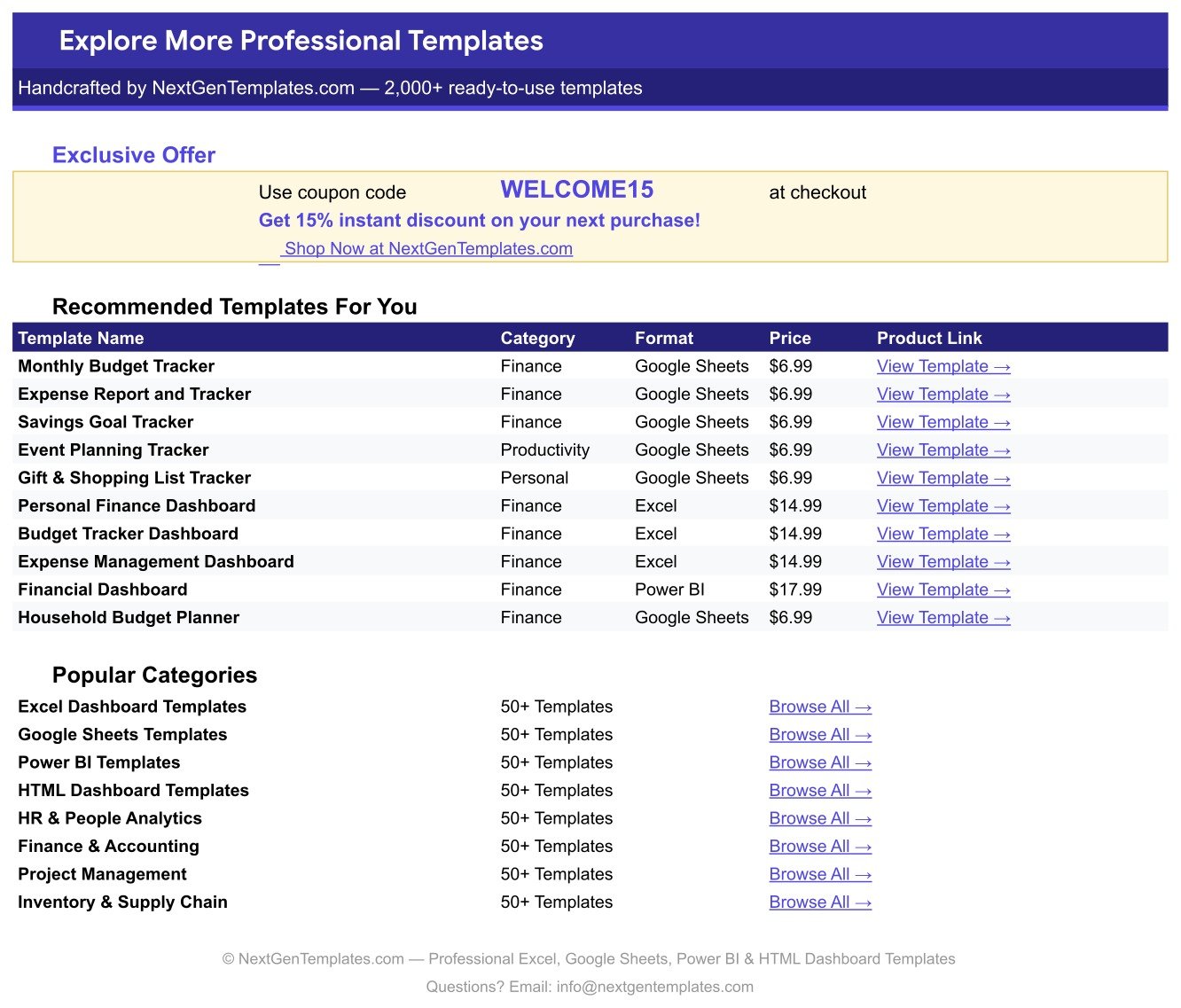
A curated index of related NextGenTemplates products with direct links, popular category shortcuts, and a WELCOME15 coupon code worth 15% off your next purchase.
The List Tab
The quiet engine behind the sheet. Rows 2-500 hold the master values for Category, Payment Method, Priority and Status. Edit this tab and every dropdown on the tracker updates itself.
📊 Holiday & Christmas Budget Tracker vs. Excel Budget Template vs. YNAB / Quicken — Where This Fits
| Feature | Holiday & Christmas Budget Tracker | Excel Budget Template | YNAB / Quicken |
|---|---|---|---|
| Cost | $6.99 one-time ✅ | $0-25 one-time | $109-155 per year |
| Platform | Google Sheets — browser, no install ✅ | Microsoft Excel (licence needed) | Proprietary app + mobile |
| Setup time | Under 10 minutes ✅ | 15-30 minutes | 30-60 minutes plus bank linking |
| Real-time family collaboration | Yes — share the link, edit together ✅ | Only via OneDrive co-authoring | Extra seat or shared login |
| Mobile access | Google Sheets app, free ✅ | Excel mobile, limited editing | Yes |
| Customisable fields | Add any column or category ✅ | Yes | Fixed schema |
| Share with a link | Yes ✅ | File attachment or cloud link | Invite-only |
| Bank account linking | No — manual entry | No | Yes ✅ |
| Year-1 cost at 5 users | $6.99 total ✅ | $0-25 plus Office licences | $545-775 |
For families that want the whole Christmas list visible in one shared tab without paying an annual subscription, the Holiday & Christmas Budget Tracker sits in the sweet spot.
👥 Who This Template Is For — and Who It’s Not For
✅ This template is built for:
- Families running a $500-$5,000 holiday season across gifts, food, travel and decorations
- Couples who want one shared list so nobody buys the same present twice
- Anyone who overspent last December and wants a per-item budget this time
- Office managers or committees planning a Christmas party, Secret Santa or team gifting round
- People who already live in Google Drive and do not want another app or login
❌ This template is NOT for:
- Anyone who wants automatic bank or card feeds — every amount here is typed in by hand
- Year-round household budgeting across income, bills and savings goals — use a full budget planner instead
- Retailers tracking inventory or resale margins rather than personal spending
- Teams that need approval workflows or audit trails on each purchase
⚙️ How to Use the Holiday & Christmas Budget Tracker
- Open the PDF in your download and click the “Make a copy” link to create your own editable Google Sheet.
- Replace the 15 sample rows with your real list: Item / Gift, Category, For / Recipient and a Budgeted amount for each.
- Leave Item ID, Remaining and % Used alone — they are formulas and fill themselves as you type.
- As you shop, enter the Actual Spent, set Status to Purchased or Completed, and add the Store / Vendor and Purchase Date.
- Watch the Remaining column: if it turns red you are over budget on that item, so trim another line to compensate.
- Add any missing Category, Payment Method or Priority value on the List tab — the dropdowns pick it up automatically.
- Optional, 10 seconds: select column C, then Data → Data validation → Advanced options → Display style: Chip to get the coloured pills shown in the screenshots.
💼 Real-World Use Cases
Maria hosts Christmas for eleven people every year. She lists the turkey, the ham, the wine, the tree and every gift in the tracker in November, sets a budget per line, then logs each receipt as she shops. The Budgeted vs Actual chart tells her by mid-December which lines are running hot, so she trims the party catering rather than discovering the overspend in January.
Dev and Priya split the shopping. They share one copy of the sheet, filter by For / Recipient, and mark items Purchased as they go. Because Status updates in real time on both phones, neither of them buys the sister’s handbag twice — the row is already sitting at On Hold, waiting for a sale.
Sam runs the office Secret Santa for 40 people. Each name goes in as a row with a $25 budget, the Payment Method column tracks who reimbursed from petty cash, and the Items by Status donut shows leadership exactly how many gifts are still outstanding a week before the party.
❓ Frequently Asked Questions
What does the Holiday & Christmas Budget Tracker actually track?
The Holiday & Christmas Budget Tracker records 14 fields per item, including Budgeted, Actual Spent, Remaining, % Used, Payment Method, Priority, Status, Purchase Date and Store / Vendor, across 10 spending categories from Gifts to Party & Hosting.
How long does setup take?
Under 10 minutes. Click the copy link in the PDF, delete the 15 sample rows, and type your own list. The Holiday & Christmas Budget Tracker calculates Remaining and % Used for you, and all four charts pick up the new rows automatically.
How does this compare to YNAB or Quicken?
YNAB and Quicken cost $109-155 every year and manage your whole financial life. The Holiday & Christmas Budget Tracker is a $6.99 one-time purchase built for one season, so you get per-gift budgeting and a shared list without an annual subscription or bank linking.
Will the charts update when I add more rows?
Yes. Every chart in the Holiday & Christmas Budget Tracker reads the data columns directly from rows 16 to 1000 using the built-in Aggregate option, so new items appear in Items by Category, Items by Status, Actual Spent by Item and Budgeted vs Actual with no range editing.
Can I add my own categories or payment methods?
Yes. Open the List tab and add your value anywhere in rows 2-500. Every dropdown in the Holiday & Christmas Budget Tracker reads that tab, so the new option appears on existing and future rows instantly.
Does it work in currencies other than dollars?
Yes. The Holiday & Christmas Budget Tracker ships formatted in $. Select the money columns and use Format → Number to switch to ₹, € or £ — no formulas need changing.
Can my family edit it at the same time?
Yes. It is a native Google Sheet, so share the link with edit access and everyone sees the same Status and Actual Spent values live. There are no per-user fees on the Holiday & Christmas Budget Tracker.
👤 About the Author
Built by PK — Microsoft Certified Professional with 15+ years of Excel, Google Sheets, and Power BI experience. Founder of NextGenTemplates, reaching 300K+ subscribers across YouTube channels (@PK-AnExcelExpert, @NextGenTemplates, @NeoTechNavigators). Every template is hand-built and tested before release.
🔗 Explore Related Templates
- Gift Card and Store Credit Tracker in Google Sheets — the natural companion: log the gift cards you receive so none expire unused.
- Bank Account Balance Tracker in Google Sheets — see what is actually left across your accounts before the December spend.
- Week Money Challenge Tracker in Google Sheets — save up for next Christmas one week at a time.
- Charitable Giving and Tithe Tracker in Google Sheets — keep year-round donations and holiday giving in one record.
Browse the full range of dashboard templates if you would rather have charts and slicers than a single tracker page.
📖 Click here to read the Detailed Blog Post
🎥 Visit our YouTube channel for step-by-step video tutorials
👉 YouTube.com/@NextGenTemplates
Watch the step-by-step video Demo:
📅 Last updated: August 2026






















Reviews
There are no reviews yet.