Are you unsure how much home you can truly afford? Worried about making the wrong financial decision or taking on a loan that becomes a burden?
Home Affordability Calculator in Excel!
This powerful, ready-to-use Excel tool is designed to help you make confident home-buying decisions with complete financial clarity. Whether you are a first-time buyer or an experienced investor, this calculator simplifies complex mortgage calculations and gives you instant insights into your affordability.
Instead of relying on guesswork or manual formulas, this tool centralizes all your financial inputs and transforms them into clear, actionable results. With automated calculations, real-time updates, and advanced analysis features, you can evaluate your budget, plan your loan, and avoid financial risks.

As a result, you can move forward with your home purchase confidently and stress-free.
🔑 Key Features of Home Affordability Calculator in Excel
✨ 🏡 Accurate Home Price Estimation – Instantly calculate how much home you can afford based on your income and expenses.
✨ 💰 EMI & Loan Calculation – Get detailed breakdown of monthly payments including principal and interest.
✨ 📊 DTI Ratio Analysis – Measure your financial health with front-end and back-end debt-to-income ratios.
✨ 🎯 Affordability Zones – Understand your risk level with clear indicators (Safe, Moderate, High Risk).
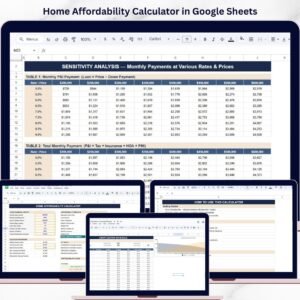
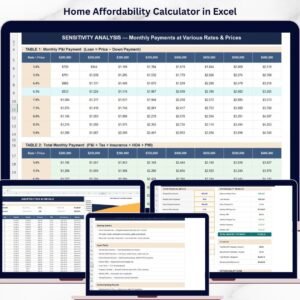
✨ 📈 Sensitivity Analysis Tool – Analyze how changes in interest rates and home prices impact your EMI.
✨ 📉 Amortization Schedule – View complete loan breakdown including interest, principal, and remaining balance.
✨ ⚡ Automated Calculations – All results update instantly when you change inputs.
📂 What’s Inside the Home Affordability Calculator in Excel
📁 Financial Input Section – Enter income, expenses, interest rate, loan term, and other details.
📁 Affordability Results Dashboard – View maximum home price, loan amount, EMI, and total payment.
📁 DTI Analysis Section – Evaluate front-end and back-end debt ratios for better planning.
📁 Affordability Zone Indicator – Visual signals showing risk levels for decision-making.
📁 Sensitivity Analysis Table – Compare different loan scenarios and interest rate impacts.
📁 Amortization Schedule Sheet – Detailed month-by-month loan repayment breakdown.
📁 Automated Excel Formulas – Real-time calculations for accurate financial insights.
🛠️ How to Use the Home Affordability Calculator in Excel
👉 Step 1: Enter your financial details (income, expenses, down payment, interest rate)
👉 Step 2: Review affordability results instantly
👉 Step 3: Analyze DTI ratios and risk levels
👉 Step 4: Explore different scenarios using sensitivity analysis
👉 Step 5: Review amortization schedule for long-term planning
💡 No advanced Excel skills required—simple, fast, and highly effective!
👥 Who Can Benefit from This Home Affordability Calculator in Excel
✔️ First-Time Home Buyers – Understand affordability and avoid costly mistakes
✔️ Working Professionals – Plan home purchases with confidence
✔️ Financial Planners – Assist clients with accurate financial insights
✔️ Loan Advisors – Evaluate loan eligibility and repayment capacity
✔️ Real Estate Investors – Analyze investment opportunities effectively
This calculator is more than just a tool—it’s your personal home-buying advisor. It helps you avoid over-budget purchases, understand your financial limits, and plan your investment wisely.
If you want to make smarter decisions, reduce financial stress, and confidently buy your dream home, this calculator is the perfect solution.
📖 Click here to read the Detailed blog post
Watch the step-by-step video tutorial:
🎥 Visit our YouTube channel to learn step-by-step video tutorials
Compatibility and Requirements
- Works in Microsoft Excel desktop (Excel 2016 or later, or Microsoft 365).
- Results update automatically when you change the income, expense, down payment, interest rate or loan term inputs.
- New to Excel? Microsoft offers free lessons in Excel for Windows training.
Frequently Asked Questions
What do I enter into the calculator?
You enter your income, expenses, down payment, interest rate and loan term in the Financial Input section. The results update as soon as you change a value.
What results does it show?
The results dashboard shows the maximum home price, the loan amount, the monthly EMI and the total payment.
Does it check my debt-to-income ratio?
Yes. The DTI Analysis section calculates front-end and back-end debt-to-income ratios, and the affordability zone indicator marks your result as Safe, Moderate or High Risk.
Can I compare different interest rates and home prices?
Yes. The sensitivity analysis table shows how changes in the interest rate and the home price affect your EMI.
Is there a repayment schedule?
Yes. The amortization schedule sheet lists the loan month by month, with interest, principal and remaining balance.
Is there a Google Sheets version?
Yes. See the Home Affordability Calculator in Google Sheets.
Related Financial Templates
- Home Affordability Calculator in Google Sheets: the same calculator for Google Sheets
- Debt Payoff Calculator Template in Excel: plan how to pay down your debts
- Budget Calculator in Excel: a free budget calculator to plan monthly spending
- Budget Calculator in Google Sheets: the free budget calculator for Google Sheets
- Home Renovation Checklist in Excel: a checklist for the work after you buy
Browse all Excel financial tools.