

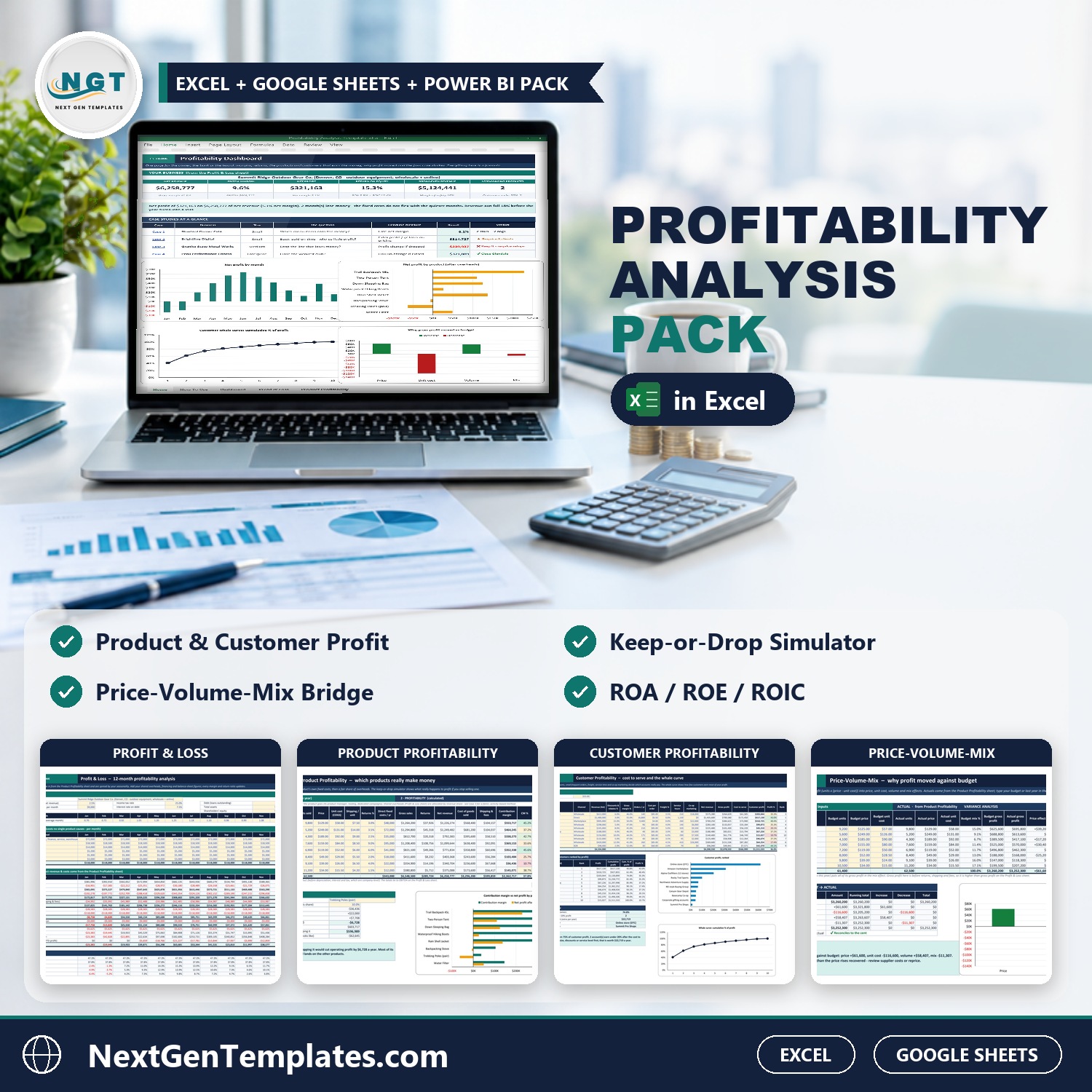
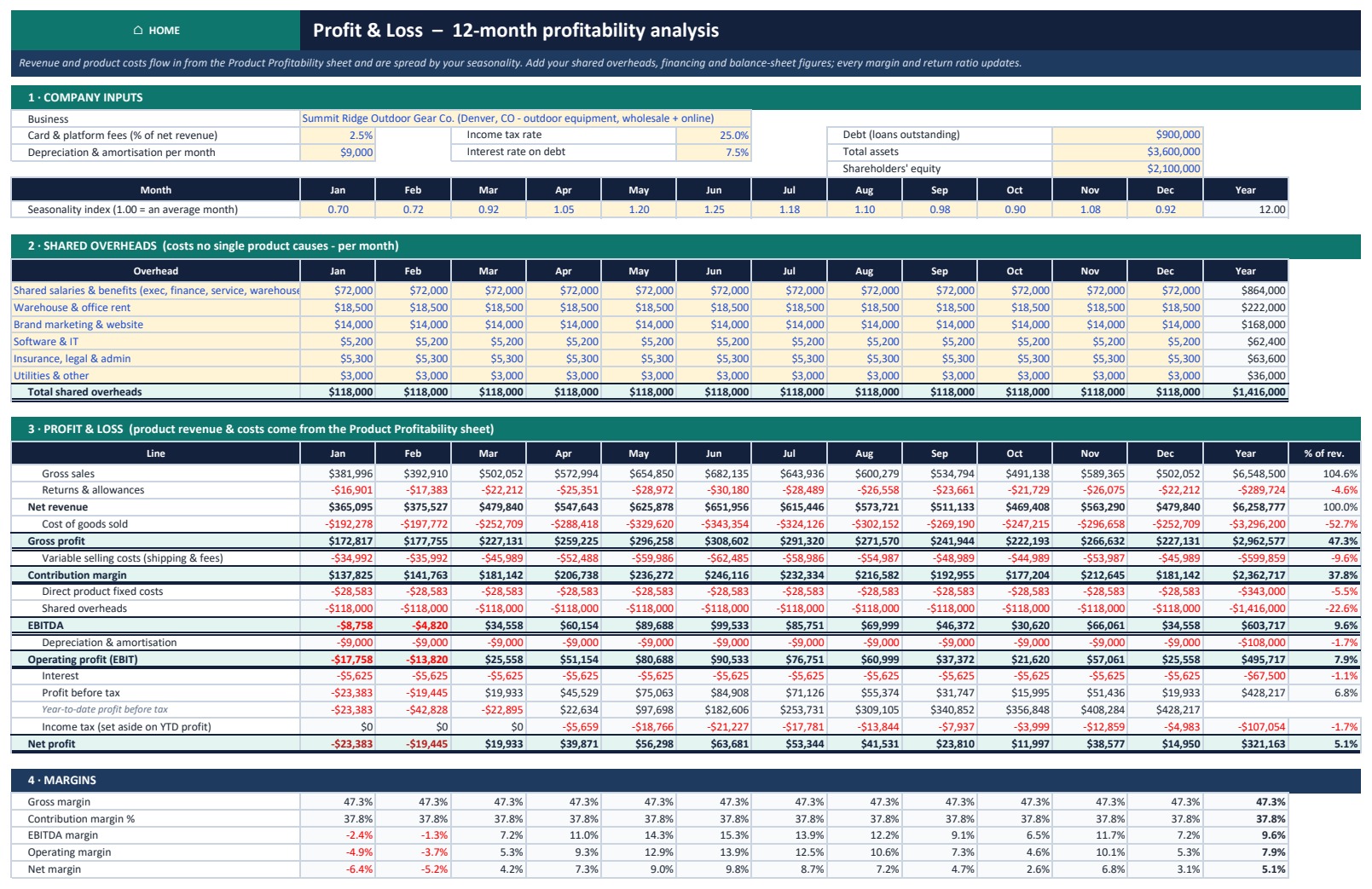

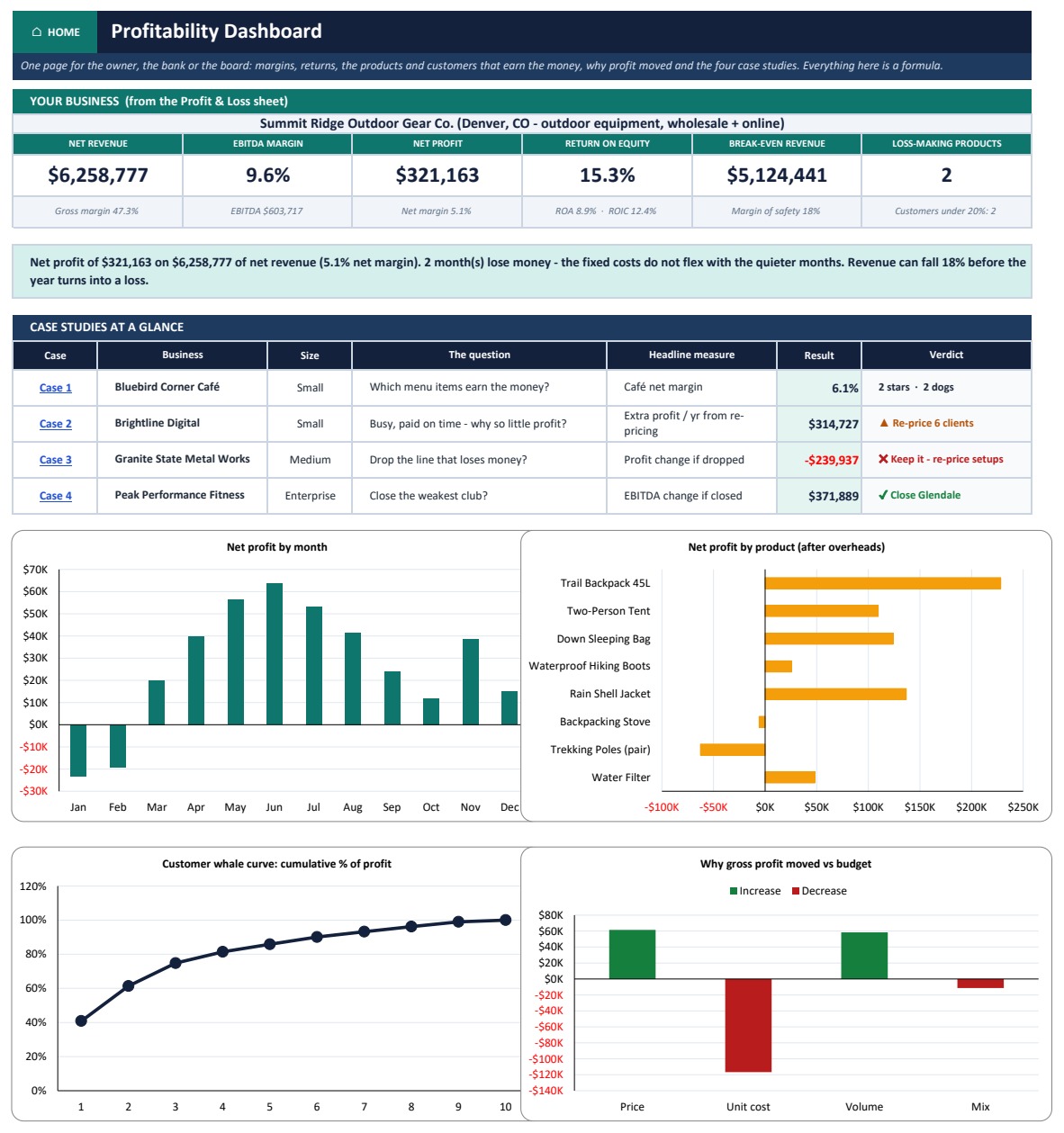
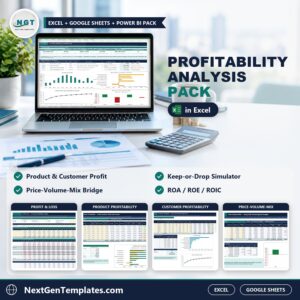
The Profitability Analysis Pack in Excel answers the question every owner, analyst and lender asks once sales are up and cash is still tight: which products, customers and locations really make money, and why did profit move? The pack contains a 17-sheet workbook delivered as a Sample edition and a Blank edition, a Google Sheets copy, a Power BI what-if explorer, a 16-slide editable PowerPoint deck and an 11-page PDF user guide. Every result is a live Excel formula, with no macros and no add-ins. In the sample, Summit Ridge Outdoor Gear Co. earns $6,258,777 of net revenue at a 47.3% gross margin, but only 9.6% EBITDA and a 5.1% net margin once shared overheads are charged, and the workbook says so in a plain-English verdict sentence. The pack is built by PK, whose YouTube channels reach 300K+ subscribers, and it is covered by our refund policy.
Watch the Profitability Analysis Pack in Excel walkthrough
Key Features of the Profitability Analysis Pack in Excel
- 12-month profit and loss built from your products, with seasonality, shared overheads, fees, depreciation, interest and tax. It shows gross, contribution, EBITDA, operating and net margin, plus ROA, ROE, ROIC, break-even revenue and margin of safety.
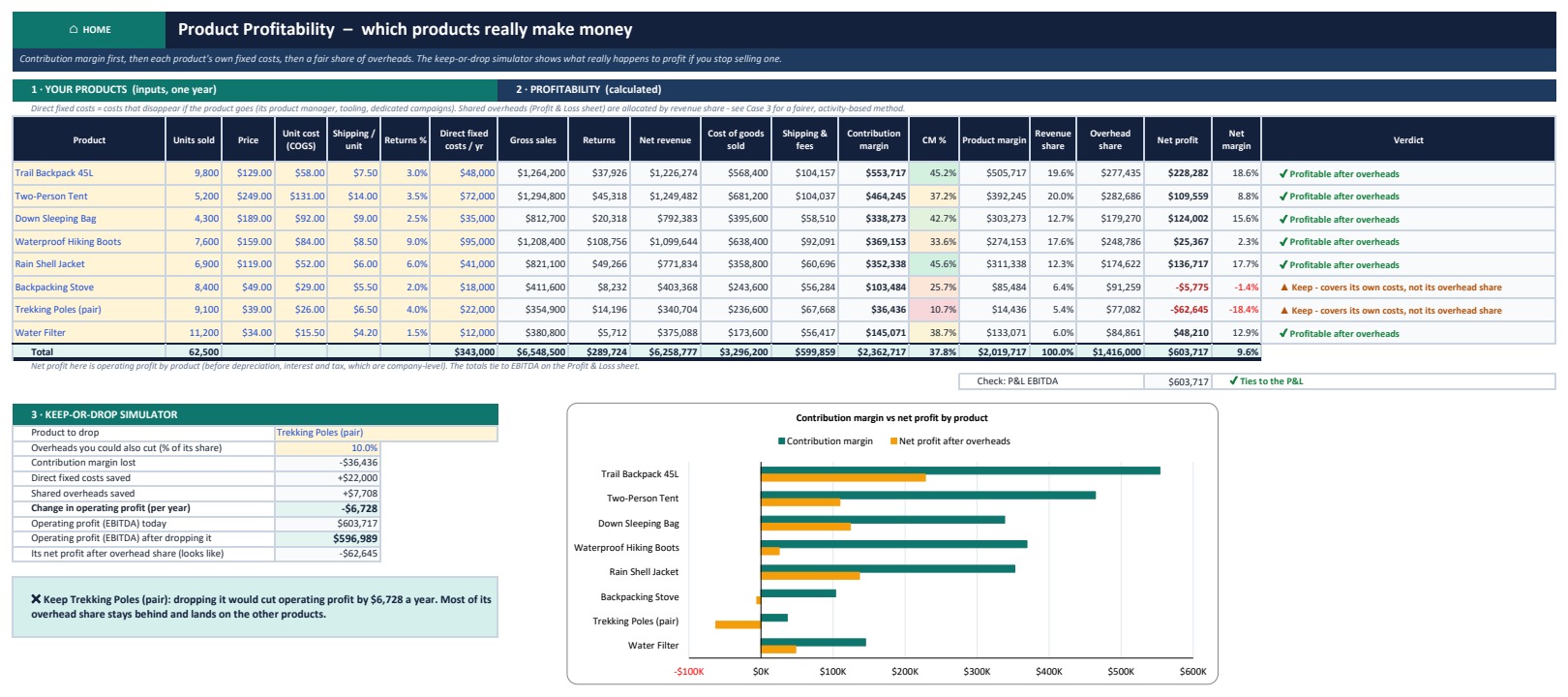
- Product profitability analysis for up to 8 products: contribution margin, each product’s own fixed costs, a revenue-based share of overheads and a verdict for each one.
- Keep-or-drop simulator that shows what really happens to operating profit if you stop selling a product, because the overhead it was charged does not disappear.
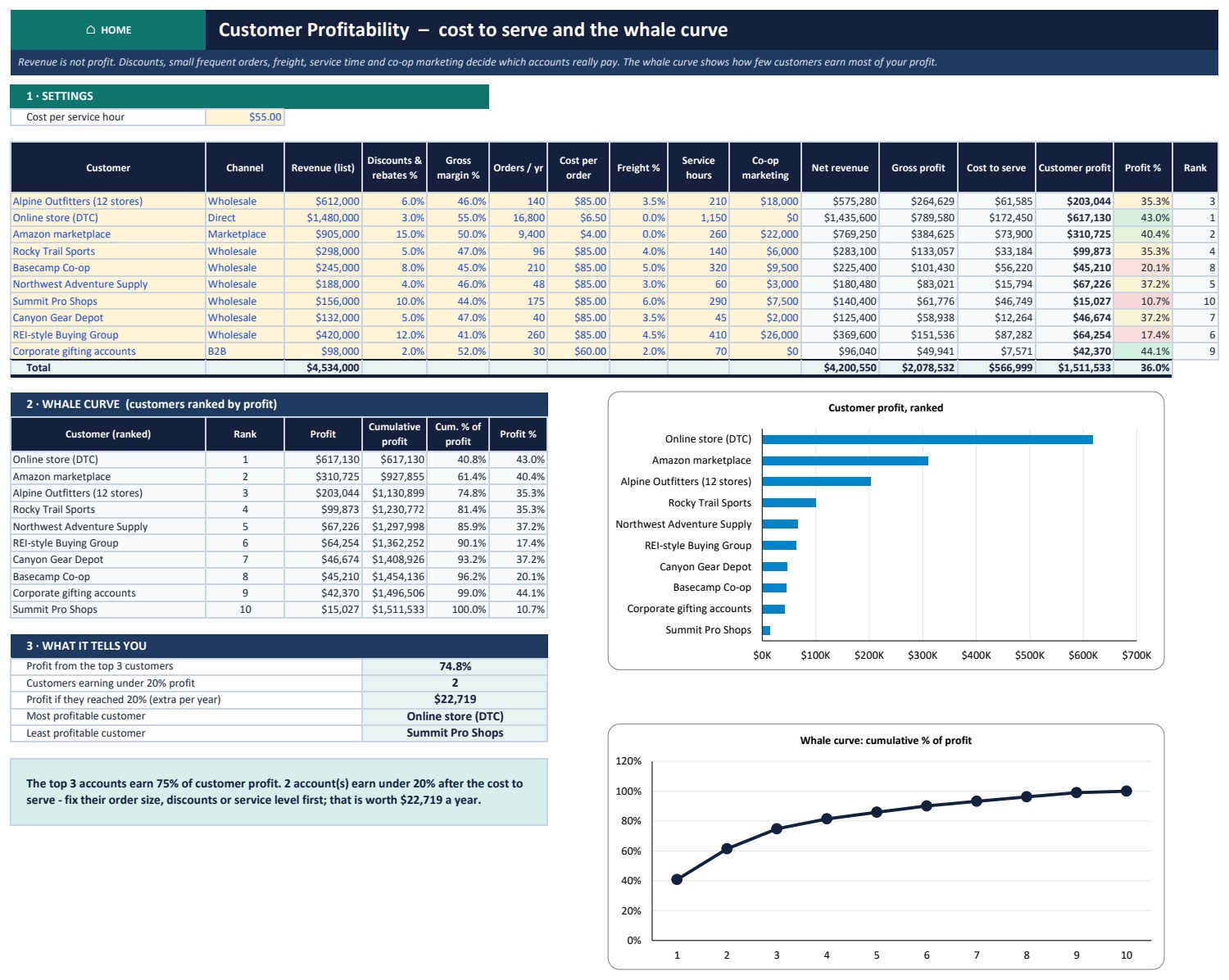
- Customer profitability analysis for up to 10 customers: discounts, orders, cost per order, freight, service hours and co-op marketing give each account’s true profit. A whale curve shows how much of your profit the top few accounts earn.
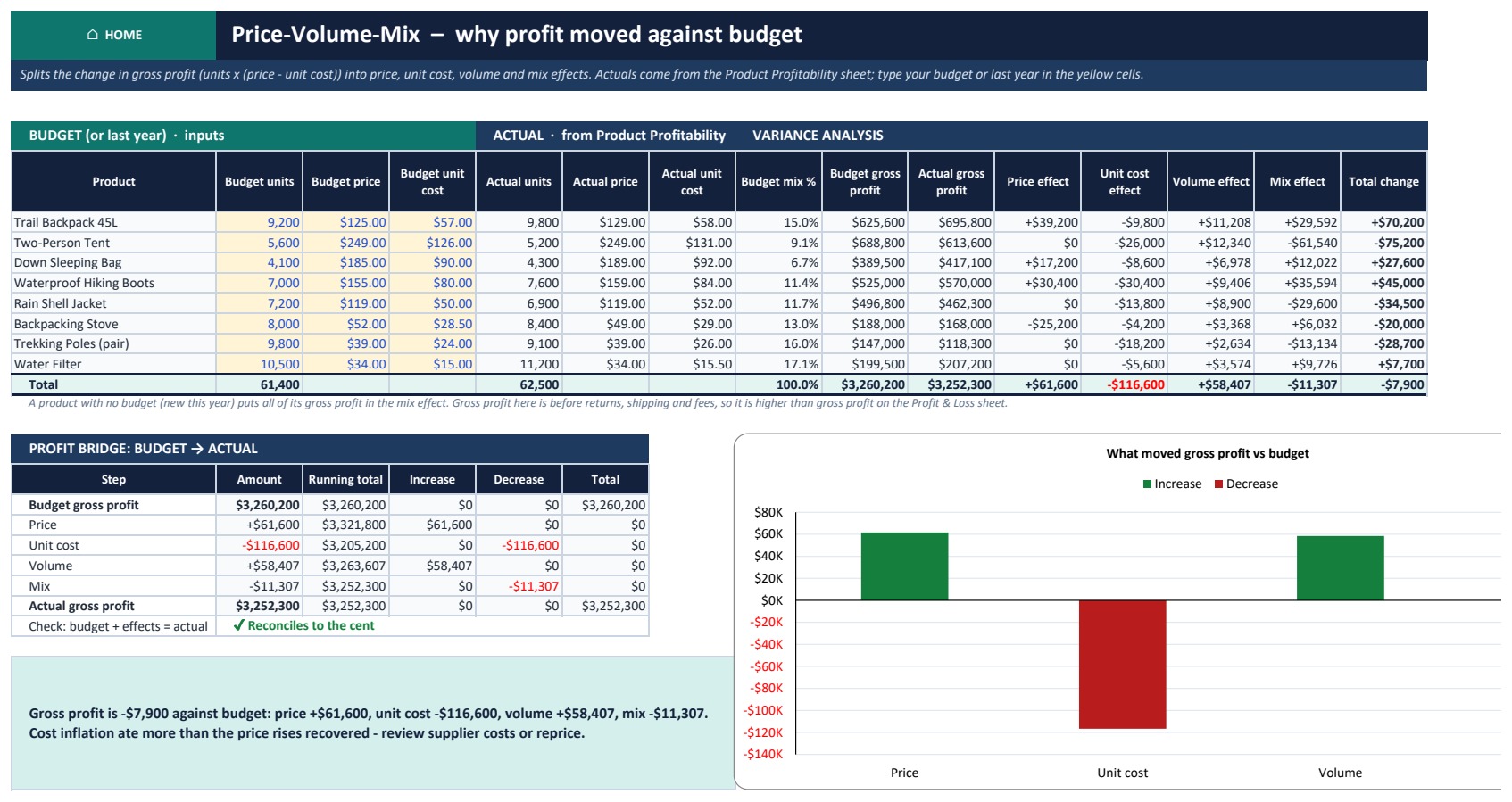
- Price-volume-mix analysis: type your budget or last year’s figures and the change in gross profit is split into price, unit cost, volume and mix effects that add up exactly, with a waterfall chart.
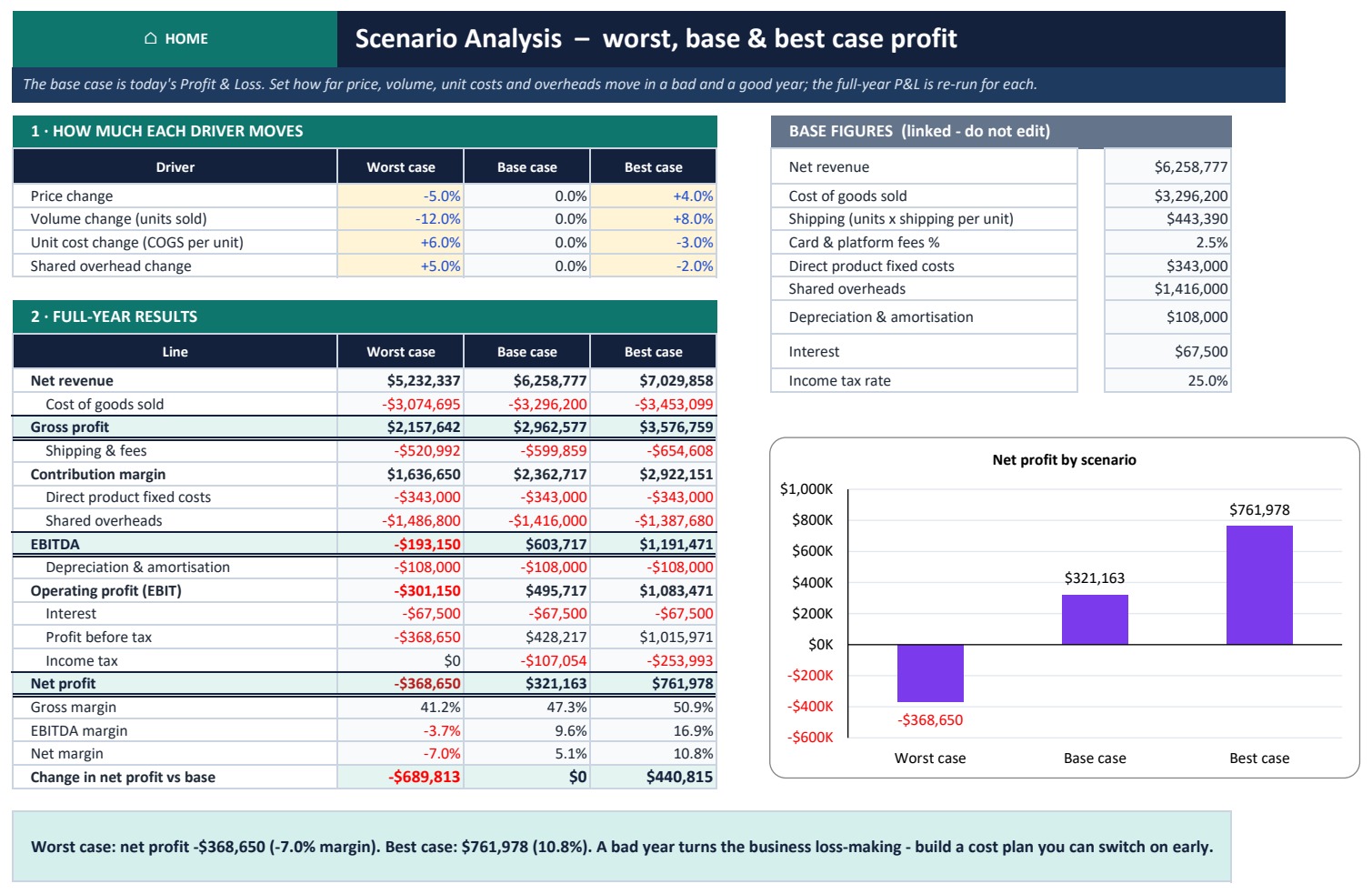
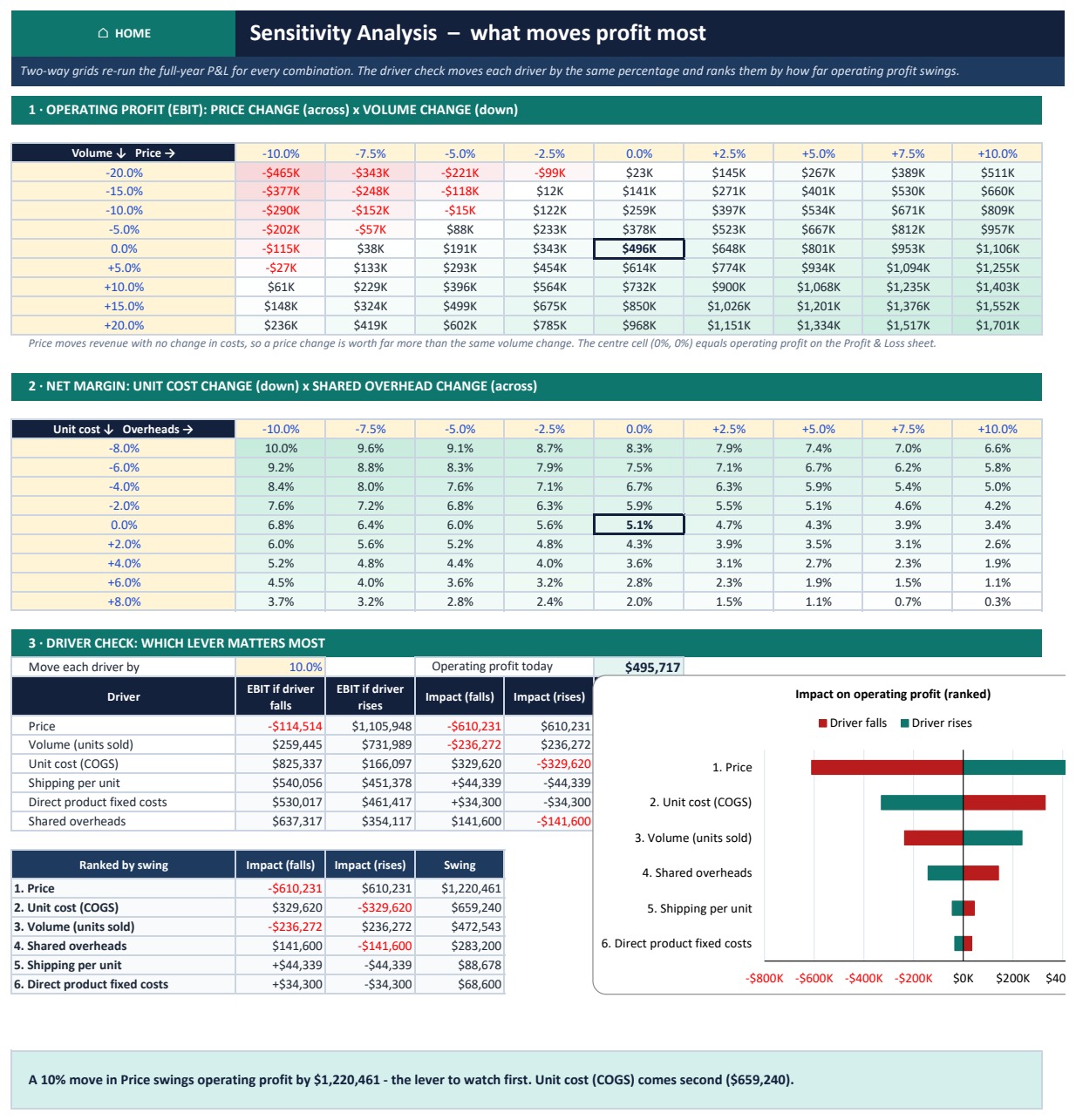
- Scenarios and sensitivity: worst, base and best cases, two-way heat-map grids for operating profit and net margin, and a ranked driver check.
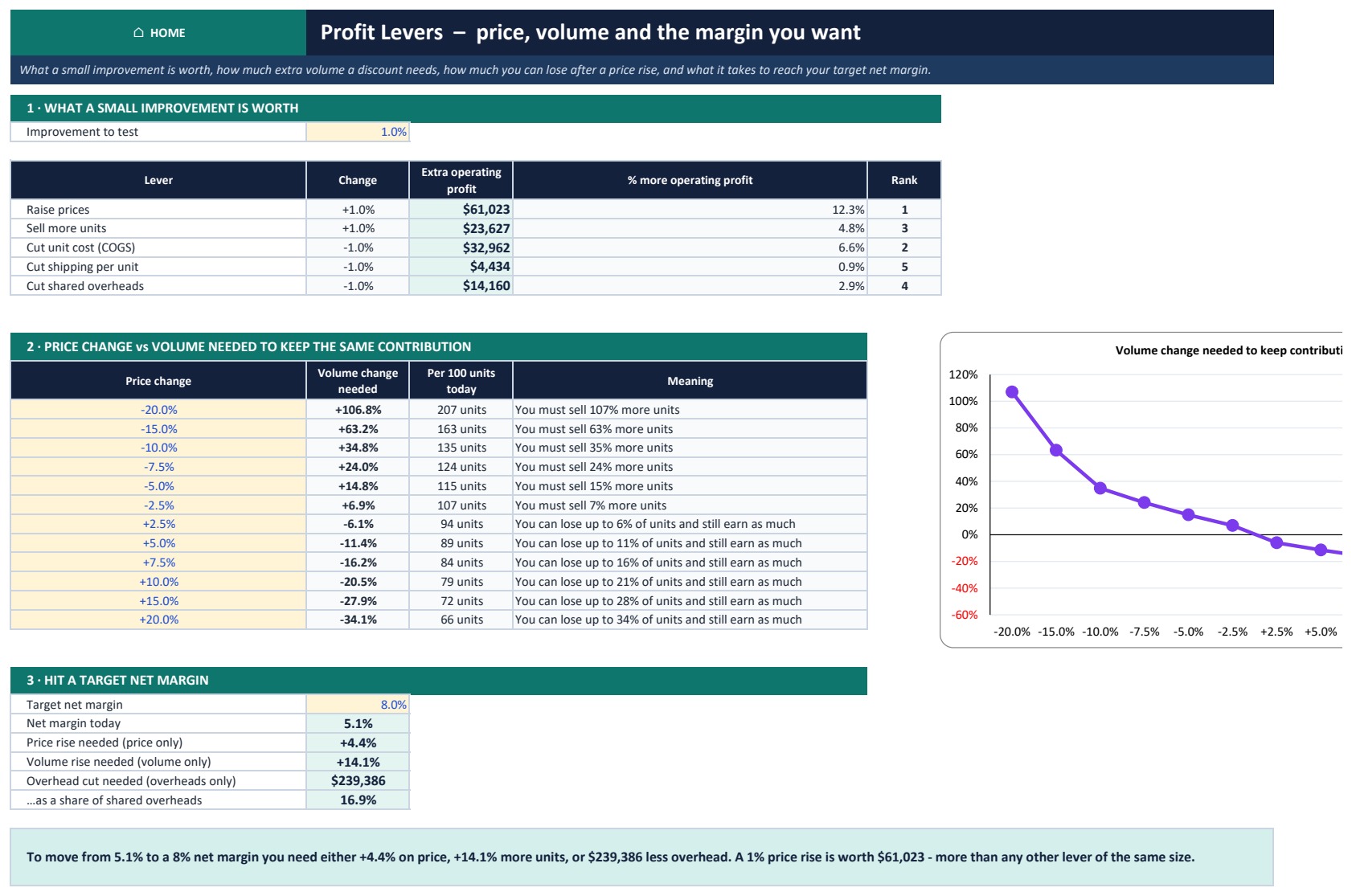
- Profit Levers: what a 1% improvement in each lever is worth, the extra volume a discount needs, and the price, volume or overhead change that reaches your target net margin.
- Monthly Tracker that compares actual revenue, gross profit and net profit against the plan, with a status for every month.
What’s Inside the Profitability Pack
The workbook opens on a Home page that links to every sheet. Core tools: Profit & Loss, Product Profitability, Customer Profitability, Price-Volume-Mix, Monthly Tracker and Dashboard. What-if analysis: Scenarios, Sensitivity and Profit Levers. Help: How To Use, Formula Guide and Get More Templates. Four worked case studies, each in its own industry:
- Small business café (Bluebird Corner Café): menu engineering puts every item in Star, Plowhorse, Puzzle or Dog. A $0.25 rise on every Plowhorse is the cheapest profit on the menu.
- Digital agency (Brightline Digital): a 30.6% delivery margin against a 45% target, with 6 of 8 clients below it. Re-pricing or re-scoping them adds $314,727 a year.
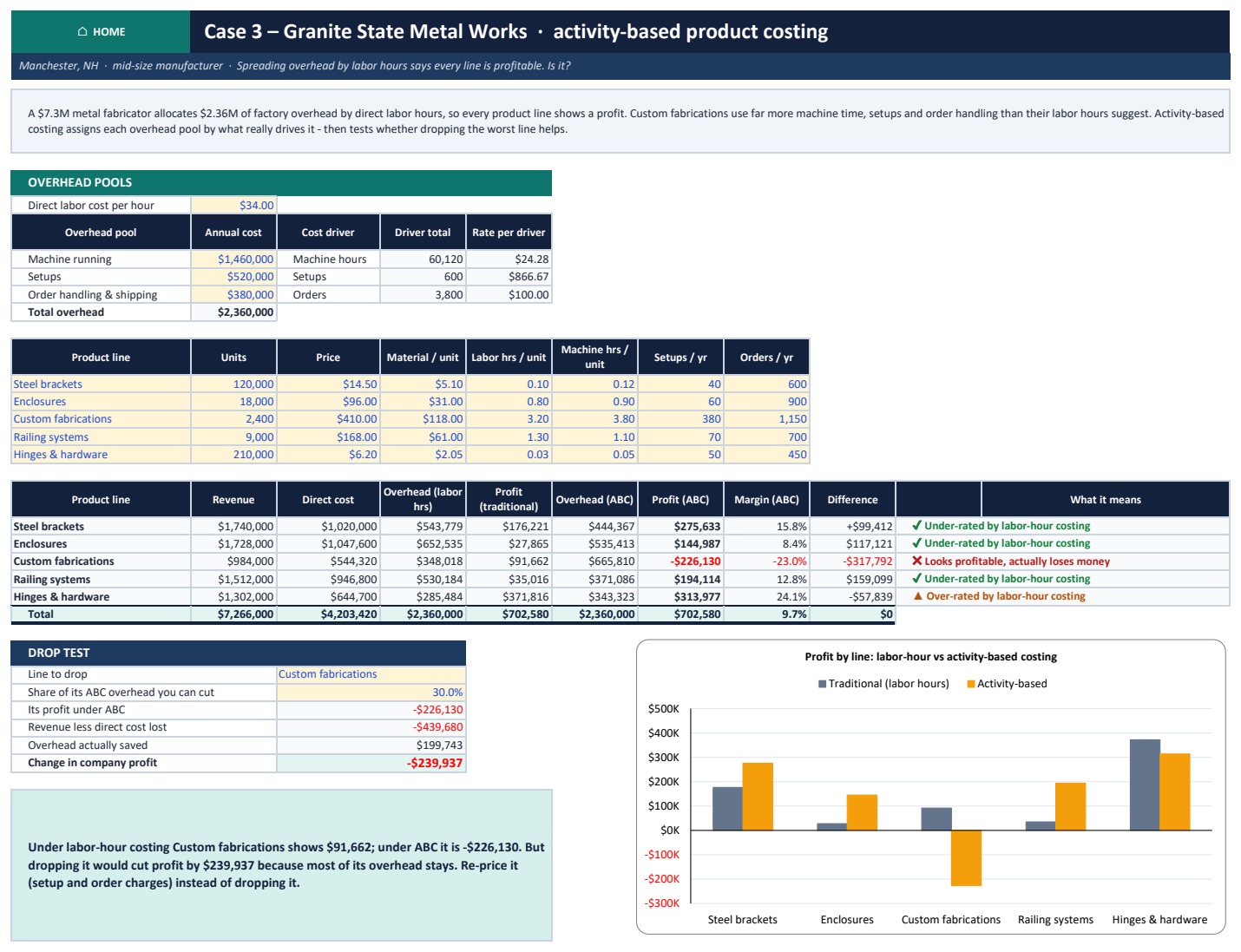
- Mid-size manufacturer (Granite State Metal Works): labor-hour costing versus activity-based costing, and a drop test that separates avoidable from unavoidable overhead.
- Fitness chain (Peak Performance Fitness, 6 clubs): four-wall EBITDA by club, head-office allocation and a close-a-club test. Closing Glendale adds $371,889.
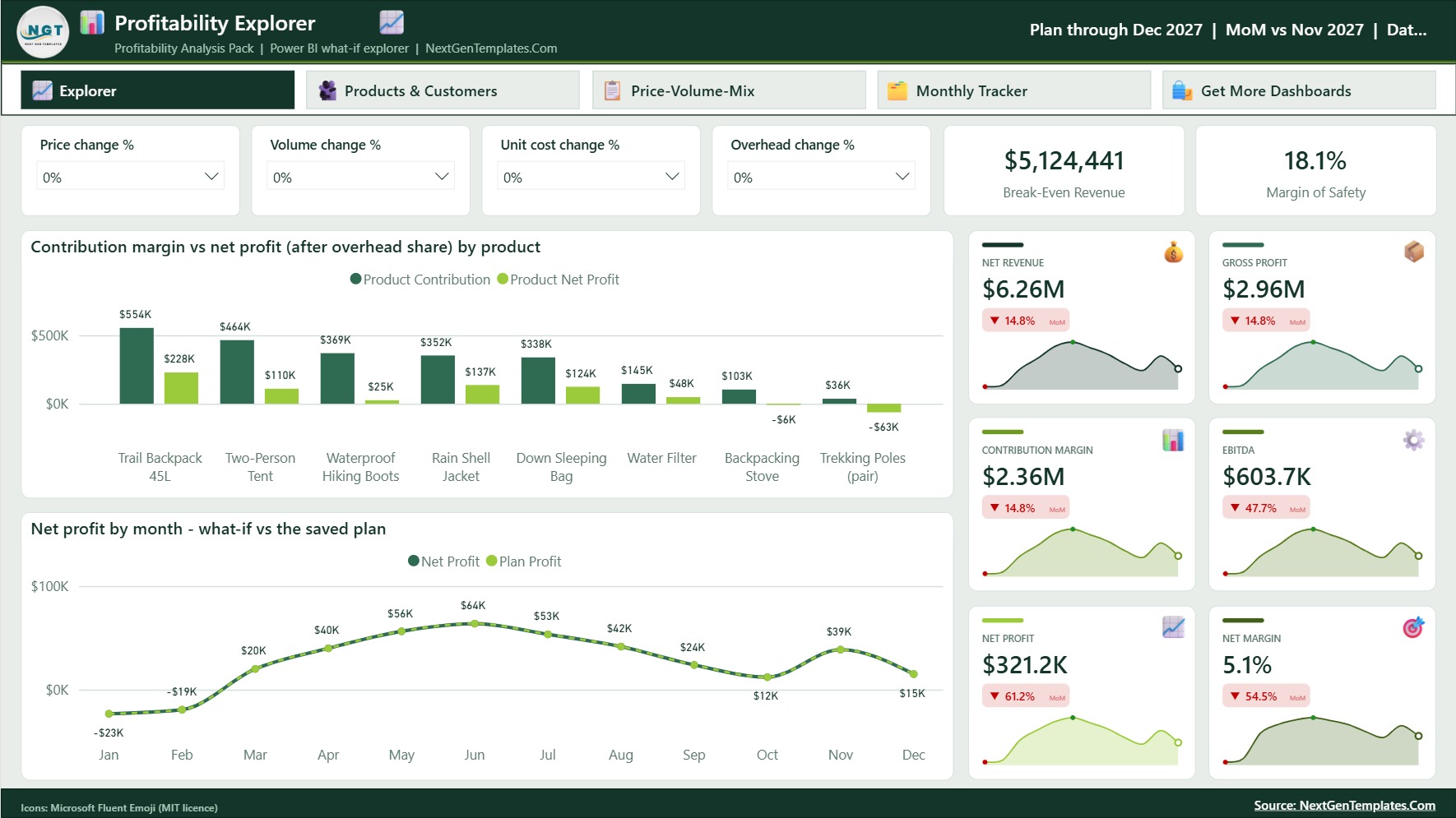
The pack also includes a Blank edition for your own numbers, a Google Sheets copy of the same model, a Power BI explorer with price, volume, unit-cost and overhead sliders, the PowerPoint deck and the PDF guide.
Profitability Analysis Pack in Excel vs. Free Templates vs. Paid Software – Where This Fits
| Feature | This Excel pack | Free profitability template | Paid FP&A / BI software |
|---|---|---|---|
| Cost | One-time purchase | Free | Monthly subscription |
| Platform | Excel 2010+ (Windows and Mac), plus Google Sheets and Power BI copies | Usually one sheet | Web app |
| Setup time | About 15 minutes | About 5 minutes | Account setup and onboarding |
| Product and customer profitability | Yes (8 products, 10 customers) | Rarely | Varies |
| Keep-or-drop simulator | Yes | No | Varies |
| Price-volume-mix bridge | Yes, adds up exactly | No | Varies |
| Customizable fields and formulas | Fully editable, nothing locked | Usually limited | Limited to the vendor’s model |
| Industry case studies and a presentation deck | 4 cases plus a 16-slide deck | No | No |
| Year-1 cost at 5 users | One purchase | Free | Per-seat fee, every month |
Who This Template Is For – and Who It’s Not For
It is for small-business owners deciding which products to keep, finance and FP&A analysts preparing a margin review for a board or bank, agencies and consultancies checking client profitability, manufacturers comparing costing methods, multi-site operators testing a closure, and students learning managerial accounting with worked examples.
It is not for teams that need live links to accounting software, since you type or paste your own figures. It is also not a full three-statement financial model, not a budgeting system, and not tax, legal or investment advice. All five sample companies are fictional, and their numbers are illustrations, not industry benchmarks.
How to Use the Profitability Pack
- Open the Sample edition and click through Home. Every sheet has a HOME button.
- List your products on Product Profitability: units, price, unit cost, shipping, returns and each product’s own fixed costs.
- Add shared overheads, financing, tax and balance-sheet figures on the Profit & Loss sheet.
- Test keep-or-drop, rank your customers and explain the variance on Price-Volume-Mix.
- Stress-test the plan on Scenarios, Sensitivity and Profit Levers, then log actual results on the Monthly Tracker and present the Dashboard or the included deck.
Real-World Use Cases
Maria, café owner. Lattes sold the most but earned thin margins. The Case 1 menu-engineering sheet showed her which items were Plowhorses worth a small price rise and which were Dogs worth dropping.
David, FP&A analyst. David used the Profit & Loss scorecard, the Scenarios sheet and the Dashboard for a quarterly margin review. The worst case showed a loss for the year and the exact drivers behind it.
Anita, plant manager. Anita adapted the Case 3 sheet to her own overhead pools. It showed that a product line that looked profitable under labor-hour costing lost money under activity-based costing.
Frequently Asked Questions
A product shows a loss. Should I drop it?
Not before running the keep-or-drop simulator. If its contribution margin is positive, dropping it usually cuts profit, because the overhead it was charged stays behind. Re-price it, cut its direct costs or bundle it first.
Do I need macros or add-ins?
No. The Excel file is a plain .xlsx with worksheet formulas and charts, and it works offline in Excel 2010 and later on Windows and Mac.
Does it include Google Sheets and Power BI versions?
Yes. The ZIP holds a PDF with a one-click Make a copy link to the Google Sheets edition, and a Power BI file with a Data.xlsx. The Power BI file is an interactive what-if explorer rather than a copy of the calculator.
How many products and customers can I analyse?
The sheets are built for up to 8 products and 10 customers. To add more, insert rows inside the table above the Total row and copy the formulas down.
Why is overhead allocated by revenue?
It is simple and common. When products use overhead very unevenly, use the activity-based method shown in the manufacturer case study.
Can I change the currency?
Yes. Select the cells, press Ctrl+1 and change the symbol in the number format. The calculations do not change.
Is there a blank version?
Yes. The Blank edition clears the core tools for your own numbers and keeps the four case studies as worked examples.
About the Author
Built by PK – Microsoft Certified Professional with 15+ years of Excel, Google Sheets, and Power BI experience. Founder of NextGenTemplates, reaching 300K+ subscribers across YouTube channels. Every template is hand-built and tested before release.
Explore Related Templates
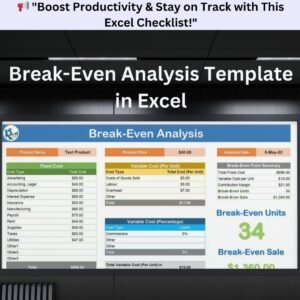
- Break-Even Analysis Pack in Excel: the companion pack for cost-volume-profit and break-even questions.
- CFO’s Financial Command Toolkit: 10 finance templates in one bundle.
- Profit and Loss (P&L) Template in Excel
- Cash Flow Template in Excel
- Pricing Strategy KPI Dashboard in Excel
Browse more Excel financial tools and Excel analysis templates, or read the full walkthrough of the Profitability Analysis Pack in Excel on our blog.
Download the pack today and know which products and customers earn your profit before your next pricing or cost decision.
Last updated: October 2026
Compatibility and Requirements
- Works in Microsoft Excel desktop (Excel 2016 or later, or Microsoft 365). The workbook is a plain .xlsx file with worksheet formulas and charts.
- The Sensitivity sheet shows results with color-coded heat-map grids. Microsoft explains how this works in Use conditional formatting to highlight information in Excel.

















Reviews
There are no reviews yet.