

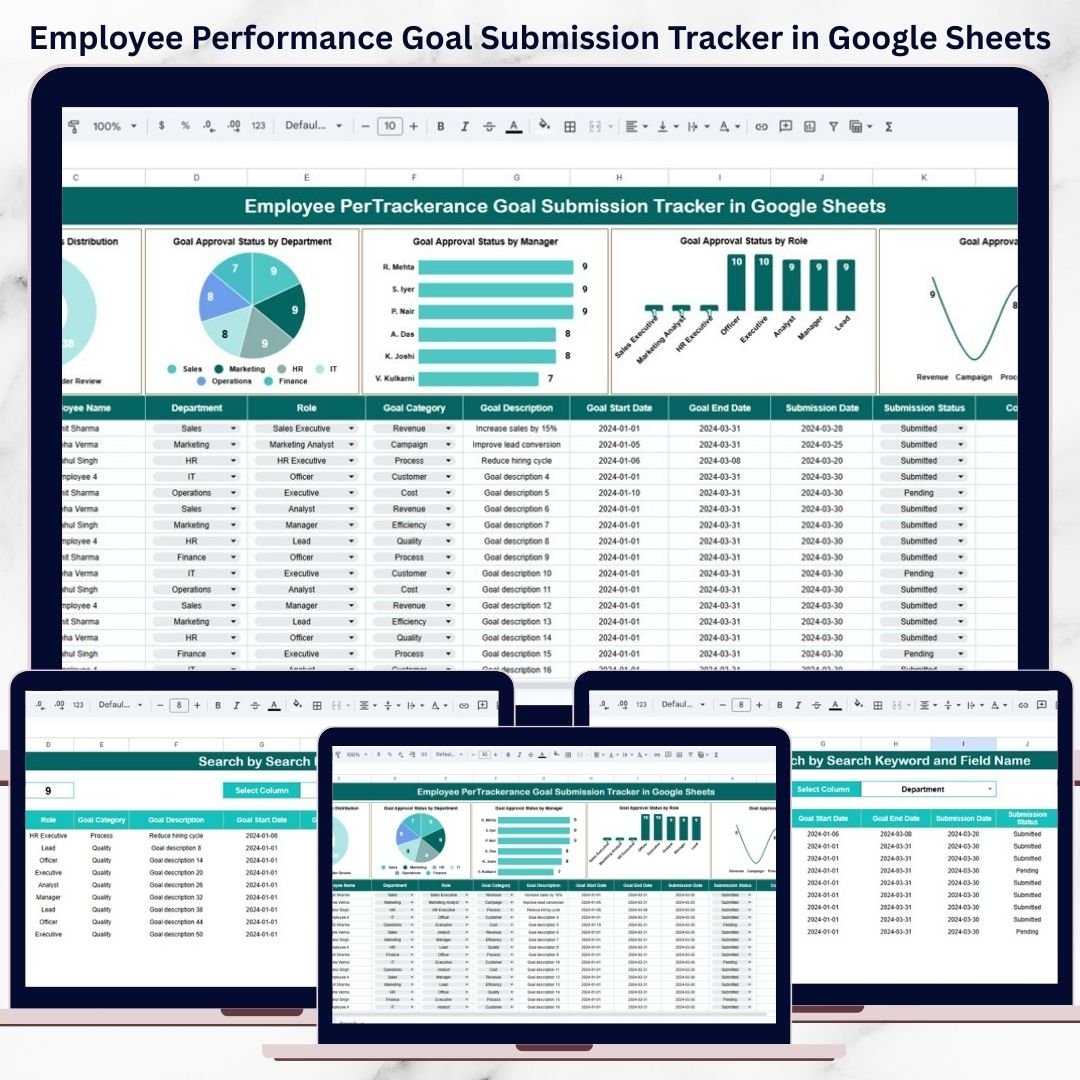

Performance management begins with clear goals. When employees understand what they need to achieve, organizations gain focus, alignment, and measurable results. However, many companies still collect performance goals through emails, Word documents, or scattered spreadsheets. As a result, submissions get delayed, approvals become unclear, and HR teams lose visibility into the goal-setting process.
That is exactly why the Employee Performance Goal Submission Tracker in Google Sheets becomes an essential HR and performance management tool.
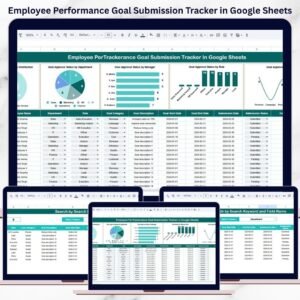
This ready-to-use tracker brings structure, clarity, and transparency to employee goal-setting cycles. It helps HR teams, people managers, and leadership track goal submissions, monitor approval status, and ensure accountability across departments, managers, and roles—all within a single, easy-to-use Google Sheets tracker.
Because the tracker is built entirely in Google Sheets, it supports real-time collaboration, automatic chart updates, secure sharing, and zero software cost. Teams can move away from manual follow-ups and manage goal submissions with confidence and speed.

✨ Key Features of the Employee Performance Goal Submission Tracker in Google Sheets
📋 1. Centralized Goal Submission Tracking
All employee goals are logged in one structured tracker, eliminating emails and disconnected files.
📊 2. Visual Goal Submission & Approval Insights
Built-in charts convert raw goal data into clear, actionable insights for HR and leadership.
🔍 3. Smart Search & Filtering
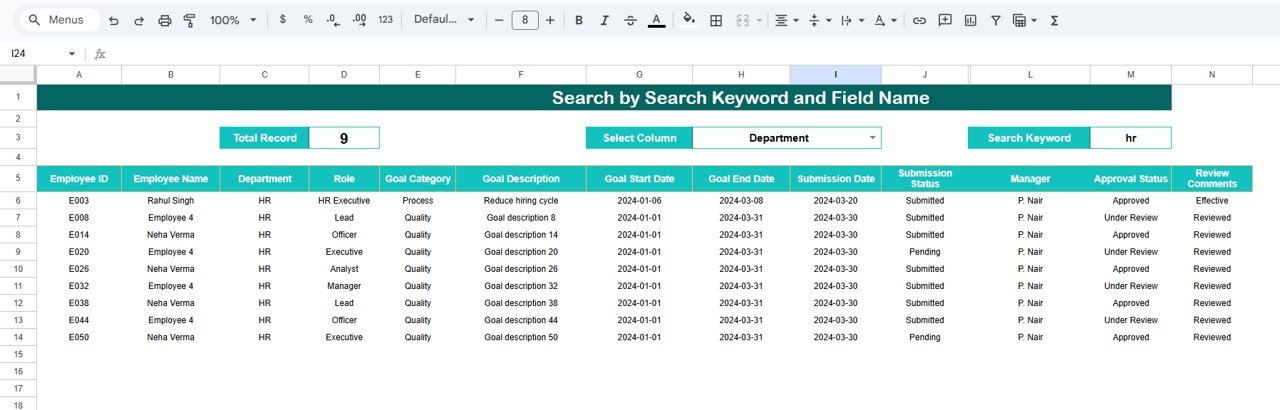
Find any employee’s goal record instantly using keyword-based search and field selection.
👤 4. Clear Manager & Role Accountability
Track submission and approval status by manager, department, and role to improve governance.
🤝 5. Google Sheets-Based Collaboration
HR teams and managers can update and review data together in real time.
📦 What’s Inside the Employee Performance Goal Submission Tracker
🗂️ Tracker Sheet Tab – Central Goal Submission Log
This is the core data entry and tracking sheet. Typical fields include:
Employee Name
Department
Role / Designation
Manager Name
Goal Submission Status
Goal Approval Status
Submission Date
Remarks
Whenever data is added or updated, all charts refresh automatically.
📈 Charts That Turn Goal Data into Insights
The tracker includes four insightful charts designed to support faster follow-ups and better decision-making:
📌 Goal Submission Status Distribution
Shows Submitted, Pending, and Not Submitted goals—helping HR teams track completion rates.
📌 Goal Approval Status by Department
Highlights departments where approvals are delayed or pending, improving accountability.
📌 Goal Approval Status by Manager
Helps leadership monitor manager responsiveness and identify approval bottlenecks.
📌 Goal Approval Status by Role / Designation
Reveals role-specific approval trends and workload challenges.
These charts provide instant clarity during appraisal cycles.
🔍 Search Feature – Find Employee Goals Instantly
The built-in search feature allows filtering by:
Employee Name
Department
Role / Designation
Manager Name
Submission Status
Approval Status
Simply enter a keyword, select the field name, and matching records appear instantly. This feature is especially useful during audits, HR reviews, and leadership meetings.
🛠️ How to Use the Employee Performance Goal Submission Tracker
1️⃣ Log All Employee Goals
Enter goal submission details as soon as employees submit them.
2️⃣ Update Submission & Approval Status
Keep status fields current to maintain dashboard accuracy.
3️⃣ Review Charts Weekly
Identify pending submissions and approval delays early.
4️⃣ Use Search During Reviews
Quickly locate specific employee records during discussions.
5️⃣ Share Access with Managers
Allow managers to update approvals directly in the tracker.
🎯 Who Can Benefit from This Goal Submission Tracker
👥 HR Teams
Manage goal-setting cycles efficiently and transparently.
👔 People Managers
Track submissions and approvals without manual follow-ups.
🏢 Leadership Teams
Monitor organization-wide goal readiness at a glance.
📊 Performance Review Committees
Ensure fair, timely, and consistent goal governance.
🚀 Growing Organizations
Scale performance management without complexity.
### Click here to read the Detailed blog post
Watch the step-by-step video tutorial:
Visit our YouTube channel to learn step-by-step video tutorials — Youtube.com/@NeotechNavigators
Compatibility and Requirements
- Works in Google Sheets with a free Google account and a web browser.
- Make a copy to your own Google Drive, then share it with your team if you want to work on it together.
- New to Sheets? Google’s guide How to use Google Sheets covers the basics.
Frequently Asked Questions
What fields does the Employee Performance Goal Submission Tracker hold?
Employee name, department, role or designation, manager name, goal submission status, goal approval status, submission date and remarks.
Which charts are included?
Four: goal submission status distribution, and goal approval status by department, by manager and by role or designation.
How do I find one employee’s record?
Type a keyword in the search box, pick the field (for example employee name or approval status) and the matching records appear.
Can managers update approvals themselves?
Yes. Share the sheet with managers so they can update approval status directly. The charts refresh as the data changes.
Related Performance and HR Templates
- Performance Review Tracker in Google Sheets: a performance review tracker in Google Sheets
- Employee Appraisal & Performance Dashboard in Google Sheets: an appraisal and performance dashboard in Google Sheets
- Employee Performance and Attrition Dashboard in Google Sheets: performance and attrition analysis in Google Sheets
- Employee Goal Setting Tracker in Excel: an employee goal setting tracker in Excel
- HR Google Sheets Pack: HR templates for Google Sheets in one bundle
Browse all Google Sheets trackers or the Google Sheets HR and payroll templates.































Reviews
There are no reviews yet.