

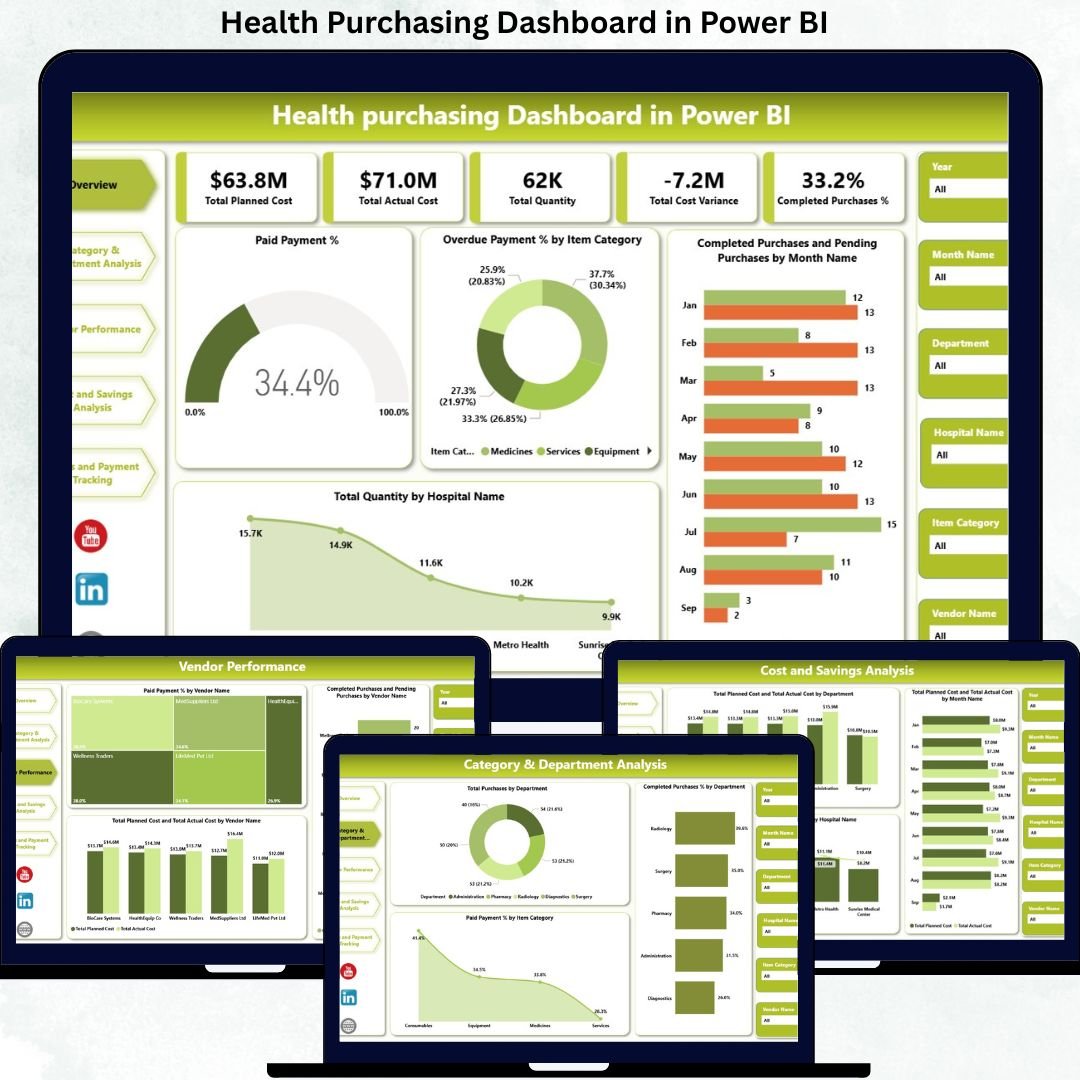
Healthcare organizations manage large volumes of purchasing activities every month. These purchases include medical supplies, equipment, consumables, medicines, and healthcare services. Because purchasing decisions directly impact patient care, operational continuity, and financial stability, healthcare leaders must maintain strong visibility into costs, quantities, vendor performance, and payment status. However, when purchasing data remains scattered across spreadsheets and manual reports, decision-making becomes slow and error-prone.
That is exactly why the Health Purchasing Dashboard in Power BI becomes an essential analytics solution.
This ready-to-use Power BI dashboard transforms raw purchasing data into clear, interactive, and actionable insights. Instead of manually consolidating reports, healthcare organizations gain a centralized platform to monitor planned cost, actual cost, quantities, cost variance, payment status, vendor performance, and purchasing efficiency in real time.
Built using Power BI, this dashboard delivers enterprise-grade analytics with interactive filters, drill-down capabilities, and executive-ready visuals. As a result, procurement teams, finance departments, hospital administrators, and leadership can make faster decisions, reduce overspending, improve vendor accountability, and strengthen financial discipline.
⚙️ Key Features of the Health Purchasing Dashboard
📊 Centralized Purchasing Visibility
Track all healthcare purchasing KPIs from a single Power BI dashboard.
💰 Planned vs Actual Cost Control
Identify cost overruns and savings opportunities instantly.
📦 Quantity & Completion Tracking
Monitor purchased quantities and completed purchases across hospitals.
💳 Payment Status Monitoring
Track paid, pending, and overdue payments to improve financial discipline.
🏥 Multi-Hospital & Department Analysis
Compare purchasing performance across hospitals and departments.
📈 Interactive & Scalable Power BI Design
Use filters, slicers, and drill-downs for deep analysis.
📦 What’s Inside the Health Purchasing Dashboard
🖥️ Overview Section – Executive Purchasing Snapshot
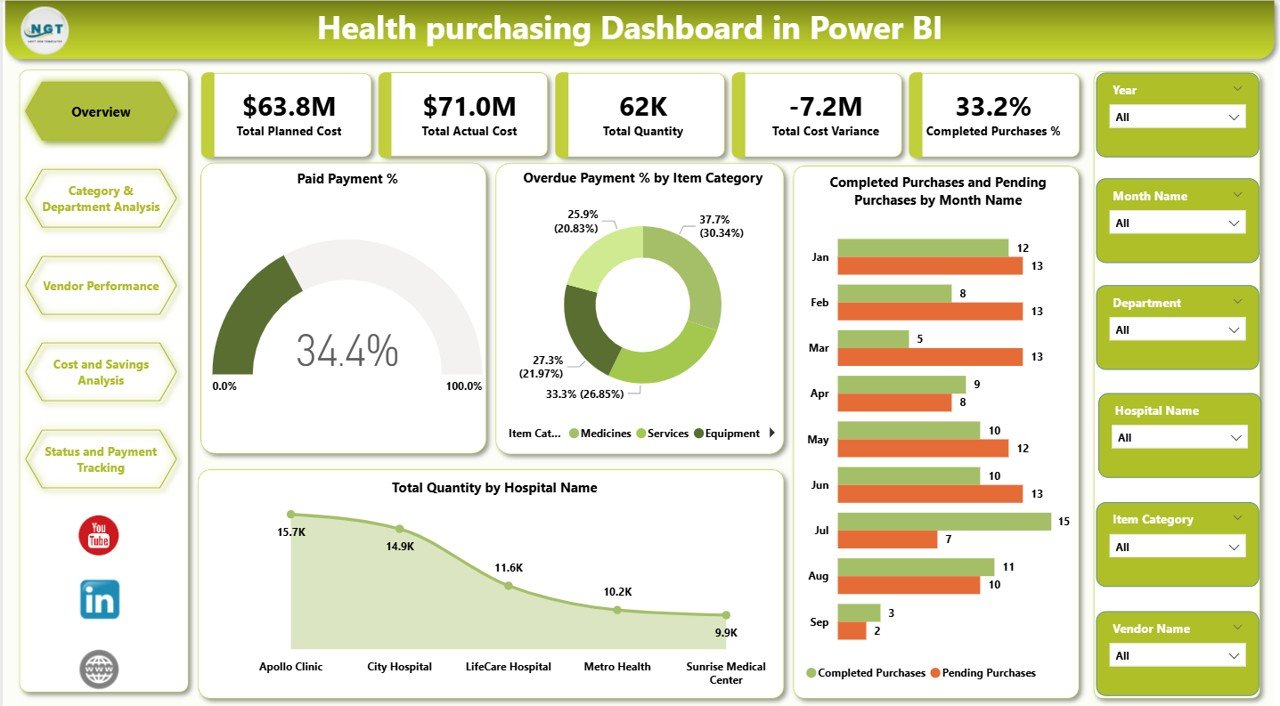
The Overview section provides an instant summary of purchasing performance.
KPI Cards Included
Total Planned Cost – Expected purchasing budget
Total Actual Cost – Real spending incurred
Total Quantity – Total items purchased
Total Cost Variance – Budget deviation
Completed Purchases % – Execution efficiency
Overview Charts
Paid Payment %
Overdue Payment % by Item Category
Completed vs Pending Purchases by Month
Total Quantity by Hospital Name
These visuals help leadership assess purchasing health within seconds.
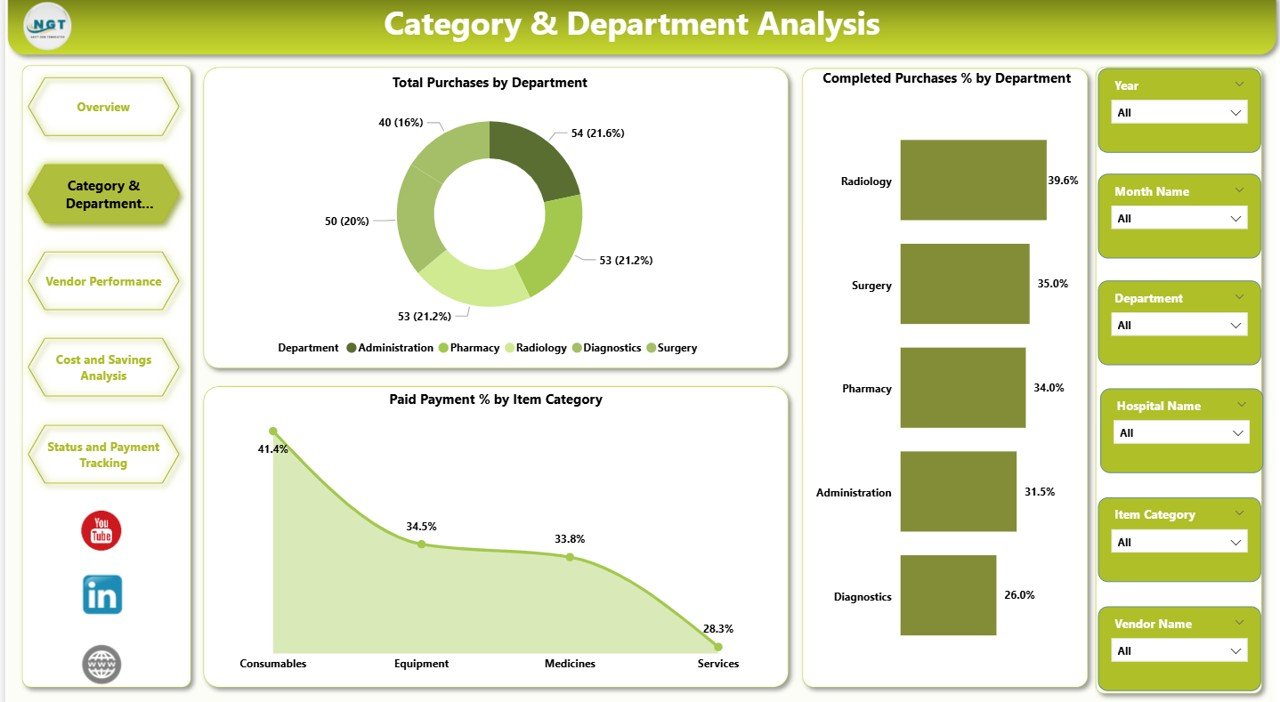
📊 Category & Department Analysis
This section evaluates purchasing performance across departments and item categories.
Charts Included
Total Purchases by Department
Completed Purchases % by Department
Paid Payment % by Item Category
This view supports departmental budgeting, accountability, and compliance tracking.
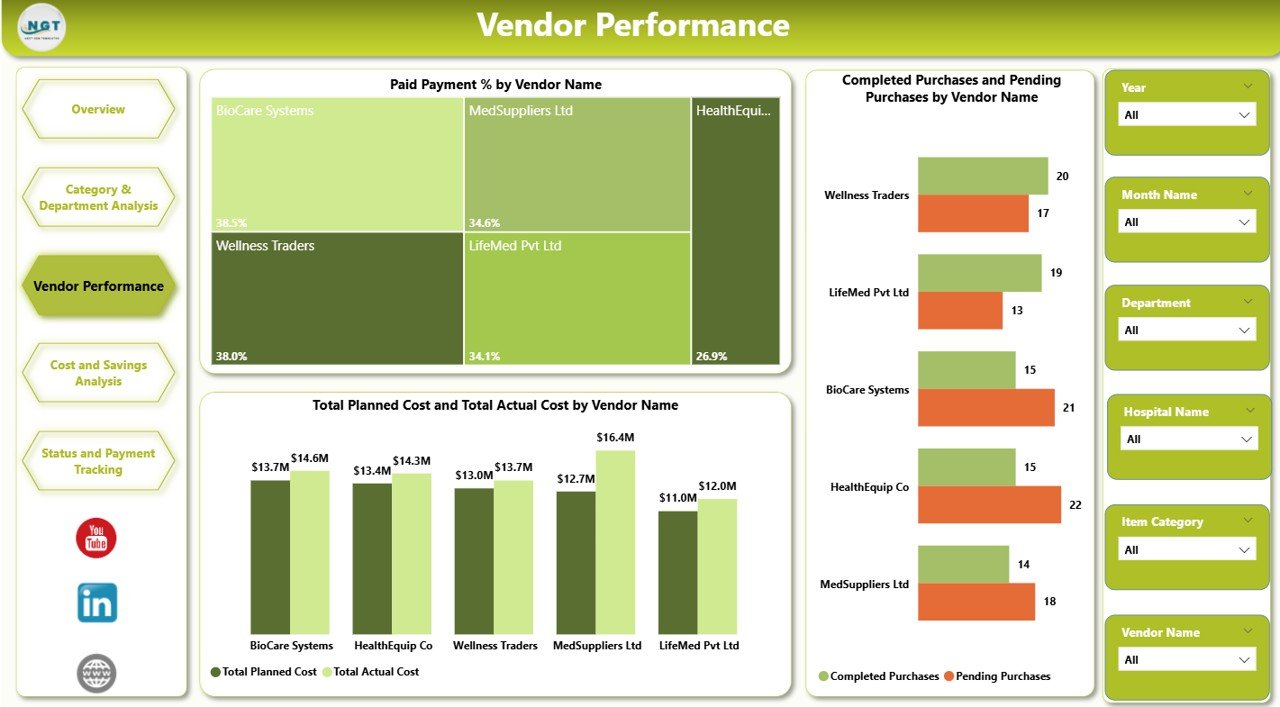
🤝 Vendor Performance Analysis
Vendor reliability directly impacts healthcare operations.
Charts Included
Paid Payment % by Vendor Name
Completed vs Pending Purchases by Vendor Name
Planned Cost vs Actual Cost by Vendor Name
Procurement teams use these insights to improve negotiations and supplier selection.
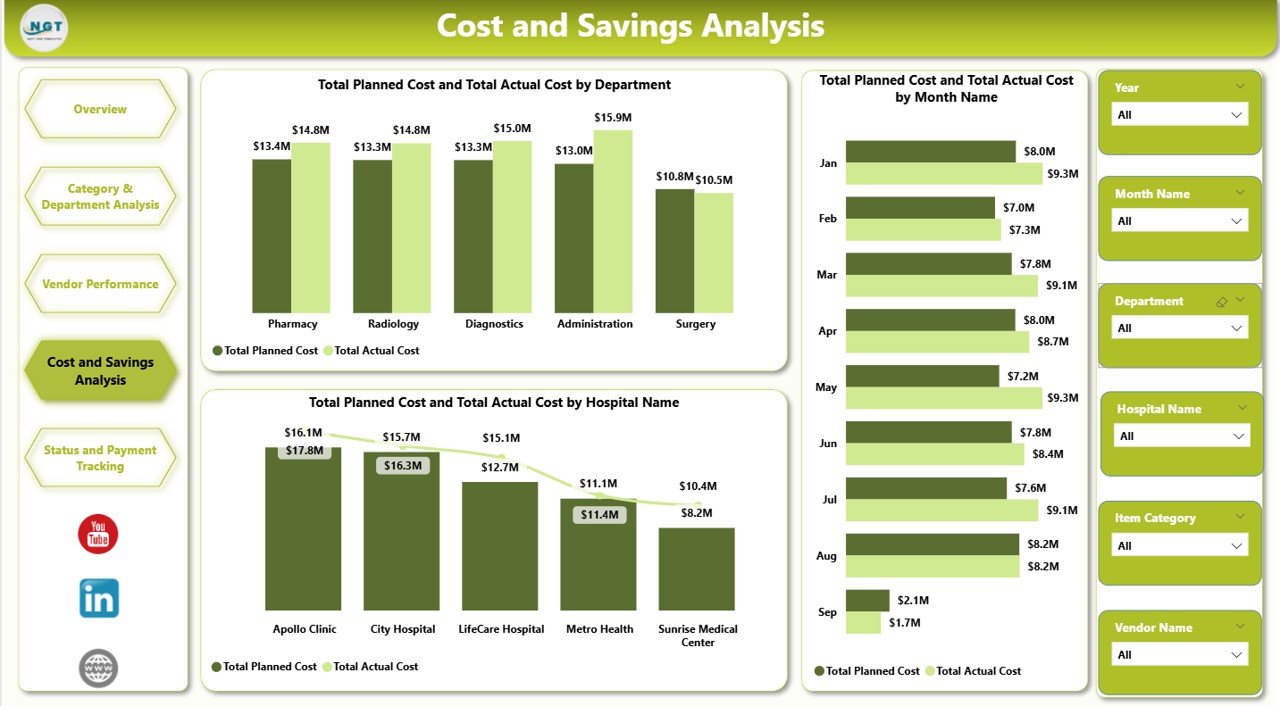
💰 Cost & Savings Analysis
This section focuses on financial control and spending optimization.
Charts Included
Planned vs Actual Cost by Department
Planned vs Actual Cost by Month
Planned vs Actual Cost by Hospital Name
Finance teams use this section for budgeting, forecasting, and audits.
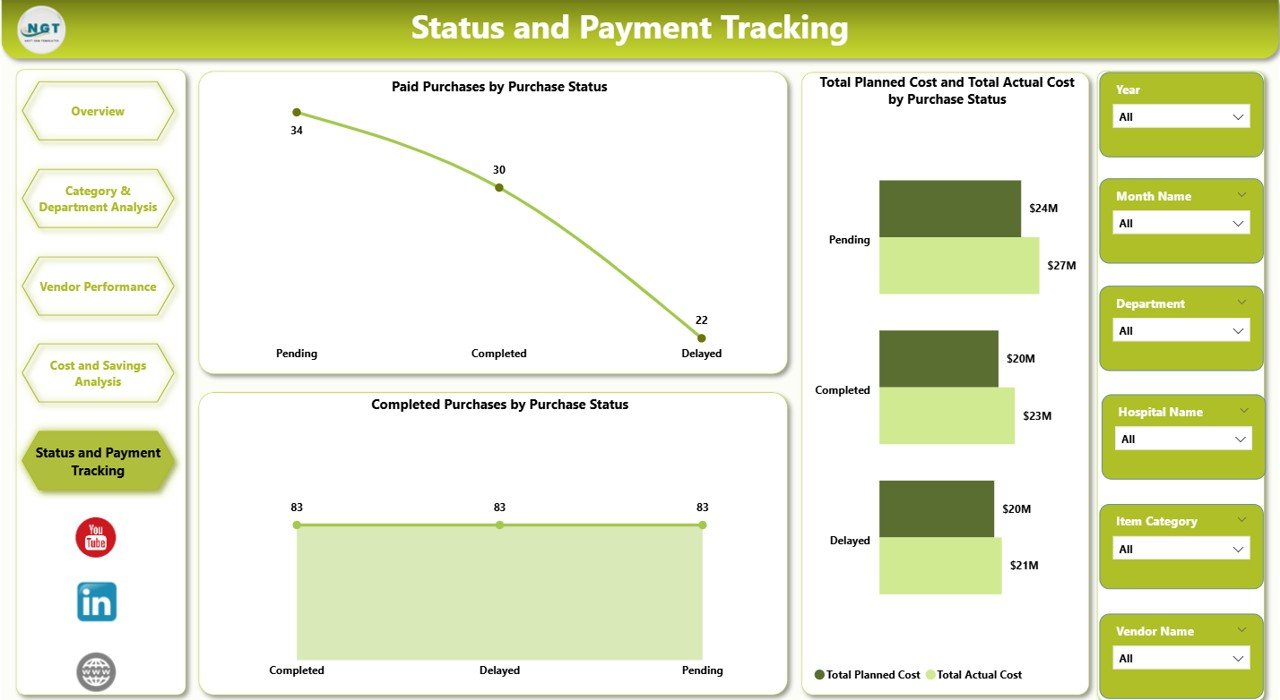
🔄 Status & Payment Tracking
This section improves coordination between procurement and finance.
Charts Included
Paid Purchases by Purchase Status
Completed Purchases by Purchase Status
These insights help reduce delays and improve purchase lifecycle efficiency.
🎯 Who Can Use This Dashboard
🏥 Hospitals & Healthcare Networks
📦 Procurement & Purchasing Teams
💼 Finance & Accounting Departments
🧠 Hospital Administrators
📊 Executive Leadership
Click here to Read detailed blog post
Watch the step-by-step video tutorial:






























Reviews
There are no reviews yet.