


In today’s remote and hybrid work environments, managing meetings efficiently is essential for keeping teams aligned and productive. The Conference Call Schedule Tracker in Google Sheets is a ready-to-use, collaborative tool that helps businesses schedule, monitor, and analyze all their meetings in one place. 📊💬
With its intuitive design, visual dashboards, and real-time collaboration features, this tracker ensures that every conference call is well-organized, properly tracked, and analyzed for time efficiency.

🔑 Key Features of the Conference Call Schedule Tracker in Google Sheets
📋 Tracker Sheet Tab
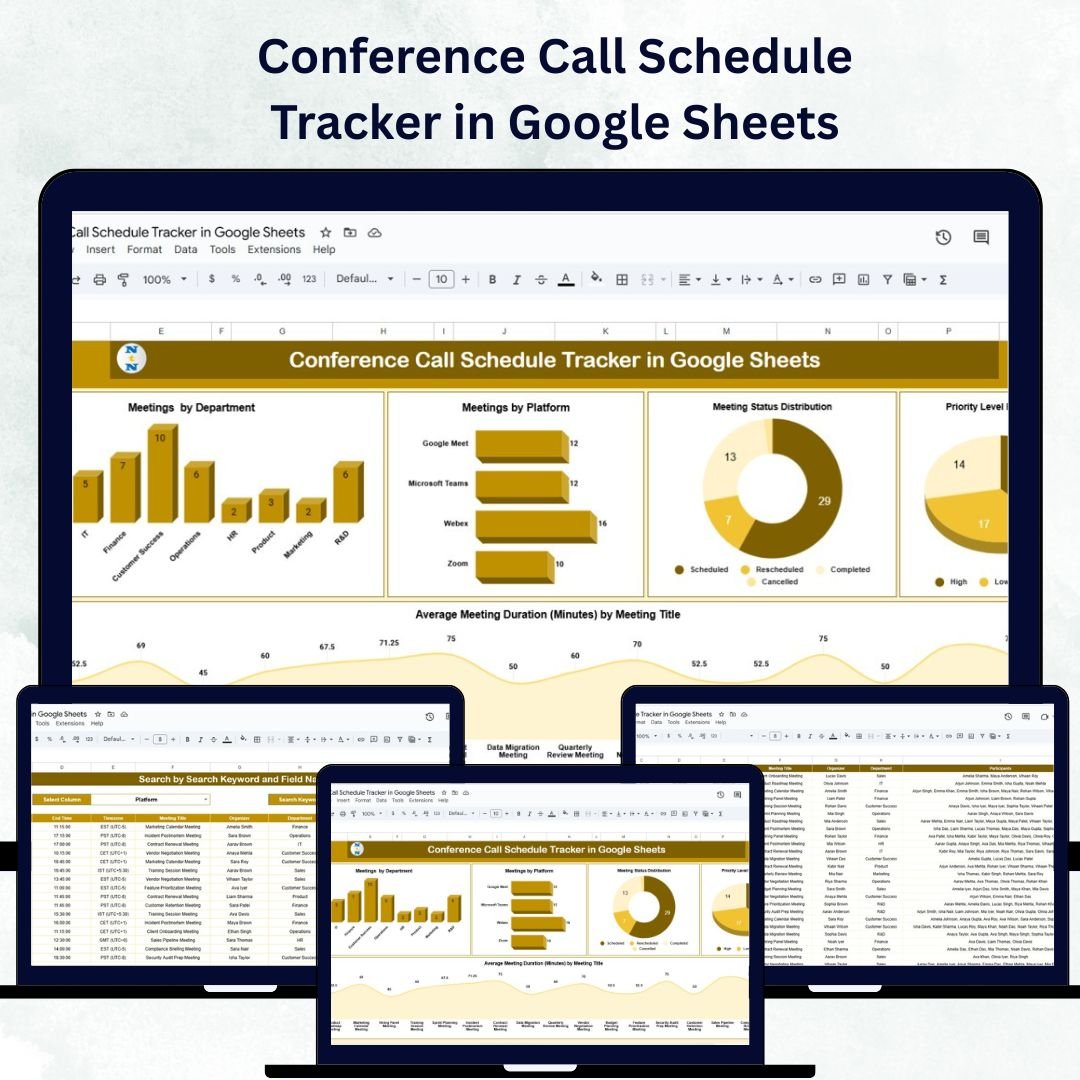
This is the main page of the tracker, giving managers and teams visual insights through dynamic charts:
Meetings by Department – View which departments hold the most meetings.
Meetings by Platform – Track platform usage (Zoom, Teams, Google Meet, etc.).
Meeting Status Distribution – Monitor how many meetings are scheduled, completed, or canceled.
Priority Level Breakdown – Identify which meetings are marked as high, medium, or low priority.
Average Meeting Duration by Title – Analyze time efficiency for various meeting types.
These visuals make it easier to spot trends, manage workloads, and prevent meeting overload.
🔎 Search Sheet Tab
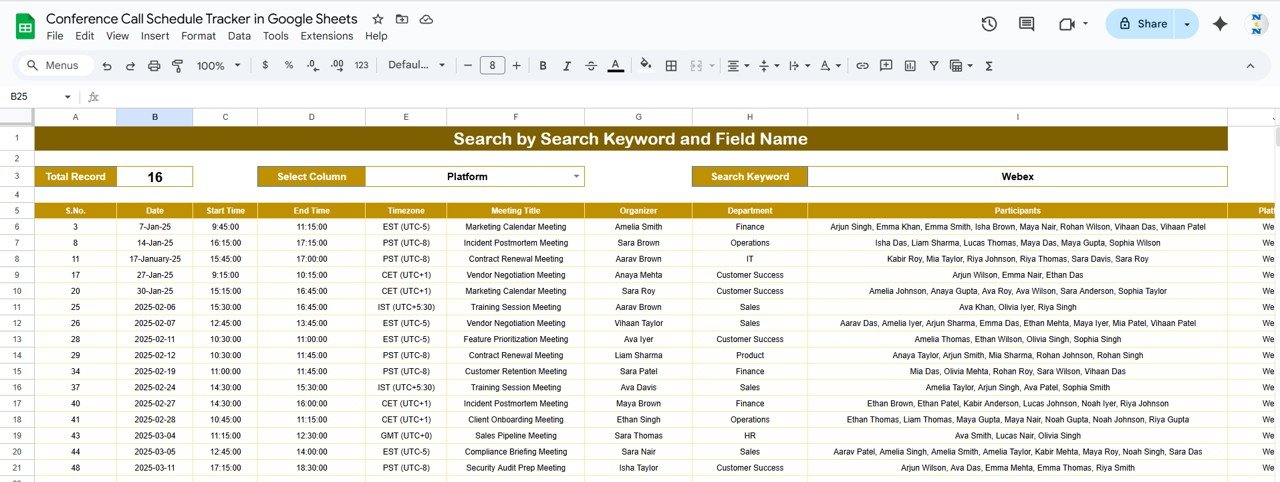
The Search Tab allows for instant access to any meeting record:
Enter a keyword or field name (e.g., Meeting Title, Department, Platform).
Automatically displays total matching records.
This ensures users can locate specific meetings without scrolling through long data tables.
🧾 Data Sheet Tab
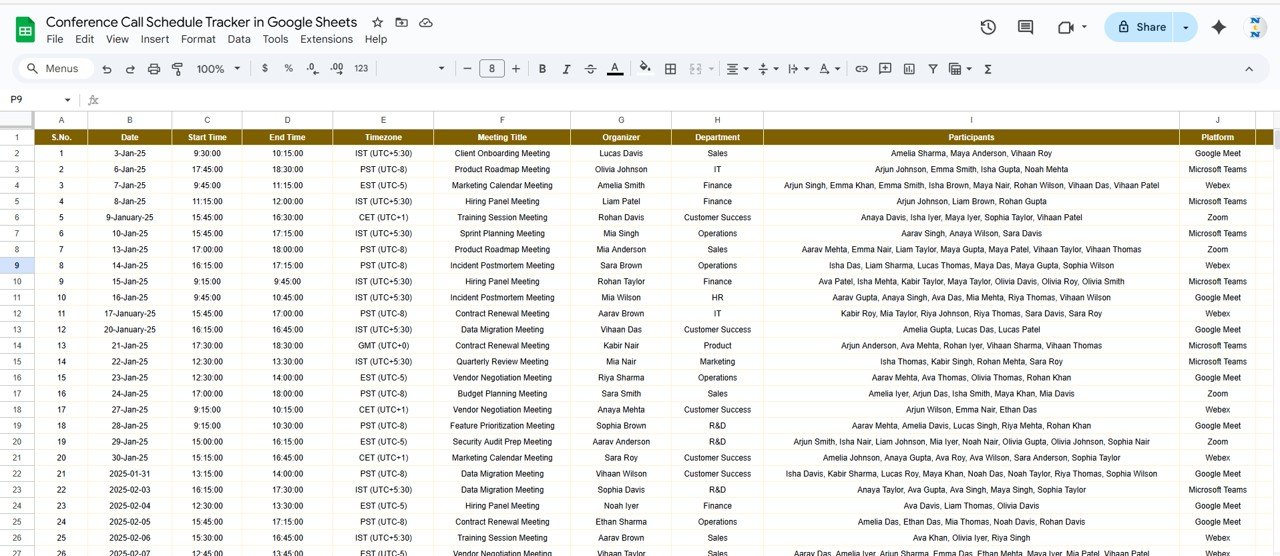
All meeting details are stored in a structured format, with automatic linkage to the dashboard.
Columns include: Meeting ID, Title, Department, Platform, Date, Time, Duration, Priority, Status, and Organizer.
Any updates made here are reflected across all charts and metrics instantly.
Provides a centralized repository for all conference call data.
📦 What’s Inside the Conference Call Schedule Tracker?
✅ Tracker Sheet – Real-time visual summary of meetings by category and priority
✅ Search Sheet – Quick search functionality for fast record retrieval
✅ Data Sheet – Structured input table for meeting data
✅ Pre-filled Sample Data – Understand functionality immediately
✅ Dynamic Charts – Automatically update with each new entry
✅ Customizable Fields – Add or modify columns to fit your organization’s structure
Everything is built for plug-and-play convenience — no setup or formulas required. Just input your meeting data and start managing productivity efficiently. 🚀
🧑💼 Who Can Benefit from This Tracker?
🎯 Team Leaders & Managers – Track team meeting frequency and productivity.
🏢 HR & Admin Teams – Organize department-wide meetings efficiently.
💼 Project Managers – Schedule and monitor project-related calls.
👩💻 Executives – View meeting patterns and time utilization across departments.
📅 Remote & Hybrid Teams – Collaborate in real time using shared access in Google Sheets.
🧪 How to Use the Conference Call Schedule Tracker
Enter Meeting Data – Input all meeting details in the Data Sheet.
View the Dashboard – Analyze meetings through visual charts and summaries.
Search Specific Records – Use the Search Sheet to locate a meeting instantly.
Track Status – Update meeting progress from Scheduled → Completed → Canceled.
Monitor Trends – Review weekly or monthly data to balance workloads.
This Google Sheets tracker offers real-time collaboration, enabling multiple users to update and review meeting data simultaneously. ✅
🌟 Why Choose This Tracker?
Centralized meeting schedule management
Visual insights for better time management
Customizable structure for any organization
Automated charts and calculations
Google Sheets compatibility for live collaboration
Scalable for small teams or large enterprises
With the Conference Call Schedule Tracker in Google Sheets, you can manage meetings smarter, not harder — improving productivity, communication, and accountability across your organization. 💡📈
🔗 Click here to read the Detailed blog post
Watch the step-by-step video Demo:
🔗 Visit our YouTube channel to learn step-by-step video tutorials
Compatibility and Requirements
- Works in Google Sheets. You need a free Google account and a web browser.
- Several people can open the same sheet and update meeting records at the same time. Google explains how to open and share spreadsheets in Get started with Google Sheets.
Frequently Asked Questions
Which sheets are included?
Three sheets: Tracker, Search and Data. The Tracker sheet holds the charts, the Search sheet finds records, and the Data sheet stores every meeting.
What details can I record for each meeting?
The Data sheet has columns for Meeting ID, Title, Department, Platform, Date, Time, Duration, Priority, Status and Organizer.
Which charts does the Tracker sheet show?
It shows meetings by department, meetings by platform, meeting status distribution, priority level breakdown and average meeting duration by title. The charts update when you change the Data sheet.
How do I find one meeting quickly?
Open the Search sheet and enter a keyword or field name, such as a meeting title, department or platform. It shows the total number of matching records.
Is there an Excel version?
Yes. See the Conference Call Schedule Tracker in Excel.
Related Scheduling Templates
- Conference Call Schedule Tracker in Excel: the same tracker for Excel
- Conference Setup Checklist in Google Sheets: a checklist for preparing a conference
- Employee Shift Schedule in Google Sheets: plan staff shifts
- Maintenance Schedule Calendar in Google Sheets: a schedule calendar in Google Sheets
- Sales Call Checklist in Google Sheets: a checklist for sales calls
Browse all Google Sheets trackers.



























Reviews
There are no reviews yet.