Customer Satisfaction Dashboard in Google Sheets

Google Sheets - instant download

Original price was: ₹1,899.00.Current price is: ₹999.00.
Details, requirements and demo below
Sale!

Customer Satisfaction Dashboard in Google Sheets

Original price was: ₹1,899.00.Current price is: ₹999.00.

✨ Customer Satisfaction Dashboard in Google Sheets – track tickets, response times & customer feedback in real time!

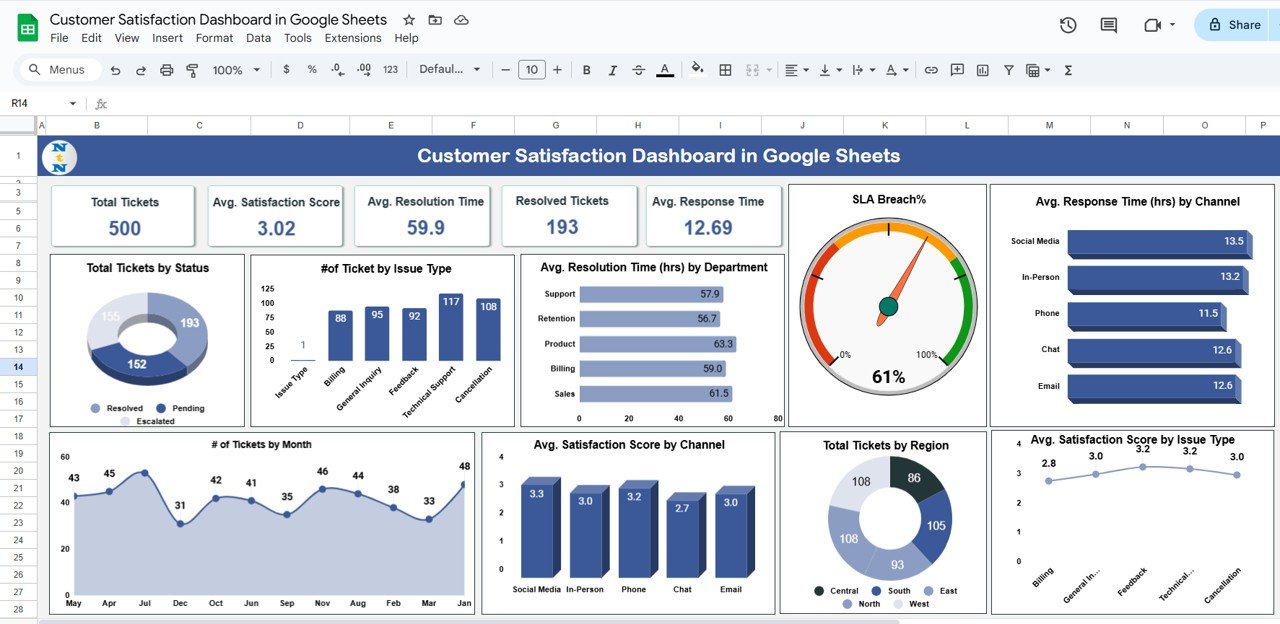
  • 📊 Dashboard Overview – Tickets, SLA, response & resolution times

  • 📝 Cards & Charts – Instant KPI insights

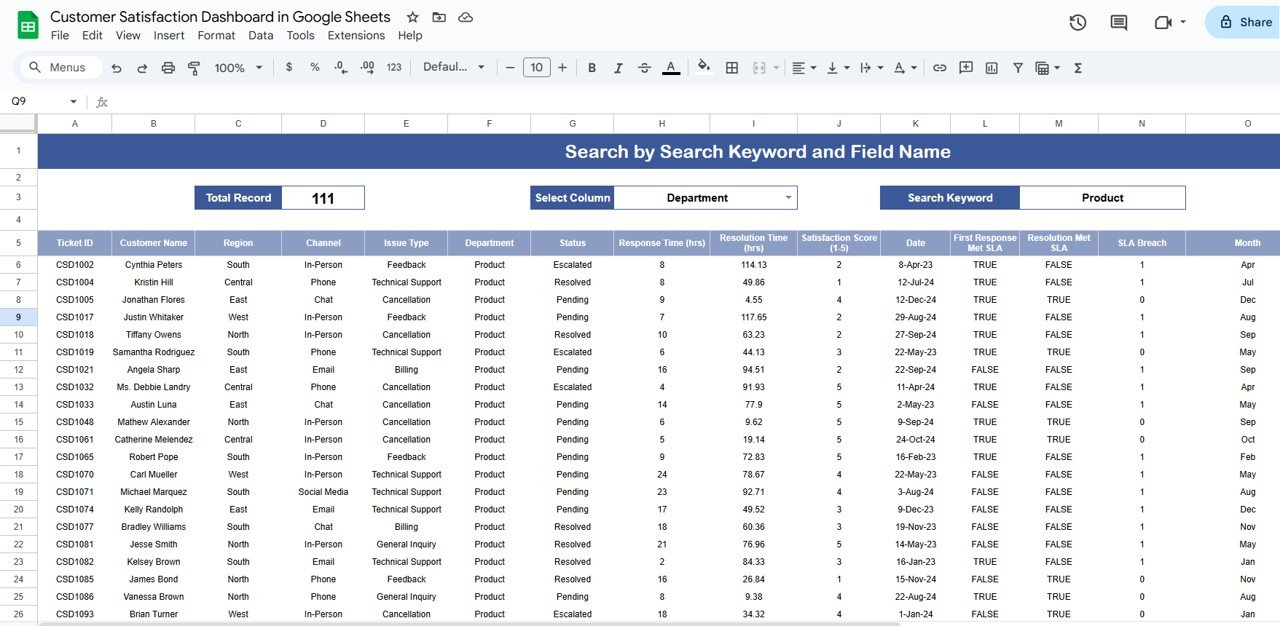
  • 🔍 Search Function – Filter by department, issue, or status

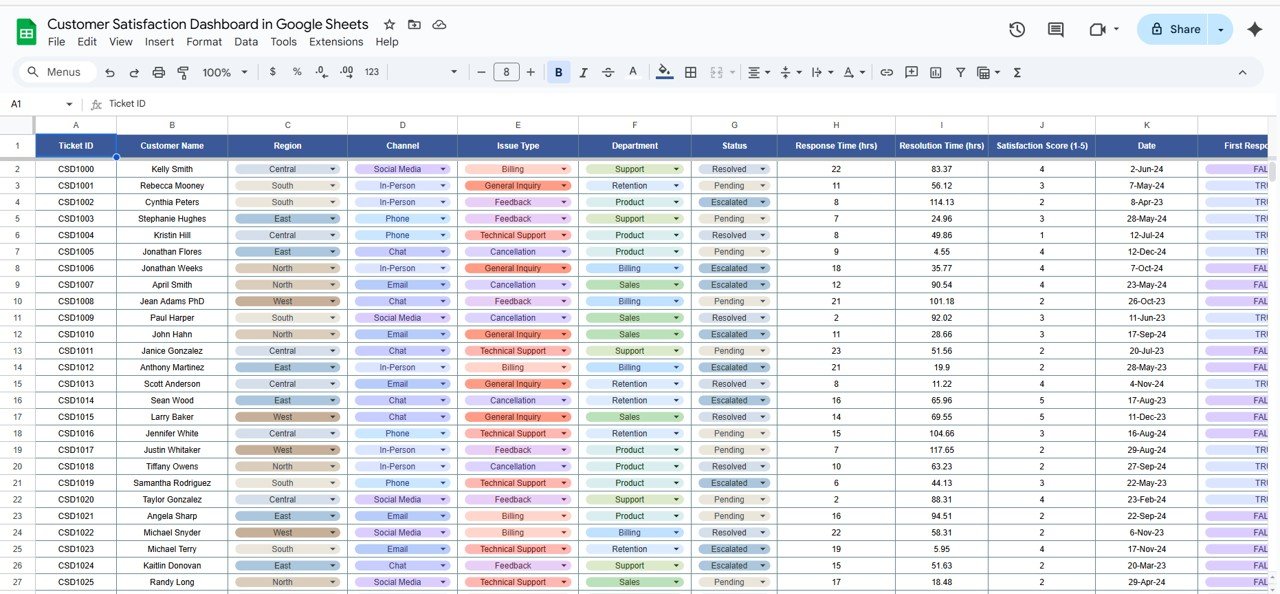
  • 📑 Data Sheet – Centralized ticket database

  • 🎯 Satisfaction Score (1–5) – Monitor customer happiness

  • ⏱ Response & Resolution Metrics – Improve efficiency

  • 🌍 Regional Analysis – Track performance by location

  • 📈 Monthly Trends – Understand workload patterns

  • ✅ Ready-to-Use Template – No advanced Excel/Sheets needed

  • 🤝 Team Collaboration – Easy to share & update

Customize this template for your business (optional)

Handled by email: we contact you within 1 business day. One revision round included. What is included

- +
Have your own data? Build a dashboard from your Excel, CSV or Google Sheets file free in Dashboard Studio →

💡 Buy any 2 templates and save 20% automatically at checkout.

Included in All-Access Templates. Get this plus 7,000+ templates for ₹4,999.00 a year. Compare plans →
Pricing country
Prices follow your selected country; checkout uses your billing country.
Google Sheets Complete Course: Beginner to Advanced courseLaunch offer
🎓 NEXTGENTEMPLATES ACADEMY
Want to build Google Sheets like this yourself?
Google Sheets Complete Course: Beginner to Advanced

Formulas, lookups, QUERY, dynamic arrays, pivot tables, charts, live data and Apps Script, ending with an interactive sales dashboard. 74 lessons by PK with a practice file for every lesson.

Monitoring and improving customer satisfaction is essential for businesses that want to deliver high-quality service and build strong customer relationships. Our Customer Satisfaction Dashboard in Google Sheets is a ready-to-use, interactive tool that allows you to track, analyze, and optimize customer service performance effectively.

Designed with simplicity and functionality in mind, this dashboard is perfect for customer service managers, support teams, and business leaders who want to gain real-time insights into ticket handling, SLA compliance, and customer feedback.
Customer Satisfaction Dashboard in Google Sheets

⭐ Key Features of the Customer Satisfaction Dashboard

1. Dashboard Sheet 📊

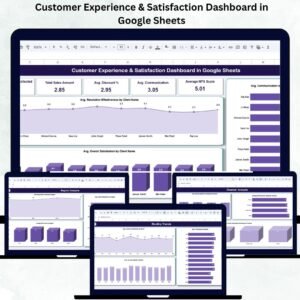
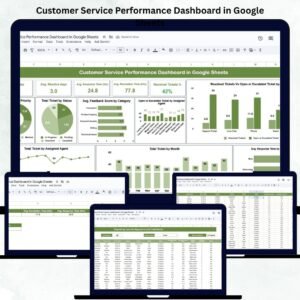
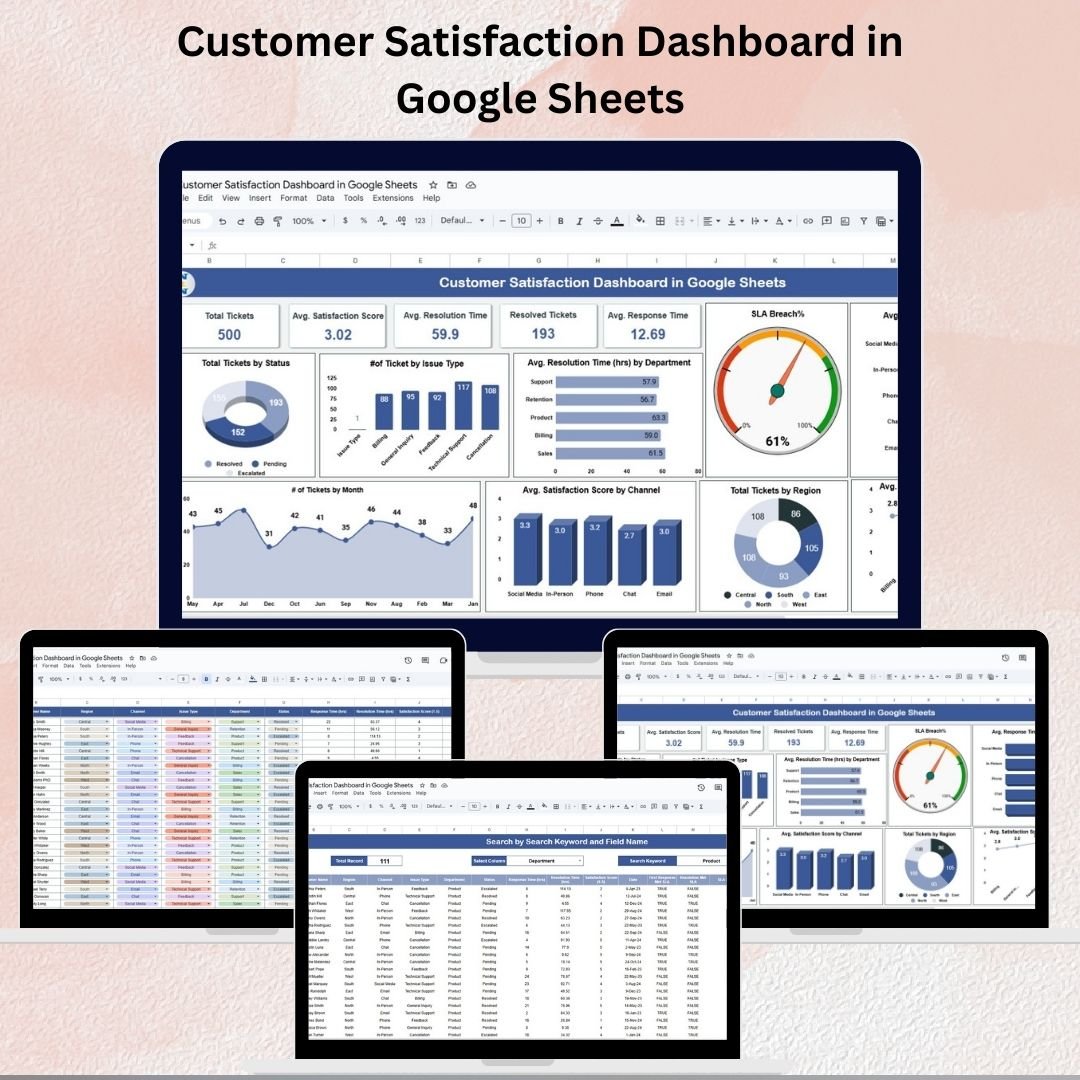
The Dashboard Sheet provides a visual and interactive summary of your customer support performance.

Cards Include:

  • Total Tickets → Count of all tickets logged.

  • Avg. Satisfaction Score (1–5) → Overall customer feedback rating.

  • Avg. Resolution Time (hrs) → Average hours taken to close tickets.

  • Resolved Tickets → Total successfully closed tickets.

  • Avg. Response Time (hrs) → Average time taken to respond initially.

Charts Include:

  • 📌 Total Tickets by Status – Open, Pending, Resolved, Escalated

  • 📌 Number of Tickets by Issue Type – Identify common customer problems

  • 📌 Avg. Resolution Time by Department – Spot slow-performing departments

  • 📌 SLA Breach % – Track tickets exceeding Service Level Agreements

  • 📌 Avg. Response Time by Channel – Compare Email, Chat, Phone, In-person

  • 📌 Avg. Satisfaction Score by Issue Type – Discover where customers are least satisfied

  • 📌 Total Tickets by Region – Regional support performance

  • 📌 Tickets by Month – Monthly workload trends

This sheet gives instant insights into customer satisfaction and performance bottlenecks.


2. Search Sheet 🔍

The Search Sheet allows quick filtering of tickets by multiple criteria. You can search by:

  • Department

  • Issue Type

  • Customer Name

  • Ticket Status

This makes it easy to analyze issues by category, highlight unresolved tickets, and focus on problem areas quickly.


3. Data Sheet 📑

The Data Sheet is the backend database of the dashboard, where all raw ticket details are stored.

Captured Information:

  • Ticket ID

  • Customer Name

  • Region

  • Channel

  • Issue Type

  • Department

  • Status

  • Response Time (hrs)

  • Resolution Time (hrs)

  • Satisfaction Score (1–5)

  • Date

  • SLA Breach Indicator

This structured dataset ensures the dashboard is always accurate and auto-updated in real time.


💡 Benefits of Using the Customer Satisfaction Dashboard

  • 📈 Quick Insights → See customer satisfaction trends instantly.

  • 🕑 Monitor Efficiency → Track resolution times & SLA compliance.

  • 🎯 Identify Weak Areas → Spot underperforming departments or channels.

  • ⚡ Improve Decision-Making → Use data to drive better service strategies.

  • ✅ User-Friendly → No advanced Excel/Sheets knowledge required.


🚀 Opportunities for Enhancement

  • 🔗 Integrate with CRM or live support systems for real-time ticket updates.

  • 📊 Add predictive analytics to forecast ticket volumes & SLA breaches.

  • 💬 Use sentiment analysis on customer comments for deeper insights.


📝 Best Practices

  • Update the Data Sheet regularly for accurate results.

  • Use the Search Sheet to drill into specific issues.

  • Align dashboard metrics with employee KPIs to improve accountability.

  • Share the dashboard with your team for collaborative improvements.


✅ Conclusion

The Customer Satisfaction Dashboard in Google Sheets is an all-in-one solution to monitor ticket management, SLA compliance, and customer feedback. By adopting this tool, your business can resolve issues faster, track performance efficiently, and enhance customer experience across all touchpoints.

📌 Click here to read the Detailed Blog Post

📺 Visit our YouTube channel for step-by-step video tutorials


Watch the step-by-step video tutorial:

Compatibility and Requirements

  • Works in Google Sheets with a free Google account and a web browser. Nothing to install.
  • Charts update from the Data sheet. Google’s guide Add & edit a chart or graph helps if you want to change a chart.

Frequently Asked Questions

Which sheets does the dashboard include?

It has a Dashboard sheet with cards and charts, a Search sheet for filtering tickets, and a Data sheet that stores the raw ticket details.

What do the summary cards show?

Total tickets, average satisfaction score (1 to 5), average resolution time, resolved tickets and average response time.

Can I find tickets for one customer or department?

Yes. The Search sheet filters tickets by department, issue type, customer name and ticket status.

Does it track SLA breaches?

Yes. Each ticket has an SLA breach indicator, and the dashboard shows SLA breach percentage.

Related Customer Satisfaction Templates

Browse all Google Sheets dashboards or the Google Sheets templates.
Frequently asked questions

How do I get my own copy?
After purchase you get a link to the Google Sheet. Open it while signed in to your Google account and use File > Make a copy - the copy in your Google Drive is fully yours and editable.
Do I need a paid Google account? Will it expire?
No. A free Google account is enough, and your copy lives in your own Google Drive - it never expires and there is nothing to renew.
Does it work on Mac, phone or tablet?
Yes - in any browser on Windows, Mac or Chromebook, and in the Google Sheets mobile app for viewing and quick entries.
Can I share it with my team?
Yes. Share your copy with colleagues using Google's normal sharing, with view or edit rights as you choose.
Can I change the design and formulas?
Yes, your copy is fully editable - colours, labels, logo, formulas and charts. If a range is protected, use Data > Protect sheets and ranges to remove it in your copy.
Are there macros or add-ons?
No macros or add-ons - it uses normal Google Sheets formulas and charts.
Is it a one-time payment or a subscription?
One-time payment. No subscription, no per-user fees and nothing to renew - the file is yours to keep.
How do I get the file after payment?
Instantly. The download link appears on screen after checkout, is emailed to you, and stays under My Account > Downloads on our website. If the email does not arrive within a few minutes, check your spam or promotions folder.
Is a user manual included?
Most of our newer products include a PDF user manual in the download. If yours does not have one, message us with your order number and we will send it.
Do I get free updates?
Bug fixes are always free - if something does not work as described, we fix it and send you the corrected file. New versions with new features are not included in the price, unless this product's description says otherwise.
Can you customise it for me?
Yes. Small changes to this template (your columns, categories, logo, colours, minor layout) cost the template price plus $40-80 (Rs 3,000-6,000 + GST), quoted once you send your list. A fully custom build is usually $100-200 (Rs 8,000-18,000 + GST) with two revision rounds. Email your requirements to [email protected] or message us on WhatsApp.
Can I use it for my business or my clients?
Yes, for your own personal or internal business use, for as long as you like. Reselling or redistributing the template is not allowed.
What is your refund policy?
Because these are digital downloads, they are non-refundable once delivered - except when the product does not match its description (report it within 48 hours of purchase) or there is a technical problem our team cannot fix within 72 hours. Email [email protected] with your order number.
How do I get help?
Email [email protected] (Mon-Fri, 10 AM-7 PM IST) or message us on WhatsApp +91 80770 90260 (chat only, no calls). Please include your order number.

Still have a question? Click Need help? at the bottom-left to ask our assistant, or message us on WhatsApp.

Application

Google Sheets

Template Type

Dashboard

Price

Paid

Business Or Department

Customer Service

Reviews

There are no reviews yet.

Only logged in customers who have purchased this product may leave a review.

You may also like…

Customer Satisfaction Dashboard in Google SheetsCustomer Satisfaction Dashboard in Google Sheets
Original price was: ₹1,899.00.Current price is: ₹999.00.
- +
Have your own data? Build a dashboard from your Excel, CSV or Google Sheets file free in Dashboard Studio →
Scroll to Top