



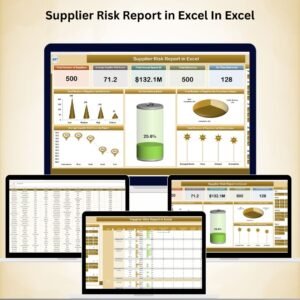
Managing Supplier Risk Report in Excel In Excel effectively is essential for building a resilient and reliable supply chain. When supplier risks go unchecked, businesses face delays, cost overruns, and serious operational disruptions. The Supplier Risk Report in Excel is a ready-to-use, centralized reporting tool designed to give procurement teams, supply chain managers, and operations leaders a clear view of supplier performance and risk profiles.Supplier Risk Report in Excel In Excel
This comprehensive Excel report allows you to track supplier risk scores, delivery performance, compliance status, and annual spend, empowering you to make proactive and data-driven decisions. With interactive cards, dynamic charts, and powerful pivot analysis, you can instantly identify high-risk suppliers, monitor trends, and ensure critical supply chain continuity.

🔑 Key Features of the Supplier Risk Report
📌 Summary Sheet Tab – High-Level Risk Overview
Cards Include:
Total Number of Suppliers
Average Supplier Risk Score
Total Annual Spend ($)
Total Deliveries
On-Time Deliveries
Charts Include:
Total Suppliers by Risk Level
On-Time Delivery Rate (%)
Suppliers by Compliance Status
Suppliers by Delivery Issue
Average Risk Score by Region
➡️ Perfect for senior leaders and procurement teams that need quick visibility into supplier performance.
📌 Report Sheet Tab – Detailed Pivot Analysis
Filter by risk level, region, or compliance status
Drill down into delivery performance and spend by supplier
Quickly identify high-risk suppliers and repeat delivery issues
Analyze trends in risk scores and performance over time
📌 Data Sheet Tab – Central Supplier Database
Fields include:
Supplier ID & Name
Region
Risk Score
Compliance Status
Total Annual Spend
Total Deliveries
On-Time Deliveries
Delivery Issues
Functions as the source data for all scores, dashboards, and reports
Auto-updates metrics across the workbook when data is refreshed
📦 What’s Inside the Supplier Risk Report?
✅ Summary Sheet – KPI cards + key charts
✅ Report Sheet – Pivot-based supplier analysis
✅ Data Sheet – All supplier records in one place
✅ Built-in Risk & Performance Metrics – Instant insights without setup
✅ Customizable Format – Easily add more KPIs (quality score, spend category, etc.)
✅ Pre-filled Example Data – See how it works right away
🧠 How to Use This Report
Input Supplier Data in the Data Sheet
Review the Summary Sheet for high-level insights
Use the Report Sheet to filter and drill down into supplier performance
Highlight high-risk suppliers and take corrective action
Update regularly to stay ahead of potential risks
👥 Who Can Benefit From This Tool?
📦 Procurement Managers – Monitor supplier risk and delivery reliability
🚚 Supply Chain Teams – Identify supply chain vulnerabilities
💼 Operations Managers – Track spend and influence sourcing strategies
📊 Business Analysts – Analyze supplier trends for management reporting
🔗 Click here to read the Detailed blog post
Watch the step-by-step video Demo:
🔗 Visit our YouTube channel to learn step-by-step video tutorials
Compatibility and Requirements
- Works in Microsoft Excel desktop (Excel 2016 or later, or Microsoft 365).
- The Report sheet is built on pivot tables. Microsoft explains how they work in Create a PivotTable to analyze worksheet data.
Frequently Asked Questions
What data does the Data Sheet hold?
Supplier ID and name, region, risk score, compliance status, total annual spend, total deliveries, on-time deliveries and delivery issues. All cards, charts and pivots read from this sheet.
Which KPI cards are on the Summary sheet?
Total number of suppliers, average supplier risk score, total annual spend, total deliveries and on-time deliveries.
Which charts does it include?
Total suppliers by risk level, on-time delivery rate, suppliers by compliance status, suppliers by delivery issue and average risk score by region.
Can I filter suppliers by region or compliance status?
Yes. The Report sheet lets you filter by risk level, region or compliance status and drill into delivery performance and spend by supplier.
Is there a Power BI or Google Sheets version?
There are related dashboards for the same topic: the Supplier Risk Dashboard in Power BI and the Supplier Risk Dashboard in Google Sheets.
Related Supplier and Risk Templates
- Supplier Risk Dashboard in Excel: a dashboard view of supplier risk
- Supplier Risk Dashboard in Power BI: the Power BI edition
- Supplier Performance KPI Dashboard in Excel: KPIs for supplier performance
- Vendor Risk Assessment Outline Checklist in Excel: a checklist for assessing vendors
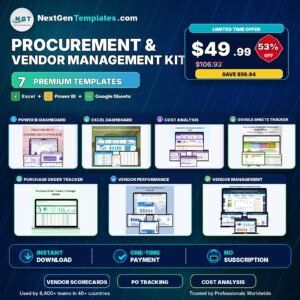
- Procurement and Vendor Management Kit: a bundle of procurement and vendor templates
Browse all Excel report templates.





Reviews
There are no reviews yet.