



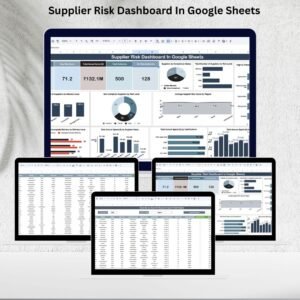
Managing supplier risk effectively is one of the most critical responsibilities for procurement and supply chain teams. Supplier performance, compliance, and financial stability directly impact an organization’s ability to operate smoothly and maintain profitability. That’s why we built the Supplier Risk Dashboard in Google Sheets — a ready-to-use, interactive solution designed to track supplier risk, performance, and compliance metrics in real time.
This dashboard consolidates key supplier data into a visual, easy-to-understand format, allowing risk analysts, procurement managers, and supply chain leaders to identify high-risk suppliers, monitor performance trends, and make data-driven sourcing decisions.

🔑 Key Features of the Supplier Risk Dashboard
📋 Dashboard Sheet
Summary cards displaying:
Total Suppliers
Average Risk Score
Total Annual Spend ($)
Total Deliveries
On-Time Deliveries
Interactive charts showing:
Supplier compliance status
Suppliers by risk level (low, medium, high, critical)
High-risk suppliers by industry
Average risk scores by region
Non-compliant suppliers by risk level
Delivery issue trends
Spend by supplier, certification, and month
🔎 Search Sheet
Quick filtering and keyword search to locate suppliers by:
Name, Region, Industry, Risk Level, Delivery Issue, or Compliance Status
Real-time record count to instantly view total matches
📑 Data Sheet
Structured input format with fields for:
Supplier ID & Name
Industry & Region
Risk Level & Compliance Status
Delivery Issues & Certifications
Last Evaluation Date & Score (0–100)
Annual Spend ($) & Deliveries
Monthly supplier spend data
Automated updates across dashboard views
📦 What’s Inside the Supplier Risk Dashboard?
When you download this template, you’ll receive:
✅ Google Sheets Dashboard with KPIs & charts
✅ Search Sheet for instant supplier filtering
✅ Data Sheet with structured fields for supplier records
✅ Pre-Built Visualizations for risk, compliance, delivery, and spend
✅ Sample Data to demonstrate functionality
✅ Customizable Fields to adapt the dashboard to your processes
The best part? Since it’s built in Google Sheets, your team can collaborate in real-time, ensuring transparency and efficiency. 🌍
🧑💼 Who Can Benefit from This Dashboard?
🎯 Procurement Teams – Identify high-risk suppliers before they cause disruptions
🎯 Supply Chain Managers – Monitor delivery reliability & recurring issues
🎯 Risk Analysts – Evaluate supplier compliance & risk scores with ease
🎯 Finance Teams – Track annual spend & supplier cost allocations
🎯 Executives – Gain high-level insights for strategic sourcing
This tool is ideal for organizations of all sizes that need clear, collaborative supplier risk management.
🧪 How to Use the Supplier Risk Dashboard
Input Supplier Data – Enter supplier information in the Data Sheet
Monitor Dashboard KPIs – Review key metrics like risk score, spend, and compliance
Search & Filter – Use the Search Sheet to find suppliers by keyword or parameter
Analyze Trends – Review delivery performance, non-compliance cases, and spend allocations
Take Action – Focus on critical risk areas and optimize procurement strategy
This plug-and-play tool is easy to use, scalable, and requires no coding or complex setup.
🌟 Why Choose This Dashboard?
Centralized supplier risk tracking
Visual insights into compliance, delivery, and spend
Risk and performance segmentation by region, industry, or supplier
Real-time collaboration in Google Sheets
Fully customizable fields & formulas
Scalable for SMEs and large enterprises alike
With the Supplier Risk Dashboard in Google Sheets, you’ll reduce risks, improve compliance, and ensure smarter sourcing decisions. 🌟
🔗 Click here to read the Detailed blog post
🔗 Visit our YouTube channel to learn step-by-step video tutorials
Compatibility and Requirements
- Works in Google Sheets. You need a free Google account and a web browser.
- The Dashboard sheet shows charts built from the Data sheet. Google explains how charts work in Add and edit a chart or graph.
Frequently Asked Questions
Which sheets are included?
Three sheets: Dashboard, Search and Data.
What do I enter in the Data sheet?
Supplier ID and name, industry, region, risk level, compliance status, delivery issues, certifications, last evaluation date, score from 0 to 100, annual spend, deliveries and monthly supplier spend.
How do I find one supplier?
Use the Search sheet. You can filter by name, region, industry, risk level, delivery issue or compliance status, and it shows a record count for the matches.
Which KPIs does the dashboard show?
Total suppliers, average risk score, total annual spend, total deliveries and on-time deliveries. Charts cover compliance status, risk levels, high-risk suppliers by industry, risk scores by region, delivery issue trends and spend by supplier, certification and month.
Is there an Excel or Power BI version?
Yes. See the Supplier Risk Dashboard in Excel and the Supplier Risk Dashboard in Power BI.
Related Supplier and Risk Templates
- Supplier Risk Dashboard In Excel: the same dashboard in Excel
- Supplier Risk Dashboard in Power BI: the Power BI edition
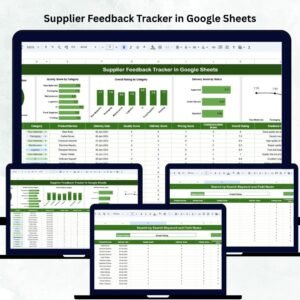
- Supplier Feedback Tracker in Google Sheets: record feedback on each supplier
- Risk Management Dashboard In Google Sheets: a wider view of business risks
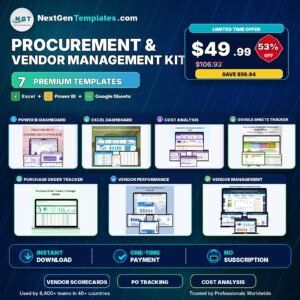
- Procurement and Vendor Management Kit: 7 templates for procurement teams in one download
Browse all Google Sheets dashboards.




Reviews
There are no reviews yet.