



Stay ahead of the curve in tech sales and AI rollouts with the Technology Sales AI Implementation Calendar in Excel — a game-changing productivity tool that lets you track every key date, event, or deadline in one smart, easy-to-use file. Whether you’re managing product launches, AI deployments, client meetings, or sales training sessions, this Excel-based calendar will streamline your workflow and keep your team perfectly aligned.
Built specifically for technology sales teams, this digital calendar doesn’t just record dates — it empowers your scheduling with automation, customization, and clarity. You’ll never miss another deadline or scramble through multiple spreadsheets again!
✨ Key Features of Technology Sales AI Implementation Calendar
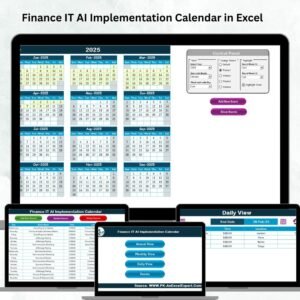
🗓️ Annual, Monthly, and Daily Views – Get a complete visual timeline of your events from macro to micro level.
🎨 Color Theme Customization – Choose from 5 attractive themes to personalize your workspace.
📋 Smart Control Panel – Set your year, start month, and week format with simple dropdowns.
⚡ One-Click Buttons – Jump between views or manage events with user-friendly action buttons.
🧩 Event Highlights – Toggle checkboxes to highlight events and weekends for easy visibility.
🛠️ Fully Excel Compatible – Works offline with Excel 2013 or newer — no external software needed.
🔁 Add/Edit/Delete Features – Manage events on the fly with clickable pop-up forms.
📦 What’s Inside the Technology Sales AI Implementation Calendar
This ready-to-use Excel file includes 5 intelligent worksheets:

Home Tab – Quick navigation buttons for Annual, Monthly, Daily views & Event Log
Annual View – Displays a full-year calendar on a single screen with filters and highlights
Monthly View – Zoom in on any month and view key events, one per day
Daily View – Search and display detailed records between custom date ranges
Events Sheet – The master event list with full CRUD (Create, Read, Update, Delete) capabilities
Each worksheet is designed for maximum interactivity and minimal effort. All forms and filters are pre-built — just plug in your data!
🧑💼 How to Use the Technology Sales AI Implementation Calendar
📍 Step 1: Open the Home Sheet and click on any button to navigate
📍 Step 2: Use the dropdowns to set your year and calendar preferences
📍 Step 3: Use the “Add Event” button to enter event details via form
📍 Step 4: Switch between Monthly or Daily View as needed
📍 Step 5: Use the Events tab to manage all your records in one place
No complicated formulas. No hidden macros. Just clean, structured Excel functionality that saves time and boosts team clarity.
👩💻 Who Can Benefit from This Product?
This calendar is perfect for:
Tech Sales Managers – Track sales campaigns, demos, and targets
AI Implementation Teams – Schedule model deployments and review cycles
SaaS Companies – Manage internal milestones and customer deliverables
Startup Founders – Align your tech roadmap with precise timelines
Project Managers – Track cross-functional tasks across sales and AI departments
Consultants – Organize client appointments and solution deployment plans
Whether you’re working solo or managing a global team, this tool offers clarity, control, and customization.
🔗 Click here to read the Detailed blog post
🎥 Visit our YouTube channel to learn step-by-step video tutorials
Watch the step-by-step video tutorial:
Compatibility and Requirements
- Works in Microsoft Excel desktop (Excel 2016 or later, or Microsoft 365). The page lists Excel 2013 or newer as supported.
- The file works offline and needs no external software.
- Excel has a guide to its tools at Excel for Windows training.
Frequently Asked Questions
Which sheets are included?
Five sheets: Home, Annual View, Monthly View, Daily View and Events.
How do I add an event?
Click the Add Event button and fill in the pop-up form. You can also edit or delete events from the Events sheet.
Can I change the year and the first month?
Yes. Use the dropdowns in the control panel to set the year, the start month and the week format.
Can I change the colors?
Yes. There are 5 color themes to choose from.
Is there a version for other teams?
Yes. See the Sales AI Implementation Calendar in Excel and the Technology Marketing AI Implementation Calendar in Excel.
Related Calendar Templates
- Sales AI Implementation Calendar in Excel: the same calendar for a general sales team
- Technology Sales Customer Experience Calendar in Excel: plan customer experience work for tech sales
- Technology Sales Remote Work Calendar in Excel: schedule remote work for a tech sales team
- Technology IT AI Implementation Calendar in Excel: the AI rollout calendar for IT teams
- Monthly Sales Goals Calendar in Excel: track monthly sales goals
Browse all Excel calendar templates.




































Reviews
There are no reviews yet.