



The Daily Habits Tracker Checklist in Google Sheets is a powerful tool designed to help individuals track, monitor, and build positive habits. This checklist provides a clear, structured approach to cultivating good habits by offering a way to track daily activities and ensure consistency.
By using this Google Sheets-based template, users can stay accountable, visualize their progress, and work towards creating lasting personal growth through consistent habit tracking.
Key Features of the Daily Habits Tracker Checklist in Google Sheets
📅 Centralized Habit Tracking
Track Multiple Habits: Keep all your tracked habits in one place, making it easier to stay organized and focused.
Monthly Overview: View your progress month-by-month, ensuring that you can evaluate the consistency of each habit over time.
📈 Customizable Template
Tailor to Your Goals: Customize the tracker to fit your specific habits—whether they relate to fitness, productivity, or personal development.
Flexible Entries: Add new habits or remove ones that no longer serve your goals.
🔧 Visual Indicators & Progress Monitoring
Color-Coded Tracking: Use color codes to highlight whether you completed each habit on a given day, making it visually easier to spot progress and consistency.
Daily & Weekly Insights: Track your habits every day and review your progress weekly to stay motivated and make adjustments if necessary.
📊 Goal Setting
Set Clear Goals: Define your personal goals for each habit and monitor your achievement.
Measure Performance: Review your results over time to ensure you’re meeting your targets and adjusting when necessary.
Benefits of Using the Daily Habits Tracker Checklist in Google Sheets
✅ Consistency and Accountability
Tracking your habits daily promotes accountability, encouraging you to stick with your goals and create lasting habits.
✅ Improved Time Management
By having a daily plan for your habits, you’re more likely to integrate positive activities into your routine, leading to better time management and productivity.
✅ Achieving Personal Goals
Consistent tracking helps you stay on track to achieve personal growth, whether it’s in fitness, learning, or other areas of self-improvement.
✅ Visual Progress
Having a clear visual of your progress allows you to stay motivated and committed to completing each habit, turning small daily actions into major achievements.
Getting Started with Your Daily Habits Tracker Checklist in Google Sheets
Download the Template: Start by downloading the Daily Habits Tracker Checklist template and customize it for your needs.
Define Your Habits: Input the habits you want to track—whether it’s exercising, reading, journaling, or any other activity that aligns with your goals.
Set Goals & Targets: Set specific targets for each habit, whether it’s a daily, weekly, or monthly goal.
Track Progress: Update your checklist every day, marking whether you completed each habit or not.
Review & Improve: Use the checklist to analyze your progress and make improvements to stay on track.
By using the Daily Habits Tracker Checklist in Google Sheets, you can stay organized, motivated, and focused on building the habits that lead to personal growth and success.
Click here to read the Detailed blog post
Daily Habits Tracker Checklist in Google Sheets
Visit our YouTube channel to learn step-by-step video tutorials
YouTube.com/@NeotechNavigators
Who Uses This Checklist
Anyone building better routines: students, professionals and people working on fitness, learning or personal goals who want to see their habits day by day.
Compatibility and Requirements
- Works in Google Sheets. You need a free Google account and a web browser.
- New to Sheets? Google’s guide How to use Google Sheets covers the basics.
Frequently Asked Questions
How do I mark a habit as done?
You mark each habit for each day. Color codes show whether you completed it, so gaps and streaks are easy to see.
Can I track several habits at once?
Yes. All your habits sit in one place, and you can add new ones or remove those you no longer need.
Can I review my progress over time?
Yes. You can review progress weekly and month by month to check how consistent each habit is.
Can I set a goal for each habit?
Yes. You set a daily, weekly or monthly target for each habit and compare your results with it.
Related Habit and Routine Templates
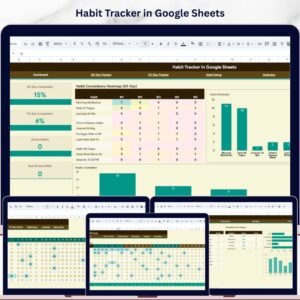
- Habit Tracker in Google Sheets: a fuller habit tracker for Sheets
- Daily Habits Tracker Checklist in Excel: the same checklist for Excel
- Gratitude Practice Checklist in Google Sheets: add a daily gratitude habit
- Personal Development Checklist in Google Sheets: set and track personal goals
- Checklist & SOP Pack: 12 Excel and Google Sheets checklists in one download
Browse all Google Sheets checklists or the Google Sheets trackers.



























Reviews
There are no reviews yet.