


The Hobby Progress Checklist in Google Sheets is a versatile and user-friendly tool designed to help individuals track and achieve their personal hobby goals. Whether you’re learning a new instrument, mastering a craft, or pursuing any passion project, this checklist provides a structured approach to monitor your progress and stay motivated.
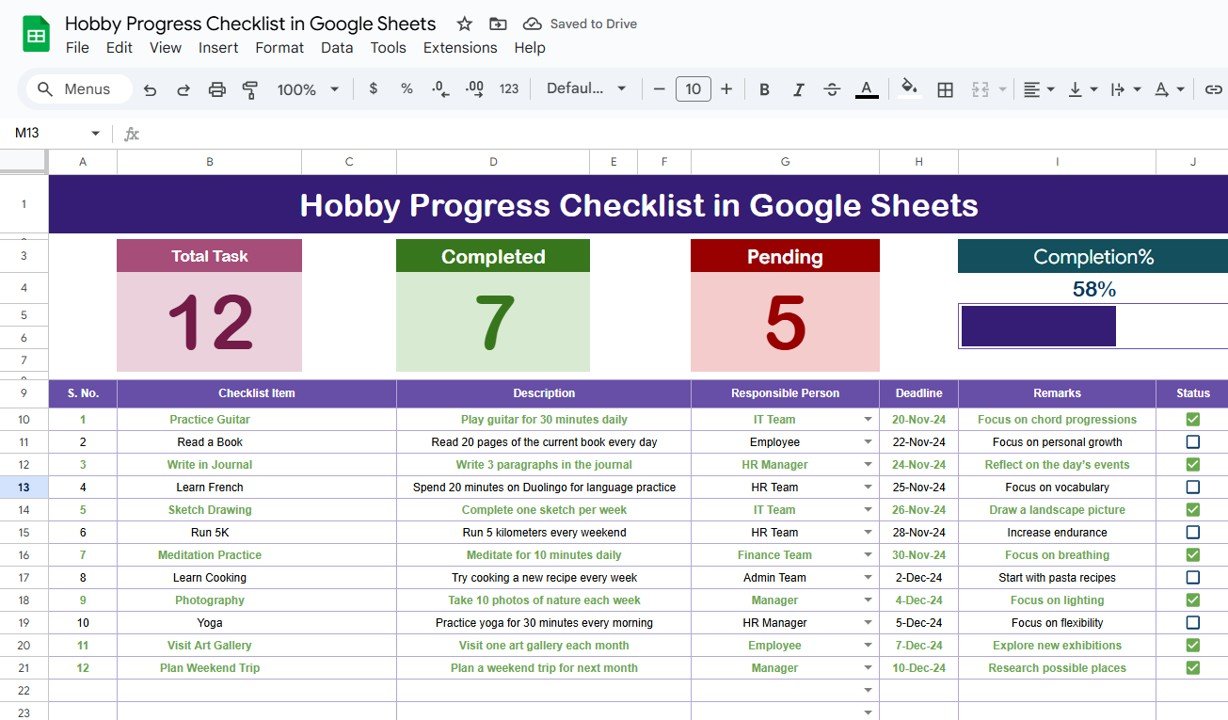
Key Features:
Customizable Categories: Tailor the checklist to suit your specific hobby by adding or modifying categories such as practice sessions, milestones, and resources.
Progress Tracking: Utilize checkboxes and date fields to mark completed tasks and set deadlines, ensuring consistent progress.
Visual Indicators: Benefit from color-coded cells and conditional formatting that highlight overdue tasks or completed milestones.
Notes Section: Add personal reflections, challenges faced, or insights gained during your hobby journey.
Shareable Format: Collaborate with friends or mentors by sharing the checklist, allowing for feedback and encouragement.
Benefits:
Stay Organized: Keep all your hobby-related tasks and milestones in one place, reducing the risk of overlooking important steps.
Maintain Motivation: Visual progress indicators and milestone tracking provide a sense of achievement, encouraging continued effort.
Enhance Learning: Reflecting on your journey through the notes section helps identify areas of improvement and reinforces learning.
Adaptable: Whether you’re a beginner or have been pursuing your hobby for years, the checklist can be customized to fit your level and goals.
How to Use:
Access the Template: Open the provided Google Sheets template link.
Customize Categories: Modify the existing categories or add new ones that align with your hobby.
Set Goals: Define clear objectives and deadlines for each task or milestone.
Track Progress: Regularly update the checklist by marking completed tasks and adding notes.
Review and Reflect: Periodically assess your progress and adjust goals as needed to stay on track.
Who Can Benefit:
Music Enthusiasts: Track practice sessions, song learning, and performance goals.
Crafters and Artists: Monitor project stages, material usage, and technique improvement.
Writers and Creators: Organize writing prompts, content creation, and publishing schedules.
Learners of New Skills: Keep a record of lessons, exercises, and proficiency milestones.
By implementing the Hobby Progress Checklist in Google Sheets, individuals can transform their passion into a structured and rewarding journey, leading to consistent growth and achievement.
Click here to read the Detailed blog post
Visit our YouTube channel to learn step-by-step video tutorials
Youtube.com/@PKAnExcelExpert




























Reviews
There are no reviews yet.