



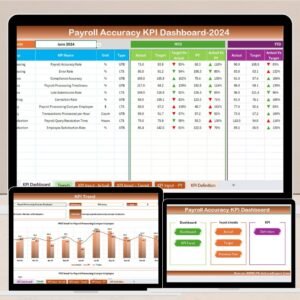
The Payroll Accuracy KPI Dashboard in Excel is an essential tool for HR departments and payroll teams to track and ensure the accuracy of payroll processing. This Excel-based dashboard allows businesses to monitor key payroll metrics, such as gross pay, deductions, net pay, overtime hours, and tax calculations, ensuring every employee is paid accurately and on time.
With features like real-time data tracking, customizable KPIs, and visual analytics, this dashboard helps you identify discrepancies in payroll data and rectify issues before they impact your employees. Whether you manage a small team or a large enterprise, this tool simplifies payroll management, enhances efficiency, and ensures compliance with regulatory standards.
Key Features of the Payroll Accuracy KPI Dashboard in Excel
📊 Payroll Data Accuracy Tracking
Monitor key payroll metrics such as gross pay, deductions, taxes, overtime, and net pay to ensure the accuracy of every paycheck. Track the consistency of payroll data from one period to the next.
📉 Payroll Error Detection
Identify errors in the payroll process by comparing data against established KPIs and thresholds. Flag discrepancies in deductions, overtime, or tax calculations to prevent inaccuracies.
📅 Payroll Compliance Monitoring
Ensure compliance with tax regulations, wage laws, and employee benefits. Track employee tax withholdings, overtime pay, and other legal payroll requirements to avoid costly penalties.
🔄 Customizable KPIs & Metrics
Customize the dashboard to include KPIs that are most relevant to your payroll processing. Whether you’re monitoring tax deductions, hourly rates, or employee benefits, tailor the dashboard to fit your needs.
📈 Real-Time Data Integration & Visual Analytics
Integrate real-time payroll data from various sources to ensure the most up-to-date insights. Use visual charts and graphs to easily analyze payroll accuracy trends, identify inefficiencies, and improve decision-making.
⚙️ Employee Benefits Tracking
Track employee benefits such as healthcare, retirement contributions, and other deductions. Monitor the accuracy of benefit-related payroll deductions and ensure employees receive the correct benefits.
Why You’ll Love the Payroll Accuracy KPI Dashboard in Excel

✅ Increase Payroll Accuracy
Track and verify all payroll components—such as wages, benefits, taxes, and deductions—before running payroll, ensuring employees are paid correctly and on time.
✅ Detect Payroll Errors Early
Quickly identify discrepancies and errors in payroll data, such as incorrect deductions or overtime, and address them before they impact employees or your business.
✅ Ensure Regulatory Compliance
Stay compliant with tax and wage laws by tracking payroll compliance metrics, reducing the risk of penalties and audits.
✅ Customizable to Fit Your Business Needs
Tailor the dashboard to match the specific payroll requirements of your organization, whether you need to track hourly pay, salaried employees, or tax withholding.
✅ Real-Time Data & Reporting
Get up-to-date payroll insights with real-time data integration. Use built-in reports and visualizations to analyze payroll trends and make informed decisions.
What’s Inside the Payroll Accuracy KPI Dashboard in Excel?
Payroll Data Accuracy Tracking: Monitor key payroll components like pay, deductions, and taxes.
Payroll Error Detection: Identify errors in payroll calculations and prevent discrepancies.
Payroll Compliance Monitoring: Ensure compliance with tax and wage laws.
Customizable KPIs & Metrics: Tailor the dashboard to your payroll system.
Real-Time Data Integration & Analytics: Analyze payroll data using real-time insights and visual reports.
Employee Benefits Tracking: Track benefits deductions and ensure they are accurate.
How to Use the Payroll Accuracy KPI Dashboard in Excel
1️⃣ Download the Template: Access the Payroll Accuracy KPI Dashboard in Excel instantly.
2️⃣ Input Payroll Data: Add payroll information, including employee pay, deductions, and taxes.
3️⃣ Track Payroll Accuracy: Monitor key payroll metrics, such as gross pay, deductions, and net pay.
4️⃣ Analyze Trends & Errors: Use visual analytics to track payroll accuracy and identify discrepancies.
5️⃣ Ensure Compliance: Verify payroll compliance with tax and legal regulations, ensuring accuracy and avoiding penalties.
Who Can Benefit from the Payroll Accuracy KPI Dashboard in Excel?
🔹 HR & Payroll Teams
🔹 Payroll Managers & Administrators
🔹 Small & Medium Businesses (SMBs)
🔹 Large Enterprises with Multiple Employees
🔹 Tax and Compliance Officers
🔹 Accounting Teams & Auditors
🔹 Businesses Looking to Improve Payroll Accuracy
Ensure accurate and timely payroll processing with the Payroll Accuracy KPI Dashboard in Excel. Track all payroll components, identify errors, ensure compliance, and improve payroll efficiency.
Click here to read the Detailed blog post
Visit our YouTube channel to learn step-by-step video tutorials
Youtube.com/@PKAnExcelExpert
Compatibility and Requirements
- Works in Microsoft Excel desktop (Excel 2016 or later, or Microsoft 365).
- The dashboard uses charts to show payroll accuracy trends. Microsoft explains how to build them in Create a chart from start to finish.
Frequently Asked Questions
What payroll figures does the dashboard track?
It tracks gross pay, deductions, taxes, overtime and net pay, plus employee benefit deductions such as healthcare and retirement contributions.
How does it help me find payroll errors?
You compare payroll data against the KPIs and thresholds you set. Discrepancies in deductions, overtime or tax calculations are flagged so you can fix them before payroll runs.
Can I change the KPIs?
Yes. The KPIs are customizable, so you can focus on tax deductions, hourly rates, employee benefits or whatever your payroll process needs.
Does it help with payroll compliance?
It includes compliance monitoring for tax withholdings, overtime pay and other payroll requirements, so you can check them in one place.
Is there a Google Sheets or Power BI version?
Yes. See the Payroll Accuracy KPI Dashboard in Google Sheets and the Payroll Accuracy KPI Dashboard in Power BI.
Related Payroll Templates
- Payroll Accuracy KPI Dashboard in Google Sheets: the same dashboard for Google Sheets
- Payroll Accuracy KPI Dashboard in Power BI: the Power BI edition
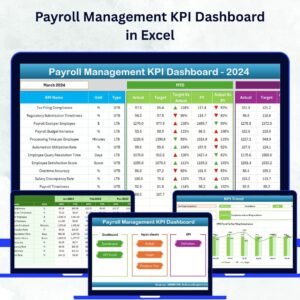
- Payroll Management KPI Dashboard in Excel: wider payroll management KPIs
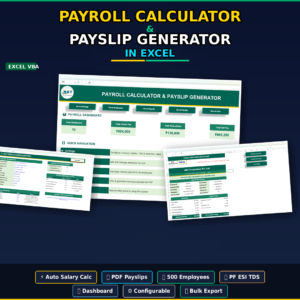
- Payroll Calculator and Payslip Generator in Excel: calculate pay and produce payslips
- Billing Accuracy KPI Dashboard in Excel: the same accuracy tracking applied to billing
Browse all HR and Payroll templates and Excel KPI dashboards.














Reviews
There are no reviews yet.