



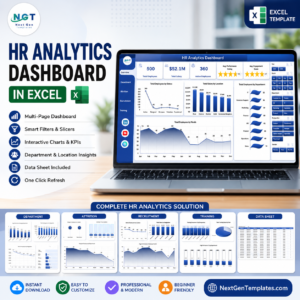
The HR Performance Dashboard in Excel is a comprehensive tool designed to help Human Resources (HR) departments track, monitor, and optimize employee performance. Whether you’re tracking individual performance metrics, team dynamics, or department-wide KPIs, this Excel-based dashboard offers an easy-to-use and effective way to evaluate and improve overall employee performance.
This dashboard integrates various HR metrics such as employee productivity, attendance, performance reviews, training completion, and employee satisfaction. It empowers HR managers, team leads, and business owners with the insights needed to make data-driven decisions that enhance workforce efficiency, improve morale, and drive organizational success.
Key Features of the HR Performance Dashboard in Excel
📊 Comprehensive KPI Tracking
Monitor key performance indicators (KPIs) such as employee productivity, training completion, and performance review scores. Track both individual and team performance to identify strengths and areas for improvement.
📅 Employee Attendance & Engagement
Track employee attendance, tardiness, and engagement levels over time. Identify trends, recognize top performers, and address attendance issues promptly.
📈 Performance Review Analysis
Analyze the results of employee performance reviews, including self-assessments, peer reviews, and manager evaluations. Easily compare performance scores across departments or teams.
💼 Training & Development Tracking
Keep track of employee training completion rates and monitor progress towards skill development goals. Ensure that employees are equipped with the necessary tools and knowledge to succeed.
📈 Team Performance Insights
Evaluate team dynamics and productivity, making it easy to identify high-performing teams and those needing additional support.
⚙️ Customizable Metrics & Visuals
Customize the dashboard to reflect the most relevant metrics for your organization. Tailor the visuals, KPIs, and reporting styles to match your specific HR goals.
Why You’ll Love the HR Performance Dashboard in Excel

✅ Monitor HR Metrics in Real-Time
Track employee performance, attendance, and training completion in real time to ensure that all team members are on track and meeting expectations.
✅ Data-Driven Decision Making
Gain valuable insights into employee performance trends, training effectiveness, and overall productivity to make informed HR decisions that drive success.
✅ Enhance Employee Development
Identify skill gaps, areas for improvement, and training needs, helping you invest in employee development and growth.
✅ Increase Workforce Efficiency
By monitoring performance and attendance closely, you can optimize team productivity and address potential issues before they impact organizational goals.
✅ Customizable & Scalable
The HR Performance Dashboard is highly customizable and scalable to suit the needs of businesses of all sizes. Adjust the dashboard based on your specific HR goals and workforce structure.
What’s Inside the HR Performance Dashboard in Excel?
Employee Performance Tracking: Monitor KPIs like productivity, review scores, and achievements.
Attendance & Engagement Monitoring: Track employee attendance and engagement levels.
Performance Review Analysis: Evaluate results from performance reviews and feedback.
Training & Development Tracking: Track employee training completion and skill development progress.
Team Performance Insights: Analyze team productivity and performance trends.
Customizable KPIs: Adapt the dashboard to meet your organization’s HR requirements.
How to Use the HR Performance Dashboard in Excel
1️⃣ Download the Template: Get instant access to the HR Performance Dashboard in Excel.
2️⃣ Input Employee Data: Add employee performance metrics, attendance, and training information.
3️⃣ Track Performance KPIs: Use the dashboard to monitor key HR metrics such as productivity and training completion.
4️⃣ Analyze & Review Data: Use visuals to analyze employee and team performance over time.
5️⃣ Make Data-Driven Decisions: Use insights from the dashboard to improve employee engagement, development, and overall workforce efficiency.
Who Can Benefit from the HR Performance Dashboard in Excel?
🔹 HR Managers & Teams
🔹 Business Owners & Executives
🔹 Employee Development & Training Managers
🔹 Operations Managers
🔹 Small & Medium Enterprises (SMBs)
🔹 Large Corporations with HR Departments
🔹 Employee Performance Analysts & Consultants
Enhance your HR processes with the HR Performance Dashboard in Excel. Track key metrics, monitor employee progress, and ensure your workforce is performing at its best.
Click here to read the Detailed blog post
Visit our YouTube channel to learn step-by-step video tutorials
Youtube.com/@PKAnExcelExpert
Watch the step-by-step video tutorial:
Compatibility and Requirements
- Works in Microsoft Excel desktop (Excel 2016 or later, or Microsoft 365).
- For help with the Excel features it uses, see Microsoft’s guide Create a chart from start to finish.
Frequently Asked Questions
Which HR metrics does the dashboard cover?
Employee productivity, attendance, performance review scores, training completion and employee satisfaction.
Can I compare performance across departments?
Yes. You can compare review scores and other metrics across departments or teams.
Does it track training?
Yes. It tracks training completion rates and progress toward skill development goals.
Can I change the KPIs?
Yes. The metrics and visuals can be adjusted to match your own HR goals.
Related HR Performance Templates
- HR Performance Dashboard in Google Sheets: the Google Sheets edition.
- HR Performance Dashboard in Power BI: the Power BI edition.
- Employee Performance Rating Card and Dashboard in Excel: rate employees on a card and dashboard.
- Employee Performance Review Dashboard in Excel: summarize performance reviews.
- HR & Workforce Analytics Bundle: 10 HR templates for Excel, Google Sheets and Power BI.
Browse all Excel HR and payroll templates or the Excel dashboards.
















Reviews
There are no reviews yet.