


Loan Amortization Schedule in Excel and Google Sheets shows where every loan payment goes. Type a mortgage, car loan or any fixed-rate loan once and get the monthly payment, the full payment-by-payment amortization schedule, the effect of extra payments, yearly totals for tax time, a comparison of three loan offers and a Dashboard that shows your payoff date and the interest you save. It ships in two editions, Google Sheets and Microsoft Excel, with the same tabs, the same formulas and sample data for a fictional $320,000 mortgage in Columbus, Ohio.
Watch the Loan Amortization Schedule in Excel and Google Sheets walkthrough
If you are searching for a loan amortization schedule excel file, a loan amortization schedule google sheets template or a mortgage payoff calculator excel workbook, or an amortization schedule with extra payments, this is a ready-made one.
Good to know: this is a planning tool for fixed-rate loans with monthly payments, up to 30 years. Escrow (property tax and insurance) and late fees are not included, and the figures can differ from your lender by a few cents because of day-count and rounding rules. Check your lender statement and Form 1098 for official numbers.
What You Get
- Dashboard with six tiles, four charts, a loan summary, progress to date and the next six payments
- Loan Details tab: type the loan amount, rate, term, first payment date, monthly extra payment and as-of date in the yellow cells
- Amortization Schedule for up to 360 payments with principal, interest, extra payment, ending balance and a Paid, Next Due or Upcoming status
- Extra Payments tab for tax refunds, bonuses and lump sums, matched to the scheduled payment they reduce
- Yearly Summary with payments, principal, interest, extras and year-end balance by calendar year
- Compare Loans tab for up to three offers with fees, total cost and a verdict on which costs the least
- How to Use tab with step-by-step instructions and links to every tab
- Two editions in one download: Excel (.xlsx, no macros) and a PDF guide with the Make a copy link for Google Sheets
Key Features
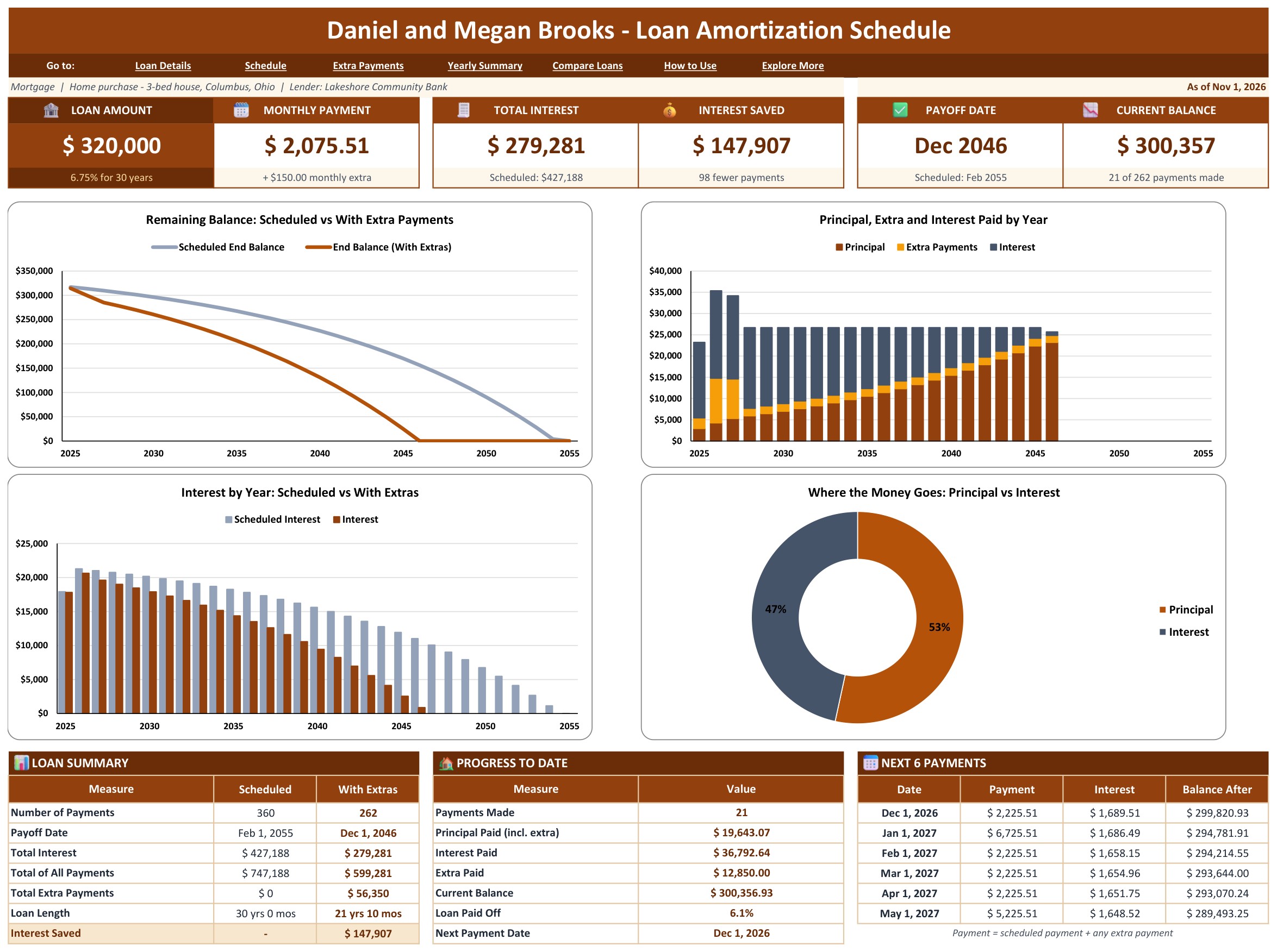
Dashboard (Google Sheets)
Six tiles open the page: Loan Amount, Monthly Payment, Total Interest, Interest Saved, Payoff Date and Current Balance. Under them sit four charts: the remaining balance on the normal schedule against the balance with extra payments, the principal, extra payments and interest paid each year, the interest by year, and a doughnut that shows how much of everything you pay goes to principal and how much to interest. The tables at the bottom show the loan summary side by side, your progress to date and the next six payments.

Loan Details (Google Sheets)
Where everything starts. Type the borrower, lender, loan type, loan amount, annual interest rate, term in years (1 to 30) and first payment date in the yellow cells, then the recurring monthly extra payment, the date it starts and an as-of date. The monthly payment, payoff dates, total interest with and without extras, interest saved and time saved are calculated, and a Check cell says OK when the inputs are complete.

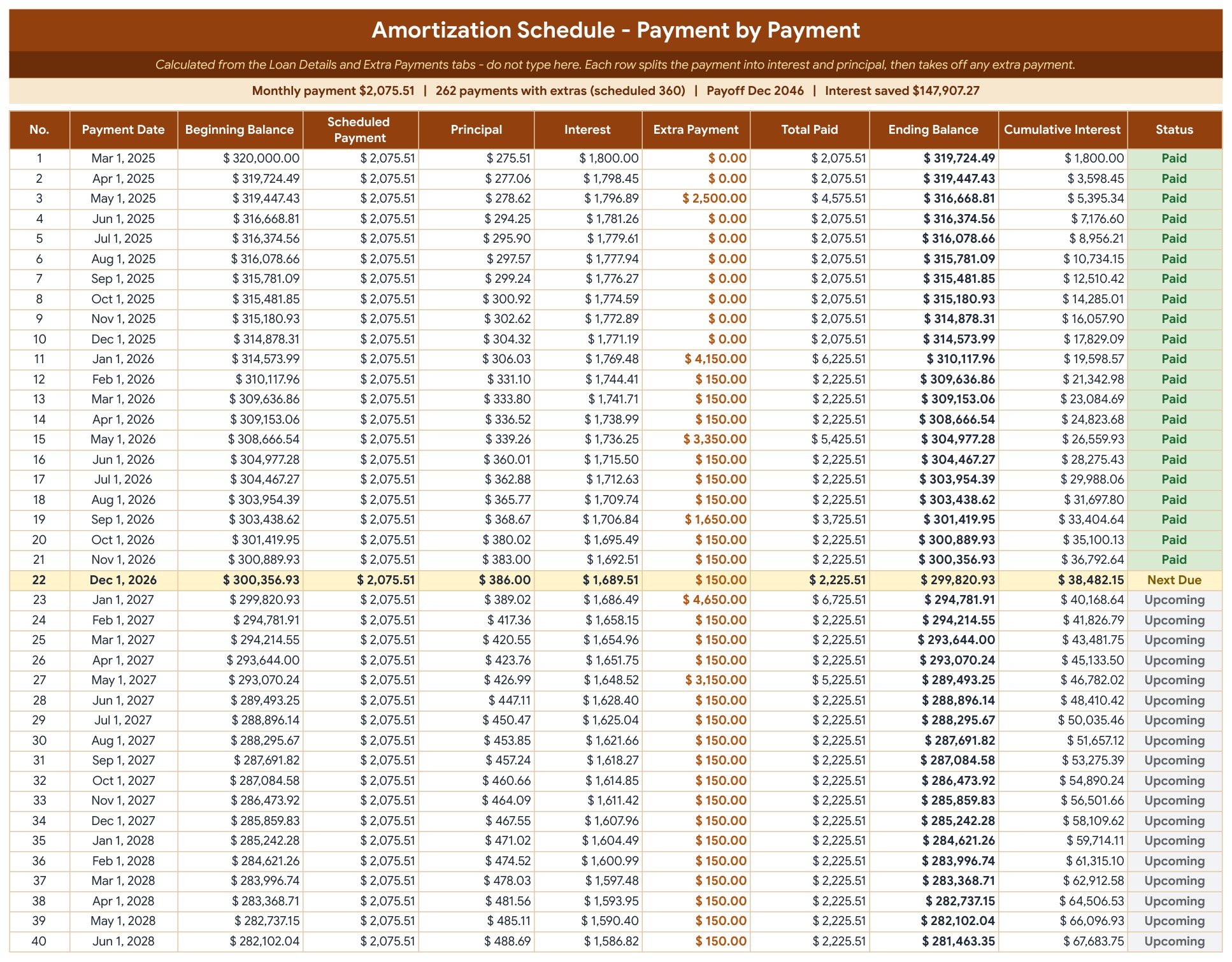
Amortization Schedule (Google Sheets)
One row per payment, up to 360: payment number, date, beginning balance, scheduled payment, principal, interest, extra payment, total paid, ending balance and cumulative interest. You never type here. The Status column shows Paid, Next Due (highlighted) or Upcoming, and every row is rounded to the cent so the principal adds up to the loan amount exactly.
Extra Payments (Google Sheets)
Log one-time payments toward principal, such as a tax refund, a bonus or a lump sum: date, amount, type and a note. The template works out which scheduled payment each one goes to, shows that payment date and gives a status of Applied or Planned. A date before the loan starts or after it is paid off gets a warning.

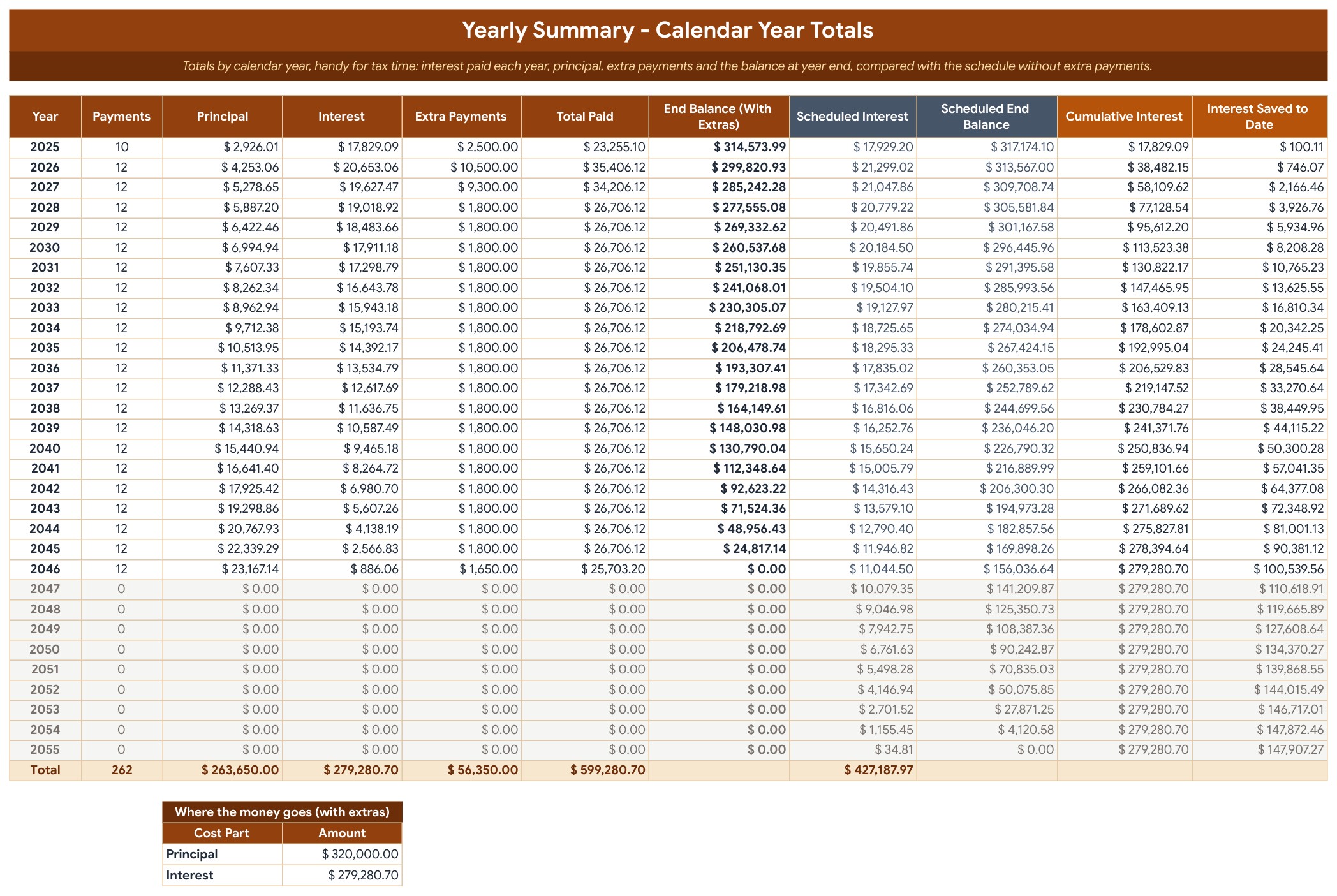
Yearly Summary (Google Sheets)
Totals by calendar year: payments, principal, interest, extra payments, total paid and the year-end balance, next to the interest and balance on the normal schedule, plus the cumulative interest and the interest saved so far. It is handy at tax time for the mortgage interest line, checked against the Form 1098 from your lender.
Compare Loans (Google Sheets)
Type up to three offers with the amount, rate, term and upfront fees. You see the monthly payment, number of payments, total interest, total cost with fees and the payoff date for each, and a verdict row that shows which offer costs the least.

How to Use (Google Sheets)
A step-by-step guide to the setup, with notes on the Google Sheets dropdown chips and links to the formulas course.

Explore More Templates (Google Sheets)
A short list of related templates from Next Gen Templates, with links to each product page.

Dashboard (Excel edition)
Six tiles open the page: Loan Amount, Monthly Payment, Total Interest, Interest Saved, Payoff Date and Current Balance. Under them sit four charts: the remaining balance on the normal schedule against the balance with extra payments, the principal, extra payments and interest paid each year, the interest by year, and a doughnut that shows how much of everything you pay goes to principal and how much to interest. The tables at the bottom show the loan summary side by side, your progress to date and the next six payments.
Loan Details (Excel edition)
Where everything starts. Type the borrower, lender, loan type, loan amount, annual interest rate, term in years (1 to 30) and first payment date in the yellow cells, then the recurring monthly extra payment, the date it starts and an as-of date. The monthly payment, payoff dates, total interest with and without extras, interest saved and time saved are calculated, and a Check cell says OK when the inputs are complete.

Amortization Schedule (Excel edition)
One row per payment, up to 360: payment number, date, beginning balance, scheduled payment, principal, interest, extra payment, total paid, ending balance and cumulative interest. You never type here. The Status column shows Paid, Next Due (highlighted) or Upcoming, and every row is rounded to the cent so the principal adds up to the loan amount exactly.

Yearly Summary (Excel edition)
Totals by calendar year: payments, principal, interest, extra payments, total paid and the year-end balance, next to the interest and balance on the normal schedule, plus the cumulative interest and the interest saved so far. It is handy at tax time for the mortgage interest line, checked against the Form 1098 from your lender.

Compare Loans (Excel edition)
Type up to three offers with the amount, rate, term and upfront fees. You see the monthly payment, number of payments, total interest, total cost with fees and the payoff date for each, and a verdict row that shows which offer costs the least.

Who Is It For?
Homeowners with a mortgage, car buyers, small landlords, financial planners and anyone with a fixed-rate loan who wants to know the real cost of the loan and what extra payments are worth. It suits people who want a loan payoff calculator they can keep and edit, in Excel or Google Sheets, with no macros and no add-ins.
How to Use
- Open the PDF guide and click Make a copy for Google Sheets, or open the Excel file.
- On the Loan Details tab, type the borrower, lender, loan amount, annual rate, term and first payment date in the yellow cells.
- Add a recurring monthly extra payment and the date it starts, and set the as-of date.
- Log one-time payments such as a tax refund on the Extra Payments tab.
- Read the Dashboard, the Amortization Schedule and the Yearly Summary, and use Compare Loans before you sign a new loan.
Comparison
| Feature | This template | Blank spreadsheet |
|---|---|---|
| Payment-by-payment schedule up to 360 payments | Built in, rounded to the cent | Write and copy the formulas |
| Extra payments and tax refunds | Recurring and one-time, interest saved shown | Rebuild the schedule each time |
| Yearly totals for tax time | Yearly Summary tab | Build pivot tables yourself |
| Compare three loan offers | Compare Loans tab with a verdict | Separate calculators |
| Google Sheets and Excel editions | Both included | One platform |
Frequently Asked Questions
What is a loan amortization schedule?
It is a table that lists every payment on a loan and splits each one into interest and principal, with the balance left after each payment. Early payments are mostly interest, and the share of principal grows over time.
How are the monthly payment and the interest calculated?
The monthly payment uses the PMT function: the monthly rate, the number of payments and the loan amount, rounded to the cent. On the schedule, the interest for each month is the balance times the monthly rate, and the rest of the payment reduces the principal.
Does it work with extra payments?
Yes. Enter a recurring monthly extra payment and the date it starts, and log one-time payments on the Extra Payments tab. The Dashboard shows the new payoff date, the interest saved and the payments saved.
Does it work in Google Sheets and in Excel?
Yes. The ZIP holds an Excel edition (.xlsx, no macros) and a PDF guide with the Make a copy link for Google Sheets. Both have the same tabs, formulas and sample data.
How long a loan can it hold?
Terms from 1 to 30 years with monthly payments, so up to 360 payments. Fixed interest rates only.
What does the sample data show?
A fictional $320,000, 30-year fixed mortgage at 6.75% for a home in Columbus, Ohio, with a $150 monthly extra payment and a few one-time payments. Clear the yellow input cells to enter your own loan.
Does it include escrow, insurance or late fees?
No. It models principal and interest only. It does not connect to a lender or a bank, and the figures are for planning, so check your lender statement for official numbers.
Can I compare different loans?
Yes. The Compare Loans tab takes up to three offers with the amount, rate, term and upfront fees, and shows the monthly payment, total interest, total cost and the payoff date of each.
Get the Template
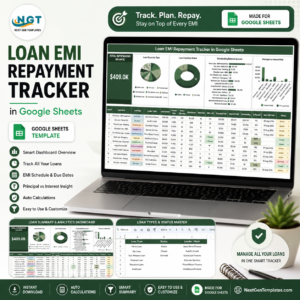
Download the Loan Amortization Schedule in Excel and Google Sheets and see where every payment goes, how much extra payments save and when the loan ends. To keep a running record of payments, see the Loan EMI Repayment Tracker in Google Sheets or the Mortgage Payoff Tracker in Google Sheets, or browse all Google Sheets templates. Join 10,000+ customers in 180+ countries.
























Reviews
There are no reviews yet.