


The best staffing agency templates for 2026 start with the Staffing Agency Dashboard ($17.99 in Excel or Power BI, $9.99 in Google Sheets), which tracks revenue, cost, net gross profit, placements and recruiter performance on five pages. Temp agencies should add the Temp Staffing Dashboard for bill rate, pay cost and hours. An applicant tracking web app covers the candidate pipeline.
Last updated: October 2026
Key takeaways
- Our top pick is the Staffing Agency Dashboard: 5 KPI cards and 5 pages covering revenue, cost, net gross profit, placements, recruiters, clients and industries, in Excel, Power BI, Google Sheets and HTML.
- Temp and contract agencies get bill revenue, pay cost, hours worked and gross margin % from the Temp Staffing Dashboard ($9.99 to $17.99).
- Executive search firms should look at search fee value, closure days against SLA and open searches in the Executive Search and Staffing Dashboard.
- The Recruitment Applicant Tracking System Web App ($39.99) runs jobs, candidates, pipeline stages, interviews and offers across 12 pages.
- Every pick is a one-time purchase from $6.99 to $39.99, and the Recruitment & Talent Acquisition Bundle packs 7 templates for $35.99 instead of $56.93.
 Launch offer
SUMIFS, XLOOKUP, FILTER, LAMBDA and checking AI-written formulas, with real business projects. 11h 47m of video by PK, with practice files, quizzes and a capstone.
Staffing agency templates compared
| Template | Format | Best For | Price |
|---|---|---|---|
| Staffing Agency Dashboard (Best overall) | Excel, Power BI, Google Sheets, HTML | Revenue, net gross profit, placements and recruiter results | $9.99 to $17.99 |
| Temp Staffing Dashboard | Excel, Power BI, Google Sheets | Bill revenue, pay cost, hours worked and gross margin | $9.99 to $17.99 |
| Executive Search and Staffing Dashboard | Excel, Power BI, Google Sheets | Search fees, closure days, SLA and open searches | $9.99 to $17.99 |
| Recruitment Agencies Dashboard | Excel, Power BI | Recruitment cost vs revenue, profit by region and source | $13.99 to $17.99 |
| Recruitment Applicant Tracking System | Web app (Google Sheets + Apps Script) | Jobs, candidates, pipeline, interviews and offers | $39.99 |
| Recruitment Agencies KPI Dashboard | Excel | Monthly targets: MTD and YTD actual vs target vs last year | $14.99 |
| Interview Scheduling Management System | Excel (VBA) | Interview calendars for candidates and interviewers | $19.99 |
| Recruitment & Talent Acquisition Bundle (Best value) | Excel, Google Sheets | Pipeline, funnel KPIs and onboarding in one pack | $35.99 |
A staffing agency earns its money in the gap between two prices. The client pays a bill rate or a placement fee, the agency pays the worker or the recruiter, and whatever is left has to cover sourcing, payroll admin, bad debts and the office. Lose sight of that spread for a quarter and an agency can grow placements while profit shrinks.
Most small agencies run on a mix of an applicant tracking system, a payroll export and a spreadsheet the owner rebuilds every month. Staffing agency software fills the gap, but it is usually priced per recruiter per month, and much of it pays for job-board and CRM features a five-person firm already has elsewhere. A good staffing agency template gives you the margin, placement and recruiter reports for a one-time price, built on the data you already export.
How we picked these staffing agency templates
We searched the NextGenTemplates catalog for files built for agencies that place people with clients: staffing, temp staffing, executive search, recruitment agencies, applicant tracking, interviews and billable timesheets. Plenty of recruitment templates are written for in-house HR teams that hire for one employer, so we checked each one for agency features such as client companies, bill rates, search fees and recruiter revenue.
In-house hiring dashboards are covered in our recruitment KPIs guide and our recruiting tools stack for recruiters, so this list leans toward the agency side of the desk. Where one tool comes in several formats we list it once with every price. We ranked on how much of an agency’s money and pipeline a file covers, how fast a small team can load its own data, and price.
The 8 best staffing agency templates for 2026
1. Staffing Agency Dashboard: best overall
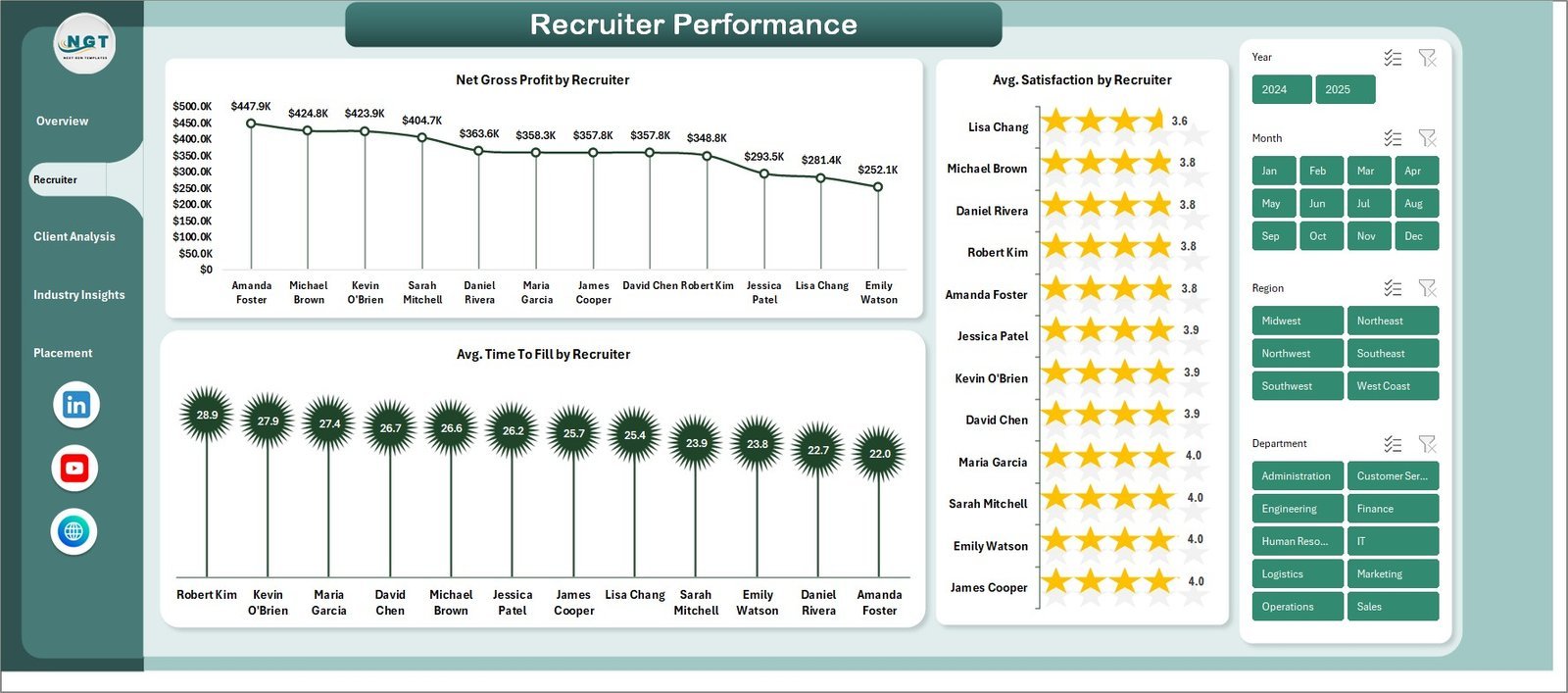
This is the file we would hand to the owner or managing director of a staffing firm. It answers the questions that decide whether the agency makes money: which recruiters bring in the most net gross profit, which clients and industries are worth the effort, and how revenue and cost move month by month.
Who it is for: agency owners, branch managers and recruitment directors who review the business every week or month.
What is inside the Excel edition:
- 5 pages: Overview, Recruiter Performance, Client Analysis, Industry Insights and Placement Pipeline
- KPI cards for total revenue, total cost, total records, total placements and net gross profit
- Gross margin %, revenue by month, revenue by job type and placements by region on the Overview
- Net gross profit, average satisfaction and average time to fill for every recruiter
- Records against placements by client company, revenue by industry and satisfaction by client
The Power BI edition uses the same five pages with DAX measures you can extend. The Google Sheets edition swaps in bill rate thinking: its cards show total placements, active placements, average bill rate and average margin %, it charts bill rate against pay rate, and a search sheet pulls up any placement by ID. The HTML edition runs in a browser with six cards, including placement rate and time to fill, and exports the data view to CSV.
Price: $17.99 in Excel, $17.99 in Power BI, $9.99 in Google Sheets and $12.99 in HTML.
Best for: the monthly owner’s review where profit, placements and recruiter league tables sit on one screen.
2. Temp Staffing Dashboard: best for hourly and contract placements
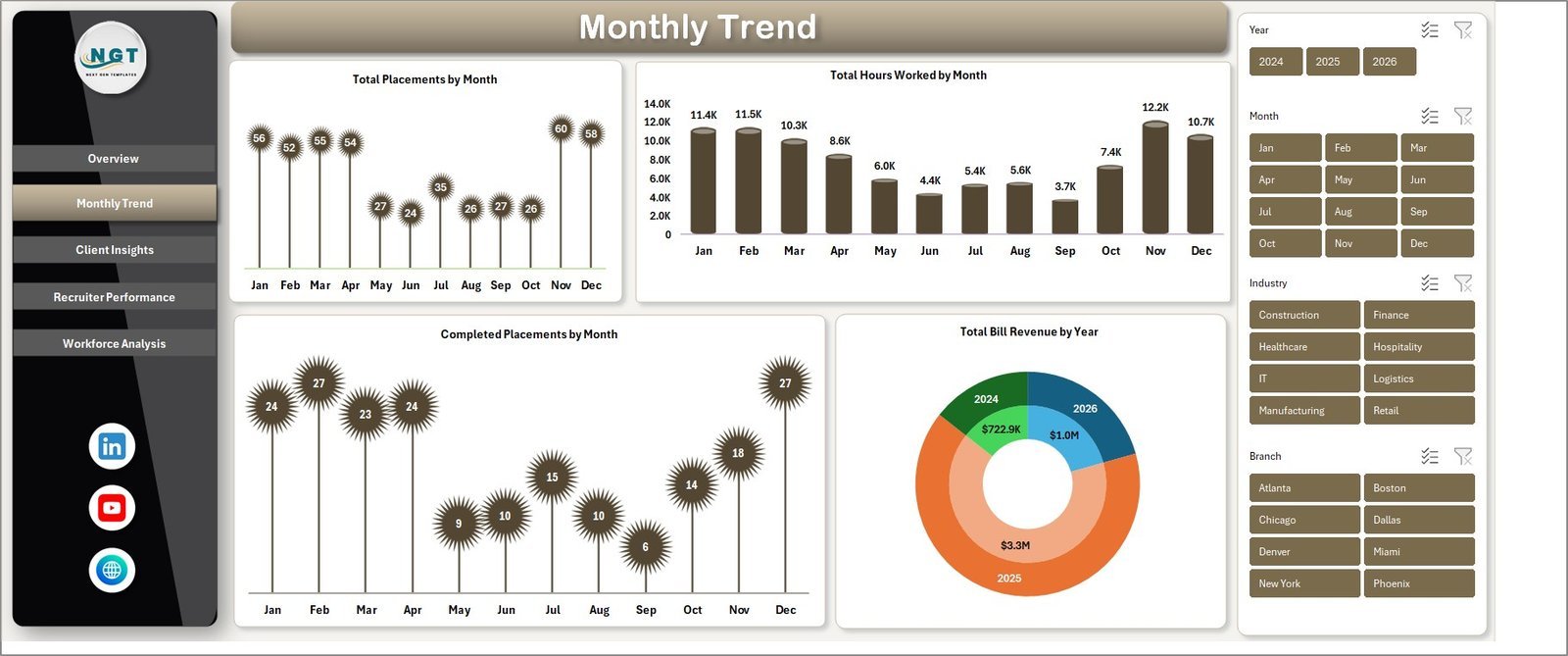
Temp and contract agencies live on hours, not fees. This dashboard is built around the numbers that drive an hourly business: bill revenue, pay cost, hours worked and the margin between them.
Who it is for: light industrial, warehouse, healthcare, hospitality and office temp agencies, and any firm that bills clients by the hour.
What is inside the Excel edition:
- KPI cards for total bill revenue, total placements, total hours worked, total pay cost and gross margin %
- 16 pivot-driven charts across Overview, Monthly Trend, Client Insights, Recruiter Performance and Workforce Analysis
- Bill revenue against pay cost by month, plus revenue by region, client and industry
- Recruiter productivity with placements, time to fill, completion % and performance rating
- Workforce mix by worker type, skill level and job category; no VBA, works in Excel 2016 to 365 and on Mac
The Power BI edition adds a net margin amount card and 13 visuals. The Google Sheets edition tracks revenue, gross margin, placements and hours billed, with revenue by branch and a search sheet that returns 13 fields for any placement. Feeding hours in? The Employee Timesheet for Billable Hours ($6.99) logs billable, non-billable and overtime hours, and our timesheet templates guide compares more options.
Price: $17.99 in Excel, $17.99 in Power BI and $9.99 in Google Sheets.
Best for: agencies that need to see the bill-pay spread by client and recruiter every week.
Not sure where to start? Most agencies begin with the Staffing Agency Dashboard ($17.99) for the business view. If more than half your revenue comes from hourly assignments, add the Temp Staffing Dashboard ($17.99) as well. Both together cost $35.98, paid once.
3. Executive Search and Staffing Dashboard: best for retained and executive search
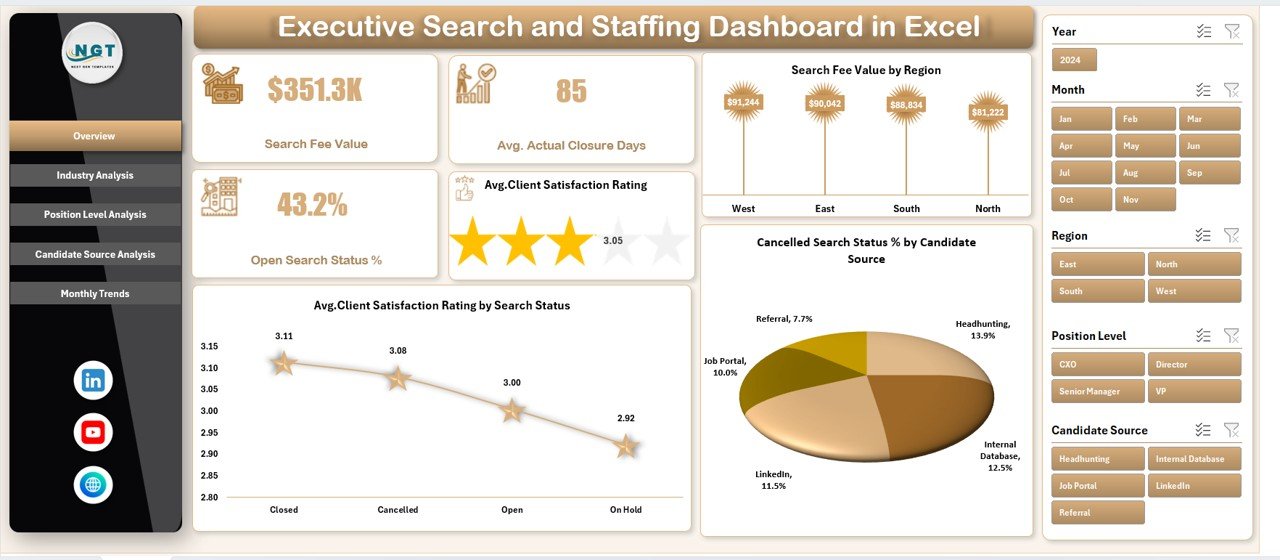
Search firms sell fewer, bigger assignments, so the questions change. How much fee value is in the pipeline? How many days does a search take to close against the SLA you promised? Which sources produce the placements that clients rate highest?
Who it is for: executive search, headhunting and senior-level recruitment firms.
What is inside:
- A data sheet for industry, region, position level, candidate source, search status, SLA days, closure days, satisfaction rating and search fee value
- Overview cards for search fee value, average actual closure days, open search status % and average client satisfaction rating
- Industry, Position Level, Candidate Source and Month analysis pages with a page navigator
- Cancelled searches by candidate source and fee value by region
If you prefer target tracking to raw analysis, the Executive Search and Staffing KPI Dashboard ($14.99 in Excel, $11.99 in Power BI) compares time to hire, fill rate, cost per hire, retention and client satisfaction against monthly targets and last year.
Price: $13.99 in Excel, $17.99 in Power BI and $9.99 in Google Sheets.
Best for: partners who report fee pipeline and SLA performance to clients and to each other.
4. Recruitment Agencies Dashboard: best for cost and profit by region

This file puts recruitment cost right next to revenue, which is where many agencies find their leaks. It suits multi-office firms that want to compare regions, client types and sourcing channels on profit rather than placement counts.
Who it is for: agencies with several branches or markets, and finance leads who want the cost side as visible as the sales side.
What is inside:
- Overview cards for recruitment cost, revenue, profit and client satisfaction (1 to 10), plus a placed % gauge
- Recruitment cost against revenue by client type, and profit by region
- Industry Analysis with cost vs revenue, profit margin %, satisfaction and placed % by industry
- Region, Candidate Source and Month pages to spot seasonal hiring and the channels that pay back
Price: $13.99 in Excel and $17.99 in Power BI.
Best for: deciding which office, industry or job board deserves next quarter’s budget.
5. Recruitment Applicant Tracking System Web App: best for the candidate pipeline
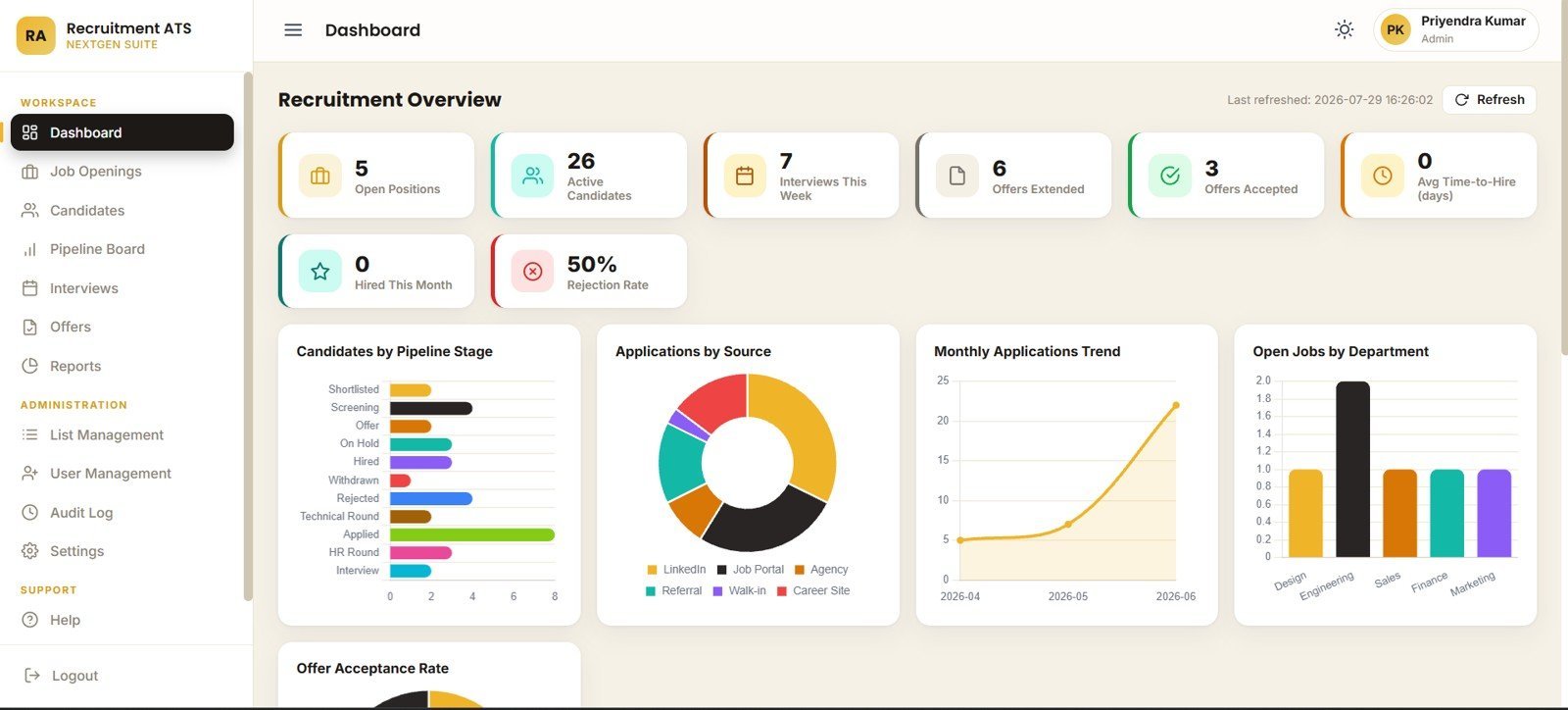
Picks 1 to 4 report on the business. This web app runs the daily desk work of moving candidates from application to offer. It is a lightweight applicant tracking system that lives in your own Google account.
Who it is for: small agencies and recruitment teams that have outgrown a candidate spreadsheet but do not want a per-seat ATS bill.
What is inside:
- 12 pages: login, overview, jobs, candidates, pipeline, interviews, offers, reports, lists, users, audit log and settings
- 8 overview cards: open positions, active candidates, interviews this week, offers extended, offers accepted, average time to hire, hires this month and rejection rate
- A pipeline board across applied, screening, shortlisted, interview and technical round, with days in stage
- Offer tracking by designation, salary, offer date, joining date, validity and status
- Admin controls for roles, departments, locations, dropdown lists, ID prefixes and email notifications
Price: $39.99 one time.
Best for: agencies that want one shared place for every open role and candidate stage.
6. Recruitment Agencies KPI Dashboard: best for monthly targets
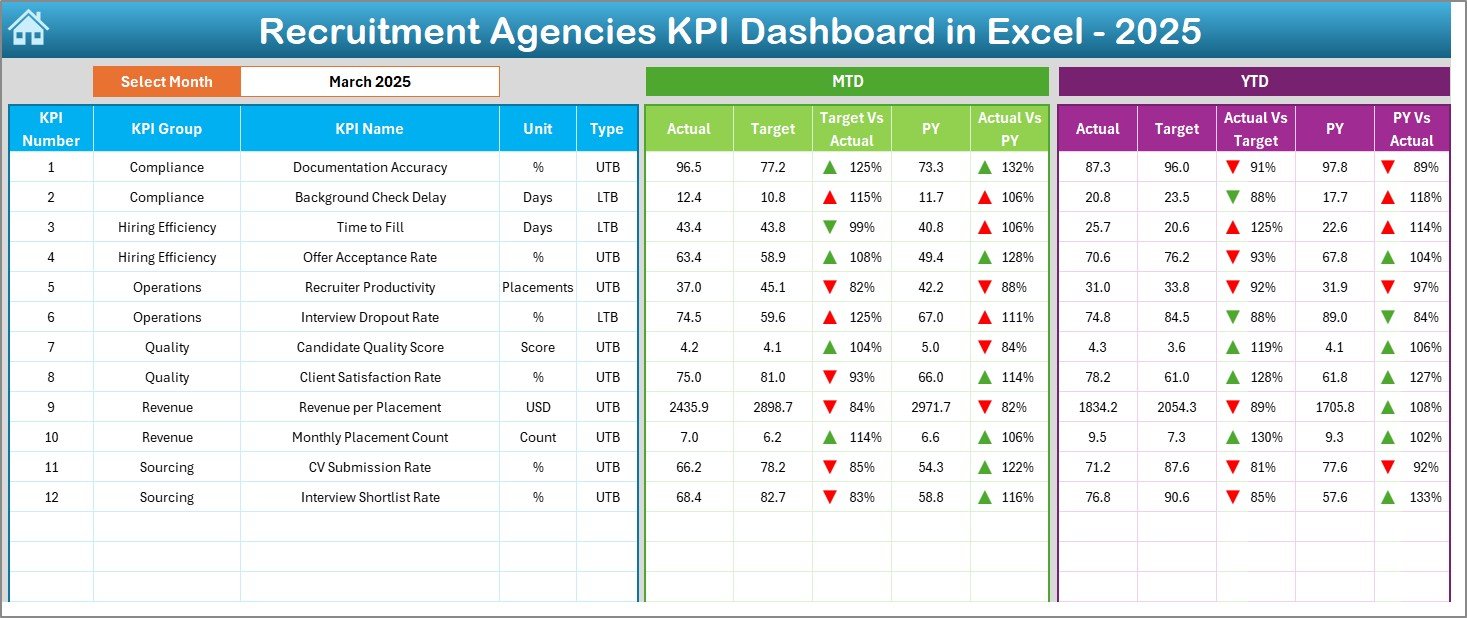
Some agency managers care less about charts and more about one question: are we on target this month? This KPI dashboard is built for that weekly sales-meeting rhythm.
Who it is for: team leads and directors who set placement, revenue and activity targets for recruiters.
What is inside:
- 7 sheets: an index page, the dashboard, KPI trend, actual numbers input, targets, previous year and KPI definitions
- MTD and YTD actuals shown against target and against the previous year
- Green and red arrows that flag improvement or decline at a glance
- A month selector that updates the whole dashboard
Price: $14.99 in Excel.
Best for: a monthly scorecard that shows every recruiter where they stand against plan.
7. Interview Scheduling Management System: best for interview coordination
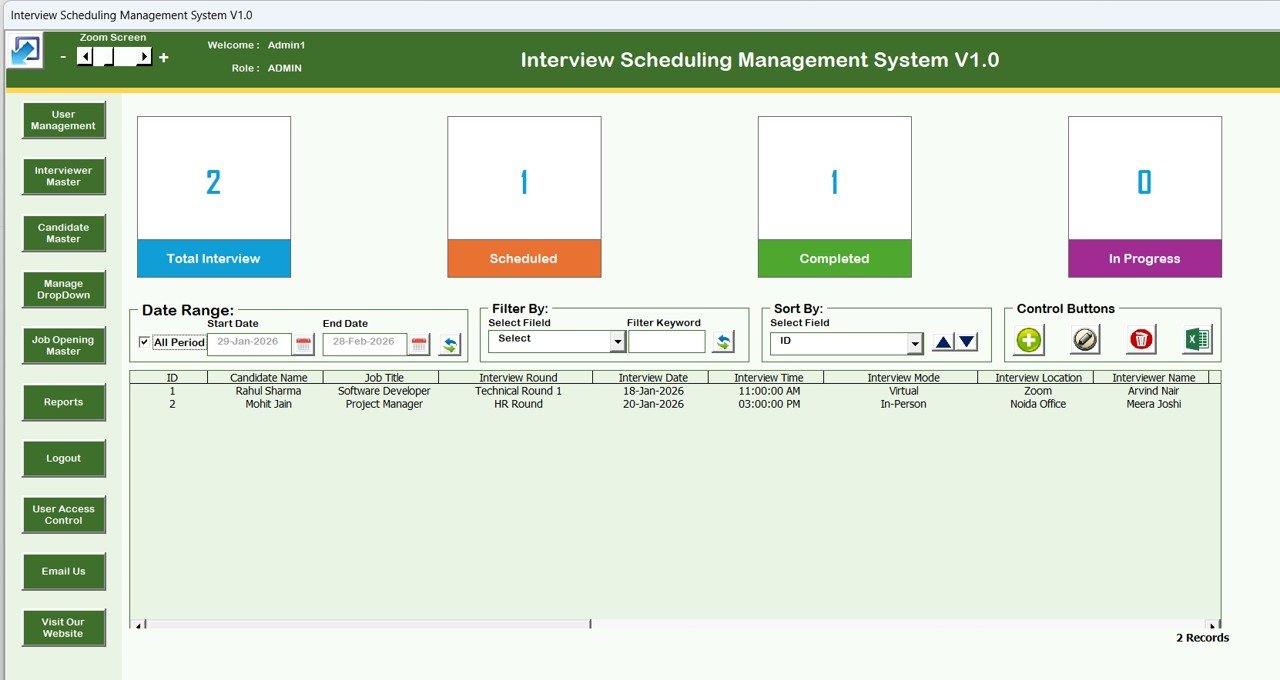
Interview logistics eat recruiter hours: matching candidate, client interviewer, time and format, then chasing outcomes. This Excel and VBA system keeps every interview in one list with status counts on top.
Who it is for: recruitment coordinators and agencies that book many client interviews each week.
What is inside:
- A secure login with Admin and User roles and user access control
- Cards for total, scheduled, completed and in-progress interviews
- A main list with date-range filters, keyword filters and sorting, plus add, update and delete forms
- Masters for interviewers, candidates and job openings, and automated reports
Price: $19.99 one time. If you want candidate applications in a desktop file too, the Candidate Application Management System V1.0 ($19.99) is built the same way.
Best for: agencies that juggle many interviews and want a clean record of each one.
8. Recruitment & Talent Acquisition Bundle: best value
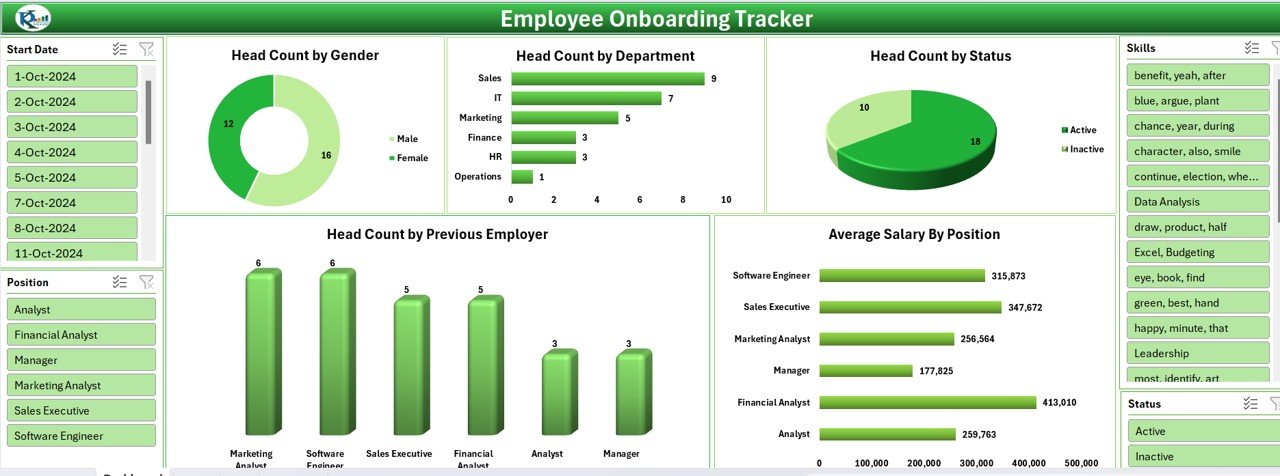
This bundle covers the in-house side of hiring, which is handy for agencies that also run recruitment process outsourcing or help clients onboard the people they place.
Who it is for: agencies offering RPO or onboarding support, and small firms that want several recruitment tools for one price.
What is inside:
- 7 templates across Excel and Google Sheets
- A Recruitment Pipeline Dashboard in Google Sheets with time to fill, cost per hire and source effectiveness
- A Recruitment Funnel KPI Dashboard in Excel covering applied, screened, interviewed, offered and hired
- An Employee Onboarding Tracker, onboarding checklists and a planner for new starters
Price: $35.99 for all seven, against $56.93 if bought one by one, a 37% saving.
Best for: getting a full hiring toolkit at the lowest cost per template.
Which KPIs should a staffing agency track?
The metrics that matter to an agency differ from in-house HR, because an agency sells time and placements to clients. These are the numbers the templates above track or let you add.
| KPI | Formula | What it tells you |
|---|---|---|
| Gross margin % | (Bill revenue – Pay cost) / Bill revenue x 100 | How much of each billed dollar the agency keeps |
| Markup % | (Bill rate – Pay rate) / Pay rate x 100 | The spread you quote to clients |
| Fill rate | Orders filled / Orders received x 100 | Whether you deliver on client job orders |
| Time to fill | Days from job order to accepted offer, averaged | How quickly clients get a person in the seat |
| Submittal to interview ratio | Candidates interviewed / Candidates submitted x 100 | The quality of your shortlists |
| Offer acceptance rate | Offers accepted / Offers made x 100 | How well you read candidate expectations |
| Net gross profit per recruiter | Gross profit credited to a recruiter / Recruiters | Who carries the desk |
| Assignment completion rate | Assignments completed / Assignments started x 100 | Temp reliability and client trust |
| Search fee value | Sum of fees on open and closed searches | Revenue in the executive search pipeline |
| Client satisfaction | Average client rating per period | Which accounts are at risk |
A worked example: you pay a forklift driver $20 an hour and bill the client $30. The markup is 50%, but the gross margin is 33.3%. On a 40-hour week that is $400 of gross profit before employer taxes and insurance. If a dashboard shows margin sliding on one client while hours climb, renegotiate the rate before you add more workers to that account. For industry data and compliance guidance, the American Staffing Association is a good place to start.
How do you choose the right staffing agency template?
| If you are… | Start with |
|---|---|
| An agency owner who wants profit, placements and recruiter results in one file | Staffing Agency Dashboard |
| A temp or contract agency billing clients by the hour | Temp Staffing Dashboard |
| An executive search or headhunting firm | Executive Search and Staffing Dashboard |
| A multi-branch agency comparing cost and profit by region | Recruitment Agencies Dashboard |
| A team still tracking candidates in email and spreadsheets | Recruitment Applicant Tracking System |
| A director who runs recruiters on monthly targets | Recruitment Agencies KPI Dashboard |
| A coordinator booking many client interviews | Interview Scheduling Management System |
A common setup is one operating tool and one report: the applicant tracking web app for the desk, and the Staffing Agency Dashboard or Temp Staffing Dashboard for the monthly review. If you also run payroll for your temps, our payroll Excel template toolkit and invoice templates guide cover the back office. HR leaders who manage internal staff as well can see our HR templates for directors.
When a template is NOT the right answer
- You need job-board posting and CV parsing. None of these files posts jobs or reads CVs automatically. Staffing agency software or a full ATS does that, and you can still use a dashboard for the owner’s report.
- You need payroll and compliance automation. Running temp payroll, tax filings and right-to-work checks needs dedicated software or a payroll provider.
- You have dozens of recruiters working the same records. At that scale, record locking, a client portal and an audit trail across every edit are worth a monthly fee.
- Nobody exports the data. A dashboard is only as current as its last data load. If no one will paste in the weekly placement or timesheet export, the numbers go stale.
For everyone else, which is most small and mid-sized staffing firms, a staffing agency template is the fastest route to clear margin and placement reports. Running a different kind of agency too? See our advertising and creative agency templates and insurance agency templates. Reselling these files to your own clients? Read our template licensing guide first.
Frequently asked questions
What are staffing agency templates?
Staffing agency templates are ready-made Excel, Google Sheets, Power BI and web app files built for recruitment and staffing firms. They track placements, bill and pay rates, gross margin, recruiter output, client accounts and the candidate pipeline. You paste in your own placement records and the KPI cards and charts update from that data.
Which staffing agency template should I buy first?
Most agencies should start with the Staffing Agency Dashboard, at $17.99 in Excel or Power BI and $9.99 in Google Sheets. It covers revenue, cost, net gross profit, placements and recruiter performance on five pages. Agencies that mostly place temporary workers by the hour should start with the Temp Staffing Dashboard instead.
Can a spreadsheet replace staffing agency software?
For reporting, often yes. A dashboard shows placements, margin and recruiter results well. A spreadsheet will not parse CVs, post jobs to boards, run payroll or send automated candidate emails. Firms that need those features should buy staffing agency software and keep a template for the owner's monthly review.
How do I calculate gross margin on a temp placement?
Gross margin is bill revenue minus pay cost, divided by bill revenue. If you bill a client $30 an hour and pay the worker $20, the margin is $10, or 33.3%. The Temp Staffing Dashboard calculates gross margin % from bill revenue and pay cost and breaks it down by client, recruiter and month.
What is the difference between markup and margin in staffing?
Markup compares the spread to the pay rate, while margin compares it to the bill rate. At a $20 pay rate and a $30 bill rate, the markup is 50% but the gross margin is 33.3%. Quote clients in markup if you like, but run the business on margin, because margin is what pays overheads.
Is there a staffing agency dashboard in Google Sheets?
Yes. The Staffing Agency Dashboard, the Temp Staffing Dashboard and the Executive Search and Staffing Dashboard each come in Google Sheets for $9.99. The Sheets versions run in your browser, share with your team like any Google file, and include a search sheet that pulls up a single placement record by its ID.
Which template suits an executive search firm?
Pick the Executive Search and Staffing Dashboard. It tracks search fee value, actual closure days against SLA days, open searches and client satisfaction, broken down by industry, position level, candidate source and month. Pair it with the Executive Search and Staffing KPI Dashboard if you also set monthly targets.
Are these staffing templates a one-time purchase?
Yes. Prices run from $6.99 for a billable-hours timesheet to $39.99 for the applicant tracking web app, paid once. There is no monthly fee and no charge per recruiter, per client or per placement. You download the file, or copy the web app into your own Google account, and keep it.
Can I send these reports to my clients?
Yes. Many agencies filter a dashboard to one client with the slicers and send that page as a monthly account review: placements, time to fill, hours billed and satisfaction. Remove other clients' rows and any candidate personal data before you share a file outside the agency.
Is candidate data safe in these files?
Excel and Power BI files stay on your own computer or server. The Google Sheets files and the web apps live in your own Google account, not on our servers, and the web apps use logins with roles. Set sensible sharing and follow the privacy law that covers candidate data where you operate.
Get your staffing agency templates
Start with the Staffing Agency Dashboard ($17.99, or $9.99 in Google Sheets) to see revenue, net gross profit and recruiter results in one place. If you want several tools at once, the Recruitment & Talent Acquisition Bundle gives you 7 templates for $35.99. Each one is a one-time purchase that you can edit and keep.
Want to see the dashboards in action first? Watch the walkthroughs on our NextGenTemplates YouTube channel.