

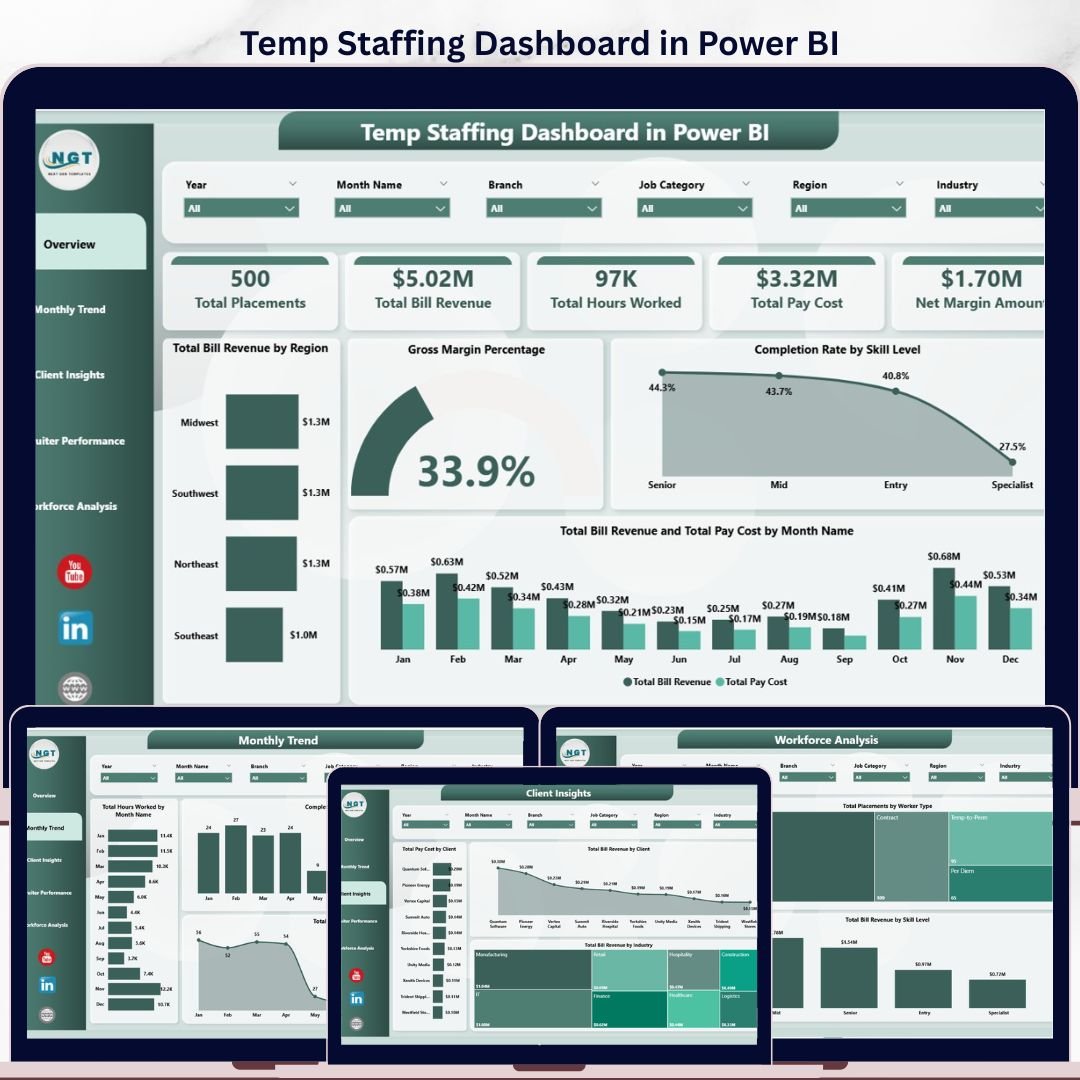
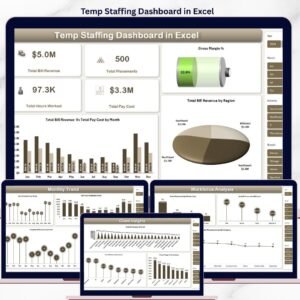
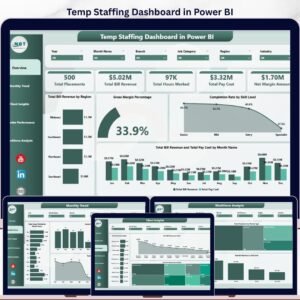
The Temp Staffing Dashboard in Power BI tracks 5 headline KPIs and 13 interactive charts across 5 dedicated report pages — Overview, Monthly Trend, Client Insights, Recruiter Performance, and Workforce Analysis. Setup takes under 10 minutes: open the .pbix file in Power BI Desktop, point it at your placement data, and every card, chart, and slicer refreshes automatically.
🌍 Join 8,400+ teams in 40+ countries using Nextgen Templates to replace paid SaaS tools with one-time-purchase Excel, Google Sheets, Power BI, and HTML templates.
✅ Instant download · One-time payment · No subscription · No per-user fees · Lifetime access
🔑 Key Features of the Temp Staffing Dashboard in Power BI
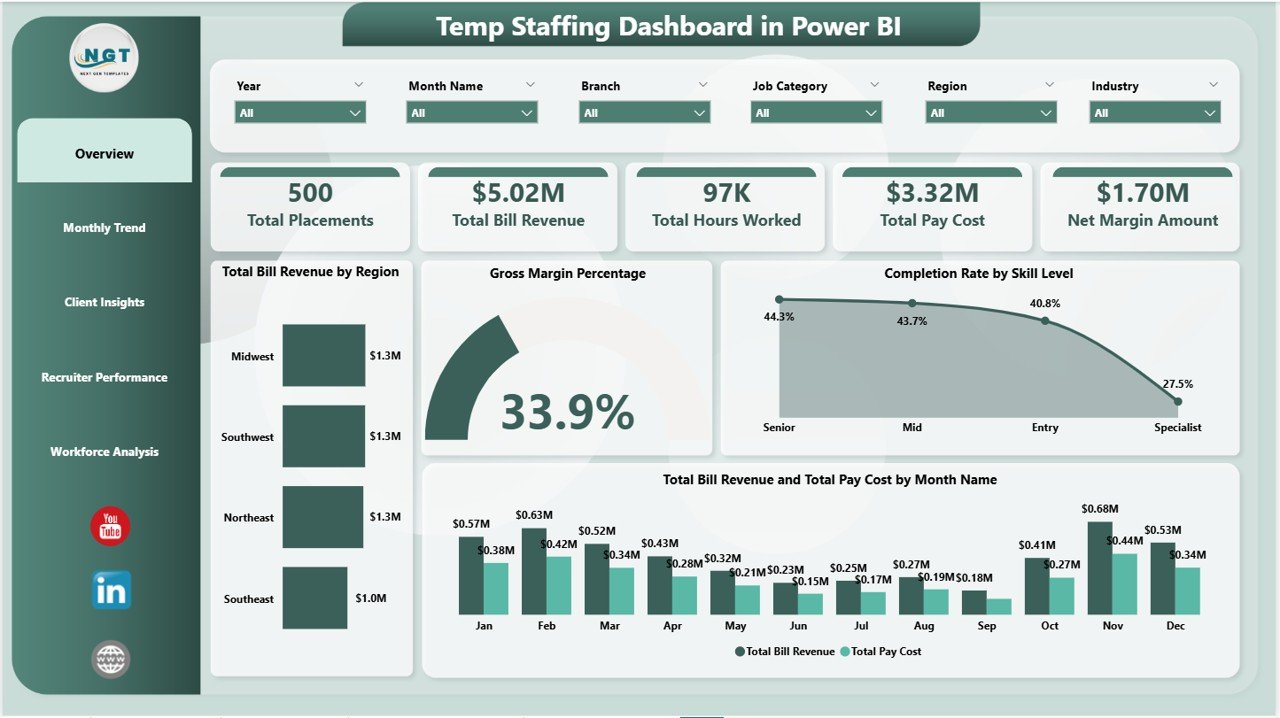
📊 5 headline KPI cards on the Overview page — Total Placements, Total Bill Revenue, Total Hours Worked, Total Pay Cost, and Net Margin Amount. Together they give temp staffing operators a one-screen view of placement volume, billed revenue, and net profitability the second the report opens.
📈 13 interactive Power BI visuals across 5 pages covering monthly bill-revenue and pay-cost trends, client and industry profitability, recruiter productivity, and workforce composition by skill level, worker type, and job category.
🔄 Multi-level slicers on every page let you filter by region, client, industry, recruiter, skill level, worker type, or month — every visual refreshes instantly with no formula edits or measure rewrites.
🛠️ Fully editable DAX measures — add custom KPIs like “placements per recruiter per week” or “gross margin by industry per quarter” in under 5 minutes. See the Microsoft DAX reference if you need syntax help.
💻 Built in Power BI Desktop (free) — no Power BI Pro required unless you want to publish to the Power BI Service. Works with any data source: Excel, CSV, SQL Server, Bullhorn export, or staffing ATS exports.
📦 What’s Inside the Temp Staffing Dashboard in Power BI
Page 1: Overview
The Overview page surfaces the 5 KPI cards — Total Placements, Total Bill Revenue, Total Hours Worked, Total Pay Cost, and Net Margin Amount — alongside charts including Total Bill Revenue by Region, Gross Margin Percentage, Completion Rate by Skill Level, and Total Bill Revenue and Total Pay Cost by Month Name. Multiple slicers (region, client, recruiter, worker type) filter the entire dashboard.
Page 2: Monthly Trend
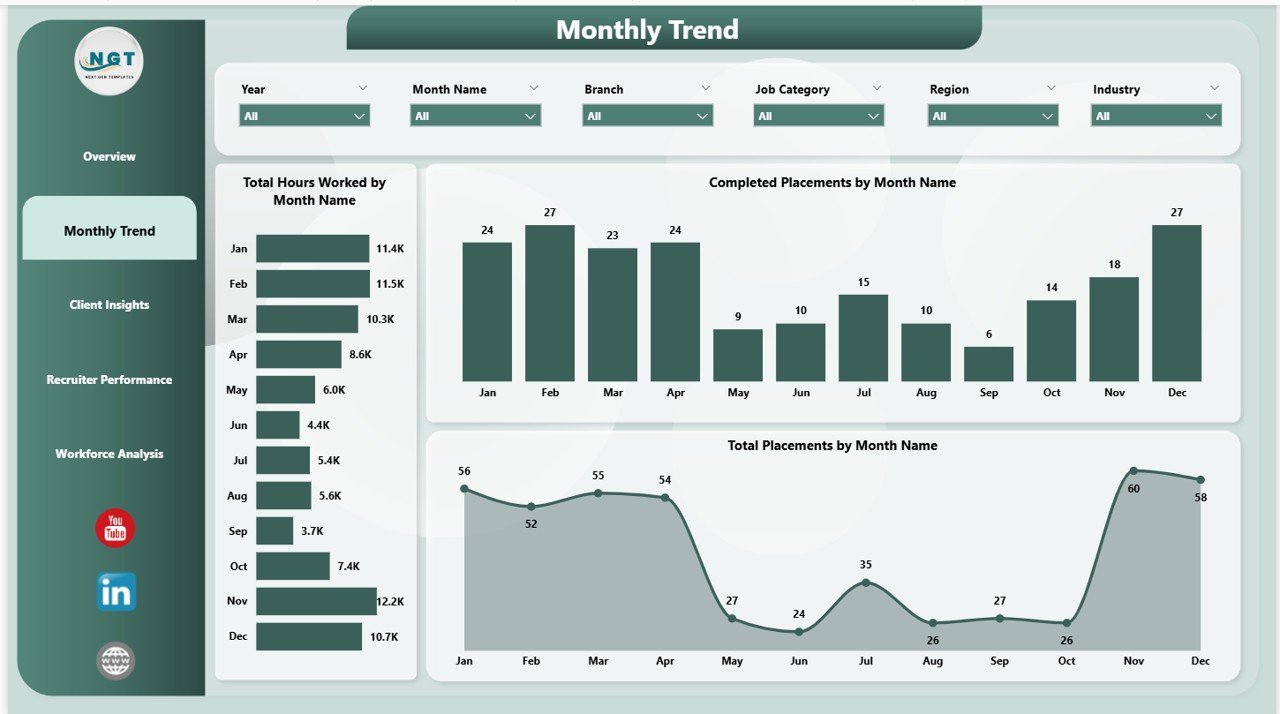
The Monthly Trend page tracks how the agency is performing across the calendar year with three visuals: Total Hours Worked by Month Name, Completed Placements by Month Name, and Total Placements by Month Name. Useful for spotting seasonality, capacity gaps, and quarter-over-quarter delivery patterns.
Page 3: Client Insights
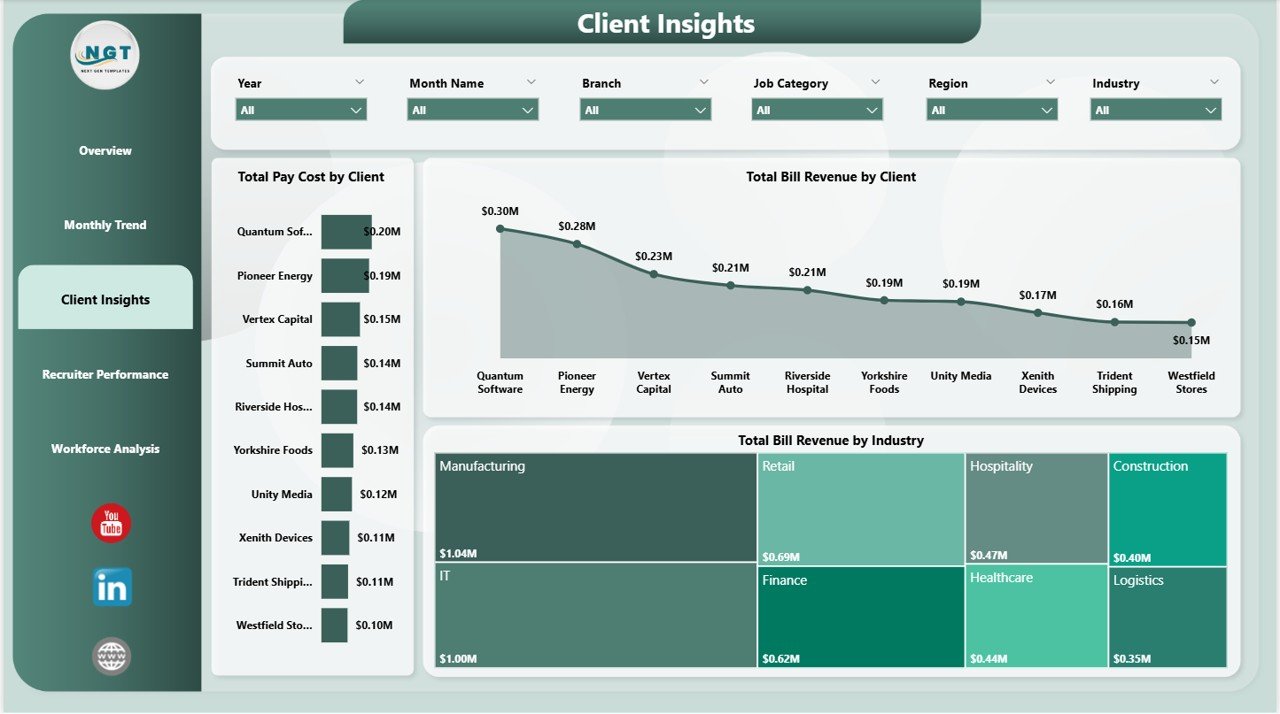
The Client Insights page breaks down profitability by account and vertical with Total Pay Cost by Client, Total Bill Revenue by Client, and Total Bill Revenue by Industry. Lets account managers identify which clients carry the highest margin and which verticals deserve more sales investment.
Page 4: Recruiter Performance
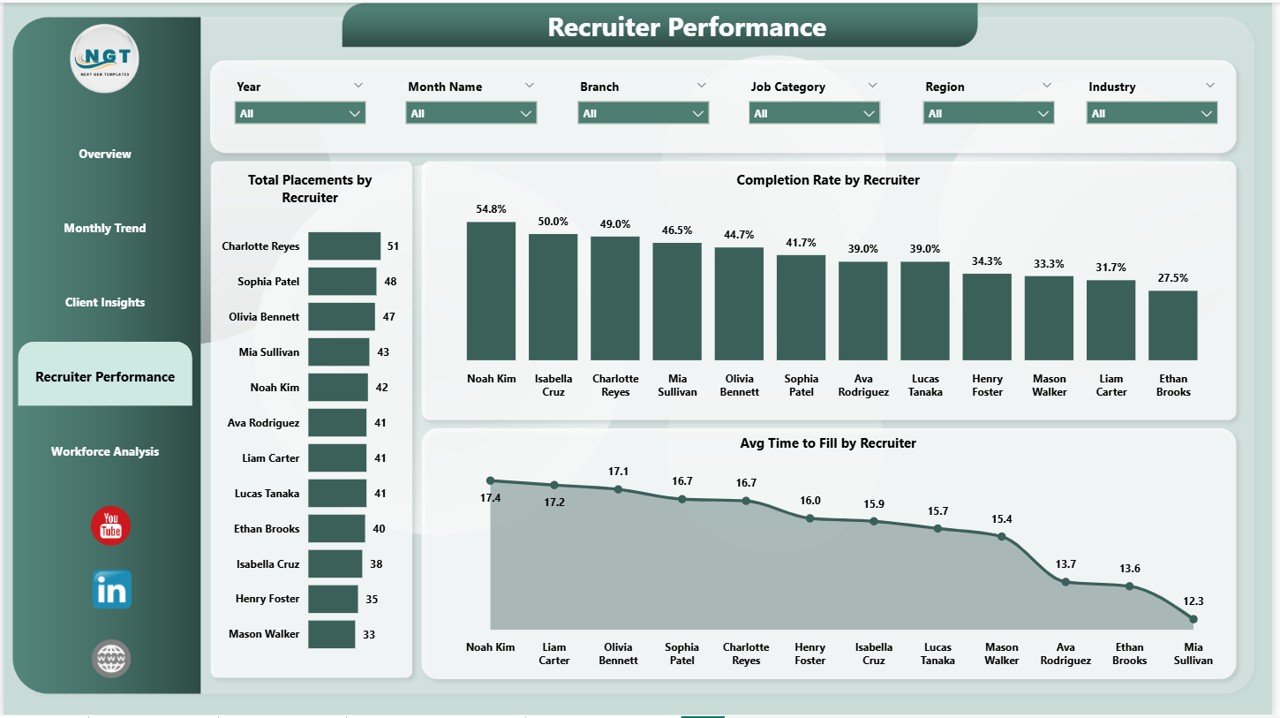
The Recruiter Performance page ranks the recruiting team by Total Placements by Recruiter, Completion Rate by Recruiter, and Avg Time to Fill by Recruiter. Surfaces the quiet high performers, the speed-to-fill leaders, and the recruiters who need coaching — all from the same view.
Page 5: Workforce Analysis
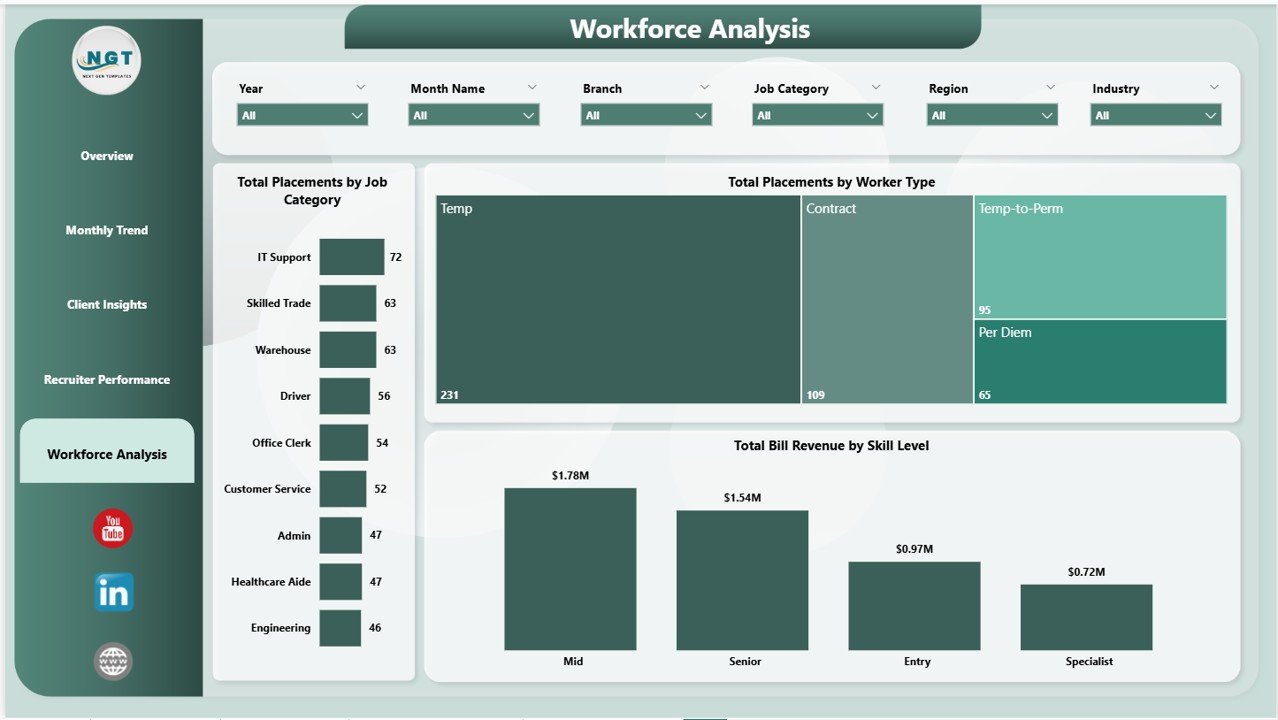
The Workforce Analysis page profiles the temp workforce itself with Total Placements by Job Category, Total Placements by Worker Type (W-2, 1099, contract), and Total Bill Revenue by Skill Level. Helps with workforce planning, bench investment, and skill-mix decisions for the next quarter.
📊 Temp Staffing Dashboard in Power BI vs. Tableau/Qlik vs. Bullhorn/Zoho Recruit — Where This Fits
| Feature | Temp Staffing Dashboard in Power BI | Tableau / Qlik Sense | Bullhorn / Zoho Recruit Analytics |
|---|---|---|---|
| Cost | $17.99 one-time | $70 / user / month | $30–$99 / user / month |
| Platform | Power BI Desktop (free) | Tableau / Qlik | Web-based ATS |
| Setup time | Under 10 minutes | 4–8 hours to build | 2–4 weeks onboarding |
| Pre-built temp staffing KPIs | ✅ 5 KPIs + 13 charts ready | ❌ Build from scratch | ✅ But locked to their data |
| Works with any data source | ✅ Excel, CSV, SQL | ✅ | ❌ ATS lock-in |
| Editable DAX measures | ✅ Fully customizable | ✅ (Tableau calc fields) | ❌ |
| Bill rate vs. pay cost margin tracking | ✅ Net Margin Amount KPI | Build manually | Limited |
| Year-1 cost at 5 users | $17.99 | $4,200 | $1,800–$5,940 |
| No subscription, no per-user fees | ✅ One-time only | ❌ | ❌ |
For temp staffing firms that want bill-vs-pay margin analytics without the $30–$99/user/month ATS lock-in, the Temp Staffing Dashboard in Power BI sits in the sweet spot.
👥 Who This Template Is For — and Who It’s Not For
✅ This template is built for:
- Temp and contract staffing agency owners with 2–50 recruiters who need bill-rate vs. pay-cost visibility in one view
- Light industrial, clerical, healthcare, and IT staffing firms tracking hours worked, placements, and net margin per client
- Branch managers running weekly recruiter reviews on completion rate and time-to-fill
- Operations leaders who export placement data from Bullhorn, Avionté, or COATS into Excel and want a polished dashboard on top
- Recruitment consultants reporting quarterly performance to agency leadership or external investors
❌ This template is NOT for:
- Enterprise staffing firms with 500+ recruiters needing SOC 2, SSO, and row-level security pre-built
- Teams looking for a full ATS with CV parsing, candidate communication, and timesheet collection — this is analytics, not workflow
- Users who have never opened Power BI Desktop and don’t want to spend 15 minutes learning the basics (Microsoft’s Power BI getting-started guide covers it)
⚙️ How to Use the Temp Staffing Dashboard in Power BI
- Download and unzip the file. Open the .pbix file in Power BI Desktop (free download from Microsoft).
- Review the sample placement data in Power Query Editor. Note the column structure: placement date, recruiter, client, industry, region, worker type, skill level, hours worked, bill rate, pay rate, status.
- Replace the sample data with your own placement records — keep the same column names so all measures and visuals work without rebuilding.
- Click Home → Refresh. Every KPI card and chart across all 5 pages updates automatically from your data.
- Apply slicers at the top of each page (region, client, recruiter, worker type, month) to drill into specific segments.
- Customize visuals — change the color theme under View → Themes, add your logo on the Overview page header, or duplicate a chart and edit the DAX to add custom KPIs.
- Publish to Power BI Service (optional, requires Power BI Pro) so your team has one live link instead of emailing .pbix files.
💼 Real-World Use Cases
Maria runs operations at a 35-recruiter light industrial staffing firm in Texas. She uses the Temp Staffing Dashboard in Power BI every Monday at 8 AM to pull up Total Bill Revenue by Region and Net Margin Amount before the leadership stand-up. When the Houston branch’s net margin dipped two weeks in a row, the Recruiter Performance page told her exactly which recruiter’s placements were running thin on bill-pay spread.
James leads a healthcare temp staffing agency in the Midwest. His monthly client reviews used to mean three days of pivoting Bullhorn exports in Excel. Now he plugs the data into the Temp Staffing Dashboard in Power BI, screenshots the Total Bill Revenue by Client and Total Bill Revenue by Industry charts, and presents directly to his C-suite in 20 minutes. He cancelled a $290/month analytics add-on after switching.
Ananya is a branch manager at an IT contract staffing firm. She uses the Workforce Analysis page to see Total Placements by Worker Type (W-2 vs. 1099 vs. corp-to-corp) and Total Bill Revenue by Skill Level. When she noticed her senior-level placements were generating 60% of revenue from 25% of placements, she shifted recruiter incentives toward higher-skill roles — and gross margin climbed two points the next quarter.
❓ Frequently Asked Questions
What KPIs does the Temp Staffing Dashboard in Power BI track?
The Temp Staffing Dashboard in Power BI tracks 5 headline KPIs — Total Placements, Total Bill Revenue, Total Hours Worked, Total Pay Cost, and Net Margin Amount — plus 13 supporting visuals across monthly trend, client insights, recruiter performance, and workforce analysis pages.
Do I need Power BI Pro to use this dashboard?
No. The Temp Staffing Dashboard in Power BI runs on Power BI Desktop, which Microsoft offers free. You only need Power BI Pro ($10/user/month) if you want to publish to the Power BI Service and share a live link with colleagues.
How does this compare to Bullhorn or Avionté analytics?
Bullhorn and Avionté cost $30–$99 per user per month and keep your data locked inside their ATS. The Temp Staffing Dashboard in Power BI is a $17.99 one-time purchase, works with any data source, and gives you fully editable DAX measures. At 5 users, that’s a first-year saving of $1,800–$5,940.
How long does setup take?
Under 10 minutes for most users. Open the .pbix in Power BI Desktop, replace the sample placement table with your own data using the same column names, and click Refresh. All 5 pages and 13 visuals update automatically from your data.
What data format does the Temp Staffing Dashboard in Power BI expect?
The dashboard expects one placements table with columns including Placement Date, Recruiter, Client, Industry, Region, Worker Type, Skill Level, Job Category, Hours Worked, Bill Rate, Pay Rate, and Status. The column mapping is documented inside the .pbix file’s Power Query Editor.
Can I add my own custom KPIs and charts?
Yes. Every DAX measure, chart, and slicer in the Temp Staffing Dashboard in Power BI is fully editable. Add new measures, duplicate visuals, rebrand the color palette, or rearrange pages to match your agency’s reporting style.
Is this a one-time purchase or a subscription?
One-time purchase. $17.99 gets you lifetime access to the Temp Staffing Dashboard in Power BI with no recurring fees, no per-user charges, and no subscription renewals. Download once, use forever across unlimited projects.
👤 About the Author
Built by PK — Microsoft Certified Professional with 15+ years of Excel, Google Sheets, and Power BI experience. Founder of NextGenTemplates, reaching 300K+ subscribers across YouTube channels (@PK-AnExcelExpert, @NextGenTemplates, @NeoTechNavigators). Every template is hand-built and tested before release.
🔗 Explore Related Templates
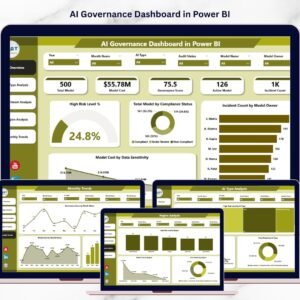
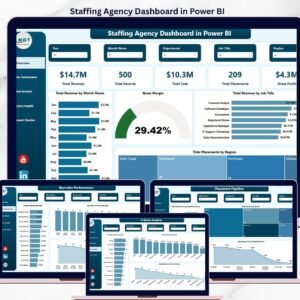
- Staffing Agency Dashboard in Power BI — sibling Power BI dashboard focused on agency-wide recruitment metrics with recruiter, client, and pipeline pages.
- Recruitment KPI Scorecard in Excel — traffic-light scorecard format for HR leadership reviews.
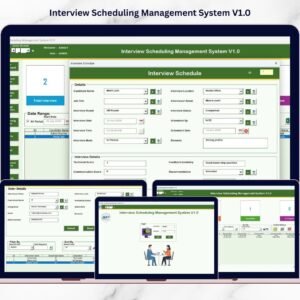
- Interview Scheduling Management System V1.0 — Excel VBA tool for coordinating candidate and panel interviews.
- Browse all Power BI Dashboard Templates on Nextgen Templates.
🔄 Also available as: Temp Staffing Dashboard in Excel · Staffing Agency Dashboard in HTML.
📖 Click here to read the Detailed Blog Post
🎥 Visit our YouTube channel for step-by-step video tutorials
👉 YouTube.com/@NextGenTemplates
📅 Last updated: May 2026
Watch the step-by-step video tutorial:
YouTube




























Reviews
There are no reviews yet.