

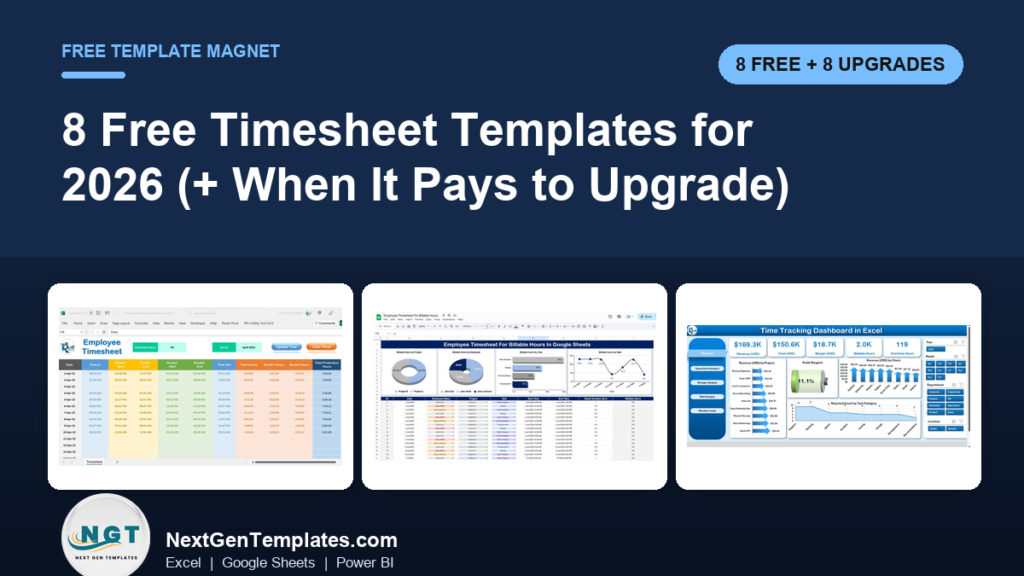
The best free timesheet template in 2026 is Vertex42’s Time Card Calculator. You enter time in, time out and break minutes, and it works out total hours and overtime, including California’s daily overtime rules. It is free for Excel and Google Sheets. For a printable form, NextGenTemplates gives away a free Timesheet Form for Word and Google Docs.
Last updated: October 2026
Tracking days rather than hours? Our list of free attendance sheet templates covers present and absent registers, and our free leave tracker Excel templates cover vacation and sick days. This page is about hours worked.
Key takeaways
- All 8 timesheet templates in the free list cost nothing to download. One is a NextGenTemplates file, five come from Vertex42 and two are Smartsheet collections. We opened every source page and checked every link in October 2026.
- Best overall free pick: Vertex42’s Time Card Calculator. It is a weekly and biweekly time card that calculates hours and overtime, with a separate sheet for California overtime. Vertex42 last updated it in April 2025.
- Best free printable timesheet: the NextGenTemplates Timesheet Form for Word and Google Docs. It has a daily time in and time out log, a weekly total with overtime, and employee and supervisor signature lines.
- A free timesheet template records one person’s hours. It does not total hours across a team, bill clients, show overtime trends or let several people edit safely at once. Those gaps are why people upgrade.
- The 8 paid NextGenTemplates upgrades below cost $6.99 to $39.99, paid once with no subscription. Four of them cost just $6.99.
 Launch offer
SUMIFS, XLOOKUP, FILTER, LAMBDA and checking AI-written formulas, with real business projects. 11h 47m of video by PK, with practice files, quizzes and a capstone.
Free timesheet templates compared
Every free timesheet template in this guide, side by side. One row is flagged best overall. All eight are free.
| # | Template | Source | Format | Best For | Price |
|---|---|---|---|---|---|
| 1 | Time Card Calculator (weekly and biweekly) (Best overall) | Vertex42 | Excel, Google Sheets | Hours and overtime from time in, time out and breaks | Free |
| 2 | Timesheet Form Template | NextGenTemplates | Word, Google Docs | A printable weekly timesheet with signatures | Free |
| 3 | Excel Timesheet (weekly and biweekly) | Vertex42 | Excel, Google Sheets | Hours plus total pay at regular and overtime rates | Free |
| 4 | Time Sheet Template with Breaks | Vertex42 | Excel, Google Sheets | Several clock-in and clock-out times per day | Free |
| 5 | Monthly Timesheet Template | Vertex42 | Excel, Google Sheets | Monthly hours by project and task | Free |
| 6 | Weekly Time Card (project-based) | Vertex42 | Excel, Google Sheets | Hours grouped by project and day | Free |
| 7 | Excel Timesheet Templates (11 designs) | Smartsheet | Excel | Daily, hourly, construction, consultant and volunteer sheets | Free |
| 8 | Google Sheets Timesheet Templates (7 designs) | Smartsheet | Google Sheets | Shared weekly, biweekly and monthly timesheets | Free |
Here are the paid upgrades we recommend once a free timesheet runs out of road. One row is best overall and one is best value.
| Upgrade | Format | Best For | Price |
|---|---|---|---|
| Advanced Employee Time Sheet in Excel (Best overall) | Excel VBA | Form entry, overtime, billable hours dashboard and PDF export | $6.99 |
| Employee Timesheet for Billable Hours in Google Sheets (Best value) | Google Sheets | Shared team timesheet with billing and overtime rates | $6.99 |
| Automated Employee Timesheet Template in Excel | Excel VBA | One-click time stamps for in, breaks and out | $6.99 |
| Billable Hours & Time Tracker in Google Sheets | Google Sheets | Freelancers who invoice clients by the hour | $6.99 |
| Time Tracking Dashboard in Excel | Excel | Billable hours, margin and overtime by department and manager | $13.99 |
| Time Tracking Dashboard in Google Sheets | Google Sheets | The same analysis, shared in the cloud | $6.99 |
| Time Tracking Dashboard in Power BI | Power BI | Timesheet reporting for managers and finance | $17.99 |
| Employee Attendance Payroll Management System | Web app | Logins, check-in and check-out, overtime and payroll | $39.99 |
How we picked these free timesheet templates
We started where people really look for a free timesheet template: the big template libraries (Vertex42, Smartsheet and Microsoft Create), the timesheet roundups that rank in search, and the free files in our own catalogue. We opened every source page in October 2026 and checked every link in this post.
A file made the list only if it downloads free with no card details and does something a blank grid cannot. It had to total hours, calculate overtime or pay, or carry a clean printable layout with signature lines. We left out pages that hide the download behind a “free trial” sign-up. We also left out Microsoft Create this year, because its template pages now send you to a Microsoft 365 sign-in page and we could not check the files without an account.
Search data shaped the order too. “Timesheet template” is searched about 3,600 times a month in the US, and “timesheet template google sheets” about 1,300 times, so we made sure both Excel and Google Sheets users get a good free option. Vertex42 has maintained its timesheet pages for years and logs every update on the page. The paid upgrades come from the NextGenTemplates time-tracking and HR range. We matched each one to a gap the free files leave open, so every upgrade is a direct next step.
The 8 best free timesheet templates for 2026
1. Time Card Calculator (Vertex42) – best overall free timesheet template
One of the simplest timesheet calculators you will find. For each day you enter the time in, the time out and the total break time in minutes. The sheet calculates total hours worked, shown as decimal hours or [h]:mm, and overtime based on daily hours, weekly hours or both. There is a weekly and a biweekly version, and a separate worksheet for California overtime rules. A mini calendar helps you pick the right start day, and the sheet prints as an official timesheet with signature lines. Vertex42 last updated it on 3 April 2025.
It is our pick for best overall because overtime is where free timesheets usually go wrong, and this one handles it for you.
Best for: hourly employees and small businesses that pay overtime. Free under Vertex42’s private-use licence – get the Time Card Calculator.
2. Timesheet Form Template for Word and Google Docs (NextGenTemplates)
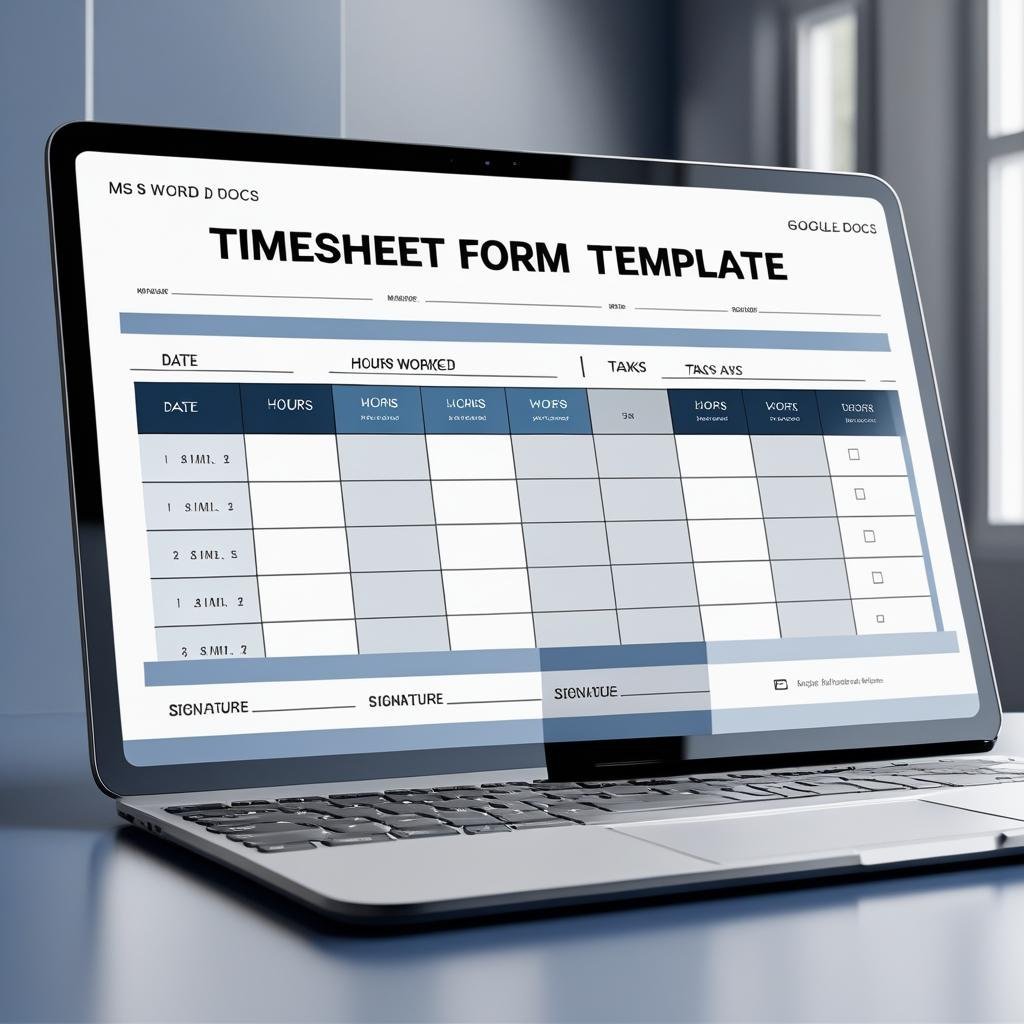
A clean, printable weekly timesheet. The top section captures employee name, ID, department and week. The daily log has time in, time out, breaks and total hours for each day, and the weekly summary shows total hours and overtime with a remarks line. It ends with employee and supervisor signature fields, so it works as a paper record for payroll and audits. You edit it in Microsoft Word or Google Docs.
Best for: teams that still sign paper timesheets, and freelancers who send a weekly record to a client. Free – download the free timesheet form.
3. Excel Timesheet – weekly and biweekly (Vertex42)
Vertex42’s classic employee timesheet. Each file has two tabs, one for entering times in h:mm format and one for decimal hours. Use h:mm if staff round to the minute, and decimals if you round to the nearest 15 minutes (0.25, 0.5, 0.75). You can enter one pay rate for regular hours and another for overtime, and the sheet calculates total pay. If you only need hours, delete the pay rows. The biweekly version is the same layout across two weeks.
Best for: small employers who want hours and gross pay on one page. Free – get the Excel timesheet.
4. Time Sheet Template with Breaks (Vertex42)
Use this when people clock in and out more than once a day, for example for a split shift or an unpaid lunch. You record each clock-in and clock-out, and the timesheet calculator totals the hours worked. It opens in Excel, Google Sheets or OpenOffice. The same page links to Vertex42’s other free timesheet calculators if you need a different layout.
Best for: shift workers, restaurants and retail with unpaid breaks. Free – get the time sheet with breaks.
5. Monthly Timesheet Template (Vertex42)
A monthly time sheet for tracking the hours one employee spends on specific projects and tasks. It is laid out week by week, so it handles both 4-week and 5-week months, and you can hide the extra columns in a short month. It has optional rows for regular and overtime hours and optional signature lines. It is designed to be printed, signed and handed to a manager, or saved as a PDF and emailed.
Best for: salaried staff and contractors who report monthly hours by project. Free – get the monthly timesheet template.
6. Weekly Time Card – project-based (Vertex42)
This time card adds up hours by project and by day of the week, rather than by clock time. It includes a weekly and a biweekly version, and you can enter hours as decimals or in h:mm format. Vertex42 says it uses the biweekly version of this time card to run its own payroll, which is a good sign that it holds up in real use.
Best for: agencies and small teams tracking time against project budgets. Free – get the weekly time card.
7. Excel Timesheet Templates – 11 designs (Smartsheet)
Smartsheet’s collection has 11 free Excel timesheets: monthly, weekly, daily, hourly, biweekly, project, construction, consultant, volunteer, employee and overtime. Each one comes with a short note on when to use it. It is the widest free choice on this list. Pick from it when your need is specific, like a construction crew sheet or a volunteer hours log.
Best for: construction, consulting and non-profit teams. Free – browse Smartsheet’s Excel timesheet templates.
8. Google Sheets Timesheet Templates – 7 designs (Smartsheet)
Seven free Google Sheets timesheets: simple weekly, weekly project, biweekly, simple biweekly, biweekly project, monthly and daily. Because they live in Google Sheets, an employee can fill one in and share it with a manager without emailing files back and forth. If you searched for a timesheet template for Google Sheets, start here.
Best for: remote teams already on Google Workspace. Free – browse Smartsheet’s Google Sheets timesheets.
Also free: Vertex42’s Time Tracking Template for freelancers and consultants, and our Overtime Request Form for Word and Google Docs if staff must get overtime approved before they work it.
Want the free timesheet template by email?
Enter your email and we will send you our free Timesheet Form Template for Word and Google Docs (template #2 above). It has a daily time log, weekly totals with overtime and signature lines. No payment, no card, and you can unsubscribe at any time.
When does it pay to upgrade from a free timesheet template?
A free timesheet template is perfect for one person recording their own hours. The same five gaps push teams to a paid tool, usually when timesheets start to drive payroll, client invoices or staffing decisions:
- One sheet per person. Free timesheets hold one employee’s week. Totalling 20 people means opening 20 files, or copying numbers into a summary by hand.
- Typed times go wrong. A missed AM/PM, a shift past midnight or a typed “8.3” for 8 hours 30 minutes quietly breaks the totals. Time-stamp buttons and entry forms stop most of these errors.
- No billing. Free sheets count hours. They do not split billable from non-billable time, apply client rates or show what has been invoiced and paid.
- No analysis. You cannot see overtime by department, billable hours by manager or the trend across months. For the numbers worth watching, see our guide to payroll KPIs to track.
- One person edits at a time. An emailed Excel timesheet soon turns into five versions. Several approvers need a shared sheet or a system with logins.
If two or more of these apply, the hours spent patching a free sheet cost more than a one-time template. The 8 upgrades below map onto those gaps.
8 paid timesheet template upgrades for when free stops working
1. Advanced Employee Time Sheet in Excel – best overall upgrade
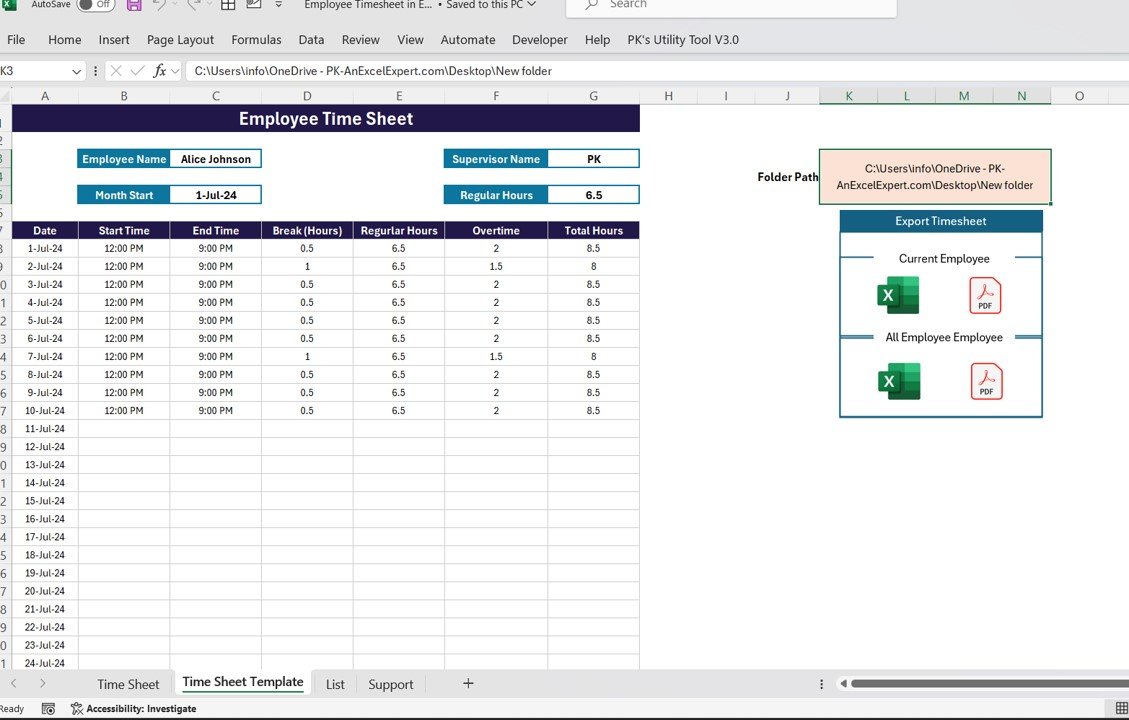
The direct step up from a free Excel timesheet. You enter work through a simple form, and pre-built formulas calculate work hours and overtime. Each entry can be tagged to a project and a task, and a dashboard charts billable hours by project, task and employee, with slicers to filter. One click exports a timesheet for the current employee or for all employees to Excel or PDF, ready for payroll or a client.
What it adds over free: many employees in one workbook, project and task tracking, and a dashboard on top, for the price of a sandwich.
Best for: small businesses and agencies tracking a whole team. $6.99 – view the Advanced Employee Time Sheet.
2. Employee Timesheet for Billable Hours in Google Sheets – best value

This fixes the “one person edits at a time” problem. The whole team logs billable and non-billable hours in one shared Google Sheet, and it calculates total billable hours, pay and overtime. You set your own billing rates, overtime rates and job categories. Charts show billable hours by project, by employee, by task and by date.
What it adds over free: a shared, real-time team timesheet with billing built in.
Best for: remote teams and service businesses. $6.99 – view the billable hours timesheet.
3. Automated Employee Timesheet Template in Excel

This removes typed times altogether. VBA buttons stamp the current time for time in, two breaks and time out. The sheet calculates total hours, break hours and total productive hours for each day. Only the current day can be filled in, which stops backdated or future entries. It is the NextGenTemplates file people find most often when they search for an Excel timesheet template.
What it adds over free: honest, time-stamped records without retyping hours.
Best for: hourly staff on a shared office PC. $6.99 – view the automated timesheet.
4. Billable Hours & Time Tracker in Google Sheets

Built for freelancers and consultants. You enter a start and end time, and logged hours calculate themselves, including work that runs past midnight. Six automatic columns fill in the entry ID, logged hours, billable hours, billable amount, % billable and a rate check. The rate check flags any billable task with no hourly rate before you invoice it at zero. Every entry moves from Unbilled to Invoiced to Paid, and four charts show time by client, status and task.
What it adds over free: a timesheet that doubles as an invoice-ready ledger.
Best for: freelancers, consultants and small agencies. $6.99 – view the billable hours tracker.
5. Time Tracking Dashboard in Excel
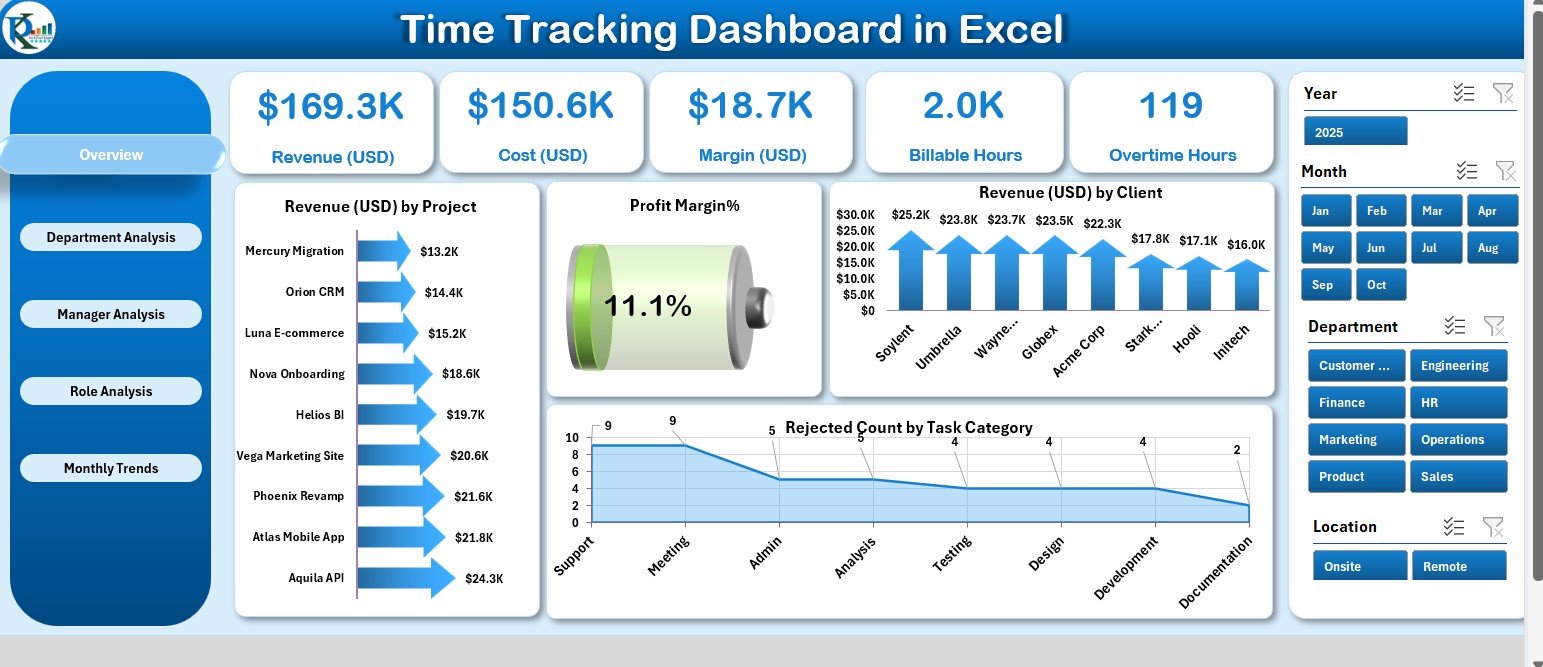
Turns timesheet data into management information. Five pages (Overview, Department, Manager, Role and Monthly Trends) show revenue, cost, margin %, billable hours and overtime hours. Slicers filter by project, client and month, and the KPIs include MTD and YTD views. It is 100% formula-based, with no VBA to enable.
What it adds over free: team-level analysis that no single timesheet can show.
Best for: operations managers and agency owners. $13.99 – view the Excel time tracking dashboard.
6. Time Tracking Dashboard in Google Sheets

The same idea in the cloud. It tracks billable hours, overtime, revenue and cost, with views by department, manager and role plus monthly trends. You update the data input sheet and the whole dashboard refreshes, so everyone sees the same numbers.
What it adds over free: a shared time dashboard for $6.99.
Best for: teams that live in Google Workspace. $6.99 – view the Google Sheets time tracking dashboard.
7. Time Tracking Dashboard in Power BI
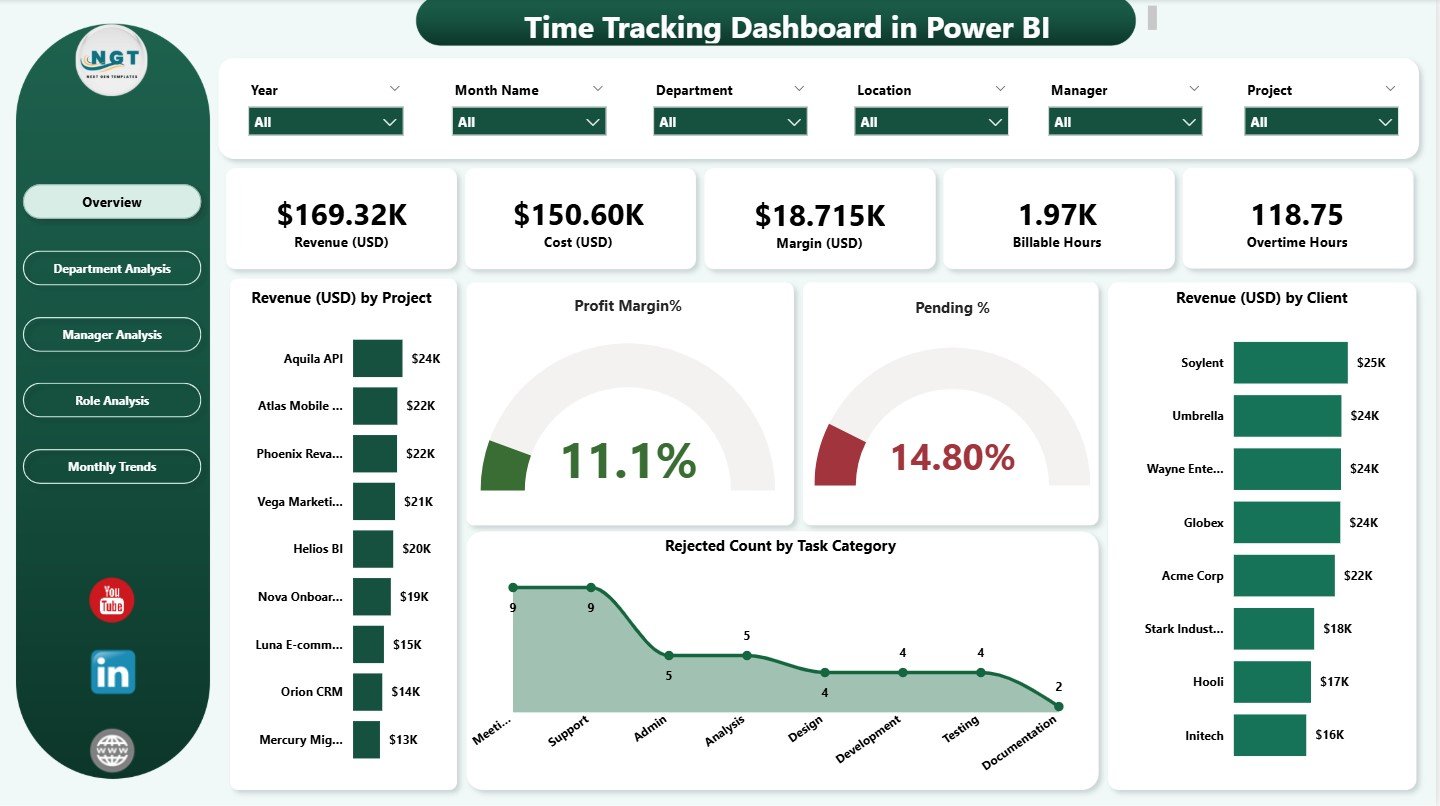
For companies that report in Power BI. KPI cards show revenue, cost, margin, billable hours and overtime hours. Pages break the data down by department, manager and role, with monthly trends for revenue, rejection % and bill rates. Slicers filter by project, client, manager, role and department. It is a ready-made Power BI timesheet dashboard, so you skip building the model yourself.
What it adds over free: refreshable, shareable timesheet reporting for managers and finance.
Best for: IT, consulting and professional services firms. $17.99 – view the Power BI time tracking dashboard.
8. Employee Attendance Payroll Management System (HR web app)
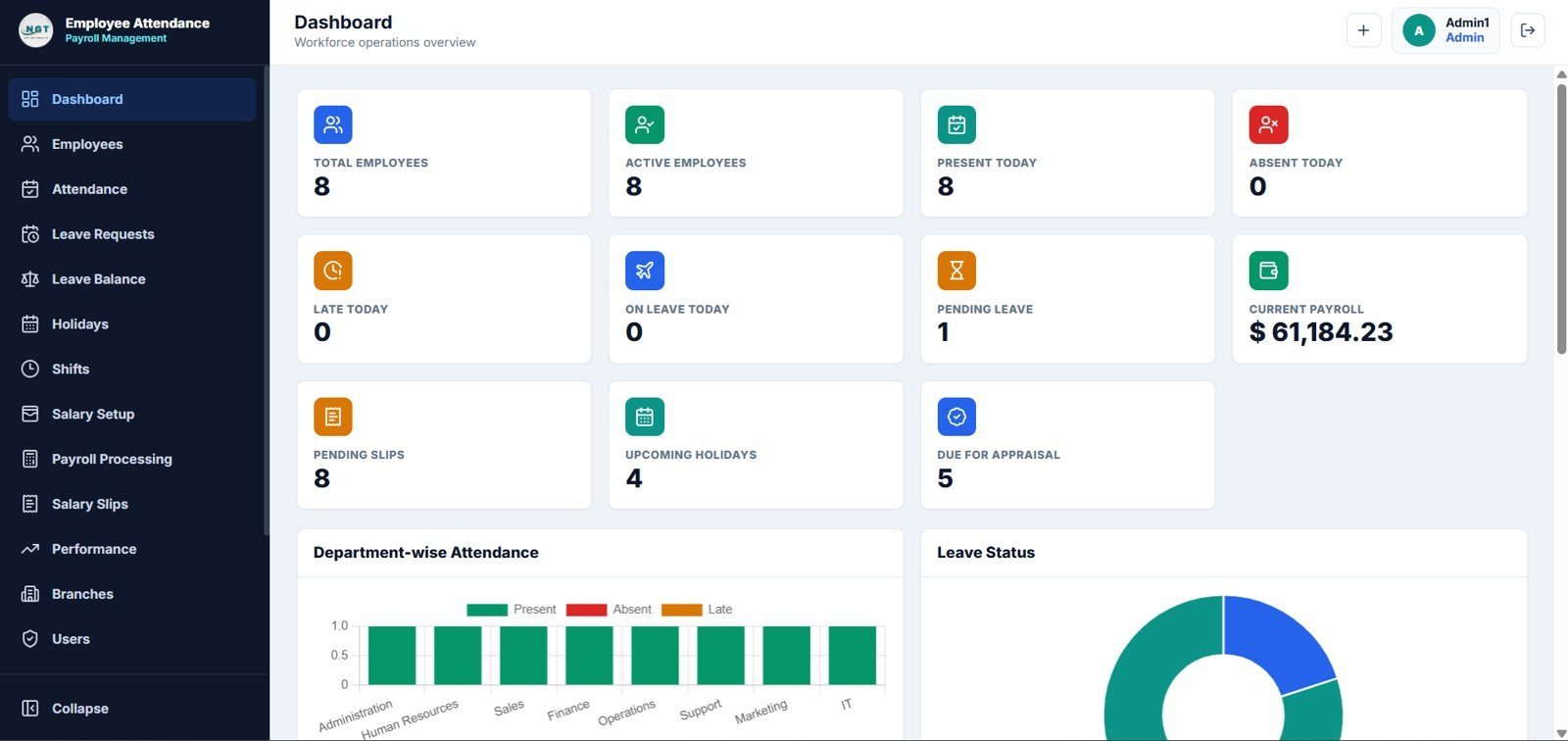
The biggest jump on this list: a 15-page HR web app with sign-in, a dashboard, employees, attendance, leave, payroll, salary slips, performance reviews, branches and users. The attendance module records check-in, check-out, shift, status, late minutes, overtime and working hours. Payroll uses paid days, earnings and deductions to work out net salary and print salary slips.
What it adds over free: logins, hours and payroll in one connected system, for a one-time price instead of a monthly subscription. For SaaS comparisons, see our Gusto alternatives and BambooHR alternatives guides.
Best for: small businesses, clinics, schools and branch offices. $39.99 – view the HR web app.
Best-value bundle: the HR and Payroll Template Bundle includes an attendance and leave tracker, a payroll template, an onboarding checklist and a performance tracker among its 10 Excel tools for $14.99. For a wider set of US payroll files, see our payroll template toolkit.
How to choose between a free and a paid timesheet template
| Your situation | Pick | Cost |
|---|---|---|
| One person, hours and overtime each week | Vertex42 Time Card Calculator (#1) | Free |
| A signed paper timesheet for payroll | NextGenTemplates Timesheet Form (#2) | Free |
| A remote team sharing one timesheet | Employee Timesheet for Billable Hours in Google Sheets | $6.99 |
| Many employees in one Excel file, with a dashboard | Advanced Employee Time Sheet in Excel | $6.99 |
| Freelancer billing clients by the hour | Billable Hours & Time Tracker in Google Sheets | $6.99 |
| Managers need billable hours and margin by team | Time Tracking Dashboard (Excel, Google Sheets or Power BI) | $6.99 – $17.99 |
| Logins, attendance and payroll in one place | Employee Attendance Payroll Management System | $39.99 |
A simple rule: if the timesheet only answers “how many hours did I work?”, stay free. If it answers “what do we bill?”, “what do we pay?” or “where is the overtime going?”, a template built for that question pays for itself in the first month.
How to calculate hours in a timesheet template
Most timesheet errors come from time maths, so here are the four formulas that matter if you build or edit your own timesheet in Excel or Google Sheets:
- Hours worked as a decimal: =(C2-B2)*24-D2/60, where B2 is time in, C2 is time out and D2 is break minutes.
- Shifts that cross midnight: =MOD(C2-B2,1)*24 gives the right answer when time out is earlier than time in.
- Weekly overtime: =MAX(0,SUM(E2:E8)-40) gives the hours over 40 in a workweek, where column E holds daily hours.
- Totals over 24 hours: format the total cell as [h]:mm, or Excel will roll over and show 3:30 instead of 27:30.
Every free and paid template above already has these built in. Want to see the timesheet formulas in action? Our YouTube channel has Excel walk-throughs: youtube.com/@NextGenTemplates.
When a timesheet template is NOT the right answer
- You need tamper-proof legal records. In the US, the Fair Labor Standards Act requires employers to keep accurate records of hours worked each day and each workweek for non-exempt employees (see the US Department of Labor recordkeeping fact sheet). A spreadsheet anyone can edit is weak evidence in a dispute. A time clock with an audit trail is safer.
- You have hundreds of hourly staff across sites. At that scale, a time-and-attendance system with payroll integration is worth its subscription. Spreadsheets work best for teams of up to about 50.
- Staff need to clock in from their phones with GPS. A spreadsheet cannot check where someone is. Use a mobile time-clock app. For scheduling tools, see our Deputy alternatives guide.
- You only need to know who turned up. Then a timesheet is more than you need. A free attendance sheet template is simpler.
Frequently asked questions
Where can I download a free timesheet template?
Vertex42 has free timesheet templates for Excel and Google Sheets, including a time card calculator, weekly, biweekly and monthly timesheets. Smartsheet has 11 Excel and 7 Google Sheets timesheet designs. NextGenTemplates gives away a free printable Timesheet Form for Word and Google Docs. None of them needs a card.
Is there a free timesheet template in Excel?
Yes. Vertex42’s Time Card Calculator, Excel Timesheet, Time Sheet with Breaks and Monthly Timesheet are all free Excel files, and Smartsheet offers 11 free Excel timesheets. For a timesheet with time-stamp buttons or a dashboard, NextGenTemplates’ paid Excel timesheets cost $6.99, paid once.
Is there a timesheet template for Google Sheets?
Yes. Smartsheet has 7 free Google Sheets timesheets, from a simple weekly sheet to biweekly and monthly project versions, and most Vertex42 timesheets open in Google Sheets too. For a shared team timesheet with billing rates and charts, the Employee Timesheet for Billable Hours in Google Sheets costs $6.99.
How do I calculate hours worked in Excel?
Subtract time in from time out, multiply by 24 to get decimal hours, and subtract breaks: =(C2-B2)*24-D2/60. For a shift that crosses midnight use =MOD(C2-B2,1)*24. Format weekly totals as [h]:mm so hours above 24 display correctly.
How does a timesheet calculate overtime?
Under the US Fair Labor Standards Act, non-exempt employees earn overtime for hours over 40 in a workweek, so a timesheet uses =MAX(0,total-40). Some states, such as California, also count daily overtime. Vertex42’s Time Card Calculator includes a separate California worksheet.
What is the difference between a timesheet and a time card?
The terms overlap. A time card usually records clock-in and clock-out times for each day, while a timesheet often records hours by project or task over a week or month. Many templates, including Vertex42’s, do both: times in and out, then hours and pay.
What is the best free printable timesheet?
The NextGenTemplates Timesheet Form for Word and Google Docs is built to print: daily time in and out, breaks, weekly totals with overtime, and employee and supervisor signatures. Vertex42’s Monthly Timesheet also prints cleanly with optional signature lines.
Should I use a weekly, biweekly or monthly timesheet?
Match it to your pay cycle. Weekly and biweekly timesheets suit hourly staff and make overtime easy to check, because overtime is counted per workweek. Monthly timesheets suit salaried staff and contractors who report hours by project. Vertex42 and Smartsheet offer all three.
Are Vertex42 timesheet templates free for business use?
Vertex42 offers them free under a private-use licence, which lets you use and edit the files yourself but not redistribute or resell them. That covers normal internal use in a company. Check the licence line on each download page if you plan to share the file outside your organisation.
When should I upgrade from a free timesheet template?
Upgrade when you have to total hours for many people, bill clients from timesheets, stop typed-time errors, or show overtime and billable hours by team. Paid NextGenTemplates timesheet tools cost $6.99 to $39.99, paid once with no subscription.
Get your timesheet template
Start free with Vertex42’s Time Card Calculator or our printable Timesheet Form Template. When timesheets have to feed payroll or client invoices, the Advanced Employee Time Sheet in Excel is our top upgrade at $6.99, the Employee Timesheet for Billable Hours in Google Sheets is the best value for teams at $6.99, and the Time Tracking Dashboard in Excel shows where the hours go for $13.99.
Looking for dashboards rather than timesheets? See our lists of free Excel dashboard templates and free Google Sheets dashboard templates.