

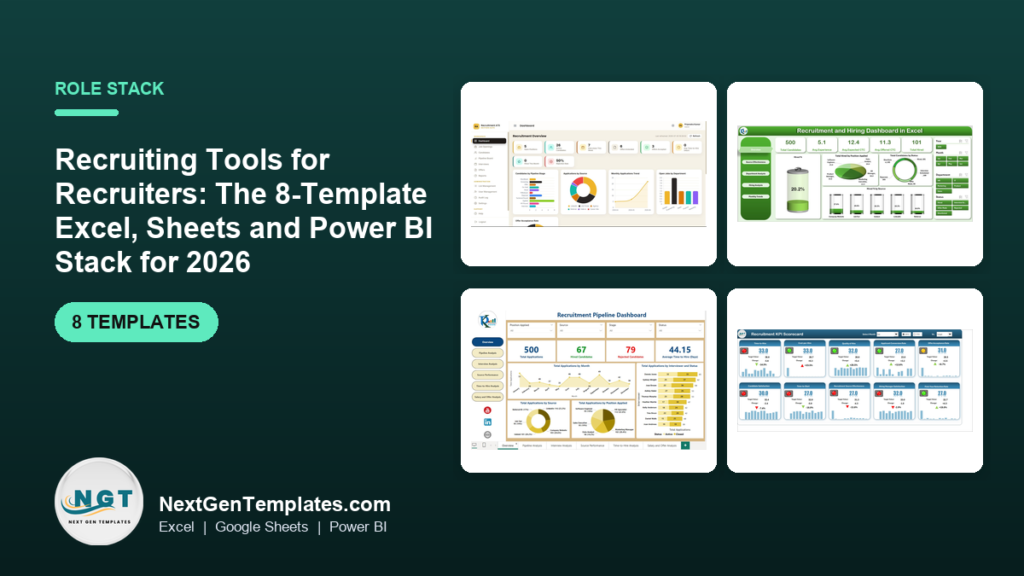
The best recruiting tools for a recruiter who does not want another per-seat subscription are a stack of eight one-time templates: two to plan, two to track candidates and interviews, three to report on the pipeline, and one to present. Our top pick is the Recruitment Applicant Tracking System Web App ($39.99, paid once).
Last updated: October 2026
Related guides: If you want the metrics before the tools, start with our 10 recruitment KPIs to track in 2026. If you run the whole people function rather than the hiring desk, the HR templates stack for HR directors is the wider version of this post. This one stays on the recruiter’s desk: the eight recruiting tools organised by the job each one does, a 30-day rollout plan, and the kind of software each one can stand in for.
Key takeaways
- A recruiter needs four kinds of recruiting tools: plan, track, report and present. Eight templates cover all four for $179.92 in total, paid once, with no per-seat or per-job fees.
- Best overall is the Recruitment Applicant Tracking System Web App ($39.99): jobs, candidates, a pipeline board, interviews, offers and reports in one browser app you deploy in your own Google account.
- Best value is the Recruitment & Talent Acquisition Bundle: seven Excel and Google Sheets recruitment templates for $35.99 instead of $56.93 (37% off).
- Time to fill, cost per hire, offer acceptance rate, source of hire and stage-to-stage conversion are the five numbers a recruiter is asked for most. Every reporting template here calculates them.
- Templates lose to a paid ATS when you need job-board multiposting, a candidate portal, automated email sequences or audited compliance records at volume. We say exactly when to buy software instead.
Recruiting tools compared
All eight recruiting tools side by side, grouped by the job they do, with the kind of paid software each can stand in for. One is marked best overall and one best value.
| # | Template | Job | Format | Best for | What it replaces | Price |
|---|---|---|---|---|---|---|
| 1 | Recruitment Applicant Tracking System Web App (Best overall) | Track | Web app (Google Apps Script) | Jobs, candidates, pipeline stages, interviews and offers for a small hiring team | An entry-level ATS such as Workable, Zoho Recruit or Breezy HR, for a team that hires a few roles at a time | $39.99 |
| 2 | Recruitment & Talent Acquisition Bundle (Best value) | All four | Excel + Google Sheets | Pipeline, funnel KPIs, hiring dashboard and onboarding in one checkout | Separate pipeline, onboarding-checklist and reporting tools | $35.99 |
| 3 | Recruitment and Hiring Dashboard in Excel | Report | Excel (Power BI edition available) | Hiring rate by source, department, interviewer and month | The reporting tab of an ATS such as Greenhouse or Lever | $17.99 |
| 4 | Recruitment Pipeline Dashboard in Power BI | Present | Power BI | Interactive pipeline review with hiring managers | A custom Power BI recruiting report built by a consultant | $17.99 |
| 5 | Recruitment KPI Dashboard in Excel | Report | Excel (Google Sheets edition available) | Monthly KPI pack, MTD and YTD, against target and last year | A BI seat used only for the monthly recruiting KPI page | $12.99 |
| 6 | Candidate Application Management System V1.0 | Track | Excel VBA | A secure candidate database with filters, roles and export, offline | A candidate database kept in a shared spreadsheet nobody trusts | $19.99 |
| 7 | Interview Scheduling Management System V1.0 | Plan | Excel VBA | Interview rounds, interviewers, modes and status in one register | The scheduling log you keep beside a booking tool such as Calendly | $19.99 |
| 8 | Recruitment KPI Scorecard in Excel | Present | Excel | A one-page KPI scorecard for the monthly hiring review | A slide deck rebuilt by hand every month | $14.99 |
How we picked these
We searched the full NextGenTemplates catalogue of Excel, Google Sheets, Power BI, VBA and web-app templates for anything a recruiter touches in a normal week. We kept a template only if it does one of the four jobs (plan, track, report, present) on its own, ships with editable formulas or a documented data sheet, and costs less than one month of the recruiting software it stands in for.
We left out near-duplicates and off-desk tools. The catalogue also has two exit-interview KPI dashboards; they are good retention tools, but exit interviews belong to the HR generalist, not the recruiter, so they are in our employee turnover and attrition metrics guide instead. Agency-side dashboards are mentioned under “When a template is NOT the right answer”, because an agency recruiter’s numbers (placements, fees, client fill rate) are different from an in-house recruiter’s.
What does a recruiter need recruiting tools for?
The in-house recruiter sits between hiring managers, who want shortlists yesterday, candidates, who want quick and clear answers, and the HR or finance lead, who wants to know what each hire cost. The week repeats in a fairly fixed pattern: open new requisitions, source and screen, book interview rounds, chase feedback, make offers, and report on where every role stands.
Most recruiters run all of that from one overgrown spreadsheet plus a calendar and an inbox. The stack approach gives each job its own recruiting tool, fed by the same candidate list. It is the same logic we used in the HR director template stack, applied to the hiring desk.
- Plan: interview rounds and the hiring plan (template 7, plus the onboarding calendar and planner inside the bundle at template 2).
- Track: jobs, candidates, stages and offers (templates 1 and 6).
- Report: source effectiveness, funnel conversion and recruiting KPIs (templates 3 and 5, plus the funnel KPI dashboard in the bundle).
- Present: the hiring-manager pipeline review and the monthly KPI scorecard (templates 4 and 8).
The 8 best recruiting tools for 2026
1. Recruitment Applicant Tracking System Web App: best overall
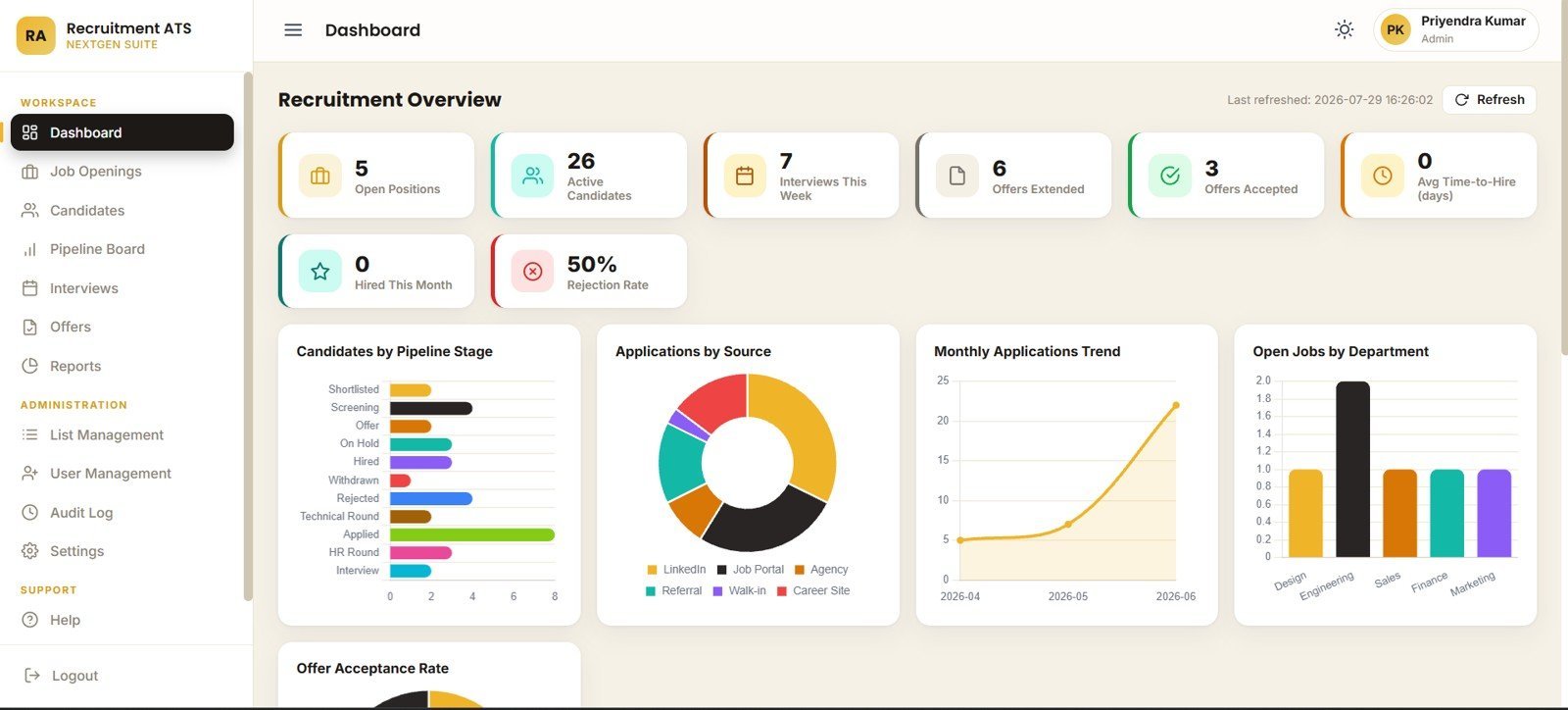
This is the closest thing in the catalogue to a real applicant tracking system, and it is why it ranks first: it is the only recruiting tool here that several people can use at once in a browser, with logins. It is a 12-page Google Apps Script web app that you deploy in your own Google account, so candidate data stays in your Google Drive, not a vendor’s database.
What is inside:
- An overview page with KPI cards for open positions, active candidates, interviews this week, offers extended and accepted, average time-to-hire, hires this month and rejection rate.
- A pipeline board by stage (applied, screening, shortlisted, interview, technical round) with days-in-stage views, so stuck candidates are visible.
- Interview scheduling by round, mode, date, time and interviewer, and offer management by designation, CTC, offer date, joining date and validity.
- Reports by funnel, stage, date range, job and department, plus users, roles, an audit log and settings.
Use it to: run five to fifteen open roles with two or three recruiters and a hiring manager logging in; see which candidates have sat in screening for more than a week; and answer “where are we on the analyst role?” without opening a spreadsheet. The product page has a live demo with sample data, so you can click through every page before buying.
Price: $39.99, one-time. See the Recruitment Applicant Tracking System Web App.
Best for: a small in-house team that wants a shared ATS without per-seat fees.
2. Recruitment & Talent Acquisition Bundle: best value

If you only buy one thing from this list, buy this. The bundle puts seven recruiting templates in one checkout for $35.99, against $56.93 bought one by one, a saving of $20.94 (37%). It covers the hiring lifecycle from pipeline to the new starter’s first month.
What is inside:
- Recruitment Pipeline Dashboard in Google Sheets and Recruitment Funnel KPI Dashboard in Excel, for stage tracking and funnel conversion.
- Recruitment and Hiring Dashboard in Excel, the same file ranked third below.
- Employee Onboarding Tracker, Onboarding Checklist, Onboarding Planner Checklist and New Hire Onboarding Calendar, all in Excel.
Use it to: share a live pipeline in Google Sheets with hiring managers, check funnel conversion from applied to hired each month, and hand every accepted candidate a consistent first-month plan, which is where recruiters lose good hires they worked hard to land. Our guide to recruitment and onboarding templates covers the onboarding half in more depth.
Price: $35.99, one-time. Get the Recruitment & Talent Acquisition Bundle.
Best for: a recruiter who wants the most recruitment templates for the least money.
Building your recruiting stack? Start with the Recruitment & Talent Acquisition Bundle ($35.99 for seven templates), then add the ATS web app ($39.99) when more than one person needs to log in.
3. Recruitment and Hiring Dashboard in Excel
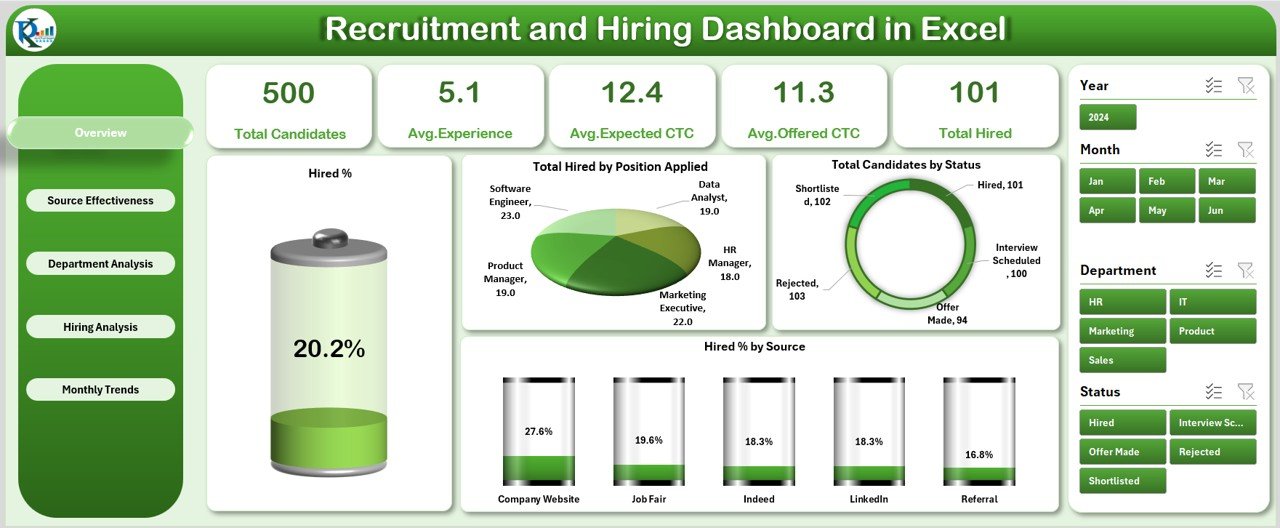
This is the report a recruiter is asked for at the end of every month: how many candidates, how many hires, and which channels and interviewers produced them. It has five pages (Overview, Source Effectiveness, Department Analysis, Hiring Analysis and Monthly Trends) with a left-hand page navigator and slicers for month, department and source.
What is inside:
- Hired percentage overall and by source, candidates by status, and total hires by role.
- Average experience and average offered CTC by source and by department, so you can see which channels bring senior candidates.
- Candidates interviewed, hires and hired percentage by interviewer, which shows who needs calibration.
Use it to: show that referrals convert at a higher hired percentage than job boards and move budget accordingly, or spot a department whose offers sit above the others. It is also inside the bundle at #2, so skip this one if you buy the bundle. If your managers live in Power BI, the Recruitment and Hiring Dashboard in Power BI has the same five pages for $17.99.
Price: $17.99, one-time. See the Recruitment and Hiring Dashboard in Excel.
Best for: the monthly source and interviewer report.
4. Recruitment Pipeline Dashboard in Power BI
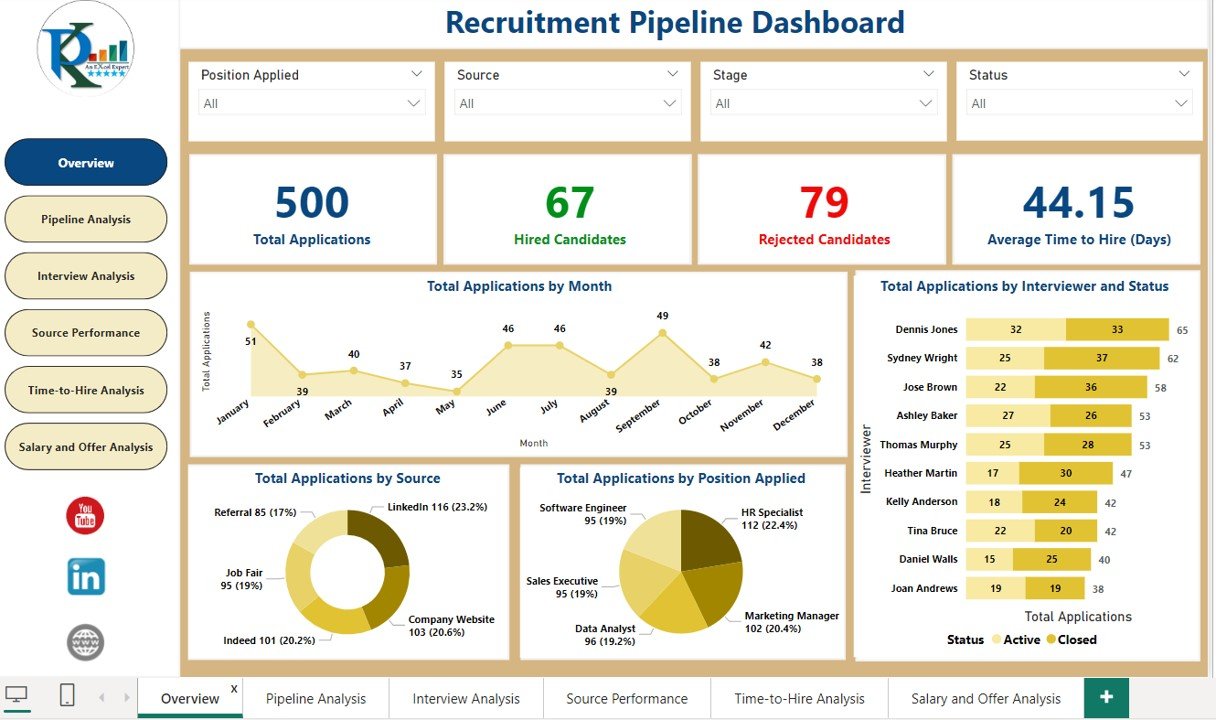
This is the recruiting tool for the meeting with hiring managers. It is an interactive Power BI report with six pages: Overview, Pipeline Analysis, Interview Analysis, Source Performance, Time-to-Hire Analysis and Salary and Offer Analysis, filtered by position, source, stage and status.
What is inside:
- Total applications, hired and rejected candidates and average time to hire on the overview.
- Applications by stage (applied, screening, interview scheduled, interview completed, offer extended, hired, rejected) by position, to find the bottleneck.
- Interviews per recruiter and interviewer, source performance, time-to-hire by role and source, and offers extended, accepted or declined.
Use it to: click a position in the review and show the manager that their role is stuck at “interview scheduled”, not at sourcing, or that time to hire for engineers is double the company average. Power BI Desktop is free, so you can present it without a paid licence.
Price: $17.99, one-time. See the Recruitment Pipeline Dashboard in Power BI.
Best for: interactive pipeline reviews with hiring managers.
5. Recruitment KPI Dashboard in Excel

Where #3 reports on candidates, this one reports on the recruiting function. You pick a month and it shows each KPI’s month-to-date and year-to-date actual against target and against the previous year, with up and down arrows. A KPI Trend sheet charts any one KPI over the year, and a Definition sheet records each KPI’s formula, unit and whether lower or higher is better.
What is inside:
- Dashboard, KPI Trend, Actual, Target, Previous Year and KPI Definition sheets.
- Recruiting KPIs such as time to hire, cost per hire, quality of hire, offer acceptance rate and source effectiveness.
- Targets you set per month, so the arrows mean something to your team.
Use it to: show that cost per hire fell year to date while time to hire held steady, in one screen. The Google Sheets edition ($12.99) suits a team that shares one file, and the Recruitment Funnel KPI Dashboard in Google Sheets ($9.99) focuses on funnel conversion.
Price: $12.99, one-time. See the Recruitment KPI Dashboard in Excel.
Best for: the monthly recruiting KPI pack against target.
6. Candidate Application Management System V1.0
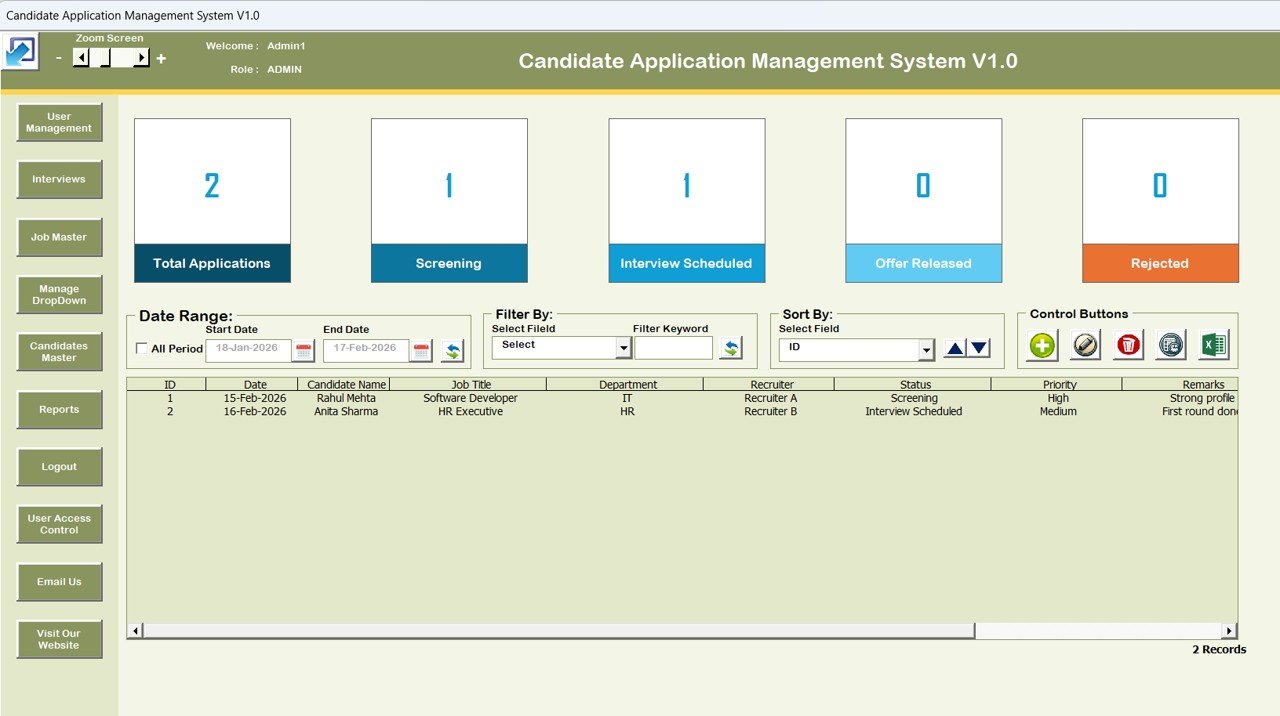
This is the offline alternative to #1. It is an Excel and VBA application that runs in Excel desktop, with a login form, Admin and User roles, and a main form that lists every candidate record with status cards for total applications, screening, interview scheduled, offer released and rejected.
What is inside:
- Add, update (or double-click to edit) and delete candidate records through a form, not by typing into cells.
- Filters by date range and by column, sorting, and one-click export to Excel.
- Masters for jobs and dropdown lists, user management and user access control, and a reports section.
Use it to: replace the shared candidate spreadsheet where someone always overwrites a row, keep recruiter and admin access separate, and filter “screening, last 14 days” in seconds. It needs Excel for Windows desktop with macros enabled.
Price: $19.99, one-time. See the Candidate Application Management System.
Best for: a recruiter who wants a controlled candidate database without a web app.
7. Interview Scheduling Management System V1.0
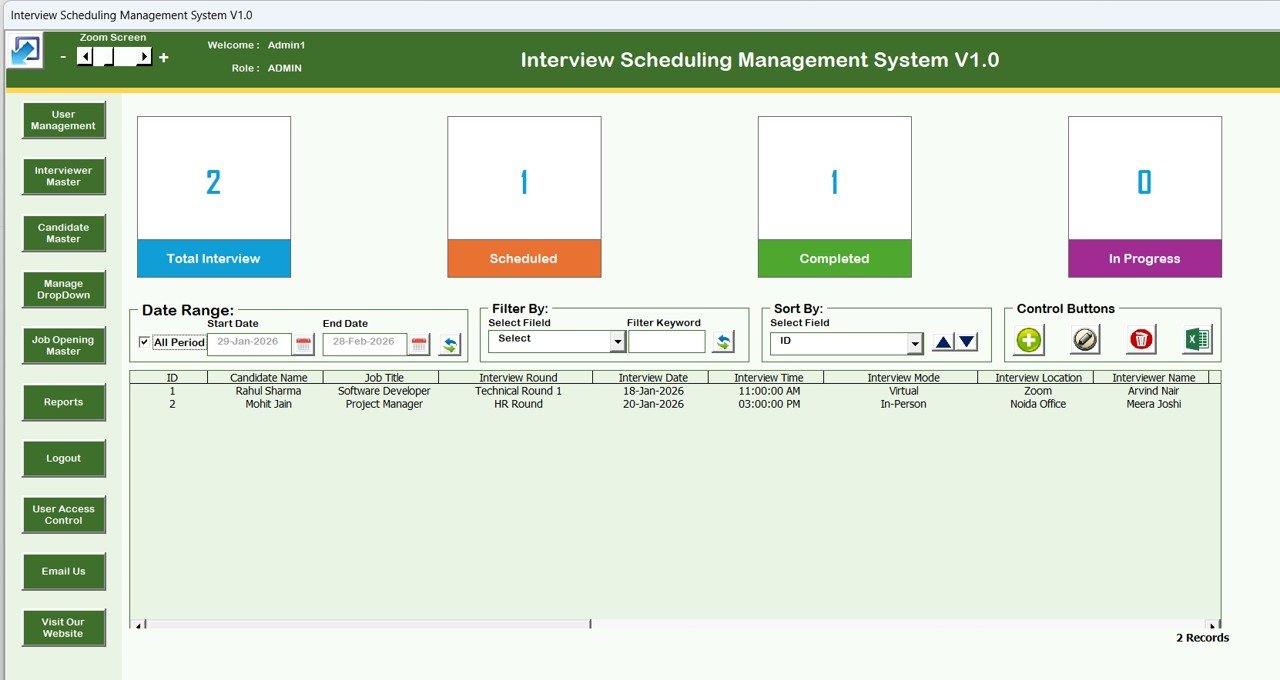
Interview logistics eat more recruiter time than sourcing does. This Excel and VBA system keeps every interview in one register with counts for total, scheduled, completed and in-progress interviews, and records candidate, job title, round, date, time, mode, location and interviewer.
What is inside:
- Secure login with Admin and User roles.
- Candidate, interviewer and job opening masters, plus managed dropdowns.
- Date-range filters, sorting, reports and export.
Use it to: see every second-round interview booked for next week across all roles, check which interviewer has five panels on one day, and close the loop on interviews still marked “in progress” after the date has passed. Pair it with #6, which has the same look and the same login pattern.
Price: $19.99, one-time. See the Interview Scheduling Management System.
Best for: recruiters who coordinate many interview rounds and panels.
8. Recruitment KPI Scorecard in Excel
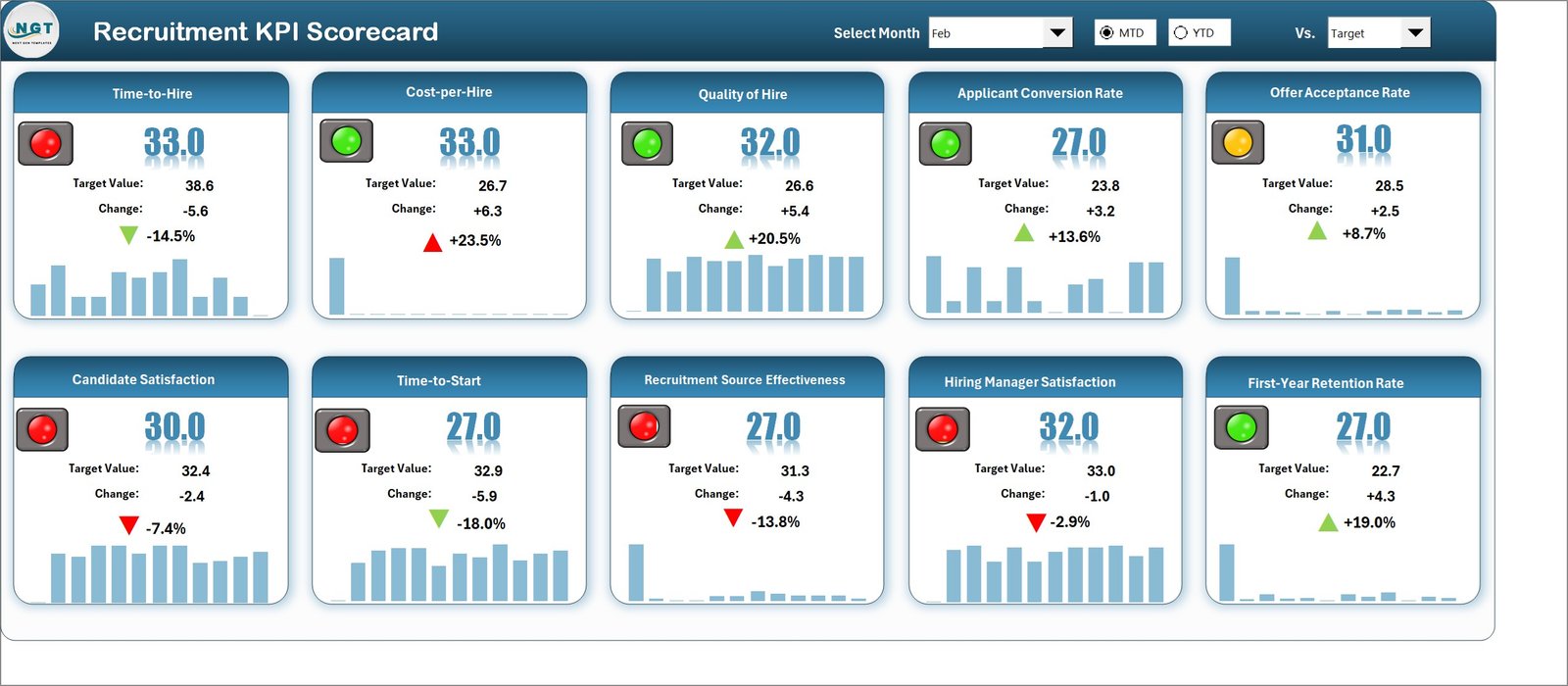
The scorecard is the one page you put on screen at the start of a monthly hiring review. Each recruitment KPI gets its own card with actual against target, the change, a colour-coded indicator and a small trend chart, and you switch between MTD and YTD views.
What is inside:
- KPI cards for hiring metrics such as time to hire, cost per hire, offer acceptance rate and candidate conversion.
- MTD and YTD views, Actual vs Target comparisons and trend charts.
- Editable KPI names, units and targets.
Use it to: open the review with “seven of ten KPIs green, offer acceptance red”, then drill into #4 for the reason. It does a different job from #5: #5 is the working file, #8 is the presentation page.
Price: $14.99, one-time. See the Recruitment KPI Scorecard in Excel.
Best for: a monthly one-page hiring scorecard for leadership.
The 30-day recruiter rollout plan
Do not switch everything on in one week. Roll the recruiting tools out in the order that removes the most manual work first.
| Days | Set up | Data you need | Done when |
|---|---|---|---|
| 1-5 | ATS web app (#1) or Candidate Application Management System (#6) | Open jobs and every active candidate with stage | All live candidates are in one place and the old sheet is read-only |
| 6-10 | Interview Scheduling Management System (#7) | Interviewer list, rounds per role, next two weeks of bookings | Every booked interview is logged with round and interviewer |
| 11-17 | Bundle (#2): pipeline, funnel and onboarding files | Last 3-6 months of applications by source and stage | Funnel conversion by stage is calculated for each open role |
| 18-24 | Hiring dashboard (#3) and KPI dashboard (#5) | Hires, sources, offers, costs and monthly targets | Time to fill, cost per hire and offer acceptance have a target |
| 25-30 | Pipeline dashboard (#4) and KPI scorecard (#8) | The same data, refreshed | First monthly hiring review runs from the scorecard and the pipeline report |
Which recruiting metrics should a recruiter track?
Five numbers answer most questions a hiring manager or HR lead will ask. The reporting templates above calculate all of them; here is how each one works so you can check the output.
- Time to fill: days from requisition approval to offer acceptance. A role approved on 1 March and accepted on 12 April took 42 days.
- Cost per hire: (external costs + internal costs) / number of hires. $18,000 of job ads, agency fees and recruiter time for 6 hires is $3,000 per hire.
- Offer acceptance rate: offers accepted / offers extended. 9 accepted out of 12 offers is 75%; a falling rate usually points to pay or process speed.
- Source of hire: hires from each channel / total hires. Compare it with applications per channel, because the biggest source of applicants is often not the biggest source of hires.
- Stage conversion: candidates reaching the next stage / candidates in the stage. 120 applied, 30 screened, 12 interviewed and 3 hired shows where the funnel narrows most.
For definitions and the professional standards behind them, the Society for Human Resource Management (SHRM) publishes talent acquisition guidance and benchmarking. Our recruitment KPIs guide covers ten metrics in more detail.
How to choose between them
| If you… | Start with |
|---|---|
| Have a small budget and need everything | Bundle (#2), $35.99 |
| Have two or more people logging candidates | ATS web app (#1), $39.99 |
| Work offline, Excel desktop only | Candidate Application (#6) + Interview Scheduling (#7) |
| Are asked for a monthly report on sources and interviewers | Hiring dashboard (#3), or the bundle that contains it |
| Present to hiring managers or leadership | Pipeline dashboard in Power BI (#4) + KPI scorecard (#8) |
The full stack costs $179.92. Because #3 is inside the bundle, a recruiter who buys the bundle needs only the other six for $161.93 and ends up with fourteen recruiting templates. Prefer Google Sheets for everything? Read our comparison of HR dashboards in Excel, Google Sheets and Power BI first.
When a template is NOT the right answer
Recruiting templates are good at tracking, reporting and presenting. They are not a full recruiting platform, and you should buy software instead if:
- You post to many job boards at once. Multiposting to dozens of boards and pulling applications back in automatically is what a paid ATS is for.
- Candidates need to apply through a careers portal. None of these templates is a public application form with resume parsing.
- You run high-volume hiring. Hundreds of applications a week need automated screening, email sequences and scheduling links that candidates book themselves.
- You need audited compliance records such as EEO reporting or data-retention controls certified by a vendor.
- You are an agency recruiter. Placements, fees and client fill rates need different numbers. Look at the Recruitment Agencies KPI Dashboard in Power BI ($11.99) instead.
If you already pay for an HR platform and are weighing whether to keep it, our BambooHR alternatives and Workday alternatives guides compare what templates can and cannot replace.
Frequently asked questions
What are the best recruiting tools for a small company?
For a small company, the Recruitment Applicant Tracking System Web App ($39.99) is our top pick because it covers jobs, candidates, pipeline stages, interviews and offers in one shared browser app. For the widest coverage at the lowest price, the Recruitment & Talent Acquisition Bundle gives you seven templates for $35.99.
Can Excel be used as an applicant tracking system?
Yes, for a small team. The Candidate Application Management System and Interview Scheduling Management System turn Excel into a form-based tracker with logins, roles, filters and export. Excel is not a replacement for job-board multiposting, a careers portal or automated candidate emails at high volume.
What should a recruitment dashboard show?
A recruitment dashboard should show applications, hires and rejections, conversion between stages, time to fill, cost per hire, offer acceptance rate and hires by source, split by role, department and recruiter. Add filters for each so a hiring manager’s question can be answered with one click.
Is Excel, Google Sheets or Power BI better for recruiting?
Excel is best for the monthly report one recruiter owns. Google Sheets is best when recruiters and hiring managers update one shared pipeline. Power BI is best for interactive reviews with managers and leadership. Many teams use all three: Sheets to collect, Excel to analyse and Power BI to present.
How much does the full recruiter template stack cost?
All eight recruiting tools cost $179.92 in total, paid once. The Recruitment and Hiring Dashboard in Excel is already inside the bundle, so if you buy the bundle you need only the other six for $161.93. There are no per-seat fees, per-job fees or renewals.
How do you calculate time to fill?
Count the days from the date a requisition is approved to the date the candidate accepts the offer. If a role was approved on 1 March and the offer was accepted on 12 April, time to fill is 42 days. Track it by role and department, because averages hide the slow roles.
Is the recruitment web app hosted for me?
No. It is a Google Apps Script template that you deploy in your own Google account with the included guide, so candidate data stays in your Google Drive. The product page links to a live demo with sample data, so you can try every page before you buy.
Do I need Power BI Pro for the recruitment pipeline dashboard?
No. Power BI Desktop is free, and you can open, edit and present the Recruitment Pipeline Dashboard with it. You only need a paid Power BI licence if you want to publish the report to the Power BI service and share it online with people who do not have the file.
Can I customise these recruitment templates?
Yes. Formulas, KPI names, targets, stages, dropdown lists and charts are editable, and you own the files outright. Rename departments and job titles, add your own sources and change the targets. Being editable was a selection rule for every recruiting tool in this stack.
Get more recruiting tools
The fastest way to start: the Recruitment & Talent Acquisition Bundle gives you seven recruitment templates for $35.99 (save 37%). Add the Recruitment Applicant Tracking System Web App for $39.99 when your team needs shared logins.
For more HR dashboards, see our best HR dashboard templates in Excel. Watch walkthroughs of our templates on the NextGenTemplates YouTube channel.