

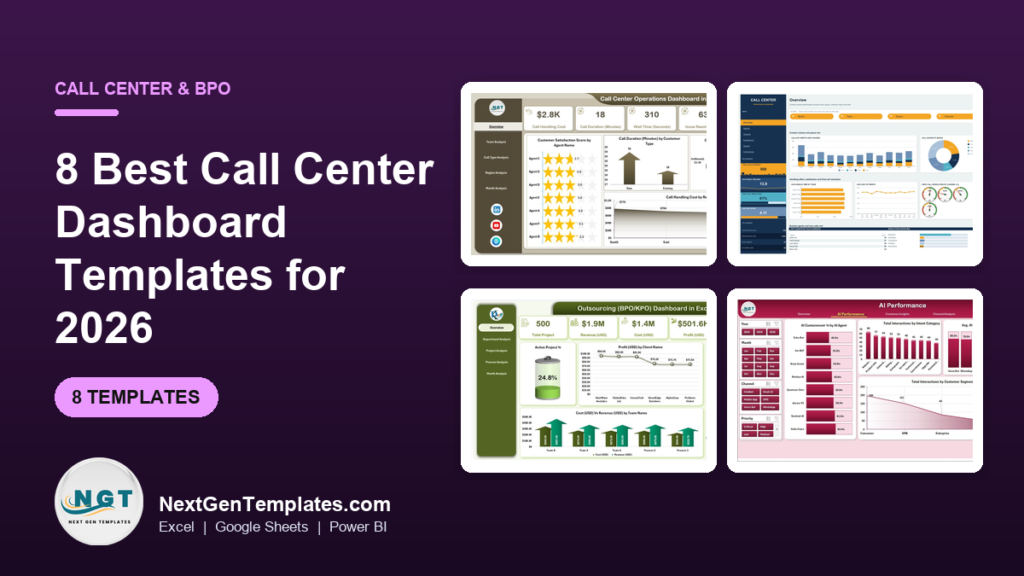
The best call center dashboard template for most teams in 2026 is the Call Center Operations Dashboard ($13.99 in Excel, $17.99 in Power BI, $9.99 in Google Sheets). It breaks satisfaction, call duration, wait time and handling cost down by agent, team, call type, region and month. BPO firms with several clients should add the Outsourcing (BPO KPO) Dashboard.
Last updated: October 2026
Key takeaways
- Our top pick is the Call Center Operations Dashboard: five analysis pages in Excel and Power BI, and six pages with 17 charts in Google Sheets.
- For the monthly review, the Call Center Operations KPI Dashboard tracks 12 KPIs, including AHT, FCR, CSAT, service level and abandon rate, against target and last year.
- BPO and KPO firms get profit, cost against revenue and satisfaction by client and process from the Outsourcing (BPO KPO) Dashboard.
- Teams running chatbots or voice bots can measure AI containment, cost per interaction and CSAT with the Contact Center AI Dashboard.
- Every pick is a one-time purchase from $9.99 to $39.99, and the Customer Service & Support Bundle packs 8 templates for $73.99 instead of $123.92.
 Launch offer
From your first Pivot Table to the Data Model, DAX, Power Query and a one-page KPI dashboard. 11h 51m of video by PK, with practice files, quizzes and a capstone.
Call center dashboard templates compared
| Template | Format | Best For | Price |
|---|---|---|---|
| Call Center Operations Dashboard (Best overall) | Excel, Power BI, Google Sheets | CSAT, call duration, wait time and cost by agent, team and region | $9.99 to $17.99 |
| Call Center Operations KPI Dashboard | Excel, Power BI | 12 KPIs against monthly target and last year | $11.99 to $12.99 |
| Outsourcing (BPO KPO) Dashboard | Excel, Power BI, Google Sheets | Profit, SLA and satisfaction by client and process | $9.99 to $17.99 |
| Contact Center AI Dashboard | Excel, Power BI | AI containment, cost savings and CSAT by channel | $17.99 |
| Call Abandonment Rate KPI Dashboard | Excel, Google Sheets, Power BI | Abandonment, service level and occupancy targets | $11.99 to $14.99 |
| Call Center KPI Scorecard | Google Sheets, Excel | A traffic-light scorecard of 10 metrics | $9.99 to $12.99 |
| Helpdesk & Ticketing Management System | Web app (Google Sheets + Apps Script) | Email and ticket queues with SLA clocks | $39.99 |
| Customer Service & Support Bundle (Best value) | Excel, Google Sheets | Support, CSAT, complaint and request tracking in one pack | $73.99 |
A call center lives or dies on a handful of numbers that move every hour. Callers wait, some hang up, agents spend longer on hard calls than easy ones, and every extra minute of handle time is wage cost. When those numbers sit in a phone system export and a supervisor’s notebook, the weekly review turns into an afternoon of copying and pasting, and the problems it finds are already a week old.
Contact center platforms and workforce tools do include reporting, but it is usually sold per agent per month, and the standard screens rarely match how your own client or leadership wants to see the numbers. A call center dashboard template sits on top of the export you already have. You paste the data in, refresh, and get the same set of charts every week for a one-time price.
How we picked these call center templates
We searched the NextGenTemplates catalog for files built for inbound and outbound call centers, contact centers, BPO and KPO firms, and support desks that answer customers by phone, chat or email. We read each product page for the fields it actually tracks, such as agent, queue, call type, wait time, handle time, CSAT, cost and SLA, and dropped files built only for IT incident management. Those are covered in our IT helpdesk and incident management templates guide.
Where one tool comes in several formats we list it once with every price. We ranked on three things: how much of a supervisor’s weekly review a file covers, how quickly a small team can load its own export, and price. If you want the metric definitions first, start with our customer service KPIs guide and come back here for the templates.
The 8 best call center dashboard templates for 2026
1. Call Center Operations Dashboard: best overall
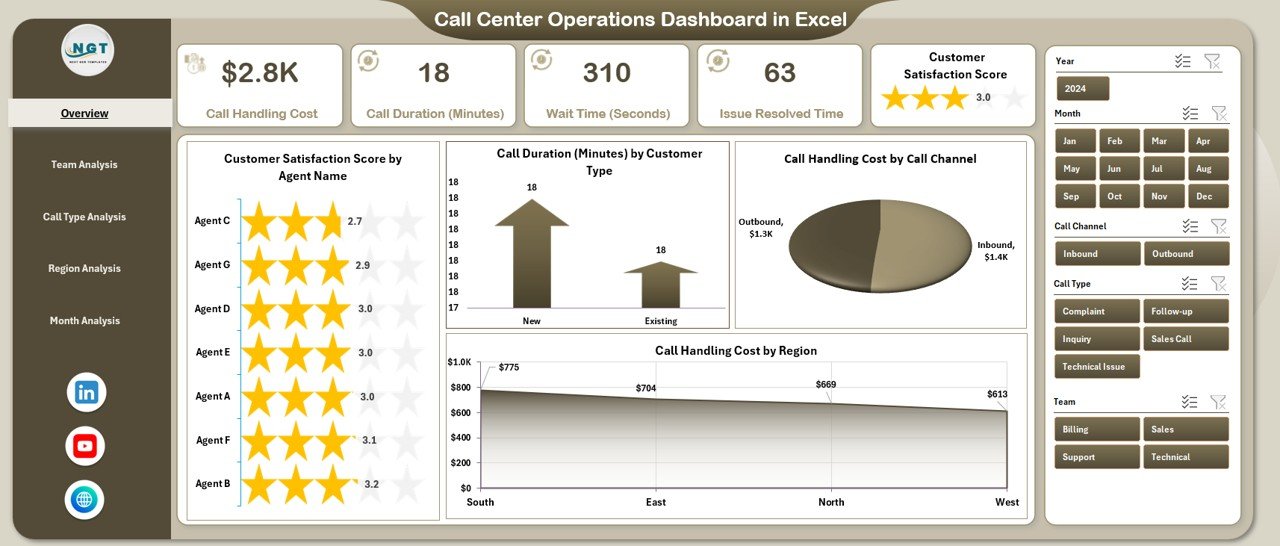
This is the file we would give a call center manager on day one. It reads a plain call log and answers the questions a weekly review keeps coming back to: which agents keep customers happy, which call types run long, where handling cost is highest, and how wait time moves through the year.
Who it is for: call center managers, team leaders, QA leads and operations heads who report on agents and teams every week.
What is inside the Excel edition:
- 5 pages: Overview, Team Analysis, Call Type Analysis, Region Analysis and Month Analysis, with a page navigator
- KPI cards for call handling cost, call duration in minutes, wait time in seconds, issue resolved time and customer satisfaction score
- Customer satisfaction score by agent, call duration by customer type, and handling cost by call channel and region
- Wait time by call type, issue resolved time by region, and cost, duration and wait time by month
- Slicers for agent, team, call type, region and month; no macros or add-ins
The Power BI edition uses the same five pages and adds issue resolved time by team and call type. The Google Sheets edition is laid out differently: six pages (Overview, Agents, Queues, Experience, Search and Instructions), four headline cards for calls handled, average handle time, first call resolution and average CSAT, 17 charts, 15 slicers, four first-call-resolution gauges by channel, and a handle time against CSAT scatter that shows which agents are fast at the cost of the score. A Call ID search page returns any single call in full.
Price: $13.99 in Excel, $17.99 in Power BI and $9.99 in Google Sheets.
2. Call Center Operations KPI Dashboard: best for monthly targets
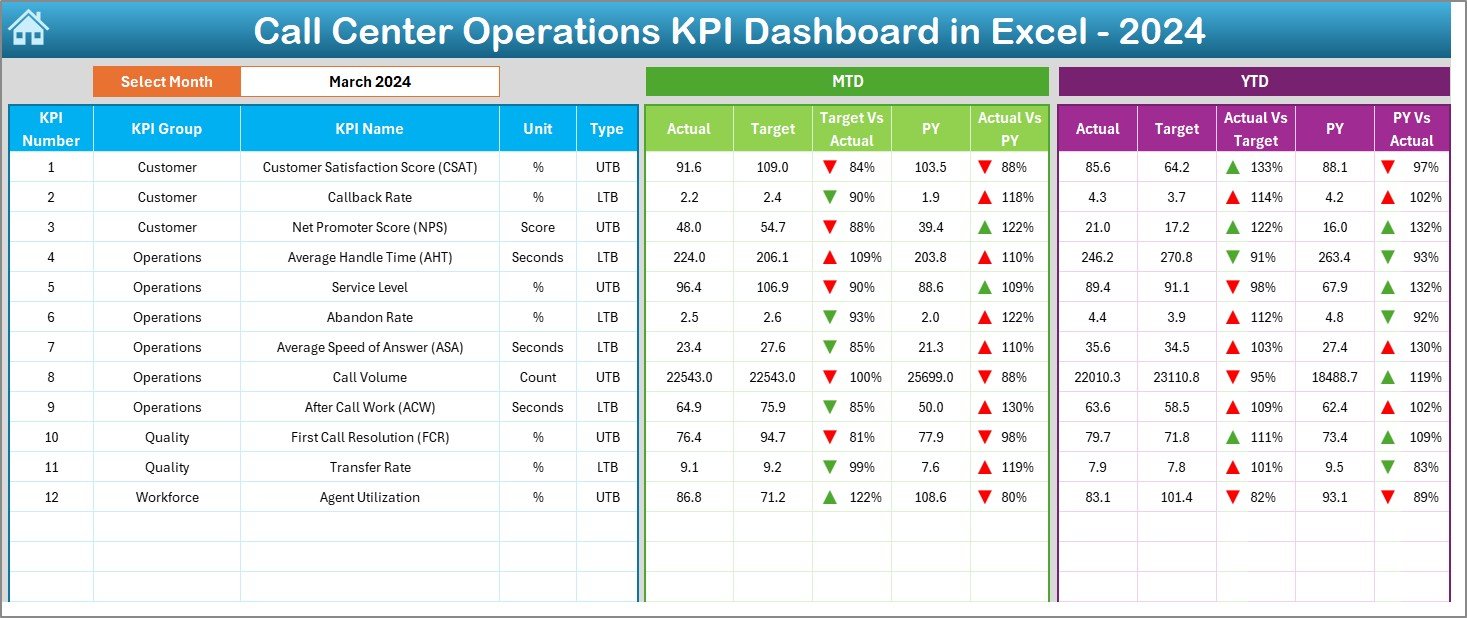
Where the first pick digs into individual calls, this one is built for the monthly meeting. You type in each month’s actual figures, targets and last year’s numbers, pick a month, and every KPI shows whether it is ahead or behind with a green or red arrow.
- 12 KPIs in three groups: CSAT, callback rate and NPS (customer); AHT, service level, abandon rate, average speed of answer, call volume and after call work (operations); FCR and transfer rate (quality); agent utilization (workforce)
- MTD and YTD actuals against target and against the previous year
- 7 sheets: a summary hub, the dashboard, KPI trend, actual input, target, previous year and a KPI definition sheet with every formula
- A trend page where you pick any KPI and see its MTD and YTD history
The Power BI edition ($11.99) adds a drill-through page with each KPI’s formula and slicers for month and KPI group. If you prefer a simpler starter, the Call Centre KPI Dashboard in Excel ($12.99) covers FCR, AHT, NPS, CSAT and cost per call, with a Google Sheets version at $9.99 and a Power BI version at $11.99.
Price: $12.99 in Excel and $11.99 in Power BI.
Not sure where to start? Most centers begin with the Call Center Operations Dashboard ($13.99) for the agent and team view, then add the Call Center Operations KPI Dashboard ($12.99) for target tracking. Both together cost $26.98, paid once.
3. Outsourcing (BPO KPO) Dashboard: best for BPO firms with several clients
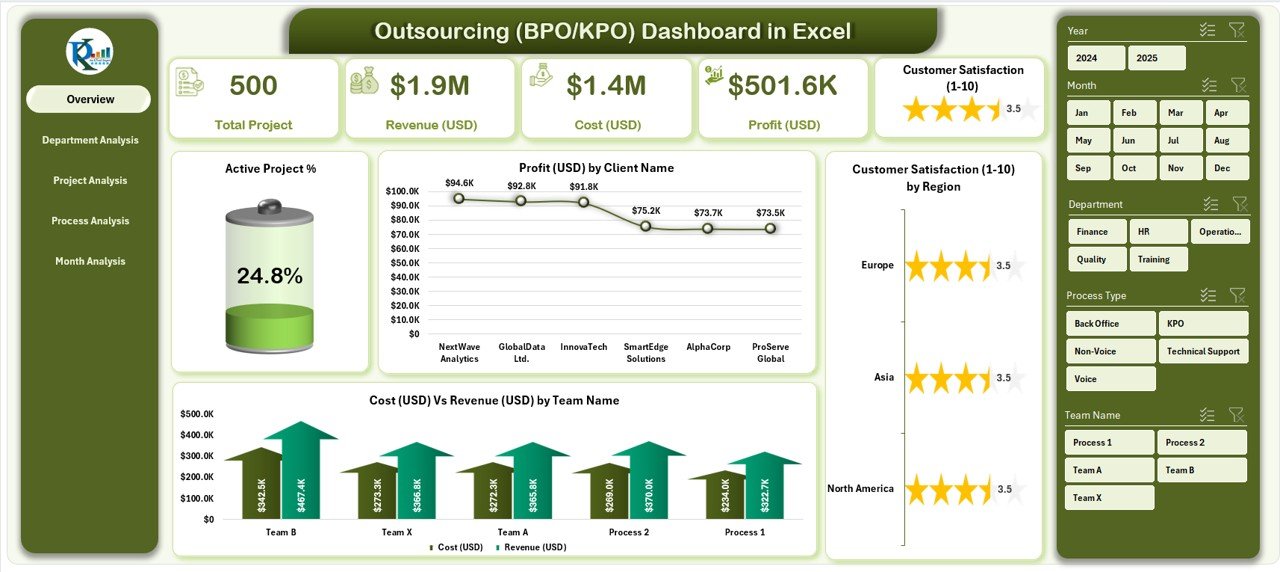
A BPO runs many small call centers under one roof, each with its own client, SLA and margin. This dashboard looks at the business the way a BPO owner or delivery head does: which clients, departments and processes make money, and which ones run late or leave customers unhappy.
- 5 pages in Excel: Overview, Department, Project, Process and Month analysis
- KPI cards for total projects, revenue, cost and profit, plus an active project % gauge
- Profit by client, cost against revenue by team, and satisfaction (1 to 10) by region
- Delayed project % and satisfaction by department, project type and process type
The Power BI edition adds client-wise profitability and escalation tracking. The Google Sheets edition is the most detailed of the three: 16 KPI cards covering revenue, cases, SLA, quality, FTE and productivity, 18 charts, 15 slicers and an SLA status mix of Met, On Track, At Risk and Breached. It can be shared view-only with a client, who can filter it themselves. For monthly targets, the Outsourcing (BPO and KPO) KPI Dashboard ($14.99 in Excel, $11.99 in Power BI) tracks productivity, quality and SLA KPIs against target.
Price: $13.99 in Excel, $17.99 in Power BI and $9.99 in Google Sheets.
4. Contact Center AI Dashboard: best for chatbot and voice bot teams
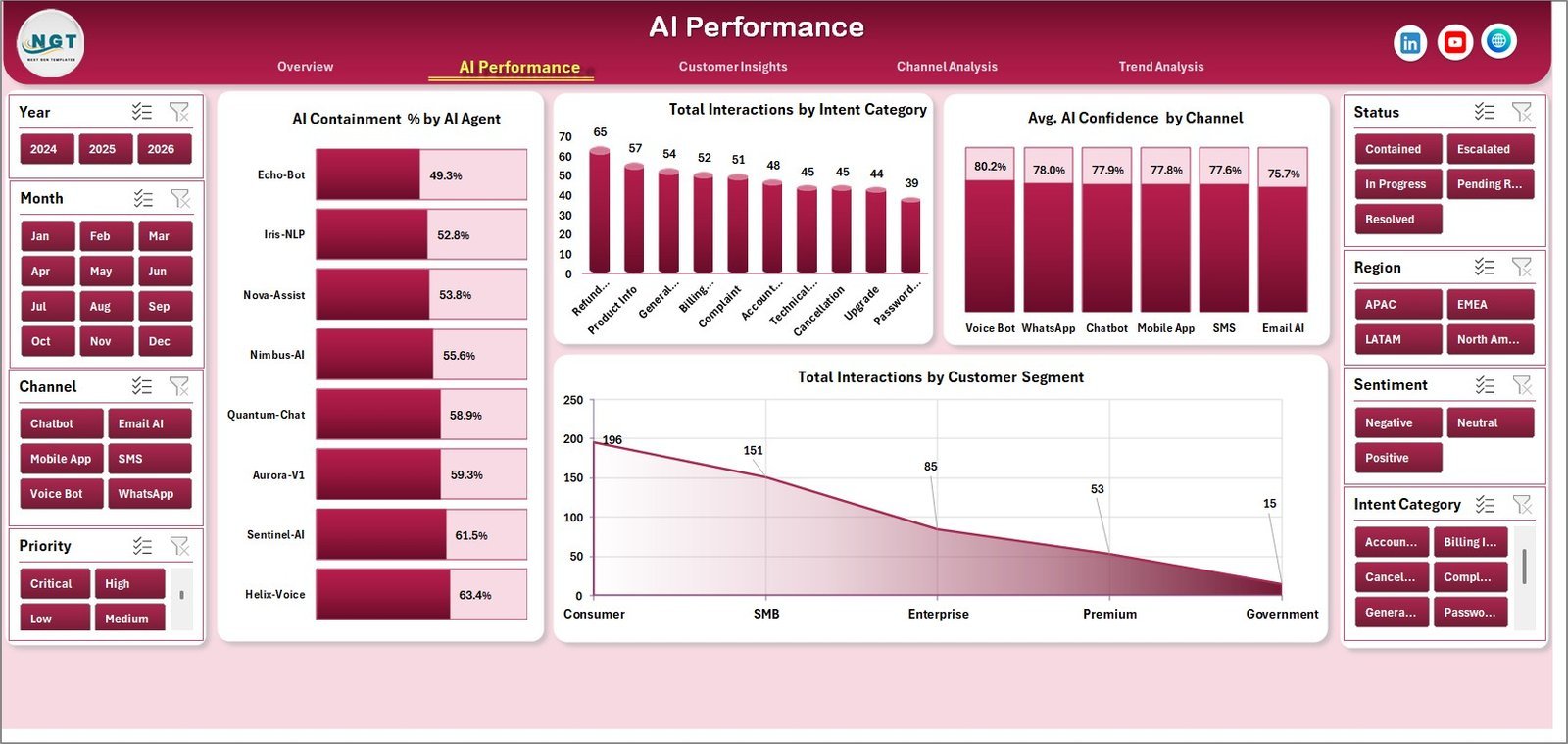
More contact centers now put a virtual agent in front of the queue. The question leadership asks is simple: how many conversations does the bot finish on its own, and what does that save? This dashboard answers it alongside the usual service numbers.
- 5 KPI cards in Excel: total interactions, total revenue impact, net AI cost savings, average cost per interaction and average CSAT
- AI Performance tab with AI containment % by AI agent, interactions by intent category and average AI confidence by channel
- Customer Insights tab for sentiment, language, handle time by channel and revenue impact
- Channel Analysis for containment, handle time by priority and monthly containment trends
- 7 connected tabs, including a data sheet you overwrite with your own export
The Power BI edition has 6 KPI cards, including total operating cost and AI containment, across 5 report pages, and covers voice, chat and email paths.
Price: $17.99 in Excel and $17.99 in Power BI.
5. Call Abandonment Rate KPI Dashboard: best for queue and staffing problems
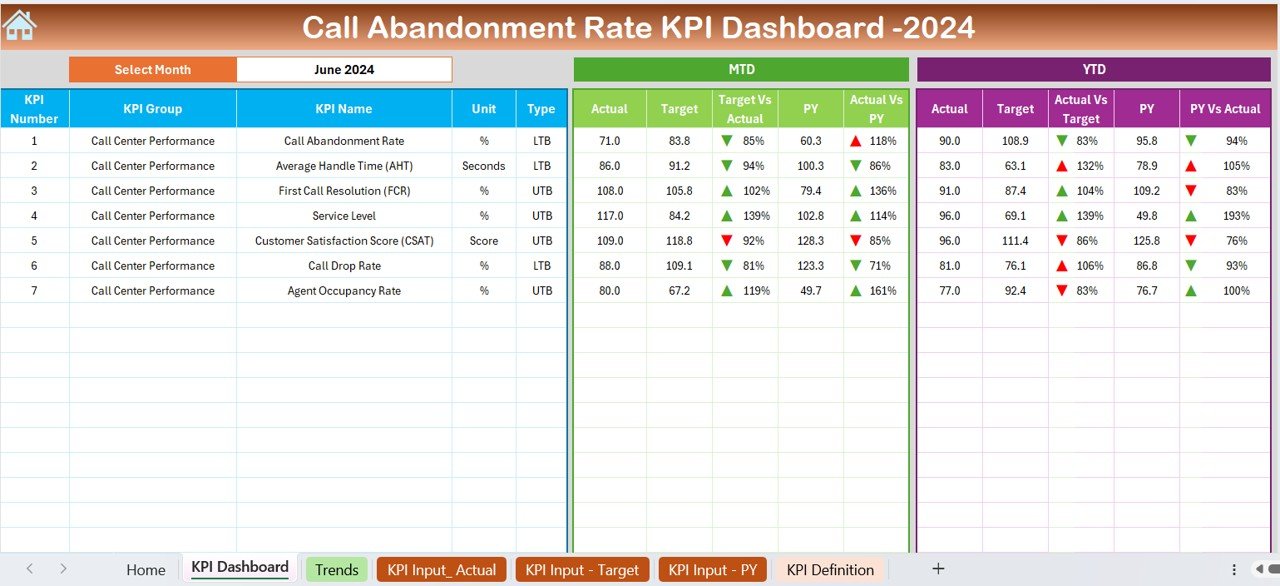
Abandoned calls are the clearest sign that a queue is understaffed. Each one is a customer who gave up, and many of them call back later and make the next peak worse. This dashboard keeps abandonment next to the numbers that explain it.
- 7 KPIs: call abandonment rate, average handle time, first call resolution, service level, CSAT, call drop rate and agent occupancy rate
- MTD and YTD actual against target and previous year, with up and down arrows
- Sheets for home, KPI dashboard, trends, actual, target and previous-year input, and KPI definitions
The Google Sheets edition ($12.99) runs in the browser with a month dropdown and KPI trend charts. The Power BI edition ($11.99) adds a drill-through page with KPI formulas and definitions.
Price: $14.99 in Excel, $12.99 in Google Sheets and $11.99 in Power BI.
6. Call Center KPI Scorecard: best for a quick team scorecard
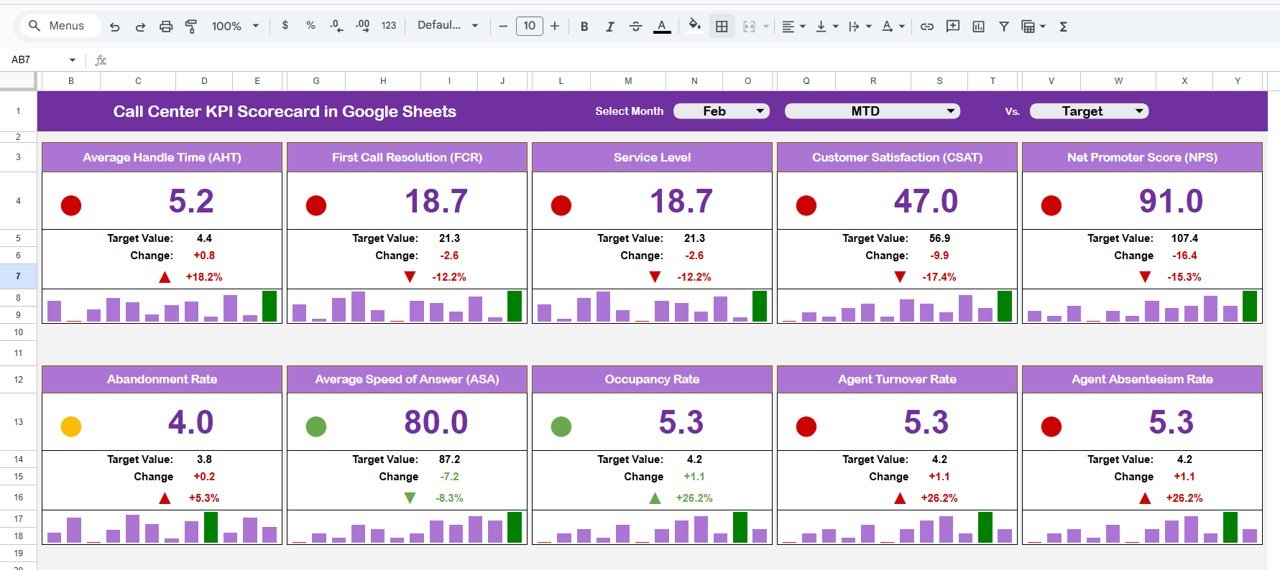
Some teams don’t need charts. They need one screen that says green, yellow or red for each metric, which they can put on a wall monitor or paste into a client update. The scorecard does that.
- 10 call center metrics, including AHT, FCR, CSAT, abandonment rate and NPS
- A month dropdown and an MTD or YTD switch
- Traffic-light indicators, up and down arrows and variance % against target
- A trend tab and a KPI definition tab with group, unit and formula
The Excel edition ($12.99) tracks up to 10 KPIs with red, yellow and green status and MTD, YTD and previous-year trends.
Price: $9.99 in Google Sheets and $12.99 in Excel.
7. Helpdesk & Ticketing Management System Web App: best for email and ticket queues
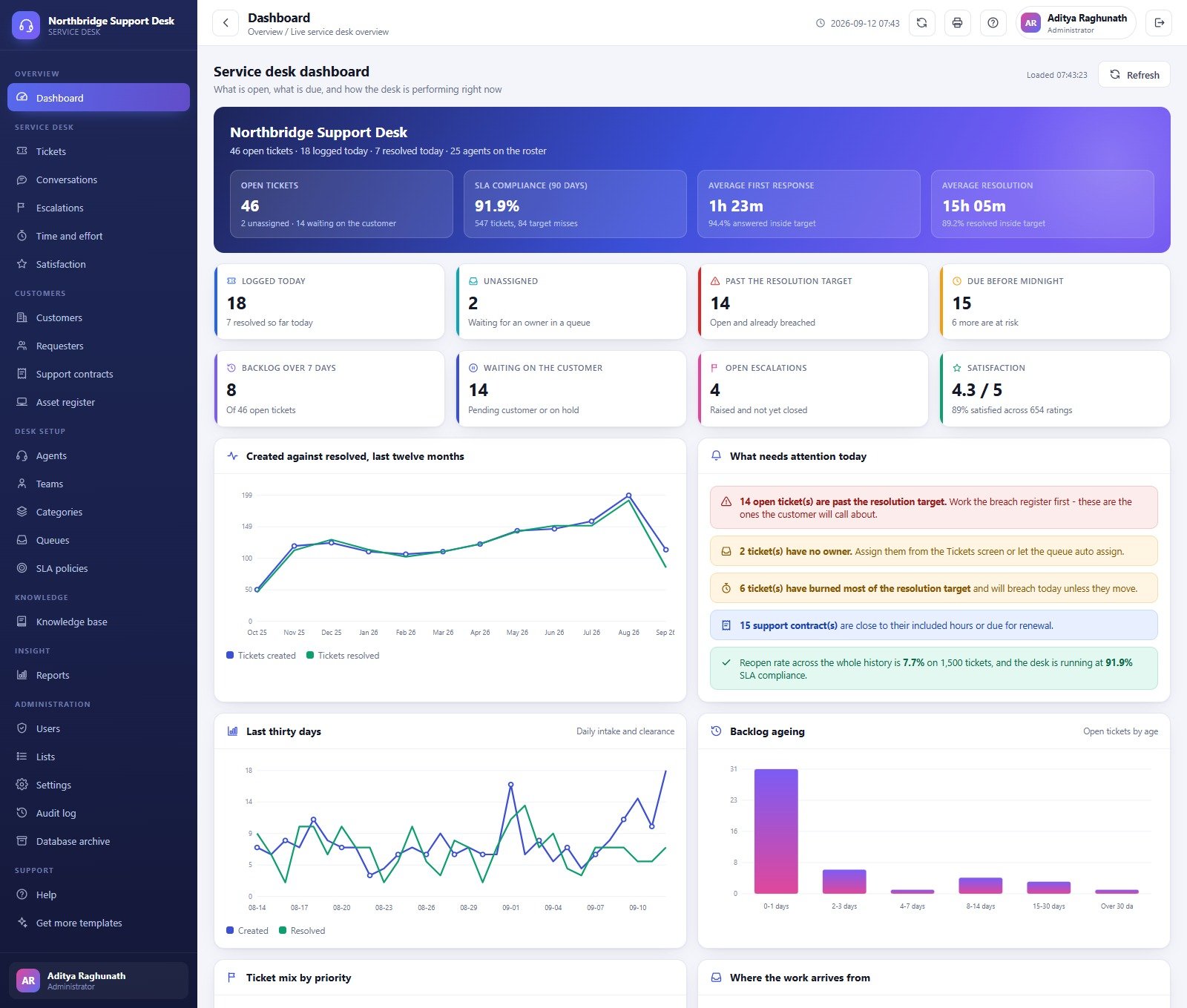
Many call centers and BPO teams also run an email or ticket queue next to the phones. Dashboards report on that work, but they don’t run it. This web app does: agents log tickets, the app tracks SLA clocks, and supervisors see what needs attention today.
- 22 screens: tickets, conversations, escalations, effort, satisfaction, customers, contracts, agents, teams, queues, SLA policies and a knowledge base
- An SLA clock on every ticket, with response and resolution targets per plan and priority, measured in business hours
- Escalations from L1 to management, with reason, owner and turnaround recorded
- Billable effort per ticket and 1 to 5 satisfaction ratings by agent
- 21 built-in reports, including SLA compliance, breach register, agent workload and backlog ageing, all exportable to CSV
- 7 roles with server-side permissions and an audit log; it runs in your own Google account
If you are weighing it against a paid helpdesk, our Zendesk alternatives guide and Freshdesk alternatives guide compare the options.
Price: $39.99 one time.
8. Customer Service & Support Bundle: best value
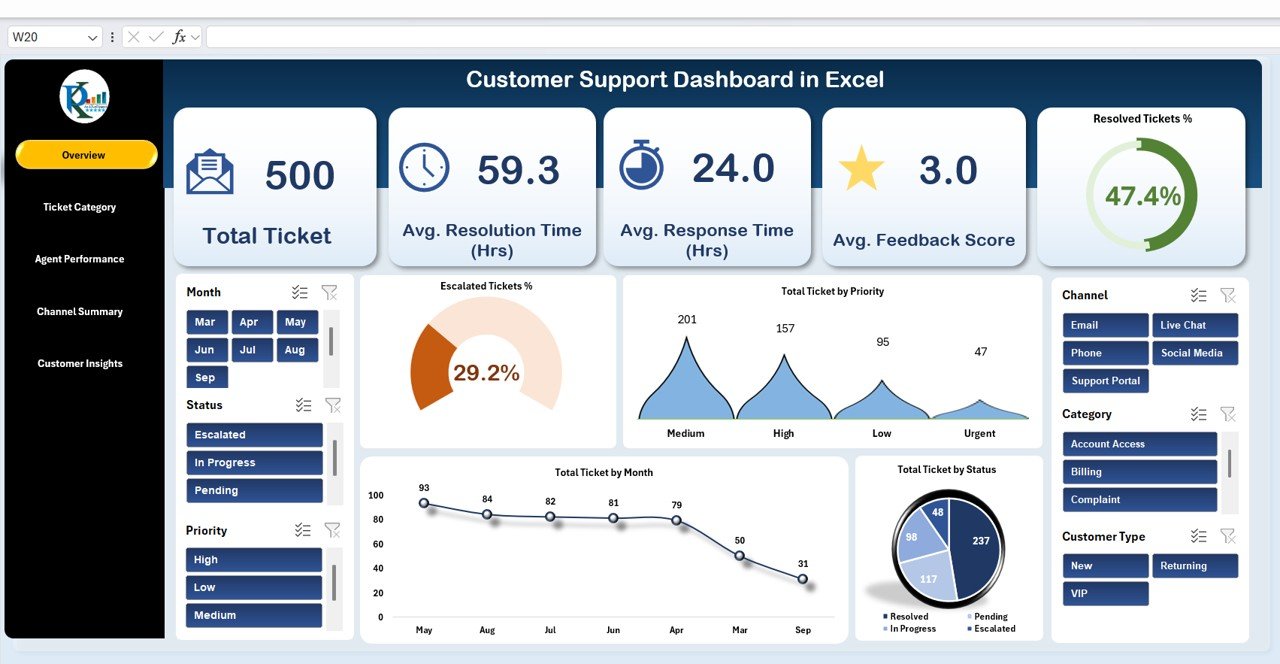
If your call center also owns complaints, service requests and customer satisfaction reporting, the bundle covers the rest of the service desk in one purchase.
- 8 templates across Excel and Google Sheets
- Customer Support Dashboard, Customer Service Dashboard and Customer Satisfaction Dashboard in Excel
- A Customer Complaint Tracker in Google Sheets and a Customer Service Request Tracker in Excel
- IT Support Ticket and IT Services dashboards, plus a Customer Address Book and Follow Up System
Price: $73.99 for all eight, against $123.92 if bought one by one, a saving of $49.93.
Which KPIs should a call center track?
Every template above is built around some mix of these ten metrics. The targets in the last column are common starting points, not rules. Set your own from your contracts and your last six months of data.
| KPI | Formula | Common starting target |
|---|---|---|
| Service level | Calls answered within X seconds / Calls offered x 100 | 80% within 20 seconds |
| Abandonment rate | Abandoned calls / Calls offered x 100 | Under 5% to 8% |
| Average speed of answer (ASA) | Total wait time of answered calls / Answered calls | Under 30 seconds |
| Average handle time (AHT) | (Talk time + Hold time + After call work) / Calls handled | Set by call type, then trend it |
| First call resolution (FCR) | Issues resolved on first contact / Total issues x 100 | 70% to 75% |
| Customer satisfaction (CSAT) | Satisfied responses / Total responses x 100 | 80% or higher |
| Agent occupancy | Handle time / Logged-in available time x 100 | 75% to 85% |
| Transfer rate | Transferred calls / Calls handled x 100 | Under 10% |
| Cost per call | Total operating cost / Calls handled | Trend it month on month |
| Schedule adherence | Time on schedule / Scheduled time x 100 | 90% or higher |
Two of these pull against each other. Push AHT down too hard and FCR falls, because agents rush callers off the phone and they call back. Push occupancy above about 85% and agents burn out, which shows up later as absence and attrition. That is why the best dashboards put handle time and satisfaction side by side, as the Google Sheets edition of our top pick does with its scatter chart.
Staffing for a service level target is usually done with the Erlang C formula, named after the Erlang unit of traffic. You don’t need to run Erlang in a dashboard. What a dashboard tells you is whether last month’s staffing met the target, and which hours and queues missed it.
How do you choose the right call center dashboard template?
| If you are… | Start with |
|---|---|
| A call center manager who wants agent, team and call-type analysis from a call log | Call Center Operations Dashboard |
| A director who reviews KPIs against monthly targets and last year | Call Center Operations KPI Dashboard |
| A BPO or KPO owner reporting on several clients and processes | Outsourcing (BPO KPO) Dashboard |
| A team measuring chatbot or voice bot containment | Contact Center AI Dashboard |
| A workforce planner fighting long queues and dropped calls | Call Abandonment Rate KPI Dashboard |
| A supervisor who wants one red-yellow-green screen | Call Center KPI Scorecard |
| A desk handling email and tickets as well as calls | Helpdesk & Ticketing Management System |
| A QA lead scoring service quality against targets | Customer Service and Support QA KPI Dashboard |
A common setup is one analysis file and one target file: the Call Center Operations Dashboard for the weekly agent review, and the KPI Dashboard or Scorecard for the monthly leadership pack. Teams with strict client SLAs can add the Customer Support SLA KPI Dashboard ($12.99). If your agents are paid by the hour, our timesheet templates guide covers time tracking, and our staffing agency templates help if you hire agents through an agency. Telecom operators running their own care centers should also see our telecom KPI dashboard templates.
When a template is NOT the right answer
- You need real-time wallboards. These files refresh when you paste in new data. A live queue display that updates every few seconds needs your ACD or contact center platform.
- You need call recording, speech analytics or automatic QA scoring. None of these templates listens to calls. They report on the scores your QA team records.
- You need interval-level workforce forecasting. Planning staff in 15 or 30 minute intervals with Erlang C belongs in a workforce management tool. The dashboards show whether the plan worked.
- Nobody owns the export. A dashboard is only as fresh as its last data load. If no one will paste in the weekly call export, the numbers go stale fast.
For most small and mid-sized call centers and BPO teams, a call center dashboard template is the quickest way to get a clean weekly report without paying for more seats. Want more general options? See our free Excel dashboard templates and free Power BI dashboard templates, and our customer churn and retention metrics guide for what happens after the call.
Frequently asked questions
What is a call center dashboard template?
A call center dashboard template is a ready-made Excel, Google Sheets or Power BI file that turns an export of call records into KPI cards and charts. You paste in calls, agents, queues, durations, wait times and satisfaction scores, refresh, and the file shows handle time, cost, CSAT and resolution by agent, team, region and month.
Which call center dashboard template should I buy first?
Start with the Call Center Operations Dashboard. It costs $13.99 in Excel, $17.99 in Power BI and $9.99 in Google Sheets, and it reads a normal call log by agent, team, call type, region and month. Add the Call Center Operations KPI Dashboard at $12.99 if you also review monthly targets.
Can a spreadsheet replace contact center analytics software?
For the manager's reporting, often yes. A dashboard shows handle time, CSAT, cost and abandonment well. It will not route calls, record them, forecast staffing in real time or score calls with speech analytics. Centers that need those features keep their platform and use a template for the weekly and monthly review.
Do these templates connect to my phone system?
No. They are offline analysis files. You export calls or a monthly summary from your telephony, ACD or helpdesk tool, paste it into the data or input sheet and refresh. Most platforms can export a CSV of call records, which is all these templates need.
How do I calculate call abandonment rate?
Divide abandoned calls by total calls offered and multiply by 100. If 2,000 calls reached the queue and 120 hung up before an agent answered, the abandonment rate is 6%. Some centers exclude calls that hang up within the first few seconds, so agree the rule once and keep it.
What is the 80/20 service level in a call center?
80/20 means 80% of calls are answered within 20 seconds. It is a common default target, not a law, and many teams set different numbers for sales lines, support lines and chat. The KPI dashboards here let you type your own target for each month and compare it with the actual figure.
Is there a call center dashboard in Google Sheets?
Yes. The Call Center Operations Dashboard in Google Sheets costs $9.99 and has six pages with four headline KPIs, 17 charts and 15 slicers. The Call Center KPI Scorecard and the Call Center KPI Dashboard also come in Google Sheets at $9.99 each, and they work in any browser.
Which template suits a BPO with several clients?
Choose the Outsourcing (BPO KPO) Dashboard. The Excel version compares profit, cost against revenue, delayed project % and satisfaction by client, department, process and month. The Google Sheets version adds SLA status by engagement and lets you share a filtered view with each client.
Are these call center templates a one-time purchase?
Yes. Prices run from $9.99 to $39.99 for single templates and $73.99 for the eight-template Customer Service and Support Bundle, paid once. There is no monthly fee and no charge per agent, per seat or per queue. You download the file and keep it.
Is customer data safe in these files?
Excel and Power BI files stay on your own computer or server. The Google Sheets files and the helpdesk web app run in your own Google account, not on our servers. Keep phone numbers and names out of any file you share with clients, and follow the privacy rules that apply to your callers.
Get your call center dashboard templates
Start with the Call Center Operations Dashboard ($13.99, or $9.99 in Google Sheets) to see satisfaction, handle time, wait time and cost by agent and team in one file. If you also run complaints and service requests, the Customer Service & Support Bundle gives you 8 templates for $73.99. Each one is a one-time purchase that you can edit and keep.
Want to see the dashboards working first? Watch the walkthroughs on our NextGenTemplates YouTube channel.