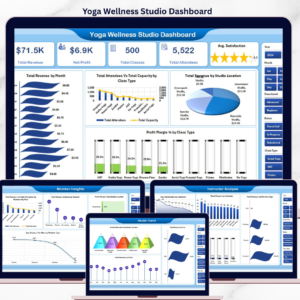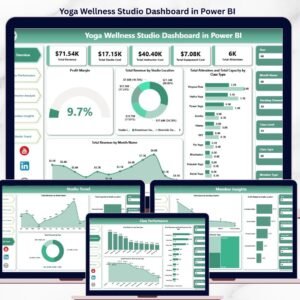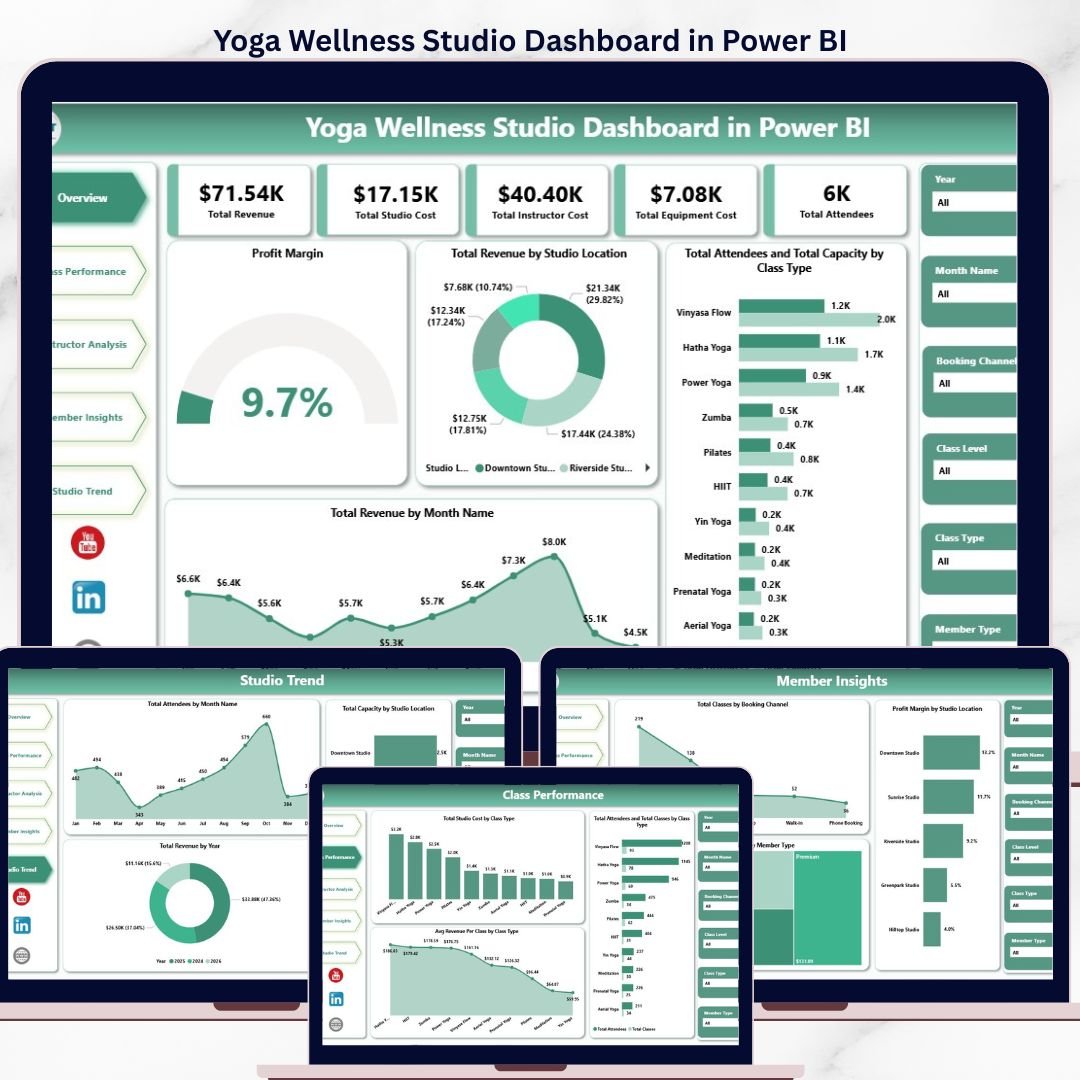
The Yoga Wellness Studio Dashboard in Power BI tracks 5 KPI cards and 16 interactive charts across 5 dedicated pages — Overview, Class Performance, Instructor Analysis, Member Insights, and Studio Trend. Setup takes under 10 minutes — connect your studio’s class log to Power BI Desktop and every visual, slicer, and KPI card refreshes automatically.
🌍 Join 8,400+ teams in 40+ countries using NextGenTemplates to replace paid SaaS tools with one-time-purchase Excel, Google Sheets, Power BI Dashboards, and HTML templates.
✅ Instant download · One-time payment · No subscription · No per-user fees · Lifetime access
Yoga Wellness Studio Dashboard in Power BI
🔑 Key Features of the Yoga Wellness Studio Dashboard in Power BI
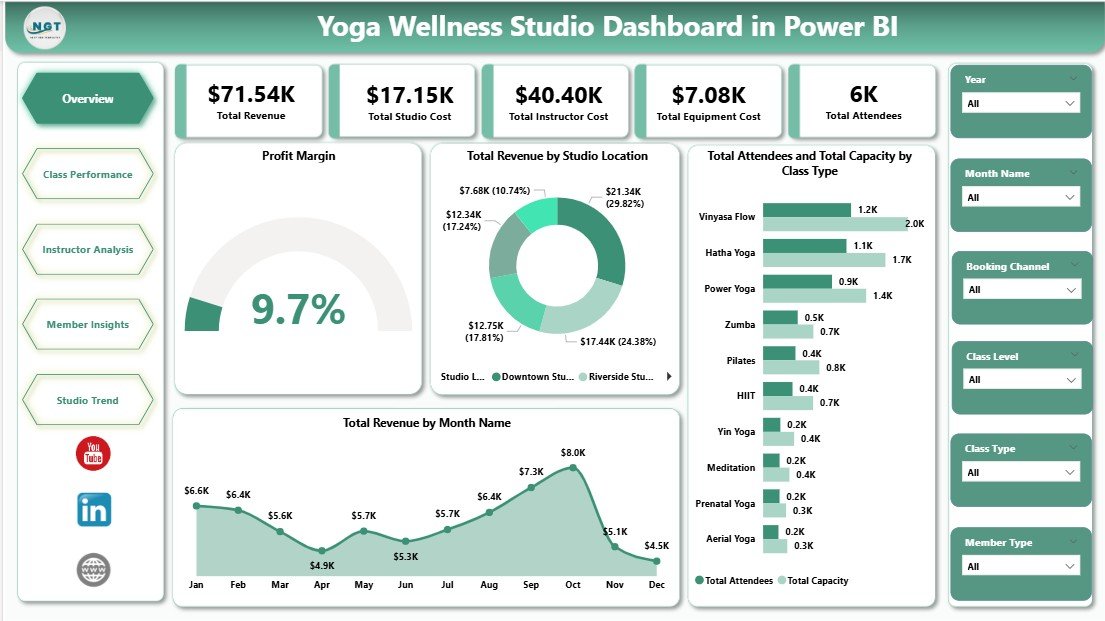
🔹 5 KPI cards on the Overview page — Total Revenue, Total Studio Cost, Total Instructor Cost, Total Equipment Cost, and Total Attendees. Studio owners get a single-screen snapshot of operational health across every location, instructor, and class type.
🔹 16 charts across 5 dedicated pages covering Class Performance, Instructor Analysis, Member Insights, and Studio Trend. Every chart respects the slicer selection so you can drill into a single location, class type, or instructor and see the full picture update instantly.
🔹 Slicer-driven filtering on every page — apply Studio Location, Class Type, Instructor, or Month filters once and every visual updates without writing a DAX measure or editing visuals.
🔹 Profit Margin gauge plus revenue-by-location and revenue-by-month visuals — pinpoint which studio location and which calendar month drive the highest profit, and which need pricing or staffing intervention.
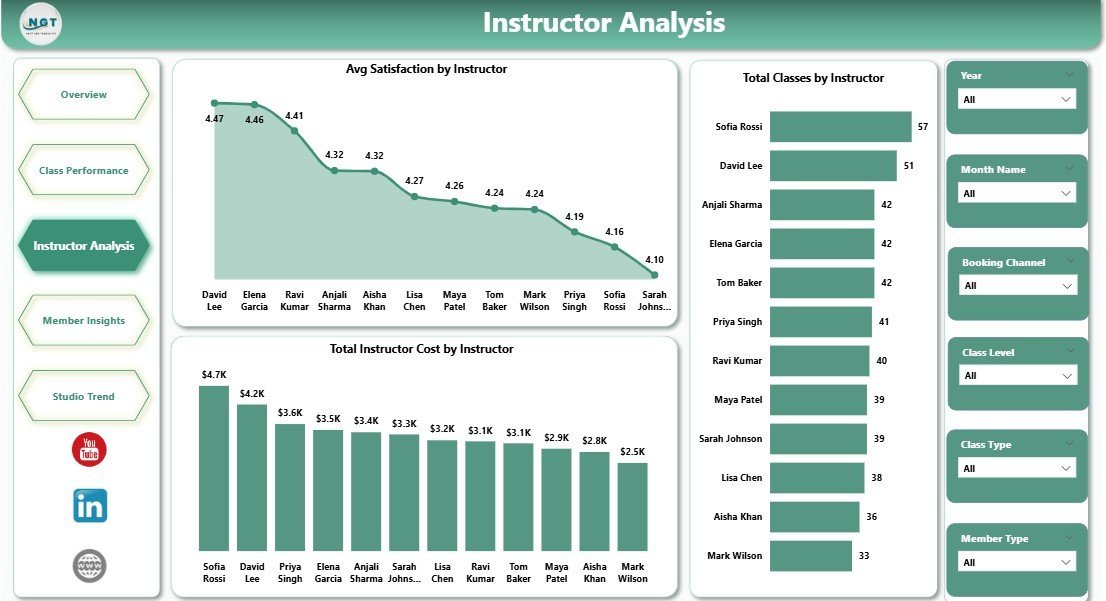
🔹 Instructor Analysis page with Avg Satisfaction by Instructor, Total Instructor Cost by Instructor, and Total Classes by Instructor — quantify which instructors deliver the best member experience versus the highest payroll cost.
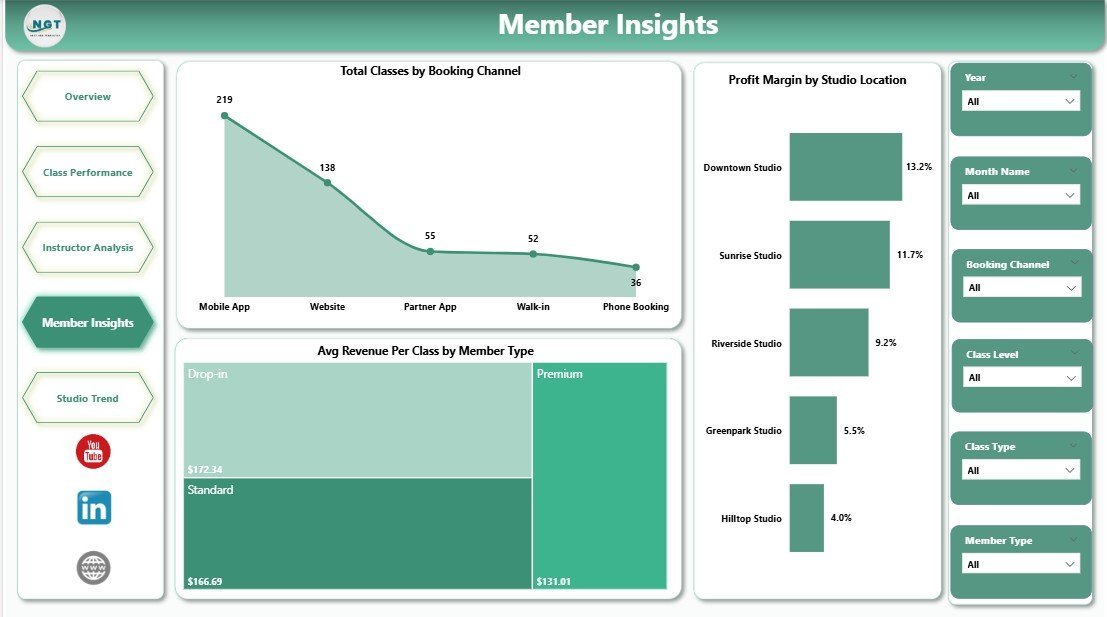
🔹 Member Insights page showing Total Classes by Booking Channel, Avg Revenue Per Class by Member Type, and Profit Margin by Studio Location — useful for marketing teams deciding where to push membership upgrades and which booking channel to prioritize.
📦 What’s Inside the Yoga Wellness Studio Dashboard in Power BI
This dashboard ships with multiple types of pages.
1 — Overview Page: The top section shows 5 cards for high-level information. The page also has charts and slicers so you can filter the entire dashboard quickly.
🔹 Total Revenue
🔹 Total Studio Cost
🔹 Total Instructor Cost
🔹 Total Equipment Cost
🔹 Total Attendees
Charts on the overview:
🔹 Profit Margin — gauge visual showing the studio’s overall profit margin percentage, calculated from total revenue minus all operational costs.
🔹 Total Revenue by Studio Location — column chart comparing revenue across all studio locations, helping owners spot the strongest and weakest performers.
🔹 Total Attendees and Total Capacity by Class Type — clustered chart comparing actual attendance against class capacity for every yoga style, exposing under-filled and over-subscribed sessions.
🔹 Total Revenue by Month Name — time-series chart showing monthly revenue trend, helping spot seasonality and the impact of marketing pushes.
Yoga Wellness Studio Dashboard in Power BI
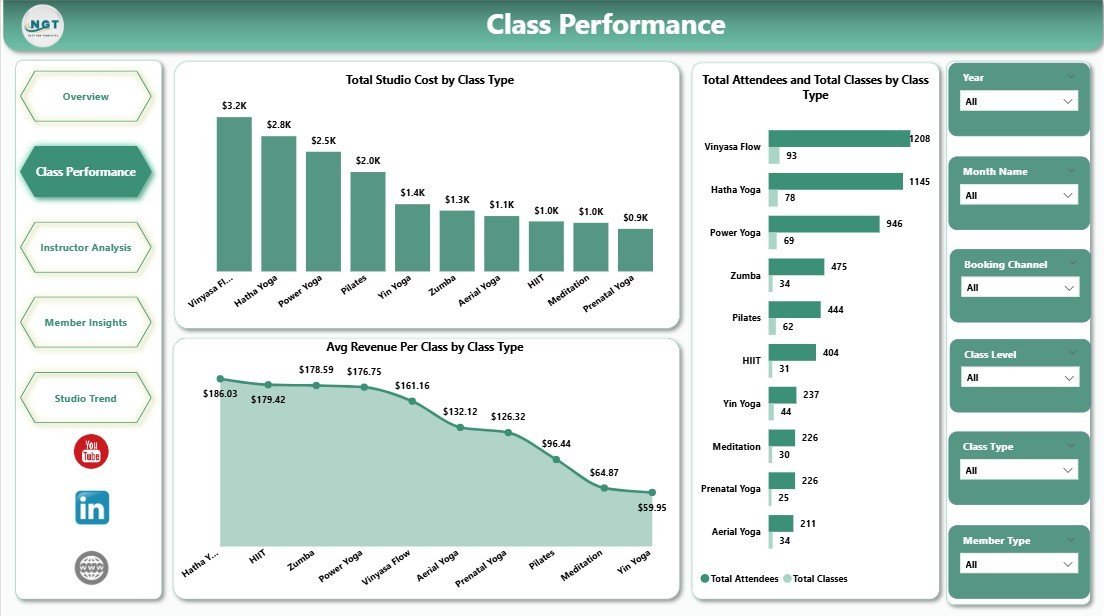
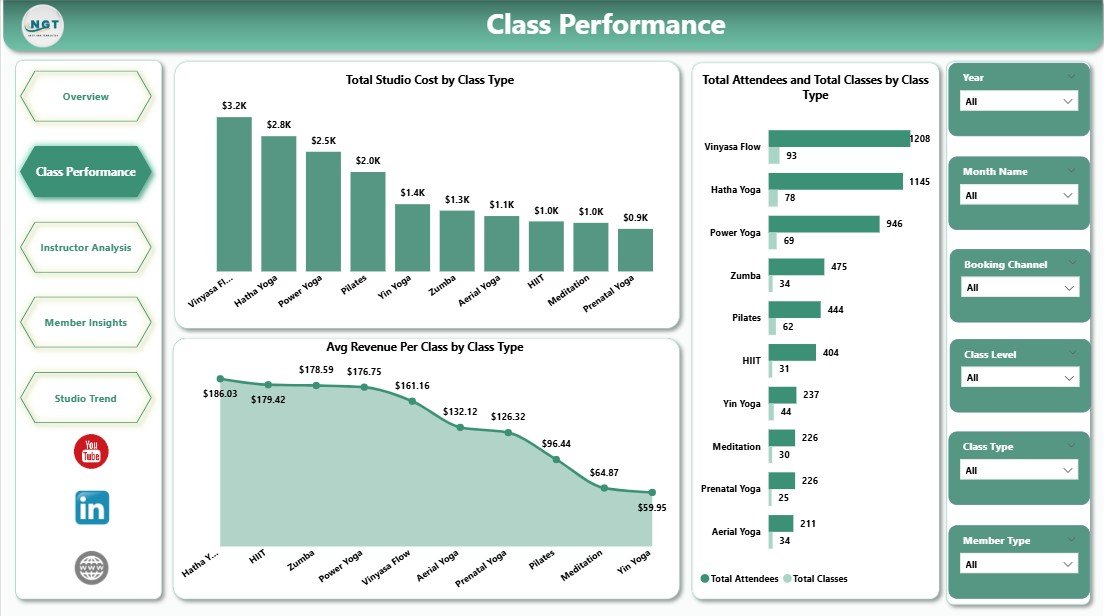
2 — Class Performance: Analyzes how each class type contributes to revenue and operational cost.
🔹 Total Studio Cost by Class Type — reveals which class formats consume the most studio overhead (room hire, equipment, utilities).
🔹 Avg Revenue Per Class by Class Type — identifies the highest-yielding session formats per single class run.
🔹 Total Attendees and Total Classes by Class Type — a combined view of demand (attendees) versus supply (classes scheduled), exposing where to add or cut capacity.
Class Performance
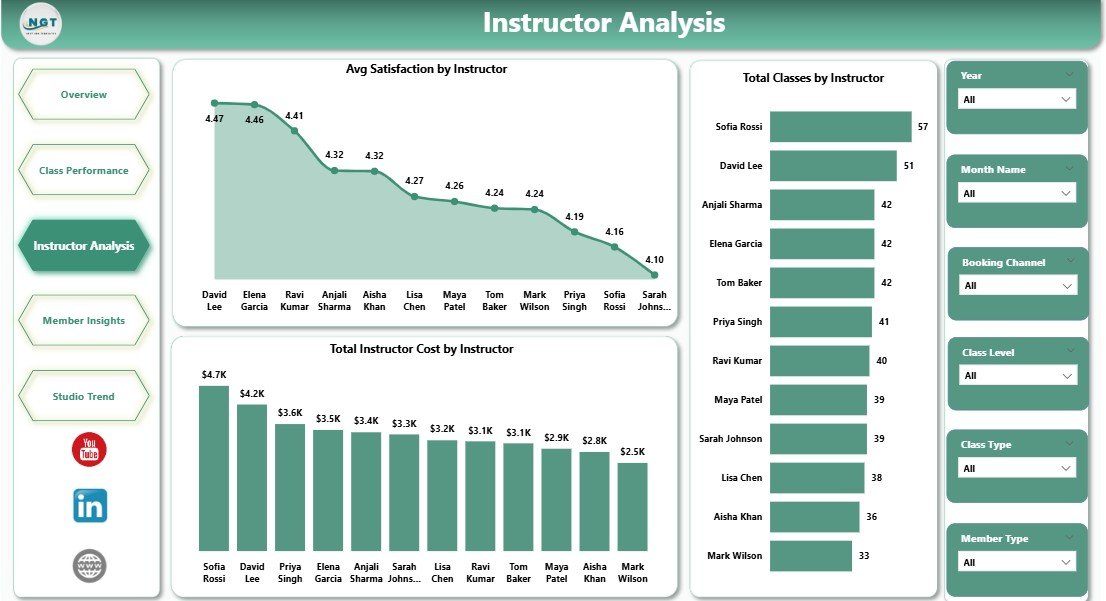
3 — Instructor Analysis: Compares instructors on satisfaction, cost, and volume.
🔹 Avg Satisfaction by Instructor — surfaces top-rated instructors based on member feedback scores.
🔹 Total Instructor Cost by Instructor — shows total payroll spend per instructor over the period.
🔹 Total Classes by Instructor — reveals teaching workload distribution and helps balance scheduling.
Instructor Analysis
4 — Member Insights: Shows how members behave across booking channels and membership tiers.
🔹 Total Classes by Booking Channel — compares the volume of bookings via app, website, walk-in, and partner channels.
🔹 Avg Revenue Per Class by Member Type — reveals which membership tier (drop-in, monthly, annual) produces the most revenue per session.
🔹 Profit Margin by Studio Location — pinpoints which location returns the highest margin after all costs.
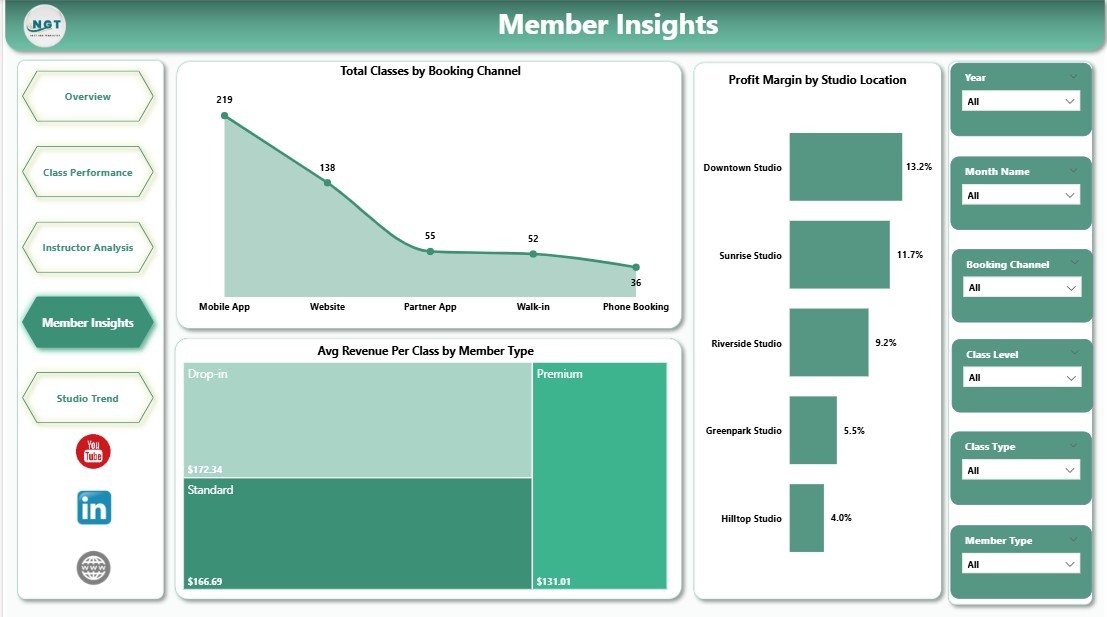
Member Insights
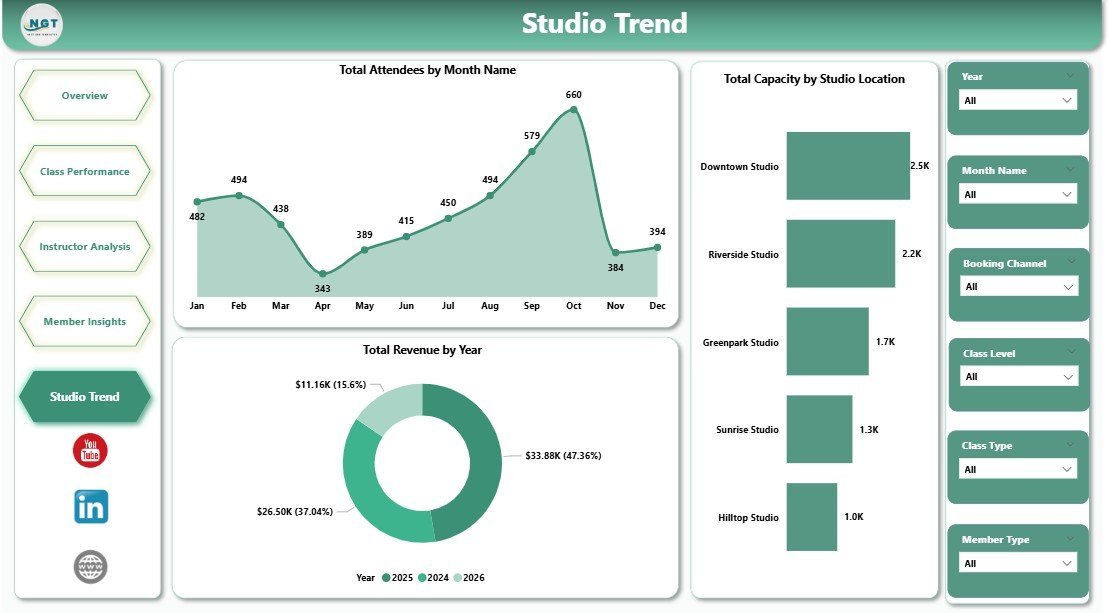
5 — Studio Trend: Long-range view of attendance, revenue, and capacity.
🔹 Total Attendees by Month Name — month-over-month attendance trend across the year.
🔹 Total Revenue by Year — year-over-year revenue comparison for multi-year planning.
🔹 Total Capacity by Studio Location — utilization view showing capacity available at each location.
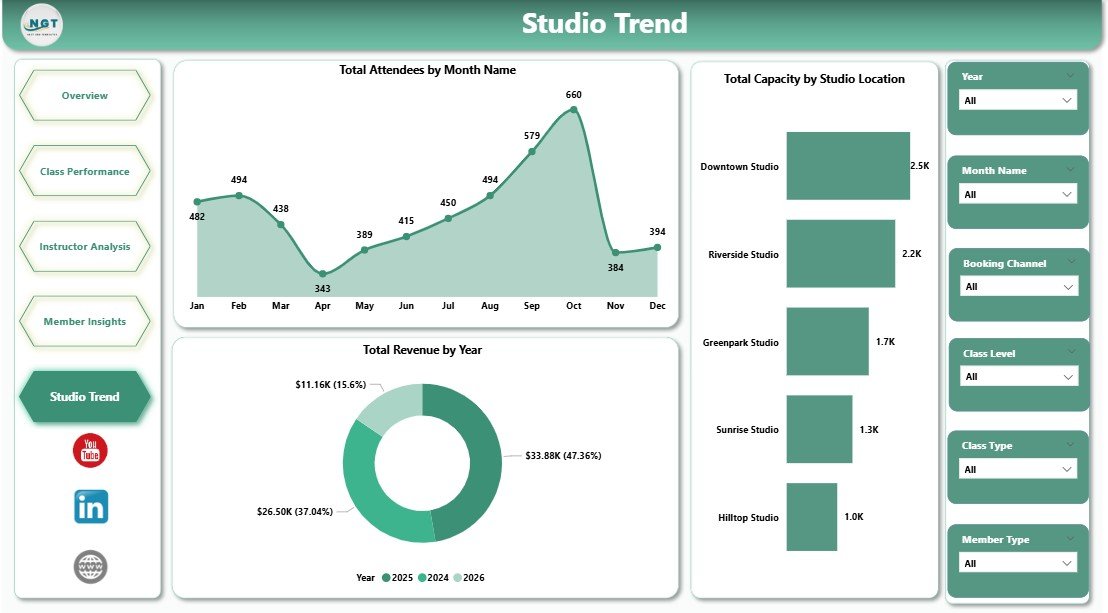
Studio Trend
📊 Yoga Wellness Studio Dashboard vs. Tableau / Qlik vs. Mindbody / Glofox — Where This Fits
| Feature | Yoga Wellness Studio Dashboard in Power BI | Tableau / Qlik Equivalent | Mindbody / Glofox / Vagaro |
|---|---|---|---|
| Cost | $17.99 one-time | $70 / user / month (Tableau Creator) | $129–$499 / month per location |
| Platform | Power BI Desktop (free) | Tableau Desktop / Qlik Sense | Cloud SaaS booking + reporting |
| Setup time | Under 10 minutes ✅ | 2–5 days of data modeling | 1–4 weeks onboarding |
| Customizable visuals & DAX | Full edit access ✅ | ✅ | Limited — vendor-controlled |
| Multi-location view | Built-in slicer ✅ | ✅ (build it yourself) | ✅ (per-location subscription) |
| Instructor satisfaction analysis | Pre-built page ✅ | Build from scratch | Limited / paid add-on |
| Booking channel analysis | Pre-built visual ✅ | Build from scratch | ✅ |
| Year-1 cost at 5 users | $17.99 total ✅ | $4,200 | $1,548–$5,988 |
| Recurring fee | None ✅ | Yes | Yes |
For yoga and wellness studios that want full Power BI analytics on revenue, instructors, and members without paying for a Mindbody-tier reporting subscription, the Yoga Wellness Studio Dashboard in Power BI sits in the sweet spot.
👥 Who This Template Is For — and Who It’s Not For
✅ This template is built for:
- Yoga and wellness studio owners running 1–5 locations who want a one-screen revenue and cost view
- Studio managers who already export class logs from Mindbody, Glofox, Vagaro, or a custom booking system into Excel/CSV
- Operations leads who want to compare instructor cost-to-satisfaction and act on the data
- Boutique fitness chains tracking profit margin per location across class types
❌ This template is NOT for:
- Studios that need a live booking engine — this is reporting-only, not a Mindbody replacement for class registration
- Enterprise franchise networks needing row-level security, AAD integration, and audit logs across 50+ locations
- Users who don’t have Power BI Desktop installed and don’t want to download it (free from Microsoft)
⚙️ How to Use the Yoga Wellness Studio Dashboard in Power BI
1. Download the .pbix file and open it in Power BI Desktop (free).
2. Replace the sample dataset with your studio’s class log — keep the column names identical.
3. Click Refresh in the Home ribbon — every card, chart, and slicer updates automatically.
4. Use the slicers at the top of each page to filter by Studio Location, Class Type, Instructor, or Month.
5. Publish to Power BI Service when you’re ready to share with managers and instructors.
💼 Real-World Use Cases
Priya runs a 3-location yoga studio in Mumbai. She uses the Yoga Wellness Studio Dashboard in Power BI every Monday morning to compare revenue and profit margin across all three locations. The Class Performance page told her that Hot Yoga sessions have 40% higher revenue per class than Yin — so she added two more Hot Yoga slots per week.
Marcus manages a wellness chain in Austin. His Instructor Analysis page revealed that two of his most-booked instructors had the lowest satisfaction scores. He used the data to schedule shadowing with top-rated instructors instead of cutting them — retention improved within a quarter without losing experienced staff.
Lena opened her first solo studio in Berlin. She uses the Member Insights page to compare booking channels every month — she discovered her partner-app channel was driving 60% of new sign-ups, so she renegotiated commission terms before her contract renewal.
❓ Frequently Asked Questions
What KPIs does the Yoga Wellness Studio Dashboard in Power BI track?
The Yoga Wellness Studio Dashboard in Power BI tracks 5 KPI cards on the Overview page — Total Revenue, Total Studio Cost, Total Instructor Cost, Total Equipment Cost, and Total Attendees — plus 16 supporting charts across Class Performance, Instructor Analysis, Member Insights, and Studio Trend pages.
Do I need a Power BI subscription to use this dashboard?
No. The Yoga Wellness Studio Dashboard in Power BI runs in Power BI Desktop, which is free from Microsoft. A Power BI Pro subscription is only needed if you want to share the report online with other users via Power BI Service.
How long does setup take?
Setup takes under 10 minutes for most studios. Open the .pbix file, point the data source to your class log export (CSV or Excel), match the column names to the template’s data model, and click Refresh. Every chart and KPI updates automatically.
How does this compare to Mindbody or Glofox reporting?
Mindbody and Glofox are full booking platforms with built-in reporting at $129–$499 per month per location. The Yoga Wellness Studio Dashboard in Power BI is a one-time $17.99 reporting layer you connect to any booking system’s data export — useful when you want deeper analytics without paying enterprise SaaS pricing.
Can I customize the visuals and add my own KPIs?
Yes. The .pbix file is fully editable in Power BI Desktop. You can change colors, add new measures in DAX, swap visuals, add pages, and connect additional data sources — without restrictions or vendor lock-in.
Does it work with Mindbody, Glofox, Vagaro, or my custom booking system?
Yes. The Yoga Wellness Studio Dashboard in Power BI accepts any class log exported as CSV or Excel. Mindbody, Glofox, Vagaro, MarianaTek, and most custom systems all support data exports that can feed this template directly.
👤 About the Author
Built by PK — Microsoft Certified Professional with 15+ years of Excel, Google Sheets, and Power BI experience. Founder of NextGenTemplates, reaching 300K+ subscribers across YouTube channels (@PK-AnExcelExpert, @NextGenTemplates, @NeoTechNavigators). Every template is hand-built and tested before release.
🔗 Explore Related Templates
🔹 Yoga & Wellness Studio Dashboard in Excel — same dashboard, Excel version for teams that prefer pivot-driven Excel.
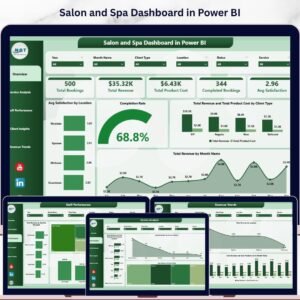
🔹 Salon and Spa Dashboard in Power BI — sister template for spa, beauty, and wellness chains.
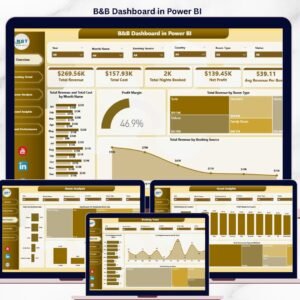
🔹 B&B Dashboard in Power BI — same Power BI architecture for hospitality service businesses.
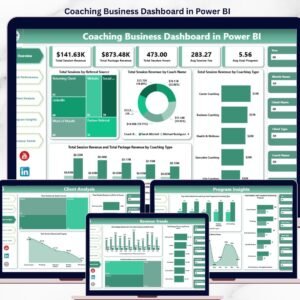
🔹 Coaching Business Dashboard in Power BI — for solo coaches and instructor-led businesses.
🔹 Browse the full Power BI Dashboard collection.
Also available as: Excel version — same KPIs, different platform.
📖 Click here to read the Detailed Blog Post
🎥 Visit our YouTube channel for step-by-step video tutorials
👉 YouTube.com/@NextGenTemplates
📅 Last updated: April 2026