



The Workplace Organization Checklist in Google Sheets is a practical tool designed to help businesses and individuals maintain an organized and efficient workspace. Whether you’re managing a team, running a small business, or working solo, this customizable checklist allows you to monitor and manage various organizational tasks, ensuring a clutter-free and productive environment.
With its user-friendly interface and customizable features, this checklist simplifies the process of task management, responsibility assignment, deadline tracking, and progress monitoring, helping you stay on top of your workplace organization efforts. From office decluttering to workflow optimization, this tool covers all aspects of maintaining an organized space, allowing you to focus on productivity.

Key Features of the Workplace Organization Checklist
📋 Task Management
Easily list and prioritize tasks to streamline your organizational efforts. This feature allows you to break down your workplace tasks into actionable steps for maximum efficiency.
👥 Responsibility Assignment
Assign tasks to team members to ensure clear accountability and improve team collaboration. This feature helps everyone understand their roles, making sure nothing is overlooked.
⏰ Deadline Tracking
Set and monitor deadlines for each task to ensure timely completion. Stay on top of deadlines and avoid delays with automatic reminders.
📊 Progress Monitoring
Track the status of each task with a simple checkbox system, allowing you to keep track of what’s completed, in progress, or yet to be done.
🔄 Customizable Categories
Organize tasks into categories that suit your specific workplace needs, whether it’s for general office organization, project management, or team-specific duties.
💻 User-Friendly Interface
The checklist is built within Google Sheets, offering a simple and accessible platform for anyone to use. No technical skills required to set up and manage your organizational efforts.
Benefits of Using the Workplace Organization Checklist
✅ Enhanced Productivity
By keeping tasks organized and clear, you can focus on priorities and work more efficiently, reducing time spent on unnecessary distractions.
✅ Improved Accountability
With clear task assignments, everyone knows their responsibilities, ensuring better follow-through and completion rates.
✅ Timely Task Completion
The ability to set deadlines and track progress ensures that tasks are completed on time, keeping your workplace running smoothly.
✅ Flexible Customization
Adapt the checklist to meet your specific organizational needs. Whether it’s for a personal to-do list or team-wide tasks, you can modify the categories, tasks, and other elements to fit your needs.
✅ Simplicity and Accessibility
Being based on Google Sheets, the checklist is easily accessible from any device, allowing for seamless collaboration and sharing across teams and devices.
How to Use the Workplace Organization Checklist
1️⃣ Access the Template – Download the checklist template instantly from the provided link.
2️⃣ Customize the Checklist – Modify the categories, tasks, and any other sections to suit your specific workplace needs.
3️⃣ Assign and Schedule Tasks – Allocate tasks to appropriate team members and set realistic deadlines.
4️⃣ Monitor Progress – Regularly update the status of tasks to keep track of progress and ensure timely completion.
5️⃣ Review and Adjust – Periodically assess the checklist’s effectiveness and make necessary improvements to better manage your tasks.
Who Can Benefit from the Workplace Organization Checklist?
🔹 Businesses – Organize tasks and activities within teams to increase workplace efficiency.
🔹 Freelancers – Keep track of personal organizational projects to maintain a productive work environment.
🔹 Managers – Oversee and coordinate organizational tasks across teams or departments.
🔹 Individuals – Maintain a tidy, organized workspace to boost personal productivity and keep everything in order.
With the Workplace Organization Checklist in Google Sheets, you can effortlessly stay organized and focused, ensuring a smooth and productive working environment for yourself or your team.
Click here to read the Detailed blog post
Workplace Organization Checklist in Google Sheets
Visit our YouTube channel to learn step-by-step video tutorials
Youtube.com/@PKAnExcelExpert
Watch the step-by-step video Demo:
Compatibility and Requirements
- Works in Google Sheets. You need a free Google account and a web browser.
- New to Google Sheets? Google’s guide How to use Google Sheets covers the basics.
Frequently Asked Questions
What can I track with this checklist?
You can list workplace organization tasks, assign each one to a team member, set deadlines and track progress.
How do I mark a task as done?
Each task has a simple checkbox, so you can see what is completed, in progress or not started.
Can I change the categories?
Yes. You can rename or add categories for general office organization, projects or team duties.
Can my team use it together?
Yes. It is a Google Sheets file, so you can share it and update it from any device.
Is there an Excel version?
Yes. The Workplace Organization Checklist in Excel does the same job in Excel.
Related Workplace Organization Templates
- Workplace Organization Checklist in Excel: the same checklist in Excel
- Workplace Organization Audit in Excel: audit how organized each area is
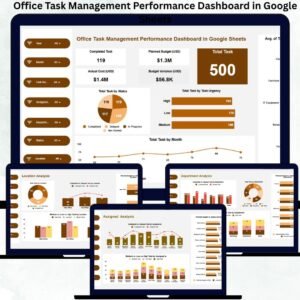
- Office Task Management Performance Dashboard in Google Sheets: track office tasks on a dashboard
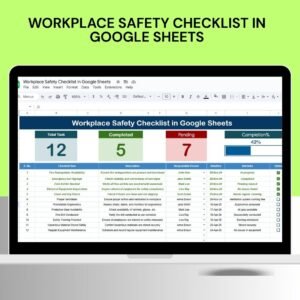
- Workplace Safety Checklist in Google Sheets: check safety items in the same workspace
- Checklist & SOP Pack: 12 checklist templates in one download
Browse all Google Sheets checklists or the Excel checklists.



Reviews
There are no reviews yet.