



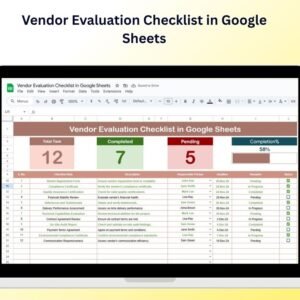
The Vendor Evaluation Checklist in Google Sheets is an essential tool for businesses looking to assess, evaluate, and compare potential and current vendors. This Google Sheets-based checklist simplifies the vendor evaluation process by providing an organized system to track vendor performance, compliance, pricing, delivery time, and other key metrics. Whether you’re sourcing raw materials, outsourcing services, or managing suppliers, this checklist ensures that you make informed decisions and build strong vendor relationships.
With a user-friendly interface, customizable criteria, and real-time tracking, this checklist helps you identify the best vendors that align with your business needs and objectives, ensuring the long-term success of your supply chain.

Key Features of the Vendor Evaluation Checklist in Google Sheets:
✅ Vendor Performance Tracking
Track key performance indicators (KPIs) such as quality, delivery time, pricing, and customer service to assess vendor reliability and efficiency.
💰 Cost Comparison
Easily compare the pricing structures of different vendors to ensure you’re getting the best value for your business.
📦 Compliance Monitoring
Monitor whether vendors comply with your specific requirements, including industry certifications, environmental standards, and regulatory compliance.
📅 Delivery Time and Reliability Tracking
Track delivery schedules and performance to ensure that vendors meet deadlines and consistently provide timely shipments.
📊 Rating and Scoring System
Use a standardized scoring system to rate vendors based on various factors such as product quality, customer service, and reliability, making it easier to compare vendors.
📈 Customizable and Easy-to-Use
Easily customize the checklist to match your business’s specific vendor evaluation criteria, ensuring that you’re assessing what matters most for your operations.
🚀 Why You’ll Love the Vendor Evaluation Checklist in Google Sheets:
✅ Streamline Vendor Assessments – Use a comprehensive, organized checklist to evaluate potential and current vendors based on key performance metrics.
✅ Make Informed Decisions – Compare vendors on cost, quality, reliability, and other factors to make data-driven decisions that benefit your business.
✅ Ensure Vendor Compliance – Track vendor compliance with your standards and requirements, ensuring they meet your business’s needs and industry regulations.
✅ Enhance Vendor Relationships – Monitor and evaluate vendor performance over time to foster strong, long-term relationships with reliable partners.
✅ Customizable and Simple – This Google Sheets checklist is fully customizable, making it easy to align with your business’s unique vendor evaluation needs.
✅ Improve Supply Chain Efficiency – Optimize your vendor selection process and make strategic choices to improve supply chain operations and reduce costs.
What’s Inside the Vendor Evaluation Checklist in Google Sheets:
- Performance Tracking: Track vendor performance across critical metrics such as product quality, service delivery, compliance, and cost-effectiveness.
- Cost Comparison: Easily compare vendor pricing to ensure you’re getting the best deal for your company.
- Delivery Time Tracking: Monitor delivery timelines to assess how well vendors meet deadlines and ensure timely delivery of goods and services.
- Scoring and Rating System: Use a standardized rating system to score vendors on key aspects, making it easier to compare their performance.
- Vendor Compliance Check: Track whether vendors meet industry standards, regulations, and your specific compliance requirements.
- Customizable Evaluation Criteria: Customize the checklist to include the evaluation criteria that are most important to your business.
How to Use the Vendor Evaluation Checklist in Google Sheets:
1️⃣ Download the Template – Instantly access your Google Sheets file upon purchase.
2️⃣ Input Vendor Data – Enter vendor details, pricing, and performance metrics into the checklist to evaluate their suitability for your business.
3️⃣ Evaluate Vendor Performance – Use the checklist to assess key metrics such as quality, delivery time, pricing, and customer service.
4️⃣ Compare Vendors – Use the scoring and rating system to compare multiple vendors and identify the best options for your business.
5️⃣ Track Vendor History – Keep an ongoing record of vendor performance over time to assess consistency and reliability.
Who Can Benefit from the Vendor Evaluation Checklist in Google Sheets:
- Procurement Managers
- Supply Chain Managers
- Purchasing Departments
- Business Owners
- Operations Managers
- Vendor Managers
- Sourcing Specialists
- Financial Analysts
The Vendor Evaluation Checklist in Google Sheets is the perfect tool for businesses looking to streamline their vendor selection process, ensure compliance, and build strong, reliable vendor partnerships.
Click here to read the Detailed blog post
https://neotechnavigators.com/vendor-evaluation-checklist-in-google-sheets/
Visit our YouTube channel to learn step-by-step video tutorials
Youtube.com/@PKAnExcelExpert
























Reviews
There are no reviews yet.