



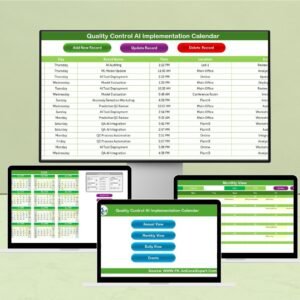
Integrating AI into quality control workflows is no longer a futuristic idea—it’s a necessity. The Technology Quality Control AI Implementation Calendar in Excel is your all-in-one digital planning tool designed for modern tech teams embracing AI-based quality assurance.
Whether you’re managing system validations, bug patch reviews, or AI model audits, this Excel calendar gives you full control over your scheduling—ensuring no task is missed and every milestone is met. This macro-enabled template features 5 interconnected worksheet tabs, intuitive navigation, real-time updates, and visual customizations that help your team stay on top of all AI-driven quality tasks.
Ideal for QA engineers, AI ethics boards, project leads, and software testing teams, this calendar offers much more than a typical planner—it’s a smart, structured productivity solution.
📌 Key Features
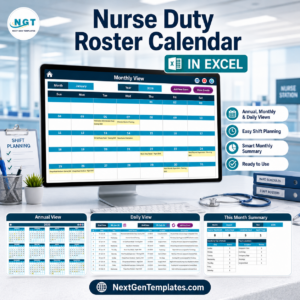
This tool includes 5 professionally designed Excel sheets:
🏠 Home Sheet

Your quick-access control panel
Navigate seamlessly to Annual, Monthly, Daily, or Events views with one click
📅 Annual View Sheet
12-month calendar auto-updated based on selected year
Customize start month and day of the week
5 theme options for personalization
Highlights weekends and scheduled events in yellow
Add and view events with easy form-based buttons
📆 Monthly View Sheet
Focused monthly calendar with event hints (“More than 1…” indicators)
Quick event add/view buttons
Select month and year to auto-update calendar
📊 Daily View Sheet
View all events between any two dates—perfect for daily meetings
Add new tasks and use refresh for latest data
🗂 Events Sheet
Master database of all logged events
Auto-generated ID, Date, Time, Location, Description
Action buttons: Add, Update, Delete records
✅ Advantages of Using This Excel Calendar
📂 Centralized AI Task Management
Track all AI-related QC events like audits, ethics reviews, model testing, and calibration in one place.
🧭 Seamless Navigation
Move between annual, monthly, and daily views without hassle.
🎨 Personalized Themes
Choose from 5 pre-built color schemes and highlight weekends/events.
⚙️ Automation-Ready
Compatible with Power BI dashboards and other Excel-based reporting tools.
🚀 No Learning Curve
No complex tools to install—just open Excel and start scheduling.
👨💻 Who Should Use This Template?
AI Quality Control Teams
QA and Compliance Managers
System Calibration Coordinators
AI Ethics Committees
Project and Product Managers
Startups and Large Tech Firms alike
🧠 Real-World Use Cases
Plan quarterly AI model validations
Schedule system calibration alerts
Track AI bug fix reviews and patch updates
Organize AI training/upskilling sessions
Maintain audit trails for compliance
💡 Best Practices for Maximum Efficiency
✔ Use clear and descriptive event titles (e.g., “AI Model V2 Regression Test”)
✔ Refresh the Daily/Monthly view after event updates
✔ Back up the Events sheet weekly
✔ Assign color themes by department or project
✔ Schedule recurring audits in advance
🚫 Avoid These Common Mistakes
❌ Skipping regular updates of events
❌ Using vague names like “Meeting” instead of “AI Ethics Board Review”
❌ Ignoring start-of-week/month configuration
❌ Disabling macros—required for full functionality
❌ Using the tool only for tracking, not analysis
📈 Why Excel Works for AI QC Planning
✅ Familiar to most professionals
✅ Allows offline access
✅ Easy to share via email or cloud
✅ Supports macros, forms, slicers, and pivot charts
✅ Integrates with Power BI dashboards for reporting
🎯 Conclusion
The Technology Quality Control AI Implementation Calendar in Excel is your go-to tool for scheduling, managing, and analyzing AI-related quality tasks. With its structured layout, customizable themes, macro-driven efficiency, and analytics-ready format, this template transforms how your tech teams manage timelines, accountability, and excellence in quality control.
Use it consistently and proactively—and watch your workflow become smarter, faster, and more transparent.
🎥 Learn How to Use It
Visit our YouTube channel for step-by-step tutorials:
🔗 youtube.com/@PKAnExcelExpert
Watch the step-by-step video tutorial:
Compatibility and Requirements
- Works in Microsoft Excel desktop on Windows with macros enabled. It does not run in Excel for the web, Google Sheets or mobile apps.
- The Add, Update and Delete buttons and the event forms need macros. Microsoft explains how in Enable or disable macros in Microsoft 365 files.
Frequently Asked Questions
Which sheets are included?
Five sheets: Home, Annual View, Monthly View, Daily View and Events.
Where are my events stored?
Every event is saved on the Events sheet, which holds an auto-generated ID, date, time, location and description. You add, update and delete records there with the action buttons.
Can I see all events between two dates?
Yes. The Daily View sheet lists all events between any two dates you choose. Use the refresh button after you add new tasks.
Can I change the start month or the colors?
Yes. On the Annual View sheet you can set the start month and the first day of the week, and pick one of 5 themes. Weekends and scheduled events are highlighted in yellow.
Is there a version for another department or industry?
Yes. See the Quality Control AI Implementation Calendar in Excel and the Finance Quality Control AI Implementation Calendar in Excel.
Related Quality Control Calendars
- Quality Control AI Implementation Calendar in Excel: the general version for any team
- Technology Quality Control Customer Experience Calendar in Excel: the same layout for customer experience tasks
- Technology Quality Control Remote Work Calendar in Excel: schedules for remote work reviews
- Technology Operations AI Implementation Calendar in Excel: AI planning for operations teams
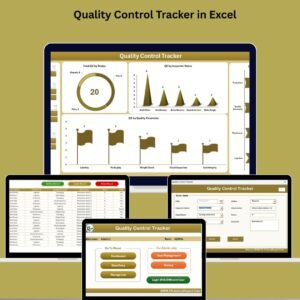
- Quality Control Tracker in Excel: a tracker for logging quality issues
Browse all Excel calendars and Quality Control templates.










Reviews
There are no reviews yet.