



The Procurement Tracker and Dashboard in Google Sheets is a ready-made template for businesses and organizations that want to streamline their purchasing process. It brings orders, suppliers, purchase costs and delivery dates into one place. Procurement managers, business owners and project managers get a clear overview of the entire procurement lifecycle and can keep purchasing on track and within budget.
Whether you manage supplies, inventory or raw materials, this intuitive and customizable tracker helps you stay on top of every purchase order. It supports real-time tracking of inventory levels and financial expenditures, so your team always works from the same up-to-date information.

Key Features of the Procurement Tracker and Dashboard
- Purchase order management: Track each purchase order with details such as supplier, order status and delivery dates. Purchase order tracking stays simple and organized.
- Supplier tracking: Monitor multiple suppliers, compare prices and help ensure timely deliveries.
- Financial overview: Track total spend, compare costs and stay within budget with real-time calculations.
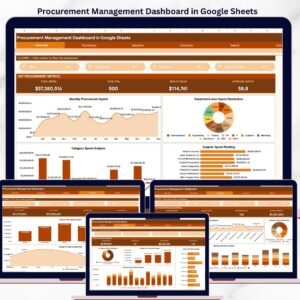
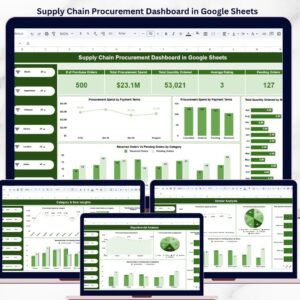
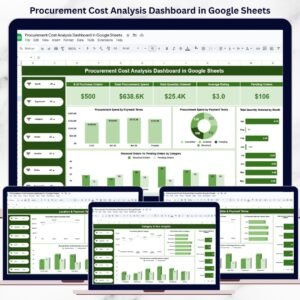
- Visual insights: Built-in charts and graphs show procurement trends and spending patterns at a glance in the procurement dashboard.
- Real-time collaboration: Share the tracker with your team for collaborative updates and decisions.
- Customizable layout: Adapt the tracker to your specific procurement needs, whether you buy materials, services or products.
Why You’ll Love This Google Sheets Procurement Tracker
- Efficient procurement management: Keep orders, suppliers and purchases in a single, organized place.
- Real-time tracking: Live data updates support timely decision-making.
- Budget management: Automatically track procurement spending and make sure you stay within budget.
- Customizable to your needs: Adjust the template to fit your organization’s procurement process, supplier relationships and product categories.
- User-friendly interface: A simple, intuitive design makes data entry and updates easy, with minimal setup required.
What’s Inside the Template
| Component | What it helps you do |
|---|---|
| Order Management | Track purchase orders, delivery dates and payment statuses. |
| Supplier Management | Maintain supplier details, including contact information and pricing history. |
| Spending Overview | Visualize total spending and budget status with interactive charts. |
| Customizable Fields | Add custom categories for materials, products and services to match your procurement strategy. |
| Real-Time Collaboration | Share the sheet with others and work on procurement decisions together in real time. |
Together, these components combine supplier management, purchase order tracking and a visual procurement dashboard in one Google Sheets file.
Who Is It For?
This template suits anyone who needs a clear, shared view of purchasing activity:
- Procurement Managers: oversee every order and supplier from one place.
- Small Business Owners: keep purchasing costs visible and under control.
- Operations Managers: monitor deliveries and order status.
- Supply Chain Coordinators: track delivery timelines and supplier performance.
- Financial Analysts: review total spend, cost comparisons and budget status.
- Project Managers: manage project purchases and stay within budget.
- Inventory Managers: keep track of supplies, inventory and raw materials.
How to Use the Procurement Tracker in Google Sheets
- Download the template: Get instant access to the pre-configured procurement tracker in Google Sheets.
- Enter supplier and order details: Add supplier contact information, product details and order specifics.
- Track purchases: Monitor order status, delivery timelines and payments.
- Analyze procurement data: Use the charts and graphs to review spending patterns and procurement performance.
- Collaborate and update: Share the sheet with your team for real-time updates and collaborative decision-making.
Click here to read the detailed blog post
Watch the step-by-step video tutorial:
Visit our YouTube channel to learn from step-by-step video tutorials.
Frequently Asked Questions
What can I track with the Procurement Tracker and Dashboard in Google Sheets?
You can track purchase orders, suppliers, order status, delivery dates, payment statuses, purchase costs and total spending, all in one place.
Does it help with supplier management?
Yes. You can maintain supplier details, including contact information and pricing history, monitor multiple suppliers and compare prices.
How does it support procurement budget tracking?
The tracker uses real-time calculations to track total spend and compare costs. Interactive charts show your spending and budget status, so you can stay within budget.
Can my team work on the tracker together?
Yes. Because it is built in Google Sheets, you can share the sheet with your team for real-time collaboration on updates and procurement decisions.
Can I customize the template?
Yes. The layout and fields are customizable. You can add your own categories for materials, products and services to match your procurement process.
Is there a tutorial on how to use it?
Yes. A step-by-step video tutorial is embedded above, and a detailed blog post is linked on this page.
Streamline your procurement process, manage supplier relationships and stay within budget with the Procurement Tracker and Dashboard in Google Sheets.
Also check our Attendance Template in Google Sheet
Last updated: October 2026
Compatibility and Requirements
- Works in Google Sheets with a free Google account and a web browser. Nothing to install.
- Share the file with your team from Google Sheets to update orders together. Google explains charts in Add & edit a chart or graph.
Related Procurement Templates
- Procurement Dashboard in Excel: the procurement dashboard for Excel users
- Procurement Dashboard in Power BI: procurement reporting in Power BI
- Purchase Order Tracker in Google Sheets: a dedicated purchase order log
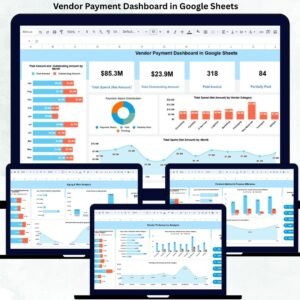
- Vendor Payment Dashboard in Google Sheets: follow supplier payments
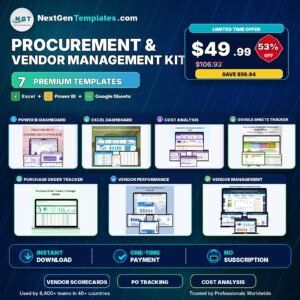
- Procurement and Vendor Management Kit: 7 procurement and vendor templates in one bundle
Browse all Google Sheets dashboard templates or the Google Sheets financial tools.



Reviews
There are no reviews yet.