Sustainability has become a top priority for modern organizations as they strive to reduce environmental impact and improve operational efficiency. Companies today focus on monitoring energy consumption, managing water usage, optimizing workspace utilization, and reducing waste generation. However, managing sustainability across multiple buildings, offices, and departments can become complex without a structured monitoring system.
Many organizations still depend on scattered spreadsheets and manual reporting to track sustainability metrics. As a result, managers often struggle to analyze energy consumption trends, monitor water usage, and evaluate workplace efficiency effectively. Without a centralized system, it becomes difficult to identify inefficiencies or make informed sustainability decisions.
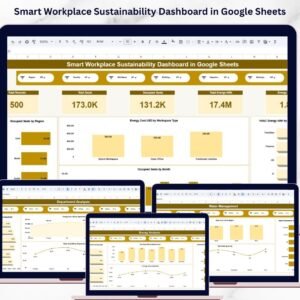
The Smart Workplace Sustainability Dashboard in Google Sheets is a ready-to-use analytics solution designed to help organizations track environmental performance and workplace efficiency in a structured and interactive way. This dashboard consolidates key sustainability metrics into a centralized platform where decision-makers can quickly analyze data and identify improvement opportunities.
Through interactive charts, KPI cards, and analytical reports, the dashboard provides insights into energy consumption, water usage, workspace utilization, environmental costs, and waste management. Because the template runs in Google Sheets, organizations can collaborate in real time, access data from anywhere, and update sustainability information easily.
By using this dashboard, businesses can monitor sustainability performance across multiple dimensions such as regions, countries, buildings, departments, and workspace types. As a result, organizations gain better visibility into environmental performance and can implement strategies that support sustainable operations.

Key Feature of Smart Workplace Sustainability Dashboard in Google Sheets 🌱
The Smart Workplace Sustainability Dashboard in Google Sheets includes several powerful features designed to improve sustainability monitoring and workplace efficiency.
📊 Interactive Sustainability Dashboard
The main dashboard provides a centralized overview of workplace sustainability metrics.
🔍 Advanced Data Filters
Users can filter data by Region, Country, Site Name, Building, Department, and Workspace Type to analyze specific locations.
📈 Sustainability KPI Cards
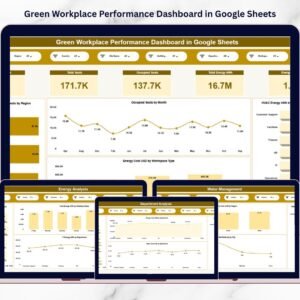
The dashboard displays important metrics such as Total Records, Total Seats, Occupied Seats, Total Energy Consumption, and Energy Cost.
⚡ Energy Consumption Analysis
Organizations can analyze electricity usage across buildings, regions, and departments.
🔋 Renewable Energy Monitoring
Track renewable energy consumption across different regions to evaluate sustainability initiatives.
💧 Water Usage Monitoring
Monitor water consumption across departments and locations to improve conservation strategies.
♻️ Waste Management Analysis
Track waste generation and analyze environmental impact across multiple cities.
🏢 Workspace Utilization Insights
Monitor seating capacity and workspace occupancy to optimize office space usage.
💰 Environmental Cost Analysis
Analyze energy and water costs across departments to identify cost-saving opportunities.
☁️ Cloud-Based Collaboration
Because the dashboard runs on Google Sheets, teams can collaborate and update sustainability data in real time.
What’s Inside the Smart Workplace Sustainability Dashboard in Google Sheets 📂
This template includes multiple analytical sections designed to provide a complete view of workplace sustainability performance.
📊 Overview Page – Sustainability Summary
Provides a high-level overview of sustainability metrics including energy usage, workspace capacity, and environmental costs.
⚡ Energy Analysis Section
Analyzes electricity consumption by building type, weekday patterns, renewable energy adoption, and departmental usage.
💧 Water Management Section
Tracks water consumption trends, regional water costs, and departmental water usage.
🏢 Department Analysis Section
Provides insights into seat utilization, energy consumption, and water costs across departments.
🔎 Data Search and Analysis Section
Includes a keyword-based search system that allows users to quickly filter records and analyze specific data.
Together, these components create a comprehensive sustainability monitoring system.
How to Use the Smart Workplace Sustainability Dashboard in Google Sheets ⚙️
Using this dashboard is simple and requires only basic Google Sheets knowledge.
1️⃣ Enter workplace sustainability data into the data source sheet.
2️⃣ Include metrics such as energy consumption, water usage, workspace occupancy, and waste generation.
3️⃣ Use dashboard filters to analyze data by region, department, building, or workspace type.
4️⃣ Review KPI cards to evaluate overall sustainability performance.
5️⃣ Analyze charts to identify trends in energy consumption, water usage, and environmental costs.
6️⃣ Use insights to implement sustainability improvements.
Because the dashboard automatically updates charts and KPIs, managers can easily monitor environmental performance.
Who Can Benefit from This Smart Workplace Sustainability Dashboard in Google Sheets 👥
This dashboard is ideal for organizations focused on sustainability, workplace efficiency, and environmental responsibility.
🏢 Corporate Sustainability Teams – Monitor environmental performance across workplace locations.
🌍 Environmental Management Departments – Track sustainability initiatives and environmental impact.
🏭 Facilities Management Teams – Monitor building energy consumption and workspace utilization.
📊 Operations Managers – Analyze energy costs and optimize workplace efficiency.
🏙 Large Organizations with Multiple Offices – Track sustainability performance across regions and locations.
🌱 Green Building Consultants – Evaluate workplace sustainability metrics for clients.
Organizations that aim to improve environmental performance and reduce operational costs can greatly benefit from this dashboard.
Click hare to read the Detailed blog post
Watch the step-by-step video tutorial:
Visit our YouTube channel to learn step-by-step video tutorials
🔗 https://youtube.com/@NeotechNavigators
Compatibility and Requirements
- Works in Google Sheets with a free Google account and a web browser. Nothing to install.
- Google explains how Sheets charts work in Add & edit a chart or graph, which helps if you want to restyle the visuals.
Frequently Asked Questions
Which KPI cards are on the dashboard?
Total Records, Total Seats, Occupied Seats, Total Energy Consumption and Energy Cost.
How can I filter the data?
Filter by Region, Country, Site Name, Building, Department and Workspace Type.
What analysis sections are included?
An Overview page, an Energy Analysis section, a Water Management section, a Department Analysis section and a Data Search and Analysis section.
Can I search for specific records?
Yes. The Data Search and Analysis section has a keyword search that filters records quickly.
Can my team work in it together?
Yes. It runs in Google Sheets, so your sustainability and facilities teams can update data in the same file in real time.
Related Sustainability Templates
- Green Workplace Performance Dashboard in Google Sheets: another view of workplace environmental performance.
- Office Sustainability Dashboard in Google Sheets: sustainability metrics for a single office.
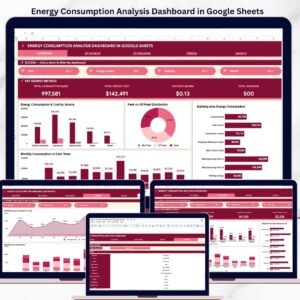
- Office Energy Consumption Dashboard in Google Sheets: a closer look at office energy use.
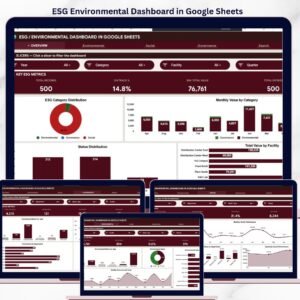
- ESG Environmental Dashboard in Google Sheets: environmental ESG reporting.
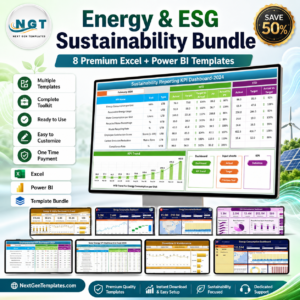
- Energy & ESG Sustainability Bundle: 8 sustainability templates in Excel and Power BI.
Browse all Google Sheets dashboard templates or the Google Sheets KPI dashboard templates.