



The SEO Optimization Calendar in Excel is a comprehensive tool designed to help businesses, marketers, and SEO specialists plan, track, and optimize their SEO efforts throughout the year. This Excel-based calendar simplifies the process of scheduling SEO tasks, monitoring progress, and staying organized by offering a clear, visual representation of important SEO activities.
With customizable features, this calendar helps you manage SEO content creation, backlinking efforts, keyword tracking, on-page optimization, and more. Stay on top of deadlines, set goals, and ensure your SEO strategy is aligned with your business objectives. Whether you’re working alone or managing a team, this calendar helps you streamline your SEO campaigns for maximum results.
Key Features of the SEO Optimization Calendar in Excel
📅 Comprehensive SEO Task Planning
Plan and schedule all of your SEO activities, including content creation, keyword research, backlink building, site audits, and more. Organize your tasks by dates, making sure that every aspect of your SEO strategy is covered.
📊 Track SEO Goals & Milestones
Set measurable SEO goals and track milestones, such as keyword rankings, traffic increases, or backlink acquisition. Monitor progress to ensure that you’re hitting your targets and optimizing your efforts.
🗓️ Monthly & Weekly Task Breakdown
View your SEO tasks on a monthly or weekly basis for better organization and time management. Break down tasks into smaller, actionable steps and ensure that you stay on track throughout the month.
📈 Performance Tracking & Reporting
Track key SEO metrics such as organic traffic, keyword rankings, backlink quality, and more. Use built-in reporting features to analyze your SEO performance and make adjustments to your strategy as needed.
🖥️ Customizable & User-Friendly
The calendar is easy to use and fully customizable. Adjust task dates, add custom SEO activities, and track unique metrics to suit your specific SEO needs. Perfect for both beginners and advanced SEO practitioners.
Why You’ll Love the SEO Optimization Calendar in Excel

✅ Stay Organized & On Schedule
Organize your SEO tasks in a structured, easy-to-use calendar format. Stay on top of deadlines and ensure that every aspect of your SEO strategy is executed efficiently.
✅ Track & Measure SEO Performance
Track the effectiveness of your SEO activities and measure key metrics like keyword rankings and traffic growth. Analyze what’s working and adjust your strategy for even better results.
✅ Improve Your SEO Strategy
By monitoring tasks and tracking performance over time, you can continuously improve your SEO strategy. Stay informed about your SEO progress and identify opportunities for optimization.
✅ Boost Your Rankings & Traffic
Use this calendar to optimize your content, on-page SEO, backlinking, and technical SEO efforts. Improve your site’s visibility and increase organic traffic over time.
✅ Fully Customizable for Your Business Needs
Tailor the calendar to fit your specific SEO objectives. Add custom tasks, adjust timelines, and track any SEO metric you find important.
What’s Inside the SEO Optimization Calendar Template in Excel?
- SEO Task Planning: Organize all your SEO tasks, from keyword research to content creation.
- Monthly & Weekly Breakdown: Track tasks on a monthly or weekly basis for better time management.
- Performance Tracking: Monitor SEO metrics such as rankings, traffic, and backlinking efforts.
- Customizable Layout: Adjust task dates, goals, and categories based on your SEO needs.
- Reporting & Analysis: Generate reports to assess the effectiveness of your SEO campaigns.
How to Use the SEO Optimization Calendar in Excel
1️⃣ Download the Template: Get immediate access to the SEO Optimization Calendar in Excel.
2️⃣ Enter Your SEO Goals & Tasks: Fill in your SEO tasks, deadlines, and goals.
3️⃣ Track Progress & Performance: Monitor the status of each SEO activity and track your performance metrics.
4️⃣ Review & Adjust Strategy: Use the insights from performance tracking to adjust your strategy and improve results.
5️⃣ Generate Reports: Create custom reports to share with your team or stakeholders to showcase SEO performance.
Who Can Benefit from the SEO Optimization Calendar in Excel?
🔹 Digital Marketers & SEO Specialists
🔹 Content Creators & Copywriters
🔹 Business Owners & Entrepreneurs
🔹 Marketing Teams & Agencies
🔹 Bloggers & Affiliate Marketers
🔹 Website Developers & Webmasters
Plan, track, and optimize your SEO strategy with the SEO Optimization Calendar in Excel. Ensure you stay on track, measure performance, and achieve better SEO results by using this powerful and easy-to-use tool.
Click here to read the Detailed blog post
Visit our YouTube channel to learn step-by-step video tutorials
Youtube.com/@PKAnExcelExpert
Watch the step-by-step video Demo:
Compatibility and Requirements
- Works in Microsoft Excel desktop (Excel 2016 or later, or Microsoft 365).
- New to Excel? Microsoft has a free guide: Excel for Windows training.
Frequently Asked Questions
Which SEO tasks can I plan in this calendar?
You can schedule content creation, keyword research, backlink building, site audits and on-page optimization, organized by date.
Can I see tasks by week or by month?
Yes. Tasks can be viewed on a monthly or weekly basis, so you can break bigger jobs into smaller steps.
Can I track SEO results as well as tasks?
Yes. You can track metrics such as organic traffic, keyword rankings and backlink quality next to your planned work.
Can I add my own SEO activities?
Yes. You can adjust task dates, add custom SEO activities and track the metrics that matter to you.
Related SEO and Content Templates
- SEO Audit Checklist in Excel: run a step-by-step SEO audit in Excel
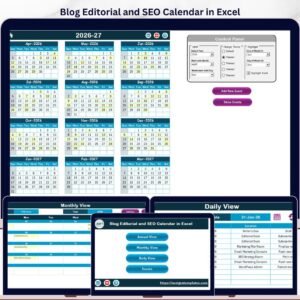
- Blog Editorial and SEO Calendar in Excel: plan blog posts and SEO work in one Excel calendar
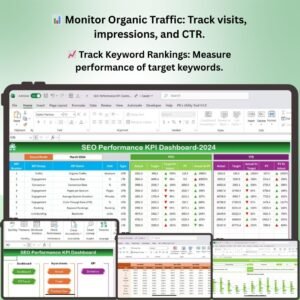
- SEO Performance KPI Dashboard in Excel: track SEO performance KPIs in Excel
- Blog Content & SEO Tracker in Google Sheets: track blog content and SEO in Google Sheets
- Calendar & Planner Pack: 12 calendar and planner templates in one download
Browse all Excel calendars or the Excel sales and marketing templates.










Reviews
There are no reviews yet.