



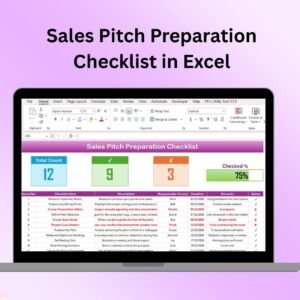
The Sales Pitch Preparation Checklist in Excel is an essential tool for sales professionals, managers, and teams looking to organize and streamline their sales pitch process. Whether you’re preparing for a one-on-one client meeting or a large group presentation, this checklist ensures that every detail of your pitch is covered, helping you deliver a polished, persuasive, and effective sales pitch every time.
This Excel-based checklist is designed to guide you through each step of the sales preparation process. From defining your goals to crafting the perfect pitch, tracking key client information, and managing your presentation content, this tool provides a clear, structured approach to enhance your sales performance.
Key Features of the Sales Pitch Preparation Checklist in Excel
📋 Step-by-Step Sales Preparation
The checklist provides a step-by-step guide through the sales pitch preparation process, ensuring that you don’t miss any critical tasks. From defining objectives to refining your pitch, every element is covered.
📝 Client & Prospect Information Tracking
Track detailed client and prospect information including their pain points, needs, and previous interactions. This helps you tailor your pitch to address their specific requirements, ensuring greater relevance and impact.
📊 Presentation Content Organization
Organize your presentation materials such as slides, handouts, and supporting documents. The checklist ensures that all necessary content is included and ready for the pitch, making your presentation seamless.
⏰ Time Management & Deadlines
Set timelines for each step of the preparation process and track deadlines. This ensures that you stay on schedule and have enough time to review your pitch before the actual presentation.
🔑 Actionable Feedback & Follow-Up Planning
After the pitch, use the checklist to track feedback and plan follow-up actions. Document key takeaways, client reactions, and any additional questions that arise, helping you refine future presentations and follow-ups.
⚙️ Customizable & Scalable
This checklist is customizable to fit any sales process, from small businesses to large corporations. You can add specific tasks, deadlines, and categories relevant to your business, ensuring it suits your unique requirements.
Why You’ll Love the Sales Pitch Preparation Checklist in Excel

✅ Organized & Structured Approach
Ensure every aspect of your sales pitch is covered, from content preparation to client interactions and follow-up planning. Stay organized and reduce stress before your presentations.
✅ Increase Sales Success
By focusing on client needs and preparing your pitch with structured steps, you can improve your chances of making a successful sale. Customize your pitch for each client for maximum impact.
✅ Improved Time Management
Track deadlines and manage your preparation time effectively, ensuring that you have enough time to perfect your pitch and deliver a smooth presentation.
✅ Enhance Client Engagement
With thorough preparation, your pitch will be more relevant to the client’s needs, increasing engagement and boosting the likelihood of closing the deal.
✅ Flexible & Customizable
Easily adjust the checklist to meet the specific requirements of different clients, industries, or products. Whether you’re preparing for a small meeting or a large-scale pitch, the checklist can adapt to fit your needs.
What’s Inside the Sales Pitch Preparation Checklist in Excel?
Step-by-Step Sales Preparation: Track each step of the sales pitch process, from defining goals to finalizing the presentation.
Client & Prospect Information: Store key details about your client’s needs, preferences, and pain points.
Presentation Content Management: Organize presentation slides, documents, and other materials.
Time Management & Deadlines: Set timelines and deadlines for each stage of the preparation.
Feedback & Follow-Up Tracking: Record feedback and plan follow-up actions after the pitch.
Customizable Layout: Adjust the checklist to suit your specific sales process and objectives.
How to Use the Sales Pitch Preparation Checklist in Excel
1️⃣ Download the Template: Instantly access the Sales Pitch Preparation Checklist in Excel.
2️⃣ Input Client Information: Enter the client’s details, including their needs and pain points, to tailor the pitch.
3️⃣ Track Preparation Steps: Follow the checklist to ensure all aspects of the sales pitch are ready.
4️⃣ Organize Presentation Materials: Ensure your slides and supporting documents are ready for the pitch.
5️⃣ Track Follow-Up Actions: After the pitch, use the checklist to track feedback and plan your follow-up actions.
Who Can Benefit from the Sales Pitch Preparation Checklist in Excel?
🔹 Sales Teams & Professionals
🔹 Sales Managers & Directors
🔹 Business Development Teams
🔹 Entrepreneurs & Small Business Owners
🔹 Marketing & Sales Alignment Teams
🔹 Consultants & Advisors
🔹 Any Professional Preparing for a Pitch
Ensure that your sales pitch is organized, well-prepared, and tailored to your client’s needs with the Sales Pitch Preparation Checklist in Excel. Stay on track and make every sales pitch count!
Click here to read the Detailed blog post
Visit our YouTube channel to learn step-by-step video tutorials
Youtube.com/@PKAnExcelExpert
Compatibility and Requirements
- Works in Microsoft Excel desktop (Excel 2016 or later, or Microsoft 365).
- The checklist is an Excel workbook you fill in yourself, so you can add your own tasks, deadlines and categories. Microsoft explains the basics in Excel for Windows training.
Frequently Asked Questions
What does the checklist cover?
It covers step-by-step pitch preparation, client and prospect information, presentation content, time management and deadlines, and feedback and follow-up tracking.
Can I change the checklist for my own sales process?
Yes. You can add your own tasks, deadlines and categories, so it fits small businesses and large teams alike.
What client details can I record?
You can record the client’s needs, pain points, preferences and previous interactions, so you can tailor the pitch to them.
Can I use it after the pitch?
Yes. The checklist includes feedback and follow-up tracking, so you can note client reactions, key takeaways and your next actions.
Is there a Google Sheets version?
Yes. See the Sales Pitch Preparation Checklist in Google Sheets.
Related Sales and Checklist Templates
- Sales Pitch Preparation Checklist in Google Sheets: the same checklist for Google Sheets
- Sales Funnel Dashboard in Excel: follow prospects through your sales stages
- Sales Target Dashboard in Excel: compare results with your sales targets
- Sales Tracking Dashboard in Excel: track sales results after the pitch
- Checklist & SOP Pack: 12 checklist templates in one download
Browse all Excel checklists or Excel sales and marketing templates.


































Reviews
There are no reviews yet.