



The Product Development Calendar in Excel is an essential tool for businesses, product managers, and teams looking to streamline and manage their product development lifecycle. This Excel-based calendar allows you to plan, track, and monitor each phase of the product development process, ensuring that every step is completed on time and within scope.
From initial concept development to product launch, this calendar provides a clear, organized structure to help you stay on top of key milestones, deadlines, and tasks. Its customizable features make it ideal for any product development team, whether you’re working on software, consumer goods, or other types of products.
Key Features of the Product Development Calendar in Excel
📅 Milestone Tracking
Track key product development milestones such as idea validation, prototyping, testing, and final launch. Stay organized and ensure you meet deadlines at each stage of the process.
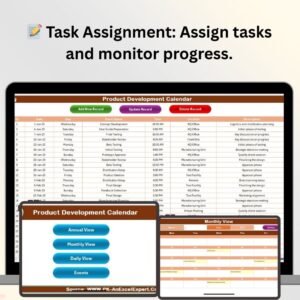
📝 Task Assignment & Progress Monitoring
Assign tasks to team members and monitor their progress. Ensure that each phase of the development is carried out by the right person at the right time.
📈 Customizable Phases & Deadlines
Customize the development phases and set specific deadlines to meet your product’s unique needs. Adjust the calendar according to your project’s complexity.
🔄 Time-Based Scheduling
Organize tasks and deadlines over daily, weekly, and monthly schedules. Stay ahead of project timelines with efficient time-based tracking.
📊 Progress Tracking & Reporting
Track the completion of each phase and generate progress reports. Monitor delays and quickly adjust resources or timelines to avoid bottlenecks.
⚙️ Collaborative & Scalable
The calendar is designed to be easily shared among team members, ensuring collaboration throughout the product development process. It’s scalable for both small projects and large-scale product launches.
Why You’ll Love the Product Development Calendar in Excel

✅ Stay Organized & On Schedule
Ensure that all tasks, milestones, and deadlines are managed efficiently throughout the product development lifecycle.
✅ Improve Team Collaboration
Easily assign tasks, track progress, and communicate deadlines with team members. Everyone stays on the same page, improving productivity and workflow.
✅ Achieve Timely Product Launches
Stay ahead of deadlines by tracking each phase of product development, from concept to launch. Avoid costly delays and ensure your product is launched on time.
✅ Customizable to Fit Your Needs
Customize the calendar to match your product’s specific development process. Whether you’re working on a tech product or a physical product, you can adjust the phases and deadlines as needed.
✅ Track and Report Progress
Use the built-in progress tracking features to monitor your project’s success. Generate reports to assess how well you’re sticking to deadlines and make adjustments as necessary.
What’s Inside the Product Development Calendar in Excel?
Milestone Tracking: Track key stages of product development from ideation to launch.
Task Assignment & Monitoring: Assign tasks and monitor their progress.
Customizable Phases & Deadlines: Set development phases and deadlines to fit your project needs.
Time-Based Scheduling: Organize tasks and deadlines based on time intervals (daily, weekly, or monthly).
Progress Tracking & Reporting: Track completed tasks and generate reports on project progress.
Collaborative Sharing: Share the calendar with your team for easy collaboration.
How to Use the Product Development Calendar in Excel
1️⃣ Download the Template: Get immediate access to the Product Development Calendar in Excel.
2️⃣ Customize Phases & Deadlines: Input your product’s specific development stages and deadlines.
3️⃣ Assign Tasks: Assign tasks to your team members and track their progress in real time.
4️⃣ Monitor Project Progress: Use the progress tracker to ensure that everything is on schedule and adjust timelines as needed.
5️⃣ Collaborate & Share: Share the calendar with your team to ensure seamless collaboration and communication.
Who Can Benefit from the Product Development Calendar in Excel?
🔹 Product Managers
🔹 Product Development Teams
🔹 Project Managers
🔹 Marketing Teams
🔹 Startups & Small Businesses
🔹 Large Enterprises with Multiple Product Lines
🔹 Research & Development Teams
Make your product development process smoother, more efficient, and more organized with the Product Development Calendar in Excel. Stay on top of every phase of development and achieve timely, successful product launches.
Click here to read the Detailed blog post
Visit our YouTube channel to learn step-by-step video tutorials
Youtube.com/@PKAnExcelExpert
Compatibility and Requirements
- Works in Microsoft Excel desktop (Excel 2016 or later, or Microsoft 365).
- You enter your own phases, tasks and deadlines in the calendar. Microsoft’s Excel for Windows training covers the basics if you are new to Excel.
Frequently Asked Questions
What can I track with this calendar?
You can track milestones from idea validation through prototyping and testing to launch. You can also assign tasks to team members, set deadlines and monitor progress for each phase.
Can I change the development phases?
Yes. The phases and deadlines are customizable, so you can match them to your own product, whether it is software or a physical product.
Does it support daily, weekly and monthly planning?
Yes. Tasks and deadlines can be organized by day, week or month.
Can my team use it together?
Yes. The calendar is built to be shared with team members so everyone sees the same tasks and deadlines.
Is there a Google Sheets version?
Yes. See the Product Development Calendar in Google Sheets.
Related Product Development Templates
- Product Development Calendar in Google Sheets: the same calendar for Google Sheets
- Product Development Schedule in Excel: a schedule view of your development work
- Product Launch Calendar in Excel: plan the launch dates
- Product Development Checklist in Excel: a checklist for each step
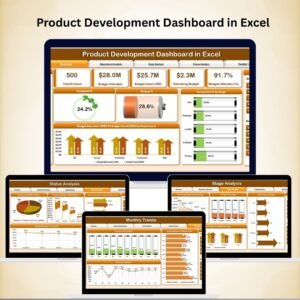
- Product Development Dashboard in Excel: a dashboard to review progress
Browse all Excel calendar templates.
































Reviews
There are no reviews yet.