

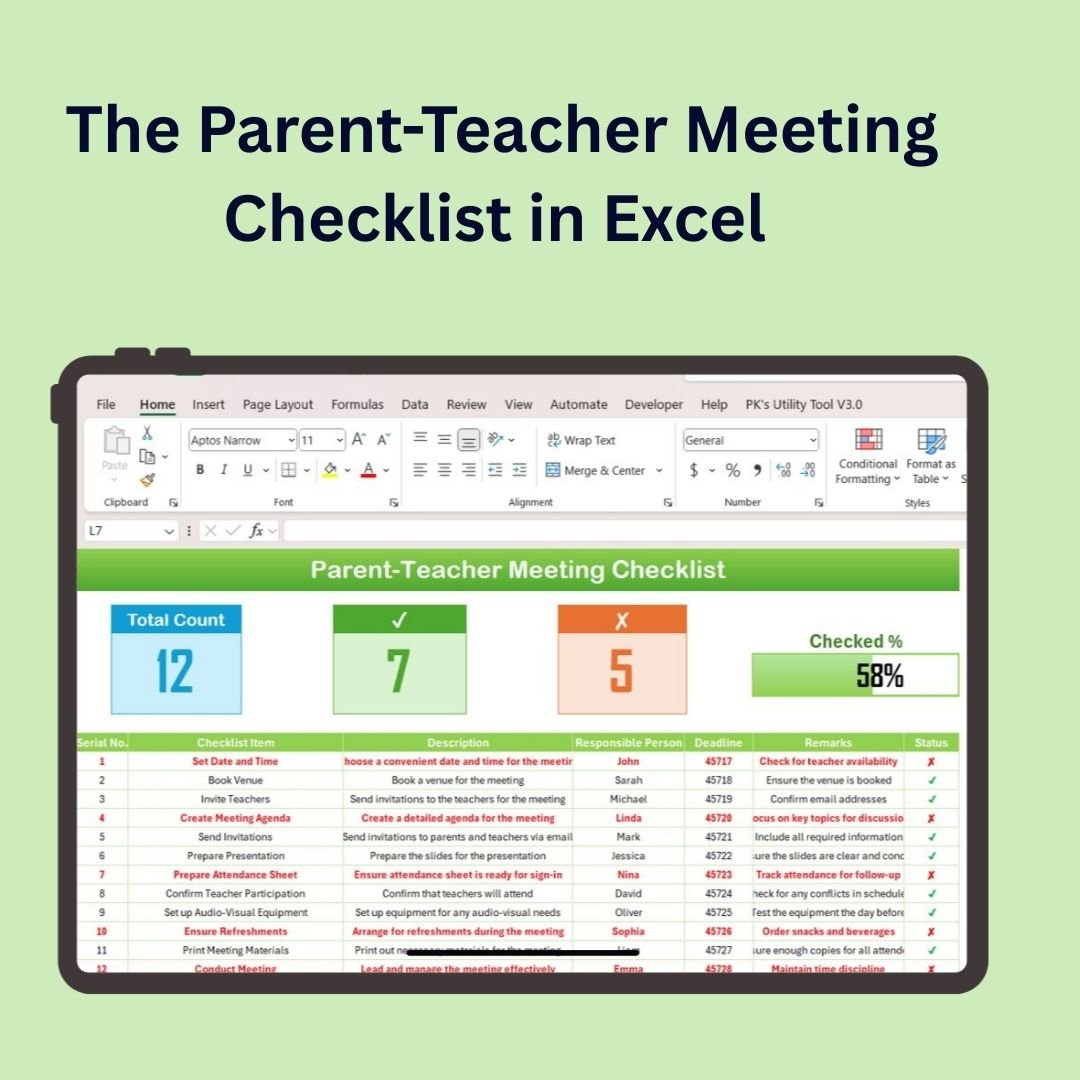

The Parent-Teacher Meeting Checklist in Excel is an essential tool for teachers, school administrators, and educational coordinators. This easy-to-use, customizable checklist helps you stay organized and prepared for parent-teacher conferences. From scheduling meetings and tracking attendance to managing discussion points and follow-up tasks, this Excel-based checklist covers all the important aspects of parent-teacher meetings to ensure a smooth and productive interaction.
With this checklist, you can efficiently plan meetings, track parental involvement, and ensure that all necessary topics are discussed to foster a positive relationship between teachers and parents.

Key Features of the Parent-Teacher Meeting Checklist in Excel:
📅 Meeting Schedule and Attendance
Track meeting dates, times, and parent attendance, ensuring you stay organized and on top of scheduled meetings.
📋 Discussion Points and Agenda
Organize key topics and discussion points for each meeting, ensuring you cover all important areas like student progress, behavior, and development.
✍️ Follow-Up Actions and Notes
Record action items, follow-up tasks, and notes from the meetings to ensure that both teachers and parents are aligned on next steps.
🎯 Student Progress and Performance
Monitor and record student progress, grades, behavior reports, and any concerns to facilitate a meaningful discussion with parents.
🔄 Customizable and Flexible
Tailor the checklist to your specific school needs and customize it to suit different grade levels, subjects, or student-specific requirements.
🚀 Why You’ll Love the Parent-Teacher Meeting Checklist in Excel:
✅ Stay Organized – Track meeting schedules, attendance, and key discussion points to ensure smooth and efficient parent-teacher meetings.
✅ Plan Ahead – Organize your discussion points and agenda before each meeting to make sure you cover everything that’s important for student progress.
✅ Track Follow-Ups – Easily record follow-up tasks and action items to ensure both parents and teachers are on the same page.
✅ Monitor Student Progress – Keep track of student progress, grades, and behavior reports to ensure meaningful and constructive conversations with parents.
✅ Customize to Your Needs – Tailor the checklist to fit the needs of your class, grade level, or individual students for maximum effectiveness.
✅ Improve Parental Engagement – Foster better communication between parents and teachers by organizing and tracking all aspects of the meeting.
What’s Inside the Parent-Teacher Meeting Checklist in Excel:
Meeting Schedule: Track meeting dates and times to ensure you stay organized and on top of your schedule.
Attendance Tracking: Keep track of which parents attend the meetings and monitor engagement.
Discussion Points: Plan out key topics to discuss, such as student performance, grades, behavior, and development.
Follow-Up Tasks: Record follow-up actions and tasks for both parents and teachers to ensure progress after the meeting.
Student Progress: Record notes on student achievements, challenges, and areas for improvement.
Customizable Fields: Add or remove fields to suit your specific classroom needs, grade levels, or subjects.
How to Use the Parent-Teacher Meeting Checklist in Excel:
1️⃣ Download the Template – Access the Excel file instantly upon purchase.
2️⃣ Schedule Meetings – Input the dates and times for each parent-teacher meeting, and track attendance for each session.
3️⃣ Organize Discussion Points – Use the checklist to outline topics to discuss during the meeting, including student progress, behavioral concerns, and development goals.
4️⃣ Track Follow-Ups – Add notes, follow-up actions, and responsibilities to keep both parents and teachers on track.
5️⃣ Generate Reports – Create custom reports summarizing the meetings, student progress, and next steps for each parent-teacher interaction.
Who Can Benefit from the Parent-Teacher Meeting Checklist in Excel:
Teachers and Educators
School Administrators
Parent-Teacher Association (PTA) Coordinators
Educational Consultants
Parents and Guardians
Schools of All Grade Levels (Elementary, Middle, High School)
The Parent-Teacher Meeting Checklist in Excel is the ideal tool for ensuring that all parent-teacher meetings run smoothly, and that both parents and teachers remain informed and aligned on student progress and development.
Click here to read the Detailed blog post
https://www.pk-anexcelexpert.com/parent-teacher-meeting-checklist-in-excel/
Visit our YouTube channel to learn step-by-step video tutorials
Youtube.com/@PKAnExcelExpert
Compatibility and Requirements
- Works in Microsoft Excel desktop (Excel 2016 or later, or Microsoft 365).
- Everything is entered in worksheet cells, so you can add or remove fields. Microsoft explains the basics in Excel for Windows training.
Frequently Asked Questions
What can I track in this checklist?
You can track meeting dates and times, parent attendance, discussion points, follow-up tasks and notes on student progress.
Can I change the fields?
Yes. You can add or remove fields to suit your class, grade level or subject.
Does it cover follow-up after the meeting?
Yes. You record follow-up actions and tasks for both parents and teachers, plus notes from the meeting.
Which student information can I record?
You can record notes on achievements, challenges and areas for improvement, including grades and behavior concerns, to prepare for the conversation with parents.
Is there a calendar for scheduling these meetings?
Yes. See the Parent-Teacher Meeting Calendar in Excel and the Parent-Teacher Meeting Calendar in Google Sheets.
Related School and Checklist Templates
- Parent-Teacher Meeting Calendar in Excel: schedule the meetings you prepare for here
- Parent-Teacher Meeting Calendar in Google Sheets: the same topic in Google Sheets
- Teacher Feedback Form in MS Word and Google Docs: a free form for collecting feedback
- Parent Consent Form in MS Word and Google Docs: a free consent form for parents
- Education & School Management Bundle: 8 school templates in one download
Browse all Excel education templates and Excel checklists.

































Reviews
There are no reviews yet.