



The Magic search with highlight template in Excel is a ready-made tool that helps you quickly find and highlight specific data in large datasets. It is built for HR, sales, finance and project teams, and anyone who works with long spreadsheets such as employee performance records or sales data. Type a keyword, pick a column, and matching data is highlighted automatically, so you spend less time searching and make fewer mistakes.
Key Features of the Magic Search with Highlight Template
Search Box and Dropdown Integration
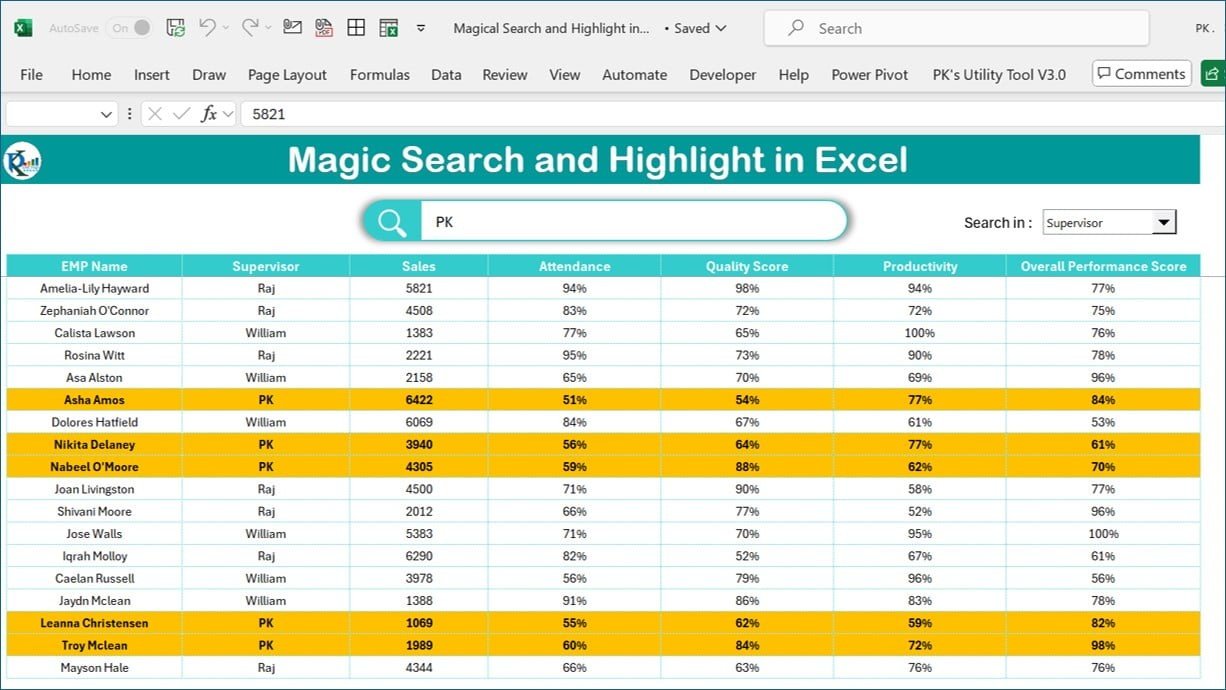
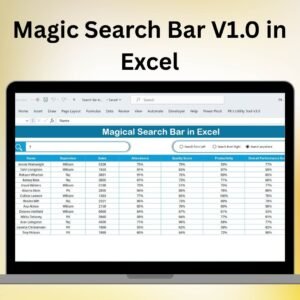
The template includes a search box where you can enter any keyword, and the data filters according to your search term. A dropdown menu lets you choose the specific column to search within. Whether you need an employee’s name, sales numbers or performance metrics, you can narrow the search to exactly the column you care about. This saves real time when a sheet has hundreds or thousands of rows.
- Search box: Quickly search for any term in your dataset.
- Dropdown menu: Choose specific columns to filter and search within for more precise results.
Automatic Highlighting with Conditional Formatting
The standout feature is automatic highlighting. As soon as you enter a search term, the matching data is highlighted using Excel’s built-in conditional formatting. Relevant records stand out at a glance, so you can focus only on the parts of the dataset that matter. There is no need to highlight cells by hand or worry about missing important information.
- Automatic highlighting: Data matching the search term is highlighted for quick access.
- Increased visibility: Reduce errors and time spent hunting for data points.
Customizable Functionality
The tool works out of the box, and it can also be adjusted to suit your own data. Whether you are tracking sales, employee performance or inventory levels, you can adapt the search and highlight functionality to work with any range of cells, specific conditions or different types of data columns.
- Tailor to your needs: Customize the search for different data types or reporting needs.
- Flexible: Useful across sales, HR, finance and many other areas.
Improved Data Accuracy
Manual searches often lead to missed information or errors. By automating the search and instantly highlighting relevant data, the template helps you work with accurate information. Conditional formatting also gives clear, immediate feedback on whether your search term has been found.
- Reduce human error: Automated searching and highlighting minimize mistakes.
- Instant feedback: Quickly check whether a search term exists in the dataset.
Streamlined Data Analysis
With the search box and automatic highlighting, reviewing data becomes faster and more intuitive. Whether you are checking performance scores, looking for trends or analyzing sales data, you can locate key data points quickly. Highlighted results make it easier to see patterns and identify outliers, which helps managers and team leaders make quick decisions.
Enhanced Productivity and Ease of Use
The template removes the need for manual filtering or scrolling through large Excel datasets. It is designed for all experience levels, with no complex formulas or technical knowledge required. Simply enter your search term, select the column from the dropdown, and the template does the rest.
What’s Inside the Template
| Component | What it does |
|---|---|
| Search box | Enter any keyword to search and filter your data |
| Column dropdown menu | Choose which column the search should look in |
| Conditional formatting rules | Automatically highlight cells that match the search term |
| Data area | Holds your dataset, such as employee, sales or inventory records |
Who Is It For?
- HR teams reviewing employee records and performance data
- Sales teams looking up customers, products or sales numbers
- Finance professionals checking transactions and reports
- Project managers tracking tasks and team data
- Any Excel user who regularly works with large datasets and wants faster lookups
How to Use It
- Open the template in Excel and place your data in the data area.
- Select the column you want to search from the dropdown menu.
- Type your keyword into the search box.
- Review the automatically highlighted results and act on what you find.
- Adjust the ranges or conditions if you want to customize it for a different dataset.
Learn More and Watch the Tutorial
Click here to read the detailed blog post on the Magic search with highlight template in Excel
Visit our YouTube channel to learn from step-by-step video tutorials: Youtube.com/@PKAnExcelExpert
Watch the step-by-step video tutorial
Frequently Asked Questions
What does the Magic search with highlight template in Excel do?
It lets you type a keyword into a search box, choose a column from a dropdown menu, and automatically highlights the matching data using conditional formatting, so you can find information in large datasets quickly.
Do I need advanced Excel skills to use it?
No. The template is designed for all experience levels and requires no complex formulas. You only enter a search term and pick a column.
Can I search within a specific column?
Yes. The dropdown menu lets you choose the column to search within, giving more precise results than searching the whole sheet.
How is the matching data highlighted?
Highlighting is done with Excel’s built-in conditional formatting, which automatically marks cells that match your search term.
Can I customize it for my own data?
Yes. The search and highlight functionality can be adjusted to work with different cell ranges, conditions and data columns, whether you track sales, employee performance or inventory.
Also check our Automated Employee Timesheet Template in Excel
Last updated: October 2026
Compatibility and Requirements
- Works in Microsoft Excel desktop (Excel 2016 or later, or Microsoft 365).
- Microsoft’s guide Use conditional formatting to highlight information explains the Excel feature this file is built on.
Related Excel Search Templates
- Universal Searchable Drop-down List in Excel: add a searchable drop-down list in Excel
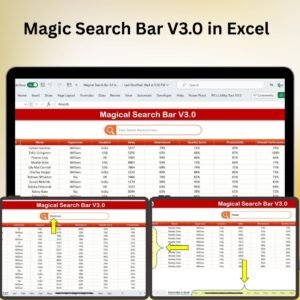
- Magic Search Bar V3.0 in Excel: a free search bar for Excel
- Multilevel dependent drop-down in User Form: build dependent drop-downs in a user form
- Highlight the Specific data point in a Line Chart Dynamically: highlight one data point in a line chart
Browse all Excel Misc. templates or the Excel Utility and Converters.













Reviews
There are no reviews yet.