



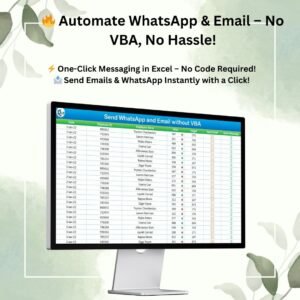
The Send WhatsApp and Email without VBA Excel tool lets you send WhatsApp messages and emails straight from your spreadsheet with a single click, with no VBA coding at all. It is built for business professionals, sales teams and HR managers who need to notify employees about sales targets, send reminders or share performance updates. Built-in formulas and clickable hyperlinks create the message content for you, so you only click and send.
Effective communication is key to business success. This tool takes repetitive messaging off your plate. Update the data in the Employee Master sheet and the dynamic formulas do the rest. They write the email subject, the email body and the WhatsApp message based on each employee’s sales performance. It is a simple, practical form of email automation in Excel that anyone can use.

Key Features of Send WhatsApp and Email without VBA
- One-click messaging: Send WhatsApp messages and emails by clicking the built-in icons. No extra software is required.
- Formula-driven automation: Email subjects and message content are generated automatically from sales performance.
- Customizable employee data: Update employee names, contact details and targets to tailor each message.
- No VBA required: The tool is built entirely with formulas and hyperlinks. There are no macros to enable and no code to maintain.
- Error-free communication: Data comes directly from the structured Excel sheets, which cuts down on manual errors.
- Time-saving workflow: You don’t need to copy, paste or type messages by hand. Just click and send.
What’s Inside the Template
The tool is organised around a structured Employee Master sheet that feeds every message.
| Component | What it does |
|---|---|
| Employee Master sheet | Stores employee names, contact details, sales targets and performance data. This is the only area you need to update. |
| Dynamic formulas | Build the email subject, email body and WhatsApp text automatically from each employee’s sales performance. |
| Clickable hyperlinks and icons | Let you send the prepared WhatsApp message or email with one click from Excel. |
Why Excel WhatsApp integration without VBA matters
Many messaging solutions in Excel depend on macros. Those can be hard to set up, hard to share and hard to troubleshoot.
This template handles Excel WhatsApp integration and email sending with standard formulas and hyperlinks only. It stays simple to use and easy to hand over to colleagues. You get a smooth, hassle-free experience without any coding skills.
Who It’s For
- Sales teams and sales managers who want to notify employees about their sales targets and achievements.
- HR managers who send reminders and performance updates to staff.
- Business professionals who want to streamline routine communication and improve efficiency.
- Excel users without coding skills who want automation with no VBA required.
It is a must-have for businesses looking to streamline communication. Just plug in your data and start messaging.
How to Use It
- Open the template in Excel.
- Update the Employee Master sheet with employee names, contact details and targets.
- Enter or refresh the sales performance data. The formulas then generate the email subject, body and WhatsApp message for each employee.
- Click the WhatsApp or email icon next to an employee to send the prepared message.
- Repeat for other employees. Each message stays tailored to that person’s data.
Click here to read the detailed blog post
Also check our Inventory Management Form in Excel.
Watch the step-by-step video tutorial:
Frequently Asked Questions
Does this tool need VBA or macros?
No. The Send WhatsApp and Email without VBA tool is built entirely with formulas and hyperlinks, so no VBA is required.
How are the email and WhatsApp messages created?
Dynamic formulas create the email subject, email body and WhatsApp message automatically. They use the data in the Employee Master sheet and each employee’s sales performance.
Can I change the employee details?
Yes. You can update employee names, contact details and targets in the Employee Master sheet, and every message is tailored accordingly.
How do I send a message?
Click the built-in WhatsApp or email icon for the employee. One-click messaging means there is no copy-pasting or manual typing.
Who is this tool best suited for?
It is designed for business professionals, sales teams and HR managers. Typical uses include target notifications, reminders and performance updates.
Do I need coding skills to use it?
No coding skills are required. Just plug in your data and start messaging.
Last updated: October 2026
Compatibility and Requirements
- Works in Microsoft Excel desktop (Excel 2016 or later, or Microsoft 365).
- The tool uses formulas and hyperlinks only, so there are no macros to enable.
Related Messaging and Email Tools
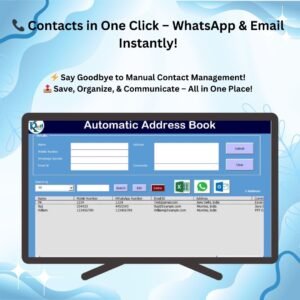
- Automated Address Book with Auto WhatsApp and Email: keeps contacts and sends messages from one sheet
- Auto WhatsApp and Email Address Book in Google Sheets: the address book idea for Google Sheets
- Email Reminder Scheduler in Excel: plans reminder emails by date
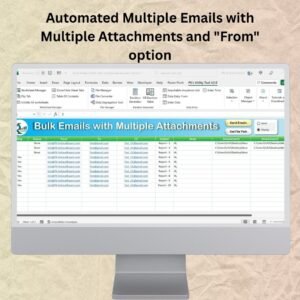
- Automated Multiple Emails with Multiple Attachments: sends many emails with files attached
Browse all Excel misc. tools or the Excel VBA tools.
















Reviews
There are no reviews yet.