



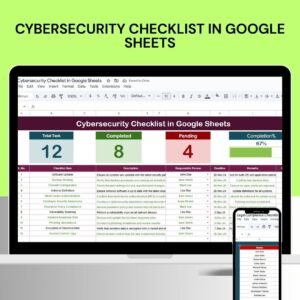
The Cybersecurity Checklist in Google Sheets is a crucial tool for organizations that want to protect their digital infrastructure and ensure compliance with best cybersecurity practices. By organizing tasks and monitoring progress in a simple, cloud-based platform, your team can manage and track essential cybersecurity efforts, identify potential vulnerabilities, and mitigate risks effectively.
With Google Sheets, you can easily customize your cybersecurity checklist, automate task tracking, and collaborate in real-time with your team to enhance security measures. This tool is designed to provide your organization with a robust, accessible way to manage your cybersecurity initiatives.

Key Features of the Cybersecurity Checklist in Google Sheets
📋 Customizable Security Categories
Tailored Sections: Organize the checklist into relevant security categories such as data protection, network security, access control, and incident response.
Adjustable Priorities: Assign priority levels to each checklist item to ensure that critical security tasks are addressed first.
🔄 Collaborative and Accessible Platform
Real-Time Collaboration: Allow multiple team members to update and review the checklist simultaneously, ensuring everyone is working with the most current information.
Cloud Accessibility: Access the checklist from any device with internet connectivity, making it easy for both remote and in-office teams to stay aligned.
📊 Automated Tracking and Notifications
Progress Monitoring: Use checkboxes and conditional formatting to track task completion, providing clear visual cues for progress.
Automated Reminders: Set up automatic email or in-app notifications for upcoming deadlines or overdue tasks to keep your cybersecurity initiatives on track.
📂 Integration with Other Google Services
Data Linking: Integrate with Google Docs for detailed cybersecurity documentation or Google Forms for data collection related to cybersecurity activities.
Reporting: Use Google Sheets’ powerful data analysis features to generate reports and insights on cybersecurity efforts, enabling better decision-making.
Benefits of Using Google Sheets for Cybersecurity Checklists
✅ Cost-Effective
Google Sheets is free to use, offering robust features that make it a cost-effective solution for managing your organization’s cybersecurity tasks.
✅ User-Friendly
The intuitive interface reduces the learning curve, enabling teams of all skill levels to use the checklist effectively.
✅ Scalable
As your organization grows and your cybersecurity requirements change, the checklist can easily be adapted to accommodate new regulations, tasks, and priorities.
Getting Started with Your Cybersecurity Checklist in Google Sheets
Define Security Requirements: Identify the cybersecurity standards, regulations, and practices applicable to your organization.
Develop Checklist Items: Create a detailed list of tasks under each category, ensuring all necessary cybersecurity protocols are covered.
Assign Responsibilities: Designate team members to each task, ensuring clear ownership and accountability for cybersecurity initiatives.
Set Deadlines: Establish timelines for each task to ensure timely execution of your cybersecurity efforts.
Monitor and Update: Regularly review the checklist to adapt to new cybersecurity threats and adjust tasks as necessary.
By using a Cybersecurity Checklist in Google Sheets, your organization can enhance security, streamline processes, and ensure compliance with cybersecurity best practices in an accessible, cost-effective manner.
Click here to read the Detailed blog post
Cybersecurity Checklist in Google Sheets
Visit our YouTube channel to learn step-by-step video tutorials
YouTube.com/@PKAnExcelExpert
Compatibility and Requirements
- Works in Google Sheets. You need a free Google account and a web browser.
- Task completion is tracked with checkboxes and conditional formatting. Google explains charts and in-cell dropdowns in its Google Sheets getting started guide.
More Questions About This Template
What security areas does the checklist cover?
You can organize items into categories such as data protection, network security, access control and incident response, and rename or add sections to fit your organization.
How do I track progress on each task?
Each checklist item uses a checkbox, and conditional formatting gives a clear visual cue when a task is complete. You can also assign a priority level, an owner and a deadline to every item.
Can my team work on it at the same time?
Yes. Several people can update and review the checklist at once in Google Sheets, from any device with an internet connection.
Is there an Excel version?
Yes. See the Cybersecurity Checklist in Excel.
Is there a dashboard to go with the checklist?
Yes. The Cybersecurity KPI Dashboard in Google Sheets tracks cybersecurity metrics in the same platform.
Related Cybersecurity Templates
- Cybersecurity KPI Dashboard in Google Sheets: track cybersecurity KPIs in Google Sheets
- Cybersecurity Checklist in Excel: the same checklist for Excel
- Cybersecurity KPI Dashboard in Power BI: a Power BI dashboard for security metrics
- Data Privacy Checklist Template in Excel: a checklist for data privacy tasks
- IT and Cybersecurity Operations Bundle: 8 templates for IT and security teams in one download
Browse all Google Sheets checklists.



























Reviews
There are no reviews yet.