



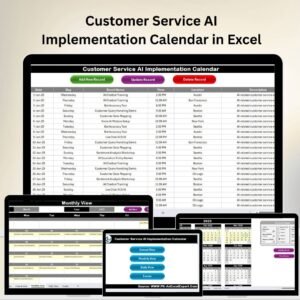
The Customer Service AI Implementation Calendar in Excel is a comprehensive tool designed to help businesses and customer service teams plan, manage, and track the implementation of AI solutions in their operations. This Excel-based calendar provides a structured framework to guide the AI adoption process from planning to deployment, ensuring that every phase of the AI implementation is executed on time and within scope.
Artificial Intelligence is transforming the customer service landscape, automating tasks like chatbots, virtual assistants, and personalized support. This calendar helps organizations ensure a smooth transition to AI-powered customer service, with clear milestones, deadlines, and tasks that are essential for a successful implementation.
Key Features of the Customer Service AI Implementation Calendar in Excel
📅 Comprehensive Planning & Scheduling
The calendar breaks down the AI implementation process into phases, such as research, vendor selection, training, and deployment. Each phase is assigned a timeline to ensure the project stays on track.
🔑 Task Management & Accountability
Organize tasks, assign responsibilities, and set deadlines for each step in the AI implementation process. Track progress to ensure that the project stays on schedule and that all tasks are completed successfully.
📈 Milestone Tracking
Track important project milestones such as AI system selection, prototype development, testing, and deployment. This feature allows you to visualize the progress of the implementation and ensure that key dates are met.
⚙️ AI Training & Testing Schedule
Monitor the timeline for training AI models, testing, and adjusting the system. This helps ensure that your AI system is properly trained and ready for use before going live.
📝 Customizable Tasks & Phases
The calendar is fully customizable, allowing you to add specific tasks, deadlines, and notes related to your organization’s unique AI implementation needs.
📊 AI Adoption Progress Monitoring
Monitor the overall progress of AI adoption across various customer service functions. Track implementation, adjustments, and performance to ensure that the system delivers value to the business.
Why You’ll Love the Customer Service AI Implementation Calendar in Excel

✅ Comprehensive Project Management
Manage the AI implementation process from start to finish with clear milestones, tasks, and deadlines. Ensure that every phase is accounted for and keep everything on track.
✅ Ensure Timely Deployment
Track deadlines and milestones for AI deployment to ensure that the project is completed on time and within the projected timeline.
✅ Monitor Progress in Real-Time
Use the calendar to track the progress of AI adoption, ensuring the system is effectively integrated and functioning as expected.
✅ Improve Collaboration & Accountability
Assign tasks and responsibilities to relevant team members. Everyone involved in the project will have a clear understanding of their duties, helping to foster better collaboration.
✅ Scalable for Different Business Sizes
Whether you’re implementing AI for a small team or a large organization, this tool is scalable and adaptable to fit your specific needs and business structure.
What’s Inside the Customer Service AI Implementation Calendar in Excel?
Planning & Scheduling: Break down the AI implementation process into clear phases with deadlines.
Task Management: Assign responsibilities and track task completion to keep the project on track.
Milestone Tracking: Track key project milestones, including AI system selection, testing, and deployment.
Training & Testing Schedule: Monitor the AI model’s training and testing phase to ensure quality results.
Progress Monitoring: Track overall progress to ensure AI adoption is successful and on time.
Customizable Framework: Modify the calendar to fit your company’s unique AI project needs.
How to Use the Customer Service AI Implementation Calendar in Excel
1️⃣ Download the Template: Instantly access the Customer Service AI Implementation Calendar in Excel.
2️⃣ Set Up AI Implementation Phases: Input your project’s phases, including planning, testing, and deployment, and set deadlines for each phase.
3️⃣ Assign Tasks & Deadlines: Organize tasks, assign team members, and track progress on each phase of AI implementation.
4️⃣ Monitor Milestones & Progress: Track key milestones and overall progress to ensure timely deployment of AI solutions.
5️⃣ Adjust as Needed: Customize the calendar to include additional phases or tasks as necessary for your project.
Who Can Benefit from the Customer Service AI Implementation Calendar in Excel?
🔹 Customer Service Teams & Managers
🔹 AI Project Managers & Data Scientists
🔹 IT & Technology Teams Implementing AI Solutions
🔹 E-commerce & Retail Customer Service Teams
🔹 Technology Consultants & Agencies
🔹 Small & Medium Enterprises (SMBs)
🔹 Large Corporations with Customer Service Departments
Ensure the successful implementation of AI solutions in your customer service operations with the Customer Service AI Implementation Calendar in Excel. Plan, track, and manage every phase of the AI adoption process for a smooth and efficient implementation.
Click here to read the Detailed blog post
Visit our YouTube channel to learn step-by-step video tutorials
Youtube.com/@PKAnExcelExpert
Compatibility and Requirements
- Works in Microsoft Excel desktop (Excel 2016 or later, or Microsoft 365).
- New to Excel? Microsoft’s Excel for Windows training covers the basics.
Frequently Asked Questions
Which phases does the calendar cover?
Research, vendor selection, training and deployment, each with its own timeline.
Can I assign tasks to people?
Yes. Assign responsibilities and deadlines for each step and track progress.
Which milestones can I track?
AI system selection, prototype development, testing and deployment, or any milestone you add.
Does it include a training and testing schedule?
Yes. You can plan when the AI system is trained, tested and adjusted before it goes live.
Can I add my own tasks and notes?
Yes. You can add tasks, deadlines and notes for your own project.
Related AI Implementation Calendars
- Technology Customer Service AI Implementation Calendar in Excel: the same plan for technology companies
- Operations AI Implementation Calendar in Excel: plan AI rollout in operations
- Sales AI Implementation Calendar in Excel: plan AI rollout for sales teams
- Customer Service Event Calendar in Excel: schedule customer service events
- Calendar & Planner Pack: 12 calendar and planner templates in one download
Browse all Excel calendars.































Reviews
There are no reviews yet.