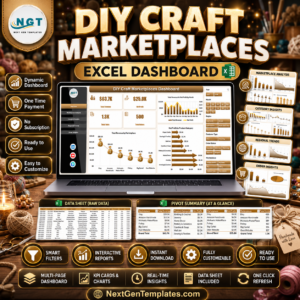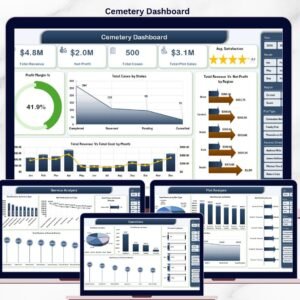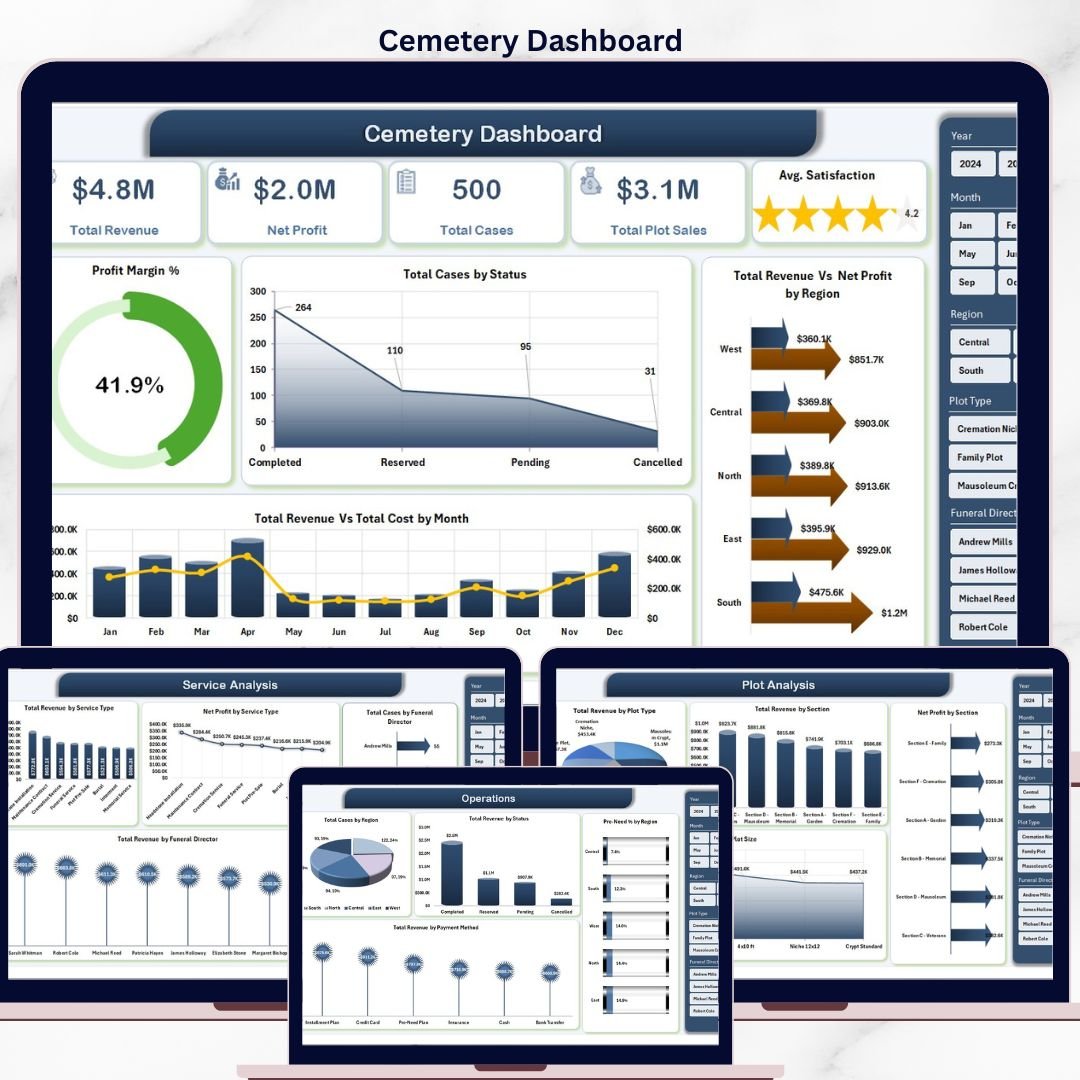


The Cemetery Dashboard in Excel tracks 5 high-level KPI cards and 16+ analysis charts across 5 interactive pages, plus a Data Sheet and Support Sheet with pre-built pivot tables. Setup takes under 10 minutes — replace the sample data and every chart, slicer, and KPI updates automatically.
🌍 Join 8,400+ teams in 40+ countries using NextGenTemplates to replace paid SaaS tools with one-time-purchase Excel, Google Sheets, Power BI, and HTML templates.
✅ Instant download · One-time payment · No subscription · No per-user fees · Lifetime access
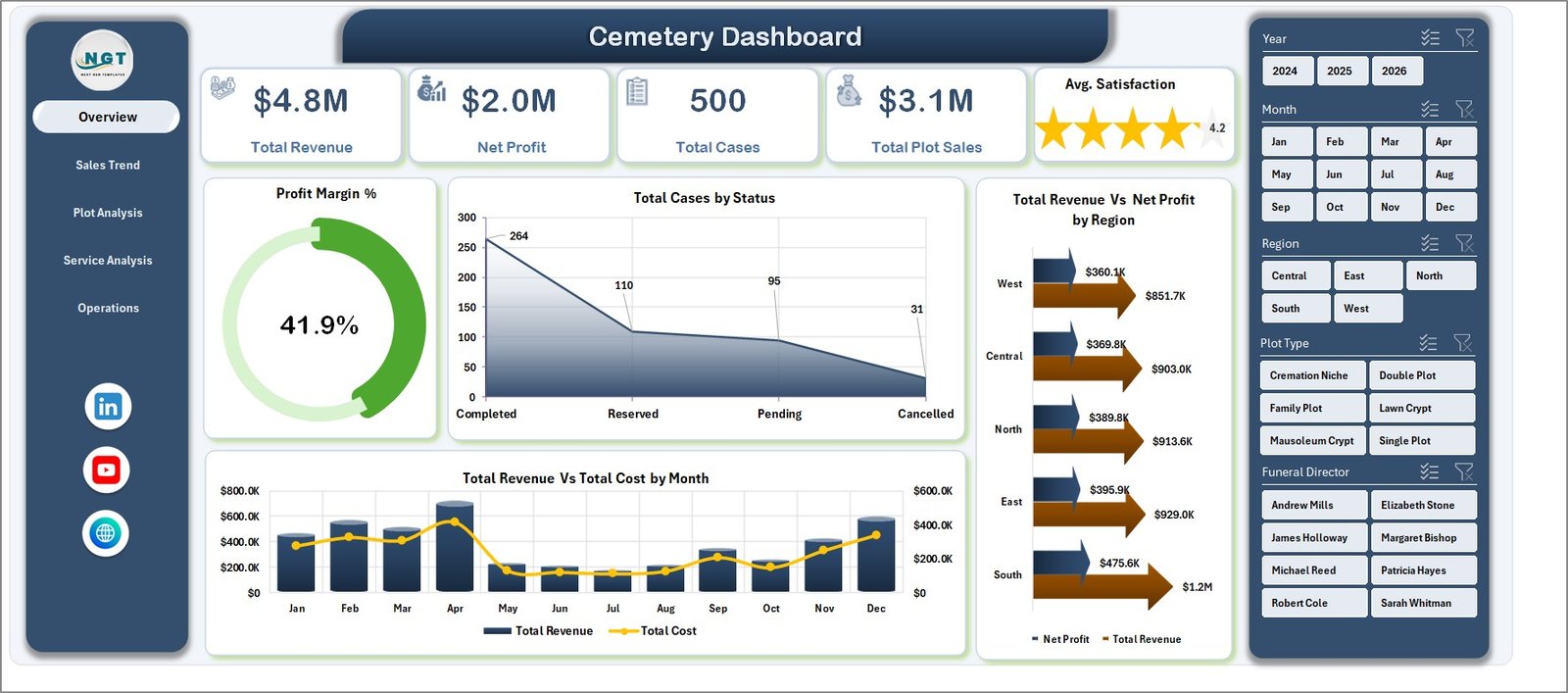 Cemetery Dashboard in Excel — Overview Page
🔑 Key Features of Cemetery Dashboard in Excel
📊 5 high-level KPI cards on the Overview page — Total Revenue, Net Profit, Total Cases, Total Plot Sales, and Avg. Satisfaction. Each card recalculates the moment you change a slicer or add new data rows, so every view shows live numbers.
📈 16+ pre-built charts across 5 dashboard tabs — Overview, Sales Trend, Plot Analysis, Service Analysis, and Operations. Charts cover Profit Margin %, Total Cases by Status, Revenue vs Net Profit by Region, Revenue vs Cost by Month, and many more breakdowns.
🔍 Multiple slicers for instant filtering — slice the entire dashboard by Region, Status, Plot Type, Service Type, Funeral Director, Payment Method, or Year with one click. All charts and KPIs across all pages refresh together.
🗂️ Structured Data Sheet — paste your transaction-level data (case ID, region, plot type, plot size, service type, funeral director, status, payment method, revenue, cost, satisfaction score, etc.) in the same column format and the dashboard pulls everything automatically.
⚙️ Hidden Support Sheet with all pivot tables — every chart on every page is driven by pivots on this sheet. Click Data → Refresh All after updating data and the entire dashboard rebuilds in seconds. The support sheet can be hidden from end users.
🖨️ Print-ready and presentation-friendly layout — clean color palette, fixed page sizes, and clear chart titles make the dashboard suitable for board meetings, monthly reviews, and family-management committee reports.
📦 What’s Inside the Cemetery Dashboard in Excel
1. Overview Page — 5 KPI cards (Total Revenue, Net Profit, Total Cases, Total Plot Sales, Avg. Satisfaction) plus 4 analysis charts: Profit Margin %, Total Cases by Status, Total Revenue Vs Net Profit by Region, Total Revenue Vs Total Cost by Month. Includes multiple slicers for one-click filtering.
Overview Page
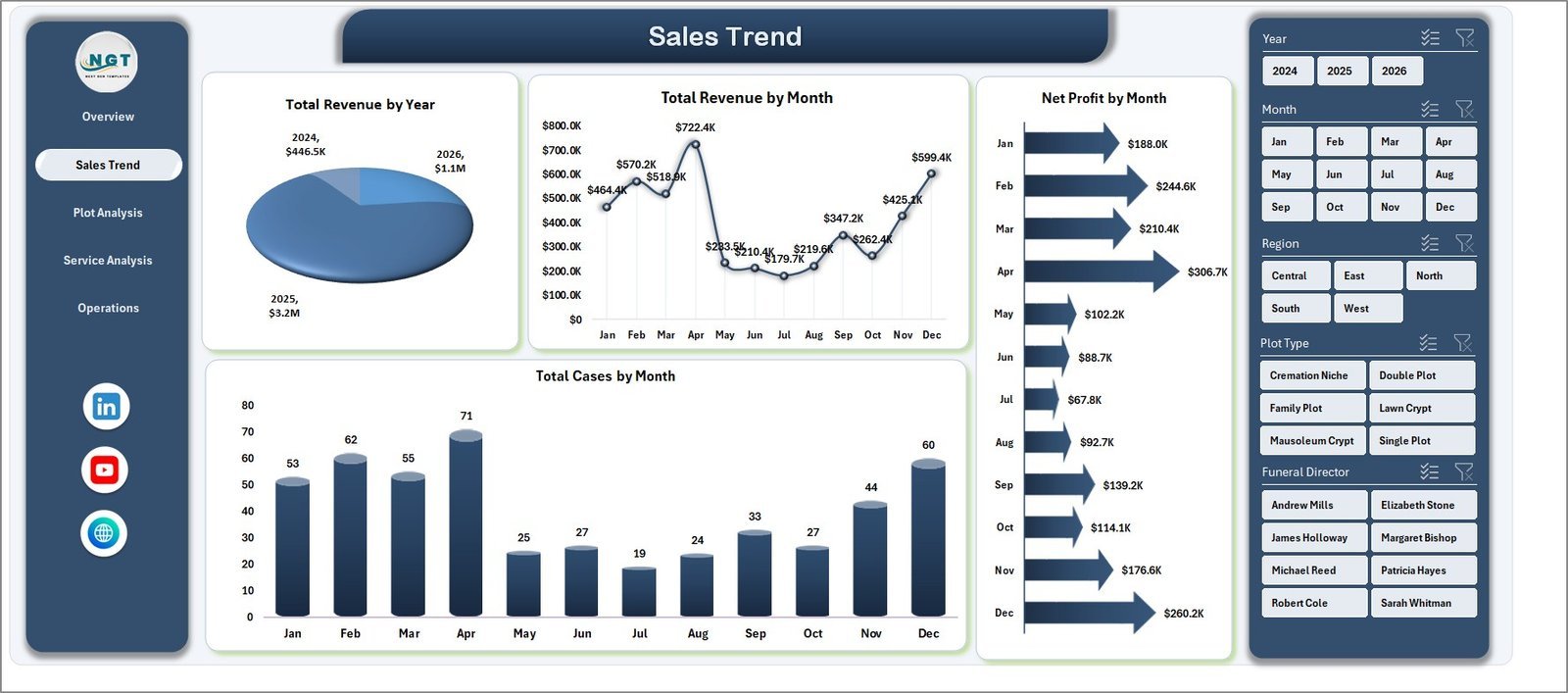
2. Sales Trend Page — track yearly and monthly performance with: Total Revenue by Year, Total Revenue by Month, Net Profit by Month, and Total Cases by Month. Spot seasonal cycles in pre-need vs at-need cases instantly.
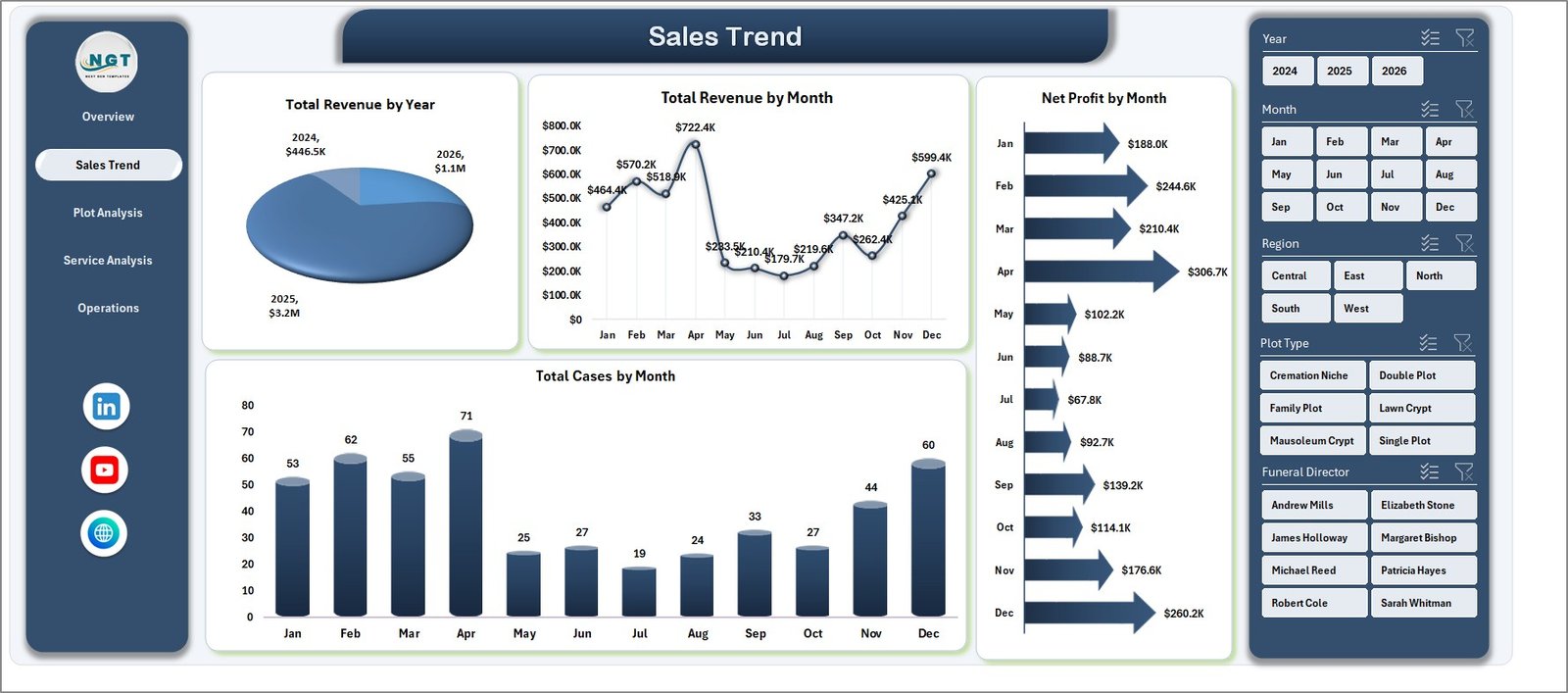 Sales Trend
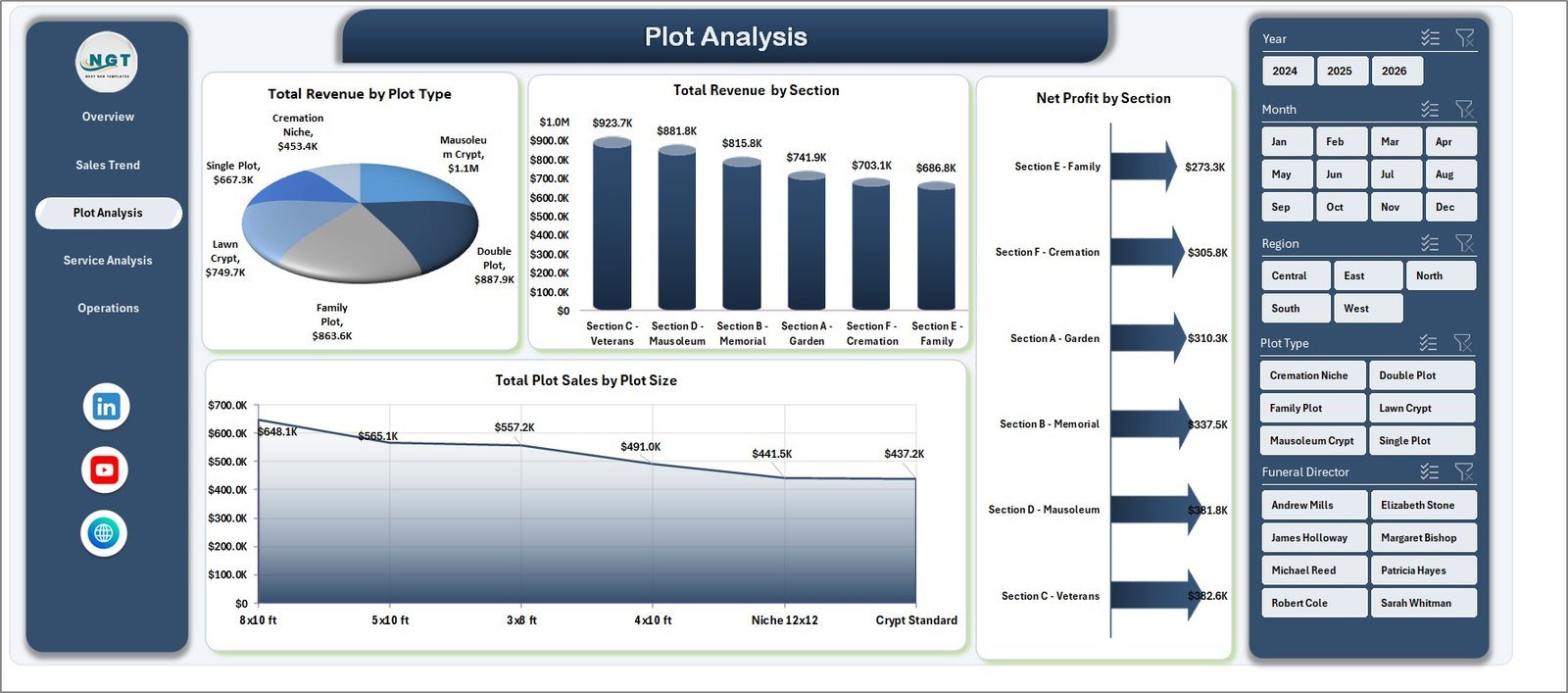
3. Plot Analysis Page — understand what is selling and where: Total Revenue by Plot Type, Total Revenue by Section, Net Profit by Section, and Total Plot Sales by Plot Size. Identify high-margin sections and underperforming inventory at a glance.
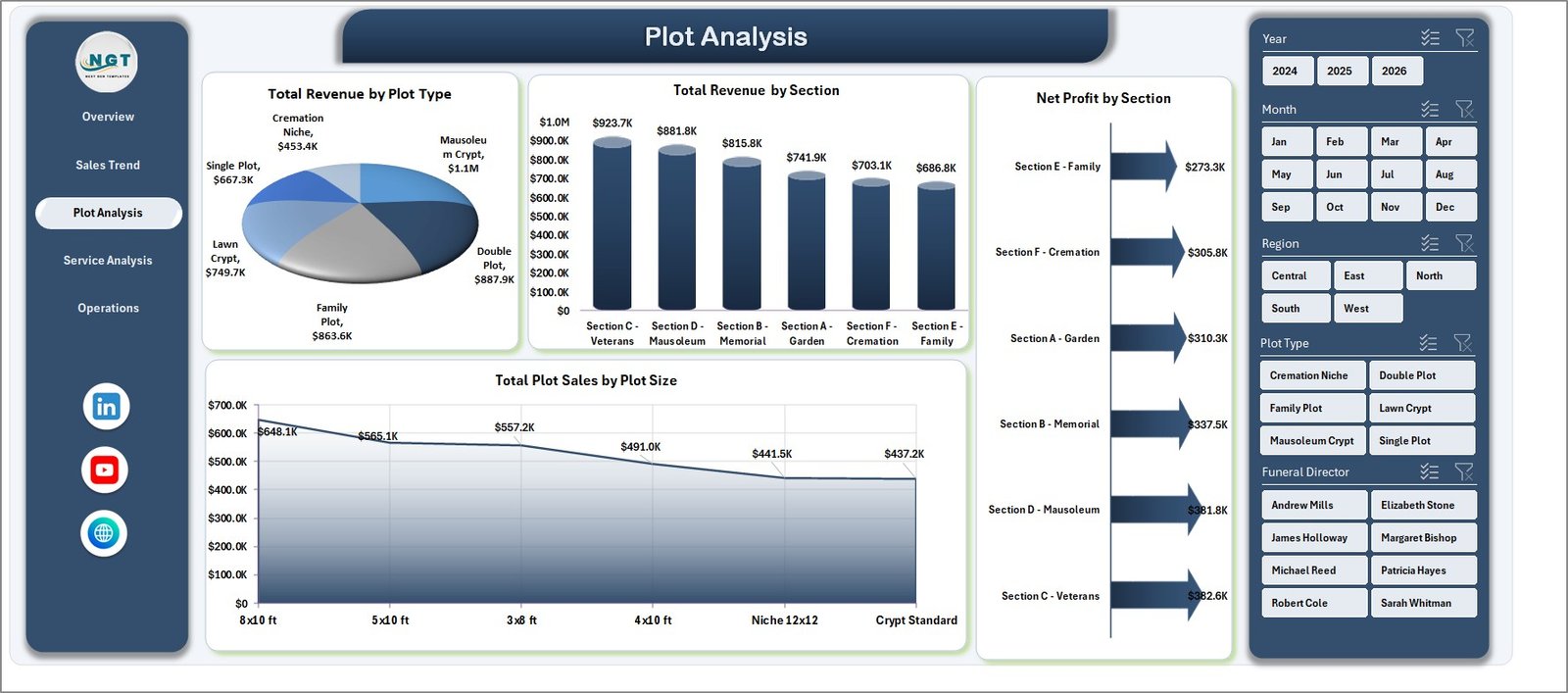 Plot Analysis
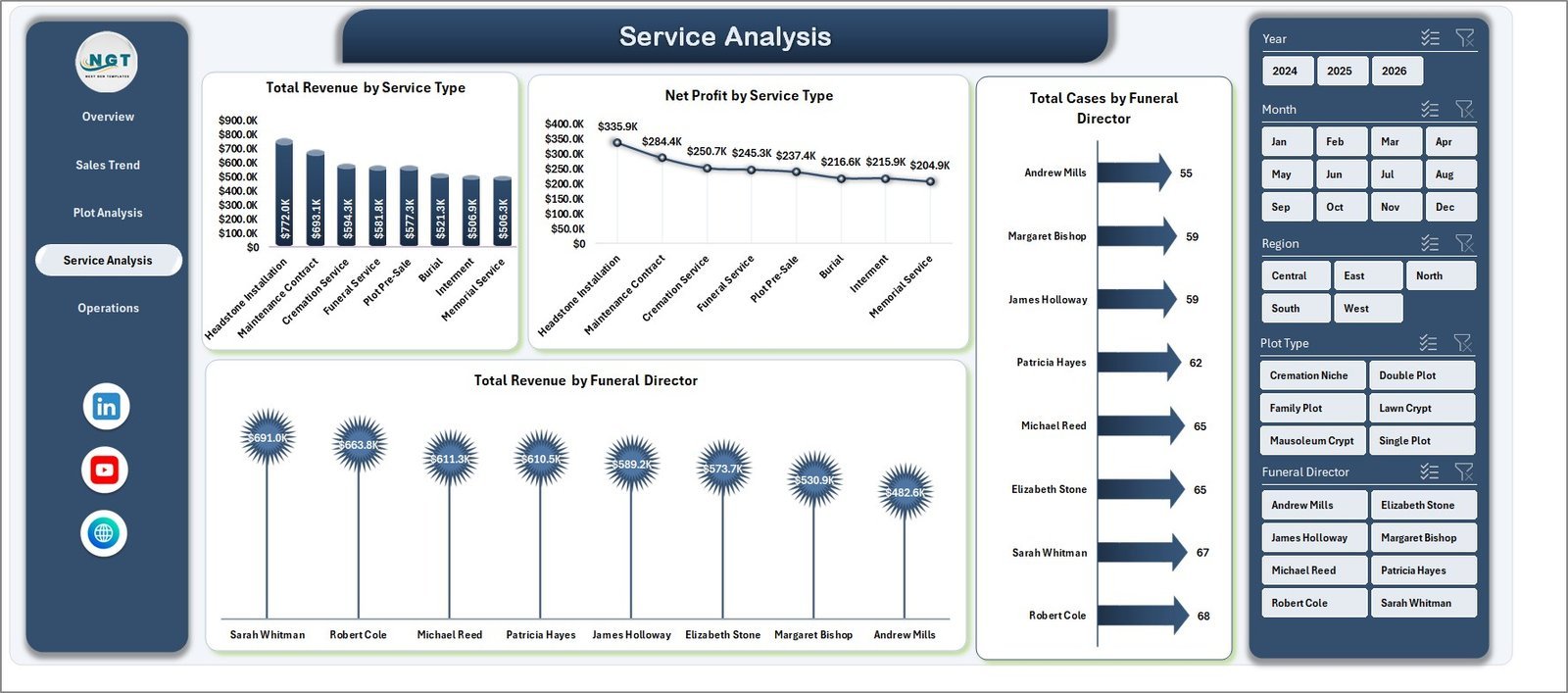
4. Service Analysis Page — view: Total Revenue by Service Type, Net Profit by Service Type, Total Cases by Funeral Director, and Total Revenue by Funeral Director. Compare director productivity and profitability across burial, cremation, and memorial services.
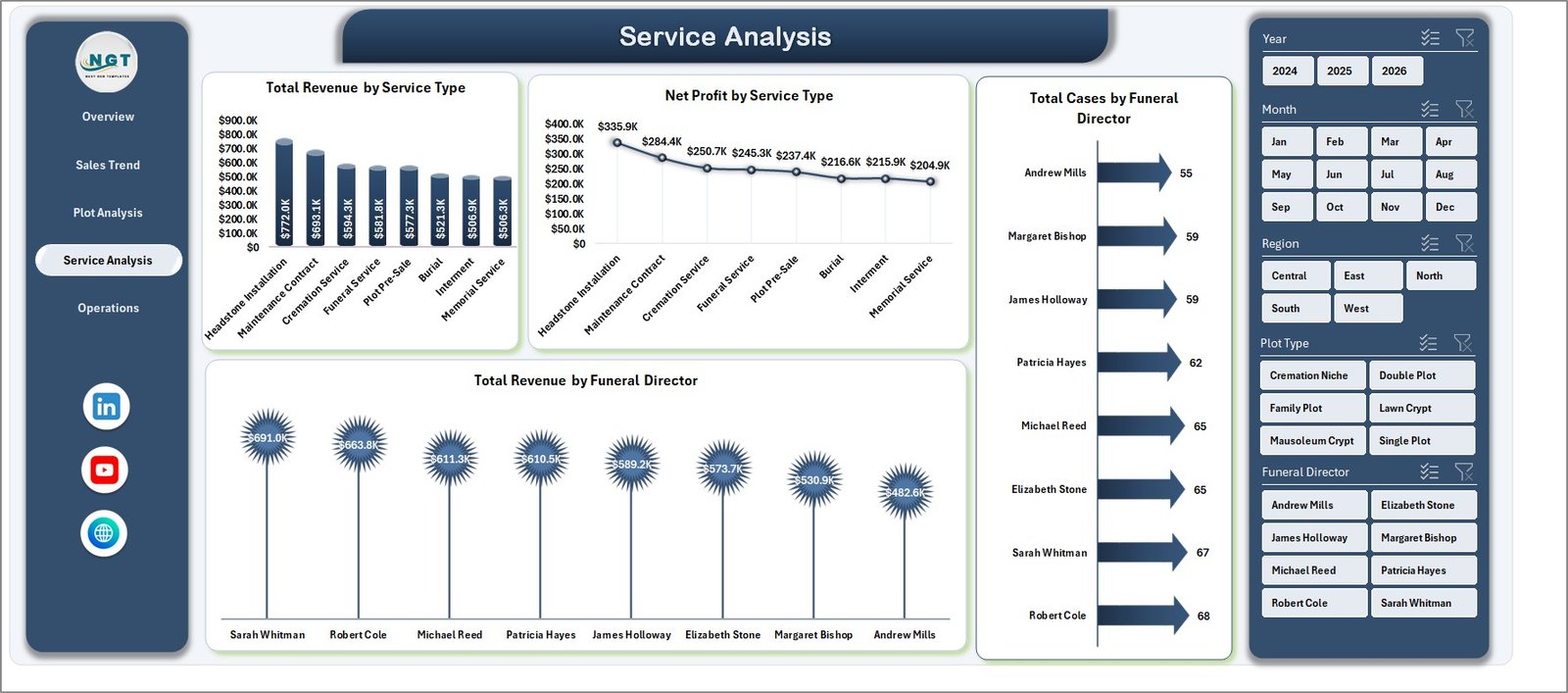 Service Analysis
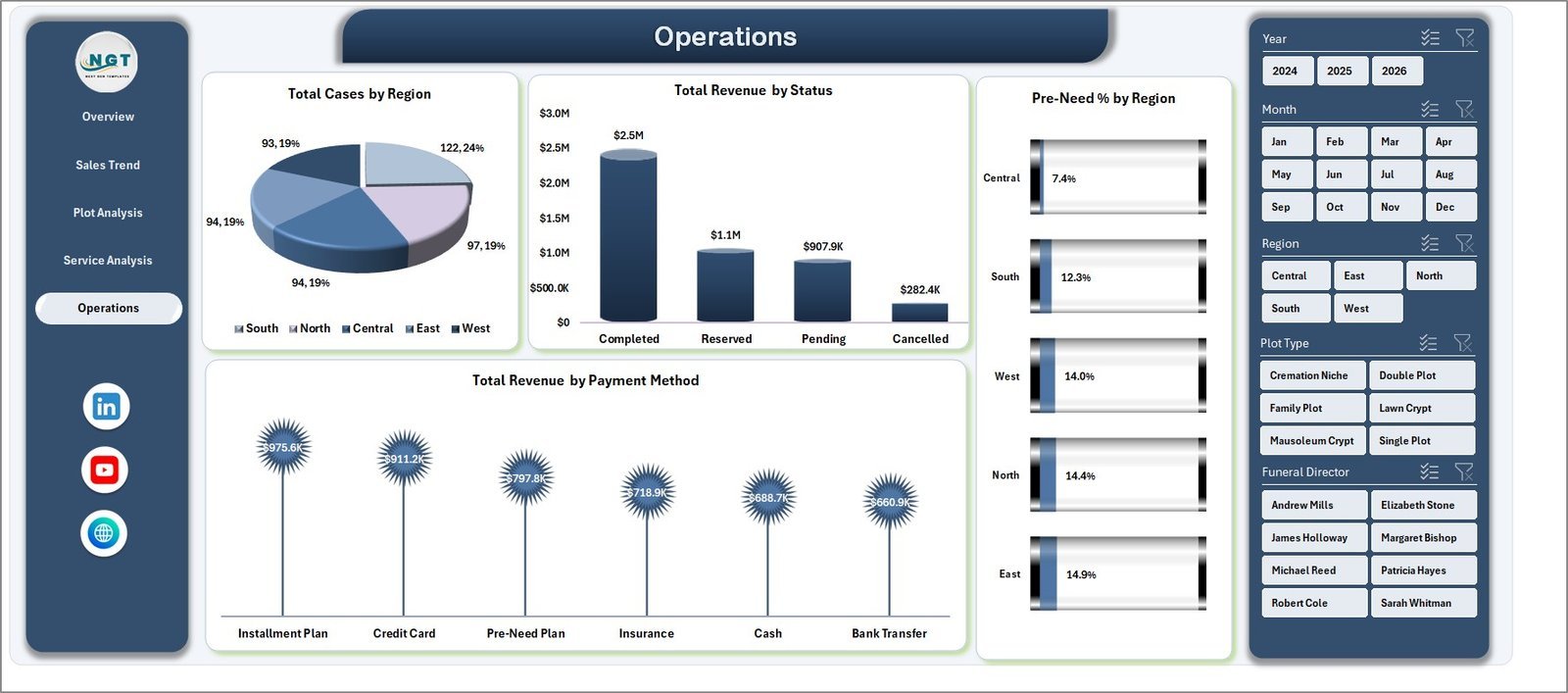
5. Operations Page — operational KPIs like: Total Cases by Region, Total Revenue by Status, Pre-Need % by Region, and Total Revenue by Payment Method. Use this view for financial planning and pre-need vs at-need mix decisions.
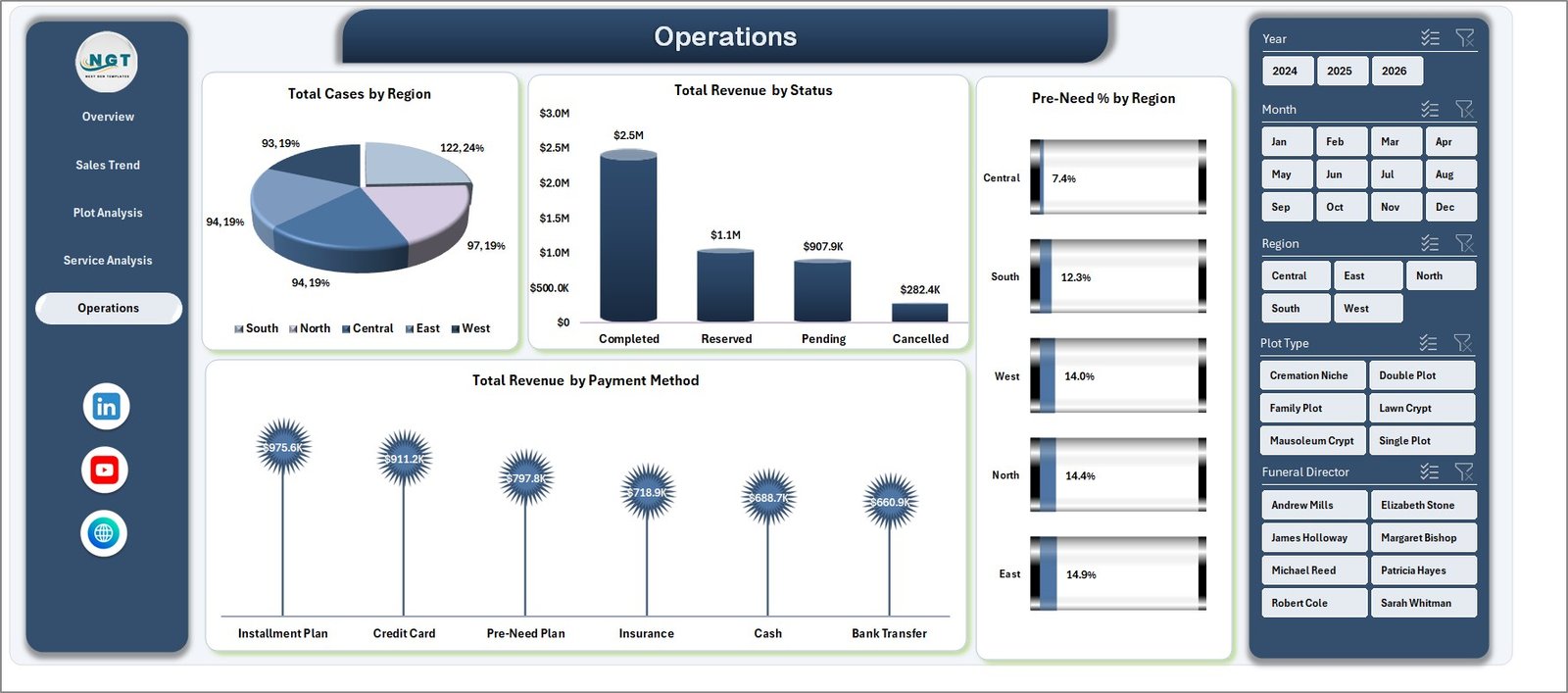 Operations
6. Data Sheet — the single source of truth for the entire dashboard. Add or replace your case-level records here in the same column format and the dashboard updates automatically after Refresh All.
 Data Sheet tab
7. Support Sheet — the engine room of the dashboard. Holds all pivot tables that feed the charts. Go to Data → Refresh All after editing data, and every pivot, chart, and KPI rebuilds. Keep this sheet hidden from end users.
 Support sheet tab
📊 Cemetery Dashboard in Excel vs. Google Sheets Equivalent vs. Paid Cemetery SaaS — Where This Fits
| Feature | Cemetery Dashboard in Excel | Google Sheets Equivalent | Paid Cemetery SaaS (PlotBox / CIMS / Chronicle) |
|---|---|---|---|
| Cost | $17.99 one-time ✅ | $10–$25 one-time | $150–$500 / user / month |
| Platform | Microsoft Excel (offline) ✅ | Google Sheets (browser) | Web-based proprietary platform |
| Setup time | Under 10 minutes ✅ | 15–20 minutes | 4–12 weeks implementation |
| 5 dashboard pages with slicers | ✅ Included | Limited (pivots only) | ✅ Full (locked behind license) |
| Edit charts and KPIs yourself | ✅ Full control | ✅ Full control | ❌ Vendor only |
| Works offline | ✅ Yes | ❌ Internet required | ❌ Internet required |
| Per-user fees | ❌ None ✅ | ❌ None | $150+ per user / month |
| Year-1 cost at 5 users | $17.99 total ✅ | $10–$25 total | $9,000–$30,000+ |
| Pre-need vs at-need analysis | ✅ Built-in | Configurable | ✅ Configurable |
For small and mid-size cemeteries and funeral homes that want clean reporting without paying $9,000+ per year for enterprise software, the Cemetery Dashboard in Excel sits in the sweet spot.
👥 Who This Template Is For — and Who It’s Not For
✅ This template is built for:
- Cemetery and funeral home owners running 1–5 locations who need a single monthly view of revenue, cost, plot sales, and case counts.
- Cemetery office managers tracking pre-need vs at-need mix, payment methods, and funeral director performance.
- Family-owned memorial businesses moving away from paper logs or scattered spreadsheets to one consolidated Excel file.
- Bookkeepers and accountants preparing monthly reports for cemetery boards, trustees, or family councils.
- Memorial-park operators who want clean charts for board meetings without learning Power BI or Tableau.
❌ This template is NOT for:
- Large cemetery groups (50+ locations) that need integrated CRM, inventory mapping, GIS plot maps, and multi-location user permissions — you should evaluate PlotBox or CIMS.
- Teams that need real-time multi-user editing in the cloud with audit logs (consider the Google Sheets equivalent or a paid SaaS).
- Operators who want automatic data sync from POS, payment processors, or ERP systems — this template is manual data entry only.
⚙️ How to Use the Cemetery Dashboard in Excel
- Download and unzip the file. Open Cemetery-Dashboard.xlsx in Microsoft Excel 2016 or later (also works in Microsoft 365).
- Go to the Data Sheet tab. Replace the sample rows with your real cemetery data — keep the column headers exactly as they are.
- Click Data → Refresh All. All pivot tables on the Support Sheet refresh, which then refreshes every chart, KPI card, and slicer across all 5 dashboard pages.
- Use slicers on the Overview page to filter by Region, Status, Year, or any other dimension. The whole dashboard re-slices instantly.
- Hide the Support Sheet (right-click tab → Hide) before sharing with management or board members.
- Print or export to PDF from each tab for monthly reporting packs.
💼 Real-World Use Cases
Maria runs a 12-acre family cemetery in upstate New York. She uses the Cemetery Dashboard to track plot sales by section, monitor pre-need program growth, and present a one-page revenue summary to her board every quarter — without paying $4,200/year for a cemetery management subscription.
James is the office manager at a 3-location memorial group in Texas. He uses the Operations and Service Analysis pages to compare cases per funeral director, spot which payment methods are slowing collections, and identify the most profitable service type each month.
Priya is a bookkeeper handling 4 small funeral homes in Mumbai. She drops monthly case data from each location into the Data Sheet, refreshes once, and produces clean PDF reports for each owner the same afternoon — replacing 4 separate Excel files she used to maintain by hand.
❓ Frequently Asked Questions
What KPIs does the Cemetery Dashboard in Excel track?
The Cemetery Dashboard in Excel tracks 5 main KPIs on the Overview page — Total Revenue, Net Profit, Total Cases, Total Plot Sales, and Avg. Satisfaction. It also analyzes Profit Margin %, cases by status, revenue by region, plot type, section, plot size, service type, funeral director, payment method, and pre-need percentage by region.
How long does setup take?
Setup takes under 10 minutes for the Cemetery Dashboard in Excel. Open the file, paste your case-level data into the Data Sheet using the same column format, then click Data → Refresh All. Every chart, KPI card, and slicer rebuilds automatically across all 5 dashboard pages.
Do I need Excel macros or VBA enabled?
No. The Cemetery Dashboard in Excel uses only native pivot tables, charts, and slicers — no macros and no VBA. It works in Microsoft Excel 2016, 2019, 2021, and Microsoft 365 on both Windows and Mac, and you do not need to enable any security exceptions.
How does this compare to PlotBox or CIMS?
PlotBox and CIMS are full cloud-based cemetery management systems with GIS plot maps, CRM, and online ordering — and cost $150–$500 per user per month. The Cemetery Dashboard in Excel is a one-time $17.99 reporting layer for revenue, cases, plot sales, and director performance. It complements, not replaces, full-platform software for small operators.
Can I customize charts and add my own KPIs?
Yes. Every chart in the Cemetery Dashboard in Excel is a standard Excel pivot chart driven from the Support Sheet. You can edit colors, change chart types, add new measures, or insert your own KPI cards. The file is unlocked — no protection, no hidden formulas.
Will the dashboard work for funeral homes that do not sell plots?
Yes, partially. The Cemetery Dashboard in Excel was built for combined cemetery + funeral operations, so the Service Analysis, Operations, and Sales Trend pages apply to any funeral home. The Plot Analysis page is most useful when you sell plots — funeral-only operators can hide that tab.
Is this a one-time purchase or subscription?
The Cemetery Dashboard in Excel is a one-time purchase. You pay $17.99 once, download the file instantly, and own it for life. No monthly fees, no per-user charges, no expiry — and you can use it on as many computers and as many cemetery sites as you operate.
👤 About the Author
Built by PK — Microsoft Certified Professional with 15+ years of Excel, Google Sheets, and Power BI experience. Founder of NextGenTemplates, reaching 300K+ subscribers across YouTube channels (@PK-AnExcelExpert, @NextGenTemplates, @NeoTechNavigators). Every template is hand-built and tested before release.
🔗 Explore Related Templates
📌 Yoga & Wellness Studio Dashboard in Excel — another service-business Excel dashboard with the same multi-page slicer-driven layout.
📌 B&B Dashboard in Power BI — Power BI version of a similar small-business operations dashboard.
📌 Cleaning Service Dashboard in Google Sheets — Google Sheets version of a service-business revenue dashboard.
📌 Event Management Report in Excel — complementary event tracking for memorial events and services.
📌 Browse all Excel Dashboard Templates on NextGenTemplates.
📖 Click here to read the Detailed Blog Post
🎥 Visit our YouTube channel for step-by-step video tutorials
👉 YouTube.com/@NextGenTemplates
📅 Last updated: April 2026
Watch the step-by-step video tutorial: